A Guide to the Best Small Business Phone System
Think of a modern small business phone system as the central nervous system for all your customer communications. It’s a smart, internet-based platform built to make your operations smoother and keep your customers happy. We’re not just talking about making and receiving calls anymore; this is about intelligently managing every interaction—from phone calls and text messages to automated appointment scheduling and capturing new leads, all without the clunky, expensive hardware bolted to your office wall.
What a Small business phone system really is
Let's ditch the technical jargon. At its heart, a modern phone system is a cloud-based platform, usually running on Voice over Internet Protocol (VoIP), that brings all your communication channels together. Instead of just a phone sitting on a desk, you get a powerful tool that connects your calls, texts, and customer history into one cohesive system.
This is a game-changer for small businesses, whether you're running a local dental clinic or a busy home services company. It gives you the kind of polished, 24/7 responsiveness that used to be reserved for giant corporations with deep pockets. More importantly, it solves the real-world communication headaches that get in the way of growth and drive customers crazy.
Solving Everyday Business Problems
What happens when a potential customer calls after hours? With a traditional setup, they hit a voicemail box and likely call your competitor. A smart phone system, however, can capture their information, let them book an appointment right then and there, or even answer their basic questions automatically.
Imagine a plumbing company getting a call at 10 PM for a burst pipe. Instead of a missed call, an automated assistant can ask clarifying questions like, "Is water actively leaking?" and "What is your address?" It then schedules the emergency visit and automatically dispatches the job to an on-call technician's phone. This turns a missed opportunity into a high-value, captured job.
The market is taking notice. The small business phone system industry was valued at USD 1,131.8 million recently and is on track to hit USD 1,977.74 million by 2033—that's a steady 8.3% growth each year. Businesses are ditching old, inefficient systems for something better. You can dig into more of these trends on archivemarketresearch.com.
At its core, a modern phone system is designed to lift the administrative weight off your shoulders. It can automate follow-ups, sync appointments straight to your calendar, and keep a clean, simple record of every conversation you have.
More Than Just a Phone
When it comes down to it, a small business phone system is an operational tool that makes you look more professional and work more efficiently. It helps you create a fantastic customer experience from the very first ring by making sure every single call is handled quickly and intelligently.
Here’s what that looks like in practice:
Look More Professional: An auto-attendant greets every caller with a polished, helpful menu ("Thank you for calling ACME Landscaping. Press 1 for a new quote..."), directing them to the right person or information without a fuss.
Be More Responsive: You'll never miss a lead again. A 24/7 automated system can answer after-hours calls, capture lead information, and even book an appointment for the next business day.
Work Smarter, Not Harder: Instead of manually typing notes after a call, the system can automatically log the call details and a transcript into your customer's file in your CRM. This frees up your team to focus on what they do best.
Grow Without Headaches: Need a new phone line for a new hire? You can add it in minutes from a web dashboard, assign a number, and have it ready before they even start their first day.
By bringing all your communications into one automated hub, these systems give you a solid foundation to grow your business. You get to spend less time managing phone calls and more time delivering great service.
Traditional Phone Lines vs Modern Small Business Phone Systems
To really see the difference, it helps to put the old way of doing things side-by-side with the new. Traditional landlines (PSTN) served their purpose, but modern cloud-based systems (VoIP) are built for how businesses operate today.
The takeaway is clear: while traditional systems are static and costly, modern phone systems offer the flexibility, advanced features, and cost-effectiveness that small businesses need to compete and thrive.
Core Features Your Business Can't Live Without
A modern small business phone system is much more than just a dial tone. Think of it as a toolkit built to solve real-world business headaches. To really get the most out of it, you need to understand what these features actually do for you day-to-day. So, let's cut through the jargon and talk about the practical tools that can make a huge difference, starting with how you answer the phone.
Your 24/7 Digital Receptionist
Imagine a receptionist who never calls in sick, never gets overwhelmed during a rush, and always routes callers to the right person. That’s an Auto-Attendant in a nutshell. It’s the professional, automated voice menu that greets callers with options like, "Press 1 for Sales, Press 2 for Support."
For a busy law firm, this is a game-changer. A potential client calling about a personal injury case can press "2" and be immediately connected to the paralegal specializing in that area. Meanwhile, a caller from another law office can press "4" for the records department. It’s a simple feature that projects professionalism and efficiency from the very first interaction.
A well-configured Auto-Attendant acts as a frontline customer service agent, efficiently sorting and directing inbound traffic so your team can focus on higher-value conversations. It immediately elevates your business's perceived size and professionalism.
At their heart, these systems bring all your communication streams together under one roof, just like in the diagram below.
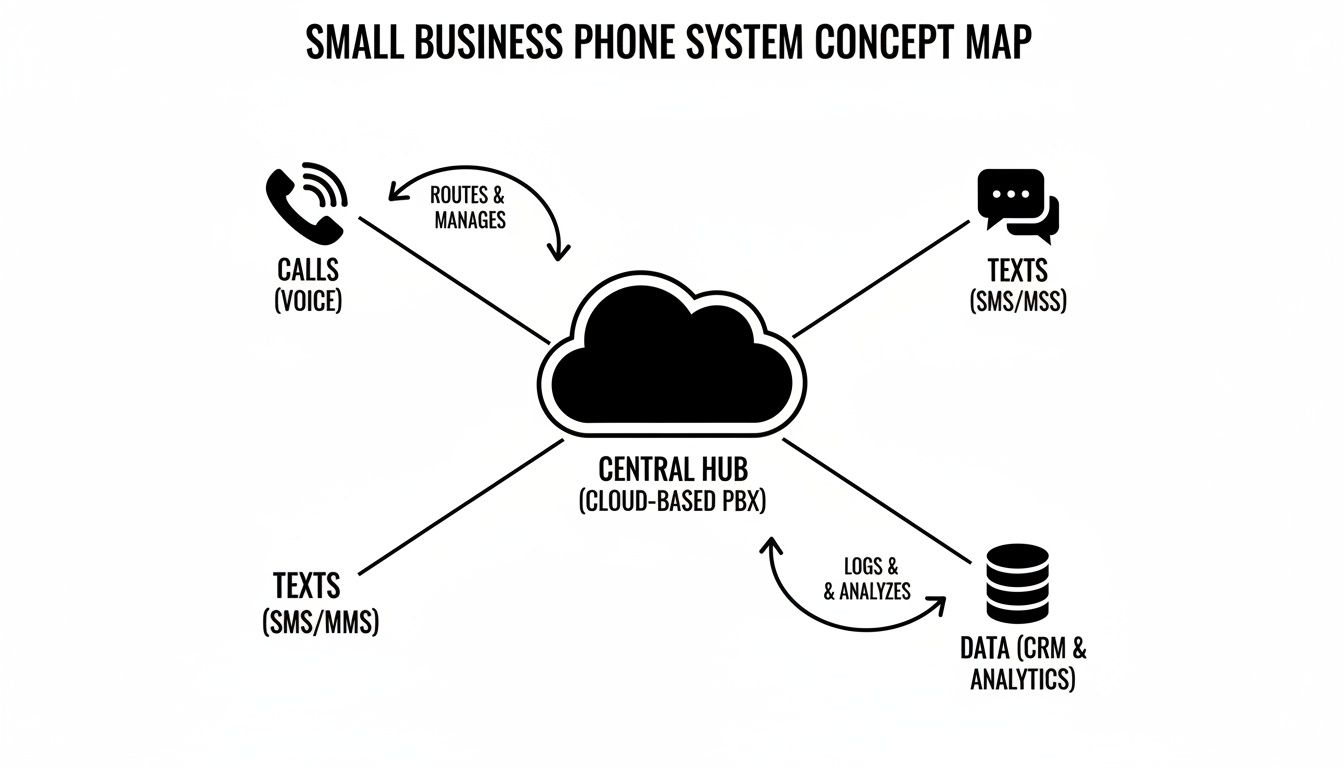
This concept map shows how a central, cloud-based system intelligently manages calls, texts, and other channels, turning them into a single, powerful tool for your business.
The Smart Director for Every Call
So, a caller presses a button on the menu. Where does the call go next? This is where Call Routing (sometimes called Call Forwarding) comes in. It’s the intelligent director that makes sure every call gets to the right person or department based on rules you set up.
Take a home services business, like an HVAC company. During business hours, calls about new installations can go straight to the sales team's phones simultaneously—the first person to answer takes the lead. But after 5 PM, the system can automatically forward all calls to an on-call technician's mobile phone for emergencies. That means a homeowner with a broken furnace gets help right away, and you capture a high-value job that could have easily gone to a competitor.
This kind of smart routing is incredibly flexible and can be set up for any scenario:
Time-Based Routing: A retail store can route calls to the shop floor during opening hours and to a voicemail-to-text service after closing.
Skills-Based Routing: A software company can route a call from a Spanish-speaking customer directly to the one support agent who is fluent in Spanish.
Geographic Routing: A pizza chain can automatically direct a caller to the closest franchise location based on their area code.
Turning Voicemails and Phones into Actionable Tools
Let's be honest: missed calls and voicemails are often where opportunities go to die. Two key features flip this around, turning dead ends into actionable tasks: Voicemail-to-Email and Mobile App Integration.
Voicemail-to-Email is a lifesaver. It converts voice messages into text and emails them straight to your inbox, usually with the audio file attached. For a busy contractor on a noisy job site, this means they can quickly read a message from a potential client about a kitchen remodel instead of stopping everything to listen to a voicemail. They can even forward that email to their office manager to schedule a follow-up, creating a task on the spot.
On top of that, Mobile App Integration turns any employee's smartphone into a secure extension of your business phone system. This is a must-have for remote teams or anyone working in the field. A real estate agent can make and receive calls from clients on their personal iPhone while at a property showing, but the client only ever sees the agency's professional business number. This keeps personal numbers private and maintains a professional company image.
These core features aren't just standalone bells and whistles; they work together to create a true communications hub. By exploring the full range of available products and services, you can build a system that fits your business like a glove.
Choosing Between On-Premise and Cloud-Based Systems
When you're picking a phone system for your small business, the first big fork in the road is deciding where it will "live": in your office or in the cloud. This choice between an on-premise setup and a cloud-based one really sets the stage for everything that follows—cost, flexibility, and how your team works.
Think of an on-premise system like owning a house. You buy the property (the server hardware), you put it in a spare room or closet, and it’s all yours. You have total control, but you're also on the hook for all the upkeep, repairs, and any big renovations (upgrades) down the line.
A cloud-based system, on the other hand, is more like renting a great apartment in a full-service building. You pay a predictable monthly fee, and the landlord (the provider) handles all the maintenance, security, and infrastructure. You get all the amenities without the headaches of ownership, and you can easily move to a bigger or smaller place as your needs change.
Initial Investment and Long-Term Costs
The financial models for these two options couldn't be more different, and for a small business, the contrast is stark.
An on-premise system hits you with a big upfront cost. For example, a small office with 10 employees might pay $8,000 - $10,000 for the PBX hardware, desk phones, and professional installation. And the spending doesn’t stop there; you’ll have ongoing costs for IT support, maintenance contracts, and eventually, expensive upgrades.
Cloud-based systems completely change the game. Instead of a massive capital expense, you pay a simple, predictable subscription fee—usually per user, per month. That same 10-person office might pay around $25 per user, per month, totaling just $250/month. This turns a major purchase into a manageable operating expense.
The numbers don't lie. Cloud communications have stormed past traditional on-premise setups to grab the largest global market share. The VoIP market alone, valued at $134.86 billion recently, is expected to climb to $236.25 billion by 2028. Small businesses are a huge part of that story. You can check out more VoIP market trends and statistics to see the full picture.
For most small businesses, it’s a no-brainer. A steady, predictable monthly bill from a cloud provider is a whole lot easier to budget for than the surprise—and often steep—costs of buying and maintaining your own hardware.
Scalability and Remote Work Capability
Your business is going to grow and change, and your phone system needs to be able to keep up without causing a major disruption.
Scaling Up: Let's say a landscaping company hires three extra crew members for the busy spring season. With an on-premise system, adding lines could take weeks. With a cloud system, the office manager can log into a web portal, add three new users, and have their phone lines active in under five minutes.
Supporting Remote Work: An accountant needs to work from home on a Friday. With an on-premise system, this is a technical headache. With a cloud system, they just open the app on their laptop or mobile phone and have full access to their business line, voicemail, and contacts as if they were sitting at their desk.
Adapting to Change: A cloud-based small business phone system is built for flexibility. Your team can use a traditional desk phone, a software-based phone on their computer, or a mobile app—all with the same business number and features. It doesn't matter if they're at the office, at home, or on the road. This makes it the go-to choice for any modern business with a distributed team or big plans for the future.
Calculating the ROI of a Modern Phone System
Let's get down to brass tacks. Fancy features are great, but the decision to switch your small business phone system really hinges on one thing: the bottom line. Calculating the return on investment (ROI) isn't just a simple cost comparison. It’s about understanding what you save, what new business you can capture, and how much more your team can get done.
A modern phone system pulls levers in all three of these areas, and the impact is often bigger than you'd think.

When you're building the business case, think of your ROI in three distinct buckets: hard cost savings, new revenue opportunities, and massive efficiency gains. Each one is a powerful reason to upgrade, and together, they make a compelling argument.
Direct Cost Savings
This is the easiest part of the math to do. Moving to a cloud-based VoIP system immediately erases a lot of the costs baked into old-school phone lines. That bulky PBX box in the closet? Gone. Expensive maintenance contracts? A thing of the past. The need for a specialized IT person just to manage the phones? No longer your problem.
For instance, a business paying $600/month for five traditional phone lines and a maintenance contract could switch to a VoIP system for $150/month, saving $450 every month or $5,400 per year. On top of that, long-distance calls to a supplier in another state, which might have cost extra, are often included in a flat monthly fee.
Capturing New Revenue Streams
This is where things get really interesting. A modern phone system doesn’t just trim your expenses; it can become a powerful tool for generating more income. How? By plugging the biggest leak in your sales funnel: missed calls.
Every unanswered call is a lost opportunity. Voicemail is where good leads go to die. But with a system that provides 24/7 intelligent answering and automatic lead capture, every single inbound call becomes a potential job, no matter when the phone rings.
A Real-World Example: The Pest Control Company
A local pest control business knew they were missing calls after 6 PM and on weekends—exactly when homeowners find an unwelcome critter and panic. They brought in a system with an AI receptionist and immediately started capturing 30% more leads after hours. Each new job averaged $250.Let's do the math: 15 new leads a month x $250/job = $3,750 in new monthly revenue.
That's found money. The system more than paid for itself just by turning missed calls into booked jobs, adding directly to their top-line revenue.
This is often the most significant part of the ROI calculation. Your phone system transforms from a simple utility into a lead-generation machine that works around the clock.
Improving Operational Efficiency
The final piece of the puzzle is all about giving your team back their most precious resource: time. When your phone system talks to your other software, like a Customer Relationship Management (CRM) platform, it automates a ton of the busywork that slows everyone down.
Here’s what that looks like in practice:
No More Manual Data Entry: When a customer calls, their contact record from your CRM instantly pops up on the screen. Call details, notes, and even recordings get logged directly into the customer's file automatically after the call ends.
Automated Follow-ups: After a sales call, the system can be configured to automatically send a follow-up text with a link to a quote, or schedule a task in the CRM for the salesperson to call back in a week.
Less Admin Headaches: Instead of spending 30 minutes each day manually logging calls for billing, a law firm's paralegals can rely on the system to do it for them, freeing up valuable, billable time.
By taking these repetitive tasks off your team's plate, a smart phone system frees them up to focus on activities that actually grow the business. You can explore a variety of transparent pricing plans and see for yourself how a small monthly investment can deliver such a massive return.
How the Right Phone System Solves Real-World Industry Problems
A modern business phone system is far from a one-size-fits-all solution. Its true value emerges when it's put to work solving the very specific, day-to-day headaches of different industries. Let's move past the abstract features and look at how smart businesses are actually using these systems to turn communication bottlenecks into a serious competitive edge.
Think of each of these examples as a practical blueprint for solving real problems, not just managing calls.

Home Services: For Plumbers & HVAC Techs
If you're in home services, your entire business runs on speed and responsiveness. When a homeowner's pipe bursts or their AC dies in a heatwave, they're not going to leave a voicemail and wait patiently. They'll just call the next name on the list. This is where a modern phone system becomes your most valuable player.
The biggest challenge is handling a flood of calls, especially after hours or during a crazy weather event. A basic phone line just can't cope, and every missed call is a lost job.
Here’s how a specialized system turns things around:
Capture Every Emergency Lead: An AI receptionist can answer every single call, 24/7. When that emergency call comes in at 2 AM, it doesn't just take a message. It gathers the caller’s details, confirms the urgency ("Is water actively leaking?"), and instantly texts the on-call technician with everything they need to get moving.
Smarter Dispatching: Forget the frantic ring-around trying to find a free tech. The system can send a single text with job details to the whole crew. The first one to reply "CLAIM" gets the job, and the schedule updates automatically—no human dispatcher needed.
Handle Seasonal Surges: When that first heatwave hits, an HVAC company gets buried in calls. The system can act as a filter, using an auto-attendant to answer common questions (“Are you taking new appointments?”) or routing non-urgent jobs to an online scheduling link sent via text. This frees up your human team to focus on the high-priority, high-profit repairs.
Healthcare: For Dental & Medical Clinics
In a medical setting, communication is about more than just booking appointments—it's about patient care, privacy, and trust. Clinics are constantly fighting no-shows, handling sensitive patient questions, and making sure every interaction is HIPAA-compliant.
A generic phone system can open the door to huge compliance risks and administrative chaos. A simple missed call could be a patient trying to reschedule a critical procedure or reporting a serious post-op issue.
For a medical practice, every call represents a patient's trust. Your phone system must be a fortress—secure enough to protect sensitive health information, yet simple enough for a worried patient to get the help they need right away.
Here’s what that looks like in action:
Slash No-Show Rates: The system automatically sends text and voice reminders 48 hours before appointments. Patients can confirm by pressing '1' or request to reschedule by pressing '2', cutting down the 20-30% no-show rate that hurts so many practices.
Lock Down Patient Data: All call recordings and transcripts containing patient details are automatically encrypted and stored in a HIPAA-compliant environment, accessible only to authorized staff. This is absolutely essential for protecting Patient Health Information (PHI).
Intelligent Triage: A patient calling to ask about office hours gets an instant, automated answer. But a patient calling and using words like "severe pain" or "bleeding"? The system can recognize these keywords, flag the call as critical, and immediately escalate it to a live nurse or doctor's extension.
Legal Services: For Law Firms
For a law firm, every minute is billable and client confidentiality is everything. The core challenges are tracking all communication for accurate billing and maintaining a secure, professional line for sensitive client conversations.
Your standard phone system has no way of connecting call logs to specific cases, which means lost revenue. Worse, attorneys using personal cell phones for client calls creates a massive security risk.
Never Miss a Billable Minute: Every single call made through the business system to a client can be automatically logged in the firm’s case management software with a specific case number. This creates a perfect, time-stamped record, ensuring billing is precise and no 15-minute call slips through the cracks.
Keep Personal and Professional Separate: With a dedicated business phone app, lawyers can call and text clients from their personal smartphones, but the client only ever sees the firm’s official number. This protects personal privacy and reinforces a professional boundary.
24/7 Client Intake: A potential client needing urgent legal help after a car accident can call after hours and be greeted by an AI receptionist. It can perform an initial intake ("Were you injured? When did the accident occur?"), gather key case details, and schedule a consultation for the next business day. You capture high-value leads that your competitors would miss.
And these examples are really just scratching the surface. You can learn more about how a flexible small business phone system adapts to even more industry-specific communication needs and see how it could work for your own business.
Your Buyer's Checklist for Choosing a Phone System
Picking the right small business phone system can feel overwhelming, but it gets a lot easier once you know the right questions to ask. Don't think of this as just buying a piece of tech; think of it as hiring a new team member. This is the team member who will handle your most vital customer conversations, so you want to get it right.
This checklist is designed to help you interview potential providers. The right answers will do more than just help you avoid a bad fit—they'll help you find a system that actually drives growth, not just another line item on your monthly expenses.
Does It Integrate With My Existing Tools?
Your phone system can't be a lone wolf. It needs to play well with the software you and your team already rely on every single day. If it can't, you’re just creating more work for everyone with mind-numbing manual data entry, which is the exact opposite of what a modern system should do.
Here’s what to ask any potential vendor:
"Can you show me how your system connects with my CRM?" If you use something like HubSpot or Salesforce, every call should automatically create a log in that customer's record. No excuses.
"Does it sync with my calendar for booking appointments?" A smart system will let a customer book an open slot right on a call, and that appointment should pop up on your Google Calendar or Outlook instantly.
"What other tools does it connect to?" You want to see a healthy ecosystem of integrations. A platform that works with over 2,500+ apps gives you a ton of flexibility as your needs change down the road.
Can It Grow and Adapt With My Business?
The system you pick today absolutely has to work for the business you're building for tomorrow. The last thing you want is to be stuck ripping everything out and starting over in two years because you’ve outgrown your provider. For a growing business, scalability isn’t just a nice-to-have; it's a must-have.
Here are the key questions to ask about growth:
How easy is it to add or remove users and phone lines? Bringing on a new team member should take a few clicks in a dashboard, not a week-long IT project.
What happens if my call volume doubles overnight? For example, if a marketing campaign goes viral, can the system handle a sudden flood of calls without breaking a sweat—no dropped calls, no busy signals?
Can I easily add new locations or departments? If a retail business opens another store, can they set up a new branch with its own number, hours, and call routing rules in minutes?
Understanding the True Cost
Pricing for phone systems can be notoriously tricky, with different models and plenty of opportunities for hidden fees. You need to get a perfectly clear picture of your total cost before you sign on the dotted line.
Don't get fixated on the advertised monthly price. You have to dig deeper. Ask about extra charges for things that should be standard, like call recording, extra phone numbers, or what happens if you go over your call minute limits. Transparency is everything here.
Make sure you get clear answers to these questions:
What is your pricing model? Is it a flat per-user, per-month fee? Or is it a tiered plan where you have to pay more to unlock key features like CRM integration?
Are there any setup fees or long-term contracts? Always look for providers who offer month-to-month flexibility. It keeps them honest and motivated to earn your business.
Can I get a free trial to test it out first? A company that's confident in its product will happily offer a risk-free trial, like a 30-day period, so you can see the value for yourself before committing.
In the end, the best system is one that finds the perfect balance between smart automation and the human touch. You want a system that can handle the routine stuff on its own but knows exactly when to bring in a real person for a complex or sensitive issue. That's how you deliver a great customer experience, every single time.
Frequently Asked Questions
Choosing a new phone system for your business always brings up a few key questions. Let's tackle some of the most common ones to help you clear up any confusion and move forward with confidence.
How Long Does It Take to Set Up a New System?
You might be surprised by how fast modern, cloud-based systems get up and running. Forget the old days of waiting weeks for technicians and hardware installation. A new cloud system can often be configured and fully operational in just a few hours.
The whole process is pretty straightforward: you link your existing business number, connect your essential tools like your CRM and calendar, and set up your call routing rules. For instance, a small consulting firm could be set up in a single afternoon, ready to present a professional auto-attendant and direct calls to the right consultants by the next morning.
Will I Have to Change My Existing Business Phone Number?
Nope, you shouldn't have to. There's a standard process called "porting," which is just a fancy way of saying you can transfer your existing business number from your old provider to the new one.
Any good provider will handle this for you, making sure the transition is seamless. This is a huge deal—it means you get to keep the number your customers already know and have printed on your business cards and service vans, maintaining your brand's consistency without any confusing changes.
Choosing the right provider is key to a seamless transition. They should manage the porting process from start to finish, ensuring there's no interruption in your ability to communicate with customers.
Is a Cloud Phone System Secure Enough for My Industry?
Absolutely, as long as you choose a provider that takes security seriously. The top business phone systems are designed from the ground up with security and compliance in mind.
You'll want to look for features like end-to-end call encryption to keep conversations private. If you're in healthcare, it's non-negotiable to pick a system that is HIPAA-compliant to protect patient information. For law or finance firms, things like secure call recording and detailed audit logs are must-haves for staying compliant. Always do your homework and verify a provider's security credentials.
Ready to see how a modern phone system can transform your customer communications? Discover how Recepta.ai combines 24/7 AI-powered answering with expert human support to capture every lead and streamline your operations. Start your 30-day risk-free trial today!