Your Guide to an Answering Service for Medical Offices

Think of an answering service for medical offices as an extension of your front desk—one that never sleeps. It's a specialized service that makes sure every patient call is answered professionally and securely, whether it’s after hours, during a busy lunch rush, or when your staff is tied up with in-person patients.
Understanding the Modern Medical Answering Service

This isn't your grandfather's answering service. We're not talking about a simple message-taking operator anymore. Today’s services are more like on-demand patient care coordinators, deeply woven into your practice's daily workflow.
They solve some of the most common frustrations that patients and your own staff face every day. No more voicemail black holes. No more missed appointment requests from patients who call while your team is at lunch or gone for the day.
From Taking Messages to Managing Patient Interactions
The old model was passive. A call came in, someone jotted down a note, and your staff had to play catch-up the next morning. The new model is proactive and interactive, powered by smart technology. At the heart of it all is often a cloud phone system, which lets remote agents function as a seamless part of your team, no matter where they are.
This fundamentally changes how your practice communicates. Instead of just taking a name and number, a trained agent can actually do things.
- Schedule an Appointment: A new patient calls at 7 PM on a Friday. The agent pulls up your calendar in real-time and books them for the first open slot on Monday. Actionable Example: A patient from a new insurance plan calls. The agent can follow a script to collect their full name, DOB, and insurance ID, then book a "New Patient - Insurance Verification" slot, ensuring your billing team has everything they need before the visit.
- Capture Critical Information: A patient calls with a post-op concern. The agent follows a custom-built script to gather key details, which are then securely sent straight to the on-call nurse. Actionable Example: A bariatric patient calls after surgery reporting nausea. The agent asks scripted questions like "What is your temperature?" and "Have you taken the prescribed anti-nausea medication?" The answers are sent via secure message to the on-call surgeon, providing immediate context.
- Handle Routine Inquiries: Someone needs to confirm an appointment time or get directions to your office. The service handles it instantly, freeing your in-house team from those repetitive, time-consuming calls. Actionable Example: A patient is running late and calls from their car. The agent accesses your office's Google Maps link and texts it to the patient's phone, helping them navigate directly to your suite without distracting your front desk.
The core function has evolved from simple call answering to comprehensive patient engagement. It's about providing continuous, high-quality care coordination, regardless of the time of day.
The Growing Need for 24/7 Patient Access
This shift isn't just a gimmick; it’s a direct response to rising patient expectations and the real-world operational pressures on medical practices. The numbers tell the story. The global medical answering services market was valued at USD 500 million in 2024 and is on track to hit USD 1.2 billion by 2033.
This explosive growth is driven by the demand for round-the-clock patient communication. Services like after-hours appointment scheduling and basic support help clinics run more efficiently and significantly cut down on costly no-shows. You can dig into the full market research behind these trends on marketresearchintellect.com.
By bridging these crucial communication gaps, a medical answering service becomes a vital tool for keeping patients happy and making your practice run a whole lot smoother.
Why Your Practice Can't Afford to Miss Calls

In a busy medical practice, the phone rings constantly. It's easy to see it as an interruption, but every single ring is a patient—current or potential—looking for care, answers, or simple reassurance. Sending them to voicemail isn't just a minor hassle for them; it's a huge financial and reputational risk for you.
Let's put it in real-world terms. A potential new patient calls your office after hours, hoping to learn more about your services. No one picks up. What do they do? They hang up and call the next practice on their Google search list. That one captured call could have booked an initial appointment, generating enough revenue to pay for a professional answering service for the entire month.
Every call that goes to voicemail is a missed opportunity. It’s a chance to build trust, book a high-value procedure, or keep a loyal patient from feeling neglected and looking elsewhere. When a patient gets your voicemail, the unspoken message is, "Your needs can wait."
The Real Cost Of A Missed Patient Call
The financial hit from a lost call goes way beyond a single appointment fee. Think about the lifetime value of a patient, especially in specialties like dentistry, orthopedics, or chronic care management. Losing out on that relationship before it even starts is a preventable blow to your practice's long-term health.
Just consider these everyday situations where an answering service for medical offices pays for itself almost instantly:
- After-Hours Urgency: A worried parent calls at 8 PM because their child has a high fever. Instead of a cold recording, they get a calm, professional agent who can follow your protocols, gather symptoms, and securely page the on-call pediatrician. That experience builds incredible loyalty.
- Lunchtime Chaos: Your front desk is swamped with patients checking in and out. A patient calls to reschedule an appointment and gets an immediate answer, preventing a no-show and freeing up that slot for someone else. Actionable Example: A patient calls at 12:15 PM to cancel a 2 PM appointment. The agent immediately reschedules them and marks the 2 PM slot as open in your EMR. Your office manager sees the opening and can call a patient from the waitlist to fill it.
- New Patient Capture: A prospective patient finds your practice online and calls with a few questions. A live agent answers warmly, explains your services based on a pre-approved script, collects their insurance information, and books their first consultation right then and there.
Every call answered is a patient served and revenue protected. Voicemail, on the other hand, is a direct path to patient churn and operational inefficiency.
Empowering Your In-House Team
Beyond just capturing calls, a medical answering service gives your in-house team a massive operational boost. When your staff isn't tethered to the phone, they can finally focus on higher-value tasks and, most importantly, the patients standing right in front of them.
This clear division of labor allows your on-site team to:
- Handle complicated billing and insurance questions without being constantly interrupted. Actionable Example: Your office manager can have a 15-minute, uninterrupted conversation with a patient about a confusing Explanation of Benefits (EOB) instead of putting them on hold three times to answer the phone.
- Provide a more personal and focused check-in and check-out experience for patients. Actionable Example: Instead of rushing a patient through payment, your receptionist has time to explain follow-up instructions and schedule their next visit properly, improving patient compliance.
- Reduce the daily stress and administrative burnout that leads to high employee turnover.
This boost in efficiency is why the market for medical answering services is set to explode, projected to reach USD 14.1 billion by 2031. Leading platforms like Recepta.ai are showing practices they can achieve up to a 15x ROI and slash costs by 80% compared to a full-time receptionist—all by ensuring every call is answered, 24/7. You can find more details on these market trends at Verified Market Research.
By offloading the relentless pressure of inbound calls, you empower your team to do their best work. The result is a calmer, more organized, and truly patient-focused environment for everyone.
In-House Receptionist vs Medical Answering Service: A Cost And Benefit Analysis
When deciding how to manage your practice's phones, it often comes down to two choices: hiring another in-house receptionist or partnering with a specialized medical answering service. While a receptionist provides a dedicated on-site presence, an answering service offers flexibility, scalability, and significant cost savings. This table breaks down the key differences to help you see which model offers a better return for your practice.
As you can see, while an in-house receptionist is a familiar solution, a medical answering service provides a far more cost-effective and operationally efficient alternative. It eliminates staffing headaches, ensures no patient call is ever missed, and allows your on-site team to focus entirely on patient care.
Navigating HIPAA and Patient Privacy

In healthcare, patient privacy isn't just a courtesy—it's the law. The Health Insurance Portability and Accountability Act (HIPAA) is the bedrock of patient data protection, establishing strict rules for handling sensitive Protected Health Information (PHI).
When you bring on an answering service, you're essentially extending your practice's front door. You're giving them access to your patients' most private information, which means their compliance is your compliance. A slip-up on their end can lead straight back to you, resulting in massive fines and a serious blow to your reputation.
That’s why choosing a fully HIPAA-compliant answering service for medical offices is an absolute must. It’s the foundational requirement that keeps your patients’ data secure and your practice out of legal trouble.
The Business Associate Agreement: A Critical First Step
Before a single call is answered, you need a Business Associate Agreement (BAA) in hand. This isn't just a formality; it's a legally binding contract that spells out exactly how the answering service (your "business associate") will safeguard PHI.
Think of it as your proof that your partner is legally accountable for upholding HIPAA standards. If a potential vendor hesitates or can't produce a BAA, that's your cue to walk away immediately.
A Business Associate Agreement is the legal handshake that confirms your answering service is committed to upholding the same strict patient privacy standards that your own practice follows. Without it, you are exposed to significant risk.
Protecting Patient Data in Action
So, what does real-world compliance look like on a typical call? It’s all about weaving secure protocols into every single interaction. A trustworthy service doesn't just talk about security; they live it through their technology and agent training.
Here are a few practical examples:
- Identity Verification: Before diving into any sensitive details, an agent must first confirm the caller's identity. Actionable Example: A patient calls asking for test results. The agent must first verify the patient's full name, date of birth, and the last four digits of their social security number or a pre-set security phrase against the information in your EMR before proceeding.
- Secure Messaging Platforms: Forget standard SMS texting. When a message needs to be relayed to an on-call physician, agents use a fully encrypted, secure messaging app. Actionable Example: Instead of texting "Jane Doe needs a refill for Oxycodone," the agent uses an app like TigerConnect or Halo Health to send a secure message that requires the doctor to log in to view the sensitive PHI.
- Encrypted Data Storage: Every call recording, message, and patient note is stored on encrypted servers with tightly controlled access. It's like a digital fortress designed to keep PHI locked down.
These aren't optional upgrades; they are core functions of a professional medical answering service. This level of diligence also extends to their internal operations. As you explore your options, you might find it helpful to understand the broader role of a medical virtual receptionist and how they fit into these secure workflows.
Questions to Ask Your Potential Answering Service
When you're vetting potential services, you need to go beyond a simple "Are you HIPAA compliant?" Use this checklist to dig deeper and really test their commitment to patient privacy.
- Can you provide a signed Business Associate Agreement (BAA)? This is the first and most important question. No BAA, no deal.
- How are your agents trained on HIPAA regulations? Look for a commitment to ongoing training, not just a one-and-done session during onboarding. Actionable Question: "Can you describe a recent HIPAA training scenario your agents went through?"
- What security measures protect your technology and data centers? They should be able to clearly explain their encryption methods, access controls, and physical security. Actionable Question: "What is your protocol if an agent's workstation is lost or stolen?"
- How do you ensure secure message delivery to our on-call staff? Ask them to name the specific secure messaging platform they use and describe the protocol. Actionable Question: "Can you demonstrate how a secure message is sent and how you confirm the doctor has received it?"
It's also worth remembering that compliance is an investment for the service provider. Understanding what goes into it can help you spot a quality partner. For a deeper look into this, a helpful resource is Understanding Your HIPAA Compliance Audit Cost, which sheds light on the provider's side of the equation. Ultimately, choosing a partner who invests in compliance is choosing a partner who invests in protecting your practice.
What a Modern Medical Answering Service Really Does
Forget the old image of a simple message pad and a pen. Today’s answering service for a medical office is a dynamic extension of your front desk, woven directly into your practice’s daily workflow. The right service doesn't just take messages; it actively resolves patient needs, lightens your administrative load, and protects your practice's time and resources.
Think of it as transforming a passive message-taker into an active partner in patient care. The goal is to ensure that when a patient calls—day or night—their needs are met with the same efficiency, accuracy, and care as if they were speaking directly to your best-trained staff.
Let's dig into the core features that make this a reality.
Seamless Appointment Scheduling and EMR Integration
One of the most powerful things a service can do is book, change, and cancel appointments right inside your existing calendar or Electronic Medical Record (EMR) system. This is a total game-changer, especially for capturing patient requests that come in after you’ve closed for the day.
Imagine this: a patient decides at 9 PM that they need to book their annual check-up. Instead of leaving a voicemail and hoping for a callback tomorrow, they speak with a live agent who has real-time access to your schedule. The agent sees you have an open slot Tuesday at 10 AM, books it, and that appointment instantly populates in your EMR, whether you use Epic, Cerner, or another practice management software.
- Here's how it works in practice: A worried parent calls on a Saturday about their child's recurring ear infection. The answering service agent doesn't just take a message. They book an appointment for Monday morning and log the initial call notes directly into the child’s patient file in your EMR. Now, the physician has valuable context before the appointment even starts.
This deep integration gets rid of double data entry, prevents frustrating scheduling conflicts, and secures appointments you might have otherwise lost to phone tag.
Custom Call Triage and Escalation Workflows
Let's be honest: not all patient calls carry the same weight. A simple request for a prescription refill is worlds away from a call from a post-op patient describing severe pain. A truly modern answering service uses custom-built protocols to intelligently triage every single call, making sure the right information gets to the right person, right away.
You’ll work directly with the service to build a decision tree that guides their agents. This workflow is essentially your practice's logic, just digitized.
A Triage Protocol in Action:
- A patient calls reporting chest pain. → The protocol immediately flags this as a potential medical emergency. The agent is instructed to perform a warm transfer directly to the on-call cardiologist's line without delay.
- A patient calls just to confirm their appointment time. → The agent verifies the caller's identity, pulls up the information from the integrated calendar, provides the time, and logs the call as a routine inquiry. No need to bother your staff.
- A referring physician's office calls. → The protocol guides the agent to capture specific referral details and then forward the message via a secure messaging app straight to your office manager. Actionable Example: A primary care physician's office calls to refer a patient for a colonoscopy. The agent's script prompts them to ask for the patient's demographics, insurance details, and the specific diagnosis code (e.g., K63.5), ensuring a clean referral.
This structured, methodical approach ensures both consistency and patient safety. It guarantees that truly urgent matters are escalated instantly, while routine questions are handled efficiently without interrupting your clinical team.
Secure and Compliant Messaging
Standard text messages and emails just aren't secure enough for Protected Health Information (PHI). It's a hard truth. A top-tier answering service for medical offices will always use a fully HIPAA-compliant, encrypted messaging platform to communicate with you and your team.
This isn't just a "nice-to-have"; it's absolutely critical for maintaining patient privacy and avoiding the hefty fines that come with HIPAA violations. When an agent needs to get a message to the on-call doctor, that information travels through a secure, closed-loop system—not an everyday, unencrypted text that could easily be intercepted.
Must-Have Features Checklist For Your Medical Answering Service
When you're evaluating different services, it's easy to get lost in the details. This checklist breaks down the non-negotiable features you should be looking for. It explains why each one is so important for a medical practice and gives a clear example of how it works in the real world.
For a deeper dive into the technology behind these features, you might find our guide on what an automated phone answering service can do helpful.
By making sure these key features are in place, you’re not just hiring a utility. You're bringing on a central partner in your practice's success—an engine for better patient satisfaction, smoother operations, and a healthier bottom line.
Choosing and Implementing Your Answering Service
Picking the right answering service for medical offices is a big deal. You’re not just hiring a vendor; you’re choosing a partner to act as an extension of your patient care team. The right choice can make your office run like a dream and keep patients happy. The wrong one? It can be a one-way ticket to chaos.
Let's walk through how to get it right, from vetting potential partners to getting everything up and running smoothly. The first step is to look past the sales pitches and dig into who these companies really are. Not all answering services are built the same—a service that’s great for a law firm just won’t get the unique demands of a medical practice.
You need a partner with deep experience in healthcare. This means they're not just HIPAA compliant on paper, but their agents are also trained in basic medical lingo and know how to speak to patients with genuine empathy. That specialization is key, as it ensures they grasp the weight of every patient call and handle it with the care it deserves.
A Practical Vendor Evaluation Checklist
Before you even think about signing a contract, you need a solid checklist to compare your options. This isn't just about finding the lowest price. It’s about finding a service that truly fits your practice's specific needs and can grow with you.
Here are the non-negotiables to look for:
- Industry Specialization: Do they live and breathe healthcare? Ask to see case studies or speak with references from practices similar to yours. Actionable Example: Ask a potential vendor, "Can you provide a reference from another orthopedic practice that uses your service for after-hours post-op calls?"
- Integration Capabilities: This is a big one. Can their system talk directly to your EMR, CRM, and scheduling software? Seamless integration is a must. It eliminates the headaches of manual data entry and makes sure appointments are booked into your calendar in real-time. If you want to learn more, check out our guide on the benefits of CRM integration.
- Transparent Pricing: Look for a pricing model that’s easy to understand. Steer clear of vendors with confusing fee structures or hidden charges for things like after-hours calls or holiday coverage. The best partners offer straightforward, scalable plans based on call volume or minutes. Actionable Example: Ask, "Does your monthly plan include a set number of minutes or calls? What is the exact per-minute or per-call overage charge?"
Your Step-by-Step Implementation Journey
Once you’ve picked your partner, the real work begins. A top-notch provider will work alongside you, guiding you through each stage to make sure their service fits your practice’s workflow like a glove.
Think of it as a team effort. Your input is critical for building a system that actually works for your patients and your staff. The process usually follows a pretty clear path.
Onboarding is where you translate your practice's unique patient care philosophy into actionable call-handling protocols. The goal is a seamless transition where patients feel like they are speaking to a member of your in-house team.
This flowchart shows a simple decision tree an agent might use to sort urgent calls from routine ones.
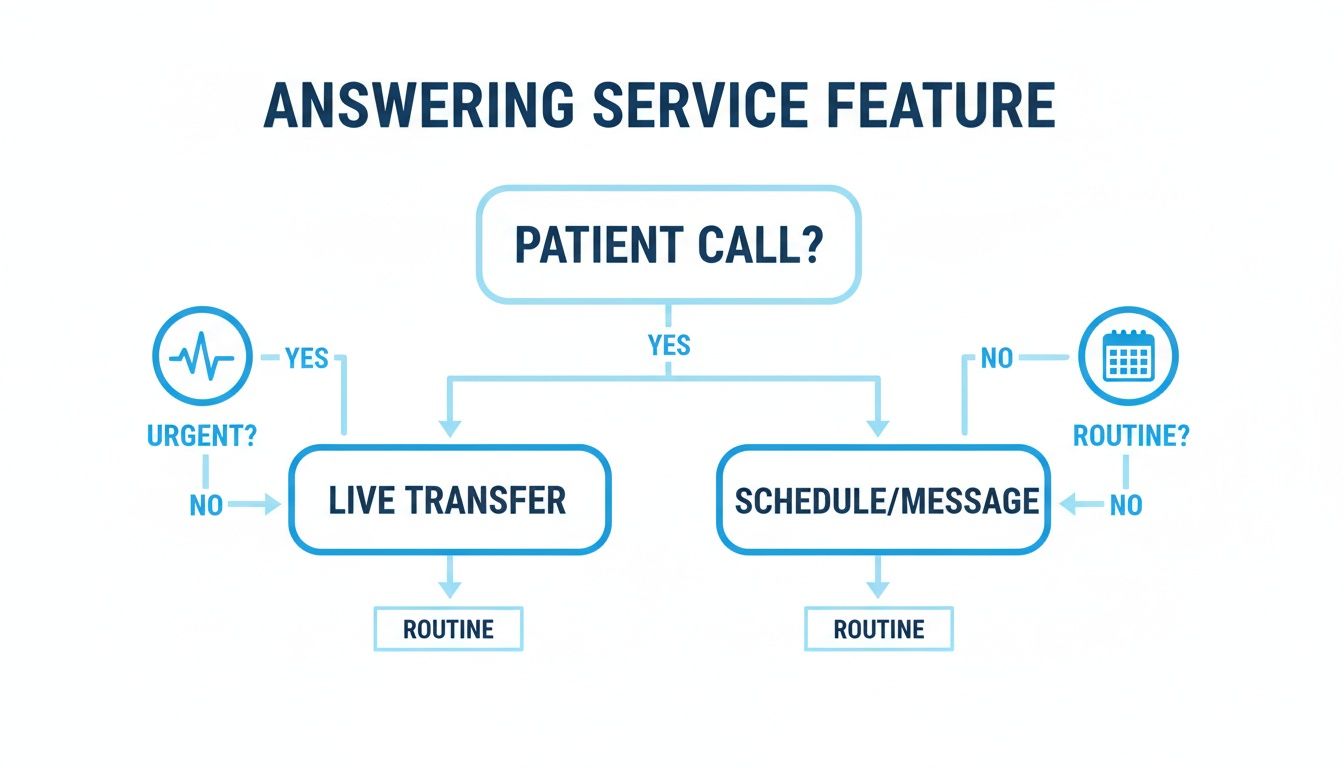
As you can see, a custom protocol helps an agent instantly route critical patient needs for immediate attention while efficiently handling standard administrative requests.
Building Call Scripts and Training Your Team
The heart of a successful rollout is developing smart call scripts. These aren’t meant to be rigid, robotic dialogues. Instead, think of them as flexible guides that ensure every call is handled with consistency and accuracy. You’ll build these out with your new service provider.
- Map Common Scenarios: First, list out the types of calls you get all the time. This usually includes new patient inquiries, appointment scheduling, prescription refill requests, and calls from other doctors' offices. Actionable Example: For a dermatology practice, scenarios might include "New patient asking about cosmetic procedures," "Existing patient reporting a reaction to a new medication," and "Pharmacy calling for a prescription renewal."
- Define Desired Outcomes: For each of those scenarios, decide what the perfect outcome is. For a new patient, the goal is to get their information and book that first visit. For a refill request, it's to securely pass that message to the right person on your clinical team. Actionable Example: For the "cosmetic procedures" call, the outcome is to capture the caller's name and number, email them a brochure, and book a free consultation with the aesthetician.
- Train Your Own Staff: Finally, you have to get your own team up to speed on the new workflow. They need to know how messages will be delivered, where to find call logs, and who to contact at the answering service if an issue pops up. A smooth internal process is just as important as the external one.
Measuring the Success of Your Answering Service
So, you've got your new answering service up and running. How do you know it's actually working? Going on a "gut feeling" isn't enough; you need to see the real impact. Tracking a few key metrics is the only way to truly understand the value you're getting and find opportunities to make the service even better.
This isn't just about counting calls. It's about understanding how well those calls are managed and what that means for your patients and your practice's bottom line.
Key Performance Indicators to Watch
Think of Key Performance Indicators (KPIs) as your service's report card. These numbers tell a clear story about what’s going right and where things could be improved. Any reputable provider will give you access to a dashboard where you can see this data for yourself.
Here are the essential KPIs you should have your eyes on:
- Average Speed to Answer (ASA): How long does a patient wait before a live person picks up? This is measured in seconds, and a lower number is always better. Actionable Goal: Aim for an ASA of under 20 seconds to ensure callers don't get frustrated.
- Call Abandonment Rate: What percentage of people hang up before anyone answers? A high rate is a serious red flag. Actionable Goal: Your abandonment rate should be well below 5%. If it's higher, the service may be understaffed during your peak call times.
- First Call Resolution (FCR): This is a big one. It measures how many patient issues are completely handled on the first try, without needing a callback from your staff. Actionable Goal: A high FCR (over 75%) is a sign of an efficient, well-scripted service that is saving your team valuable time.
Tracking these core KPIs helps you quantify the patient experience. A low abandonment rate combined with a fast answer speed directly translates to higher patient satisfaction and retention.
Want to go deeper into the numbers? You can learn more about how to interpret these figures in our article on the value of call detail reporting.
Calculating Your Return on Investment
Beyond the day-to-day performance, you need to look at the financial picture. A simple Return on Investment (ROI) calculation can show you exactly how the service is helping your practice grow.
First, you need to figure out the total value the service is bringing in. This is a mix of new revenue and smart cost savings.
- Value of New Appointments Booked: Add up the revenue from every appointment the service schedules. Pay close attention to the ones booked after hours—those are appointments you almost certainly would have missed otherwise.
- Cost Savings: This is where it gets interesting. Tally up what you've saved on staff overtime, the cost of hiring another full-time receptionist, and the value of your team's time now that they can focus on in-office patients and critical tasks.
Once you have those numbers, plug them into this simple formula:
(Total Value Generated - Cost of Service) / Cost of Service x 100 = ROI %
Let's walk through an example. Say the service booked 10 new patient appointments after hours last month, with each appointment valued at $250. That's $2,500 in new revenue. You also avoided $1,000 in staff overtime. Your total value generated is $3,500. If the service cost $800 for the month, your ROI calculation is: ($3,500 - $800) / $800 x 100 = 337.5%.
That kind of number makes it crystal clear: the right answering service isn't an expense. It's a powerful tool for growing your practice.
Frequently Asked Questions
Choosing the right answering service for your medical practice is a big decision, and it’s natural to have questions. Let's walk through some of the most common ones we hear from practice managers to give you the clarity you need.
How Are Genuine Medical Emergencies Handled?
This is, without a doubt, the most important question. The last thing you want is a true emergency getting lost in a voicemail system. A professional service handles this with meticulously planned escalation protocols that you help design.
Think of it like a set of if-then rules. You and the service will define exactly what constitutes an emergency for your practice. For instance, if a caller mentions keywords like "chest pain," "severe bleeding," or "difficulty breathing," a specific protocol kicks in. The agent's instructions might be to bypass the standard message-taking process entirely and perform an immediate, live transfer to the on-call physician's cell phone.
Will The Service Integrate With Our EMR?
Absolutely. Any service worth considering needs to plug directly into your existing software. Modern services use secure API connections to become a true extension of your front office, not just an external message pad.
Imagine this: a new patient calls after hours to book an appointment. Instead of just taking a message, the agent accesses a live view of your EMR calendar and schedules them directly into an open slot. The call notes are then automatically logged in the new patient's file. This completely eliminates double data entry and keeps patient records perfectly up-to-date.
How Is Agent Professionalism Ensured?
A great answering service knows their agents are representing your practice. It all starts with intensive, industry-specific training. Agents aren't just taught phone etiquette; they're educated on medical terminology, patient empathy, and, most critically, HIPAA compliance.
But training is just the beginning. Quality assurance is a constant process. Calls are regularly and randomly monitored by supervisors who provide coaching and feedback. Agent performance is also tracked against key metrics like call resolution time and patient satisfaction, ensuring they consistently deliver the professional, compassionate experience your patients deserve.
What Is The Typical Setup Time?
You can be up and running much faster than you might think, usually in under a month. The onboarding process is designed to be thorough yet efficient, so there's no disruption to your practice.
It generally breaks down into a few key stages:
- Script Development (3-5 business days): We'll work together to map out call flows, customize scripts, and define those all-important emergency protocols.
- Technical Integration (1-2 weeks): This is where we connect the service to your EMR, scheduling software, and phone systems.
- Testing and Launch: Before going live, we run a series of tests to make sure every call is routed correctly and all integrations work flawlessly.
Ready to see how a dedicated answering service can elevate your medical practice? With Recepta.ai, you get a 24/7 HIPAA-compliant team that captures every opportunity, integrates with your systems, and ensures every patient feels heard. Learn more and start your risk-free trial today at https://recepta.ai.