AI Phone Receptionist for Business: A Practical Guide
A two-truck HVAC company can lose a $4,800 furnace replacement opportunity because nobody answers at 6:47 p.m. on a Tuesday. That isn't a rare technology problem. It's an operating gap created when customer demand continues after staffing ends.
A 2023 field study of 85 small and mid-sized businesses across 58 industries found that only 37.8% of calls were answered live, while 37.8% went to voicemail and 24.3% received no response (field-study summary). In other words, roughly 62.2% of incoming calls weren't answered by a person. For an appointment-driven business, that gap can affect lead capture, scheduling, dispatch, and customer trust in the same moment.
An AI phone receptionist for business shouldn't be purchased as a fantasy replacement for your front desk. The practical role is different. It acts as a triage and routing layer, catching routine calls, collecting the right details, booking straightforward appointments, and bringing a human into the conversation when judgment or empathy matters.
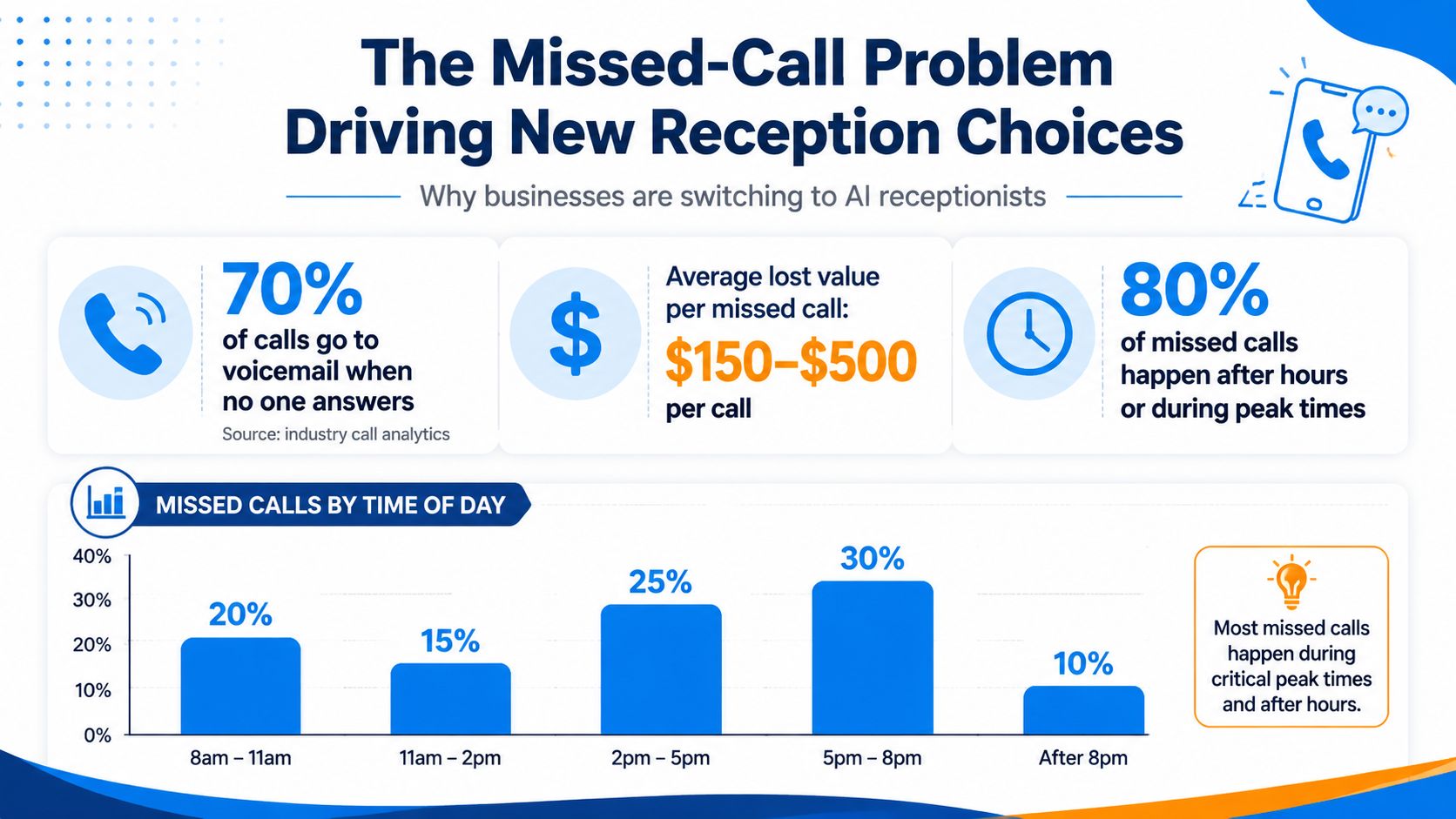
The Missed-Call Problem Driving New Reception Choices
At 6:47 p.m., an HVAC owner is finishing a job, the coordinator has left, and the on-call technician is driving. A homeowner calls about a failed furnace and wants a replacement estimate. The call reaches voicemail, and the homeowner contacts another contractor who answers.
The operational failure is not the absence of a dedicated receptionist. It is a phone process that depends on one employee being free at the exact moment demand arrives. The benchmark cited earlier found that only 37.8% of calls were answered live, while 24.3% received no response at all. That gap leaves lead capture and customer confidence to chance.
Voicemail also provides weak recovery. Industry summaries report that around 80% or more of callers who reach voicemail hang up without leaving a message, while another summary says 85% of missed callers never call back (missed-call economics). A business cannot build its intake process around callers patiently trying again.
Why normal coverage breaks
Three conditions usually collide:
- After-hours gaps: A 2026 industry report says 28.5% of business calls arrive after hours, making evening and overnight coverage a practical operating issue (after-hours call report).
- Peak-period overload: Staff may be onsite but serving customers, driving, processing payment, or speaking with another lead.
- Poor recovery: A ringless voicemail drop or delayed callback can arrive after the caller has selected another provider.
The missed opportunity varies by business. A plumbing company may lose an emergency dispatch, a dental practice a new-patient appointment, and a law firm an intake request.
The fix is a controlled handoff, not the removal of human contact. An AI receptionist should answer first, identify intent, collect contact details, and either complete a routine action or transfer the call with useful context. High-stakes, regulated, and emotional calls need clear escalation rules and human ownership.
Use ProdShort's call recording guide to assess how recordings, transcripts, and follow-up tasks fit into the phone workflow. For practical scripts and fallback wording, review this missed-call message guide. The standard is simple: don't let a caller disappear into an unmanaged voicemail box.
What an AI Phone Receptionist Actually Does
An AI phone receptionist is software that answers inbound calls, conducts a natural conversation, identifies what the caller needs, and takes a defined action. That action might be answering a business-hours question, collecting information for a quote, booking an appointment, routing an urgent request, or logging the interaction for staff follow-up.
The system works best when you think of it as three connected layers.
The listening layer
Speech recognition converts the caller's voice into usable information. It needs to handle ordinary conversational phrasing, interruptions, names, addresses, service descriptions, and clarifying questions. The objective isn't merely to transcribe words. It's to capture the details needed for the next operational decision.
A caller might say, “The water heater is leaking, and I need someone tonight.” The system should recognize the service type, urgency, location, and callback information without forcing the caller through a rigid menu.
The decision layer
The conversational engine interprets intent and follows a controlled call flow. It can ask qualifying questions, provide approved information, confirm details, and determine whether the request belongs to sales, service, billing, scheduling, or an on-call team.
This is different from a traditional touch-tone IVR that asks callers to press one for sales or two for support. Natural-language routing reduces menu friction, but it still needs boundaries. A well-designed flow tells the system what it may answer, what it must verify, and when it must stop.
The action layer
The final layer connects the conversation to business systems. It can write a note to a CRM, check calendar availability, send an SMS confirmation, create a ticket, or initiate a warm transfer to a human.
That last step determines whether the system creates value or merely sounds impressive. A pleasant conversation that doesn't book, route, record, or trigger follow-up is still an incomplete workflow.
Operating rule: Use AI for repeatable intake and routing. Keep humans responsible for exceptions, judgment, emotional support, and regulated decisions.
Outsourced answering services solve the staffing issue with human agents, but they can introduce handoff friction and variable familiarity with the business. AI provides consistency and simultaneous coverage, while a hybrid model preserves human involvement where outcomes matter most.
Core Features That Drive Real Business Results
Voice quality helps, but it does not create return by itself. An AI phone receptionist for business must capture demand, complete a useful action, and route exceptions to the right person. Treat it as a controlled triage layer, not a replacement for human judgment.
Conversational routing
Natural-language IVR deserves a high priority because callers can explain their needs without working through a menu tree. Configure clear intents such as “new estimate,” “existing appointment,” “emergency service,” “billing question,” and “speak with a manager.”
The system should also follow boundaries. Define which questions it may answer, which details it must verify, and which situations require a handoff. That design protects high-stakes, regulated, and emotional calls.
Always-on answering
Twenty-four-hour answering earns high priority, particularly for home services and appointment-driven businesses. It covers evenings, weekends, lunch periods, and call spikes when employees cannot answer. The benchmark report cited by BizRNR's AI receptionist report estimated first-ring answer rates of 96% to 99% for AI, compared with 55% to 75% for human reception, and estimated after-hours coverage at 100% for AI versus roughly 8% to 20% for in-house staffing.
Use that coverage to protect demand, not to eliminate staff. The AI should handle repeatable intake while people retain responsibility for exceptions and sensitive decisions.
Warm human escalation
Warm transfer is a high priority, not a courtesy feature. Set rules that send qualifying calls to an on-call plumber, nurse line, attorney, or manager. The handoff should include the caller's name, reason for calling, urgency, and collected details, so the recipient can act without forcing the caller to repeat the story.
A failed transfer also needs a defined fallback. The system can record the request, send the approved notification, and explain what happens next.
Calendar and CRM actions
Appointment booking is another high-priority capability. The receptionist should read current availability, apply scheduling rules, select the correct appointment type, book it, and send confirmation. It should record the call outcome in HubSpot, Salesforce, ServiceTitan, or a practice-management platform.
A conversation that does not book, route, document, or trigger follow-up remains unfinished.
Analytics and polish
Prioritize operational reporting over decorative dashboards. Track missed opportunities, booking outcomes, transfer reasons, unanswered escalations, and recurring caller questions. Sentiment scoring and multilingual support can help at scale, but add them after the core flow performs reliably.
| Feature | What It Does | ROI Impact | Priority |
|---|---|---|---|
| After-hours answering | Captures calls when staff aren't available | Protects demand that would otherwise reach voicemail | High |
| Appointment booking | Checks availability and confirms appointments | Converts conversations into scheduled work | High |
| Warm transfer | Sends qualified or sensitive calls to a human | Protects complex interactions and speeds response | High |
| CRM logging | Records caller details and outcomes | Prevents follow-up gaps and duplicate work | Medium-high |
| Sentiment scoring | Flags emotional tone for review or escalation | Helps managers identify service risks | Medium |
| Multilingual support | Handles calls in supported languages | Expands accessibility when demand justifies it | Medium |
The market context supports treating this category as operational infrastructure. Grand View Research estimated the global AI voice agents market at USD 2.54 billion in 2025 and projected USD 35.24 billion by 2033, with a projected 39.0% compound annual growth rate from 2026 to 2033. North America represented 38.1% of global revenue in 2025 (market report summary). Buy for measurable workflows, not a voice demo.
Industry Use Cases and Practical Examples
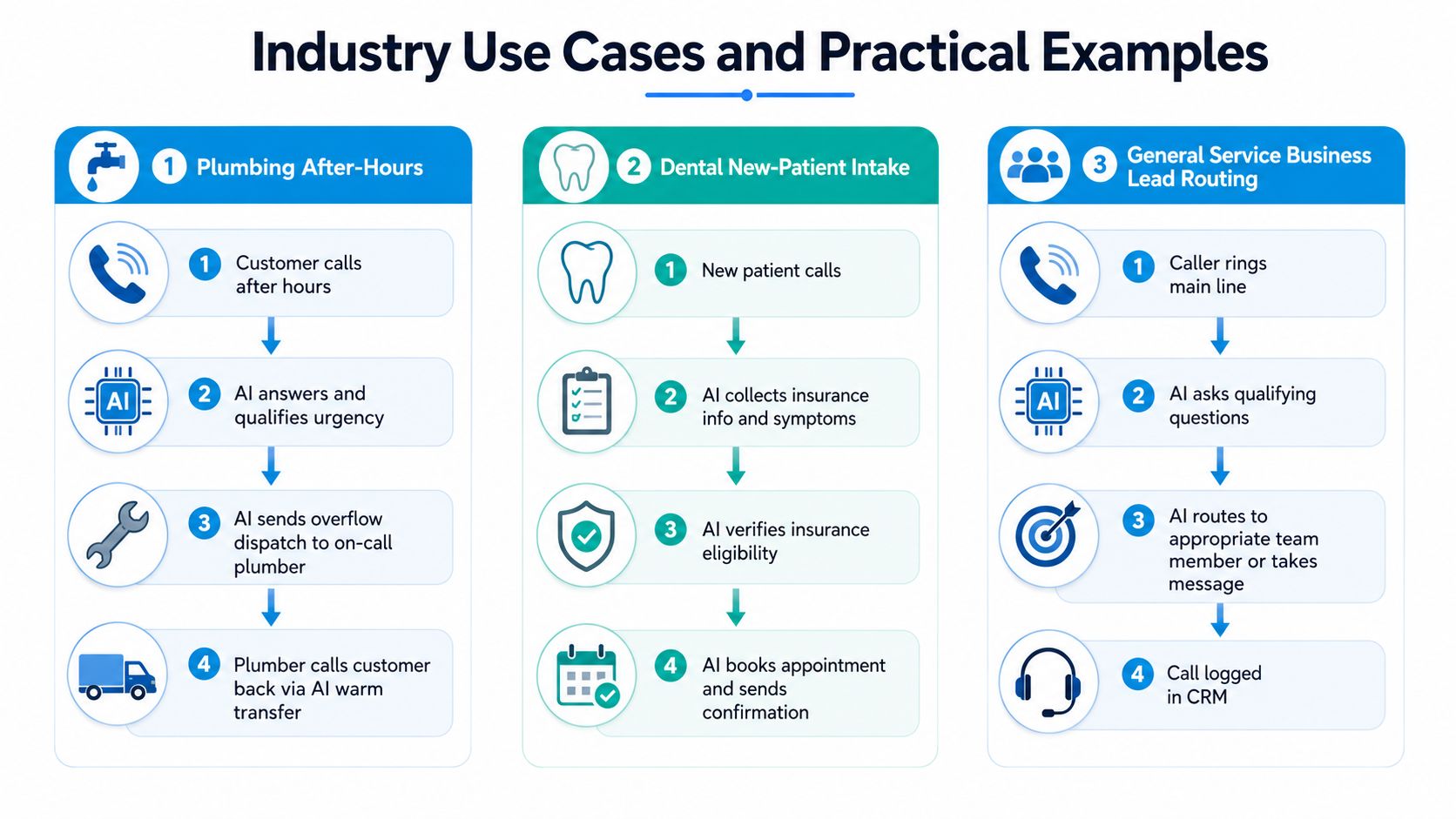
A plumbing company, dental practice, and law firm can all use an AI receptionist, but they shouldn't use the same script. The effective design starts with the consequences of a wrong answer and then builds the escalation rules around that risk.
Plumbing after hours
At night, the AI answers the call and asks for the property address, callback number, service problem, and urgency. It can distinguish a routine estimate request from a reported leak, no-heat situation, or other issue that requires the on-call process.
If the caller meets the emergency criteria, the system sends the details to the overflow dispatch workflow and offers a warm transfer to the on-call plumber. If the transfer isn't accepted, it records the request, sends the agreed notification, and tells the caller what happens next. The value here is continuous coverage and structured dispatch, not a machine pretending to diagnose a repair.
Dental new-patient intake
A dental practice can use the AI to collect the caller's name, contact details, reason for the visit, preferred appointment times, and insurance information. It can apply the practice's approved intake questions, check whether the scheduling request matches an available appointment type, and send a confirmation after booking.
The system should not make unsupported clinical judgments. A caller describing severe symptoms, medication concerns, or an urgent situation should move to a human-approved escalation path. Insurance eligibility workflows also need current data and clear disclosure rules. If the AI can't verify a required detail, it should collect the information for staff instead of guessing.
Law firm lead routing
A law firm can ask an AI receptionist for the caller's name, contact details, matter category, opposing-party information needed for a conflict-check process, location, and consultation preferences. The system can route the lead to the appropriate practice group and offer available consultation times.
It shouldn't promise representation, interpret legal facts, or handle a distressed caller as if the conversation were a routine sales lead. A human must take over when the caller reports an immediate threat, discusses a sensitive emergency, or asks for advice beyond the firm's approved intake language.
The common pattern: collect only the fields required for the next decision, then route with context.
The same pattern works for insurance claims, property management, veterinary offices, and financial services. Define the routine path, define the stop conditions, connect the calendar or CRM, and make the human handoff reliable. For additional implementation examples, review these Recepta.ai case studies.
A short demonstration can make the difference between understanding the concept and evaluating the workflow:
Integrations, Setup, and What to Expect
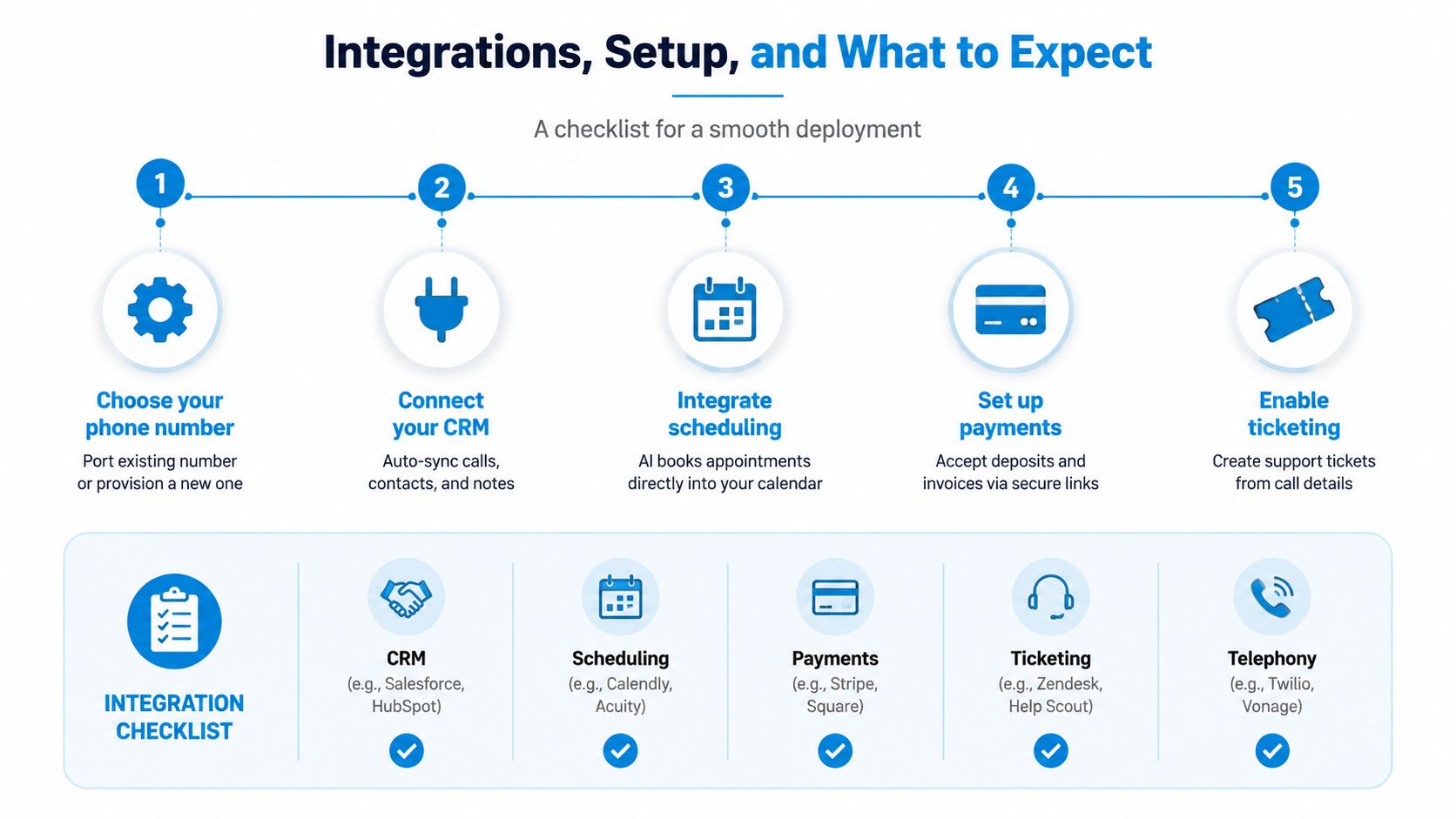
“Integration” should mean more than connecting a phone number. Before buying, map the systems that must change when a call ends. That normally includes the CRM, scheduling platform, payment process, ticketing system, and telephony carrier.
Start with the phone path
Decide whether to port the existing business number or provision a new line. Porting preserves customer familiarity, but provisioning a new line can make a controlled pilot easier. Confirm how forwarding, business-hours rules, call recording, transcripts, voicemail fallback, and warm transfers will work before launch.
Then document the events that matter. A booked appointment should update the calendar. A new lead should create or update a CRM record. A support request should create a ticket. If the provider uses webhooks or an API, ask how it handles authentication, failed events, retries, and rate limits.
Use a staged deployment
A practical deployment can follow this sequence:
- Days 1 to 3: Map call types, business hours, escalation criteria, and current routing rules.
- Days 4 to 7: Write greetings, approved answers, qualifying questions, and fallback language.
- Days 8 to 10: Connect the CRM, calendar, ticketing tools, and confirmation messages, then test real scenarios.
- Days 11 to 14: Run the AI alongside existing coverage, review transcripts, correct errors, and train staff on handoffs.
Test the failure points
Most launch problems come from operations, not voice technology. Overlapping routing rules can send calls to the wrong person. Stale calendar data can create double bookings. An outdated Google Business Profile can tell callers the office is closed when the team is available.
Keep a test list for urgent calls, incorrect information, no calendar availability, transfer failure, caller interruption, spelling of names, and requests outside the approved knowledge base. The setup should remain iterative. Review calls, update the flow, and adjust escalation rules as your business changes.
For a more detailed integration checklist, use this guide to third-party integrations.
Comparing AI to In-House and Traditional Answering
The choice isn't human versus machine. Each model solves a different operating problem.
An in-house receptionist offers the strongest relationship-building and judgment. That person knows the team, can notice emotional cues, and can handle unusual requests without waiting for a configured rule. The tradeoff is limited coverage and capacity, especially when the receptionist is already helping a customer, taking a break, or away from the desk.
A traditional answering service gives you a human voice without hiring directly. It can work well for basic message taking, but the agent may have limited knowledge of your services, calendars, policies, and escalation criteria. Per-minute billing can also make heavy call periods less predictable.
AI receptionists provide rapid, consistent coverage and can handle multiple calls without shift scheduling. Their weakness is workflow reliability when the task requires complex state tracking or several tool actions. A 2026 benchmark cited in an independent systems review found that a voice-agent model completed only 31% to 51% of grounded tasks cleanly, compared with 85% over text for the same model (voice-agent benchmark review). That gap is why controlled workflows and human escalation matter.
| Factor | In-House Receptionist | Traditional Answering Service | AI Phone Receptionist |
|---|---|---|---|
| Cost structure | Salary, benefits, and management overhead | Often billed by usage | Software and automation expense |
| Coverage | Usually tied to staffed shifts | Depends on service agreement | Designed for continuous coverage |
| Consistency | Depends on staff training and workload | Depends on agent familiarity | Depends on script, knowledge base, and workflow design |
| Call spikes | Capacity is limited | Capacity may be available at added usage | Can absorb routine volume at scale |
| Complex calls | Strongest option | Human judgment is available | Requires defined escalation |
| Booking and logging | Manual or system-assisted | May require follow-up | Can trigger connected systems when configured |
The benchmark report cited above estimated AI answered-call costs at approximately $0.18 to $0.45, compared with $3.50 to $7.20 for a W-2 receptionist at SMB volumes, implying a roughly 7x to 18x cost advantage when call volume is sufficient to keep the system active (AI receptionist cost benchmark). Use that as a model for evaluating economics, not as a promise for every vendor or call pattern.
Choose in-house staff when calls require nuanced relationships. Choose traditional answering when human voice matters but integration needs are modest. Choose AI when speed, consistency, after-hours capture, and structured actions are the priority. For many service businesses, the strongest design combines AI for first contact with people for exceptions.
Buyer's Checklist and Metrics to Track After Launch
Buy the system only after you can describe the calls it must handle. Start with the operating facts, not a product demo.
Before signing
Check these items with the vendor and your own team:
- Call volume and timing: Review when calls arrive and where the current coverage gap appears.
- Language needs: Confirm which languages the system supports and whether human escalation is available in those languages.
- Sensitive-call rules: Define what happens with medical urgency, legal emergencies, insurance claims, angry customers, and requests involving private information.
- Compliance controls: Ask how HIPAA, PCI, and TCPA requirements apply to recording, storage, disclosures, messaging, and payment workflows.
- Number ownership: Decide who controls porting, forwarding, recordings, transcripts, and export access if you change providers.
- Escalation coverage: Name the actual human, phone number, backup person, and response rule for each high-priority call type.
Roll out in phases
During the first week, document call categories, required fields, business hours, routing rules, and stop conditions. In the next two weeks, build the scripts, knowledge base, CRM actions, calendar rules, and transfer paths.
Use the fourth week for a soft launch alongside existing coverage. Listen to real calls, compare AI-collected details with staff expectations, and correct the flow before directing all traffic through it. Don't launch with every possible use case. Start with one or two high-volume, low-risk workflows, such as appointment requests and after-hours message capture.
Measure the operating result
Track the following at 30, 60, and 90 days. The first review should focus on obvious failures. Later reviews should examine conversion, staffing impact, and whether escalations are reaching the right people.
| Phase | Primary KPIs | Target Benchmark | Review Cadence |
|---|---|---|---|
| First 30 days | Answer rate, escalation accuracy, failed transfers, data completeness | Establish a reliable baseline and correct critical errors | Review weekly |
| 60 days | First-call resolution, average handle time, booking conversion, after-hours revenue captured | Improve completion of approved workflows | Review every two weeks |
| 90 days | Human escalation rate, cost per answered call, booking quality, repeat-call patterns | Decide which workflows to expand, revise, or retire | Review monthly |
Use a dedicated performance dashboard to keep these metrics tied to operational decisions. A high answer rate means little if the AI collects the wrong address or books the wrong appointment type.
Early data will be noisy. Callers phrase requests differently, staff may bypass the configured process, and calendar or CRM errors can distort the first reports. Set the review cadence before launch, assign an owner for corrections, and require every escalation rule to have a named human destination.
The core buying question is straightforward: which calls should AI complete, which calls should AI prepare, and which calls should always reach a person? Businesses that answer that question clearly will get more value than businesses that turn on a conversational voice.
Recepta.ai provides a 24/7 AI phone receptionist that handles routine questions, qualifies callers, schedules appointments, logs interactions, and escalates complex or sensitive conversations to trained human support. Visit Recepta.ai to evaluate a controlled call-routing workflow for your business.