What Is Lead Capture and How Does It Actually Work
Lead capture is the process of collecting identifiable prospect information at the point of inquiry and routing it into a fast, trackable follow-up. In a 2011 audit of 2,241 U.S. companies, only 37% responded within one hour, while 23% never responded, showing why a captured record can still become a lost opportunity (Harvard Business Review study summary).
A homeowner calls an HVAC company after work, hears voicemail, and leaves a message with a name and phone number. The office receives the message the next morning, but by then the homeowner has already contacted another contractor. The business technically received the lead. It didn't turn that inquiry into an owned, timely next step.
That distinction answers the practical question, what is lead capture? It isn't just a form on a website. It's a closed-loop intake process that identifies intent, records usable information, routes the inquiry to the right person or system, and triggers follow-up that someone can measure.
What Lead Capture Really Means for Small Businesses
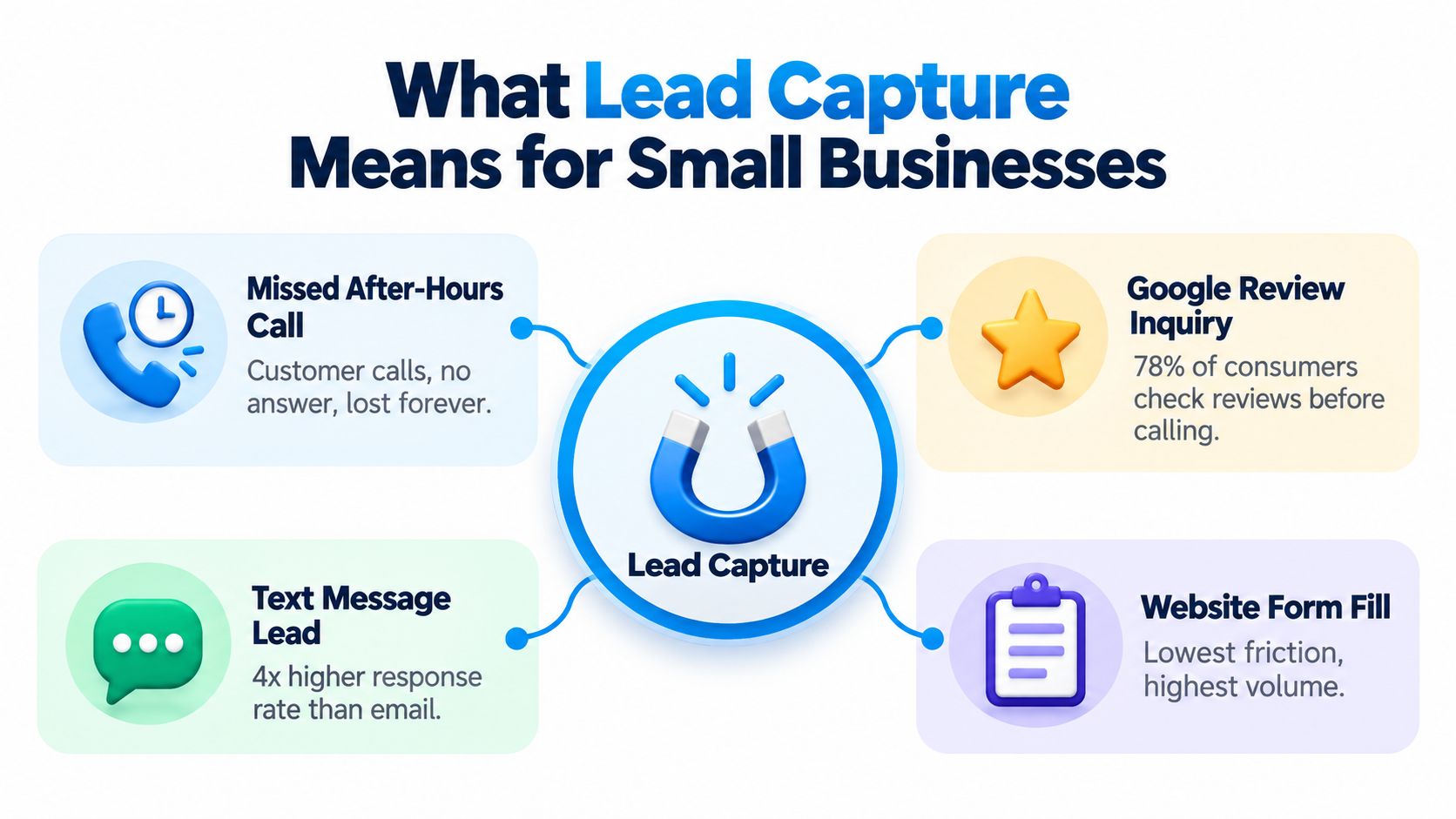
For a small business, lead capture begins whenever a prospective customer shows interest. That moment might be a website form, an inbound call, a text message, a live chat, a review response, or a referral. The business needs to preserve both the person's identity and the context of the request, such as the service needed, location, urgency, and preferred appointment time.
A useful lead record lets the team answer four questions quickly:
- Who is asking? Name, phone number, email address, and permission to follow up.
- What do they need? A leaking pipe, a dental consultation, or a legal intake call.
- Who owns the next step? A dispatcher, receptionist, attorney, or automated workflow.
- What happened afterward? Contact made, qualified, appointment booked, or opportunity lost.
Capture is more than collection
A form submission sitting in an unattended inbox isn't a finished lead-capture process. The record needs validation, a timestamp, an owner, and a defined response. For a service business, the workflow might record a caller's number, confirm the service address, classify the request as urgent or routine, and send the request to the correct team.
That matters because service inquiries are often time-sensitive. A plumbing emergency, an available dental appointment, or a consultation request can lose value while a staff member searches through voicemail, email, and paper notes.
Lead generation creates interest. Lead capture preserves that interest as an actionable record. Sales execution begins only when the record reaches someone who can respond, qualify the request, and arrange the next outcome. Businesses that want a deeper set of real-world scenarios can review these lead capture examples for different channels.
The Lead Capture Pipeline From Inquiry to Booked Job
Consider an HVAC quote request submitted at 2:00 p.m. The customer enters a name, phone number, service address, problem description, and preferred appointment window. A working intake system treats that submission as an event that starts several connected actions.
Six stages of a usable intake record
- Inquiry arrives. The system records whether the request came from a form, phone call, chat, text, advertisement, or referral, along with the submission time.
- Information is normalized. The system checks that the phone number is usable, the address is complete, and required fields aren't empty. Standardized service categories make later routing more reliable.
- Intent is qualified. The workflow identifies the job type, urgency, location, property details, and appointment preference. An emergency cooling failure shouldn't enter the same queue as a routine maintenance request.
- Ownership is assigned. The request goes to a dispatcher, receptionist, salesperson, or automated assistant who can take the next action. Businesses that need human support for this handoff can explore resources on the best place to hire appointment setters.
- Follow-up begins. An acknowledgment can confirm receipt, while a call or text gives the customer a useful next step. The business should record the first contact attempt, not just the automated acknowledgment.
- The outcome is logged. The record shows whether the prospect was reached, qualified, scheduled, declined, or still needs attention.
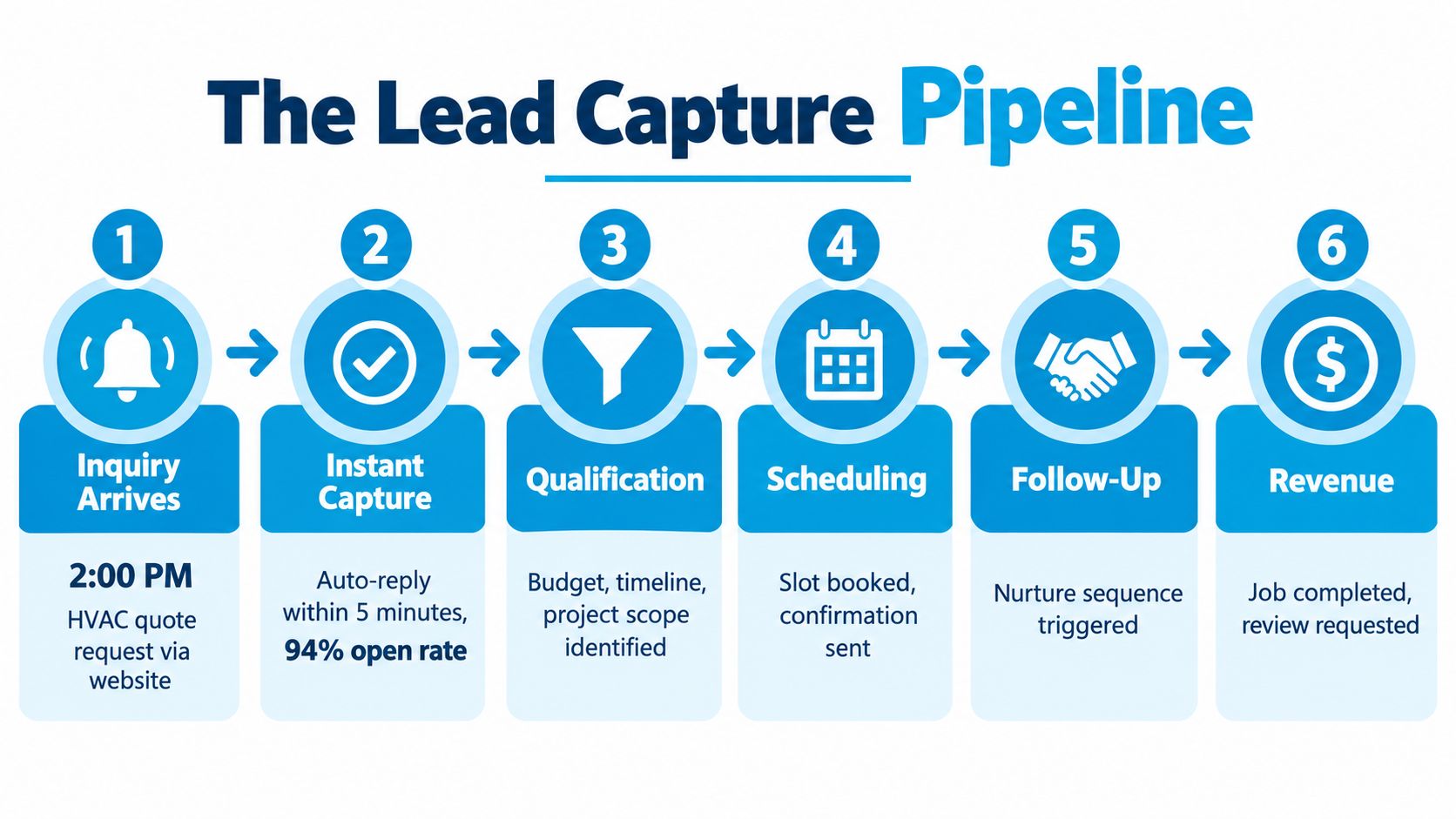
Each stage creates a timestamp or status that helps an owner find the leak. If many requests arrive but few are contacted, routing or response time is the problem. If conversations happen but appointments don't, the qualification questions, scheduling process, or offer may need attention. A clear sales lead management workflow keeps those records connected instead of scattering them across separate tools.
The pipeline also explains why lead capture can't be judged by submission volume alone. A request that reaches the CRM, receives an owner, and triggers a timely response is more operationally useful than a larger pile of unassigned contacts.
Lead Capture Methods Compared
Different channels capture different kinds of intent. A website form gives structure and scale, while a phone call often gives richer context. Live chat can answer questions during browsing, but someone must staff it or configure it carefully. An AI receptionist can handle the first conversation when a human isn't available, then route the request according to business rules.
| Method | What It Captures Well | Where It Leaks | Best Fit For |
|---|---|---|---|
| Website form | Name, contact details, service type, location, and campaign source | Visitors who prefer calling, abandoned forms, unclear validation | Quote requests, consultations, and scheduled inquiries |
| Inbound phone call | Urgency, objections, detailed context, and conversational intent | Voicemail, after-hours calls, incomplete notes, inconsistent handoffs | HVAC, plumbing, healthcare, legal, and high-intent services |
| Live chat | Questions, page context, contact details, and conversation history | Unstaffed chats, shallow qualification, disconnected transcripts | Businesses with active website traffic and prompt coverage |
| AI-receptionist call capture | Caller identity, service need, structured answers, and appointment preferences | Poorly designed scripts, unclear escalation rules, limited handling of unusual cases | Businesses that receive calls outside office hours or need consistent intake |
Choose the mix by operating reality
A small dental practice may prioritize calls and a simple consultation form because patients often want reassurance before booking. An HVAC company may need both forms and phone coverage because a customer with no heat may not wait for an email response. A law firm may use a consultation form to collect matter type while giving callers a conversational path for urgent questions.
The right channel mix depends on inquiry volume, operating hours, staff availability, and the value of a completed appointment. Every channel should create or update the same CRM record, with the source, consent status, qualification answers, and outcome attached. That makes it possible to compare channels without mistaking raw activity for commercial value.
Businesses with specialized staffing workflows may also evaluate sales automation for recruiting agencies as a reference point for routing and follow-up design. The principle is transferable: capture the event once, preserve the context, and assign a clear owner.
For call-heavy companies, an AI call answering service can fit alongside forms and chat rather than replacing them. The goal isn't to force every prospect into one channel. It's to ensure each channel ends in a structured, reachable record.
The Data Depth vs Trust Trade-Off
A longer form doesn't automatically create a better lead. It may give the team more information, but it also asks a stranger to surrender more time and personal detail before trust exists. Form-analysis summaries report that abandonment rises sharply when forms request more than seven fields, including one cited 67.8% abandonment rate in that situation (Brixon Group summary).
The better question isn't, “How many fields can we fit?” It's, “What information is necessary for the next safe and useful step?”

Start with low-risk, high-value details
An HVAC company may need a name, phone number, service address, job category, and urgency before dispatching a technician. A dental clinic may need a name, contact method, appointment preference, and a brief reason for the visit. A law firm may ask for contact details, matter category, location, and a short description, while deferring sensitive facts until a qualified professional can explain the process.
Progressive profiling keeps the first interaction manageable:
- First contact: Request only the information needed to reply and route the inquiry.
- Qualification: Ask additional questions during a call, chat, or later interaction.
- Sensitive details: Explain why the information is needed and offer a phone alternative where appropriate.
- Ongoing record: Store only what the team needs, with access limited to people who handle the matter.
This staged model is especially important in healthcare, finance, insurance, and legal services. Asking for insurance details or a detailed legal history before explaining the purpose can reduce trust and create unnecessary compliance exposure.
Consent language should be specific and visible. The UK Information Commissioner's Office says organizations should explain why they want the information, disclose intended sharing for direct marketing, explain data-protection rights including the right to object, and provide that information when collecting details (ICO guidance on collecting information and generating leads).
A dental form, for example, can say that the name, phone number, and appointment preference will be used to arrange the consultation. Promotional email consent should use a separate, unchecked option, not a vague condition hidden in the submit button.
A chatbot or AI receptionist should also identify its role clearly, avoid implying that it is a licensed professional, and escalate when a human must review the inquiry.
Metrics That Turn Capture Into Revenue
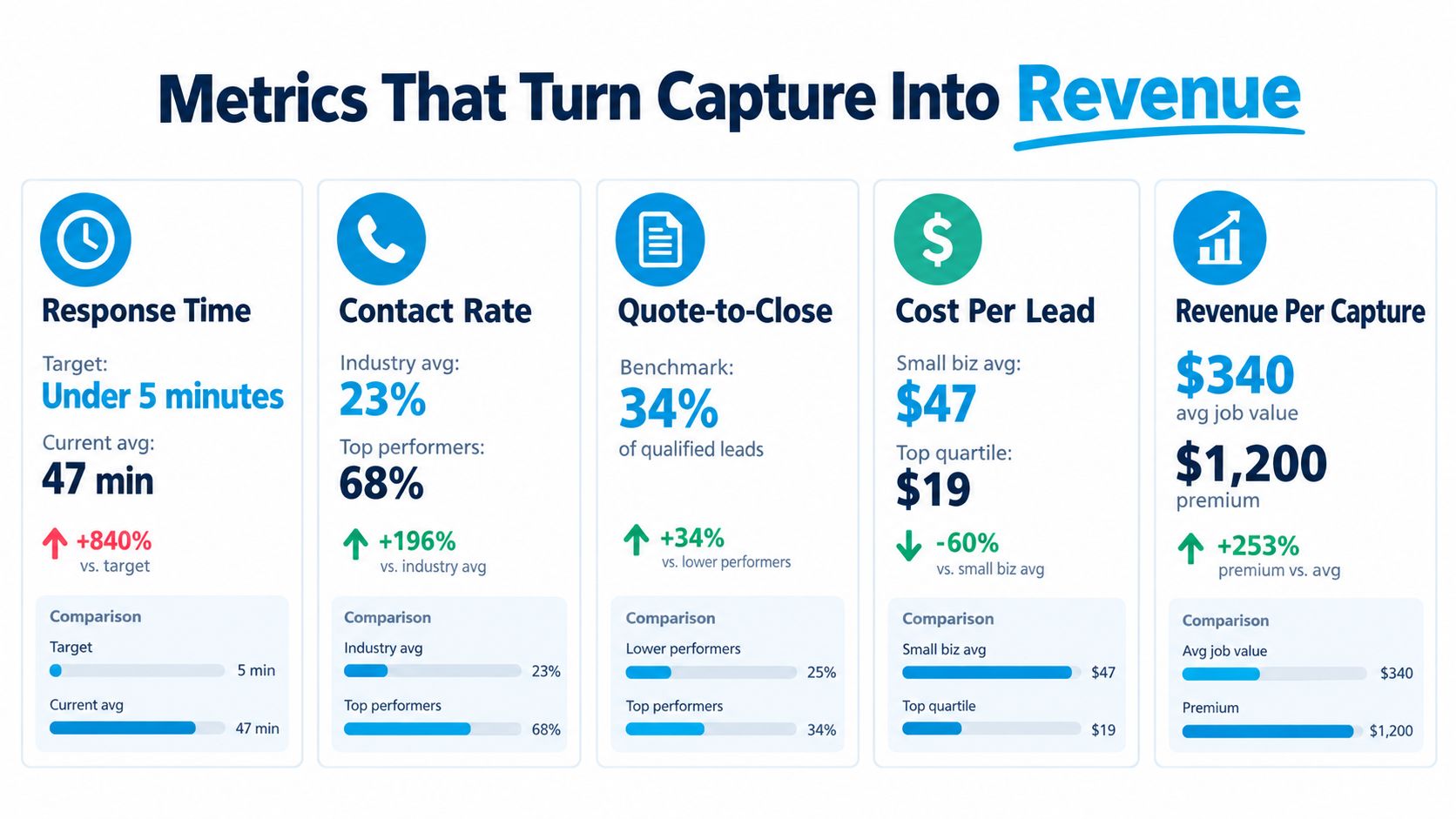
A lead record becomes valuable when the business can connect it to an outcome. Five measures reveal whether the intake system is creating usable opportunities or collecting activity.
Track the full path
Response time measures the gap between submission and the first human or useful automated next step. The Harvard Business Review research summarized in industry coverage found that companies contacting an online lead within one hour were seven times more likely to achieve a meaningful conversation with a decision-maker than companies waiting an additional hour, and 60 times more likely than companies waiting 24 hours (speed-to-lead study summary). That makes response latency part of capture quality, not merely a later sales metric.
Contact rate shows whether the team can reach captured prospects. Wrong phone numbers, incomplete forms, unclear consent, and poor channel selection can all lower it.
Qualification rate shows whether the intake questions identify genuine fit. If many contacts lack a serviceable location or fall outside the firm's practice area, the form or script may need better routing questions.
Appointment booking rate tests the handoff from interest to calendar. A strong inquiry can still fail when staff can't offer a suitable slot or the scheduler doesn't receive the necessary context.
Revenue per source connects outcomes to acquisition channels. A campaign that produces many submissions but few qualified appointments may deserve less attention than a smaller source that creates completed jobs.
Practical rule: Store the timestamps for submission, first contact, qualification, appointment, and final outcome in one record.
Set a response-time service-level objective that matches the business's operating hours and customer expectations. Then configure alerts, ownership rules, and escalation when the target is missed. A cost-per-lead calculation guide can help connect channel spending to the captured opportunities, but the calculation is only useful when the business distinguishes raw submissions from qualified leads and revenue.
How Real Businesses Set Up Lead Capture
A dental clinic might begin with a new-patient form that asks for a name, phone number, preferred appointment time, and general reason for the visit. The clinic's AI receptionist handles calls that arrive when the front desk is busy or closed, records the same core details, and routes urgent questions to the appropriate staff member.
The owner watches time to first useful response first. A common breakdown is channel separation: forms reach an office inbox while calls remain in a voicemail system. The fix is to write both sources into the same intake record and show staff the patient's preferred contact method.
An HVAC workflow
An HVAC company can send Google Ads traffic to a quote page with service type, address, phone number, and urgency. A validation rule checks whether the location falls inside the service area. Emergency requests go directly to a live dispatcher, while routine estimates enter the scheduling queue.
The owner watches contact rate by source. If the advertising page generates requests but the phone numbers aren't usable or staff can't reach customers, the business should review field validation, confirmation messages, and the first response channel.
A small law firm
A small law firm can combine a consultation form with call capture. The form asks for contact information, matter category, location, and a short description. A call workflow records missed calls, gathers basic intake information without giving legal advice, and assigns the inquiry to the next available reviewer.
The owner watches qualified consultation bookings. A frequent breakdown is asking for too much confidential information before an attorney has established the purpose of the conversation. The firm can fix that by collecting a concise summary first, displaying a clear privacy notice, and reserving detailed fact gathering for the consultation.
These examples share the same operating pattern, even though their questions differ:
- Channel: Meet the prospect where the inquiry begins.
- Fields: Capture only what the next step requires.
- Routing: Send the request to the person equipped to handle it.
- Escalation: Define what happens when the request is urgent, unusual, or sensitive.
- Measurement: Watch one early metric that exposes the largest operational leak.
A form alone can't provide that consistency. The workflow needs a destination, an owner, and a recorded outcome.
A Practical Lead Capture Checklist and Common Questions
Use this checklist to inspect your current intake system:
- List every channel: Include forms, calls, chat, texts, reviews, referrals, and offline inquiries.
- Define required fields: Ask for the minimum information needed to contact and route the prospect.
- Explain data use: State why details are collected, how marketing permission works, and how people can object.
- Validate entries: Check phone numbers, addresses, service areas, duplicate records, and required selections.
- Assign ownership: Send every new record to a named person, queue, or defined automated workflow.
- Set response rules: Record submission time, first contact, escalation, and final disposition.
- Protect sensitive data: Limit access, avoid unnecessary collection, and explain automated assistance.
- Measure outcomes: Report contact rate, qualification, booked appointments, and revenue by source.
Questions owners ask
How fast should we respond?
Respond as soon as the business can provide a useful next step. The available research shows that delays after the first hour materially weaken the chance of a meaningful conversation, so measure the gap instead of relying on a general promise.
Can an AI receptionist handle healthcare intake?
It can handle defined administrative tasks such as collecting contact details, appointment preferences, and basic routing information, provided the workflow protects sensitive data, discloses the automated role, and escalates clinical or sensitive questions to qualified staff.
What must a lead form include legally?
Requirements depend on jurisdiction and purpose. At minimum, explain why information is collected, identify relevant sharing, describe applicable rights, and separate service communication from optional marketing consent. Have counsel review workflows for regulated services.
How do we calculate ROI?
Compare the cost of the channel and intake operation with the qualified appointments, completed jobs, or revenue attributed to those captured records. Include staff time and distinguish submissions from outcomes.
Recepta.ai helps businesses capture and qualify inquiries from calls, chats, texts, and website forms, then route requests or book appointments while logging the results in connected systems. Visit Recepta.ai to see how a structured intake workflow can reduce missed interactions and make follow-up measurable.