Third-Party Integrations: A Guide to Business Growth

You're probably dealing with this already.
A new lead fills out a form on your website. Then someone on your team copies that information into the CRM, adds the appointment to a calendar, sends a confirmation message, and later creates an invoice in a separate system. If the phone rings during a busy hour, that lead might sit in an inbox until evening. If someone mistypes a phone number or forgets one step, the whole customer journey gets shaky fast.
For service-based small businesses, that's where revenue trickles away. Not in dramatic system failures, but in missed appointments, unreturned calls, duplicate entries, billing delays, and admin work that keeps staff busy without moving the business forward. Third-party integrations solve that problem by connecting the software you already use so information moves automatically instead of waiting for a person to push it along.
What Are Third-Party Integrations and Why They Matter
A lead comes in at 12:07. Your office is busy, the phone rings twice, and by 12:30 that lead is still sitting in one system while the calendar, CRM, and billing tool know nothing about it.
That gap is what third-party integrations fix.
Third-party integrations connect separate software tools so they can pass information to each other automatically. A useful comparison is a universal adapter for electronics. Your scheduling app, CRM, phone system, intake forms, invoicing software, and calendar were built by different companies, with different rules for sharing data. An integration gives those tools a reliable way to work together.
For a service business, that matters because operations problems quickly become revenue problems. If customer details stay trapped in one app, your team spends time copying and checking information instead of confirming appointments, replying to new inquiries, or closing jobs. One missed handoff can mean a lost booking, a no-show, or an invoice that goes out late.
Here is the practical difference:
- Without integrations, a new inquiry waits for a person to move it from the form tool into the CRM.
- Without integrations, appointment details may never reach the calendar or reminder system.
- Without integrations, staff often have to search across multiple apps to answer a simple customer question.
- Without integrations, admin payroll rises because people are doing software handoffs by hand.
With integrations, those handoffs happen automatically. A web form can create a contact record. A booked job can update the calendar and trigger a confirmation text. A completed call can attach notes to the customer profile. Platforms such as Recepta.ai are built around this kind of connected workflow, which is why integrations are tied so closely to operational ROI for service-based SMBs.
A simple rule helps here. If your staff enters the same customer information more than once, you are paying for the same administrative task more than once too.
The broader market has already shifted in this direction. According to a 2025 analysis by MarketsandMarkets on third-party integrations, more than 89% of companies consider third-party business intelligence platform integrations important to business success. For small service companies, the reason is straightforward. Better connections between tools lead to fewer missed appointments, more captured leads, and lower administrative cost per job.
If customer records are one of the main pain points in your business, this overview of CRM integration basics explains how connected systems keep sales and service data aligned. If your lead flow also depends on social channels, this guide for social media API developers shows how those connections are typically handled behind the scenes.
How Different Types of Integrations Work
Business owners do not need to write code to choose the right integration. You do need a clear picture of how the common connection types behave, because each one solves a different operational problem.
That matters in service businesses where minutes turn into money. The wrong setup can delay lead follow-up, leave calendars out of sync, or force staff to copy customer details between systems. The right setup keeps inquiries moving, appointments confirmed, and admin time under control.
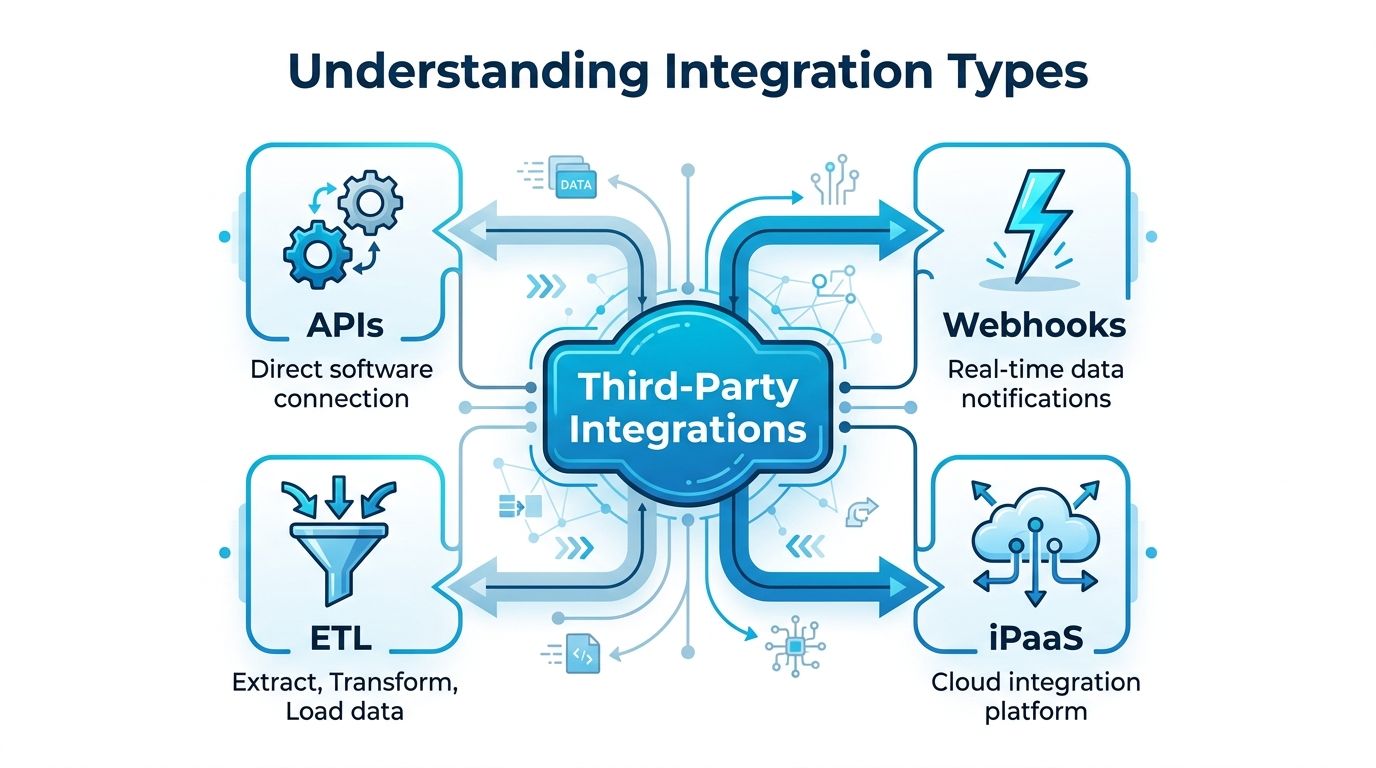
The four main integration types
APIs
An API works like a restaurant menu. One system asks another for something specific, such as customer details, appointment status, or invoice data. The menu defines what can be requested and how that request needs to be made.
APIs fit jobs where one tool needs direct, structured access to another. A CRM might request payment status from billing software before your office team calls a customer. A scheduling tool might pull customer records so staff can see the service history before booking.
Webhooks
A webhook works like a doorbell. One app does not keep checking whether something happened. Instead, the source app sends a message as soon as an event occurs.
That event could be a new form submission, a canceled appointment, or a paid invoice. Webhooks are useful when speed affects outcomes, especially if your team wants to respond before a lead goes cold or a schedule gap goes unfilled.
ETL
ETL stands for extract, transform, and load. It moves data from one place to another, cleans it up, and puts it into a system that can use it well.
This type is usually less about instant action and more about order. If a multi-location service company wants reporting across booking software, invoicing, and customer support tools, ETL helps combine those records into one reliable view.
iPaaS and middleware
An iPaaS platform, or middleware tool, acts like a dispatcher for your software. It connects multiple apps and follows rules you set, such as “when a lead fills out this form, create a contact, assign a task, and send a confirmation message.”
This approach is often the practical choice for small and midsize service businesses because it handles workflows across several tools without requiring custom development. Recepta.ai uses this kind of connected logic to help businesses move leads, appointments, and customer updates between systems with less manual handoff.
Here is a simple example. A cleaning company gets a website inquiry after hours. Middleware can send that lead into the CRM, notify the office manager, create a follow-up task, and place the requested time on the schedule so the opportunity does not sit untouched until morning.
If your team also relies on social channels for lead flow, Mallary.ai's guide for social media API developers gives a useful look at how those API connections work behind the scenes.
Comparison of Integration Types
| Integration Type | How it Works (Simple Analogy) | Best For | Example |
|---|---|---|---|
| API | Ordering from a menu | Direct software-to-software requests | A CRM pulling customer details from a billing system |
| Webhook | A doorbell alert | Instant updates when something happens | A form tool notifying your CRM the moment a lead submits |
| ETL | A funnel that cleans and sorts | Reporting and structured data transfer | Moving data from several apps into a reporting database |
| iPaaS | A switchboard operator | Connecting many tools without custom coding | Automation software moving web form appointment data into a CRM |
A quick rule helps. If one app needs to request information, you are usually looking at an API. If one app needs to alert another right away, a webhook is often the better fit. If several tools need to work together under business rules, iPaaS is usually the simplest way to set that up.
Scheduling is a good example because it often uses more than one type at once. A booking tool might use an API to check calendar availability, a webhook to announce a new appointment, and middleware to update the CRM and send reminders. If that is a pain point in your business, this guide to calendar integrations for appointment workflows shows where those connections usually have the biggest operational payoff.
The Business Benefits of a Connected Tech Stack
A connected tech stack doesn't just save clicks. It changes how work flows across the day.
For service businesses, the return usually shows up in three places first: fewer missed opportunities, lower admin burden, and cleaner records. Those outcomes affect revenue more directly than the broad word “efficiency” ever does.
Fewer missed appointments and more captured leads
When your website forms, phone handling, CRM, and scheduling system are connected, leads move immediately into the next step. That matters because the highest-risk moment is often the gap between inquiry and follow-up.
A plumbing company, for example, can route a new customer request straight into the CRM, create a task for dispatch, and send a booking confirmation without waiting for office staff to re-enter anything. A wellness clinic can log a callback request and place it on the front desk calendar before the day gets chaotic.
Lower administrative costs
Manual entry is expensive because it repeats. Staff copy names, dates, service notes, and billing details from one tool to another. Then they check for typos, fix duplicates, and answer customer confusion caused by inconsistent records.
A connected setup reduces that loop. The office manager spends less time updating systems and more time handling exceptions that require judgment.
For trade businesses reviewing tools and workflow priorities, this comprehensive guide for trades business owners is useful because it ties CRM selection to field operations, follow-up, and quoting.
Better data for everyday decisions
If each tool holds a slightly different version of the customer record, your team ends up making decisions from partial information. One system shows the appointment was requested. Another shows it was canceled. A third still shows an open estimate.
Connected systems create a more reliable operating picture. That makes it easier to answer practical questions like:
- Which leads need follow-up today
- Which customers already confirmed appointments
- Which jobs are complete and ready for invoicing
- Which callers should be prioritized because they've contacted you before
Clean data isn't just for reporting. It helps the person answering the phone respond correctly in the moment.
The market is moving in the same direction. The global data integration market reached $15.24 billion in 2026 and is projected to reach $47.60 billion by 2034, driven by AI adoption and digital transformation, with SMBs expected to grow at the fastest rate, according to Integrate.io's data integration market analysis. That's less about hype and more about where operational tools are heading.
Integrations in Action Across Different Industries
The easiest way to understand third-party integrations is to see how they change an ordinary workday.

Home services
Sarah runs a plumbing business. Most of her missed opportunities don't happen because demand is weak. They happen because calls come in while the team is on jobs, and website inquiries pile up until someone gets back to the office.
A connected workflow changes that. A caller's information gets captured, the service request is logged, an available time slot gets matched against the schedule, and the customer receives a confirmation. The office no longer has to reconstruct the conversation from handwritten notes or voicemail snippets.
The core payoff is operational. Fewer leads get stranded between “someone called” and “someone followed up.” The dispatch board stays current, and billing starts from a cleaner record.
Healthcare and wellness
A dental clinic has a different pain point. The front desk doesn't just book appointments. It has to coordinate reminders, intake details, schedule changes, and follow-up communication while keeping records organized.
When scheduling software connects with patient communication tools and internal record systems, the team spends less time toggling between windows. A booked visit can trigger confirmation messages and internal updates automatically. If someone reschedules, the change doesn't need to be repeated manually in every place.
That's especially useful for smaller practices where one missed update can throw off the whole day.
Legal services
A law firm often works across intake tools, calendars, case management software, and billing systems. If those systems stay disconnected, attorneys and staff spend too much time recreating the same matter details in multiple places.
With integrations, an intake form can create a new contact, reserve a consultation slot, and push the conversation summary into the right record. The handoff from first inquiry to first meeting gets much smoother.
For firms and technical service providers that also field high volumes of calls, this article about an answering service for IT companies is relevant because it shows how communication workflows and system connections support fast response times.
Multi-location and franchise operations
Franchise groups face a different challenge. They need consistency across locations without forcing every site to work from spreadsheets and manual updates.
An integration layer helps standardize intake, appointment handling, and customer records across multiple teams. Local staff can still work in the tools they know, but corporate leaders get cleaner data and fewer process gaps.
What these stories have in common
The industry changes. The operational pattern doesn't.
- A customer reaches out
- Information needs to move fast
- Several tools need the same details
- Manual handoffs create risk
The value of integrations shows up in the cracks they close. Missed calls, delayed follow-ups, duplicate entries, and forgotten updates don't look dramatic on their own, but they add up.
Navigating Security and Compliance with Confidence
Security concerns are one of the main reasons owners hesitate to connect systems. That concern is reasonable. When software tools start sharing data, you're creating more paths for information to move.
The key is to treat integrations like any other business process. If you manage access, document responsibilities, and choose platforms carefully, the risk becomes much more manageable.
What the risk actually is
Third-party integrations often rely on non-human identities, which means machine credentials such as OAuth tokens or service accounts. Those credentials allow systems to talk to each other without a person logging in every time.
According to Astrix's overview of third-party integration security, these credentials can create meaningful security risk if they aren't managed properly. That's why access control, credential oversight, and compliance with relevant data laws matter from the start.
What to check before you connect anything
You don't need a security department to ask the right questions. Start with a simple vetting list:
- Access scope: What data can the integration read, write, or modify?
- Authentication method: Does it use secure credentials such as OAuth tokens or API keys?
- Data handling: Where does the data go, and how long is it stored?
- Error control: What happens if the connection fails halfway through a workflow?
- Compliance fit: Does the vendor support the privacy or regulatory requirements that apply to your business?
A calm, practical review beats vague reassurance every time.
Ask vendors to explain the exact path your data takes. If they can't explain it clearly, don't connect your systems yet.
Good habits that reduce risk
Small businesses can make major improvements with a few consistent habits:
- Limit permissions: Give each integration only the access it needs.
- Review active connections: Remove tools and accounts you no longer use.
- Test before launch: Run realistic scenarios, including failed syncs and partial entries.
- Assign ownership: One person should know who manages each integration and where to troubleshoot it.
- Document changes: When fields, workflows, or vendors change, update the integration plan.
If you're tightening internal processes around customer information, these data security best practices for business systems are a useful next read.
Your Checklist for Implementing Integrations Successfully
Integration projects go wrong when businesses jump straight into connecting apps without deciding what problem they're solving first. A short checklist keeps the rollout grounded in operations.
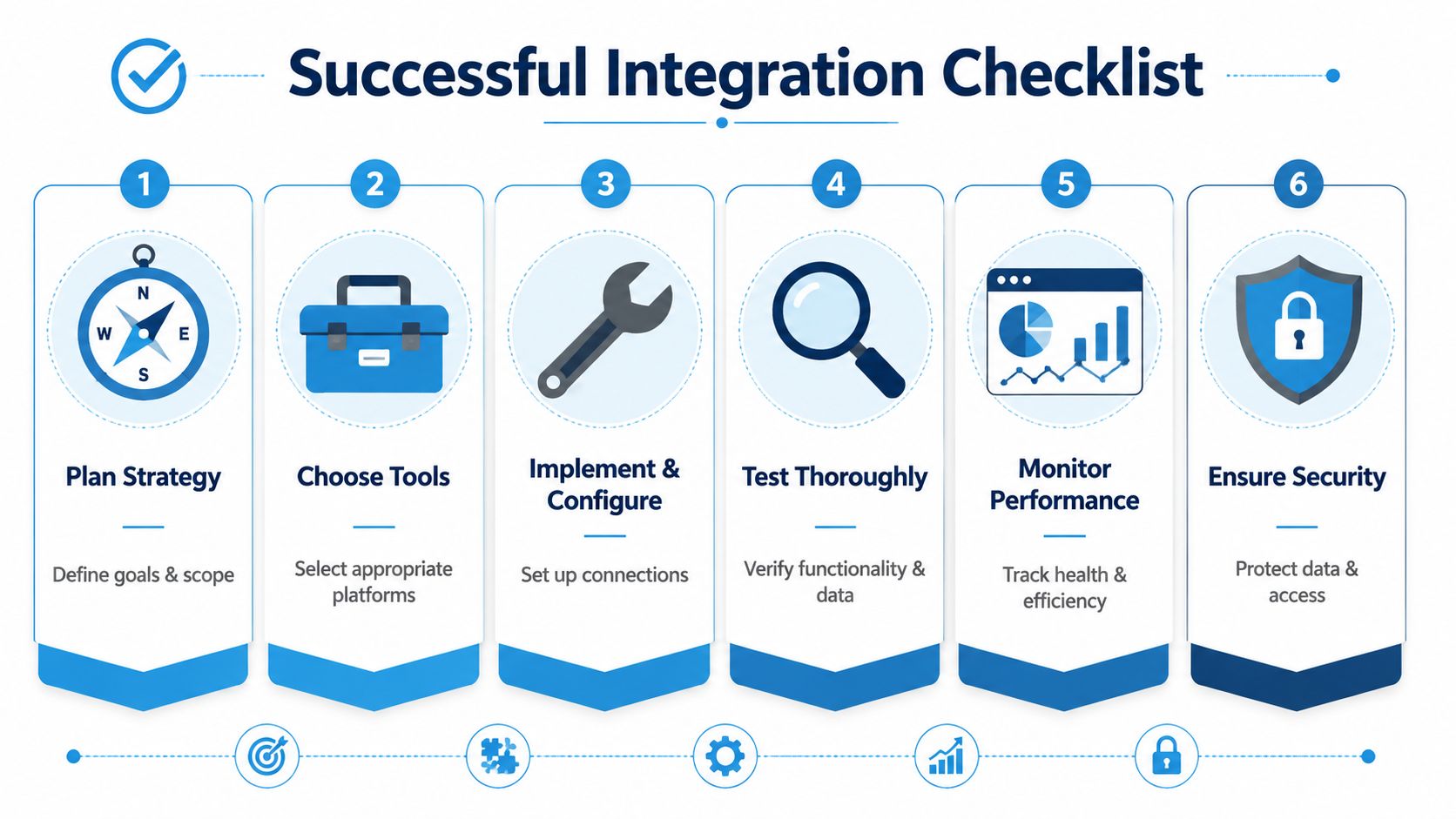
Start with one workflow that hurts
Don't begin by mapping every system in the company. Start with the workflow that causes the most frustration or leakage.
That might be inbound leads not reaching your CRM fast enough. It might be appointments that aren't syncing with your team calendar. It might be customer notes living in too many places.
Use this rollout checklist
- Define the business outcome: Write down the result you want, such as fewer missed leads, cleaner scheduling, or less duplicate entry.
- Choose the connection method: Decide whether you need a direct API, a webhook-based alert, or a middleware platform.
- Map the fields carefully: Make sure names, phone numbers, appointment times, service types, and notes land in the right places.
- Build the trigger logic: Decide what starts the workflow and what should happen next.
- Test with real-world scenarios: Include cancellations, no-shows, incomplete forms, and duplicate contacts.
- Monitor after launch: Check whether records sync correctly and whether staff are still doing manual workarounds.
A visual walkthrough can help if your team is new to this process.
What teams often miss
The technical connection is only half the job. The other half is operational clarity.
If no one decides which system is the source of truth, confusion starts quickly. If the calendar says one thing and the CRM says another, your team needs to know which record wins. If a field changes name in one system, someone has to update the mapping.
Third-party integrations also need ongoing monitoring. Meegle notes that implementation requires secure authentication, field mapping, trigger-action logic, testing, and ongoing monitoring to reduce failure risk in software workflows, as outlined in its guide to third-party integrations in software lifecycle management.
Successful integrations are less about “set it and forget it” and more about “set it, test it, then watch it.”
A simple first project done well is better than a complex rollout that no one trusts.
How Recepta.ai Delivers ROI with 2500+ Integrations
A common service-business problem looks like this: the phone rings after hours, a prospect wants to book, and the request ends up sitting in a voicemail box until morning. By then, the customer may have called someone else. Recepta.ai addresses that gap by connecting with 2,500+ tools, so call details can move into calendars, CRMs, and industry software without staff re-entering the same information.
Those integrations work like a universal adapter for your front office. One customer conversation can trigger the next practical steps across the systems you already use: book an appointment, create or update a contact, assign follow-up, and save a record your team can find later.
That matters because ROI for service-based SMBs usually shows up in operations first.
A plumbing company can capture an overnight emergency call and place the request where dispatch and scheduling teams will see it. A law firm can log consultation requests without relying on handwritten notes or copy-and-paste between tools. A med spa can reduce front-desk time spent confirming appointments and updating customer records in multiple places. In each case, the return is concrete: fewer missed appointments, more captured leads, and lower administrative cost.
According to publisher data provided by Recepta.ai, customers report more qualified leads, lower reception costs compared with in-house staffing, and strong return on investment. Those results fit the same pattern covered throughout this guide. Connected systems help small teams respond faster, keep records cleaner, and spend less time on repetitive admin.
For a busy owner, the value is straightforward. Integrations help your business follow through on every call, every booking request, and every lead.
If you want to see how a connected receptionist workflow could fit your current tools, explore Recepta.ai. It's built to handle calls, scheduling, lead capture, and follow-up while syncing with the systems your team already relies on.