Boost Service with an Automated Voicemail System
An automated voicemail system is more than just a digital answering machine. Think of it as an intelligent gatekeeper for your business phone line, one that actively engages callers instead of just passively recording a message. It essentially turns your standard voicemail from a passive inbox into an active digital receptionist.
From Message Graveyard to Lead-Capturing Tool
Imagine your business phone line. Right now, it probably feels like a message graveyard—a place where customer calls go to wait, and hopefully, get a call back. This is a huge problem because today's customers don't like to wait. A missed call often becomes a missed opportunity.
An automated voicemail system flips this script entirely. It’s your frontline defense against losing revenue to a competitor simply because you couldn't pick up the phone. It gives every caller an immediate, helpful interaction, sorting and guiding them 24/7.
What an Automated System Actually Does
Instead of the old, generic "please leave a message after the tone," an automated system greets callers with a smart, interactive menu. This immediately gives them a sense of control and makes them feel heard, all while organizing your incoming calls behind the scenes.
For a home services business, like a plumber, a caller might hear this:
- "Press 1 for emergency services."
- "Press 2 to schedule a new appointment."
- "Press 3 for billing questions."
- "Press 4 for our office hours and location."
That simple menu works wonders. A frantic call about a burst pipe gets routed directly to the on-call technician, while a routine scheduling request can be handled by the office staff. At its core, this kind of system is a form of customer service automation software built to manage common interactions without needing a live person every time.
The sheer volume of calls makes a system like this almost a necessity. In the United States alone, an unbelievable 1.1 trillion calls end up in voicemail each year. For businesses in healthcare, law, and home services, even a tiny fraction of those missed calls can translate into a significant revenue leak.
An automated system doesn't just manage calls—it protects revenue. By giving every caller a clear path forward, you prevent them from hanging up and dialing a competitor. It’s the difference between a missed opportunity and a captured lead.
Traditional Voicemail vs. Automated Voicemail System
The best way to understand the leap forward is to see them side-by-side. One is a passive bucket for messages; the other is a dynamic tool that works for your business.
This table breaks down the key differences.
| Feature | Traditional Voicemail | Automated Voicemail System |
|---|---|---|
| Caller Interaction | Passive recording only | Interactive menu and guidance |
| Call Routing | None; all messages in one inbox | Directs calls to specific people |
| Lead Capture | Relies on caller leaving details | Actively gathers info and sorts leads |
| Business Impact | Often leads to lost opportunities | Maximizes every incoming call |
As you can see, the automated approach is designed to be an active part of your customer service and sales process, not just an afterthought.
How Automated Voicemail Technology Works
To really get how a modern automated voicemail system operates, it’s best to stop thinking of it as a single piece of software. Instead, picture a perfectly coordinated team of digital assistants. Each one has a specific job, working together to turn a simple missed call into a structured, actionable task for your business.
The magic starts the moment a call comes in that you can't answer. Instead of hitting a dead-end recording, the caller is met by this digital team. Let's walk through what each member of the team does.
The Greeter and Sorter
First up is the system’s "greeter," which is typically an Interactive Voice Response (IVR). This is the clear, professional voice that presents callers with a simple menu. Its sole purpose is to figure out why someone is calling, without needing a human to ask.
For instance, a busy law firm’s IVR might say:
- "Press 1 if you are a new client."
- "Press 2 for an existing case matter."
- "Press 3 for our office location and hours."
This first step is huge. It instantly separates a high-priority call (like a potential new client) from a routine administrative question. This ensures your team’s focus goes exactly where it’s needed most. This kind of front-end intelligence is a fundamental feature of any good automated phone answering service, designed to improve the caller's experience from the very first second.
The Intelligent Call Dispatcher
Once a caller chooses an option, the "dispatcher" steps in. This is the intelligent call routing logic that directs the call according to the rules you've established. It’s the engine making sure the right calls get to the right people—instantly.
Let's go back to that law firm. If the caller presses "1" for a new client inquiry, the system can be set up to:
- Forward the call directly to the intake specialist's cell phone.
- If there's no answer, send the call to a specific voicemail box just for new business leads.
- Simultaneously fire off an email alert with the caller's number to the entire new business team.
This kind of smart routing means high-value opportunities aren't left to die in a general inbox. It creates a fast track for the calls that actually grow your business.
A well-designed automated voicemail system isn't just about taking messages. It's about actively managing your communication flow. It prioritizes, sorts, and delivers calls with precision, turning potential chaos into an orderly, efficient process.
This flowchart really highlights the difference between a passive, traditional voicemail box and an active, automated system.
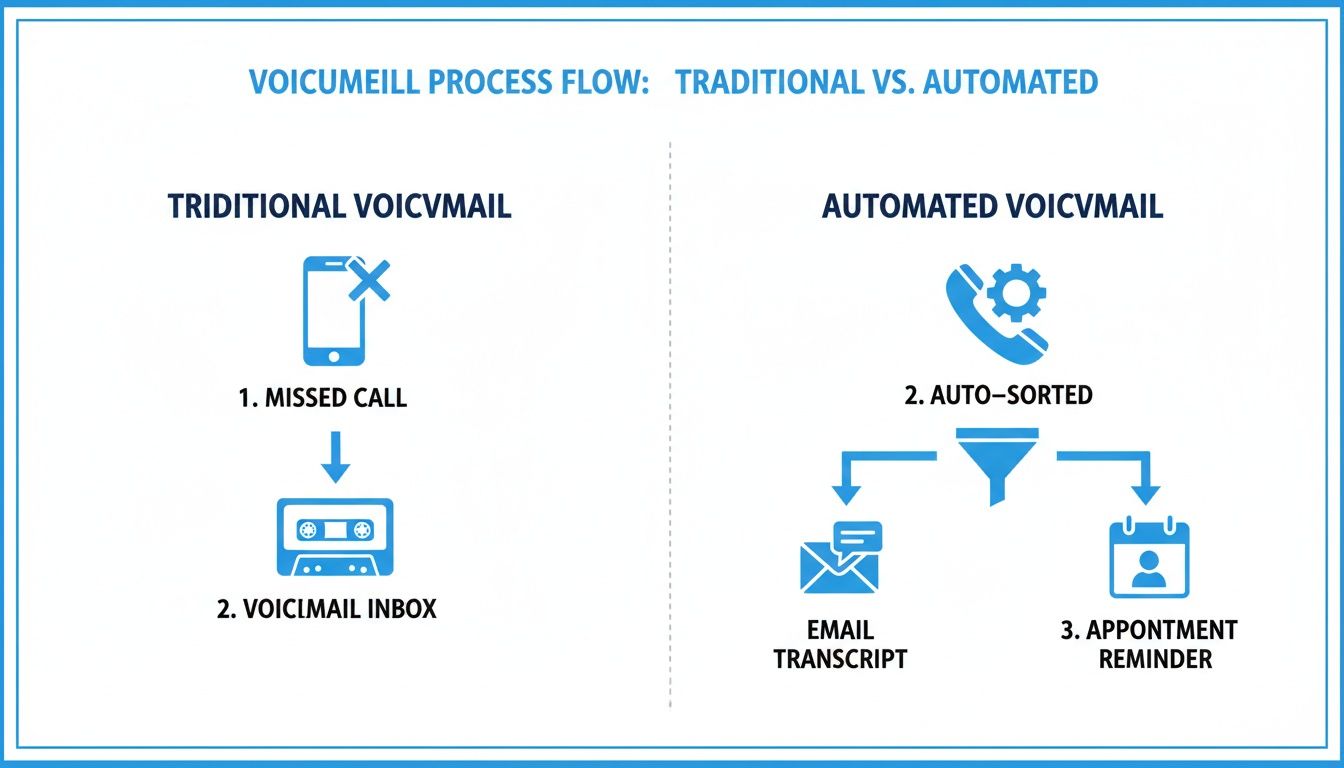
As you can see, the automated system introduces that critical sorting and action step, preventing your most important calls from getting lost in the shuffle.
The Transcriber and Action-Taker
If a caller does end up leaving a message, two final assistants get to work. The "transcriber" uses voicemail-to-text technology to convert the audio into a written message. This is a game-changer, letting your team read and triage messages in seconds instead of listening to them one by one. Actionable example: A sales manager can scan five transcribed voicemails in the time it takes to listen to one, quickly identifying the most urgent lead and forwarding it to a rep directly from their email.
Finally, the "action-taker" handles automated actions. Based on the caller’s menu choice, it can trigger follow-up tasks. For a plumber, if a caller selects "emergency leak" and leaves a message, the system can automatically send a confirmation text to the caller, create a high-priority ticket in their service software, and add the job to the on-call tech's calendar. This level of automation is what ensures nothing ever falls through the cracks.
Calculating The Real Cost Of Missed Calls

What does it really cost your business when a call rolls over to a passive, generic voicemail? In a world of instant answers, very few customers will bother to wait for a callback. Instead, they just hang up and dial the next company on their list.
This expensive problem plays out every single day. Picture a homeowner frantically looking for a roofer during a storm. They call the first local company they find, get sent to a standard "please leave a message" prompt, and hang up. They immediately call a competitor who actually answers the phone. That first company didn't just miss a call—they lost a potential $10,000 project. This isn't just a story; for many businesses, it’s a critical and costly blind spot.
The Voicemail Graveyard, by the Numbers
Let's move beyond anecdotes and put some hard numbers to this. The way people interact with voicemail has changed drastically. Data shows that only about 20% of callers will actually leave a message. That means a staggering four out of five potential customers hang up without a word.
This is made even worse by the fact that many businesses only answer around 38% of their incoming calls, with another 38% going straight to voicemail. You can find more details on these lost opportunities in research from RingDNA.
This creates what I call the "voicemail graveyard"—a digital resting place for unheard messages and vanished leads. An automated voicemail system isn't just another monthly expense; it's a vital revenue protection strategy. It acts as your safety net, making sure every single caller is engaged, even when you can't personally pick up the phone.
A Simple Formula for Lost Revenue
Figuring out your own potential losses isn't as complicated as it might sound. You can get a solid estimate with a simple formula that puts the true cost of doing nothing into sharp focus.
The Lost Revenue Formula:(Missed Calls per Month) x (Hang-up Rate) x (Lead Conversion Rate) x (Average Customer Value) = Monthly Revenue Lost
Let's walk through this with a real-world example for a dental practice.
- Missed Calls per Month: Your phone logs show you miss 100 calls a month, mostly after hours or during the team's lunch break.
- Hang-up Rate: Using the 80% average, you can assume 80 of those callers didn't leave a message. They're just gone.
- Lead Conversion Rate: You know from experience that about 25% of qualified callers become new patients. That's 20 potential new patients you never had a chance to speak with (80 x 0.25).
- Average Customer Value: For your practice, the lifetime value of a new patient averages $1,500.
When you run the numbers, the practice is losing a potential $30,000 every single month (20 leads x $1,500).
By reframing the investment in an automated voicemail system, you shift from seeing it as a cost center to viewing it as a powerful revenue protection tool. It actively prevents qualified leads from slipping through your fingers.
From Cost to Investment
Once you see the math, the perspective changes entirely. The monthly fee for a good automated system seems tiny compared to the thousands of dollars in revenue it can save and generate. By setting up a system that intelligently routes callers or lets them book appointments on their own, you solve the exact problem that causes hang-ups in the first place: a lack of immediate action.
The first step is to dig into your own call data. Using the best call tracking software gives you precise numbers on missed calls, peak calling hours, and caller behavior. This data doesn't just justify the need for a better system—it shows you exactly how to set it up for the best results. For a small business, this isn't about adding a flashy gadget; it's about plugging a major, often invisible, leak in your revenue stream.
Automated Voicemail Scripts For Your Industry

This is where the real magic of an automated voicemail system happens—its ability to be molded to your exact business. A generic, one-size-fits-all script just won't do the job. The best systems are built on smart, thoughtful prompts that guide callers, grab the essential details, and even kickstart your team into action. It’s about building a clear, effortless path for every single person who calls you.
Let's look at a few real-world examples. These aren't just templates to copy and paste; think of them as strategic playbooks designed to boost your efficiency, flag urgent calls, and make sure a valuable lead never gets lost in the shuffle.
For Home Services HVAC and Plumbing
If you run a home service company, you know that every ringing phone could be a new job. The challenge is telling the difference between a panicked homeowner with a burst pipe and someone just asking for a routine quote. A well-designed script sorts this out for you instantly.
Example Script for "Rapid Response Plumbing":
"Thank you for calling Rapid Response Plumbing. To get you the right help, fast, please choose from the following:
- Press 1 if you have a plumbing emergency, like a burst pipe or a major leak.
- Press 2 to schedule a non-urgent service or to get a quote.
- Press 3 for any billing questions.
- Press 4 for our business hours and service area."
See what this does? When a caller hits "1," the system can immediately ring the on-call tech’s cell. If they don't pick up, a follow-up prompt can grab the caller's name and address while shooting a high-priority text alert to the entire team. You've just turned a potential disaster into a secured, high-priority job.
For more inspiration on what to say, take a look at our guide on crafting the perfect automated voicemail message.
For Healthcare Dental Clinics
In any clinic, the front desk is a whirlwind of activity. Phones ring off the hook while patients are trying to check in and out. An automated system can take a huge chunk of that phone traffic off your staff’s plate, letting them focus on the people right in front of them.
Example Script for "Bright Smiles Dental":
"You've reached Bright Smiles Dental. So we can best help you, please listen to the following options:
- Press 1 to schedule or change an appointment.
- Press 2 to request a prescription refill.
- Press 3 for our office hours, location, and insurance information.
- If this is a dental emergency, please hang up and dial 911."
This script acts as a digital traffic cop. Actionable example: A request to schedule an appointment (Press 1) could trigger a text message with a direct link to your online booking portal. A prescription refill request (Press 2) can be routed to a specific voicemail box checked by clinical staff twice a day. This reduces administrative burden while giving patients quick, easy ways to get what they need.
For Law Firms
In a law practice, not every call carries the same weight. A new client consultation is a high-value opportunity that needs to be handled with care, while a call about an ongoing case can be routed to the right paralegal. Your voicemail script is your first line of defense for sorting this out.
A well-structured script for a law firm isn't just about routing calls; it's a client intake tool that prioritizes new business and ensures potential clients feel heard from the first second.
Example Script for a Law Firm:
"Thank you for contacting Smith & Associates. Your call is important to us.
- Press 1 if you are a new client and would like to schedule a consultation.
- Press 2 if you are calling about an existing case.
- Press 3 for all other inquiries."
That simple menu makes all the difference. Anyone pressing "1" can be sent directly to a dedicated intake specialist or a priority voicemail box. You've instantly separated your most valuable calls from routine traffic, turning your phone system into a tool that actively grows your firm.
How To Choose And Implement Your Automated System
Switching to an automated voicemail system is one of the smartest moves you can make to stop losing business and run a tighter ship. But with so many options out there, how do you pick the right one? Let's walk through a straightforward process for choosing and setting up a system that actually works for your business.
The cost of a missed call is very real, but the return on a good automated system is easy to see. It's no surprise that over 67% of businesses have already adopted some form of voicemail automation. We've seen it firsthand: one restaurant owner boosted reservation conversions by 23% with an AI-powered system. Most businesses see a full return on their investment in just 3-6 months.
Key Factors For Choosing The Right Provider
Before you sign any contracts, you need to vet your options. Here’s what really matters when you're comparing providers.
- Integration Capabilities: Does the system play well with the tools you already rely on? It absolutely needs to connect with your CRM (like Salesforce or HubSpot) and your calendars (like Google Calendar or Calendly). Actionable example: An integration could automatically create a new lead in Salesforce and a task for a sales rep to call back whenever a voicemail is left in the "New Sales" mailbox. This removes manual data entry and ensures no lead is forgotten.
- Scalability for Growth: The system that’s perfect today might be too small in a year. Make sure your provider can handle more phone lines, higher call volumes, and more complex call flows as your business grows. You don't want to have to switch systems right when you're gaining momentum.
- Robust Analytics: Good data is everything. You need a system that gives you clear reports on call volume, when your busiest hours are, which menu options callers choose most, and what happens on those calls. This is pure gold for fine-tuning your scripts and scheduling your staff.
For many small businesses, the first step is looking into modern phone setups. Exploring Small Business VoIP Solutions is a great place to start, since these platforms often include the advanced call management features you'll need.
Your Four-Step Implementation Guide
Once you have a provider in mind, setting things up can be broken down into four simple steps.
- Map Your Customer Call Journeys: Before you write a single word, grab a whiteboard. Seriously. Map out the top 3-5 reasons customers call you. For a law firm, that might be "new client inquiry," "existing case update," or "billing question." Sketch out the simplest, most logical path for each one.
- Write Clear and Concise Scripts: Your journey maps are your guide. Now, write simple, direct scripts that get right to the point. Ditch the corporate jargon and long, flowery greetings. Your goal is to get the caller where they need to go, fast. A good rule of thumb is to keep your main menu to four or five options, max.
- Configure Your Routing Rules: This is where you tell the system what to do with each call. If a caller presses "1" for sales, does it ring one person, a whole team, or go to a special voicemail box? This is also where you can set up handy features, like getting transcripts of messages sent directly to you. You can learn more about how to forward your voicemail to email in our detailed guide.
- Test Relentlessly Before Going Live: Call your new system. A lot. Use different phones. Test every single menu option and every path a caller could take. Ask a colleague to pretend they're a confused customer and see what happens. Fixing the glitches now will save your real customers a world of frustration later.
An automated system's success is not just in its technology but in its design. A thoughtfully planned call flow that anticipates customer needs feels helpful, not robotic.
The Next Evolution: AI Receptionists
A standard automated voicemail system is a huge leap from a basic answering machine. But if you're aiming for peak efficiency, the next step is an AI receptionist. These platforms are a true game-changer, offering a much more dynamic and human-like conversation that captures more business.
Think of it this way: a traditional automated system is like a directory in a building lobby—it gives callers a fixed menu of options. An AI receptionist, on the other hand, is like a skilled concierge. It can have a natural conversation, understand what the caller wants, and take action right away. It can answer questions like, "Are you open on Saturdays?" or "Can I book a roof inspection for next Tuesday afternoon?"
For businesses that want to combine 24/7 availability with a personal touch, conversational AI platforms like Recepta.ai are the clear choice. They merge the reliability of automation with the understanding of a human, making sure no opportunity is ever truly missed.
Frequently Asked Questions About Automated Voicemail
Even after seeing the benefits, it's smart to have questions before you jump into a new system. An automated voicemail system changes how you talk to your customers, so let's walk through some of the most common things business owners worry about. This should clear up any doubts and show you why it's time to move past that old, generic voicemail box.
Will An Automated System Sound Robotic And Scare Away Customers?
That's a perfectly fair question, and it probably comes from bad experiences with those clunky, monotone systems from a decade ago. The good news is that modern tech is in a completely different league.
Today’s platforms give you a choice of high-quality, natural-sounding voices. Better yet, many let you upload your own professionally recorded greetings for a polished, on-brand touch. Actionable example: Instead of a default system voice, record your office manager's friendly voice for the main greeting. This adds a personal, welcoming touch that immediately sets a positive tone.
The real secret isn't the voice, though—it's how you design the caller's journey. A well-thought-out system is simple, offers clear options, and—this is crucial—always gives callers an easy out (like "Press 0 to talk to a person"). When you do that, it feels helpful, not like a frustrating roadblock.
A thoughtfully designed automated system actually improves the customer experience. It respects their time by getting them to the right place quickly, which is always better than being dumped into a generic voicemail inbox.
AI receptionists take this a step further. They use conversational AI to have a more natural, back-and-forth chat, giving you efficiency without sacrificing that human-like connection.
How Much Does An Automated Voicemail System Cost?
Costs can vary quite a bit depending on what the system can do, so it helps to think about it in a few tiers.
- Basic Tier: You might get some simple automated features for free with your business VoIP plan. These are usually just basic greetings and maybe some call forwarding rules.
- Mid-Tier: This is the sweet spot for most small businesses. For systems with a multi-level phone menu (IVR), voicemail-to-text, and smarter routing, you’re typically looking at $30 to $150 per month.
- Premium Tier: For a fully conversational AI platform that can hold a real dialogue and book appointments, you’re looking at a premium service. The monthly cost is higher, but the ROI can be massive when you factor in the salary savings and the extra leads it captures 24/7.
The best way to judge the cost is to ask yourself: what’s the value of one or two new clients you'd otherwise lose each month? Usually, the system pays for itself right there.
Can I Integrate An Automated System With My Existing Software?
Yes, and you absolutely should. This is where the magic really happens. Integration is one of the most powerful aspects of any modern automated system and should be a top priority when you're choosing a provider. The best platforms are built to talk to the tools you already rely on.
This means connecting with your:
- Customer Relationship Management (CRM) like Salesforce, HubSpot, or Zoho.
- Scheduling Tools like Calendly, Acuity, or Google Calendar.
- Other Business Platforms, such as help desk software or project management tools.
Actionable example: Imagine a caller selects the option for "New Sales Inquiry" and leaves a voicemail. A well-integrated system can automatically create a new lead in your CRM (e.g., HubSpot), transcribe the voicemail and add it as a note, assign the lead to a sales rep, and send a text to that rep alerting them to the new hot lead. All of this happens instantly, without a single person on your team having to do manual data entry.
What Is The Difference Between Automated Voicemail And An AI Receptionist?
This is a great question because it gets right to the heart of where this technology is going. Think of it as the difference between a simple building directory and a skilled concierge.
An automated voicemail system, even a good one with a phone menu, is mostly a one-way street. It gives callers a fixed path of options to route them or take a message. It's great for sorting calls, but it’s rigid. Practical example: A caller hears "Press 1 for Sales, Press 2 for Support." If they want to know if you ship to Canada, neither option is a perfect fit.
An AI receptionist, on the other hand, is built for a two-way dialogue. It uses conversational AI to understand what the caller is saying. It can answer specific questions ("Are you open this Saturday?"), book appointments right on the spot, and capture detailed information. Practical example: The same caller could ask, "Do you ship to Canada?" and the AI could respond, "Yes, we do. Standard shipping to Canada is $15." It understands intent, not just a button press.
Ready to stop losing leads to your voicemail and provide a seamless experience for every caller? Recepta.ai combines the best of conversational AI with 24/7 human-backed support to capture, qualify, and convert every opportunity. See how it can work for your business.