Stop Losing Leads with an Automated Voicemail Message
An automated voicemail message isn't just a recording—it's a smart system designed to actively engage callers, capture crucial information, and make sure you never lose a lead just because you couldn't pick up the phone. It's the difference between asking someone to "leave a message" into a void and actively guiding them toward a solution.
Why Your Voicemail Is a Black Hole for Business

Let’s be honest for a second: your standard voicemail is probably losing you business. It’s a completely passive tool. You're counting on a potential customer to have the patience to wait for the beep and then perfectly articulate their needs. Most people just won't do it.
The sheer scale of this problem is hard to wrap your head around. Projections show that by 2026, the world will see an estimated 13.5 billion phone calls made every single day. A staggering 80% of those calls—that’s 10.8 billion a day—are expected to go straight to voicemail. You can dig into the numbers yourself in this detailed report on SellCell.com.
For any business that relies on direct client interaction, this isn't just a small leak. It's a gaping hole in your revenue stream.
The Real Cost of a Missed Call
Think about what a missed call actually costs in the real world. For a plumbing business, that’s a frantic homeowner with a burst pipe who immediately hangs up and dials the next number on Google. For a law firm, it might be a high-value corporate client who needs urgent advice and simply moves on to a competitor who answers.
Actionable Example: Imagine a caller reaches your standard voicemail: "You've reached ABC Plumbing. Please leave a message." They hang up. Now, picture an automated response: "Thanks for calling ABC Plumbing. If this is an emergency, press 1 to connect to our on-call technician now. For all other inquiries, press 2." The emergency is captured, not lost.
An intelligent automated voicemail system completely flips this script. Instead of hitting a dead end, your caller gets a guided experience that actually helps them.
Here’s how an automated system turns a liability into a genuine asset:
- It actively engages them. The system doesn't just sit there; it asks smart questions to figure out what the caller needs. Is this an emergency? A new sales inquiry? Do they just need to book an appointment?
- It takes immediate action. Based on the caller’s responses, the system can provide instant info, text them a link to your online scheduler, or escalate the call to the right person’s cell phone.
- It gives you 24/7 coverage. Your business can capture leads and serve customers even when the office is dark. A well-designed after-hours answering service can be the single biggest factor in your growth.
This approach stops your phone from being a passive message-taker and turns it into a proactive machine that secures every single opportunity. It makes every caller feel heard, and that’s a game-changer.
How to Craft a Voicemail Script That Actually Converts
Think of your voicemail as more than just a digital answering machine. A generic, passive message is a dead end. Instead, your automated voicemail should be a tool that actively helps callers and moves them one step closer to becoming a customer.
The key is to be concise, helpful, and give every caller a clear, specific action to take. Forget just taking a name and number; the goal is to solve their problem right then and there.
Keep your message short. We've found the sweet spot is under 30 seconds. Go any longer, and you'll hear a click before you even get to the important part—what you want them to do next. They called you for a reason, so respect their time and get straight to the point.
Breaking Down a Script That Works
A great script isn’t complicated, but it does have a few essential ingredients.
First things first, state your business name right at the beginning. This immediately reassures callers they've reached the right place. Then, let them know you’ve missed the call but quickly pivot to how they can still get what they need.
The most critical part, though, is the call to action (CTA). This is where an automated voicemail message truly proves its worth. Instead of a vague "leave a message," you give them a better, faster option.
Here are some practical, actionable CTAs you can use:
- For scheduling: "To book an appointment right now, I can text you a link to our online calendar. Is that okay?"
- For urgent needs: "If you have a plumbing emergency, please stay on the line to be connected to our on-call technician."
- For sales inquiries: "If you're a new client looking for a quote, please say 'new client' after the tone, and I'll gather some basic details for our sales team."
This isn't leaving things to chance. It's actively guiding the caller to the next step. If you're looking for a solid starting point, browsing some professional Voicemail Greeting Script templates can spark some great ideas.
Industry-Specific Voicemail Script Starters
Of course, a plumber's priorities are completely different from a law firm's. You need to triage emergencies, while they need to qualify new clients. Your script has to be tailored to what matters most for your business.
The table below breaks down how to approach your script based on the industry you're in, giving you a head start on what to say.
| Industry | Key Information to Include | Primary Call-to-Action (CTA) | Example Snippet |
|---|---|---|---|
| Home Services | Business name, emergency option, non-urgent callback time. | Route emergencies to an on-call tech; text a scheduling link for quotes. | "If this is an emergency, like a burst pipe, press 1 now. To schedule a free estimate, press 2." |
| Healthcare | Practice name, emergency directive (911), link to online booking. | Direct true emergencies to 911; push scheduling to an online portal. | "If this is a medical emergency, hang up and dial 911. To schedule or change an appointment, press 1." |
| Professional Services | Firm name, clear instructions for new clients, callback timeline. | Capture initial details for a consultation; set follow-up expectations. | "If you are a new client, please leave a brief, non-confidential summary of your matter. Our team will return your call within four business hours." |
Let's look at why these distinctions are so important.
For a trade business like an HVAC company or electrician, urgency is everything. The script must immediately filter out the high-stakes calls.
Actionable Example: An HVAC company's after-hours message could say, "Thank you for calling Climate Control Experts. If you have no heat or AC and require emergency service, press 1 to be connected to our on-call technician. For all other calls, including scheduling future service, press 2 to leave a message, and we will call you back first thing in the morning."
In healthcare, clarity and reassurance are paramount. The script has to guide patients to the right place while managing sensitive information and office hours.
Actionable Example: A dental office script could be: "You've reached Smile Bright Dental. If you are experiencing a true medical emergency, please hang up and dial 911. For all other calls, our office is currently closed. To request an appointment, please visit our website at SmileBright.com. We will reopen at 8 AM tomorrow."
For professional services like law or finance firms, the initial interaction is all about building trust and capturing lead details.
Actionable Example: A law firm's message could state, "Thank you for calling Smith & Jones Law. All our attorneys are currently in consultation or with clients. If you are a new client, please press 1 to leave your name and a brief, non-confidential summary of your matter. An intake specialist will return your call within two business hours to schedule a consultation." This conveys demand and sets a professional expectation.
Setting Up Your Automated Voicemail System
With a powerful script ready to go, the next move is connecting it to an intelligent system. The good news is, you don't need an IT degree for this. Modern platforms like Recepta.ai are designed for a quick setup, turning your business line into a smart, automated assistant in just a few minutes.
The process is surprisingly straightforward. You start by forwarding your main business number to the one provided by your AI receptionist. Then, you’ll plug in your business hours and any holidays, which tells the system exactly when to pick up and how to handle calls after you've closed for the day.
Configuring Your Call Handling Rules
This is where you put your strategy into action. A quality automated voicemail message system lets you build specific rules for different kinds of calls, almost like a smart decision tree that directs traffic for you.
Think about a property management company. They can set up rules that instantly sort callers without anyone lifting a finger:
- Urgent Maintenance: If a caller says keywords like "leak," "burst pipe," or "emergency," the system can skip the standard script and immediately patch the call through to an on-call technician's cell phone.
- New Leasing Inquiries: When someone asks about "available units" or "scheduling a tour," the AI can answer basic questions, ask a few qualifying ones, and then send a text message with a link to the online application.
- General Questions: For those common queries about office hours or how to pay rent, the AI provides instant, accurate answers. Your team is completely freed up.
Voicemail isn't going away—data shows that 35% of global enterprises still rely on it for call overflow. But in a world where VoIP is used by over 3 billion people, old-school voicemail just can't keep up. An automated system bridges this gap, adding intelligence and immediate action to every call you miss. You can explore detailed VoIP statistics on ElectroIQ.com to see the full scope of this shift.
This simple framework is the key to building your script.
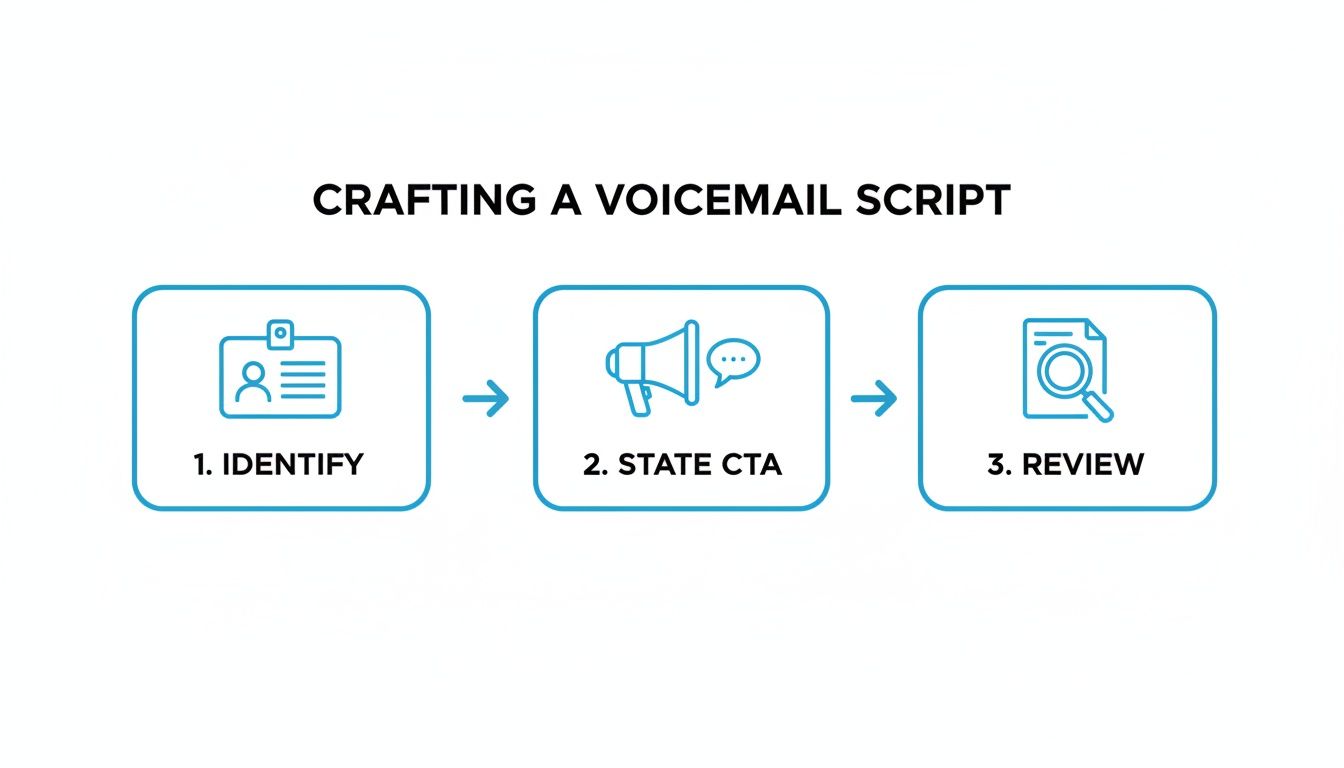
It’s a constant loop: identify the caller's need, direct them to a solution, and then refine the process based on what you learn. This is how you create a system that doesn't just take messages but actually solves problems.
Connecting Your System to Other Business Tools
The real game-changer is when your automated system starts talking to your other business software. Instead of creating more data entry for your team, integrations make it disappear. A single phone call can trigger a whole chain of automated tasks, all without any human input.
Let's walk through a real-world scenario for a home service business. A potential customer calls your number after hours, looking to get their broken air conditioner fixed.
- AI Engages: The AI receptionist answers: "Thanks for calling. Are you calling for emergency service or to schedule a future appointment?"
- Caller Responds: The caller says, "I need to schedule an appointment for tomorrow."
- AI Acts: The AI captures their name, address, and a brief description of the issue.
- Creates a new lead in your CRM like HubSpot.
- Books a tentative appointment in your Google Calendar for the first open slot.
- Sends the customer a text message confirming the details and asking them to reply "YES" to confirm.
- AI First: The AI answers every single call. It instantly handles common requests for things like your business hours, address, or basic service questions.
- Intelligent Escalation: If a caller has a complicated issue, sounds frustrated, or simply asks to speak with a person, the AI knows to transfer the call to a human agent without a fuss.
- Seamless Hand-off: Best of all, your team member gets the full context of the AI's conversation. The caller never has to repeat themselves, which makes for a much smoother experience.
Call Capture Rate: What percentage of inbound calls are actually engaged by your system instead of just hanging up? This is your first and most important metric. A high capture rate means you're successfully stopping leads from falling through the cracks.
Lead Qualification Success: How many of those captured callers does the AI identify as legitimate new leads? This tells you how effectively the system is filtering your call traffic to find new business opportunities.
Appointments Booked: This is where the rubber meets the road. Tracking how many calls lead to a booked meeting—either through a direct calendar integration or by getting the details for a callback—gives you a hard number for ROI.
Reduction in Missed Opportunity Cost: This is how you put a dollar value on your success. If your average customer is worth $500 and your system captures 10 new leads a month that would have otherwise been missed, you’ve just recovered $5,000 in potential revenue.
- CRMs: Instantly sync lead data with platforms like HubSpot.
- Calendars: Book appointments directly into Google Calendar or Outlook.
- Industry Tools: Connect to countless other programs specific to your field.
This kind of seamless automation means you never miss an opportunity, even at 10 PM on a Friday. It also creates a fantastic first impression, showing new clients how responsive and efficient you are from the very first touchpoint. You can read more about how an automated phone answering service makes these workflows possible. By connecting your tools, you stop just handling calls and start actively growing your business with them.
Moving Beyond Voicemail with Conversational AI

Let's be honest: the traditional automated voicemail message is broken. It’s a passive system that basically asks callers to do you a favor by leaving a message, all while hoping they don’t just hang up. For any business focused on growth, that’s no longer good enough.
The modern approach is to actively manage the conversation from the second someone calls. By using conversational AI, you can turn a missed call from a dead end into a productive, interactive experience.
From Passive Recording to Active Engagement
A modern AI receptionist doesn't just take messages; it understands and acts. It can ask clarifying questions, give callers instant answers, and figure out what they actually need. This completely changes the game for both your team's efficiency and your caller's experience.
Think about a busy dental office. A standard voicemail has no idea if the caller has a dental emergency or just wants to check your hours.
Actionable Example: A conversational AI can handle this dynamically.
AI: "Thanks for calling Smile Bright Dental. Are you a new or existing patient?"
Caller: "New patient."
AI: "Great! Are you calling to book an appointment or for something else?"
Caller: "I want to book a cleaning."
AI: "Perfect. I can help with that. To find the best time, I'll text a link to our online booking calendar. What's the best number to send that to?"
This kind of intelligent sorting is a world away from just passively recording a message. It ensures every single call is handled the right way, even in the middle of the night.
The Power of a Hybrid AI Model
The real secret sauce is a hybrid model that blends the 24/7 efficiency of AI with the essential empathy of a human. The AI takes care of all the routine, repetitive calls, freeing up your team to focus on the conversations where they're needed most.
And this isn't some futuristic idea—it's happening now. Voice technology, including speech recognition and transcription, is already used in 97% of organizations worldwide. Even more telling, 85% of large enterprises and 78% of SMBs are now using AI agents, especially in fields like law, finance, and home services where being available is critical. You can get a much deeper look by checking out the full research on automated voice solution adoption.
Here’s how this hybrid approach works in practice:
This gives you the best of both worlds: incredible efficiency paired with a personal, human touch when it counts. Integrating these systems often starts with securely managing access credentials, like a ChatGPT API key.
This kind of smart automation transforms your phone from a simple communication device into a powerful business tool. You can dive deeper into the benefits of an AI phone answering service in our complete guide to see exactly how it can work for your business.
Measuring the ROI of Your Automated Call System
Putting a smart call system in place is a great first step, but how do you know if it’s actually making you money? An automated voicemail message is only as good as the results it delivers. To see the real value, you have to look past simple call counts and dig into the metrics that truly matter.
Modern analytics dashboards are no longer just about tracking call volume. They give you a direct view into your entire call handling process, showing you exactly where you're winning and where potential customers are slipping away. It’s time to stop guessing what works and start seeing the proof in the numbers.
Key Performance Indicators to Track
To get a clear picture of your ROI, you need to focus on a few core numbers. These are the Key Performance Indicators (KPIs) that connect directly to your bottom line and show how well your system is performing its most important job: capturing business.
Here’s what I always tell clients to watch closely:
Using Data for Continuous Improvement
Think of your analytics dashboard as a live playbook, not a static report card. The data it provides, from call summaries to engagement patterns, gives you everything you need to fine-tune your approach.
Actionable Example: Imagine your dashboard shows that 30% of callers hang up when the AI asks, "What is your budget for this project?" This suggests the question is too direct. You could change the script to something softer, like "Are you working with a specific budget in mind for this project?" or remove the question entirely and have a team member qualify them later. After a week, you check the data again. If the drop-off rate falls to 5%, you've successfully optimized your script.
This cycle of analyzing, testing, and refining is the secret to building a system that really performs. You're not just setting it and forgetting it; you're constantly plugging small leaks in your funnel. It's this exact process that has helped some businesses achieve a staggering 15x ROI after switching to an intelligent call automation platform like Convirza or CallRail.
By zeroing in on these metrics, you can draw a straight line from your automated system to your bank account. It stops being a simple office tool and becomes a genuine driver of business growth.
Have Questions About AI Voicemail? We Have Answers.
When I talk to business owners about AI-powered receptionists, a few key questions always come up. You want to know if it really works, if it's secure, and if it's going to be a headache to set up. It’s smart to be skeptical. Let's tackle those common hang-ups head-on.
Will It Actually Sound Human?
This is probably the #1 concern I hear, and it’s a valid one. Nobody wants their business represented by a clunky, robotic voice. The good news? Those days are long gone.
Today's conversational AI is incredibly sophisticated. It uses advanced natural language processing to understand what people are saying and text-to-speech tech that sounds warm, smooth, and genuinely human. It's often impossible to tell you're not speaking with a live person.
The best systems also know their limits. If a caller's request gets too complex or they're clearly upset, the AI is smart enough to transfer the call to a real person. This hybrid approach gives you the best of both worlds: 24/7 efficiency with a critical human touch when it matters most.
Ultimately, the goal is to make your first impression a great one, and modern AI ensures it's always helpful and welcoming.
How Difficult Is It to Set Up with My Current Software?
You’d be surprised how simple it is. The top AI receptionist platforms are designed to connect seamlessly with the tools you already use every day. We’re talking about thousands of integrations right out of the box.
The setup is usually a guided, click-through process you can finish in minutes, no IT degree required. Once connected, new appointments, client details, and call notes flow into your other systems automatically. No more tedious data entry.
Can I Trust It with Sensitive Client Information?
Absolutely. For any professional service—be it healthcare, legal, or finance—security isn't just a feature; it's a requirement. Reputable platforms are built from the ground up with compliance in mind.
They adhere to strict industry regulations like HIPAA for patient privacy and follow robust data security protocols. All conversations are protected with end-to-end encryption, ensuring client information stays completely confidential. You get a secure, detailed log of every interaction without ever putting privacy at risk.
What Happens If Someone Calls with a Real Emergency?
This is where an intelligent system truly proves its worth. You can set up custom rules to screen for emergencies, so you never miss a critical call.
The AI can be programmed to listen for trigger words like "emergency," "leak," or "burst pipe." It can also recognize specific phone numbers, like from a key client or a hospital.
When one of these triggers is detected, the system immediately abandons its normal script. It instantly routes the call to a designated person or an on-call team's mobile phone. This ensures a human expert is alerted without a second's delay, giving you automated efficiency with an essential human safety net.
Ready to see how an AI receptionist can transform your business communications and capture every lead? Recepta.ai combines 24/7 conversational AI with expert human support to ensure you never miss an opportunity. Start your 30-day risk-free trial today!