Find Your Ideal Telephone Answering Service For Business

Your phone is probably leaking revenue.
Industry summaries report that small and mid-sized businesses answer only 37.8% of inbound calls, while 62.1% go to voicemail or get no response at all, which means most callers never reach a live person on the first try, according to AMBS Call Center's business phone stats summary. If your business depends on inbound calls for new work, that isn't a customer service issue. It's a pipeline failure.
A telephone answering service for business fixes that problem only if you buy the right model. Most companies don't. They either overpay for humans to handle routine calls, or they over-automate and force high-value callers through clumsy scripts. The smart move is to design a call workflow that matches the actual value and complexity of each conversation.
That means deciding what should be answered by a person, what can be handled by AI, and where a hybrid setup gives you the best return.
Why Your Business Is Losing Leads and How to Stop It
Nearly two out of three inbound calls at small and mid-sized businesses never reach a live person on the first try, as noted earlier. That is not a staffing nuisance. It is a revenue leak.
If your company depends on phone calls to book jobs, screen cases, schedule visits, or qualify new business, every missed call creates three immediate costs. You lose the lead in front of you. You waste the money that generated the call. You force your team into slower follow-up work with lower close rates.
Missed calls break the whole acquisition chain
A bad call workflow can erase the return from good marketing. You can invest in Google Ads, SEO, referrals, and local outreach all month and still lose the sale in 20 seconds because nobody picked up.
That is why phone coverage belongs in the same conversation as sales process and digital marketing for local businesses. If calls roll to voicemail during lunch, after hours, or field service peaks, your operation is blocking the demand your marketing already paid for.
One rule is enough here.
If a caller is ready to buy now and your process delays them, your competitor gets a free shot at the sale.
The fix is operational
Do not waste time polishing your voicemail greeting. Fix the workflow.
Start by finding your failure windows. Check after-hours gaps, lunch coverage, overflow during busy periods, and every point where the front desk is expected to answer while doing three other jobs. Then decide what each call type is worth. A new high-margin lead should not follow the same path as a routine billing question.
That is the core decision. You are not shopping for “someone to answer the phone.” You are choosing a handling model that fits call value, urgency, and complexity. Human agents make sense for nuanced conversations, upset customers, and high-value intake. AI works for routine FAQs, basic qualification, appointment requests, and status updates. A hybrid setup usually produces the best margin because it puts labor where judgment matters and automation where speed matters.
For most businesses, the practical starting point looks like this:
- Cover the known leak points: after hours, lunch breaks, field hours, weekends, and call spikes.
- Capture structured intake data: caller name, service need, urgency, location, and best callback number.
- Route by business value: new lead, emergency, existing customer, scheduling, billing, or support.
- Sync the call outcome into your systems: CRM, scheduling software, help desk, or ticketing tool.
- Set escalation rules: define which calls AI can finish, which calls a person should take, and which calls must reach on-call staff immediately.
If you want a practical baseline before comparing vendors, this guide on small business phone answering gives a useful overview of what small teams should have in place.
What a Modern Answering Service Actually Is
Most owners still picture an answering service as a message pad with a headset. That model is obsolete.
A modern telephone answering service for business is closer to an air traffic control system for customer communication. It receives calls, identifies what kind of interaction is happening, applies the right rules, and moves the caller into the correct workflow.

It's no longer just message taking
Modern answering services have evolved from simple message-taking to integrated communication platforms. Providers cite research indicating that, aside from robocalls and solicitations, 92% of calls represent an opportunity to win, retain, or lose business, and they now bundle 24/7/365 coverage, CRM syncing, and appointment scheduling into core offerings, as described in Moneypenny's practical guide for busy business owners.
That shift matters because the old model was passive. Someone answered, took a note, and hoped your team followed up. The new model is active. A caller can be identified, qualified, booked, escalated, or logged automatically.
The real components of a modern setup
A useful modern setup usually includes a mix of these parts:
- Live answering: trained agents for nuanced, emotional, or regulated conversations.
- AI handling: fast capture of routine requests like scheduling, status checks, and intake.
- Workflow integrations: syncing to calendars, CRMs, ticketing tools, and messaging systems.
- Escalation logic: rules for when a call should transfer immediately to a human or on-call staff member.
That's why the provider isn't just selling coverage. They're selling call operations.
If you're evaluating vendors, this overview of an answering services company helps clarify what capabilities separate a basic provider from an actual workflow partner.
A good answering service doesn't just answer the phone. It decides what should happen next, then makes that next step happen.
Think in workflows, not in minutes
Owners often shop by minutes or price tiers first. That's backwards.
The question is whether the service can do these things cleanly:
- identify a new lead versus an existing client
- book into the right calendar
- send structured notes to the right person
- escalate urgent matters without delay
- keep a record in the systems your team already uses
If it can't do that, you're buying outsourced interruption management. Not a revenue tool.
Key Features That Drive Growth and Efficiency
Features matter only when they change business outcomes. Don't buy a long feature list. Buy the few capabilities that remove delay, reduce admin, and capture more demand.
Coverage and overflow are the first layer
By providing 24/7 coverage plus overflow handling for peak times, an answering service acts as a scalable substitute for hiring more in-house staff, ensuring operational continuity and immediate response without the associated payroll and training costs, according to MAP Communications' overview of phone answering options for small businesses.
That matters in obvious situations like nights and weekends. It matters just as much at 10:30 a.m. on a Tuesday when your office coordinator is already on two lines and your field team is calling in.
Practical example: a plumbing company can route overflow calls to an answering team during the morning rush, while emergency leak calls trigger immediate dispatch procedures and routine quote requests get captured for same-day follow-up.
Lead capture should qualify, not just record
A weak answering service takes messages. A useful one qualifies intent.
You want custom scripts that ask the right questions without turning the call into an interrogation. For home services, that might mean property type, issue type, urgency, and service area. For a law office, it might mean practice area, opposing party conflict check details, and whether the caller is a new or existing client.
Good intake gives your internal team a head start. Bad intake creates another round of callback chaos.
Use this standard:
- For sales calls: capture fit, urgency, and next step.
- For support calls: identify whether the issue needs reassurance, routing, or escalation.
- For repeat callers: pull context from prior records if your stack supports it.
Scheduling and integration remove admin drag
Real-time scheduling is one of the highest-value functions in a telephone answering service for business because it ends the phone-tag loop.
When the answering workflow connects directly to Google Calendar, Outlook, a practice management system, or your CRM, the caller gets an appointment while motivation is still high. Your staff doesn't have to decode handwritten notes or re-enter data later.
That reduces friction in practical ways:
- your front desk spends less time returning missed calls
- your sales team gets warmer handoffs
- your records stay cleaner because information enters once, not three times
The best feature is the one that removes a handoff. Every extra handoff creates delay, mistakes, and drop-off.
Custom scripts and compliance are not optional extras
Some industries can tolerate a generic greeting. Others can't.
A dental office needs appointment logic and privacy-aware intake. A family law firm needs calm, discreet language. An insurance agency needs scripts that separate claims urgency from routine policy questions. If your vendor can't support customized scripts, bilingual handling where needed, and compliance-friendly processes for your sector, move on.
Hybrid providers often make more sense than basic call centers. They can pair automation for routine intake with trained humans for sensitive interactions. One example in this category is Recepta.ai, which combines AI call handling with human escalation, appointment scheduling, and integrations with business systems.
Choosing Your Model Human AI or Hybrid
This is the decision that matters. Not whether you want “better phone coverage.” Whether your calls should be handled by humans, AI, or a combination of both.
The market is splitting into live-only, AI-assisted, and hybrid models. The core issue isn't whether calls can be answered. It's which call types require a human, especially in sectors like healthcare, legal, and home services, as outlined by AMBS Call Center's market analysis.
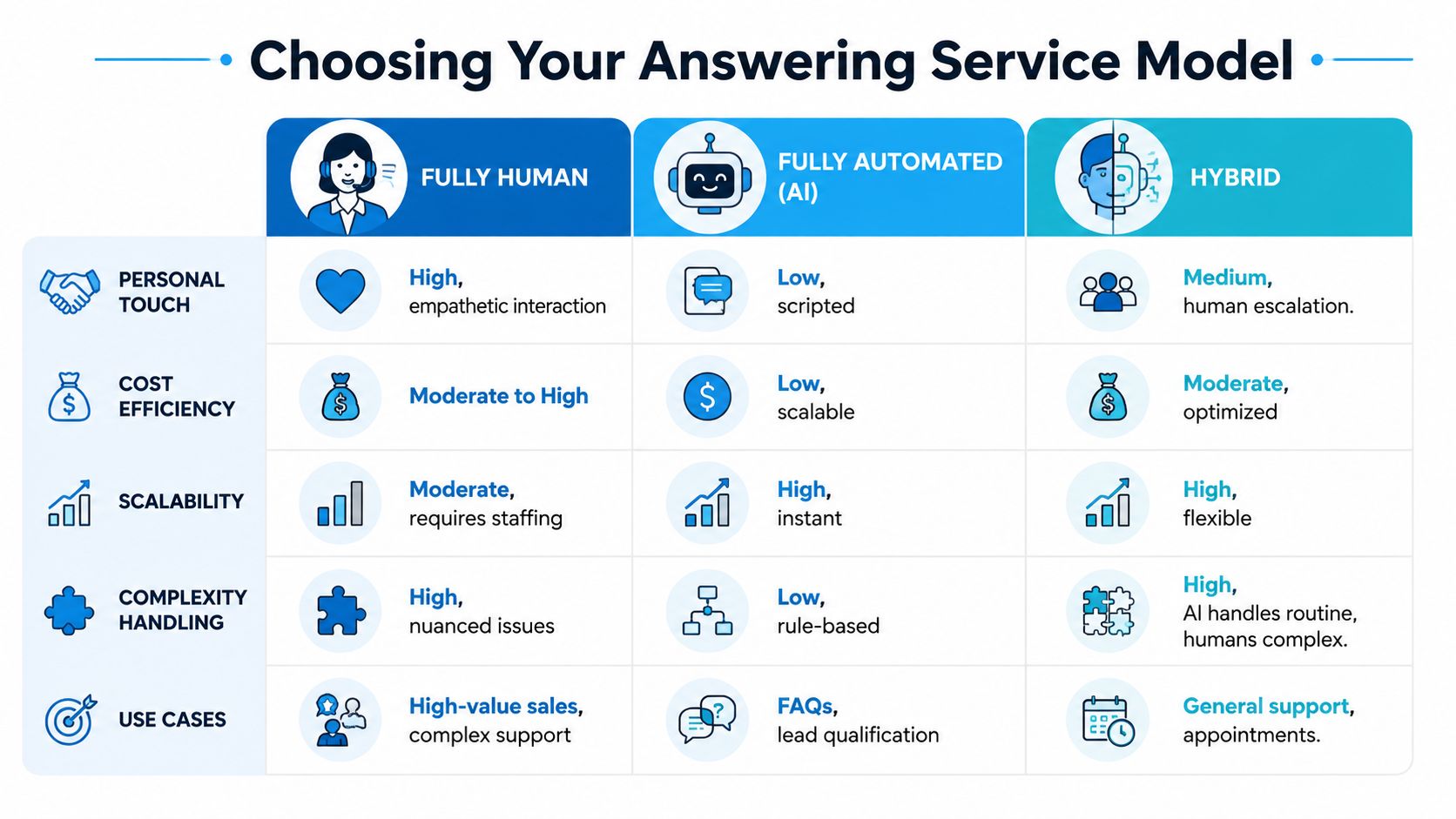
Comparison of Answering Service Models
| Criterion | Human-Only Service | AI-Only Service | Hybrid Service |
|---|---|---|---|
| Personal touch | Strong for emotional or high-trust calls | Limited when caller needs reassurance or nuance | Strong where AI triages and humans step in when needed |
| Cost efficiency | Usually higher because every call uses people time | Usually more efficient for routine, repetitive calls | More balanced because humans focus on higher-value interactions |
| Scalability | Depends on staffing depth and queue management | Handles volume spikes well | Scales well without making every call fully automated |
| Complexity handling | Best for ambiguity, objections, and sensitive intake | Best for structured, predictable tasks | Best for mixed call environments |
| Best fit | Legal intake, sensitive support, complex sales | FAQs, appointment requests, simple lead capture | Most service businesses with mixed call types |
When human-only makes sense
A fully human model works when every call carries emotional weight, compliance sensitivity, or a lot of nuance.
That includes:
- estate planning and family law firms
- concierge medical and specialty practices
- high-ticket B2B services where callers expect immediate confidence
- businesses where poor tone can damage trust quickly
The problem is cost and consistency at scale. If you use humans for every basic scheduling request and routine status question, you're paying skilled labor for tasks that don't need it.
When AI-only is enough
AI-only is a good fit when the majority of calls are structured and repetitive.
Examples:
- a cleaning company booking standard estimates
- a multi-location med spa answering routine scheduling questions
- a franchise fielding location, hours, and basic appointment requests
- a real estate office collecting lead details after hours
AI is fast, tireless, and consistent. It's also rigid when callers are upset, confused, or calling with exceptions.
If you're exploring that route, review what an AI call answering service should handle before you replace people with software.
Why hybrid is usually the right answer
Hybrid is the strongest model for most businesses because most businesses have mixed call types.
A hybrid setup lets AI handle routine interactions such as:
- appointment booking
- lead capture
- hours and location questions
- callback requests
- intake forms and basic qualification
Then it sends higher-risk conversations to a human:
- upset customers
- emergency dispatch
- legal or medical nuance
- objection handling
- high-value sales calls
Use humans where judgment matters. Use AI where speed and consistency matter.
That is the decision framework I recommend:
- List your top call categories. Don't guess. Pull examples from a normal week.
- Mark each category as routine, sensitive, urgent, or revenue-critical.
- Assign AI to routine work.
- Assign humans to sensitive or high-stakes calls.
- Create escalation rules for everything in between.
If your provider can't support that logic, they aren't helping you build a system. They're just answering the phone.
Answering Services in Action for Your Industry
This gets easier when you stop thinking in abstract features and look at daily call flows.

Home services
A homeowner calls after hours because their water heater failed. They don't want a voicemail box. They want help.
A strong answering workflow does three things fast. It confirms the issue, determines urgency, and either books the earliest slot or escalates to the on-call technician if the script flags a true emergency. The office doesn't need to be open for the business to stay responsive.
For HVAC, plumbing, pest control, roofing, and electrical contractors, this matters because many calls come in while crews are in the field and office staff are stretched thin. The answering service becomes the intake desk your growth requires.
Law firms and professional services
Legal callers often arrive stressed, embarrassed, or unsure what to say. A generic call center can damage trust in the first minute.
A better setup uses a firm-approved script to collect the basics, avoid overpromising, and route the matter correctly. New potential clients get a calm, professional intake. Existing clients reach the right channel faster. Spam, solicitors, and irrelevant inquiries don't eat attorney time.
For accounting firms, consultants, and financial professionals, the same principle applies. Separate new business from admin requests, gather the right details, and hand off clean notes instead of vague messages.
The caller should feel like they reached your office, not a generic outsourced vendor.
Healthcare and wellness practices
A clinic has different call types all day. New patient inquiries, appointment changes, refill requests, billing questions, and urgent concerns all need different handling.
A modern service can route routine scheduling into calendars, collect intake information, and push messages into practice workflows. Sensitive situations or anything requiring clinical judgment should escalate to trained staff according to your rules.
That's the key distinction. The answering service shouldn't pretend to be care delivery. It should remove front-desk friction so your care team spends time where human judgment matters.
Multi-location and franchise operators
Franchise groups and multi-location service businesses often have a routing problem more than a staffing problem.
The caller needs the right location, right schedule, and right next step. A good telephone answering service for business can identify geography, route by business hours, and log interactions consistently across sites. That gives leadership cleaner visibility and stops each location from improvising its own call process.
Your Implementation and Best Practices Checklist
Most answering service failures happen during setup, not after launch. The provider didn't magically underperform. The business gave weak instructions, disconnected tools, and fuzzy escalation rules.
A modern business answering service functions as a software-and-integration layer, connecting live agents and AI to CRMs, calendars, and other tools so a single call can capture a lead, book an appointment, and log the data without manual re-entry, as described in Nextiva's guide to answering services for small business.

Build the workflow before you buy the seat
Start with operational decisions, not vendor demos.
- Define your call goals. Are you trying to capture leads, protect after-hours service, reduce front-desk load, or all three? Rank them.
- Map your call categories. New lead, current customer, emergency, billing, scheduling, vendor call, spam.
- Set the desired outcome for each category. Book, message, transfer, escalate, or reject.
If you skip that work, even a capable vendor will give you a messy result.
Write scripts that sound like your business
Bad scripts sound robotic or vague. Good scripts sound like a prepared employee.
Use prompts, not essays:
- greeting in your brand voice
- qualifying questions for each service line
- clear emergency triggers
- rules for when not to answer beyond scope
- exact handoff format for notes
If you plan to record calls for quality or compliance reasons, review the legal rules first. Whisper AI's guide to call legality is a practical reference for understanding what your business should check before turning on recording workflows.
Connect the systems your team already uses
Most of the ROI appears by connecting the answering layer to the systems that run the business.
Minimum useful stack:
- Calendar integration: so appointments can be booked live
- CRM or lead system: so caller data lands in one place
- Internal notifications: email, SMS, or team messaging for escalations
- Reporting access: call summaries and dispositions your managers can review
Then test it.
Call your own line with common scenarios:
- a routine booking request
- an urgent service issue
- a confused existing customer
- a wrong-number style interruption
- a lead that needs transfer
Don't launch on hope. Run test calls until the workflow feels boring. Boring is good. Boring means reliable.
Calculating ROI and Questions to Ask Vendors
Pricing pages are designed to get you interested. They are not designed to help you budget accurately.
While many services advertise low entry prices, the actual cost depends on usage. Businesses should compare monthly fees for expected call volume against the hidden costs of missed leads and administrative overhead to understand true ROI, as noted by Specialty Answering Service. If your phone system is also part of the discussion, this comparison of UK VoIP systems for SMEs is useful for understanding the broader communications stack around answering coverage.
Use a simple ROI formula
You do not need a finance team to evaluate this.
Use a back-of-the-napkin formula:
(Value of a captured lead x number of additional leads captured) - monthly service cost
Then add a second layer:
- reduced admin time for office staff
- fewer interruptions for sales or service teams
- fewer delays in booking appointments
- cleaner records because notes sync automatically
For a closer look at pricing structures and what drives cost, review this breakdown of business answering service cost.
Ask vendors these questions before you sign
- How do you charge? Per minute, per call, flat subscription, or blended model?
- What counts as billable usage? Hold time, spam calls, short hangups, transfers?
- Can you show my exact integration path? Not a generic promise. A real workflow with my CRM and calendar.
- How do escalations work? Who gets contacted, when, and in what order?
- Can I control scripts and routing rules without opening a support ticket every time?
- What happens during call spikes? Queue, overflow, fallback, or voicemail?
- Can you support compliance requirements for my industry?
- What reports will I receive?
The right provider should answer those questions clearly and without dodging. If they can't explain the workflow in plain language, they probably can't run it well either.
If you want to stop losing leads to voicemail and build a call workflow that fits your business, Recepta.ai is built for that hybrid model. It combines AI answering with human escalation, appointment scheduling, lead capture, and integrations with business systems so your calls don't just get answered. They move forward.