A Guide to Using a Medical Virtual Receptionist

Imagine your front desk. The phone rings off the hook, patients are waiting to check in, and your staff is juggling a dozen tasks at once. Now, picture a dedicated, intelligent assistant working 24/7 to handle every incoming call and message, ensuring no patient ever slips through the cracks. That’s the essence of a medical virtual receptionist.
This isn't just an automated system; it's a sophisticated service that blends smart technology with a human touch. It acts as the first point of contact for your practice, managing everything from answering calls and scheduling appointments to handling initial patient intake—all without taking a single break.
What Exactly Is a Medical Virtual Receptionist?
It’s helpful to think of a medical virtual receptionist as an air traffic controller for your practice's communication. It expertly manages the flow of incoming calls, messages, and appointment requests with complete precision, freeing your in-house team from the constant interruption of a ringing phone.
This isn't about replacing your amazing staff. It's about giving them superpowers. By taking over the repetitive, time-consuming administrative tasks, a virtual receptionist allows your on-site team to focus on what they do best: providing exceptional, hands-on care to the patients standing right in front of them. For example, instead of answering a call about office hours for the tenth time, your front desk staff can help an elderly patient complete their paperwork or comfort a nervous child.
Beyond a Simple Answering Service
A traditional answering service just takes a message and promises a callback. A medical virtual receptionist is a world away from that—it’s an active, integrated part of your team. It can intelligently screen and route calls, book appointments directly into your clinic’s calendar, and even get the patient intake process started by sending out digital forms.
Here's a practical example: A new mother calls your pediatric clinic at 10 PM, worried about her baby's high fever. Instead of hitting voicemail, the virtual receptionist understands the urgency. It immediately offers to book the first available appointment for the next morning and sends a text confirmation with a link to fill out new patient forms. That parent feels heard and supported, and your staff arrives the next day to find a pre-registered, scheduled patient.
This kind of support is quickly becoming a necessity. The market for healthcare virtual assistants was valued at $1,806.74 million in 2024 and is expected to skyrocket to $29.63 billion by 2032. This explosive growth is a direct response to a looming healthcare worker shortage—projected at 10 million by 2030—as practices turn to smart automation to keep patient care standards high. You can find more statistics on AI receptionists to see the full picture.
A medical virtual receptionist transforms your front desk from a reactive call center into a proactive patient engagement hub. It ensures every patient feels acknowledged and supported from their very first interaction, setting the stage for a positive healthcare journey.
This system is built to solve the administrative overload that plagues so many practices, leading to staff burnout and lost opportunities. By managing the relentless flow of routine communications, it guarantees no call is missed and no potential patient is lost to a busy signal.
To better understand the value, let's compare it directly to having a traditional in-house receptionist.
Comparing In-House Staff and a Virtual Receptionist
This table breaks down the key differences in cost, availability, and capability between hiring another full-time employee and integrating a virtual receptionist service.
While nothing can replace the warmth of an in-person greeting, a virtual receptionist handles the high-volume, repetitive tasks that often pull your staff's attention away from the patients in your office. It's a partnership that elevates both efficiency and the human touch.
How the Core Features Transform Your Patient Experience

It’s one thing to understand the idea of a medical virtual receptionist, but it’s another to see how its features work in the real world. These aren’t just robotic add-ons; they are intelligent tools built to solve the everyday frustrations that both your patients and your staff face.
By turning these smart features into a smooth, professional, and empathetic patient experience, you start building trust from the very first phone call. Let's break down how these capabilities solve critical problems and make your practice run better.
24/7 Call Handling When Patients Need It Most
Medical concerns rarely follow a neat 9-to-5 schedule. Imagine a patient recovering from a minor procedure on a Friday evening who has a non-urgent question about their medication. Instead of worrying all weekend or going to an urgent care clinic, they can call your office.
A medical virtual receptionist answers immediately. It recognizes they are an existing patient and can provide pre-approved, scripted information, such as, "Dr. Smith's post-op instructions state that mild discomfort is normal. If the pain becomes severe, please contact the on-call physician at this number..."
A recent study showed that 74% of patients simply hang up when put on hold. A 24/7 virtual receptionist means no more hold music and no more voicemail tag. Every single call gets a helpful, immediate response.
This practical support provides reassurance and prevents unnecessary ER visits, demonstrating your practice's commitment to patient care long after they've left the office.
Intelligent Appointment Scheduling That Prevents Errors
Front-desk chaos often starts with a simple scheduling mistake. A new patient gets accidentally booked into a 15-minute follow-up slot, or a complex procedure is scheduled without enough time, throwing the entire day off-kilter. An intelligent scheduling system is designed to prevent these exact problems.
Think about a specialty clinic that has different appointment lengths for new and returning patients. The virtual receptionist handles this flawlessly:
- New Patients: When a new patient calls, the system is smart enough to only offer them the designated 30-minute consultation slots. For example, it will ask, "Have you visited our clinic before?" If the answer is no, it will only display and offer the longer appointment times.
- Follow-Ups: An existing patient calls, and the system recognizes their phone number. It then offers them the standard 15-minute appointment times that fit perfectly into the existing schedule.
This all happens because the system syncs directly with your practice's calendar or EHR, which eliminates double bookings and enforces your specific scheduling rules. It takes the guesswork away from your staff and helps the entire day run on time. You can dig deeper into crafting these positive interactions in our guide on how to improve patient experience.
Automated Patient Intake for a Faster Check-In
The clipboard full of paperwork is often the final hurdle before a patient can see their doctor. It's a time-consuming ritual for everyone involved, frequently leading to a backed-up waiting room and a stressed-out front desk. A medical virtual receptionist can automate this entire process from start to finish.
Here's how it works in practice. The moment a new patient schedules their first appointment, an automated workflow kicks in:
- A secure link to your practice's digital intake forms is sent via both SMS and email.
- The patient can then fill out their medical history, insurance information, and consent forms on their own phone or computer, long before they arrive.
- The system sends a reminder 24 hours before the appointment if the forms haven't been completed.
- Once completed, the forms are automatically and securely saved to the patient’s file in your EHR.
This one simple change can save an average of 15 minutes of in-office time for every new patient. The result? A much faster check-in, shorter waits, and a front-desk team that’s free to greet patients with a warm welcome instead of a stack of forms.
Maintaining HIPAA Compliance and Data Security
In healthcare, protecting patient information isn't just a good idea—it's the law. So, when a medical practice thinks about bringing on a virtual receptionist, the first question that should pop into anyone's mind is, "Is this secure?"
It’s natural to feel a bit uneasy handing over patient communications to an outside service. But a professional medical virtual receptionist isn't just any service; it’s built from the ground up to be a fortress for your data. They act as a secure extension of your own compliance efforts, and when set up right, they can actually reduce the risk of human error, which is a surprisingly common cause of data breaches.
The Foundation of Trust: A Business Associate Agreement
Before a single call is answered or a message is sent, the partnership must be cemented with a Business Associate Agreement (BAA). Think of this as a legally binding handshake that holds the virtual receptionist service to the exact same strict HIPAA standards your own team follows. Working without one isn't just risky; it's a major violation.
A BAA isn't just a piece of paper to be filed away. It details precisely how Protected Health Information (PHI) will be handled, used, and kept safe. For example, it will specify that all data must be encrypted both in transit and at rest, and that access to patient data will be restricted to authorized personnel only. It’s your practice's concrete guarantee that your new partner is legally and operationally all-in on protecting patient privacy.
A rock-solid BAA is non-negotiable. It contractually forces your virtual receptionist provider to use specific technical, physical, and administrative safeguards required by HIPAA. In essence, it makes them a secure and accountable part of your healthcare team.
Tracing the Path of Patient Data
So, how does this actually work in practice? Let's follow a piece of sensitive information on its journey. Imagine a patient leaves a voicemail to ask for a prescription refill, giving their name, date of birth, and the specific medication.
Here’s how a HIPAA-compliant medical virtual receptionist protects that data every step of the way:
- Initial Contact and Encryption: The second that voicemail is recorded, the audio file is wrapped in end-to-end encryption. It’s like putting the message in a digital armored truck before it even leaves the phone line.
- Secure Transcription and Logging: The encrypted audio is then transcribed by an authorized, secure system. That transcript, which now contains PHI, is logged into a platform with strict access controls. Only people with the right permissions can ever see it.
- Protected Transmission to Your EHR: Next, the refill request is sent directly to your clinic's Electronic Health Record (EHR) system through another encrypted, secure connection, often appearing as a task assigned to a specific nurse or medical assistant. No un-protected pit stops.
- Data at Rest Security: Once the information is in the system, it doesn’t just sit there unprotected. It remains encrypted while stored on constantly monitored, secure servers. These data centers typically have their own heavy-duty physical security and undergo regular audits to prove they're up to snuff.
This layered approach ensures that from the moment a patient calls to the final entry in their record, their private information is shielded from prying eyes. To keep everything secure, it also helps to follow strong website security best practices to protect your practice's own digital front door. For a deeper dive, check out our guide on choosing a secure medical office answering service.
When done right, a compliant virtual service goes from being a potential security question mark to a powerful asset for strengthening it.
Integrating a Virtual Receptionist Into Your Workflow
Technology in a medical office should be a bridge, not a barrier. A medical virtual receptionist truly shines when it connects effortlessly with the tools your team uses every single day, like your Electronic Health Record (EHR) and practice management software.
Bringing one on board isn't about blowing up your current operations; it's about making them better. The whole point is to create a single, unified system where the virtual receptionist is a natural extension of your practice, working with your existing tech, not against it. This is all possible thanks to powerful API (Application Programming Interface) connections that let different software talk to each other and share information securely.
What a Seamless Workflow Actually Looks Like
Let's walk through a real-world example to see how this works. Imagine a patient, Sarah, needs to book a follow-up with her cardiologist.
- The Call: Sarah calls the clinic after hours. The medical virtual receptionist picks up instantly.
- Patient Identification: It recognizes her phone number from your EHR and greets her by name: "Hello, Sarah. Are you calling to schedule an appointment?"
- Smart Scheduling: The system securely checks the cardiologist’s real-time calendar in your practice management software and offers Sarah a few open slots that work for a follow-up appointment.
- Automatic EHR Update: As soon as Sarah picks a time, the receptionist logs the new appointment directly into her patient file in the EHR. This simple step cuts out manual data entry and kills the risk of human error.
- Instant Confirmation: At the same time, Sarah gets an SMS and an email confirming all the details, along with a link to any pre-visit forms or instructions.
This whole exchange takes just a few minutes, with zero staff involvement. Your team comes in the next morning to find a perfectly scheduled, confirmed appointment already sitting in the right systems. This kind of automation is key to a smooth patient journey, which is why we break down different tools in our guide to medical appointment scheduling software.
The Power of Smart Integration
This isn't just about convenience; it's a strategic move that delivers tangible results. Recent tech advancements have made a huge impact. Pilot projects in over 20 clinics managed to slash patient query resolution time by 40%. In another 35 facilities, new integrations improved patient data handling by 30% in 2023. Better yet, updates in early 2024 pushed voice recognition accuracy past 90% in 25 hospitals, showing just how reliable these systems have become.
The secret to a great integration is making sure data flows securely and automatically between your systems. When it does, you eliminate administrative bottlenecks and free up your staff to handle more complex patient needs and deliver quality in-person care.
The flowchart below gives you a simplified look at the secure path patient data takes during a call.
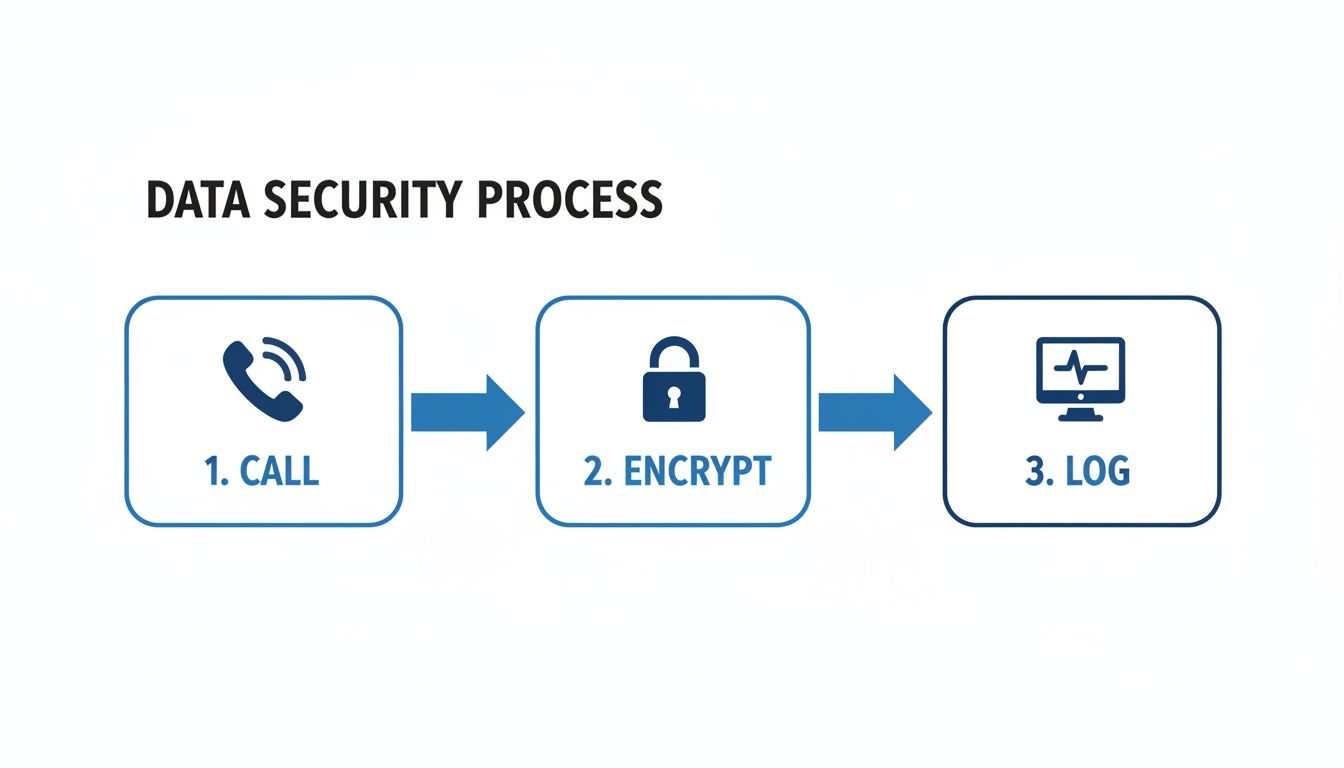
As you can see, every step is protected. From the moment the call connects to the final entry in the EHR, encryption and secure protocols are in place. This ensures that adding a virtual receptionist actually strengthens your practice's data security, rather than creating a new vulnerability.
The Financial and Operational Benefits for Your Practice

While the technology behind a medical virtual receptionist is impressive, what really matters are the tangible results it brings to your practice. This isn't just about adding a new tool; it's a strategic move that directly strengthens your bottom line, improves staff morale, and opens the door for real growth.
When you can connect automated tasks to measurable outcomes, the value becomes crystal clear. You'll quickly see a return on your investment through serious cost savings, more appointments on the books, and an in-house team that's finally free to focus on what they do best.
Drive Significant Cost Reduction
Bringing a full-time receptionist on board means a lot more than just paying a salary. You also have to factor in benefits, payroll taxes, sick days, training time, and the overhead for their workspace and equipment. A medical virtual receptionist swaps all those variable expenses for one predictable monthly fee.
Let's look at a practical cost breakdown for a small clinic:
- Full-Time In-House Receptionist: An average salary of $37,000 plus benefits (payroll tax, insurance, PTO) can easily push the total annual cost to over $50,000.
- Medical Virtual Receptionist: A typical subscription plan might cost $1,500 per month, totaling $18,000 per year. This often delivers savings of over 60%.
This isn’t just about trimming the budget. It's about smart resource allocation. The $32,000 saved annually could be reinvested to purchase a new piece of diagnostic equipment or provide advanced training for your clinical staff.
This shift turns your front desk from a major overhead cost into a scalable, efficient part of your operations. For any practice looking to manage its budget without compromising on quality, the numbers speak for themselves. You can see how these savings break down by exploring different pricing models for virtual receptionists.
Increase Patient Bookings and Capture Lost Revenue
Every call that goes to voicemail is a missed opportunity—and lost revenue. Let’s be honest, when a patient gets a busy signal or a recording, they usually don't wait. They just call the next practice on their list.
A virtual receptionist works around the clock, 24/7, making sure that never happens. By answering calls after hours, on weekends, and even during your team’s lunch break, you create brand-new opportunities to bring in patients.
Consider this actionable scenario: A potential new patient searches for a local dermatologist at 8 PM on a Wednesday. Your practice is closed, but your competitor's is too. The patient calls your office first. Instead of voicemail, the virtual receptionist answers, confirms you accept their insurance, and schedules them for a consultation. You've just captured a new patient—and their lifetime value—while your competitor slept.
This constant availability directly leads to a fuller schedule and a much healthier bottom line. You’re no longer limited to booking appointments only from 9 to 5 on weekdays.
Reduce Staff Burnout and Improve Focus
Administrative overload is a huge factor in front-desk staff burnout. When your team is constantly juggling ringing phones, scheduling, and checking patients in, there’s no time left for the high-value work that truly requires a human touch.
A medical virtual receptionist takes that weight off their shoulders by handling the repetitive administrative grind. It manages the routine calls, sends appointment reminders, and answers basic questions, which frees up your talented staff to focus on what really matters.
This allows your in-office team to:
- Give their full attention to a patient who is distressed about a high co-pay.
- Proactively call patients to follow up on complex insurance pre-authorizations.
- Create a warm, welcoming environment for patients who are physically in the office.
By delegating the routine tasks, you empower your team to work at the top of their game. The end result is a more efficient, less stressed, and happier staff, which ultimately leads to better employee retention and a superior experience for every patient who walks through your door.
Forecasting the ROI of a Medical Virtual Receptionist
To truly grasp the impact, it helps to put some numbers behind these benefits. The table below outlines how a virtual receptionist can transform key metrics for a typical small or medium-sized practice, turning operational improvements into a clear return on investment.
As the data shows, implementing a medical virtual receptionist is more than a quality-of-life improvement—it's a powerful financial strategy that drives measurable growth and efficiency across the board.
A Step-by-Step Guide to Implementing a Virtual Receptionist
Bringing a medical virtual receptionist into your practice isn't some massive, complicated overhaul. Think of it as a well-planned process with clear, manageable stages. Breaking it down this way ensures a smooth transition, minimizes disruption for your team, and helps you start seeing the benefits right away.
This whole journey starts with a simple, honest look at your clinic's specific challenges and what you hope to achieve. This first step is everything—it makes sure you pick a solution that actually solves your problems, not just another piece of tech you have to manage.
Stage 1: Define Your Clinic's Real Needs
Before you can even think about picking a provider, you need to know exactly what you need them to do. This means taking a hard look at your current operations to find the biggest pain points a virtual receptionist could fix. Getting this initial analysis right is the key to a successful partnership.
Here's an actionable first step: Have your front desk team keep a simple log for one week. On a sheet of paper, they can make a tick mark for every call that falls into categories like "New Appointment," "Reschedule," "Prescription Refill," "Insurance Question," and "Directions/Hours." This simple data will quickly show you which tasks are eating up the most time.
Common tasks that are perfect for a virtual receptionist include:
- Booking new patient and follow-up appointments
- Answering basic questions (like hours, location, or accepted insurance plans)
- Making appointment reminder calls
- Handling the initial patient intake and sending out forms
Stage 2: Select the Right Partner
Once you have a clear list of needs, you can start looking at potential providers. But don't just get dazzled by features and price tags. In a healthcare setting, the things that truly matter are security, integration, and solid, reliable support.
Look for a provider that is upfront about its HIPAA compliance and can provide a Business Associate Agreement (BAA) without hesitation. You'll also want to verify their integration capabilities—ask them for a live demo showing how their system connects with your specific EHR or practice management software. Finally, ask about their customer support. You're not just buying software; you're gaining a partner who needs to be there when you need them.
Choosing a provider is a lot like hiring a new team member. You have to be confident in their skills, their reliability, and their absolute commitment to protecting your patients' sensitive information.
Stage 3: Configure Your System
After you've picked a partner, it's time to set up the system to mirror your practice's unique workflow. This is where you build the call flows and scripts that will shape every patient interaction. A thoughtful setup is the secret to creating a professional and genuinely helpful experience for your patients.
Work directly with your provider to map out your call routing rules. For instance, a call where a patient mentions a "billing question" could be sent straight to your office manager, while a simple "scheduling" request is handled automatically by the system.
Practical Scripting Example for 'Insurance Questions':
Patient: "Do you accept Blue Cross Blue Shield?"
Virtual Receptionist: "We do work with many Blue Cross Blue Shield plans. To confirm your specific coverage, I can schedule a brief call with our billing specialist or send you a secure link to our insurance verification form. Which would you prefer?"
This kind of script gives the patient a helpful, immediate answer while intelligently routing the more complex query to the right person.
Stage 4: Launch and Refine
The final step is to go live and start fine-tuning the system based on how it performs in the real world. A successful launch isn't just about flipping a switch; it involves training your in-house staff on how the new system works so they can collaborate with it, not fight against it.
Once you're up and running, make a habit of checking the analytics dashboard your service provides. Keep an eye on key metrics like call volume, appointment booking rates, and how quickly calls are resolved. This data is gold—it will show you exactly where you can tweak scripts and adjust call flows to better serve your patients and support your practice's growth. For example, if you notice many calls are being transferred for a specific question, you can create a new script to answer it automatically.
Frequently Asked Questions
It’s completely normal to have a few questions before bringing a new system into your practice. Let's walk through some of the most common ones we hear from practice managers, so you can feel confident about how a medical virtual receptionist would work for your team.
We'll clear up everything from how the service handles those tricky patient calls to how it plays with the software you already use every day.
Can a Virtual Receptionist Handle Medical Emergencies?
No, and for a very good reason. A medical virtual receptionist is specifically trained not to handle emergencies. Its job is to act as a first line of defense.
It's programmed to listen for keywords and phrases that signal a potential emergency, like "chest pain," "severe bleeding," or "I can't breathe." The moment it detects a trigger like this, its protocol is to immediately interrupt the normal script and say, for example, "This sounds like a medical emergency. Please hang up and dial 911 immediately." This ensures that truly urgent situations get to a real medical professional, instantly.
Will Patients Know They’re Talking to an AI?
Most of the time, they won't. The whole point is to make the experience feel helpful and natural, like they're speaking with a highly efficient member of your front desk staff. The technology is built to be conversational, not to sound like a robot.
And for those calls where a human touch is non-negotiable? The system is smart enough to know when to pass the baton. For example, if a patient says, "I'm very upset about my last visit," the system is programmed to recognize the sentiment and can say, "I understand you're upset, and I want to make sure you speak with someone who can help. Let me transfer you to our office manager right away." This hybrid model gives you the best of both worlds: automation for the routine stuff and genuine empathy when it counts.
The best systems don't replace your team; they support them. Patients get a fast, helpful response, and your practice never loses that compassionate, human connection.
How Much Can I Customize It?
A great deal, actually. Think of it less like a rigid software and more like a new team member you get to train. You can—and should—tailor almost every part of the service to match your clinic's unique workflow.
- Custom Greetings: You can have the system use the exact same welcoming phrase your in-office staff uses. For example, "Thank you for calling Sunshine Pediatrics, how can I help you today?"
- Call Flow Logic: You decide where calls go. Want calls about billing to go to one person but new patient inquiries to go to another? No problem. You can even set up different rules for after-hours calls.
- Provider-Specific Rules: Dr. Smith might only take new patient appointments on Tuesdays, while Dr. Jones needs 30-minute slots instead of 15. You can build these unique rules right into the scheduling logic.
This level of control ensures the virtual receptionist works exactly the way you need it to, following your practice's established protocols to the letter.
Is This Only for Big Medical Practices?
Not at all. A medical virtual receptionist scales to fit any size practice, from a solo practitioner to a large multi-location group. For smaller clinics, it delivers the power of a full-time front desk staff without the associated salary and benefits costs. For example, a solo therapist can use it to ensure no new client call is missed while they are in a session.
For larger practices, it’s all about managing call volume effectively. It cuts down on frustrating hold times for patients and frees up your administrative team to focus on higher-value tasks like insurance claims and in-person patient care. A multi-location urgent care, for instance, could use it to handle the surge of calls during flu season without hiring temporary staff.
Ready to see how an intelligent, 24/7 receptionist can transform your practice? Discover how Recepta.ai helps healthcare providers reduce costs, capture more appointments, and deliver an exceptional patient experience. Learn more and start your risk-free trial today at https://recepta.ai.