A Guide to Medical Appointment scheduling Software
At its heart, medical appointment scheduling software is a specialized tool designed to automate the entire patient booking process for a healthcare practice. It's so much more than a digital calendar; think of it as the central nervous system for your clinic, coordinating provider availability, patient appointments, and even physical resources like exam rooms. The goal is to slash the time spent on administrative tasks and make the whole operation run more smoothly.
How Medical Appointment Scheduling Software Works
Imagine an air traffic control system for your clinic. That’s really the best way to picture this software. Its main job is to manage the constant flow of patients, provider schedules, and resources to prevent collisions—like dreaded double-bookings—and keep things moving without long delays. This tech automates the whole appointment journey, from the moment a patient books online to the follow-up reminders that come after their visit.
The process kicks off the second a patient decides they need an appointment. Instead of playing phone tag with your front desk, they can hop on your website at 10 PM on a Sunday, see exactly what times are available in real-time, and lock in a slot that fits their life. This is a massive improvement over the old way of doing things, which often left both patients and staff feeling frustrated.
The Lifecycle of an Automated Appointment
The true magic of this software is how it seamlessly connects all the different pieces of the puzzle. Let’s walk through a real-world example at a busy, multi-provider physical therapy clinic to see it in action:
Patient Self-Booking: A patient with a new referral for knee pain visits the clinic's website. They click "Book Now" and are prompted to select "New Patient Evaluation." The system shows them the three therapists who specialize in knee injuries and displays only the available 45-minute slots that fit this appointment type, automatically filtering out the shorter 30-minute follow-up slots.
Automated Confirmation and Reminders: The moment the appointment is booked, the software fires off an email with a link to fill out digital intake forms and an SMS confirmation. It then queues up a series of reminders—an email 72 hours before and a text message 24 hours before the visit with an option to confirm by replying "YES." This one feature is a game-changer for reducing the 20-30% no-show rate that hurts so many practices.
Real-Time Calendar Sync: The new appointment instantly pops up on the therapist’s Google Calendar, the front desk’s master schedule in the software, and syncs directly with the clinic’s EHR. The specific treatment room with the necessary traction equipment is also reserved for that time block. No one has to manually enter a single thing, which wipes out the risk of human error.
Post-Visit Follow-Up: After the appointment, the system automatically sends an email asking the patient to rate their experience. Two weeks later, if a follow-up visit hasn't been booked, it can trigger a gentle reminder email, helping to ensure the patient completes their full treatment plan.
This hands-off approach transforms the front desk from a reactive call center into a proactive patient experience hub. Staff are freed from the monotonous grind of scheduling and can focus on what matters: greeting patients warmly, managing check-ins efficiently, and handling complex issues that actually require a human touch.
Ultimately, medical appointment scheduling software just creates a smoother, more reliable experience for everyone involved. It closes the communication gap between patients and providers, making sure the right person is in the right place at the right time. For any modern practice looking to operate efficiently and grow, this kind of organization is non-negotiable.
If you're looking to take patient communication automation a step further, an automated phone answering service can be another powerful tool for cutting down on administrative busywork.
The Must-Have Features for Any Medical Practice
When you're looking for the right medical appointment scheduling software, it's easy to get lost in a long list of features. What really matters are the core functions that act as the engine for your practice—the tools that cut down on staff busywork, smooth out your daily operations, and make life easier for your patients. These aren't just nice-to-haves; they're the foundation of any modern clinic.
The industry's growth tells the story. The global market for this software was valued at USD 467.4 million in 2025 and is expected to surge to USD 1,127.8 million by 2032. This isn't just a trend; it's a fundamental shift in how healthcare operates. Digging into the data on this healthcare technology trend reveals just how essential these systems have become.
Real-Time Calendar Syncing
Think of real-time calendar syncing as the central nervous system for your practice's schedule. It creates a single, unified calendar that everyone—from the front desk to the providers—can trust. No more juggling separate schedules or second-guessing availability.
When a patient books an appointment through your online portal, that slot is instantly blocked off everywhere. It’s gone from the main office calendar, the doctor's personal calendar, and any connected EHRs. This simple, automated action completely prevents the dreaded double-booking, ensuring that a specific exam room or piece of equipment is reserved for one patient, and one patient only.
This diagram shows how the software acts as a central hub, connecting all the moving parts of your practice.
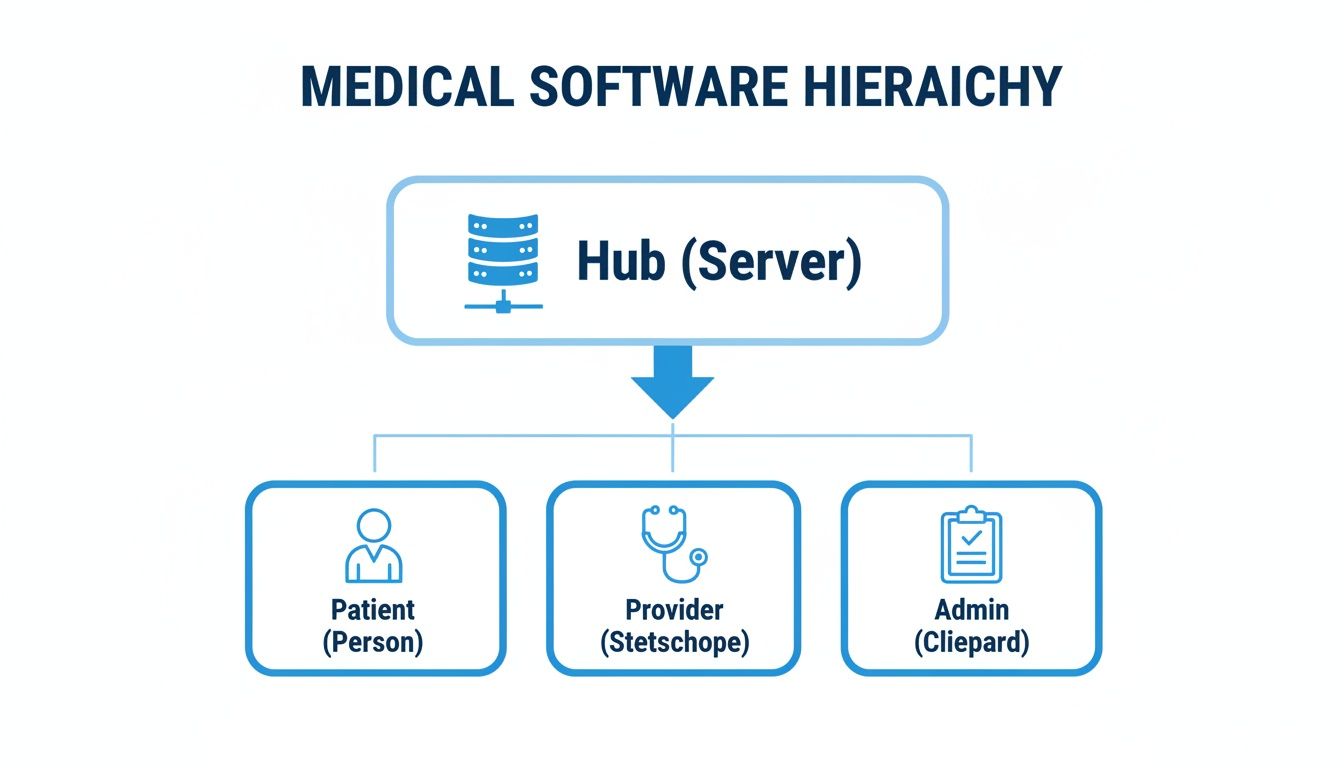
As you can see, the right system ensures information flows smoothly between patients, providers, and your admin team, keeping everyone on the same page.
Automated Appointment Reminders
No-shows are a killer for clinic revenue and efficiency. Automated reminders are your best line of defense, working tirelessly behind the scenes to make sure patients show up. The most effective systems don't just send one message; they use a multi-channel approach to connect with patients in the way they prefer.
A smart reminder sequence often looks like this:
- An email confirmation is sent the moment the appointment is booked, allowing the patient to add it to their personal calendar with one click.
- An SMS reminder goes out 72 hours beforehand, asking them to reply 'C' to confirm or 'R' to reschedule.
- A final automated voice call is sent 24 hours before the visit for older patients who may not use text messages frequently.
This simple strategy works wonders. Clinics using these systems often report a patient show rate as high as 89%. Plus, when a patient does cancel ahead of time, your staff gets an immediate heads-up and can offer the slot to someone on the waitlist, keeping your schedule packed and productive.
Patient Self-Scheduling Portal
A patient self-scheduling portal is like having a virtual receptionist who works 24/7. It gives patients the power to book, reschedule, or cancel appointments whenever it's convenient for them—no phone call required.
This isn't just about making patients happy. It's a strategic move to free up your administrative team. When they aren't tied to the phone handling routine scheduling, they can focus on what really matters: greeting patients, managing complex billing questions, and providing a fantastic in-person experience.
Imagine a busy dental practice. Before, their receptionist spent most of the day on the phone. After launching a self-scheduling portal, new patient bookings jumped by 32% because people could finally book appointments after business hours. Now, that same receptionist has the time to chase down insurance claims and make sure every patient walking through the door feels valued.
Essential vs. Advanced Scheduling Features
While the features above are non-negotiable, it's also important to understand the difference between the foundational tools every practice needs and the more advanced capabilities that can help a growing clinic scale.
Getting the essentials right is the first step. But as your practice grows, these advanced features can unlock even greater levels of efficiency and patient satisfaction.
The Impact of AI on Patient Scheduling
Artificial intelligence isn't some far-off concept in healthcare anymore—it's here, and it's completely changing how practices manage their patient flow. When you fold AI into medical appointment scheduling software, it becomes more than just a booking tool. It acts as an intelligent command center for your entire operation, strategically optimizing the day instead of just filling empty slots.
This isn't just about plugging gaps. An AI-powered system analyzes everything from a provider's work patterns to the typical length of different appointments. It might notice Dr. Smith is most efficient in the mornings and start clustering her more complex cases then, which keeps the day moving smoothly and cuts down on patient wait times. It’s this kind of deep analytical power that’s making a real difference.

The market growth tells the story. Valued at USD 262.42 million in 2026, the global AI in medical scheduling software market is on track to hit an incredible USD 2,444.35 million by 2035. That explosive growth shows just how much practices are starting to rely on smart automation.
Automated Insurance Verification
One of the first places you’ll feel the impact of AI is with automated insurance verification. We all know the drill: front-desk staff spend ages on the phone manually checking a patient's eligibility, and it’s a process ripe for errors that lead to denied claims.
AI flips the script. Before the patient even walks through the door, the system automatically pings the insurance payer's database to verify coverage in real-time. This simple check catches potential problems—like an inactive policy or an unmet deductible—so your staff can sort it out with the patient ahead of time.
This one feature prevents a ton of headaches:
- Fewer Claim Denials: You know the service is covered before it’s performed, which slashes the number of rejections.
- Better Cash Flow: Confirming coverage upfront means you can collect co-pays and deductibles with confidence.
- Happier Patients: Patients appreciate the transparency. Knowing their financial responsibility beforehand builds trust and avoids awkward surprises.
The Rise of the 24/7 Virtual Receptionist
Perhaps the biggest game-changer is the arrival of conversational AI, which essentially gives you a virtual receptionist that works around the clock. Imagine a system that can understand a patient's spoken request over the phone, ask the right follow-up questions, and get them booked with the correct provider—all without a human lifting a finger.
Practical Example: A patient calls your dental clinic at 10 PM, frantic about a toothache. The AI receptionist answers instantly. It picks up on the urgency ("I have a severe toothache") and asks a few smart questions, like, "How long has it been bothering you?" Based on the responses, it identifies an emergency, finds the first open slot with the on-call dentist, and books it on the spot.
This kind of technology turns every call or message into a scheduled appointment. No more voicemail tag. No more missed opportunities to help someone in need. These systems are far more advanced than simple chatbots; they manage complex conversations and sync directly with your practice calendars. You can see how this works by learning more about an AI phone answering service and its ability to handle patient communications.
And for a wider view of how this technology is improving the patient experience, companies offering AI-powered support solutions show just how much is possible. In the end, it means your clinic’s doors are always open, even when everyone has gone home for the night.
Making Sure Your Software Plays by the Rules: EHR Integration and HIPAA Compliance
When you're choosing a medical appointment scheduling software, you're looking for more than just a slick calendar. The real game-changers are two things that happen behind the scenes: deep integration with your Electronic Health Records (EHR) and rock-solid HIPAA compliance. Your scheduling tool can't just be a standalone app; it has to securely talk to your core clinical systems and guard patient data like a fortress.
Think of your EHR as the definitive biography of a patient's health. When your scheduling software syncs up with it perfectly, every appointment booked, canceled, or moved automatically becomes a new entry in that story. This creates one unified, accurate patient record, saving your team from the mind-numbing task of typing the same information into two different places.

This connection is about so much more than convenience—it's about patient safety. When systems are disconnected, you're practically inviting errors. Manual data entry is a minefield of typos and outdated details, and a simple mistake can have serious clinical consequences.
Why Seamless EHR Integration Isn't Optional
True integration means that the moment a new patient books their first visit online, a basic chart is automatically created in the EHR. And when a current patient reschedules? Their record is updated instantly. It’s no longer a nice-to-have; it’s a foundational requirement for any modern practice.
A well-integrated system delivers tangible benefits right away:
- Less Admin Overload: Kiss double data entry goodbye and give your staff their valuable time back.
- Fewer Data Errors: Ensures the information you see is consistent and reliable across every platform.
- Smoother Clinical Flow: Clinicians get a real-time view of their day right inside the EHR, where they do most of their work.
Without this digital bridge, you're stuck managing two separate realities, which is not only inefficient but also incredibly risky.
HIPAA Compliance: What It Actually Means for Your Practice
The Health Insurance Portability and Accountability Act (HIPAA) isn't just bureaucratic red tape; it's the law that protects a patient's most sensitive health information. Any software that touches this data—from names and appointment times to the reason for a visit—must be HIPAA compliant. This is non-negotiable, and the penalties for getting it wrong are severe.
For scheduling software, HIPAA compliance really comes down to three core pillars:
- Data Encryption: All patient data has to be scrambled and unreadable, both "at rest" (sitting on a server) and "in transit" (zipping across the internet).
- Access Controls: Not everyone should see everything. The system must let you define who can access patient information based on their role.
- Business Associate Agreement (BAA): The software provider must sign a BAA. This is a legally binding contract where they promise to protect your patient data with the same rigor you do.
Here's a real-world example of a HIPAA breach: Your system sends an unencrypted text reminder that says, "Hi Jane, a reminder for your appointment with Dr. Smith at the oncology clinic tomorrow." That message contains Protected Health Information (PHI). If it gets intercepted, it's a breach. A truly compliant system ensures every communication is secure from end to end.
Ultimately, choosing HIPAA-compliant software is about earning and keeping your patients' trust. This becomes even more critical when AI is involved in scheduling, as regulations like HIPAA in the US and GDPR abroad must be followed. For a great resource on this, check out this practical AI GDPR compliance guide.
Always vet your software partner's commitment to security. A good place to start is by reviewing their official documentation, like our own privacy policy. Transparency about how they handle data is one of the best signs you've found a vendor you can count on.
How to Choose the Right Software for Your Practice
Picking the right medical appointment scheduling software can feel like a huge task, but it doesn’t have to be. If you break it down into a few manageable steps, you can move from a long list of possibilities to a confident decision that actually helps your practice. The real secret? Start by figuring out what you actually need before you even look at a single demo.
Think of it like getting a prescription. You wouldn't just grab a random bottle off the shelf; you'd get a proper diagnosis first. The same goes for software. You have to diagnose your practice's unique pains and workflows. What works for a bustling, multi-location surgical center is going to be total overkill for a solo physical therapy practice.
Assess Your Practice's Unique Needs
Before you start comparing features, take a step back and get a clear picture of what your practice really requires. This internal check-up is the single most important part of the process. It makes sure you're shopping for a solution to your real problems, not just chasing the one with the flashiest bells and whistles.
Get your team together and start asking some honest questions:
- Where are our biggest scheduling headaches? Is the front desk drowning in phone calls? Are we bleeding revenue from last-minute cancellations and no-shows?
- What's our patient volume look like? Are you seeing 20 patients a day or 200? The scale of your operation will determine how robust a system you need.
- Do we have any tricky scheduling needs? Do you have to coordinate specific equipment or rooms for certain appointments? Are you juggling schedules for multiple providers, maybe even across different clinics?
- How comfortable are our staff and patients with technology? Do you need a simple, foolproof interface, or is your team ready for a feature-rich patient portal?
Answering these questions gives you a solid blueprint for what to look for when you start your search.
The goal isn't to find a system that does everything; it's to find the system that does everything you need it to do, and does it exceptionally well. A simple, reliable tool that solves your top three problems is far more valuable than a complex, expensive one where you only use 20% of the features.
Build Your Evaluation Checklist
Once you know what you're looking for, create a checklist to size up potential vendors. This keeps you focused and helps you make an objective comparison, so you don't get sidetracked by a slick sales pitch.
Your checklist should cover these key areas:
Core Features: Does it nail the basics? Look for non-negotiables like real-time calendar syncing, automated reminders via both SMS and email, and an easy-to-use patient self-scheduling portal.
Integration Capabilities: How well does it play with your existing EHR/EMR? A smooth, two-way sync is crucial to kill manual data entry and cut down on errors. Don't forget to check for integrations with your billing software or telehealth platform if you use them.
HIPAA Compliance and Security: This is a big one. The vendor absolutely must provide a signed Business Associate Agreement (BAA). Ask them about their data encryption and how they handle access controls to ensure patient data is locked down tight.
Pricing Model: Get the full story on cost. Is it a flat monthly fee? A per-provider subscription? Are there sneaky setup or support fees? Make sure the pricing is transparent and makes sense as your practice grows.
Customer Support: What happens when things go wrong at 8 AM on a Monday? Find out if they offer responsive support by phone, email, and chat. It’s always a good idea to check reviews to see how they treat their customers after the contract is signed.
Putting It Into Practice: Two Examples
Let’s see how this checklist works in the real world for two very different healthcare settings.
Scenario A: The Small Physical Therapy Clinic: This clinic needs something simple and mobile-friendly. Their top priority is a patient portal that lets clients book and change appointments right from their phones. Deep EHR integration isn't as important as a clean interface and powerful automated reminders to slash their no-show rate. They’d likely go for a cost-effective, cloud-based tool with a low per-provider monthly fee.
Scenario B: The Large Surgical Center: This facility’s needs are far more complex. They need software that can juggle schedules for multiple surgeons, operating rooms, and specialized equipment all at once. For them, a rock-solid, real-time integration with their hospital-grade EHR is non-negotiable for patient safety and efficiency. They would prioritize a system with advanced resource scheduling, custom reporting, and hands-on implementation support, even if it comes with a higher price tag.
Measuring Your Return on Investment
Anytime you bring new software into your practice, it's a big decision. When it comes to medical appointment scheduling software, you have to look beyond simple convenience and measure its real-world value. To get the full picture, you need to draw a straight line from its features to your practice's bottom line.
This means looking past the monthly subscription cost and focusing on the tangible return on investment (ROI) it brings in. The best way to do that is by tracking a few key performance indicators (KPIs). Think of these metrics as a financial scoreboard that shows you exactly how the software is performing. By watching these numbers before and after you make the switch, you can build a solid, data-driven case for its value.
Key Performance Indicators to Track
You'll want to start with metrics that directly hit your revenue and day-to-day costs. These are the numbers that will show you whether the software is just another expense or a powerful tool for growth.
Here are three essential KPIs to keep an eye on:
- Reduction in No-Show Rate: Every empty appointment slot is lost revenue, plain and simple. Tracking how much your no-show rate drops after you turn on automated reminders is one of the clearest ways to measure ROI.
- Increase in New Patient Bookings: When patients can schedule online by themselves, your practice is effectively open 24/7. This almost always leads to a nice bump in new patients who find it easier to book after your office has closed for the day.
- Administrative Hours Saved: Think about all the time your front-desk team used to spend on the phone scheduling, making reminder calls, and manually entering patient info. Adding up those saved hours and translating them into payroll costs gives you a hard number on reduced overhead.
A common mistake is to see this software as just another line item on the expense sheet. It's much better to frame it as an investment in efficiency. When your staff isn't tied up with scheduling, they can focus on higher-value work, like improving the patient experience in the waiting room or tackling complex insurance questions.
Calculating the Financial Impact of Fewer No-Shows
Let's break this down with a real-world example. Even a small drop in your no-show rate can mean thousands of dollars in recovered revenue every month. The math is simple but powerful.
Imagine a small clinic that typically has 10 no-shows per week, and each appointment is worth $150. That’s $1,500 in lost revenue walking out the door every single week.
Now, let's say they implement a new scheduling system with automated SMS and email reminders. Their no-show rate drops by just 30%, which means three of those ten patients now show up. That small improvement alone brings back $450 per week. Over a year, that adds up to $23,400 in recovered revenue—all from one simple change.
This single metric can often pay for the software subscription several times over. If you want more ideas, our guide on how to reduce no-show appointments offers a ton of other strategies. When you focus on these hard numbers, it becomes clear that the right scheduling tool doesn't cost you money; it makes you money.
Frequently Asked Questions
Thinking about new medical appointment scheduling software for your practice? It's completely normal to have a ton of questions about how it all works in the real world. Getting straight answers on the setup time, what it can actually do, and how much it costs is the only way to feel good about your decision. Let’s dive into some of the most common questions we hear from practices just like yours.
How Long Does Implementation Typically Take?
The honest answer? It depends. The timeline really hinges on the size of your practice and the software you pick. For a solo practitioner grabbing a straightforward, cloud-based scheduler, you could be up and running in a couple of days. The process is usually as simple as setting up provider profiles, plugging in your different appointment types, and turning on the basic reminders.
On the other hand, if you're looking at a deeper integration with your existing Electronic Health Record (EHR) system, you should plan for a few weeks. That extra time is crucial for things like securely moving patient data over, building out workflows that match how your clinic operates, and training your whole team so they feel confident from day one.
Can This Software Manage Multiple Locations?
Absolutely. Most modern scheduling platforms are designed specifically for the challenges of running a practice with more than one office. The magic is in the centralized dashboard, which gives an administrator a complete, real-time view of every schedule across every location. No more double-bookings or guessing games about where a doctor is supposed to be.
These systems are smart, too. They let you set up location-specific rules to keep everything running smoothly. For instance, you can:
- Define unique business hours for your downtown clinic versus your suburban one.
- Assign certain staff and specialized equipment to a single location.
- Let patients see real-time availability and book an appointment at the office that’s most convenient for them.
This kind of flexibility is a must-have for any growing practice or healthcare group that wants a standard, professional booking experience for patients, no matter which door they walk through.
What Are the Common Pricing Models?
When it comes to cost, medical scheduling software usually follows a few predictable patterns. Getting a handle on these will make budgeting a whole lot easier.
The real goal is to find a pricing plan that fits your practice's current size but can also grow with you. If you're just starting out, steer clear of models with huge upfront costs. A simple, predictable subscription fee is often the best way to go.
Here are the most common structures you'll see:
- Per-Provider, Per-Month: This is probably the most popular subscription model. You pay a flat fee every month for each doctor, therapist, or clinician using the system. It’s predictable and scales easily as you hire more staff.
- Tiered Subscriptions: Many companies offer different packages—think Basic, Pro, and Enterprise—with more features at each level. This is great because it means you only pay for the tools you'll actually use.
- One-Time Setup Fees: Be sure to ask about this. Some vendors, especially for complex EHR integrations, charge an initial fee to cover implementation, data migration, and training. Sometimes it’s included, sometimes it’s not, so it's always worth clarifying.
Ready to see how an intelligent receptionist can transform your scheduling and boost your bottom line? Discover Recepta.ai and learn how our 24/7 AI-powered service can capture every lead, book more appointments, and deliver an exceptional patient experience. Start your 30-day risk-free trial today!