What is crm integration? A Practical Guide to Aligning Your Toolset
At its core, CRM integration is all about connecting your Customer Relationship Management (CRM) software with the other tools you use every day. Think of it as building a digital bridge between your CRM and your email, marketing platform, accounting software, and more.
This bridge allows all your separate apps to talk to each other and share information automatically. No more manual data entry. Instead of a bunch of isolated tools, you get one powerful, unified system.
Why CRM Integration Is a Game Changer
Let's picture a typical business running without any integration. A new lead calls in. Your receptionist has to manually type their name, number, and notes into the CRM. A little later, a salesperson copies and pastes that same info into their email to send a follow-up. If that lead becomes a customer, someone in accounting has to re-enter all their details again into the billing system.
Each manual step is a potential landmine for errors—a typo, a missed detail, or a task that falls through the cracks. This creates "data silos," where crucial customer information is scattered across different apps, quickly becoming outdated, inconsistent, and a pain to find.
CRM integration completely flips this script. It acts as the central nervous system for your business, making sure every department is working with the exact same up-to-the-minute information.
From Manual Chaos to Automated Harmony
With an integrated system, that same new lead’s information flows seamlessly across every tool that needs it.
- Practical Example: A potential customer fills out a "Request a Quote" form on your website. The integration instantly creates a new lead record in your CRM and automatically assigns it to a sales rep.
- That new record can automatically trigger a welcome email from your marketing platform.
- Once a deal is closed, an invoice is generated in your accounting software without anyone lifting a finger.
This level of automation doesn't just save a massive amount of time; it practically eliminates human error. Your team can finally stop juggling a dozen browser tabs and wasting their day on tedious copy-pasting. Instead, they can focus on what they do best: building relationships and growing the business.
Let's look at the practical difference this makes in day-to-day work.
Business Operations Before and After CRM Integration
The contrast is stark. Integration moves a business from a state of reactive, fragmented work to proactive, unified operations where data works for you, not the other way around.
A well-integrated CRM creates a single source of truth for all customer interactions. This means your sales, marketing, and service teams are all working from the same playbook, leading to a more consistent and professional customer experience. You can learn more about creating this unified experience in our guide to omnichannel customer service.
The Growing Demand for Connected Systems
The move toward integrated systems isn't just a fleeting trend—it's a fundamental shift in how successful companies operate. The market growth tells the story loud and clear.
The global CRM Integration Services market, which started at a healthy $7.31 billion, is on track to hit an incredible $17.17 billion by 2031. This massive jump shows that integration is no longer a "nice-to-have." It’s a must-have for any business that wants to stay competitive and efficient.
How Different CRM Integration Methods Work
Getting your software to talk to each other doesn’t have to feel like rocket science. Think of it like hooking up a new smart device in your home—you've got a few different ways to get everything connected, and each method has its own quirks and benefits.
There are three main ways to handle CRM integration: native, third-party, and custom API. They all solve the same problem—sharing data between your apps—but they go about it very differently. The right choice for your business really boils down to your specific needs, your budget, and the technical know-how you have on your team.
Native Integrations: The Plug-and-Play Solution
Native integrations are the easiest of the bunch. These are ready-made connections built by the software companies themselves. It’s like an official handshake between two apps, designed to work together perfectly from the moment you switch them on.
For example, let's say you use Salesforce for your CRM and Mailchimp for email campaigns. They have a native integration that lets you sync contacts without breaking a sweat. When a new lead gets added in Salesforce, the connection can automatically add them to the right Mailchimp list. No extra tools, no complex setup.
- Actionable Example (Dental Clinic): A dental office uses a patient management system that natively connects to their Google Calendar. When the receptionist books a check-up, the integration instantly blocks off that time on the clinic's main calendar and sends an automated appointment reminder via email. This simple sync prevents double bookings and reduces no-shows.
This is the whole point of integration: moving from scattered, disconnected data to a single, unified system that works for you.
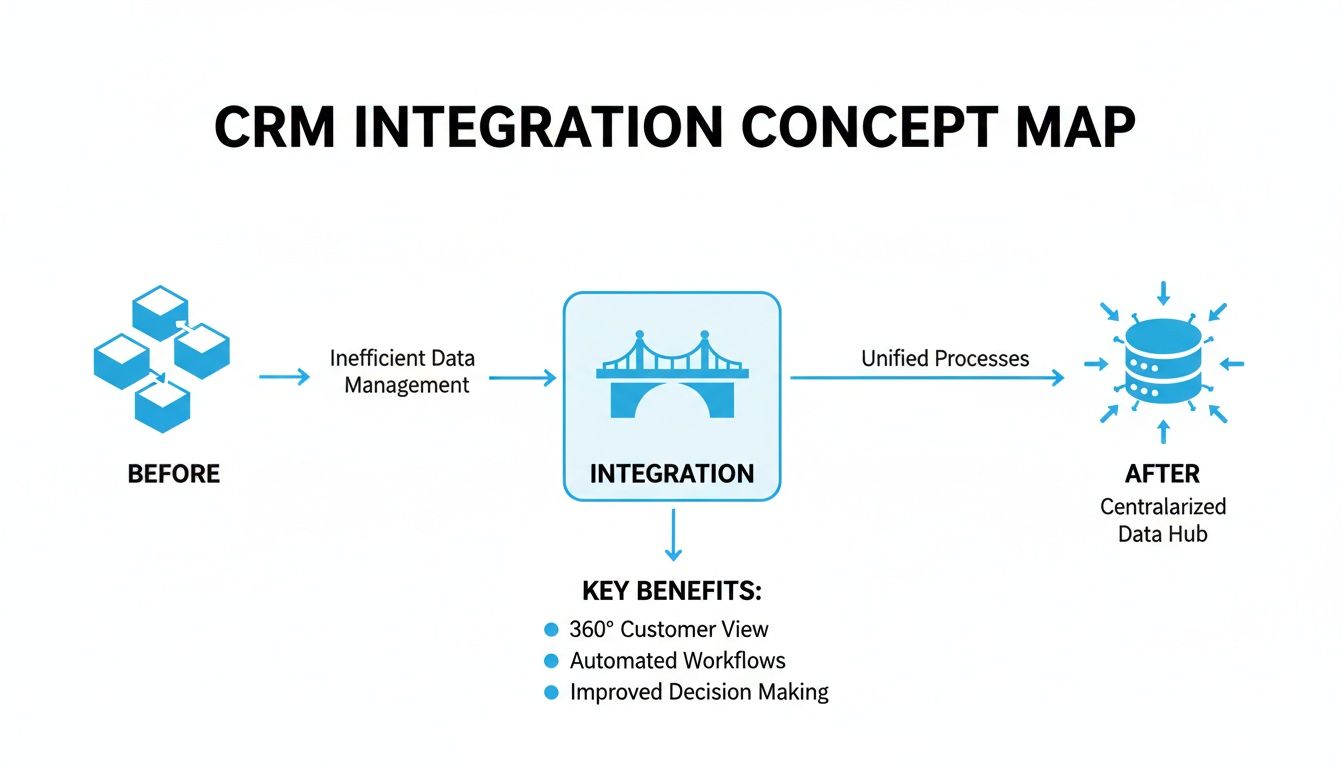
As you can see, the integration becomes the bridge, turning isolated bits of information into a central hub that fuels smarter decisions.
Third-Party Platforms: The Universal Translator
But what do you do when two of your favorite apps don't have that built-in connection? That's where third-party integration platforms shine. Tools like Zapier, Make, or MuleSoft act like universal translators, helping thousands of different apps communicate even if they weren't designed to.
These platforms work on a simple "if this, then that" logic. You set a trigger in one app (like "a new form is submitted on my website") and an action in another ("create a new contact in my CRM"). The platform handles the rest.
- Actionable Example (Home Service Franchise): A plumbing franchise uses Zapier to link its website contact form to its CRM and dispatch software. When a customer requests a quote online (the trigger), Zapier instantly creates a new lead in the CRM, adds the job to the schedule, and sends an automated text confirming the request (the actions). We dive deeper into this kind of automation in our guide on forwarding text messages to email.
Custom API Integrations: The Bespoke Suit
Sometimes, an off-the-shelf solution just won't do the trick. For truly unique needs, there's custom API integration. This is the most powerful and flexible route, but it's also the most technically demanding. An API (Application Programming Interface) is essentially a set of rules that lets software talk to each other. Building a custom integration means you're hiring a developer to use those rules to create a one-of-a-kind connection just for you.
Think of it like getting a bespoke suit. It’s tailored to fit your business processes perfectly, but it requires a bigger investment in time, money, and expertise.
This method is ideal for businesses with unique workflows or those needing to connect with proprietary, in-house software that isn't supported by other platforms. It offers unparalleled control and can handle highly complex data transfers.
- Actionable Example (Law Firm): A law firm has custom case management software that needs to sync with its billing system in a very particular way. They hire a developer to build a custom API integration that pulls billable hours, client notes, and expenses from case files and formats them into perfectly detailed invoices—a process far too specific for any standard tool.
Choosing Your CRM Integration Method
Picking the right integration path is crucial. Each one serves a different purpose, and what works for a small startup might not be the right fit for a large enterprise with complex, legacy systems. This table breaks down the key differences to help you decide.
Ultimately, the best method aligns with your technical resources, budget, and the complexity of the problem you're trying to solve. Start by checking for native integrations, explore third-party platforms for flexibility, and only turn to custom solutions when your needs are truly unique.
The Real-World Benefits of a Connected System
Let's move past the technical jargon. The real magic of CRM integration isn’t about APIs or code; it’s about what a connected system actually does for your business day in and day out. When your software starts talking, you finally get that elusive 360-degree view of every customer.
This complete picture is the key to creating personalized experiences that keep people coming back. More than that, it sets the stage for powerful automation. By letting your tools handle the grunt work, you start to systematically eliminate the small, human errors that quietly bleed profits. Your team gets to stop drowning in data entry and start focusing on what they do best: closing deals, solving tough problems, and building real relationships.

Unlocking a Complete Customer View
Think about it. Without integration, customer info is everywhere—a note in your email, a detail in your billing software, a log on your phone system. Your salesperson has no idea a client just had a frustrating support call. Your support team is blind to a pending contract renewal. This creates siloed, awkward interactions that erode trust.
CRM integration pulls all those scattered pieces together into one central place.
- Practical Example: A sales rep is about to call a customer. With a quick glance at the integrated CRM, they see the customer recently opened a support ticket for a billing issue. The rep can now start the call by proactively asking if the issue was resolved, turning a routine call into a relationship-building moment.
- Communication Logs: Every call, email, and text is automatically filed under the right contact.
- Purchase Data: Past invoices and billing details are visible to anyone who needs them, instantly.
This creates a single source of truth, giving every employee the context they need to have smart, informed conversations.
The result? A truly seamless customer journey. When your team has the full story, they can offer proactive, thoughtful service that makes people feel seen and valued, which is a massive driver for customer retention.
Driving Efficiency with Workflow Automation
One of the biggest wins from a connected system is automating those tedious, multi-step tasks. This isn't just a time-saver; it directly cuts your operational costs and makes your team far more productive.
Practical Example: Imagine a typical plumbing company. A customer calls. The receptionist has to manually create a new contact in the CRM, then switch to a separate calendar to book the job, and finally type out a confirmation text. With CRM integration, that entire chain reaction happens automatically the moment the call comes in. The workflow handles all three steps without a single click. You can find more strategies for improving your lead handling process by exploring different types of lead management software for small businesses.
This kind of automation isn't just for convenience. It's about building scalable, error-proof processes that let you grow your business without piling on more overhead.
Boosting Your Bottom Line and Proving ROI
At the end of the day, the most convincing reason for CRM integration is its direct impact on your revenue. When data flows freely, you close more leads, waste less time, and create the kind of customer loyalty that pays dividends for years. This is where the return on investment (ROI) becomes crystal clear.
The numbers don't lie. Some enterprise organizations see an average 299% ROI over three years from their integration efforts. Even better, platforms like Recepta.ai, which specialize in seamless CRM syncing, help customers achieve up to 80% cost savings and a 15x ROI simply by automating their data logging and catching every opportunity. To learn more, check out these insights on how Salesforce data integration drives ROI.
CRM Integration Examples That Solve Real Problems
Theory is great, but let's be honest—it’s seeing how technology solves real, everyday business headaches that truly matters. So, let's move beyond the abstract and look at how businesses are using CRM integration right now to stop leads from slipping through the cracks, grow their revenue, and get a serious leg up on the competition.
These aren't just hypotheticals; they're proven strategies.
Home Services: Streamlining From First Call To Final Invoice
If you run a home service company—like an HVAC, plumbing, or electrical business—you know the day is a constant shuffle of calls, quotes, and dispatches. Without your systems talking to each other, this process is just asking for costly mistakes. A missed call or a forgotten follow-up is money walking out the door.
Here’s how a smart integration turns that chaos into a well-oiled machine:
- Instant Lead Capture: A potential customer calls or fills out a form on your website. Instead of someone scrambling to write it down, the integration instantly creates a new lead in the CRM, capturing every detail.
- Seamless Job Booking: That CRM is connected directly to your scheduling software. Once a job is booked, it pops up on the technician's calendar automatically, complete with all the notes and job history. No more back-and-forth.
- Automated Follow-ups: The moment a technician marks the job as complete, the system can trigger an automated text or email asking for a review or offering a discount on a future maintenance plan.
This creates a closed-loop system where no opportunity gets wasted. Every interaction is tracked, every follow-up is handled, and the business runs smoothly without someone having to manually connect the dots. A perfect real-world example is how a HubSpot Live Chat integration funnels customer conversations directly into the CRM, keeping everything in one place.
Law Firms: Maximizing Every Billable Hour
In the legal world, every single minute counts. Accurately tracking time and communication isn’t just good practice—it's essential for billing and client management. A law firm still relying on manual time logs is almost certainly leaving money on the table.
This is exactly where integrating call tracking with case management software becomes a game-changer.
- The Problem: An attorney spends 15 minutes on the phone with a client discussing their case. After hanging up, they have to remember to log that time in the system. But if they get pulled into another urgent task, those billable minutes can easily be forgotten and lost forever.
- The Actionable Solution: With an integrated system, the call tracking software instantly recognizes the client's number, logs the exact call duration, and automatically creates a time entry in the correct case file. It can even attach a call recording or summary for future reference.
This one integration creates a precise, automated record of all client communication. It skyrockets billing accuracy, helps with compliance, and frees up attorneys and paralegals to focus on high-value legal work instead of administrative busywork. If you're looking to set this up, exploring the best call tracking software is a great place to start.
Franchises: Unifying A Disconnected Network
Multi-location franchises face a unique puzzle. Each branch operates on its own, but the parent company needs a bird's-eye view to make smart decisions about marketing and operations. When data is stuck in separate systems at each location, seeing the big picture is impossible.
A centralized CRM, fed by real-time data from every single franchise location, becomes the ultimate source of truth. It allows headquarters to spot trends, measure campaign results across different regions, and send targeted support exactly where it's needed most.
Think about a national chain of wellness clinics. By integrating the booking systems from all its locations into one master CRM, the corporate marketing team can suddenly:
- Pinpoint Top-Performing Regions: Easily see which locations have the highest booking rates and the most loyal customers.
- Launch Targeted Campaigns: Send a special offer to clients who haven't booked an appointment in over six months, segmented by their local clinic.
- Optimize Ad Spend: Analyze which marketing channels are driving the most appointments for specific branches and shift the budget for maximum impact.
This unified view turns scattered data points into powerful business intelligence. This level of connectivity is becoming the standard. North America currently dominates the global CRM market, holding a 43.6% share, and platforms that do this well inspire loyalty—Salesforce Sales Cloud, for instance, retains 72% of its users, a testament to its reliability and power.
Your Step-by-Step CRM Integration Plan
So, you're ready to connect your systems but aren't sure where to begin? A great CRM integration doesn't just happen. It's the result of a clear, practical roadmap that breaks a complicated technical project into a series of simple, manageable steps.
This plan will walk you through the entire process, from figuring out your "why" to launching that first game-changing automation. Think of it less like a strict set of rules and more like a strategic guide to make sure your integration is a success from day one.

Step 1: Define Your Goals
Before you touch a single line of code or connect a single app, you have to know why you're doing this. A successful integration is all about solving a real business problem. Start by asking pointed questions to uncover the specific headaches you want to make disappear.
Are leads falling through the cracks because follow-up is too slow? Is someone on your team wasting hours manually typing invoice details, leading to costly mistakes? Are your sales and support teams constantly tripping over each other because they're working with different versions of customer history?
Actionable Example: Don't just say, "we want to be more efficient." Instead, aim for something tangible, like, "we need to automatically log every inbound phone call as a new lead in our CRM to reduce manual data entry and ensure 100% lead capture."
Having a crystal-clear objective acts as your North Star, guiding every decision you'll make, from which tools you choose to how you map your data.
Step 2: Audit Your Existing Tech Stack
Next up, it’s time to take inventory. Get a clear picture of every piece of software your team uses daily. Create a simple list of every application that touches your customer journey—your phone system, website forms, marketing automation platform, accounting software, you name it.
For each tool, jot down what kind of data it holds and how your team is using it right now. This audit is fantastic for revealing exactly where your data is trapped in silos and highlighting the most critical connection points.
- Practical Example (Legal Firm): A law firm's audit might show they use a call tracking system for new client inquiries, a separate platform for case management, and a third tool for sending invoices. They quickly realize client call notes are being manually re-entered into the case management system—a process that’s both slow and a recipe for errors. This immediately points to the most valuable integration: connecting their phone system directly to their case software.
Step 3: Map Your Data Flows
With your goals set and your tools audited, it’s time to draw a map. A data flow map is just a simple diagram that shows what information needs to move from one application to another.
This step is absolutely critical for avoiding headaches down the road. You need to decide exactly what information gets shared, which way it flows, and what action kicks off the transfer.
Key Questions to Answer (with an example):
- Trigger: What starts the data transfer? (e.g., a potential client submits a "Contact Us" form.)
- Source: Where does the data come from? (e.g., the website's form software.)
- Destination: Where does the data need to end up? (e.g., your CRM.)
- Data: What specific info needs to move? (e.g., name, email, phone number, and the reason for their inquiry.)
Think of this map as the blueprint for your entire project. It gets everyone on the same page and ensures the final result matches your vision.
Step 4: Start Small and Score an Early Win
Whatever you do, don't try to integrate everything at once. That's a classic mistake that leads to overwhelming projects that drag on forever and eventually fizzle out. The smart approach is to start with a single, high-impact workflow that solves one of your most pressing problems.
Actionable Example: For many businesses, the best first project is automating lead capture. Connecting your website forms or call system directly to your CRM is a quick win. This one change can have an immediate, powerful, and measurable impact on the sales pipeline by ensuring no lead is ever missed.
By securing an early win, you prove the value of the project to your whole team and build real momentum for more ambitious integrations later. It’s the proof of concept that gets everyone excited about what’s possible.
Common CRM Integration Mistakes and How to Avoid Them
Getting a CRM integration project off the ground is exciting, but a few common missteps can easily derail your efforts. By knowing what these pitfalls are ahead of time, you can build a thoughtful strategy that sidesteps the usual headaches that sink so many of these projects.
Choosing the Wrong Tools for the Job
One of the most frequent errors is choosing tools based on hype rather than actual needs. It’s easy to get drawn to the platform with the flashiest features, but if those features don't solve your specific problems, you're just adding unnecessary complexity and cost.
Actionable Solution: Before you shop for tools, make a simple checklist of your top three to five "must-have" outcomes. For example: 1) Automatically log all inbound calls. 2) Sync new contacts to our email list. 3) Create a new sales opportunity when a pricing page is visited. Use this list to filter out the noise and focus only on solutions that directly address your core challenges.
Overlooking Data Hygiene and Mapping
Another major mistake is jumping into the integration without first cleaning and mapping your data. Connecting two systems with messy, inconsistent information is like trying to mix clean water with muddy water—you just end up with a bigger mess. This is how you get duplicate contacts, incorrect reports, and a frustrated team that can't trust the data they're seeing.
Practical Example: You have "John Smith" in your email list but "J. Smith" in your CRM. Without a clear data mapping rule, your integration might create a duplicate contact, splitting his history across two records and causing confusion for your sales team.
To prevent this, you absolutely have to:
- Audit Your Data: Before connecting anything, go through the data in both systems. Hunt down duplicates, standardize formats (like state abbreviations), and get rid of outdated entries.
- Create a Data Map: Actually draw it out. Visually map which fields in one system correspond to fields in the other. For instance, you need to decide if
Contact Namein your marketing tool should map toFull Namein your CRM.
Underestimating User Adoption and Training
Finally, even the most technically perfect integration will fail if your team doesn't actually use it. So many projects focus entirely on the technology and completely forget about the people. If the new workflow is confusing or feels like it's just adding more work, your team will quickly go back to their old, inefficient habits.
How to Ensure Buy-In:
- Involve Your Team Early: Ask your sales reps, "What is the most tedious, repetitive task you do every day?" Use that feedback to decide which workflows to automate first.
- Provide Practical Training: Don't just show them the new tool; demonstrate how it eliminates a task they hate. For example: "You no longer have to manually log your calls; the system does it for you. Here's where you can find the log."
- Start with One High-Impact Workflow: Get an early win on the board. When you solve one major headache for them, you’ll build the momentum and trust needed for the bigger changes.
Frequently Asked Questions About CRM Integration
Jumping into a CRM integration project naturally brings up questions about time, money, and what's technically possible. Getting straight answers is key to setting the right expectations and making sure your project is a success from the start. Let's tackle some of the most common questions we hear.
How Long Does CRM Integration Take?
The honest answer? It depends. The timeline for a CRM integration can be anything from a few minutes to several months.
If you're connecting two big-name platforms with a built-in, native integration—think Salesforce and Mailchimp—you could be up and running in less than an hour. These are usually designed to be plug-and-play.
Things get a bit more involved if you're using a third-party tool like Zapier to create a workflow with multiple steps. You'll want to set aside a few days for planning, building, and testing. A fully custom API integration is the biggest commitment, often taking three to six months depending on how complex the data mapping is and who you have on deck to build it.
What Are the Potential Costs Involved?
Integration costs can run from completely free to tens of thousands of dollars. Many native integrations are baked right into your software subscriptions, so there's no extra charge. Third-party platforms usually have a subscription fee, ranging from $20 to a few hundred dollars per month, based on how much you use them.
Custom API development is where the real investment comes in. Bringing in a freelance developer or an agency can cost anywhere from $5,000 to over $50,000, all depending on the project's scope. It gives you a perfectly tailored solution but requires a solid budget for both the initial build and any maintenance down the road.
Practical Example: A small real estate agency connecting their website contact form to their CRM using a native integration might pay nothing extra. However, a large franchise using a third-party tool to sync data between their proprietary booking system, CRM, and accounting software might pay $500/month for the platform plus a one-time developer fee.
Can I Integrate My Own Custom Software?
Yes, absolutely. This is exactly what Application Programming Interfaces (APIs) were made for. If your custom-built or in-house software has a solid, well-documented API, developers can build a bridge to connect it directly to your CRM or any other platform you use.
This route gives you total control over how your data moves between systems. It's the perfect solution for businesses with unique workflows that off-the-shelf products just can't accommodate, ensuring even your most specialized tools are part of one cohesive system.
Ready to see how a connected system can change the game for your business communications? Recepta.ai works with over 2,500 of the tools you already love, making sure every call, text, and lead is automatically logged in your CRM. Discover your ROI today.