Call Answering Service for Business: Costs, ROI and Setup
Only 37.8% of inbound calls to 85 U.S. small businesses across 58 industries reached a live person during a 30-day study. Another 37.8% went to voicemail, while 24.3% were never answered. That means about 6.2 of every 10 calls did not reach a human, according to Ubotika's small-business call monitoring. A CallRail benchmark in the same review put the average unanswered rate at 28%, meaning more than one call in four went unanswered.
Why Missed Calls Cost More Than You Think
A missed call can mean a lost job, not merely a message to return later. For a business, the practical cost is the value of the work the caller takes elsewhere.
In 2025, 77% of customers expected to reach someone immediately when contacting a company, according to Salesforce figures compiled by AMBS Call Center. In 2024, 33% of consumers said they would wait 20 minutes on hold before becoming annoyed, according to Ringover's customer-service research. Those expectations matter most when the call concerns an urgent need.
A furnace fails after dinner. The homeowner reaches voicemail and dials another company. After a burst pipe, the caller may choose a firm advertising same-day plumbing help in San Antonio. By the time your technician notices the missed-call alert, the job may already be booked elsewhere.
Put a price on that gap. If an unanswered call could have become a job, its potential loss is the value of that work. Repeat the calculation across missed opportunities, and the cost becomes easier to compare with the cost of keeping calls covered. The actual amount depends on the work and the calls your business fails to answer.
A call answering service for business covers calls while owners, technicians, clinicians, or front-desk staff are occupied or unavailable. The right setup depends on whether callers need a quick response, a booking, or a person who can handle a sensitive conversation. A missed-call recovery system can help capture the call and prompt follow-up, but urgent or complex conversations may still need human attention.
What a Call Answering Service Does and Which Model Fits
A call answering service is a front desk you rent by the minute or the month, instead of hiring someone to sit at it. It picks up, screens and qualifies the caller, books an appointment or takes a structured message, and passes the result to you by text, email, or CRM.
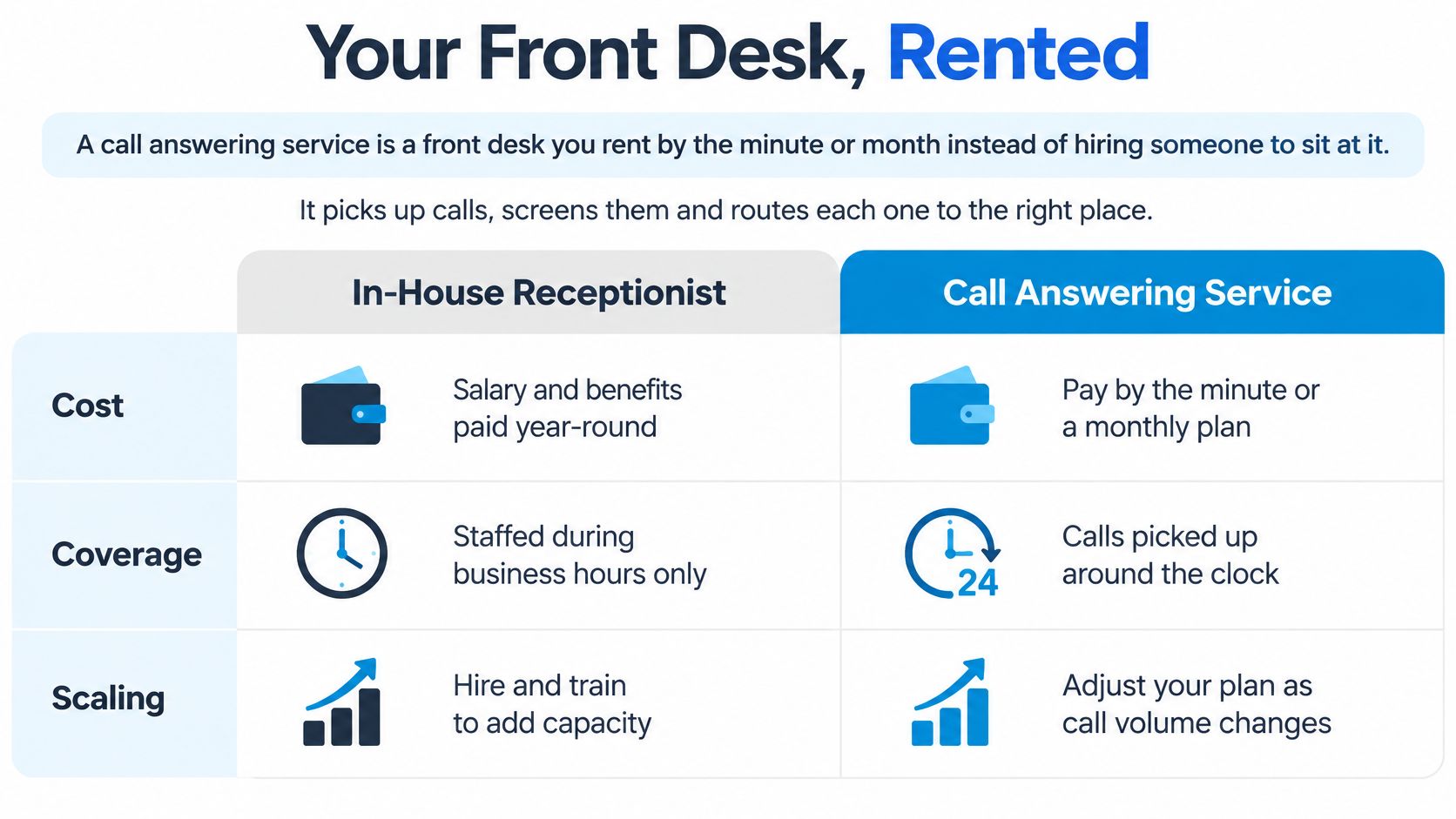
Coverage and price make the first cut. Fit by industry comes later, once you know which calls are routine and which ones can hurt you.
Four models side by side
| Model | Coverage | Typical Pricing | Main Limit |
|---|---|---|---|
| In-house receptionist | Paid business hours only, with gaps for lunch, sickness and holidays | Salary plus benefits, often several thousand dollars a month | Cannot cover nights, weekends or peak surges |
| Traditional live answering service | 24/7 with trained human operators | Quote-based, usually per minute or monthly plan | Scripts limit booking; cost rises with minutes |
| AI receptionist | 24/7, many calls at once | Usually flat or tiered monthly plan | Complex disputes and emotional calls need escalation |
| Hybrid AI plus human | 24/7 with human escalation | Flat plan plus fees for human minutes | Works only with clear escalation rules |
In-house covers the hours you already pay for, and it goes dark at lunch, on sick days, and after close. Traditional live answering puts trained operators on the line around the clock, but minutes add up and a tight script often stops at "we'll have someone call you." An AI receptionist takes many calls at once, which is the right tool for bookings, hours, and status checks. A hybrid keeps that capacity and adds a person when the call leaves the script. Hybrids fail when nobody has written the handoff.
Practical rule: Match the model to the call, not to the brochure. Routine bookings and FAQs suit AI. Emotional, legal, or clinical calls need a person, or a hybrid handoff with the trigger written down before go-live.
I would not buy 24/7 humans for a calendar full of oil changes, and I would not leave a gas-leak call on an unattended bot.
Core Features to Check Before You Sign
Price is the easy comparison. The workflow is what you are really buying. Ask for these seven items, and ask why each one exists in your day.
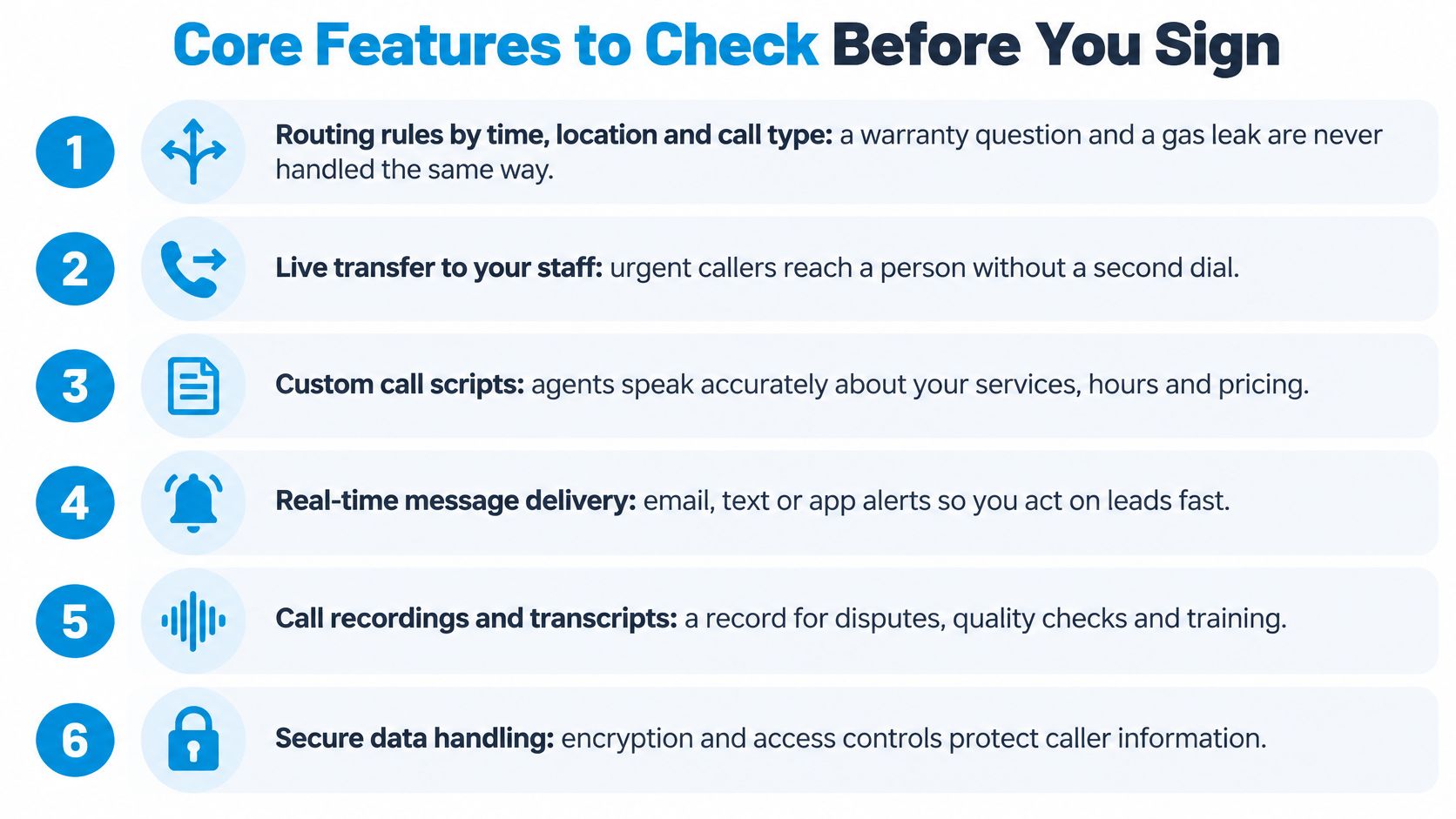
- Routing by time, location, and call type. A warranty question and a gas leak cannot share a path.
- Live calendar booking. A slot confirmed on the call beats an email that says "someone will reach out."
- Lead capture. Name, number, address, service needed, and urgency, in fields, not a paragraph.
- Live transfer with a fallback. If nobody picks up, the caller gets an immediate callback or SMS, not silence.
- Two-way sync with your CRM, calendar, and trade or practice software, so the record updates while the caller is still on the line.
- Summaries, recordings, and retention you control. You decide who can play a call back and how long the file lives.
- Analytics by location and hour. A blended weekly total hides the 7 a.m. spike at one shop.
One call, start to finish
It is Tuesday at 4:40 p.m. A homeowner reports a leaking water heater. The receptionist marks the job urgent, captures the address and callback number, checks which technician is still in that zone, and books a slot on the live calendar. The CRM gets a job tagged urgent. The caller gets a confirmation text before hanging up. If the caller then mentions a gas smell, the call transfers to the on-call dispatcher. Booking stops. Safety does not wait for a tidy note.
Before you sign, ask for a sample transcript, a sample CRM record from a real call, and the routing rules in writing. If the vendor can only show a slide, you do not yet know what your callers will hear. A short walkthrough of a live handoff is worth more than a feature grid:
Calculating the ROI of Answered Calls
Price the loss before you price the plan. The arithmetic is plain. Take calls that were not answered live, multiply by the share that are real leads, then by the share the service recovers, then by the booking rate, then by average job value. That product is booked revenue you can set next to the monthly fee.
A plumbing month, labelled illustrative
Use a shop with 300 inbound calls a month and a 62% share not answered live, the rounded gap from live answer rates in small-business monitoring. Say 20% of those missed calls are real leads, the service recovers 30% of them, 40% of recovered leads book, and the average job is $350. The plan is $300.
| Step | Input or Formula |
|---|---|
| Inbound calls per month | 300 |
| Calls not answered live | 186 (62% of 300) |
| Missed calls that are real leads | 37.2 (20% of 186) |
| Leads recovered by the service | 11.16 (30% of 37.2) |
| Recovered leads that book | 4.46 (40% of 11.16) |
| Booked revenue | About $1,562 (4.46 × $350) |
| Monthly service cost | $300 |
| Return on spend | About 5.2× ($1,562 / $300) |
About $1,562 in booked work against a $300 plan is roughly a 5.2× return in this illustration, before you count repeat work or reviews. Change the inputs for your trade. A $1,200 average job multiplies the same bookings. A shop whose missed calls cluster after 6 p.m. has more to recover than a shop that already answers the daytime rush.
Why the first half hour matters
Speed changes the booking rate you just plugged in. Research summarized from MIT and InsideSales, as recounted by Futuro's missed-call economics write-up, found that the probability of qualifying a lead drops 21-fold when response slips from 5 minutes to 30, and contact odds fall by roughly 100-fold over that same interval. A Harvard Business Review audit of 2,241 companies, cited in that same piece, found that responding within one hour made a firm nearly seven times more likely to qualify a lead than responding later. The average response in that audit was about 42 hours, and 23% of companies never responded.
A voicemail log does not create that hour. The call has to finish a workflow: intent, name, number, urgency, service area, a booked slot or a callback task, and a CRM write. Track median and 90th-percentile time from inbound call to first completed action, next to contact rate, qualified-lead rate, and booking rate. Call tracking software is how you split those buckets by campaign instead of guessing.
Vendor math is a hypothesis, not your P&L. Recepta.ai says customers report a 15× ROI and 80% savings versus in-house reception. Put those claims next to your own call log for a month. If your unanswered share, lead share, or job value is thinner than the illustration above, your return will be thinner too.
Compliance and Privacy Rules That Shape Your Setup
Legal choices change the setup as much as call volume does. Map them in three layers: breach response, outbound AI, and recordings. Then put the vendor's duties in the contract, not in a footer.
Breach clocks start on discovery
Under the FTC's Health Breach Notification Rule, covered vendors and related entities must notify every person whose unsecured personal health information was breached, notify the FTC, and in some cases notify the media, as the FTC's health privacy guidance explains. Individual notices go out without unreasonable delay and no later than 60 calendar days after discovery. If 500 or more people are affected, FTC notice is due no later than 10 business days.
Say a dental group's outsourced system exposes appointment notes for 600 patients on March 1. Assessment starts that day. Patient notices should be ready by April 30 at the latest, and the faster FTC and media notices need a named owner. If the vendor sits on the incident for a week, the 10-business-day clock is already partly gone. Write who detects the incident, who preserves call records, who contacts regulators, and who speaks to patients.
FTC breach-notice guidance also says substitute notices need a toll-free number active for at least 90 days, plus at least two ways for people to ask whether they were affected. That line is not your general voicemail.
AI voices, disclosure, and voiceprints
AI-generated outbound voices are treated as artificial voices under the Telephone Consumer Protection Act, so consent rules apply to automated follow-up calls. State rules sit on top of that, and they do not match. Clawhire's guide to AI customer conversations summarizes the split: Utah's 2025 law requires disclosure in certain regulated consumer transactions and disclosure when a consumer asks in other situations. Illinois, Washington, and Texas are among states that require notice and express written consent before collecting biometric data such as voiceprints. California has specific rules on analyzing voice recordings. Treat those state points as a checklist to confirm against current statute text with counsel, not as a substitute for reading the statute.
| Area | Requirement | What the Service Must Do |
|---|---|---|
| Breach notice to patients | FTC Health Breach Notification Rule: no later than 60 calendar days after discovery | Log the discovery date and start patient notices immediately |
| Breach notice to the FTC | Breaches affecting 500 or more people carry an accelerated deadline of 10 business days | Flag any incident touching 500 or more records on discovery |
| Breach contact line | Substitute notices require a toll-free number active for at least 90 days | Route privacy questions to a dedicated line, not general voicemail |
| AI outbound calls | AI-generated voices are treated as artificial voices under the TCPA | Capture and store consent before any automated follow-up call |
| AI disclosure | Utah 2025 law requires disclosure in certain regulated transactions and on consumer request | Disclose AI when asked and at the start of regulated transactions |
| Voiceprints and biometric data | Illinois, Washington and Texas require notice and express written consent | Play a recording notice and collect consent at the start of the call |
| Voice recording analysis | California has specific rules on analysing voice recordings | Confirm analytics features comply before switching them on |
Home-service firms are not outside this. A published privacy information for home service customers page is a useful model for telling callers what you keep. Pair it with a call recording compliance check before you turn transcripts on.
Ask any vendor, in writing: who owns the recordings, how long they are kept, how callers opt out, whether follow-up calls need consent, how cross-border callers are handled, and when a human must take over. Add encryption in transit and at rest, role-based playback, a retention period in the contract, and a duty to tell you about an incident within a stated number of hours. Rules differ by state and sector. Review the live setup with counsel before you turn it on.
Service Levels and Escalation Rules to Demand
Average speed of answer is a comforting number and a weak contract term. A center can post a tidy average while a slice of callers wait long enough to hang up. Service level is two parts: the share of offered calls answered inside a set threshold.
The widely used contact-center benchmark is 80/20, meaning at least 80% of calls answered within 20 seconds, as set out in CallForce's KPI benchmark notes. For plumbing, HVAC, clinics, law, or insurance, a tighter target such as 90% within 15 seconds cuts queue exposure, but only if staffing can carry the peak. If it cannot, the target is a slogan.

Numbers to demand separately
Ask for offered calls, answered calls, abandoned calls, threshold-abandoned calls, service level, average speed of answer, and maximum wait, split by hour and call type. Add median and 90th-percentile time to first completed action, plus escalation rate by call type and reason. Abandoned calls stay in the denominator after a short threshold. Drop them, and callers who give up make the service level look better. Put the thresholds in the service level agreement, not in a monthly PDF you cannot audit.
Who answers, and when a person takes over
- AI handles scheduling, FAQs, qualification, and status updates.
- A person takes over immediately when the caller asks for one.
- Your triggers for distress, disputes, clinical or legal judgment, and high-value leads are written per business type, not left to the agent's judgment on a busy night.
Disclosure timing changes those rates. Research summarized by Regal reports that callers who hear an immediate AI announcement tend to hang up sooner or give shorter, more robotic answers, treating the call more like an IVR. Test an opening disclosure against disclosure after intent is clear. Measure transfer rate, abandonment, and booked appointments, not how natural the voice sounds in a demo.
The call arrives, intent is detected, AI resolves it or escalates, a summary lands in the CRM, and an automatic SMS follows any call that was unanswered or came in after hours.
Longer waits raise abandonment and repeat dials. Overflow, after-hours cover, and a human on the exception list are what protect the 80/20 when the board lights up.
Choose Your Setup and Test It for 30 Days
The right stack follows the calls you really get, not the industry label on your website.
| Business Type | Typical Calls | Setup That Usually Fits | Escalate to a Human When |
|---|---|---|---|
| Home services: HVAC, plumbing, pest control, cleaning, construction | Emergencies, quote requests, bookings | Hybrid, with 24/7 live cover for emergencies | Gas smell, flooding or no heat in winter |
| Dental and medical offices | Appointments, reschedules, medical questions | Hybrid with a trained privacy line | Clinical question, privacy incident or distressed caller |
| Law firms and professional services | New matter intake, deadline questions | Hybrid with conflict-check intake | Legal advice request, deadline or dispute |
| Insurance, finance and real estate | Claim first notice, quotes, showings | AI for scheduling, human for claims | Active claim, complaint or high-value lead |
| Franchises and multi-location operators | Routing by site, bookings across locations | AI with location routing and site-level reporting | Unmapped location, complaint or closed site |
| Small businesses | Missed calls and after-hours messages | AI receptionist on a flat plan | Caller asks for a person |
If most calls are routine bookings and the budget is tight, start AI-led on a flat plan. If calls carry emergencies, legal exposure, or health information, use a hybrid with humans available around the clock. I would not start a clinic or a law firm on AI alone.
Two shops, two choices
A four-van HVAC company books tune-ups with AI and routes after-hours "no heat" and gas-smell calls straight to the on-call technician. Quotes that can wait until morning stay in the CRM with a morning callback task. A three-office dental group uses a hybrid: AI for reschedules and new-patient slots, a separate privacy line for "was my information exposed," and a trained front-desk path for clinical questions. The privacy line does not share a queue with cleaning appointments.
Four weeks, any provider
Any trial works if you get call logs, transcripts, and escalation records.
- Week one: Record your current answer rate, missed calls, and voicemail count. That is the baseline the vendor has to beat.
- Week two: Write routing rules, escalation triggers, and the consent and disclosure script. Do this before the first live call, not after a bad one.
- Week three: Run the service beside your team. Compare service level, booking rate, and time to first completed action against week one.
- Week four: Read transcripts and escalation logs. Keep the setup, tighten a trigger, or walk away.
If week three shows bookings up but emergency calls still sitting in a summary email, the model is wrong even when the dashboard looks green.
Recepta.ai answers business calls around the clock with conversational AI for routine questions, qualification, scheduling, and follow-up, and it hands the call to a trained person when the situation needs judgment. If you want that mix on your own lines, with CRM and calendar sync and a 30-day trial, visit Recepta.ai and run the four-week test against your current answer rate.