Call Recording Compliance: 2026 Guide to Laws & AI
Your office line plays a recording notice. Your CRM logs calls. Your team thinks the compliance box is checked.
Then your field technician calls a customer from a personal iPhone while driving between jobs. Your remote scheduler returns a voicemail from her own cell. Your loan officer texts, then taps to call from a mobile number that never touches your phone system. Those conversations often carry the same legal and operational weight as calls on the main line, but they sit outside the controls you paid for.
That's where many small businesses get exposed. The risk usually isn't a dramatic system failure. It's ordinary behavior. People use the fastest phone available, especially in home services, healthcare, insurance, real estate, and small professional firms. If those calls are part of customer service, scheduling, advice, consent, payment collection, or regulated communications, call recording compliance has to cover the actual workflow, not the one shown on your telecom vendor's sales page.
Understanding the Legal Landscape of Call Recording
Call recording compliance starts with one core distinction. In the United States, the rules split into one-party consent and two-party consent frameworks. In one-party states, one participant can consent to the recording. In two-party states, every participant must be informed and agree before recording starts.
As of 2026, 12 states require two-party consent, including California, Florida, Illinois, Maryland, Montana, New Hampshire, Oregon, Pennsylvania, and Washington, and violating those rules can lead to civil lawsuits and regulatory fines, according to Outreach's overview of call recording laws. If your business serves multiple states, the practical rule is simple. Build your process to satisfy the stricter standard whenever there's doubt.
Start with the consent map
A lot of owners get tripped up by legal language. Think of consent law like a front door rule.
If one person can open the door, the call can be recorded under a one-party rule. If everyone needs a key, you need all participants' knowledge and agreement before anything is captured.
Here's the working table many teams keep in their policy binder:
| State | Consent Requirement |
|---|---|
| California | Two-party consent |
| Florida | Two-party consent |
| Illinois | Two-party consent |
| Maryland | Two-party consent |
| Montana | Two-party consent |
| New Hampshire | Two-party consent |
| Oregon | Two-party consent |
| Pennsylvania | Two-party consent |
| Washington | Two-party consent |
For teams that want a broader governance framework, WorkSignal compliance is a useful reference point because it helps translate legal obligations into actual controls and monitoring practices, not just legal theory.
Practical rule: If your staff can't confidently identify the caller's jurisdiction at the start of a call, your process should assume a stricter consent requirement.
Then add the special regimes
State consent law is only the first layer.
For businesses with customers in Europe, GDPR adds stricter obligations around explicit consent, transparency, data minimization, and deletion rights. The same Outreach guidance notes that GDPR non-compliance can lead to fines of up to €20 million or 4% of annual global turnover. That changes how you design workflows. A vague “for quality purposes” message isn't enough if your broader handling of recorded data is sloppy.
Industry rules matter too:
- Healthcare practices have to treat recorded patient conversations like sensitive data. HIPAA requires providers to secure recordings with encryption and restrict access to authorized personnel.
- Financial firms can face separate recording mandates that go beyond general consent law.
- Cross-border businesses have to consider Canadian all-parties consent requirements and clearer purpose disclosure.
A practical way to organize this is to maintain three lists in your policy:
- Where you operate
- What types of calls you record
- Which legal regimes apply by business line
If you're documenting those obligations internally, it also helps to align call policies with broader documentation standards like compliance reporting practices, because auditors and regulators usually don't care that your phone setup was “mostly right.” They care whether you can show a repeatable process.
How to Obtain Proper Consent on Calls
Consent fails in practice for a boring reason. Teams rely on a generic disclaimer and assume it covers every scenario.
It doesn't.
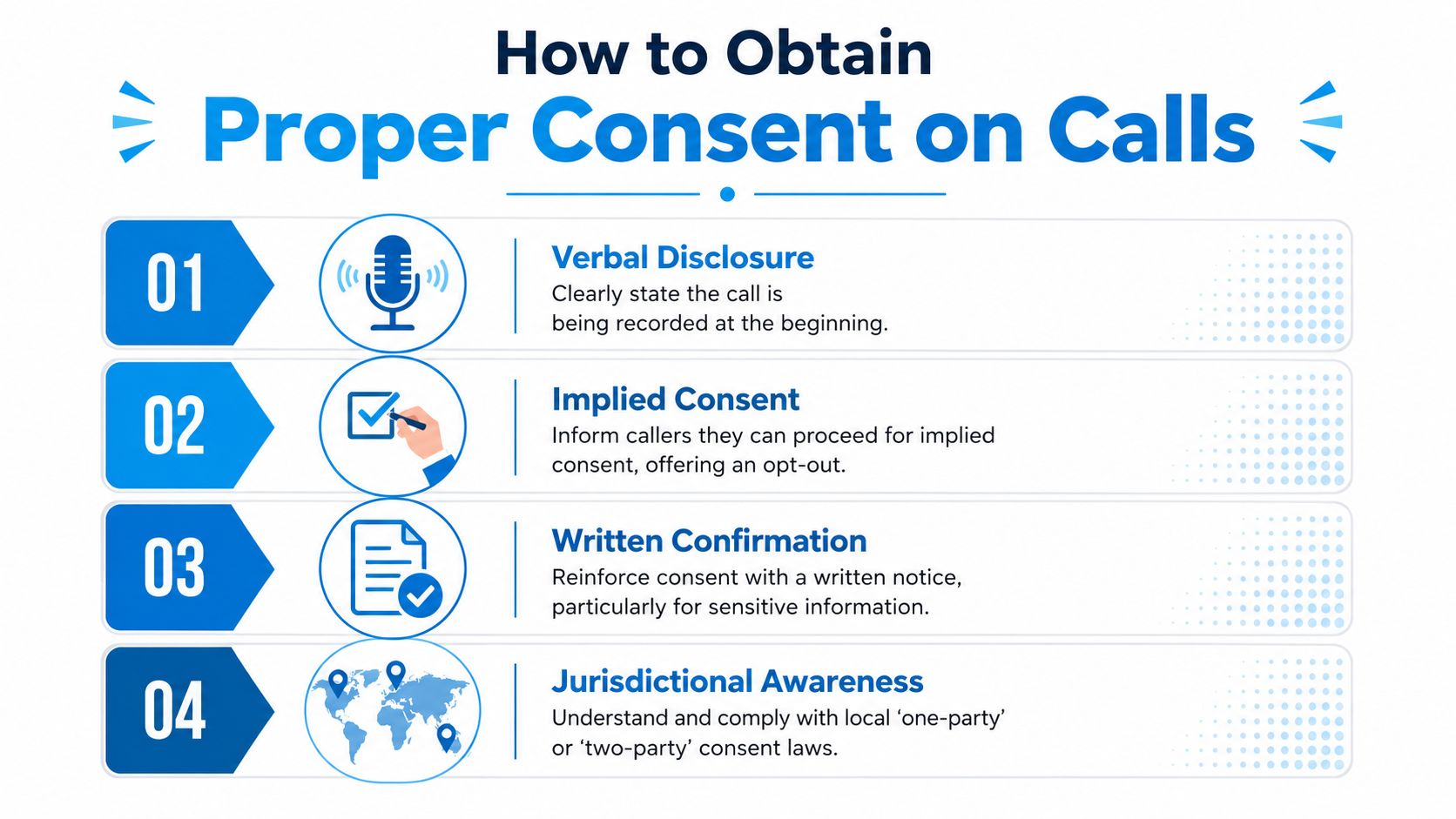
In the United States, 13 states mandate all-party consent, requiring explicit verbal or written agreement from every participant before recording begins. The practical implementation often involves automated disclosure with an affirmative opt-in such as “press 1 to consent,” as explained in Allo's call recording compliance guide.
Passive notice versus active consent
These two approaches get confused all the time.
- Passive notice tells the caller the conversation may be recorded.
- Active consent asks the caller to do something or say yes before recording starts.
Passive notice can work in some contexts. Active consent is safer when you're operating in all-party jurisdictions or handling more sensitive communications.
Use this rule of thumb:
| Method | What it sounds like | Best use |
|---|---|---|
| Passive notice | “This call may be recorded for quality and training purposes.” | Lower-risk inbound workflows where your legal review permits continued participation as consent |
| Active consent | “This call will be recorded. Press 1 to continue.” | Higher-risk jurisdictions, regulated workflows, and standardized intake processes |
| Verbal confirmation | “Before we continue, do I have your consent to record this call?” | Outbound calls and staff-led conversations that need a clear spoken record |
Copy-ready examples
For inbound calls to a main line:
“Thanks for calling. This call may be recorded for service, training, and documentation purposes. If you'd prefer not to be recorded, let the representative know before we continue.”
For inbound calls where you need stronger proof:
“Before we connect your call, please note this conversation will be recorded. Press 1 to consent and continue.”
After your team member joins, they should still confirm sensitive topics plainly:
- Payments: “Before we review billing, I want to confirm you're okay with this recorded line.”
- Clinical scheduling: “Before we discuss your appointment details, I want to confirm you consent to continue on a recorded call.”
Add a short explainer before the video if you train staff on scripts during onboarding.
What works on outbound calls
Outbound is where compliance usually gets messy, because the employee has to remember the opening line before the conversation moves.
Use a script that's short enough to survive real life:
- General outbound script: “Hi, this is Maria from Northside Plumbing. Before we continue, I need to let you know this call is being recorded. Do I have your permission to proceed?”
- If the person hesitates: “No problem. I can continue without recording if our policy allows, or we can switch to another channel.”
- If consent is refused: Stop recording immediately, or don't start it at all. Don't let staff negotiate around the policy.
If your script is too long, reps will skip it. A compliant sentence you'll actually use beats a perfect paragraph no one says.
Essential Technical Safeguards for Recorded Calls
The legal notice at the start of a call is only the first lock on the door. Once you store audio, transcripts, or notes, you need a secure system around them.
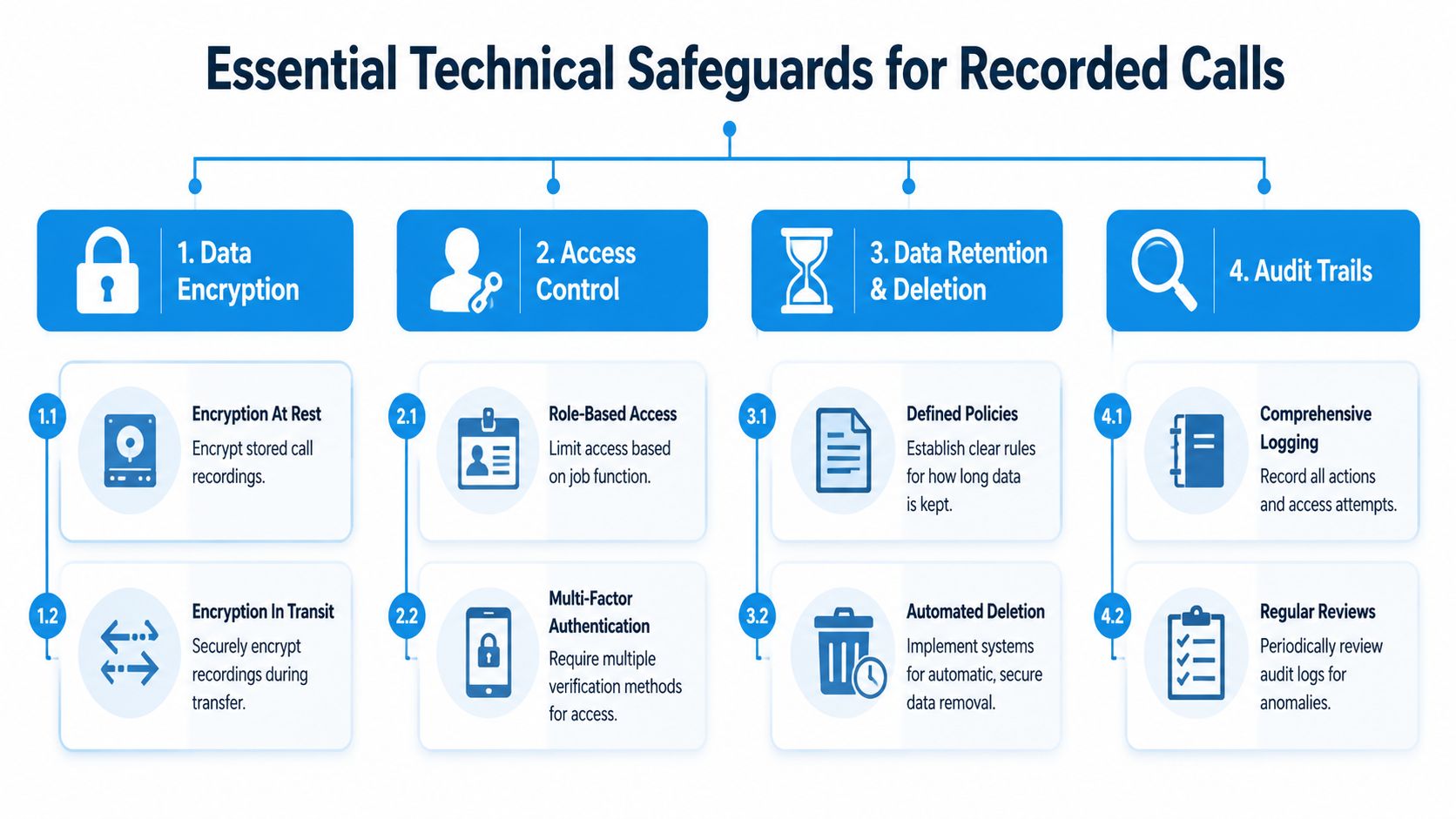
Think of recorded calls as cash in a safe. Encryption is the steel box. Access control is the keyring. Retention rules are the scheduled shredder. Audit logs are the security camera.
The controls that matter most
Start with the basics your system should enforce every day:
- Encrypt stored files: If recordings sit in a portal or cloud archive, they should be encrypted at rest.
- Protect transfers: If audio moves between phone systems, CRM tools, and storage platforms, it should be encrypted in transit.
- Limit access by role: Your dispatcher, office manager, owner, and compliance lead should not all have the same permissions.
- Keep logs: You need a record of who accessed, exported, or deleted a recording.
For small businesses, role-based access is often the weakest point. Owners give broad permissions because it's convenient. Then an employee downloads recordings onto a laptop or shares them by email. That's where “we had a secure system” falls apart.
If you're tightening your broader data posture, this practical primer on data security best practices is worth reviewing alongside your telephony setup, because recordings usually touch more than one system.
Payment data is the trap most teams miss
If your staff takes card payments by phone, you have another problem. PCI DSS Requirement 3.2 says you must prevent sensitive authentication data, such as CVV, from being stored in the recording at all. Encrypting the audio afterward is not enough. The data must be masked or blocked during capture, often through real-time DTMF interception, according to Paytia's PCI compliance guide for call recording.
That means this setup is not compliant:
- The customer reads the card number and CVV aloud.
- The system records it.
- You store the file securely and assume encryption solved the issue.
It didn't.
A workable setup looks more like this:
| Scenario | Bad practice | Better practice |
|---|---|---|
| Phone payment | Staff records the full payment conversation | System suppresses or masks card-entry tones and sensitive segments |
| Shared login | Whole office uses one admin password | Each user gets named access tied to job duties |
| Open-ended storage | Recordings sit forever “just in case” | Automatic deletion runs on a defined schedule |
For businesses adding AI into customer communications, the same security mindset applies outside voice. Hyperleap's guide to secure chatbots is useful because it frames privacy controls the same way good call systems should. Minimize data, restrict access, and design the workflow so staff can't accidentally create risk.
Secure systems don't depend on memory. They make the wrong action hard to take.
The Mobile Compliance Gap Most Businesses Ignore
Many owners tell me the same thing. “Our phone system is compliant.”
Maybe. But is your business compliant when the call happens on a personal mobile device instead of the office number?
That's the gap most guides skip. Your formal system may be clean while actual customer conversations happen elsewhere. A field estimator calls from a personal cell after checking a roof. A hygienist calls a patient from home. A claims rep uses a mobile number because it's faster than logging into the desk phone app. Those calls often carry scheduling details, service promises, payment discussions, or regulated information.
Why the office line isn't the full picture
Most compliance content assumes a central PBX or unified business phone system. That assumption breaks in companies with mobile staff, remote teams, and after-hours coverage.
According to Mobile2CRM's analysis of mobile recording risk, 40% of client interactions now occur on unmonitored mobile devices, creating a major blind spot. The same source makes the point many businesses miss: “partial compliance” is legally considered “non-compliance.”
That statement should change how you audit your setup.
If you run an HVAC company, here's the plain-English version. Recording the calls that hit your dispatch line doesn't solve the problem if technicians call customers directly from personal phones to confirm arrival windows, discuss change orders, or handle complaints. Regulators and opposing counsel don't grade on the honor system. They look at the communications that occurred.
The real-world failure pattern
The pattern usually looks like this:
- The company records inbound calls through its main number.
- Employees use personal phones for convenience.
- No one captures those calls or applies the same notice and retention rules.
- Management assumes coverage because the office system has a compliance feature.
That's not a technology problem alone. It's a policy problem and an operational design problem.
A practical fix starts with discovery:
- List the roles that make or receive customer calls away from the office.
- Identify devices used for those calls, including personal phones.
- Decide which conversations must be captured, which must not be recorded, and which should be routed through approved lines.
- Remove ambiguity so employees aren't improvising.
If your team still relies on ad hoc mobile calling, even basic operational steps like forwarding calls from a cell phone can become part of a safer design, especially when you need conversations to hit approved systems instead of private numbers.
A compliant office line doesn't protect the call your employee made from a parking lot on a personal phone.
Building Your Call Recording Policy and Checklist
Technology doesn't create compliance by itself. Policy does. The system only enforces what your business has decided.
That's why many companies with decent tools still struggle. A 2024 global study summarized by Circle.cloud found that 73% of businesses have implemented automatic call recording, but many still struggle with policy. The same source notes that recorded calls must be deleted after a defined period, and many organizations adopt a 90-day retention policy unless a justified legal or business need requires longer storage.
What your written policy must answer
A useful policy is short enough for staff to follow and specific enough to survive an audit.
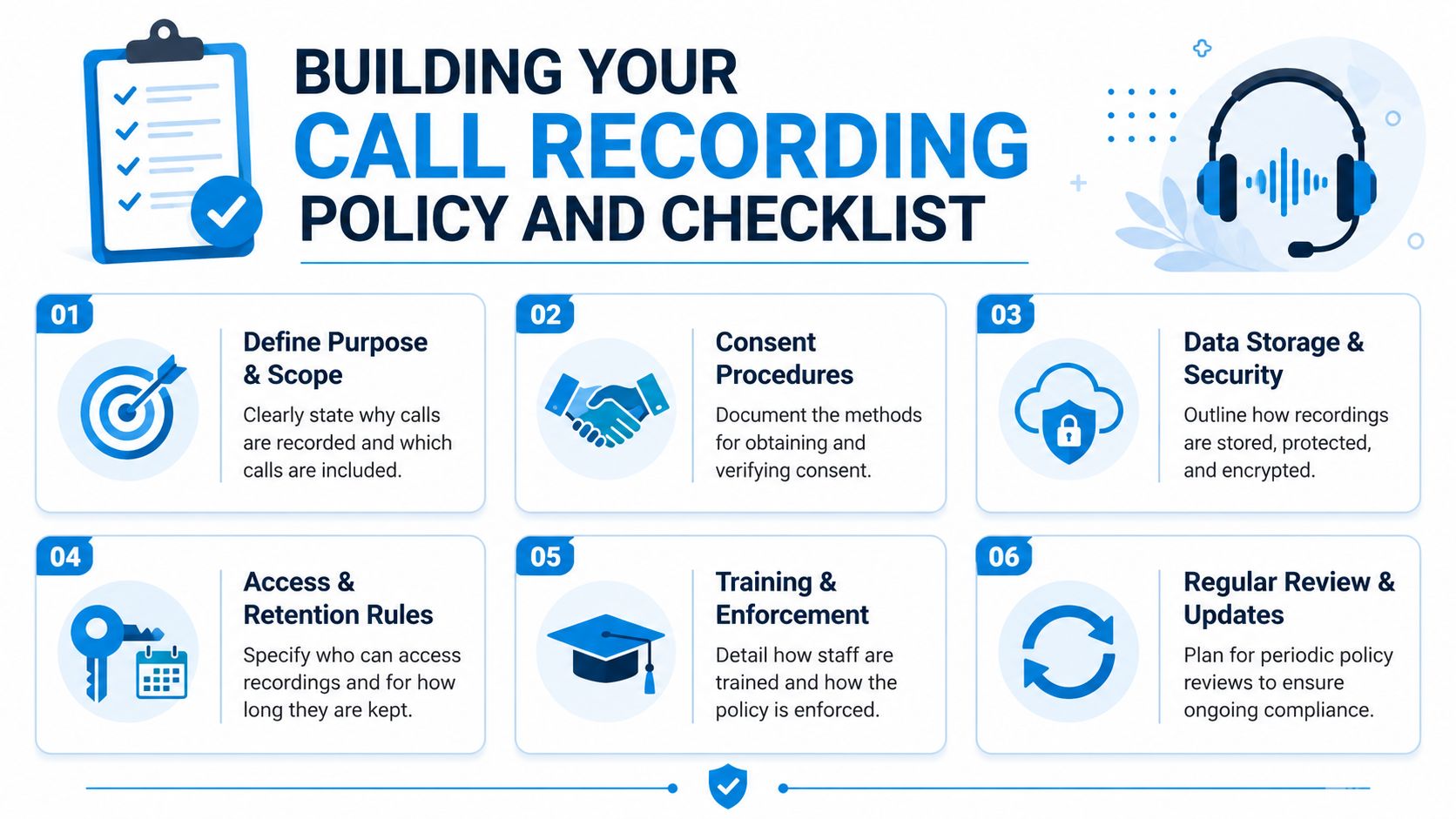
At minimum, your document should answer these questions:
- Why are calls recorded: Training, documentation, service verification, dispute resolution, regulated recordkeeping, or another defined purpose.
- Which calls are in scope: Inbound only, outbound, mobile calls, payment calls, after-hours answering, and calls made by field staff.
- How is consent obtained: Automated notice, verbal confirmation, keypress opt-in, or written notice tied to intake.
- Who can access recordings: Name roles, not departments in the abstract.
- How long are recordings kept: State the schedule and the reason.
- How are deletion requests handled: Assign an owner and a response process.
- What happens when consent is refused: Re-route, pause recording, or switch channels.
- How are employees trained: New-hire onboarding, refreshers, and spot checks.
A checklist owners can use this week
Here's a practical rollout sequence that works for small teams:
Map the call paths
Write down every way customer calls happen. Main line, direct dial, cell phone, telehealth line, after-hours overflow, technician callback.Separate high-risk conversations
Payments, health details, legal intake, investment discussions, and complaint escalation usually need tighter controls than general scheduling.Standardize scripts
Put the approved opening language in your call handling SOP, not in someone's memory.Set retention by category
Don't keep everything forever. If your team can't explain why a recording still exists, it probably shouldn't.Name a policy owner
Someone has to approve exceptions, review incidents, and update the rules when your workflow changes.Test the process like a customer
Call your own office, your after-hours line, and a field employee. See what happens.
A short example helps. A dental office might record inbound scheduling calls, block payment details from being stored, stop staff from using personal phones for patient callbacks unless routed through an approved app, and auto-delete standard recordings on a fixed schedule unless a complaint or legal hold requires retention.
That's a policy people can follow.
How AI Platforms Ensure Total Call Compliance
Manual compliance breaks in the same places every time. A rep forgets the script. A manager exports a file to the wrong folder. A retention rule exists on paper but no one configured it. A mobile call never enters the system at all.
AI platforms help because they move compliance out of memory and into workflow.
Where automation helps most
The strongest platforms don't just record audio. They enforce rules around the full lifecycle of the conversation.
That usually includes:
- Automatic disclosure based on the line or workflow
- Secure capture and logging so calls aren't scattered across devices
- Role-based access controls that match job duties
- Retention enforcement so old recordings don't pile up indefinitely
- Searchable audit trails that show who accessed what and when
For small businesses, the biggest gain is consistency. A compliant process should work the same way on a busy Monday morning that it does during a staff shortage or an after-hours handoff.
Why this matters for mobile and remote teams
The mobile gap is where AI-enabled systems become more than a convenience. They can centralize conversations, apply approved call handling logic, and reduce dependence on personal-device improvisation.
That doesn't mean software erases your legal obligations. You still need a real policy, proper consent language, and a clear decision on which calls should or shouldn't be recorded. But automation can remove the fragile parts of the process. It can make sure notices play, records are logged, and retention rules run without someone remembering to click the right button.
If you're evaluating how this fits into a wider service workflow, it helps to compare it with other automated customer service solutions that reduce human error while keeping records consistent across channels.
A good rule for owners is simple. If compliance depends on every employee doing the perfect thing every time, the system is too brittle.
If you want a way to handle calls without leaving compliance to memory, Recepta.ai is built for exactly that. It combines AI receptionist workflows with secure call handling, logging, scheduling, and escalation support, so businesses can standardize customer conversations across office lines, after-hours coverage, and distributed teams. For home services, healthcare, legal, finance, insurance, and multi-location operators, that means fewer missed interactions and a clearer path to consistent call recording compliance.