Call Summary: What It Is and Why It Matters
At the end of a busy day, the problem usually isn't the phone system. It's the missing memory between the conversation and the next action. A dental front desk may have five voicemails, three callbacks, and no reliable record of whether a patient agreed to a recall appointment. A small HVAC team may remember that someone wanted a Tuesday installation, but not whether Tuesday was confirmed or merely discussed. A sales manager may open a deal record and find a sentence that says only, “Follow up next week.”
A call summary closes that gap. It turns a conversation into an operational record that another person can understand, act on, and find later. The useful summary isn't a transcript pasted into a CRM. It's the connection between what was said, what someone promised to do, and what the business needs to remember.
The End-of-Day Problem Every Busy Phone Line Knows
At 5:12 p.m., the owner of a four-person HVAC company is looking at five voicemails and a callback list with three names. One caller asked about replacing a failing furnace. Another wanted an estimate before the weekend. A third may have agreed to a Tuesday installation, but the technician who took the call has already left for the day.
The owner can return the calls, but returning a call isn't the same as knowing what happened. Without a usable note, the next employee starts by asking the customer to repeat the story. That creates friction, and it can produce practical mistakes, such as quoting the wrong job, promising an unavailable appointment, or failing to mention an objection that had already been addressed.
A dental front desk sees the same pattern in a different form. A patient asks about insurance, says they need to check their schedule, and agrees to think about a recall appointment. If the record contains only “patient called,” the next person has no context. The patient may fall through the recall process even though the clinic did everything except preserve the conversation.
Practical rule: If another employee can't identify the outcome and the next owner from the note, the call hasn't been documented yet.
The issue also appears in B2B sales. A second representative takes over a deal and has to guess whether the first rep promised a product demonstration, a revised proposal, or a pricing exception. A missed promise can stall a deal, damage trust, or force the customer to repeat information that should have traveled with the account.
That's why a call summary matters even when the call itself seemed ordinary. It preserves the customer's need, the employee's commitment, and the next move in a form the business can reuse. Teams that are also evaluating specialized capture tools, such as a Voice-to-ELN app for scientists, will recognize the same principle: spoken information becomes useful only after it has been converted into a reliable record.
A missed call needs a response, but the response also needs context. A practical guide to missed call messages can help with the first step. The call summary handles what happens after contact is made.
What a Call Summary Actually Is
A call summary is the structured post-call artifact a team files after a conversation. It should be created within minutes of the call ending, while the participants, decisions, and unresolved questions are still clear. At minimum, it records the date, participants, purpose, outcome, decisions, action items, owners, and next steps.
The distinction between a summary and a transcript matters. A transcript is the full cargo manifest. It may contain every word, interruption, repetition, and aside, but a busy employee often can't find the decision inside it. Rough personal notes are the opposite. They may be fast and useful to the person who wrote them, but they depend on that person's shorthand and can disappear when the employee changes roles or leaves.
A call summary is closer to a shipping receipt. The receipt tells you what shipped, where it went, and what must happen next. It doesn't list every crate or reproduce every conversation between warehouse staff. The summary preserves the operational result without forcing the next employee to read the entire exchange.
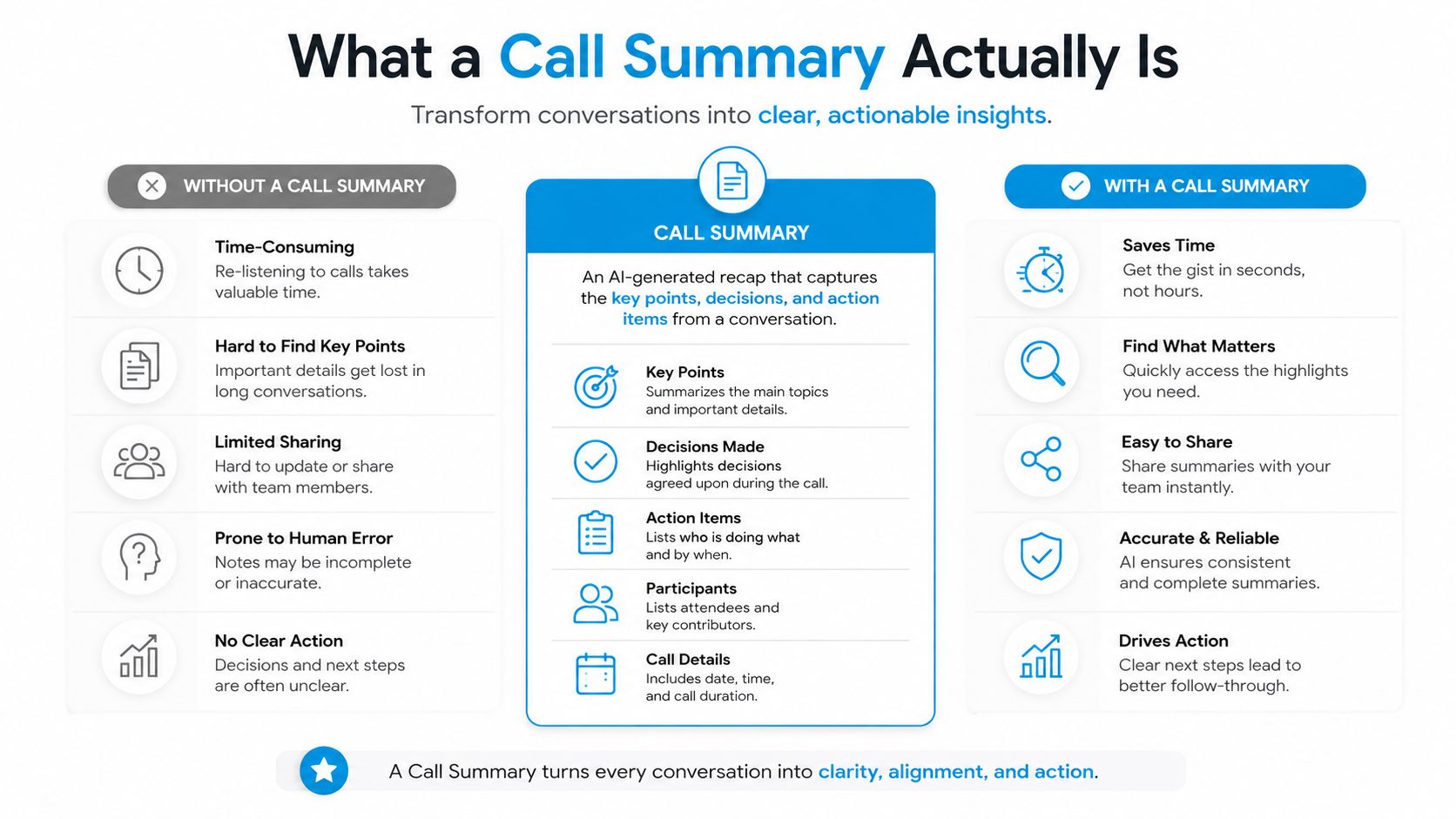
A portable format makes the record useful beyond the original phone application. The same fields can move into a CRM contact, a helpdesk ticket, a shared drive, or a clinical intake workflow. The wording may change by industry, but the structure remains stable.
The three fields that prevent a useless note
Every summary needs to answer three questions:
- Who: Which customer, patient, prospect, employee, or external party was involved?
- What: Why did the call happen, and what was decided?
- What next: Who owns the follow-up, and when must it happen?
A note that says “discussed estimate” fails because it leaves out the customer's identity, the decision, and the next action. A stronger entry says, “Jordan Lee requested a furnace replacement estimate. Technician visit is proposed for Tuesday afternoon. Maria will confirm availability and call Jordan back.”
That format is short enough for daily use and specific enough for another person to act without guessing.
Why Call Summaries Matter for Record-Keeping, Follow-Ups, and Compliance
A summary earns its place because it supports several workflows at once. It preserves the record, carries follow-up work, supports review, and gives managers structured information instead of scattered impressions.
Record-keeping protects the business memory
Employees forget details, change roles, and leave. A durable summary gives the next person an answer to “what did we agree on?” when a dispute surfaces later. It also helps a manager separate a customer's stated request from an employee's assumption.
That distinction matters in a contractor's office. “Customer wants repair” is different from “customer approved the diagnostic visit but hasn't approved replacement work.” The second note preserves the commercial boundary and reduces the chance that someone treats an estimate as authorization.
Follow-ups need an owner, not a hopeful sentence
“Follow up soon” isn't a task. “Sam sends the revised contract by Tuesday” is a task because it names the owner and the deadline. Best practices for call recording compliance are relevant here because a business needs to understand not only how it captures a conversation, but also how the resulting record is stored and used.
A recovery representative working against a 24-hour callback SLA can hit that target only if the open objection survives the handoff. The summary should carry forward the specific issue, such as “customer is concerned about installation access,” rather than reducing the call to “interested, follow up.”
Compliance requires a usable trail
A summary isn't a substitute for a formal compliance program, but it can preserve the facts people need to review. A HIPAA-covered clinic may need a record of a patient's request and the staff response. A financial advisor may need documentation of disclosures and client instructions under applicable SEC recordkeeping requirements. A contractor may need a written trail connected to lien waivers, approvals, or changes in scope.
The right level of detail depends on the workflow and the organization's retention policy. The practical test is whether an authorized reviewer can understand what was communicated, what consent or decision was recorded, and what remained unresolved.
Coaching and analytics depend on comparable records
Managers can't identify recurring missed questions or pricing patterns from inconsistent notes. A common structure lets them compare calls without requiring every review to begin with a full recording.
Over time, a collection of summaries can support an objection library, reveal repeat issues, and help teams examine why calls end in different outcomes. Raw audio may contain the evidence, but structured summaries make the evidence easier to classify and use.
Practical Call Summary Templates You Can Use Today
A useful template should be strict about the fields that protect follow-through and flexible about the wording employees use inside them. The two examples below can be copied into a CRM, helpdesk, or shared note system. For teams designing a phone workflow, a call-in script resource can help standardize the conversation before the summary is written.
| Field | Sales Discovery Call | Service Escalation Call |
|---|---|---|
| Call metadata | Date, time, rep, channel. Example: “March 14, Maya, inbound phone call.” | Date, time, agent, channel. Example: “March 14, Luis, inbound phone call.” |
| Caller or prospect identity | Name, company, role. Example: “Jordan Lee, Operations Manager, Northstar Dental.” | Name, account or ticket reference. Example: “Avery Chen, account 4817, ticket 2094.” |
| Purpose | Reason for the conversation. Example: “Evaluating appointment automation for two locations.” | Reason for escalation. Example: “Refund has not appeared after a billing correction.” |
| Background | Relevant context. Example: “Front desk handles calls manually and loses context during transfers.” | Account history. Example: “Customer contacted support earlier about the same invoice.” |
| Pain points uncovered | Customer problems in their own words. Example: “We spend the first part of every callback figuring out what the caller already told us.” | Impact of the issue. Example: “The missing refund is affecting the customer's month-end reconciliation.” |
| Customer's own words | One short, meaningful line. Example: “I need every rep to see the same next step.” | One short, meaningful line. Example: “I don't want to explain this to another department.” |
| Objections raised | Concern and response. Example: “Asked about setup effort. Rep explained the review process and handoff.” | Complaint or risk. Example: “Concerned that the correction wasn't confirmed in writing.” |
| Decisions and outcome | Qualification result. Example: “Agreed to review a workflow demonstration.” | Resolution status. Example: “Billing correction confirmed, written refund notice still pending.” |
| Next steps with owner and date | Action, owner, deadline. Example: “Maya sends workflow outline by Thursday. Jordan confirms attendees.” | Action, owner, deadline. Example: “Luis sends confirmation email by Friday. Billing reviews status.” |
| Probability or priority flag | Sales judgment. Example: “Potential fit, timing depends on internal approval.” | Service priority. Example: “Escalated, customer awaiting written confirmation.” |
| Escalation path | Usually not applicable. Example: “Bring implementation specialist to the next call.” | Department and handoff. Example: “Billing queue, then team lead if confirmation is delayed.” |
| Customer sentiment | Tone and confidence. Example: “Interested but cautious about migration.” | Tone and urgency. Example: “Frustrated, cooperative after a clear explanation.” |
The field many teams overlook is Customer's own words. A concise, accurate line often becomes the sentence used in the follow-up email, the coaching review, or the next rep's preparation. It also keeps the summary anchored to the customer's stated concern rather than the employee's interpretation.
Don't turn the template into a miniature transcript. Each field should earn its space by helping someone make a decision, complete a task, or understand the account later.
Manual Versus Automated Summaries and the Trade-Offs
Manual and automated summaries solve different operational problems. Human notes usually provide better nuance when a customer disputes a fact, uses unusual language, or describes an emotionally complicated situation. Automated summaries provide speed, consistency, and coverage across routine calls that employees might otherwise document incompletely or not at all.
Manual writing also keeps the writer engaged with the outcome. A rep who must enter an owner and deadline is more likely to notice that no one accepted the task. The trade-off is that manual work competes with the next call, and rushed employees tend to produce entries such as “customer interested” or “resolved,” which don't preserve enough context.
Automation helps with same-day CRM hygiene. It can create a first draft while the conversation is still fresh and make the long tail of low-stakes calls visible. It also introduces a privacy surface because audio may be transcribed, processed, stored, and routed through additional systems.
| Consideration | Manual summary | Automated summary |
|---|---|---|
| Speed | Depends on workload and employee discipline. | Draft can be available soon after the call. |
| Consistency | Strong only when training and templates are followed. | More uniform structure, provided fields and prompts are configured well. |
| Coverage | Often weakest during busy periods. | Useful for calls that would otherwise receive little or no documentation. |
| Nuance | Better for disputed facts, emotion, and unusual context. | Can compress or misinterpret subtle meaning. |
| Accuracy ceiling | Limited by attention, memory, and writing skill. | Limited by transcription, speaker attribution, and model interpretation. |
| Privacy | Fewer automated processing steps. | Requires clear controls for recording, access, retention, and redaction. |
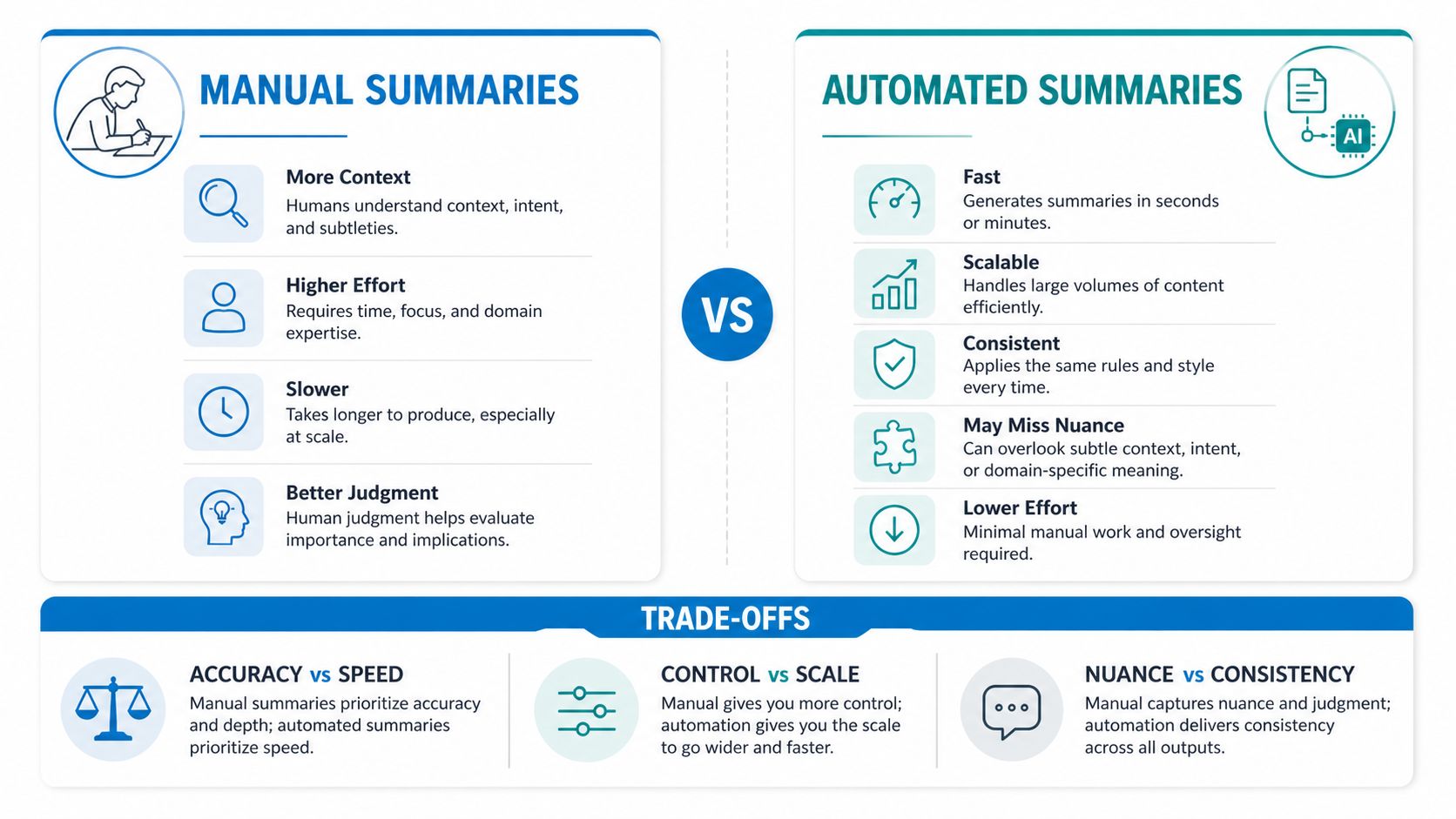
The decision rule is straightforward. High-stakes, regulated, or emotionally charged calls deserve a human pass. High-volume, routine calls are where automation is most useful, especially when a person reviews the outcome and the action fields.
The dangerous middle ground is an AI draft that nobody edits. It looks complete, so the team trusts it, but a wrong owner, missing objection, or invented resolution slips into the CRM. Automation should remove typing, not remove accountability.
Accuracy, Privacy, and the Guardrails That Make AI Summaries Safe
Accuracy and privacy belong in the same discipline. A summary that misstates a medical request is unsafe because it is inaccurate. A perfectly transcribed payment detail is unsafe if the wrong people can access it. Production readiness requires both a trustworthy record and controlled handling of that record.
Test the transcription layer on real calls
AI summarization starts with speech-to-text, so transcription quality sets the ceiling for everything downstream. In contact-center audio, word error rate, or WER, is a key benchmark. A review of AI transcription accuracy notes that WER above about 30% is generally too inaccurate for readable summaries or reliable extraction, while vendors often target sub-10% WER for operational use.
Real calls matter more than vendor demonstrations. Test a representative sample that includes accents, interruptions, product names, account numbers, noisy rooms, and the vocabulary your staff uses. If quality drops below your documented threshold, the fallback should be clear, such as requiring a human summary or preventing the draft from syncing to the CRM.
Speaker attribution matters just as much. Overlapping speech can push diarization error into the low-teens, and far-field or noisy recordings can drive transcription error rates well above 35%, according to background on how AI meeting notes work. In healthcare benchmarking discussed there, the best ASR system recorded WER around 18.2% and tcpWER around 18.65%, which still supports treating summaries as decision support rather than verbatim records.
Control what enters and leaves the pipeline
Redact payment information, health information, and other regulated identifiers before the summary reaches a broad human audience or a general CRM field. Limit access by role, define retention periods, and make sure recordings and summaries don't travel unmonitored to tools that haven't been approved.
Consent must also be explicit. Capture it at the start of the call, record the consent status against the summary, and define what happens when a caller declines. The summary process shouldn't depend on employees remembering a separate privacy step after the conversation ends.
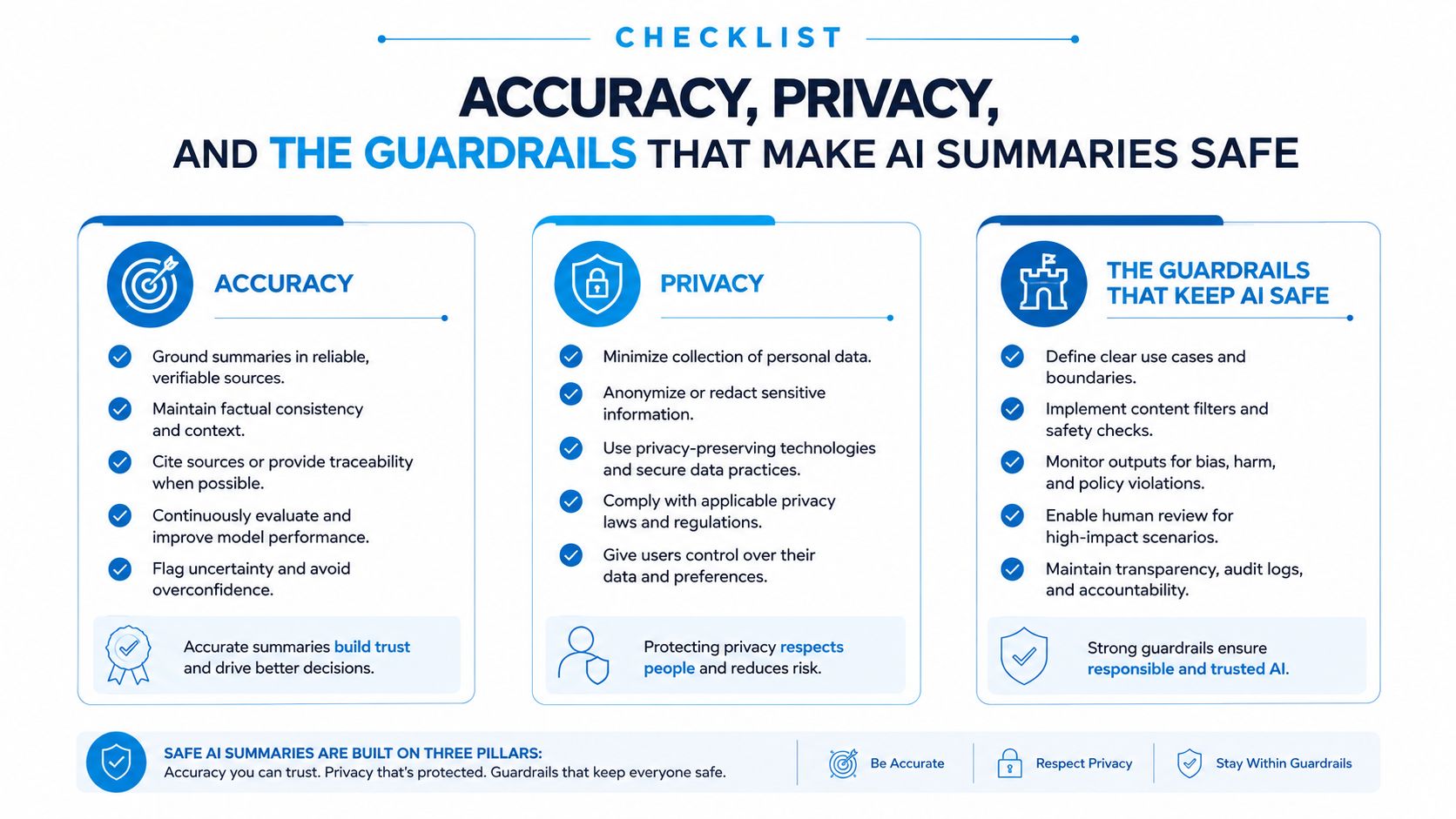
A safe pipeline passes a simple accountability test: can the operations lead explain to a customer or regulator what was recorded, who saw it, and how long it is kept? If the answer depends on asking a vendor representative to investigate, the workflow isn't ready.
Connecting Summaries to CRMs and Daily Workflows
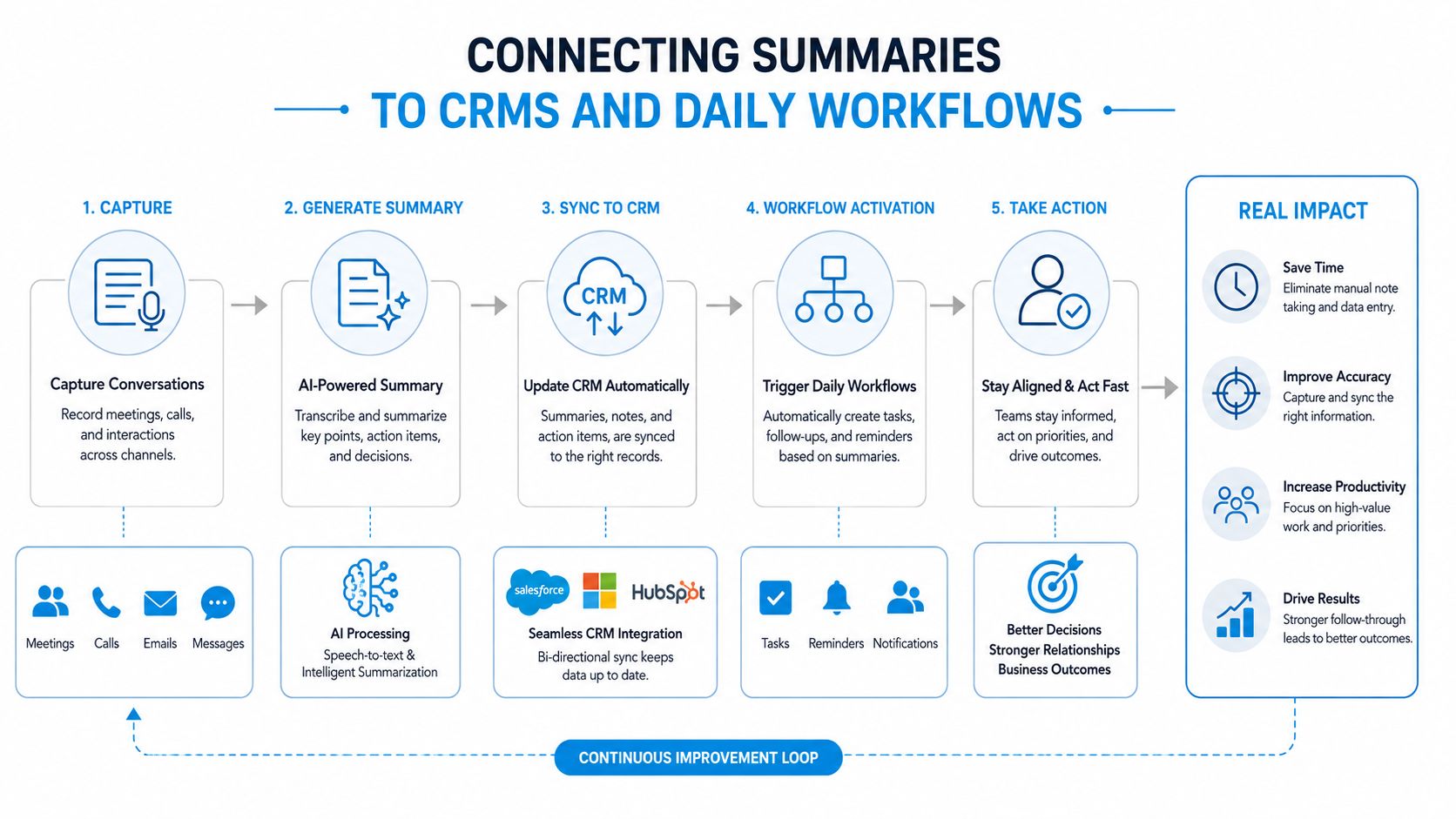
A summary becomes operational when it travels beyond the note-taking tool. The path should begin when the call ends, continue into the customer record, and branch into the work different people need to perform.
The core fields to sync are summary text, action items with owners and dates, sentiment, and call outcome. In Salesforce, these may connect to a contact, account, activity, and task. In HubSpot, they may belong to a contact timeline and follow-up task. In Pipedrive, they may attach to a person, organization, activity, and deal.
The workflow should create more than a recording link. A rep needs a task, a manager may need a coaching note, and an operations analyst may need a tagged outcome for reporting. If only the recording syncs, the business has preserved the raw material but hasn't completed the handoff.
Where integrations usually break
- Loose phone matching: A shared household or office number can create a duplicate contact instead of updating the correct record.
- Private task routing: An action item may land in one employee's personal to-do list rather than a shared queue the team can monitor.
- Incomplete payloads: The recording may sync while the summary text or action fields are missing.
- Silent webhook failure: An update can fail without a visible alert, leaving the CRM stale while staff assume the workflow worked.
A practical CRM integration guide can help teams map these handoffs before choosing an implementation pattern.
Before production, run a small checklist:
- Match calls to known contacts and test duplicate handling.
- Confirm that each action item includes an owner and deadline.
- Verify that failed syncs create an alert and a retry path.
- Check permissions for recordings, summaries, and sensitive fields.
- Compare the source note with the CRM record after test calls.
Building a Call Summary Habit That Actually Compounds
A call summary becomes more valuable when the team writes one consistently, not when it produces an impressive note occasionally. Over a sustained operating period, recurring objections become easier to spot in weekly reviews, repeat-caller history becomes visible before the next conversation, and new hires can search recent customer context instead of relying on informal explanations.
The habit also changes the quality of meetings. A sales manager can discuss specific objections instead of asking reps how calls “felt.” A clinic supervisor can find unresolved patient requests without relying on one receptionist's memory. A home service owner can see which estimates were discussed, assigned, and left open.
Use these questions as a self-audit:
- Can you find every customer promise made by phone last week?
- Do action items reach the correct owner within an hour of the call ending?
- Is the CRM record richer after the call than it was before?
If any answer is no, the problem may be the template, the handoff, or the review step. Fix that failure before adding more automation.
Recepta.ai can handle inbound and outbound calls, capture follow-ups, and send call summaries to tools such as email, Slack, and Teams while supporting CRM and calendar workflows. Visit Recepta.ai to see how its AI receptionist and human escalation model can fit into your call-summary process.