Customer Behavior Analysis for Service Businesses
Your Google Ads dashboard says traffic is healthy. Your website form submissions look fine. You even see people spending time on service pages.
But the schedule still has gaps.
That usually means the problem isn't demand. It's visibility into behavior. In service businesses, customers rarely move from ad click to booked appointment in one clean line. They call from a mobile search result, abandon when no one answers, text later, ask a spouse, compare two providers, then disappear. A standard analytics dashboard won't show most of that.
Customer behavior analysis matters because it connects those scattered actions into something operators can use. For a dental office, that might mean spotting where treatment inquiries stall between first call and confirmed visit. For an HVAC company, it might mean learning that after-hours calls convert differently from daytime web leads. For a law firm, it often means understanding which intake patterns lead to scheduled consultations and which ones die in voicemail, callbacks, or incomplete forms.
The practical version of customer behavior analysis isn't academic. It's looking at call logs, appointment schedules, CRM notes, form submissions, cancellations, no-shows, and follow-up outcomes together, then asking one hard question: where are we losing people who already showed intent?
Why Your Marketing Metrics Don't Tell the Whole Story
A common pattern shows up in service businesses. Marketing improves first. Traffic rises, click-throughs look better, and the phones ring more often. Yet revenue feels uneven because bookings, consultations, and completed jobs don't move in sync with those top-of-funnel numbers.

A plumbing company might get more calls after launching local ads, but many of those calls hit lunch-hour staffing gaps. A dental clinic might attract more website visits, but new patients abandon the process when they can't tell whether insurance is accepted. A small law firm might generate more form fills, yet consultations stay flat because follow-up takes too long and prospects call another office.
The missing layer is behavior between interest and action
Marketing metrics tell you that someone noticed you. They don't tell you whether that person got through, felt reassured, received a callback, found a convenient appointment, or gave up after one bad interaction.
That's where customer behavior analysis becomes operational. It looks at the actual path a person takes, not just the channel that introduced them. If you're already reviewing tools for best call tracking software, you're already moving in the right direction because service demand often becomes visible first in the phone system, not in Google Analytics.
Practical rule: If a customer has to switch channels to complete a task, your reporting has to follow that switch too.
Customer expectations have changed, increasing the pressure on businesses. 76% of consumers said in 2021 that they expect their experience to reflect that companies are collecting data about them, and 49% of customers expect to be recognized for loyalty, according to Pecan's summary of customer expectations. For a service business, that means callers don't want to repeat everything on every interaction. Returning patients expect the office to know they were seen before. Repeat clients expect context.
What this looks like in practice
A service operator usually needs answers to questions like these:
- Missed intent: How many first-time callers hung up before reaching a person?
- Scheduling friction: Which appointment types get delayed the longest before confirmation?
- Follow-up gaps: Which leads entered the CRM but never received a meaningful next step?
- Client care signals: Which complaints, reschedules, or support requests tend to precede churn?
Website data helps. It just isn't the whole system.
If your current reporting stops at sessions, clicks, and form fills, you're probably judging performance too early in the journey. Service businesses win or lose in the handoff between marketing and operations.
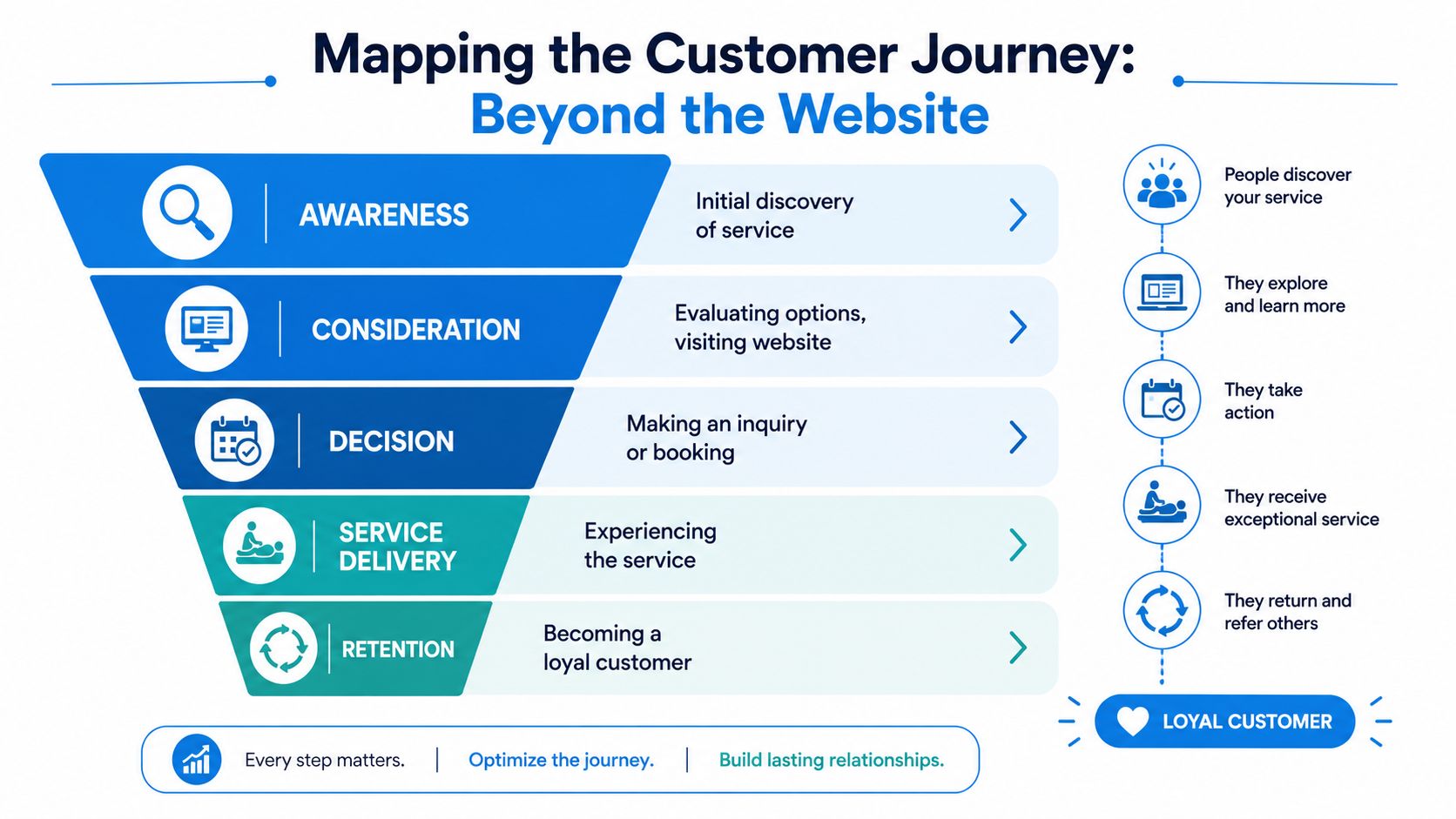
Mapping the Customer Journey Beyond the Website
A service customer journey rarely looks like the neat funnel diagrams used in ecommerce. Nobody adds an HVAC emergency to a cart and checks out in one session. People search, compare, call, ask questions, get interrupted, call back, schedule, reschedule, and sometimes need reassurance before they commit.
Modern customer behavior analysis treats those interactions like footprints. According to Glassbox's guide to customer behavior analysis, the discipline combines qualitative and quantitative methods and uses digital breadcrumbs such as click paths, support chats, and form inputs to reconstruct customer journeys. The important shift is operational: analysis becomes a real-time decision system, not just a report you review after the month closes.
Think like an investigator, not a dashboard
The useful question isn't “How many visitors did we get?” It's “What sequence of events usually happens before a booking, and where does that sequence break?”
For a service business, the journey often looks like this:
- Discovery: A homeowner searches “emergency electrician near me” or gets referred by a friend.
- Evaluation: They visit your site, check hours, reviews, financing, or insurance information.
- Inquiry: They call, fill out a form, start a chat, or text your office.
- Decision: They compare your response speed and clarity with another provider.
- Delivery: They interact with your team, technician, attorney, hygienist, or front desk.
- Retention: They rebook, refer someone, or call again when a new need appears.
A standard funnel catches only part of that. A practical journey map adds the events that matter in service operations: missed calls, voicemails, callbacks, estimate approvals, appointment reminders, late arrivals, no-shows, follow-up calls, and unresolved issues.
For teams trying to connect those channels, an omnichannel customer experience approach usually makes the journey easier to interpret because it treats the phone, inbox, booking flow, and CRM as parts of one experience.
Build the journey from real interactions
This video gives a useful visual frame for how behavior analysis works across touchpoints:
A practical journey map for a dental clinic might include:
| Journey stage | Observable behavior | Operational meaning |
|---|---|---|
| Search and visit | Reads insurance and new patient pages | Wants clarity before contacting |
| First inquiry | Calls, asks about availability | High intent, needs fast answer |
| Scheduling | Accepts or declines offered times | Convenience affects conversion |
| Pre-visit | Responds to reminders or reschedules | Commitment is strengthening or weakening |
| Post-visit | Rebooks or asks billing questions | Satisfaction and retention signal |
The strongest signal often isn't a pageview. It's a high-intent human interaction, like a call asking, “Can you get me in this week?”
What works and what doesn't
What works is a journey map tied to actual systems. Pull call timestamps, booking records, CRM stages, and support notes into one timeline. Then review patterns by service line, location, and lead source.
What doesn't work is treating every contact as a clean digital event. Service journeys are messy. If you only analyze what happens on the website, you'll optimize the least decisive part of many buying decisions.
Key Models for Understanding Your Clients
Once you've mapped the journey, you need models that help you interpret it. Most service businesses don't need a complicated analytics stack to start. They need a few decision-friendly ways to group people, compare outcomes, and spot risk.
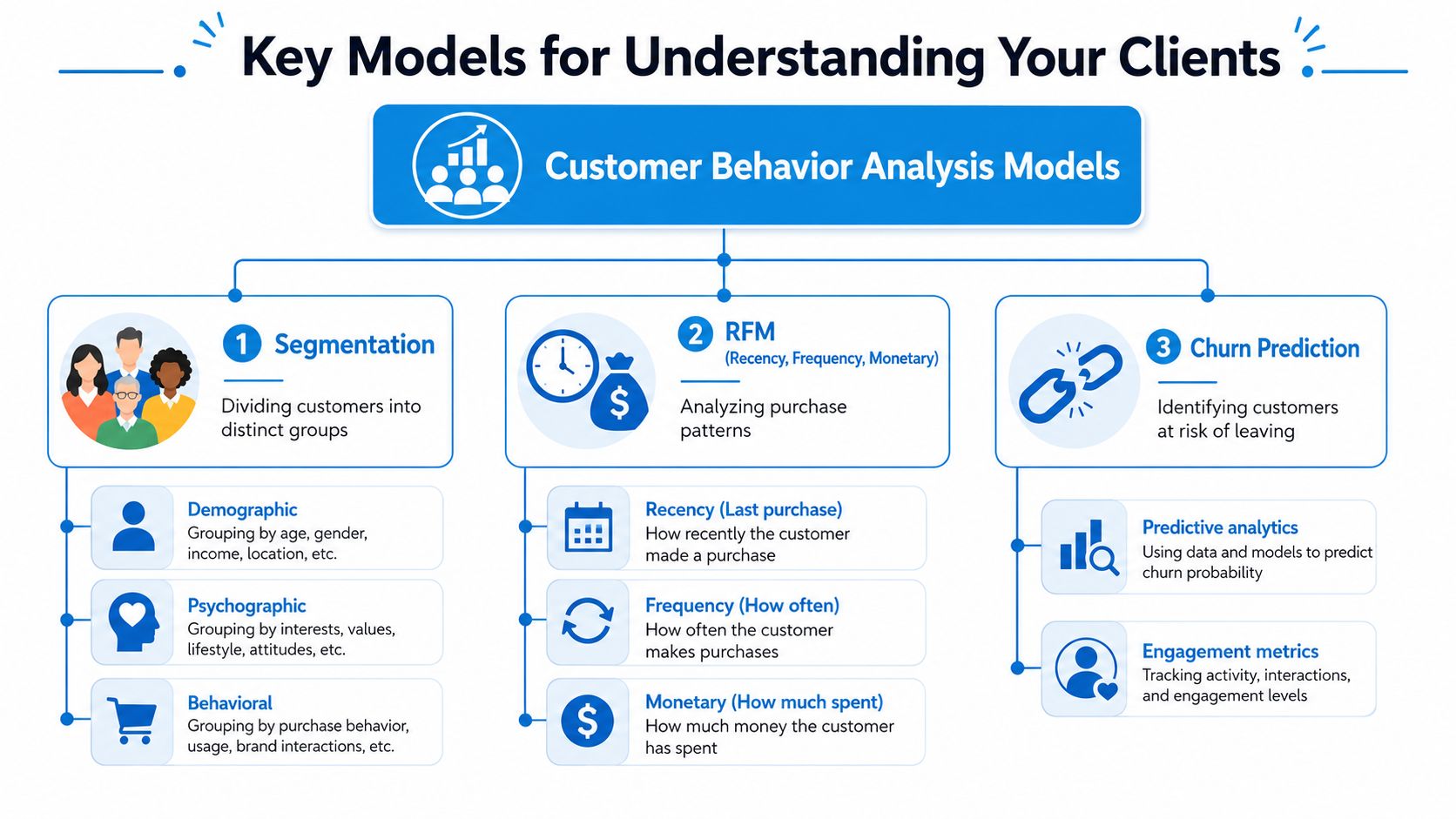
Segmentation tells you who behaves differently
Segmentation becomes useful when it reflects operational reality, not just demographics. A dental office gets more value from separating new patient inquiries, existing patients overdue for follow-up, and patients with pending treatment acceptance than from grouping by age.
For a law firm, segmentation might include:
- Urgent inbound matters: People who need immediate counsel and usually call first.
- Research-oriented prospects: People who read multiple practice area pages before contacting you.
- Referral leads: People who often arrive with more trust and different intake behavior.
- Existing clients with new matters: People who expect continuity and less friction.
If you work in remodeling or home services, Constructo Marketing's guide to targeting high-value remodeling leads is a useful reminder that behavioral segmentation usually becomes stronger when paired with demographic, geographic, and psychographic context. The point isn't to build a giant persona deck. It's to see which groups convert, hesitate, rebook, and complain differently.
RFM works even outside retail
RFM stands for Recency, Frequency, Monetary, and service operators often overlook it because it sounds like retail analysis. It still applies.
An HVAC company can use it like this:
- Recency: Which customers had service most recently?
- Frequency: Which households call repeatedly for repairs, tune-ups, or seasonal maintenance?
- Monetary: Which accounts tend to approve higher-value work or recurring plans?
That model helps identify very different outreach strategies. A recent one-time emergency caller may need a follow-up offer tied to preventive maintenance. A long-standing, frequent customer may need white-glove scheduling and priority reminders. A lapsed high-value client may need direct outreach from a service manager, not a generic email.
Operator's note: The best segment isn't the most interesting one. It's the one your team can act on next week.
Cohort analysis answers whether a change actually worked
Service teams often confuse a seasonal shift with an improvement. Cohort analysis fixes that. As Jimdo's customer behavior analysis guide notes, cohort analysis is valuable because it separates time-based effects from segment effects. In practice, that means you can compare people acquired or booked in the same period and see whether later changes in service or messaging improved retention or conversion.
A practical example:
A dental office changes its scheduling process in March. Instead of asking new callers to wait for a callback, front-desk staff begin offering appointment slots during the first interaction. The office can compare March inquiry cohorts with later cohorts to see whether time-to-schedule, completed visits, and rebooking behavior improved.
A law firm can do the same after changing intake scripts. An HVAC company can compare customers acquired during a maintenance campaign before and after introducing evening callback coverage.
Keep the models simple enough to use
You don't need perfect data to make these models helpful. Start with fields you already have in your CRM, call platform, and scheduling system.
Use these questions to keep the analysis grounded:
- Which segments get the fastest response, and do they convert better?
- Which clients look valuable on revenue but create avoidable service friction?
- Which month or campaign cohorts stayed engaged longer after a process change?
- Which group needs a different follow-up path instead of more lead volume?
The biggest mistake is choosing a model because it sounds advanced. The better move is choosing one that helps your front office, intake team, or operations manager change behavior quickly.
Gathering the Right Data for Analysis
Most businesses already have more usable customer data than they think. The issue isn't absence. It's fragmentation.
Website analytics sit in one tool. Call activity lives in a phone platform. Appointment outcomes sit in scheduling software. Notes are buried in the CRM. If no one connects them, customer behavior analysis turns into partial storytelling.
Digital data shows interest. Operational data shows intent.
The measurement problem is getting harder. As IntentHQ explains in its discussion of changing behavior measurement, the phaseout of third-party cookies is pushing teams toward first-party signals and blended models that include operational data, human-assisted interactions, and bookings. That matters even more for service businesses because many decisive actions happen before any online transaction.
A law firm is a good example. Someone may land on a practice area page, then call, ask whether the firm handles their matter, get told someone will call back, and never hear back. The website visit is visible. The failed handoff is where the lead was lost.
Comparison of Customer Behavior Data Sources
| Data Source | Type of Insight | Example for a Law Firm |
|---|---|---|
| Website analytics | Pages viewed, traffic source, device behavior | Prospects visit personal injury pages but don't submit a form |
| Call logs | First-contact volume, unanswered calls, repeat callers, call timing | Intake calls spike after hours and many aren't answered live |
| Call recordings or transcripts | Objections, confusion, urgency, staff consistency | Callers repeatedly ask whether the firm handles a certain case type |
| CRM records | Lead stage movement, follow-up status, source tracking | Web inquiries enter the CRM but stall before consultation |
| Appointment or consultation schedule | Time-to-book, cancellations, no-shows, reschedules | Qualified leads wait too long for a first consultation slot |
| Email and text follow-up data | Responsiveness to reminders and next steps | Consultation reminders are sent, but reschedule requests aren't handled well |
| Surveys or post-matter feedback | Satisfaction, friction, unmet expectations | Former clients mention poor communication during onboarding |
That's why detailed reporting matters. A clean call detail reporting workflow can expose patterns that broad lead counts hide, especially when you need to compare missed calls, callback delays, repeat callers, and outcomes by source or office location.
What to collect first
Don't start by collecting everything. Start with the sources closest to conversion failure.
A practical order looks like this:
- Call activity: unanswered calls, abandoned calls, repeat callers, first-time caller patterns.
- Booking data: scheduled, rescheduled, canceled, no-show, completed.
- CRM movement: new lead, contacted, qualified, unresponsive, closed.
- Inquiry content: top questions from calls, chats, and form submissions.
- Post-service feedback: complaint themes, review prompts, referral signals.
If you want a compact operating stack, tools usually fall into clear roles:
- Google Analytics 4: Useful for entry points, pages, and channel behavior.
- CRM platforms: Useful for lead stage history and follow-up visibility.
- Scheduling software: Useful for appointment friction and completion patterns.
- Call platforms: Useful for intent, responsiveness, and handoff quality.
- Conversation systems: A platform like Recepta.ai can serve this function, because it logs inbound interactions, scheduling activity, call summaries, and follow-up records in one operational stream.
What not to rely on alone
Don't rely only on form conversions. They favor customers comfortable with digital self-service and ignore a large share of high-intent callers.
Don't rely only on staff memory either. Teams remember dramatic calls and unusual complaints. They miss patterns spread across many ordinary interactions.
The best data set for service businesses is usually boring, repetitive, and operational. That's exactly why it works.
A Practical Five-Step Approach to Analysis
Most owners don't need a data team to begin. They need a repeatable way to investigate one business problem at a time.
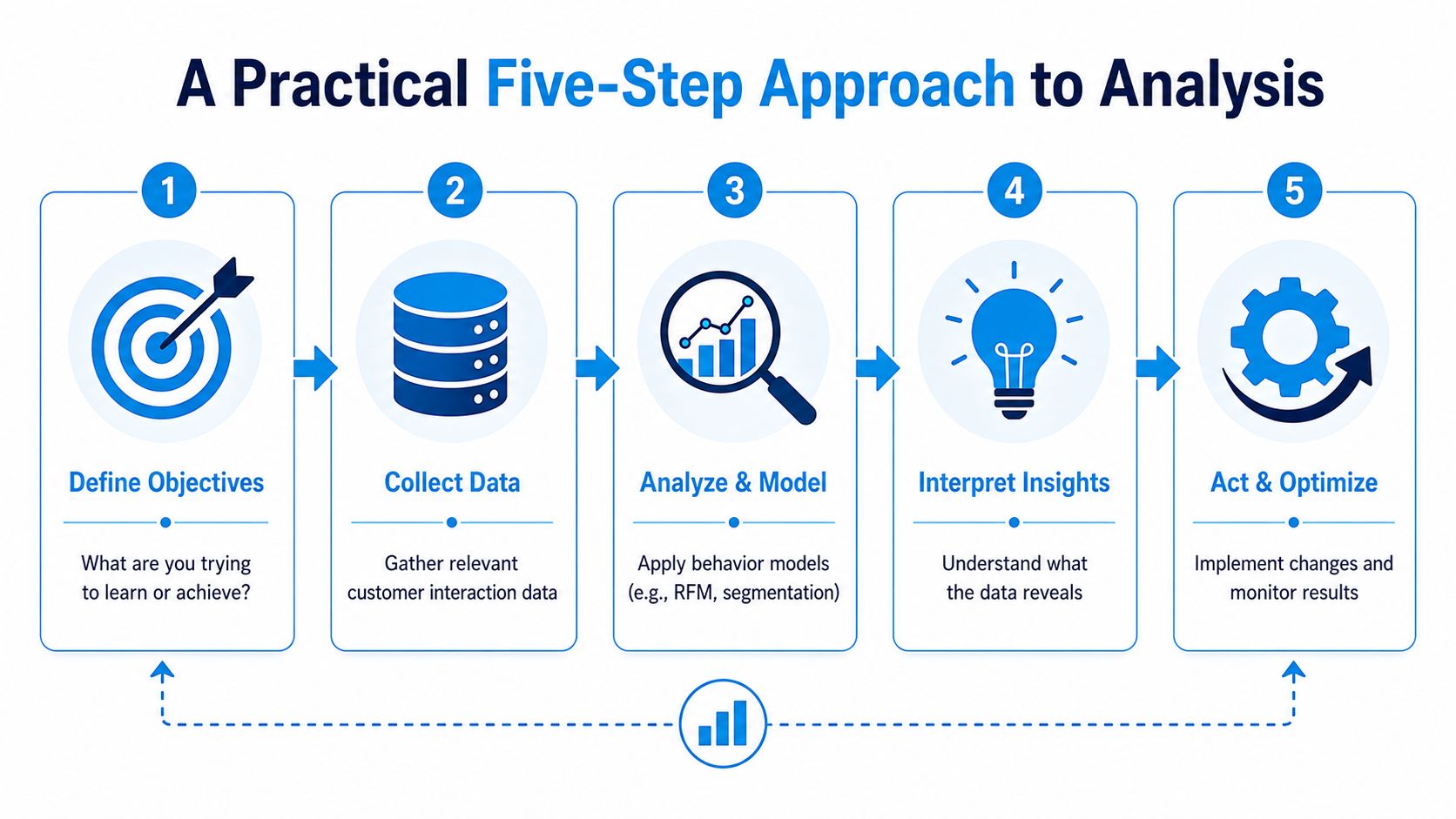
Step 1 Define one outcome that matters
Pick a target tied to operations, not vanity metrics. Good examples include reducing no-shows, increasing first-call booking, shortening callback time, or improving consultation attendance.
If you need help framing the business question before you touch the data, this list of strategic analysis questions is useful for narrowing broad concerns into something testable.
Step 2 Pull the records into one review set
Export or review the smallest useful set of data across your systems. For a dental clinic trying to reduce no-shows, that might include appointment status, reminder timing, patient type, scheduling channel, and any reschedule notes.
For a home services company, gather call timestamps, source, booking result, technician availability, and whether the lead was contacted again. You're not building a data warehouse. You're creating one shared view of the problem.
Start with one month of interactions if your team is overwhelmed. A smaller clean sample beats a giant mess nobody reviews.
Step 3 Segment the contacts in a way that changes action
Meaningful segments answer “should we handle these people differently?” If the answer is no, the segment probably isn't useful.
Examples that work:
- Emergency vs routine inquiries for HVAC or plumbing
- New patient vs existing patient for dental and medical practices
- Referral source vs direct search lead for law firms
- Booked same day vs booked later for any business where speed matters
Examples that usually don't help at first: broad age ranges, generic city-level buckets, or complicated persona labels with no operational consequence.
Step 4 Look for friction in sequence, not in isolation
A missed call by itself is one event. A missed call followed by no callback and no booking is a leak. A completed consultation followed by no retainer and no follow-up note is another leak.
Review the sequence:
- How did the person first contact you?
- Did someone respond quickly and clearly?
- Was the next step obvious?
- Did the customer complete that step?
- If not, what happened just before they dropped?
At this stage, call recordings, schedule changes, and CRM notes become more valuable than top-line lead volume.
Step 5 Form a hypothesis and change one thing
Keep the first test narrow. Don't redesign your whole workflow because one pattern appears once.
Try changes like these:
- Front desk script update: Answer insurance questions earlier in the call.
- Scheduling policy change: Offer two appointment windows immediately instead of promising a callback.
- Missed-call process: Send a text and callback within a defined window.
- CRM rule: Flag uncontacted web leads before end of day.
- Reminder adjustment: Change timing and wording for high no-show appointment types.
Then monitor whether the target behavior changes for the relevant segment or cohort. If it does, keep the change. If it doesn't, test the next bottleneck.
Customer behavior analysis works best when it's treated like operations improvement, not like a quarterly reporting exercise.
Applying Analysis in Your Industry
The most useful customer behavior analysis depends on where revenue is won or lost in your specific workflow. A dental clinic, a law firm, and an HVAC company all serve people with urgent questions, but the high-risk moments are different.
Dental clinics
Dental practices often lose momentum between inquiry, scheduled visit, treatment acceptance, and follow-up care. The website may generate interest, but the operational questions usually decide what happens next. Can the patient get a convenient time? Did someone explain insurance clearly? Was the treatment plan discussed in a way the patient understood?
Useful behaviors to track include:
- Time to next booking after an initial inquiry or completed visit
- Reschedule patterns by appointment type
- Treatment plan acceptance signals from calls and follow-up notes
- No-show patterns tied to day, reminder flow, or patient status
A common friction point is the patient who calls with intent, gets partial information, and delays scheduling. That's not a marketing issue. It's a conversion issue inside the office workflow.
Law firms
For law firms, high-intent behavior often appears in intake. A prospect may fill out a form, call with urgency, or leave a voicemail after hours. If the case type isn't identified quickly or the next step isn't clear, the lead can vanish before consultation.
Track behaviors such as:
| Focus area | What to watch | Why it matters |
|---|---|---|
| Intake speed | Time from inquiry to human follow-up | Urgent prospects often choose the first responsive firm |
| Qualification quality | Whether forms and calls capture matter type and urgency | Better screening improves consultation quality |
| Consultation movement | Scheduled, confirmed, attended, retained | Shows where serious prospects drop out |
| Communication breakdowns | Unreturned calls, unclear next steps, duplicate handoffs | These are avoidable trust failures |
HVAC and other home services
Home services have one of the clearest splits in customer behavior: urgent demand versus planned maintenance. Emergency callers want speed and reassurance. Maintenance customers respond more to timing, trust, and convenience.
This is also where “dark funnel” behavior matters most. As Luth Research notes in its discussion of underserved measurement areas, standard analytics often miss the hard-to-instrument parts of the journey, including voice conversations and offline comparisons. For service businesses, high-intent interactions such as missed calls, unresolved inquiries, and handoff failures can predict lost revenue even when they never appear in a dashboard.
An HVAC operator should watch for:
- Emergency calls that hit voicemail
- Repeated callers who never book
- Quotes sent without follow-up
- Service visits that don't convert to maintenance plans
- Past customers who call only when equipment fails
The dark parts of the journey are usually where service businesses lose their easiest wins.
One shared lesson across industries
In all three cases, the strongest growth opportunities usually come from fixing process gaps around human interaction. Better scripts, cleaner handoffs, faster callbacks, more convenient booking options, and clearer follow-up often matter more than another round of ad spend.
That's why customer behavior analysis is so valuable for service firms. It shows whether demand is weak, or whether the business is dropping the baton after a prospect raises a hand.
Start Improving Your Customer Experience Today
Most service businesses don't need more dashboards first. They need better attention to the signals customers already send.
Customer behavior analysis becomes practical when you stop asking only how people found you and start asking what happened after they tried to move forward. Did someone answer? Was the next step clear? Did the office follow through? Did the client need to repeat themselves? Those are the moments that shape both revenue and client care.
Start with actions your team can take this week
Use a short working checklist:
- Review missed calls: Look at the last month and identify when they happen, which services they relate to, and whether callbacks occurred.
- Listen to real conversations: Spend an hour on call recordings or transcripts and note the top questions, objections, and moments of confusion.
- Audit your scheduling flow: Test what happens when a new prospect tries to book, reschedule, or ask a pre-service question.
- Check CRM leakage: Find leads marked new or open with no clear next action.
- Scan no-show and cancellation patterns: Look for appointment types, times, or staff workflows that repeat the problem.
- Create one follow-up rule: For example, every missed first-time caller gets a callback and text within a defined internal window.
- Ask one feedback question: After a completed appointment or job, send a simple prompt about whether the process felt easy.
Focus on the handoffs
The biggest gains usually come from the transitions:
- ad click to call
- call to booked appointment
- appointment to completed service
- service to follow-up
- follow-up to repeat business
If you improve those handoffs, your marketing becomes more productive without changing the budget.
For teams working on the back half of the journey, these customer retention strategies are worth reviewing because retention in service businesses is often built from reliable follow-up, continuity, and low-friction communication.
Customer behavior analysis isn't a reporting project for later. It's a practical operating habit. When you combine call logs, schedules, and CRM history, you can see where good leads stall, where clients feel neglected, and where small process fixes can improve both experience and revenue.
Recepta.ai helps service businesses capture and manage customer interactions that often get lost between phone calls, scheduling, follow-up, and CRM updates. If you want a more complete view of how prospects and clients move through your business, explore Recepta.ai to see how its AI receptionist and human support model can support lead capture, appointment handling, and interaction visibility.