API Connectivity Explained for Modern Businesses

A phone rings while you're on a job, in a meeting, or halfway through a packed afternoon. It goes to voicemail, the customer doesn't wait, and by the time you see the missed call, they've already booked with someone else. That's the cost of disconnected tools, one person answers too late, another retypes the same details later, and the opportunity slips away.
API connectivity is what keeps that from happening. It's the invisible layer that lets your phone system, CRM, calendar, and follow-up tools work like one office instead of a pile of separate apps. In businesses like Recepta.ai's customers, that means a call can be captured, logged, and routed into the next step before anyone finishes their current task.
The Missed Call That an API Could Have Answered
The call comes in at 4:47 p.m. The owner is on a roof, the front desk is closed, and the office line rolls to voicemail. The caller leaves a message, then books with a competitor who answered on the first ring.
Now compare that with a connected setup. The call is answered by a voice system, the details are captured, the conversation is summarized, and the lead is written into the CRM without anyone copying notes by hand. A calendar slot appears, a reminder goes out, and the owner sees the booking before they even get back to the truck.
That's the business case for API connectivity. It isn't about software jargon. It's about making sure a customer's request doesn't sit in one tool while your team works in another.
Why this matters to a business owner
A disconnected stack creates small failures that add up. Missed calls become missed quotes, missed quotes become empty calendar slots, and empty calendar slots become lost revenue. Connected systems remove those gaps by passing information from one tool to the next as soon as something happens.
A practical example is a home services business using an AI receptionist. When a call arrives, the system can capture the contact, create the CRM record, and send the appointment request into scheduling without waiting for a human handoff. That's the difference between reacting later and acting immediately.
Practical rule: if a customer has to repeat the same information to three different tools, your operations aren't connected yet.
The point of API connectivity is not more software. It's less friction between the software you already pay for.
What API Connectivity Really Means
Think of a restaurant. The kitchen cooks the meal, the table receives it, and the waiter carries the order back and forth so nobody has to shout through the door. APIs play the waiter role in software, they move specific requests and responses between systems. API connectivity is the whole restaurant working in sync, not one isolated kitchen and a confused dining room.
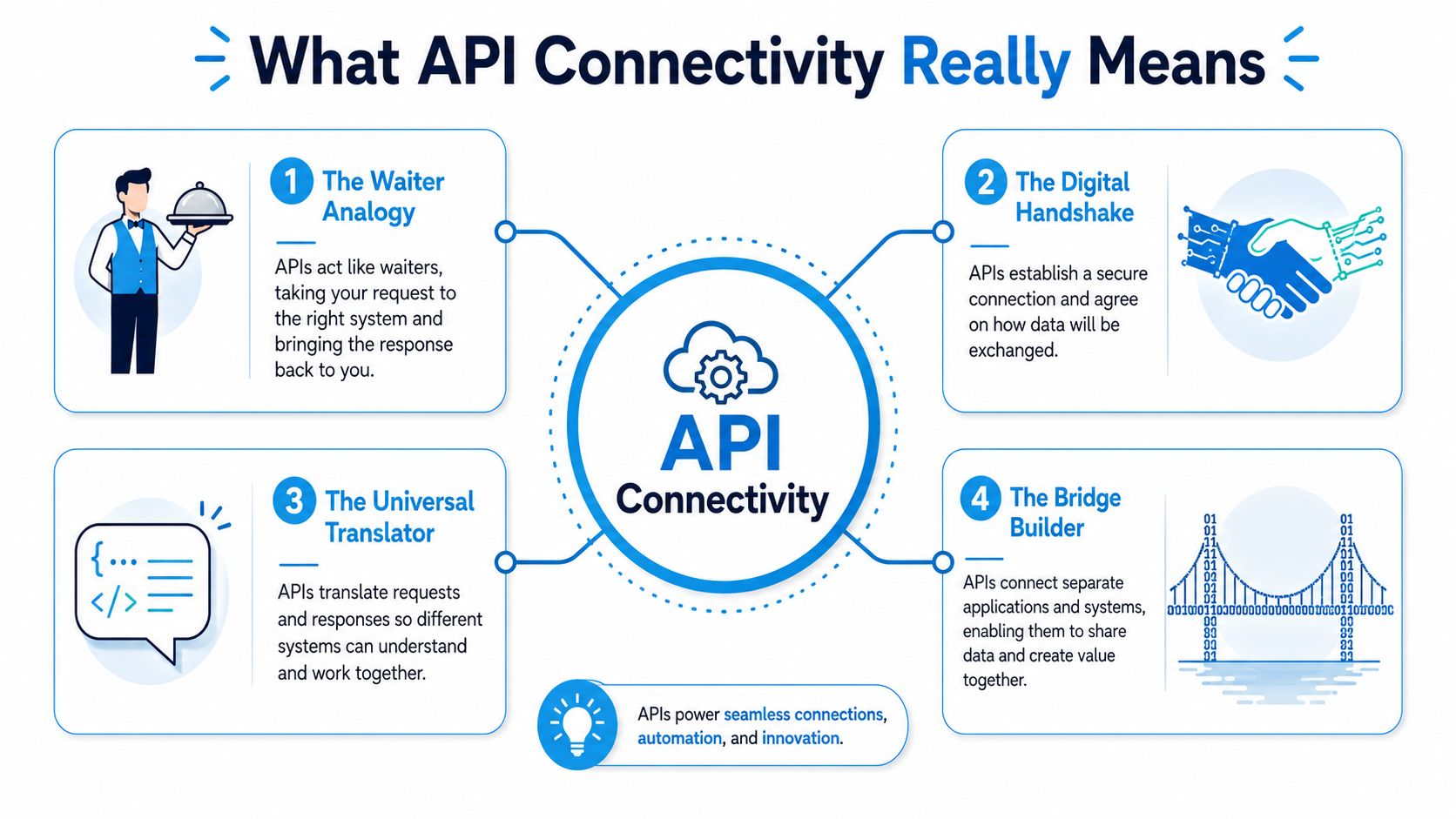
The common patterns behind the scenes
A REST API is the most familiar pattern. One system asks for something, another system responds, like a CRM asking for the customer's last appointment or a billing system asking for a payment status.
A webhook works differently. Instead of waiting to be asked, it sends a message the moment something happens. A new booking can trigger a calendar update the instant it's created.
A streaming connection keeps sending updates continuously. That's useful when a supervisor wants live call transcripts or a dashboard needs a steady flow of events without refreshing.
An SDK is a bundled toolkit that makes connections easier to build in the first place. It gives developers a ready-made way to work with the API instead of wiring everything manually.
The simplest way to think about it is this. A plug only helps if the socket fits. API connectivity makes sure the right systems can talk, and it keeps them talking in a way that matches the job.
For a practical expansion of that idea, see Recepta.ai's third-party integrations overview.
API connectivity is not one feature. It's a coordinated set of ways for tools to share information without human copying and pasting.
REST, Webhooks, Streaming, and SDKs Explained Side by Side
Different patterns solve different business problems. If you pick the wrong one, you get delays, duplicate data, or systems that look connected but still behave like silos. A quick comparison helps you match the tool to the outcome.
| API Connectivity Patterns at a Glance | |||
|---|---|---|---|
| Pattern | How It Works | Best Fit | Watch Out For |
| REST | One system requests data and another returns it | Pulling a record on demand, such as a customer's last appointment | It only happens when something asks |
| Webhooks | A system sends an event when something changes | Triggering a calendar update or CRM task the moment a booking lands | The receiving system has to be ready to listen |
| Streaming | Data flows continuously in near real time | Live transcripts, dashboards, and monitoring feeds | Too much noise if you don't filter it well |
| SDKs | A packaged toolkit makes the API easier to use | Building apps faster with less custom wiring | You still need good governance and testing |
A REST call is like asking the filing cabinet for one folder. It works well when a staff member, app, or dashboard needs a specific answer right now. A webhook is more like a doorbell, the update arrives as soon as the event happens.
Streaming is the best fit when the business cares about what's happening right now, not what happened five minutes ago. That's why teams exploring optimizing AI agent communication often compare push-based and continuously open connections before choosing a pattern.
SDKs matter when you want a custom app or workflow to use the same connection logic again and again. They reduce the amount of glue code, which is useful when a team wants to embed booking flows, lead capture, or reporting into its own software.
For a more operational view of live synchronization, the real-time data sync guide shows why timing matters when calendars, CRMs, and communication tools all need the same record.
The right question isn't, “Which API is best?” It's, “Which pattern matches the kind of business event I need to move?”
The Business Benefits You Can Measure
API connectivity pays off when it changes how fast a business answers, how often staff retype the same details, and how many opportunities stay alive after hours. A 2024 industry summary reported that over 70% of organizations use API connectors to streamline operations and integrate applications, and businesses using API integrations reported an average ROI of over 300%. The same source projected the API economy to grow at a 20% CAGR to $13.7 billion by 2027, while the global API management market was estimated to rise from $2.39 billion in 2021 to $13.21 billion by 2030. Those figures show that connected systems have moved from a technical add-on to core operating infrastructure. See the summary at SaaSworthy's API connector statistics.
What the gains look like in daily operations
A missed after-hours call should not have to wait for morning to become useful. In a Recepta.ai-style workflow, the caller is captured, the details are logged, and the follow-up can be scheduled right away. That shortens response time and lowers the chance that a warm lead goes cold while the office is closed.
Manual entry is another hidden cost. Every time a rep copies a name, number, appointment time, or note from one system to another, the team spends time and opens the door to errors. Connected APIs remove that duplicate work by writing the same event into the CRM, calendar, and internal systems at once. For a business owner, that means fewer dropped details and fewer awkward follow-up calls to correct records.
A connected front desk does more than save clicks. It gives your team a cleaner handoff between the first conversation and the next step, whether that step is a booked visit, a sales callback, or a service ticket. Recepta.ai also reports customers see up to 30% more qualified leads and 80% cost savings versus in-house reception, which points to the operational value of connecting calls, scheduling, and follow-up. For a business owner, the practical result is simple, more of the repetitive work gets handled by the system, and more of the team's time goes to real customer conversations.
For owners who want to protect the setup that makes that handoff possible, the infrastructure security guide explains the controls behind a dependable connected workflow.
Business takeaway: API connectivity is an investment in throughput. It helps a team handle more demand without adding the same amount of headcount.
Security and Compliance Without the Jargon
A connected business is only useful if it's trustworthy. That starts with the basic controls: use TLS 1.2 or above, validate every input, disable unused HTTP verbs, and make responses cacheable when possible because caching can reduce bandwidth, latency, and server load while improving resilience under network failure. Those recommendations come from the UK government's API technical and data standards, which also emphasize keeping APIs predictable and protected. Read the guidance at GDS API technical and data standards.
The controls that matter in plain language
TLS 1.2 or above means the traffic is encrypted while it moves between systems. If a customer's personal details, booking data, or payment-related information is in transit, that protection should be critical.
Input validation means the API checks what it receives instead of trusting it blindly. That protects the business from bad data, accidental mistakes, and tampering.
Disabling unused methods reduces the attack surface. If a system doesn't need to delete or update something through a public endpoint, don't leave those actions open.
Logging is what helps you answer the customer who says, “I never got that confirmation,” or the manager who needs to know who changed a record. In regulated settings, the IDRBT handbook says API traffic should be protected over TLS 1.2 or higher, with encrypted channels, digital signing and verification, and logging of access to sensitive data where required by data-protection rules. A healthcare or finance API should follow those controls so records can't be altered without detection. See the handbook at IDRBT's API handbook.
For teams evaluating infrastructure choices, Recepta.ai's infrastructure security overview is a useful companion read.
Before you sign with any vendor, ask four questions. Is the traffic encrypted in transit, does the API validate input, can we see access logs, and how are sensitive records signed or verified where needed? If the answers are vague, the integration isn't ready for production.

Monitoring and Troubleshooting Connected Systems
Once systems are connected, you need a simple way to tell when something is off. Start with three signals, error rates, latency spikes, and missed webhooks. If the calendar API gets slow, bookings can lag. If webhooks stop arriving, a booking may never make it into the CRM.
What to check first
A high error rate usually means one of three things, bad credentials, a changed endpoint, or a payload the receiving system no longer accepts. The first step is not panic, it's a test call. Verify whether the request still works with known-good data.
Latency spikes often point to a slow dependency or a heavy response payload. If the booking tool starts responding slowly, a customer may still get through, but the experience gets clunky and the chance of abandonment goes up.
Missed webhooks are trickier because the sending system may think it succeeded. That's why a weekly review of recent events, retries, and delivery logs matters. Teams that want a practical checklist can also look at optimizing API data monitoring for ideas on how to keep watch without overcomplicating the process.
A second issue hides in the background, API sprawl. Industry coverage says the total number of public and private APIs in use is nearing 200 million, which turns naming, versioning, and deprecation into everyday housekeeping instead of abstract architecture talk. Security-focused guidance also stresses handling risk at the design phase with automated endpoint discovery, strict input validation, token lifecycle management, and continuous inventory management, because waiting until runtime leaves gaps in the system. See the discussion at DevOps.com on API sprawl.

Keep an inventory, name things consistently, and retire what no longer earns its place. That routine prevents more outages than most emergency calls.
The goal isn't a fire drill. It's a steady habit of checking the signals that matter before customers notice something's broken.
How Three Different Industries Put API Connectivity to Work
A home services company gets a call from a new lead at 7:30 p.m. The voice agent captures the details, creates the CRM record, writes the appointment into the calendar, and triggers the reminder sequence. The dispatcher never touches the keyboard, which matters when the team is juggling calls, routes, and same-day work orders. For a broader look at the CRM side, see what CRM integration means in practice.
A dental clinic handles bookings differently. A patient calls to schedule a cleaning, the assistant or AI receptionist updates the practice system, and pre-visit instructions go out automatically. In that setup, the important part isn't just taking the booking, it's making sure the appointment and the follow-up message stay aligned without extra admin work.
A multi-location franchise has a different challenge. Each branch needs its own calendar, but ownership still wants one reporting view of calls, leads, and booked jobs. A REST call can pull the shared data into reporting, while local calendars remain independent so each site keeps control over its own schedule.
These examples use the same core patterns in different ways. Webhooks handle the event that just happened, SDKs help a custom flow fit into a specific app, and REST calls pull the record you need when you need it. The industry changes, but the business aim stays the same, keep the customer journey moving without handoffs that slow people down.
Your API Connectivity Checklist and Common Questions
Use this checklist before you approve any integration. Define the business goal, name the systems involved, decide which event should trigger the connection, confirm security controls, verify logging, test failure handling, check documentation quality, confirm who owns monitoring, plan the rollout, and agree on how updates will be versioned.
Common questions
How long does setup usually take? It depends on the systems involved, but a simple setup should be fast enough that the business can test it before full rollout.
Do I need a developer in the room? Not always. A well-designed platform can make the basic flow accessible to operations teams, while more complex changes may still need technical help.
What should I look for in documentation? Clear endpoints, event definitions, error handling, authentication details, and examples that match your use case.
How do I know an integration has gone wrong? Watch for missing records, delayed updates, failed deliveries, or data that no longer matches across systems.
Recepta.ai is built to connect calls, scheduling, lead capture, and follow-up into one operational flow, with the option to hand off to trained humans when needed. If you're ready to replace manual retyping and missed opportunities with connected workflows, visit Recepta.ai and see how it fits your business.