Documentation Requirements a Guide for Small Businesses
A client is on the phone. They want a copy of the estimate you approved two months ago, the one that included a small scope change after the first visit. You know you sent it. You also know the technician took photos before and after the job. But now the estimate is in one inbox, the photos are on one employee's phone, and the signed approval might be buried in a text thread.
That's what documentation requirements look like in a small business. They don't show up as theory. They show up when a customer disputes an invoice, when an insurer asks for proof, when a staff member quits, or when you need to remember what was promised and by whom.
For service businesses, documentation requirements are the records you need to prove what happened. They cover agreements, service delivery, payments, compliance steps, consent, internal decisions, and follow-up actions. Some are legal obligations. Some are operational necessities. Most are both.
If you work for yourself or run a lean team, good habits around self-employed record keeping make the difference between a quick response and a painful reconstruction job. The businesses that stay calm under pressure usually aren't doing more paperwork. They're capturing the right proof at the right moment.
Your Guide to Small Business Documentation
A cleaning company gets a chargeback notice. A plumbing contractor gets asked why the final bill exceeded the quote. A dental office needs to confirm that a patient received privacy notices and consented to treatment. A law firm has to show what was communicated to a client before a filing deadline. Different industries, same problem. If the record is weak, the conversation gets expensive fast.
The mistake many owners make is treating documentation as admin work that happens later. Later rarely comes. Or worse, later means someone is trying to recreate facts after a complaint, an audit, or a missed handoff.
What documentation requirements mean in practice
For a small service business, documentation requirements usually fall into a few everyday categories:
- Client identity and intake such as contact details, addresses, intake notes, and service needs
- Agreements and approvals including estimates, contracts, consents, and change orders
- Service proof like technician notes, photos, timestamps, and completion records
- Financial records such as invoices, receipts, payment confirmations, and refund notes
- Compliance records including privacy policies, staff procedures, notices, and required retention
Practical rule: If a reasonable third party asked, “How do you know that happened?” you should be able to answer with one record, not a story.
That doesn't mean you need a complicated system. It means you need a usable one. The right standard for most small teams is simple: capture the minimum information needed to prove the work, support the bill, and satisfy any industry rule that applies to you.
What actually works
Strong documentation usually has three traits.
First, it happens close to the event. Notes entered right after a call are better than memory-based notes entered three days later.
Second, it follows a repeatable format. If every employee names files differently and stores them in different places, the business has records, but not control.
Third, it's easy to retrieve. A document you can't find when needed might as well not exist.
That's the practical side of documentation requirements. They aren't there to make your life harder. They're there to protect revenue, reduce disputes, and keep your business from relying on memory.
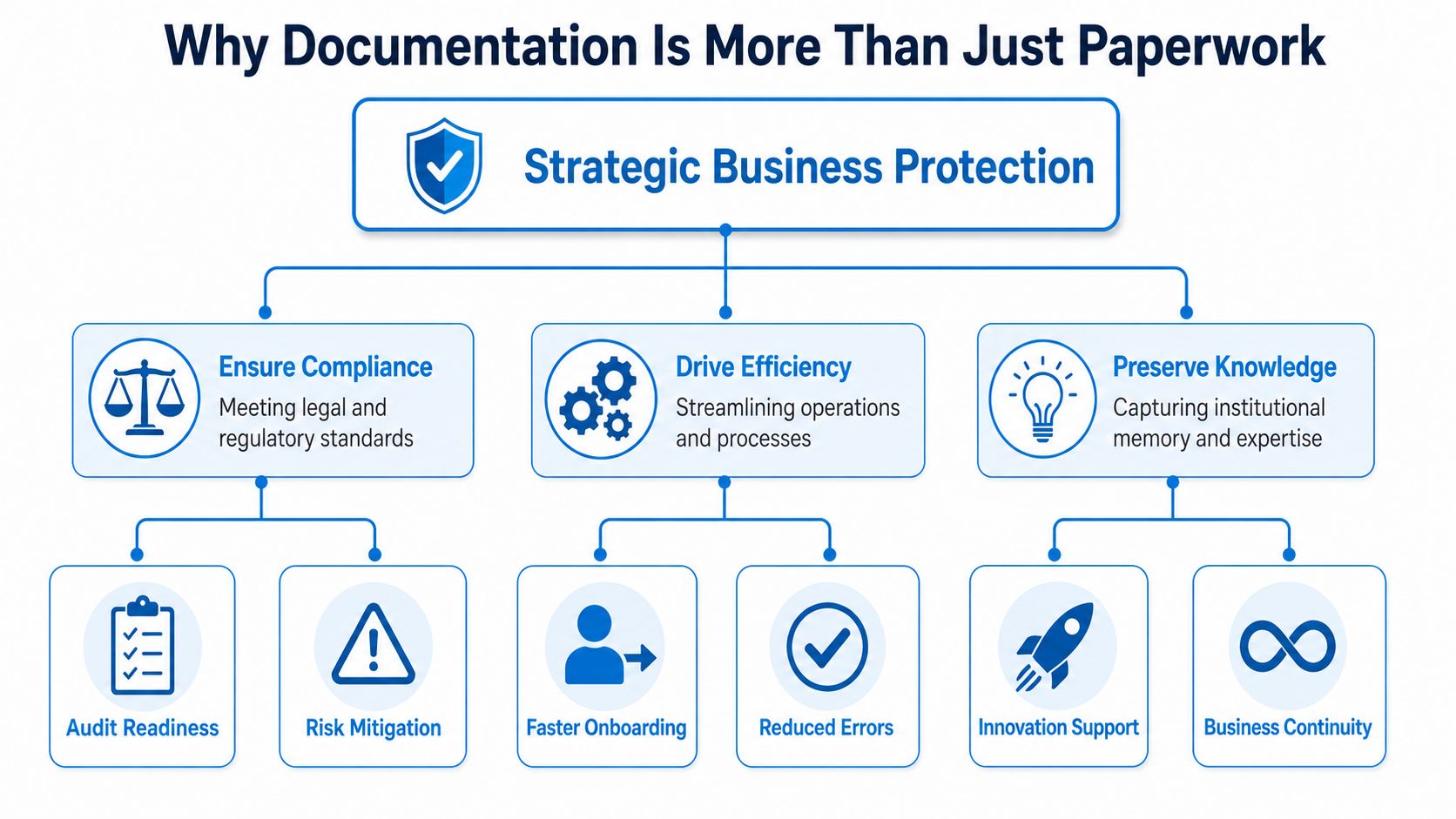
Why Documentation Is More Than Just Paperwork
The easiest way to understand documentation is to think of it as your business's black box recorder. When something goes wrong, records tell the story. They show what was requested, what was agreed, what changed, what was delivered, and who did what.
Without that record, people fill in the gaps with assumptions. Clients remember one version. Staff remember another. Regulators and payers usually trust the file more than anyone's memory.
Compliance is built on records
In some industries, documentation isn't optional because the rule itself is documentation-based. In U.S. healthcare, required documentation can include an evaluation, plan of care, diagnoses, long-term goals, therapy details, treatment notes, progress reports, and a discharge summary under Medicare-related requirements described by ASHA's guidance on documentation in health care. The same guidance notes that the Office of Inspector General treats documentation as essential for correct payment, patient protection, and provider protection from liability and fraud-and-abuse risk.
That's a useful lesson even outside healthcare. Rules are often enforced through evidence, not intention.
Liability protection depends on specifics
A signed service agreement matters. So does a timestamped message confirming that the customer approved additional work. So does a photo showing pre-existing damage before your team started.
Good documentation reduces ambiguity. It doesn't eliminate every dispute, but it gives you something stronger than recollection. That's often the difference between resolving a problem quickly and spending days arguing about facts.
A few examples:
- Home services need job notes, photos, and approval records when scope changes on site.
- Professional services need engagement terms, advice records, and decision logs when clients later claim they were told something else.
- Healthcare and wellness practices need intake, consent, and policy acknowledgments because sensitive information and treatment decisions require a clear trail.
Financial integrity starts before the invoice
Most billing problems begin upstream. A weak estimate, missing notes, or undocumented changes create friction later.
If your team standardizes intake and handoffs, invoices become easier to justify. If not, billing staff end up chasing technicians, searching texts, and cleaning up preventable gaps. That's one reason many firms pair documentation habits with process standardization instead of treating them as separate projects.
Your invoice is only as defensible as the records behind it.
Efficiency is the overlooked payoff
Documentation has a reputation for slowing people down. Bad documentation systems do. Good ones remove repeat work.
When records are organized, new staff can ramp faster, recurring clients don't need to repeat themselves, and managers don't waste time reconciling different versions of the truth. The value isn't just in surviving a bad day. It's in reducing friction on ordinary days.
Essential Documents for Key Service Industries
Small businesses don't need every possible form. They need the documents that match how they sell, deliver, and get paid. The list below focuses on records that solve common real-world problems.
| Industry | Essential Documents |
|---|---|
| Home Services | Service agreement, estimate, change order, job photos, completion note |
| Healthcare | Patient intake, consent forms, privacy notice acknowledgment, treatment notes, policy records |
| Legal | Engagement letter, conflict check record, client communication log, matter notes, billing support |
| Insurance and Finance | Client fact-find, disclosure acknowledgments, recommendation notes, signed applications, communication records |
Home services
For HVAC, plumbing, pest control, cleaning, and construction, the most important records usually sit around scope, approval, and proof of work.
- Service agreement or estimate keeps the original promise clear. If your quote covers one drain line and the customer later expects full-home jetting, the estimate defines the starting point.
- Change order matters when the job changes after arrival. If a technician opens a wall and finds additional damage, get written approval before extra work starts.
- Before-and-after photos are practical evidence. They help with customer disputes, insurance questions, and internal quality control.
- Completion note should capture what was done, what remains, and any customer instructions. A short structured note beats a vague “job done.”
- Payment record closes the loop. Keep the invoice, receipt, and any refund or adjustment notes together.
A simple example: a cleaner finds pet-related damage that requires extra treatment. The wrong move is a verbal agreement with no follow-up. The better move is a quick documented approval, updated price, and post-service note.
Healthcare and wellness
Healthcare documentation requirements are stricter because the records support care, privacy, billing, and auditability. In HIPAA-regulated settings, documentation must be retained for at least six years after creation or last effective date, and written policies, procedures, and documented actions or assessments must be available to relevant staff under the HHS Security Rule overview.
That changes how you think about storage. You're not just saving files. You're managing retention, staff access, and updates over time.
Common essentials include:
- Patient intake forms with demographic and clinical basics
- Consent for treatment so the record reflects what the patient authorized
- Privacy notice acknowledgment to document required notices and internal compliance
- Treatment notes that reflect services delivered and follow-up plans
- Written policies and security documentation for the practice itself
If you're reviewing systems used in patient-facing operations, it helps to compare them with tools designed for HIPAA-compliant scheduling software, because scheduling often creates the first compliance-sensitive record.
Keep records in the system where the work happens. Don't rely on memory, sticky notes, or a later rewrite.
Legal services
Law firms live on documented expectations. The key records often aren't flashy. They're the basics done consistently.
An engagement letter defines the scope of representation. A conflict check record shows that the firm screened the matter. A communication log keeps key instructions and advice from disappearing into scattered emails. Matter notes, filed in one place, help the next person who touches the case understand status and risk.
A practical example: a client says, “I thought you were handling that filing.” If the engagement letter excluded it and your communication log shows the handoff, the issue is manageable. If not, it becomes a credibility fight.
Insurance and finance
These businesses need records that show why a recommendation was made and what the client received.
That usually includes a fact-find or intake summary, signed disclosures, application records, recommendation notes, and communication history. If a client later says they didn't understand a coverage limitation or product term, your documentation needs to show what was presented and when.
The point across all four industries is the same. Keep the documents that prove decisions, permissions, and delivery. Drop the rest.
Common Documentation Pitfalls to Avoid
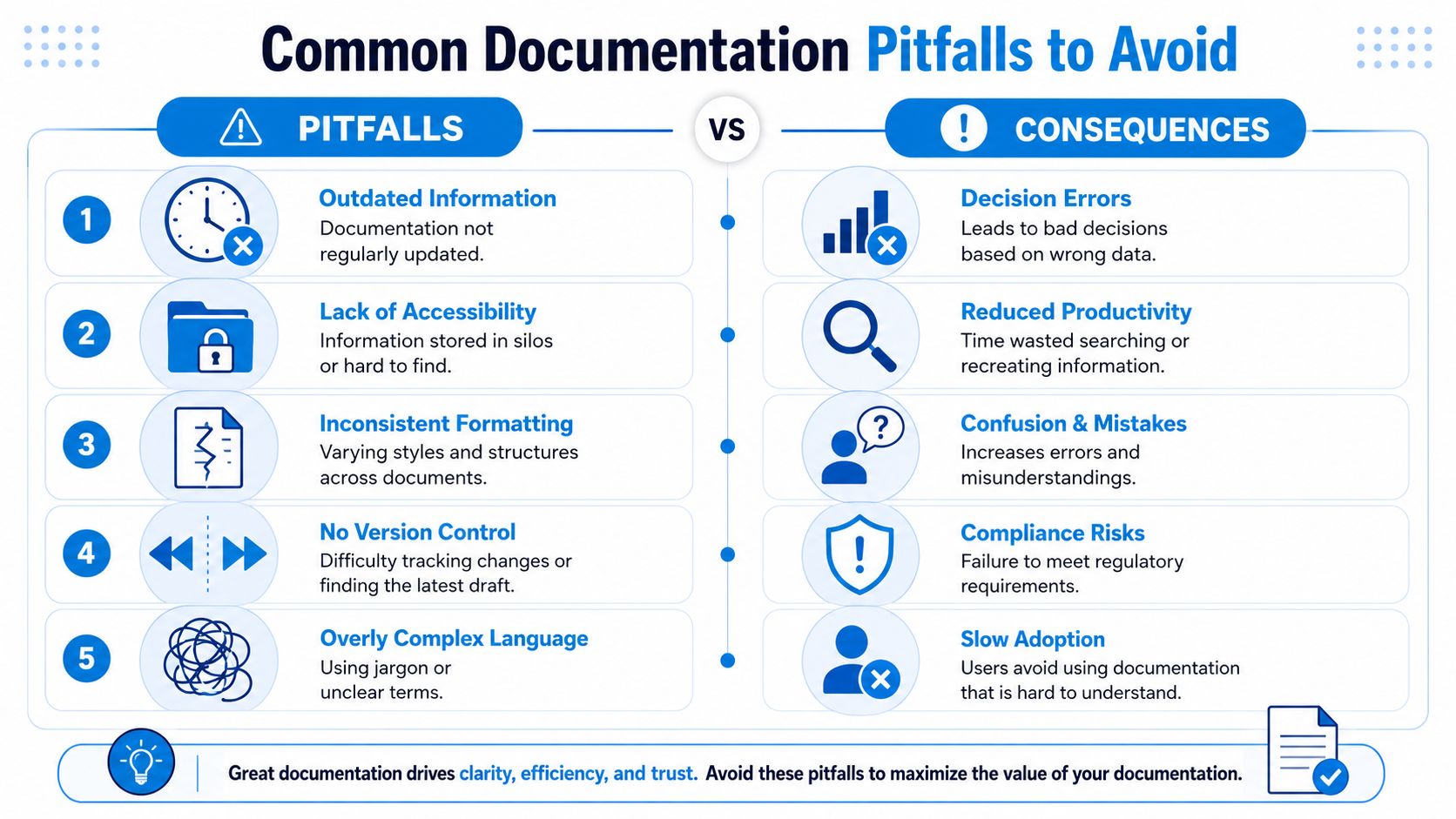
Most documentation failures aren't caused by lazy teams. They come from weak systems. People do what's convenient in the moment, especially when calls are stacking up and jobs are running late.
That's why the same problems show up everywhere. Someone writes intake details on paper. Another person types them into a phone note. A third sends a summary by text and assumes it's enough.
The missing-document trap
Weak document control is expensive in time and focus. A Forrester-compiled documentation statistics summary reports that 97% of organizations have minimal digital document processes, 83% of employees recreate missing documents, knowledge workers spend about 50% of their time creating and preparing documents, and without a strong strategy 25% of documents can be lost.
Small businesses feel this differently than large enterprises. They don't have extra admin capacity to absorb it. When one file goes missing, the owner, office manager, or lead technician usually becomes the recovery team.
Five predictable mistakes
- Inconsistent capture means client details land in different places depending on who answered the phone. Fix it with one intake workflow and one required template.
- Personal devices and informal channels create risk. Sensitive details sent through personal text threads are hard to control and harder to retrieve later.
- No version control causes teams to work from outdated agreements or old price sheets. Use a shared system with clear naming and dated versions.
- Scattered storage leaves contracts in email, photos in phones, and notes in separate apps. Build one primary home for client records.
- Over-documenting the wrong things wastes time. Long free-text notes don't help if they bury the one fact you'll need later.
If your team has to ask, “Where should I save this?” more than once, the system isn't clear enough.
What to do instead
Start smaller than is typically expected.
Use a standard job or client record with required fields. Decide where supporting files belong. Create one naming rule for estimates, signed forms, and photos. Train staff on the few records that are mandatory every time.
Then audit your own business with one question: if a client challenged an invoice from last month, could you pull the agreement, approvals, service notes, and payment record in minutes?
If the answer is no, the gap isn't discipline. It's design.
Building a Secure Document Management System
A secure document management system doesn't have to be complicated. It does have to be intentional. The businesses that struggle most usually keep adding small fixes instead of deciding how records should enter, move through, and leave the business.
Think in terms of evidence, not storage. In regulated product environments, the EU MDR treats technical documentation as a prerequisite for conformity assessment and approval, and Annex II requires traceable evidence such as device identification, intended use, labeling, risk management, and verification or validation results, as described in this overview of EU MDR technical documentation requirements. That's a medical-device example, but the principle applies broadly. A useful record must be traceable, complete enough to prove the point, and connected to the underlying work.
Start with one source of truth
Pick one primary repository for client and operational records. That may be a cloud document platform, your CRM, your practice management system, or a combination with clearly assigned roles.
What doesn't work is a loose mix of desktop folders, inboxes, and personal phones.
Your system should answer these questions without debate:
- Where does the original record live
- Who can view it
- Who can edit it
- What supporting files belong with it
- When should it be archived or deleted
Use boring naming conventions
Naming conventions feel minor until you need a file fast. Then they become everything.
A practical format is: client name, document type, date, version. Keep it simple enough that staff will use it. If you operate across locations, add a location code. If you manage repeat projects, add the job number.
For example, a plumbing firm might save a signed change order as: Smith-Change-Order-2026-06-17-v1. That beats “new form final signed latest.”
Control access and change history
Secure documentation means two things at once. People who need records can get them quickly, and people who shouldn't access them can't.
That requires role-based access, shared credentials policies, and a change history where possible. If someone updates a form, the system should preserve who changed it and when. For a practical baseline, businesses reviewing their setup should compare it against broader data security best practices so documentation controls aren't separated from the rest of the business's security habits.
The safest file isn't the one nobody can open. It's the one the right person can open immediately, and the wrong person can't.
Set retention and disposal rules
Retention is where many small businesses drift into risk. They either keep everything forever or delete records whenever storage feels messy.
Neither approach is good management. Retention should match legal obligations, industry requirements, and business value. Disposal should be deliberate and secure, especially when records include sensitive personal or financial information.
A simple internal policy can cover:
- What must be retained
- How long it stays active
- When it moves to archive
- Who approves deletion
- How deletion is documented
That's the structure that makes documentation requirements manageable instead of chaotic.
How Recepta.ai Automates Your Documentation
Most small businesses don't fail on documentation because they refuse to document. They fail because documentation depends on busy people remembering to do extra steps after the primary work is done.
The better approach is to capture records as a byproduct of the work itself.
One practical option is Recepta.ai services, which handle inbound and outbound conversations, scheduling, lead capture, follow-ups, and data logging while syncing with connected business tools. For a small service company, that matters because the first documentation gap often starts at first contact. A call comes in, details are partial, and nobody enters clean notes until hours later.
How automation fixes the usual gaps
Here's what an automated documentation flow looks like in plain terms.
- A prospect calls and their contact details, service need, and timing are captured during the conversation.
- The interaction is logged so there's a consistent record instead of handwritten notes or memory.
- An appointment is scheduled and confirmations create a documented trail of who booked what and when.
- A summary is attached to the client record so the next staff member doesn't start from zero.
- Follow-up actions are triggered in connected systems instead of relying on someone to retype the same information.
That addresses several common documentation problems at once. Intake becomes structured. Handoffs get cleaner. The business keeps one usable record from the first interaction.
Capture proof without creating more admin
One of the hardest parts of documentation requirements is proving enough without collecting unnecessary paperwork. That tension shows up in public-sector and underserved-access programs too. Some agencies accept “objective reasons” from an authoritative source, which points toward a practical need for systems that capture the necessary evidence without adding excess burden, as reflected in the Illinois application guidance on supporting documentation.
That's a good rule for small businesses. You don't need more forms just to feel thorough. You need cleaner evidence.
Automation helps when it reduces duplicate entry and preserves the record created during the actual interaction. If a scheduling change happened on a call, the system should record the update. If a caller gave intake details, those details should flow into the client record. If the team needs call summaries later, they should already be there.
The product walkthrough below shows what that can look like in operation.
Where it fits best
Automation is especially useful when your team deals with high call volume, recurring appointments, urgent scheduling, or frequent handoffs between front office and field staff.
That includes businesses like:
- HVAC and plumbing teams that need complete call intake before dispatch
- Dental and medical offices that need structured appointment and patient communication records
- Law firms that need consistent intake before conflicts review and engagement
- Insurance and finance teams that need reliable records of inquiries, follow-ups, and booked consultations
The key isn't the software alone. It's the workflow. The strongest setup turns every call, booking, and follow-up into a record that's already organized, searchable, and ready when someone asks for proof.
If documentation requirements are draining time, creating disputes, or leaving your team to reconstruct facts after the fact, Recepta.ai is worth a closer look. It helps businesses capture intake details, call records, scheduling activity, and follow-up actions automatically, so documentation becomes part of daily operations instead of an after-hours cleanup task.