HIPAA-Compliant Scheduling Software: Your 2026 Guide
You’re probably dealing with some version of the same problem most clinic managers face. The phones ring while staff are checking in patients, a provider runs late, someone asks to reschedule, and suddenly the schedule lives in three places at once. One version is in the practice management system, another is in someone’s memory, and a third is scribbled on paper at the front desk.
That’s when “we need better scheduling software” turns into a real buying decision. But in healthcare, a scheduler isn’t just a calendar. It can touch names, appointment types, phone numbers, intake details, and other protected health information. That changes the stakes.
A good hipaa-compliant scheduling software purchase should make life easier for your team. It should also lower operational risk. The hard part is that many buyers focus on feature lists and miss the day-to-day issues that cause trouble after launch: weak staff training, messy integrations, bad permissions, and workarounds that expose patient data.
The Foundations of HIPAA-Compliant Scheduling
Monday starts with a full waiting room, two providers running behind, and a parent calling to move a pediatric visit. Your front desk team updates the appointment in the scheduler, sends a reminder, and checks insurance notes. In that one routine task, staff may handle a patient name, phone number, appointment type, and other protected health information. That is why healthcare scheduling needs more than an ordinary calendar app. It needs controls that hold up under real clinic pressure.
HIPAA-compliant scheduling software rests on a few core building blocks. If one is missing, the whole process gets shaky. A clinic can buy a polished platform and still create risk through weak contracts, loose permissions, or poor staff habits. That is the part many buying guides skip, and it is often where breaches begin.
Start with the BAA
Ask this early: Will you sign a Business Associate Agreement, or BAA?
A BAA is the contract that defines what the vendor must do to protect protected health information it handles for your practice. If a scheduling company will not sign one, your evaluation should stop there. You are not assessing a healthcare-ready partner. You are assessing a general software vendor that may not accept the legal duties your clinic needs.
If you want a plain-English legal refresher before vendor calls, review this detailed guide on HIPAA compliance.affordablepentesting.com/post/hipaa-compliance-for-small-business).
One point confuses many first-time buyers. Security features alone do not make a product appropriate for healthcare. A vendor can advertise encryption, reminders, and online booking, but without a BAA, your practice still has a serious compliance gap. The contract is part of the control set, not paperwork you handle at the end.
Practical rule: If a sales rep answers feature questions quickly but gets vague when you ask about the BAA, treat that as a warning sign.
Technical safeguards protect data while it moves and while it sits
HIPAA requires technical safeguards under 45 CFR § 164.312. For scheduling software, that usually means access controls, audit capabilities, and protection for electronic patient data both in storage and during transmission.
Encryption is a good example. Scheduling information rarely stays in one place. A patient books from home. A reminder is sent by text or email. A staff member opens the schedule from another workstation. If those handoffs are not protected, a normal workday can create avoidable exposure. NexHealth notes that HIPAA-aligned systems should use encryption standards such as AES-256, and it also reports that unencrypted breaches in 2023 averaged $10.1 million in costs, compared with $2.9 million for encrypted ones, according to NexHealth’s overview of HIPAA-compliant scheduling software.
Ask vendors to explain two basic terms in plain language:
- At rest: data is protected while stored in the system.
- In transit: data is protected while moving between devices or systems.
If the explanation sounds slippery or overly technical, keep asking. A vendor that cannot explain how patient data is protected usually makes implementation harder for your team later.
Access controls keep routine work from becoming routine overexposure
Staff members do not all need the same window into the schedule.
A front-desk coordinator may need appointment times, patient names, and contact details. A biller may need scheduling context tied to coverage or follow-up workflows. A provider may need broader clinical context. Good scheduling software lets you set those boundaries by role, so people see what they need and no more.
This is also where human error often enters the picture. During setup, clinics sometimes give broad access to everyone because go-live week feels hectic and the easiest answer is full visibility. That shortcut can stay in place for years. It increases the chance of accidental disclosure, improper snooping, and confusion about who changed what.
A good implementation treats permissions like keys in a building. You do not give every employee a master key because opening day is busy.
Audit logs help you verify what happened
Audit logs record who accessed the schedule, when they accessed it, and what they changed.
That matters during obvious problems, such as a disputed appointment change or suspected improper access. It also matters during ordinary management. If a clinic manager notices repeated scheduling errors, audit logs can show whether the issue comes from training gaps, workflow confusion, or misuse of permissions. In other words, logs are not only for investigations after a breach. They are also a daily management tool.
Compliance includes the software, the room, and the people
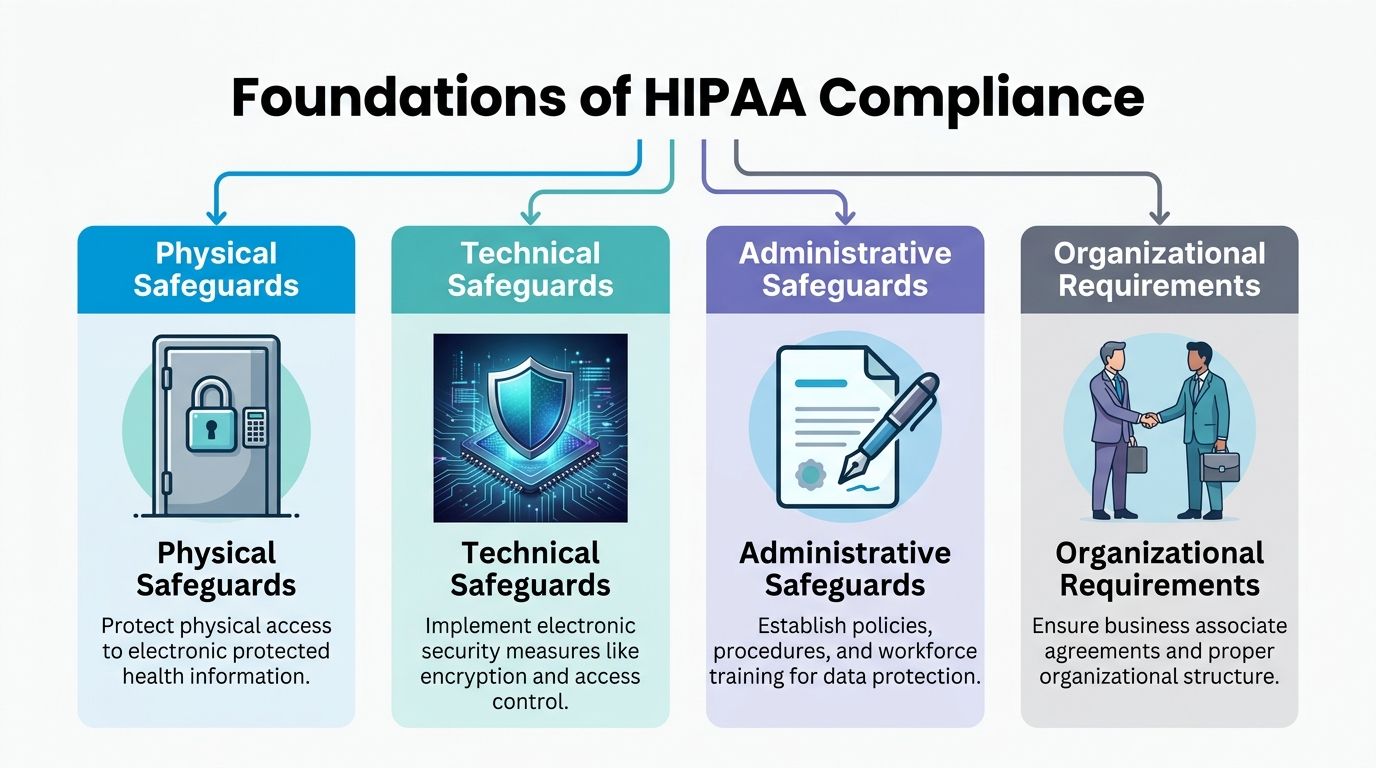
The image above shows four pillars for a reason. Software settings are only one piece.
- Physical safeguards cover the environment. An encrypted platform does not help much if a workstation at reception is left open where patients or visitors can view the screen.
- Administrative safeguards cover policy and training. Staff need clear rules for rescheduling by phone, verifying identity, handling cancellations, and avoiding workarounds like sticky notes or personal texts.
- Organizational requirements cover accountability. Your clinic should know who owns vendor management, who approves permissions, and who reviews access if a staff role changes.
Practices often discover this the hard way after launch. The software may be fine, but the front desk still writes callback lists on paper, shares logins during rush periods, or sends appointment details through personal devices when the phones back up. Those are process failures, not feature failures.
If your practice also uses live phone support for booking or overflow coverage, this guide to a medical office answering service is worth reviewing because scheduling security extends to every person and process that touches appointment information.
A simple test helps here. If your current scheduling process depends on shared passwords, personal calendars, handwritten notes, or one employee who knows all the unwritten steps, your clinic does not have a reliable scheduling system. It has a fragile one.
Must-Have Features for Modern Healthcare Practices
Features matter, but only if they solve real operational problems. A long feature list doesn’t help if staff still spend half the day calling patients back, correcting double bookings, or chasing forms.
The market is growing because practices are looking for both compliance and efficiency. The global medical scheduling software market was valued at USD 318.5 million in 2023 and is projected to reach USD 749.9 million by 2030. The same market report notes that automated reminders can reduce no-shows by up to 30 to 50 percent, according to Grand View Research’s medical scheduling software market report.

Features that fix common front-desk problems
Here’s what I’d look for first, and why.
24/7 self-scheduling: Patients don’t stop needing appointments when your front desk closes. Self-scheduling helps patients book without waiting for business hours, and it reduces voicemail pileups on Monday morning.
Automated reminders by SMS and email: Reminders are one of the clearest operational wins. A dental clinic, for example, can use reminders to cut down on missed hygiene visits and reduce the scramble to fill last-minute openings.
Secure digital intake forms: If patients can complete forms before arrival, your team spends less time re-entering information and less time managing paper.
Multi-provider and multi-location scheduling: This matters for practices that share resources across clinicians or offices. Without it, staff often resort to side spreadsheets or verbal handoffs.
Waitlist management: When a cancellation happens, the system should help fill it. Otherwise, your team is manually calling down a list.
Features that support safer operations
Some features don’t look exciting in a demo, but they prevent the mistakes that create compliance issues later.
One example is role-based permissions. If you need a simple explainer for nontechnical stakeholders, this primer on Role-Based Access Control (RBAC) is a useful read. In practice, RBAC means your scheduler acts less like a giant shared inbox and more like a controlled workspace.
Another is integration support. A system that syncs cleanly with your existing workflow usually creates fewer manual workarounds. For clinics comparing options, this guide to medical appointment scheduling software is a practical companion because it helps map features to actual workflow needs.
Don’t buy telehealth, payments, intake, reminders, and scheduling from separate tools unless someone on your team can clearly explain how patient data moves safely between them.
Nice-to-have features that may be worth it
These depend on your practice model.
| Feature | Best fit | Example |
|---|---|---|
| Integrated payments | Clinics collecting deposits or balances | A specialty practice can request payment during booking without adding another follow-up step |
| Telehealth support | Behavioral health and follow-up care | Staff can schedule virtual visits from the same workflow patients already know |
| Round-robin or team scheduling | Group practices | New patient requests can be routed to the next available clinician |
| Multilingual booking | Diverse patient populations | Patients can complete scheduling steps with less phone support |
The best feature set is the one your staff will use. A simpler system that gets adopted beats a powerful system that pushes everyone back to manual shortcuts.
Your Vendor Evaluation Checklist
Buying scheduling software is really choosing a long-term operating partner. You’re trusting a vendor with patient data, front-desk workflow, and a process your clinic uses every day.
This isn’t a place for vague reassurance. Ask direct questions and write the answers down. HIPAA was enacted on December 19, 1996, and the HITECH Act of 2009 strengthened enforcement. By 2023, over $100 million in fines had been levied, often tied to insecure scheduling tools, according to Cal.com’s HIPAA-compliant scheduling software article.
The printable checklist
Use this table during demos and procurement calls.
| Category | Question | Importance |
|---|---|---|
| BAA | Will you sign a BAA before any PHI is stored or transmitted? | This is the first compliance gate. If the answer is no, stop evaluating. |
| Encryption | How is data protected at rest and in transit? | You need a clear explanation of both storage and movement of data. |
| Access controls | Can we limit views by job role, location, or team? | Prevents overexposure of patient information. |
| Audit logs | What activity is logged, and how can we review it? | Helps investigate changes, errors, and inappropriate access. |
| Session security | Do you support automatic logoff and secure authentication? | Reduces risk on shared workstations and busy front desks. |
| Integrations | Which EHR, calendar, or practice systems do you integrate with directly? | Tells you where manual workarounds may still appear. |
| Backups | How are backups handled, and how is recovery tested? | Scheduling downtime creates both care and operational problems. |
| Support | What does implementation support include? | A secure tool still fails if setup is rushed or unclear. |
| Training | What training do you provide for managers and front-desk staff? | Adoption issues often create the real risk after purchase. |
| Data ownership | How do we export our data if we leave? | Prevents lock-in and supports business continuity. |
Questions that reveal more than the feature sheet
Ask the vendor to show you, not just tell you.
For example, don’t ask only, “Do you have audit logs?” Ask, “Show me what a manager sees when reviewing a changed appointment.” That separates mature systems from checkbox answers.
Do the same for permissions. A sales team may say the product supports role controls, but you need to know whether those controls are broad or granular. “Admin” and “staff” are not enough for many practices.
Look past the software screen
The strongest buying conversations include your operations lead, your practice manager, and whoever handles phone workflow or after-hours overflow. A scheduling system touches all of them.
If your clinic is also deciding whether live scheduling support should stay in-house or move to an external team, this guide to outsourced call center solutions helps frame the operational side of that decision.
Ask every vendor the same questions in the same order. That keeps your evaluation grounded in evidence instead of demo polish.
Red flags that deserve a pause
- BAA ambiguity: “We can discuss that after purchase.”
- Integration vagueness: “We usually connect with most systems.”
- Security overconfidence: “Our platform is fully secure, so you don’t need to worry.”
- Training as an afterthought: “Your team will pick it up quickly.”
- No clear recovery plan: “Downtime is rare.”
A careful checklist doesn’t slow the buying process. It prevents rushed decisions that are much harder to unwind later.
A Step-by-Step Implementation and Training Plan
Monday opens with a full schedule, two call-outs at the front desk, and a patient on hold asking to switch an appointment. That is not the moment to discover that visit types were set up incorrectly, staff permissions are too broad, or reminder texts are pulling the wrong details. A scheduling rollout succeeds or fails in ordinary clinic pressure, not in a vendor demo.
The part that deserves the most attention is not the button layout. It is how the software fits your daily routine, who can see what, and what staff do when they get busy. Upheal’s review of HIPAA-compliant scheduling software for private practices notes that user mistakes and weak adoption are common problems after setup, which matches what many practice managers see in real life: a compliant tool still needs careful rollout and repeated training to be used safely. Upheal’s review of HIPAA-compliant scheduling software for private practices

Pre-launch
Start with workflow mapping before you touch settings.
A scheduling system works like a front desk playbook turned into software. If the playbook is messy, the software will reproduce the mess faster. Before go-live, document how appointments are created, changed, confirmed, canceled, and handed off between front desk, providers, billing, and any after-hours support.
Then clean the basics:
- Define access by job function: Front desk staff, managers, billers, and providers should only see the information they need to do their work.
- Review appointment rules: Standardize visit lengths, appointment types, provider hours, location names, and reminder timing.
- Remove outdated users and labels: Old accounts and duplicate categories create confusion and unnecessary exposure.
- Write short job aids: A one-page checklist for common tasks is more useful than a long training manual.
- Choose one internal owner: Staff need a go-to person who can answer questions quickly and spot patterns in errors.
This is also the right time to decide what good performance looks like. Fewer scheduling errors, faster reschedules, and fewer no-shows are practical measures. If your team wants to connect the new process to patient attendance, this guide on reducing no-show appointments in healthcare practices can help you set realistic workflow goals.
Launch day
Keep the day controlled and predictable.
If your clinic can manage it, use a short parallel period where staff compare the old setup against the new one. Even a limited overlap can catch the problems that create trouble later, such as the wrong appointment duration, a missing provider block, or reminder messages firing at the wrong time.
A workable launch plan usually includes:
- A brief morning huddle: Confirm who answers workflow questions and who contacts the vendor if something breaks.
- A smaller change window: Avoid changing forms, reminders, templates, and reporting rules all on the same day.
- Real-time support: Make sure someone from the vendor side is available during patient hours, not only by email.
- One issue log: Record every problem in one shared place, including what happened, who saw it, and how it was fixed.
Post-launch
The first few weeks matter more than the first day.
Staff under pressure will create shortcuts if the approved process feels slow or confusing. That is how appointment details end up on sticky notes, in personal calendars, or in text messages with too much information. The risk is rarely dramatic at first. It usually starts as a quick workaround during a busy shift.
Hold short check-ins after week one, week two, and the end of the first month. Ask concrete questions instead of broad ones. Which task takes longer than expected? Where are staff leaving the system to finish a job? Which permission settings are getting in the way, and which ones may be too open?
Good training covers two things at once. How to complete the task, and how to complete it without creating a privacy problem.
Use refresher sessions built around common clinic scenarios:
- Rescheduling a patient while calls are stacking up
- Checking provider availability across multiple locations
- Handling a cancellation without writing patient details on paper
- Sending reminders or intake follow-up through the approved workflow
- Escalating unusual cases without sharing more information than needed
Treat training as part of operations, not a one-time event. The clinics that do this well usually have fewer workarounds, cleaner schedules, and less scrambling when someone new joins the team.
Navigating Common Pitfalls and Hidden Risks
Monday at 8:07 a.m., the phones are ringing, two providers are running behind, and a new patient is asking for the first available opening. Your scheduling software may be HIPAA-compliant on paper, but busy mornings are where privacy mistakes usually start. In most clinics, the risk comes from rushed human decisions around the tool, not from the software screen itself.
That matters because scheduling touches more systems than many managers expect. A calendar rarely stands alone. It connects, formally or informally, to reminders, intake forms, call handling, billing notes, provider templates, and staff communication. If even one of those handoffs happens outside the approved process, protected health information can spill into email inboxes, paper notes, personal phones, or generic office apps.
The integration trap
A common problem appears after purchase. The scheduler works well by itself, but daily operations still depend on other tools that do not share information cleanly.
The SecureSlate article linked below notes that many smaller organizations run into integration gaps with non-EHR tools, and that those gaps can create meaningful efficiency loss over time. You can see that discussion in SecureSlate’s article on HIPAA-compliant scheduling software. In practice, clinic staff often respond by retyping appointment details, copying screenshots, or keeping a second unofficial list to bridge the gap.
That unofficial bridge is often where compliance problems begin.
Small workarounds become exposure points
Workarounds usually look helpful, not reckless. That is why they survive.
A front-desk employee exports tomorrow’s schedule into a spreadsheet to sort patients by provider. Another staff member syncs appointments to a personal calendar so they can check changes from home. A printed schedule stays at the desk through lunch where visitors can see names and visit times. An employee sends a text with extra detail because a patient seems confused and the quickest answer feels like the kindest one.
Each step solves an immediate operational problem. Each step also creates a new place where patient information can sit outside your approved controls.
Scheduling risk works like water finding cracks in a pipe. The software may be secure, but pressure builds in the weak spots around it. Those weak spots are usually manual exports, shared logins, overbroad permissions, and side-channel communication.
Access problems stay hidden until something goes wrong
Many clinics review permissions during setup and then leave them alone for months. By then, job duties may have changed, temporary staff may still have access, or supervisors may not realize how much the scheduling team can see.
Review access on a routine calendar, not only after an incident. Then review audit logs with an operational mindset. Look for repeated appointment edits, after-hours access, unusual viewing patterns, or signs that staff keep leaving the system to finish a task somewhere else. Those clues often point to process friction before they point to misconduct.
No-shows can trigger this kind of workaround behavior too. If your team is building extra reminder systems by hand, this guide on how to reduce no-show appointments may help you tighten the process without pushing staff toward unsafe shortcuts.
Buying secure software is like installing a strong front door. It helps, but people can still leave the side entrance open.
Clinic managers who handle this well do one thing differently. They treat privacy risk as an everyday workflow issue. Clear rules, regular spot checks, and simple approved paths for common scheduling tasks hold up much better than a policy binder no one reads during a busy shift.
How Recepta.ai Delivers Secure and Efficient Scheduling
Some practices need more than a scheduling app. They also need someone, or something, to consistently answer incoming calls, capture appointment requests, send follow-ups, and escalate sensitive conversations without dropping information along the way.
That’s where a workflow layer matters.
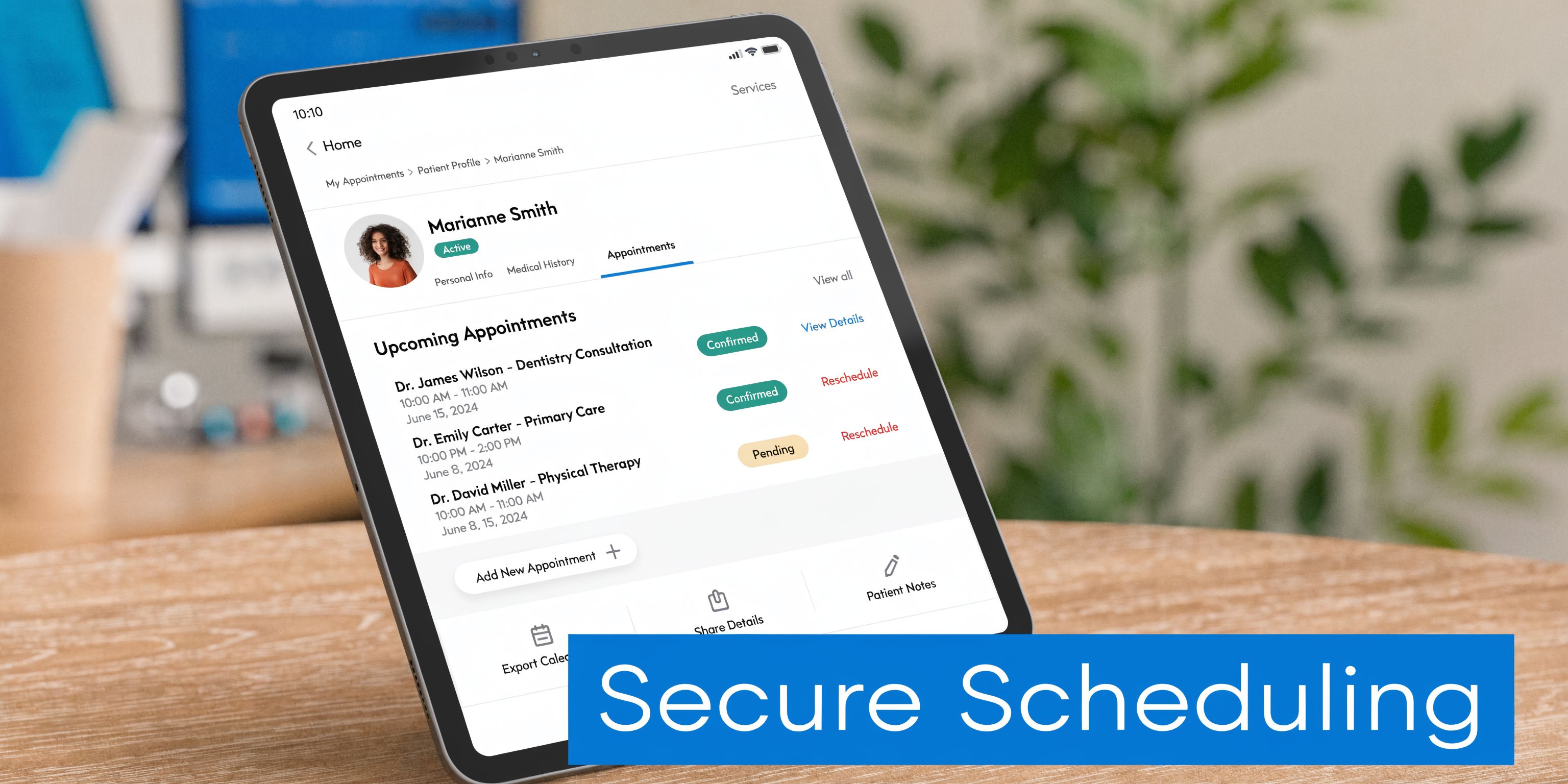
For clinics that want that broader operating model, Recepta.ai combines conversational AI with human escalation for appointment scheduling, inbound and outbound communication, and follow-up handling within a compliance-ready workflow. According to the publisher information provided for this article, it integrates with 2,500+ tools, supports healthcare use cases with BAA-backed higher-tier plans, and is designed to sync with calendars, CRMs, and medical office workflows.
That combination addresses a common operational gap. A scheduling platform may keep the calendar organized, but it doesn’t always solve what happens when patients call after hours, abandon voicemail, or ask questions that don’t fit a simple booking form.
Where the model fits in practice
Consider a busy specialty clinic.
The scheduling software manages availability. The communication layer handles incoming patient contact, captures scheduling intent, routes straightforward requests automatically, and escalates more sensitive cases to trained people when needed. That reduces the risk that appointment details are scribbled down for later entry or lost in voicemail.
This model is especially helpful when clinics need to connect scheduling with:
- After-hours call coverage
- Reminder and follow-up workflows
- Multi-location communication
- Handoff from automated interaction to a human agent
- Consistent logging across touchpoints
Why that matters operationally
The earlier sections focused on a core truth. Compliance problems often come from human workarounds, not from the purchase decision alone.
A tool that captures scheduling requests inside one documented workflow can reduce the need for side processes. That matters when the alternative is a front desk employee listening to voicemail, transcribing details, and manually updating multiple systems later.
This doesn’t replace the need for strong permissions, training, or internal policies. It supports them by narrowing the number of places where scheduling information gets handled.
For a clinic manager, that’s usually the practical question to ask: not only “Does this tool book appointments?” but also “What does my team stop doing manually if we use it?”
Frequently Asked Questions About HIPAA Scheduling
Is any online calendar automatically HIPAA compliant
No. A calendar becomes part of a compliant workflow only when the vendor supports the required safeguards, signs the right agreement, and your practice uses the tool correctly.
Is a signed BAA enough by itself
No. The BAA is necessary, but it isn’t the whole story. You still need appropriate permissions, secure configuration, training, and internal policies that match how your staff works.
Can staff use personal phones or personal calendars for scheduling
That’s risky. Even if your main system is compliant, moving appointment data into personal tools can create exposure you can’t monitor well. Keep scheduling activity inside approved systems whenever possible.
What’s the most common mistake after purchase
Teams often underestimate training. Staff learn just enough to get through the day, then create shortcuts when they hit friction. Those shortcuts become the primary problem.
How do I know whether an integration is safe
Ask exactly what data moves between systems, who can access it, and whether each connected vendor supports healthcare requirements. “It integrates” is not a sufficient answer.
Should small practices buy all-in-one software or a lighter scheduling tool
That depends on workflow complexity. A lighter tool may work well if it fits your operations and doesn’t force manual patchwork. An all-in-one platform may make sense if it reduces handoffs and duplicate data entry. The safer choice is usually the one your team can use consistently without exporting data or maintaining side systems.
How often should we review settings and access
Regularly. Review permissions when job roles change, when staff leave, and on a routine schedule set by the practice. Also check whether teams have started using unofficial workarounds.
What should I do before signing with a vendor
Get the BAA question answered, confirm how security controls work in practice, review support and training, and map how the software fits your current scheduling process. If the vendor can’t walk through that clearly, keep looking.
If your practice needs secure appointment handling that goes beyond a calendar, Recepta.ai is worth evaluating. It supports healthcare scheduling workflows with AI reception, human escalation, and integration across existing systems so your team can reduce missed calls, keep records consistent, and handle patient interactions in one operational flow.