
Escalation Contact List Template and Severity Guide

It's 6:50 on a Thursday evening. The scheduling system stops confirming appointments, the person on the front desk has no authority to reroute jobs, and the only number anyone can find belongs to a manager who left in March. Someone eventually fixes it, but customers waited, and two of them booked elsewhere.
That's not a technology failure. It's an ownership and documentation failure, and it shows up in almost every business that has grown past one location, one shift, or one person who knows everything. The fix is an escalation contact list that works like a control rather than a directory: named roles, live channels, response deadlines, and someone whose job includes keeping it current.
Required Fields for Every Escalation Contact
An escalation contact list is a maintained roster that names who must be reached, in what order, and how fast once a case exceeds frontline authority. The record matters more than the format.
Many groups already keep a version of this somewhere: a shared drive, a spreadsheet tab, a notebook at reception. It's usually organized by person, and that's exactly where routes break. A roster organized by role survives a resignation. One organized by name does not.
| Field | What to record | Example |
|---|---|---|
| Role | Job title, not a person's name | Dispatch supervisor |
| Named owner | Person currently holding the role, with start date | Current holder, updated on change |
| Decision authority | Actions this role may approve without asking | Approve an after-hours visit or a refund within policy |
| Primary channel | Duty phone or monitored line | Business-controlled duty line |
| Backup channel | Second device or person reached if the primary fails | Deputy's mobile, listed with consent |
| Time zone and coverage hours | When the role is reachable and where it sits | Central time, 07:00 to 19:00, with overnight paging to the on-call duty phone |
| Acknowledgment deadline | Time allowed for the responder to acknowledge | 10 minutes for a service-impacting case |
| Fallback owner | Who takes over if the deadline passes | Operations director |
| Identity-verification method | How the contact or caller is confirmed | Callback to the number on file |
| Handoff notes | Context the receiver needs to act | Customer ID, issue summary, prior actions, consent, urgency |
The NIST incident handling guide frames this as an operational control rather than a directory. It recommends recording primary and backup contacts both inside and outside the organization, including phone numbers, email addresses, public encryption keys where applicable, and written instructions for verifying a contact's identity. It also asks for on-call information, escalation paths for internal teams, and a defined process for the case where the assigned responder never acknowledges within the required time.
Read that last item twice. The failure of a responder to answer is a designed event, not an exception. If your list doesn't say what happens when nobody picks up, the answer becomes whatever the person holding the phone decides in the moment.
Practical rule: record a business-controlled duty phone or role-based line wherever you can, and keep personal mobiles out of the roster unless the holder has agreed in writing.
Two fields get skipped most often. Identity verification is one: before anyone shares account details, balances, or clinical information, confirm the caller against a number already on file rather than a number read out during the call. Decision authority is the other. A supervisor who can approve an overtime call-out saves an hour; one who has to ask permission saves nothing.
Roles come before names because a roster is read under pressure. The person answering an urgent call at 9pm needs to find "dispatch supervisor" in seconds, not work out whether the name they remember still holds the job. Every entry ends with a pointer to the tier system, because the tier is what tells the reader which row applies to this particular case.
Severity Tiers, Triggers and Response Deadlines
Tiers classify business impact, not who is calling or how upset they sound. A calm customer can be reporting a total outage; an angry one can be asking about a parking spot.
A widely used starting point is a four-tier ladder, where each level ties a trigger to an owner, a contact path, a deadline, and required notifications. Treat the numbers in this model as a default you adjust to your staffing, not a universal standard.
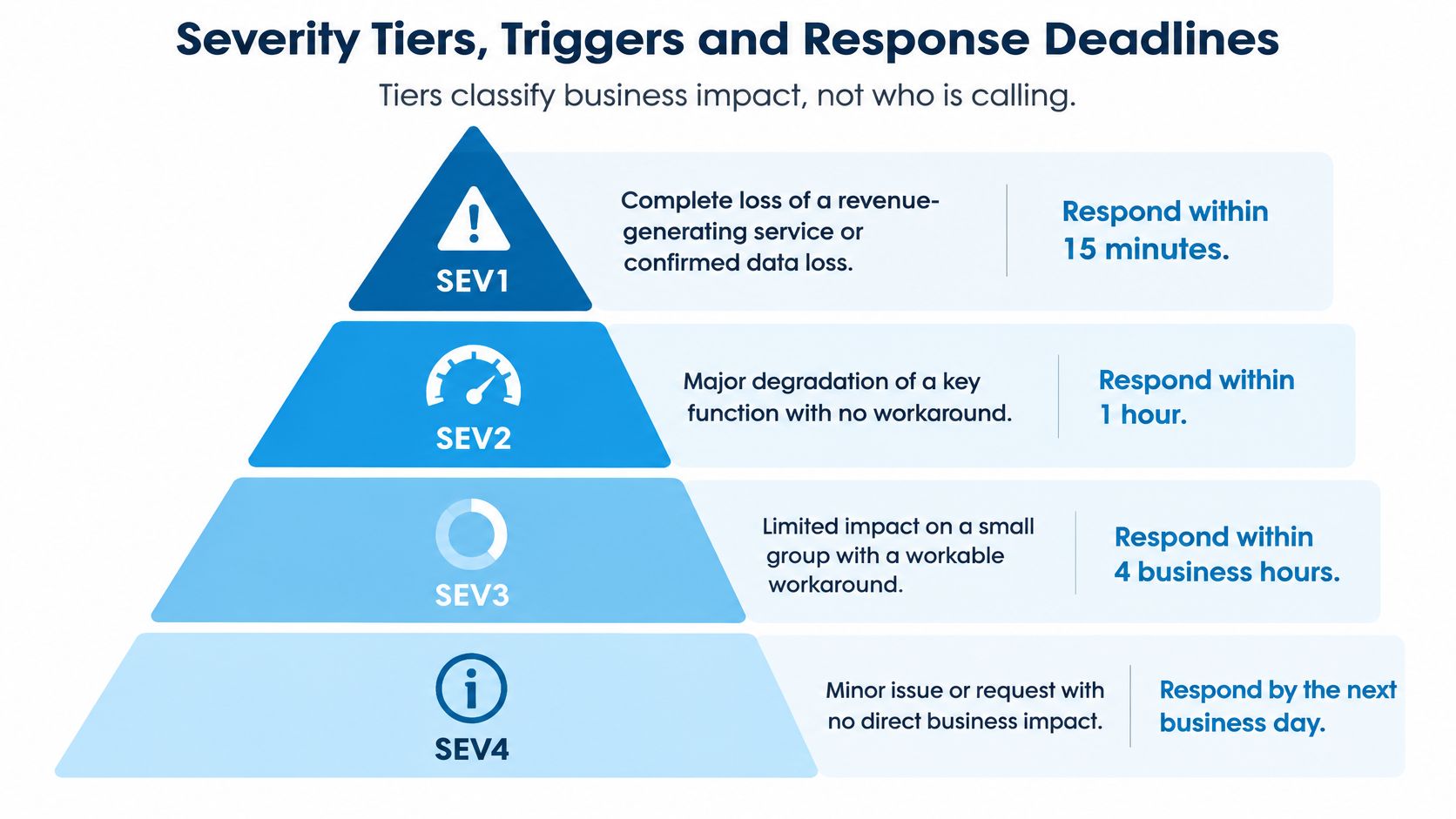
| Tier | Trigger | First owner | Acknowledgment deadline | Update cadence |
|---|---|---|---|---|
| SEV1 | Complete loss of a revenue-generating service or confirmed data loss | Incident commander, with secondary commander | 5 minutes | Every 30 minutes |
| SEV2 | Major feature unavailable to some users with no workaround | Team lead for the affected service | 10 minutes | Every 60 minutes to affected team leads |
| SEV3 | Degraded performance with a workaround | Ticket owner | 30 minutes | Every 4 hours or on change |
| SEV4 | Cosmetic or non-user-visible issue | Assigned team queue | Next business day | Per queue rules at next business day |
Two columns in this table confuse new roster builders. The acknowledgment deadline is how fast a human confirms ownership of the case. It says nothing about when the problem gets fixed, only that someone responsible is now holding it. The update cadence is how often that owner reports progress to others, and it matters because silence reads as inaction. A SEV1 case with no update for an hour will generate duplicate calls that pull responders away from the fix itself.
The contact path shifts by tier too. In this model the top tier pages an incident commander and a secondary commander, then follows the page with a phone call. The second tier notifies the team leads for the affected service. The third tier can be reached by ticket plus chat rather than a page, because a degraded service with a working workaround does not justify waking anyone up.
Translate the same ladder into a service business and it stops sounding like software. A routine scheduling exception goes to a coordinator. A failure that stops the business taking money or serving people goes to the operations manager. A safety or privacy concern goes to an executive plus a legal or privacy contact. Unresolved non-response goes to a second-level backup, regardless of tier.
Where AI ends and people begin. Automated intake and FAQ handling absorb the first layer of contact, filtering out spam, solicitors, and low-value calls, and humans take the escalations and edge cases. That division is why the tier matters so much: it decides which human gets reached, and it prevents a supervisor from being paged about opening hours.
The acknowledgment deadlines you publish in an escalation matrix should match what your service level agreements promise customers. A matrix that commits to ten minutes while the customer-facing agreement implies an hour creates two truths, and staff will follow the looser one.
Then there's the trigger test. Every trigger has to pass one check: a receiver can tell whether it applies in a single sentence, without asking the caller anything else. "Phone lines down at all three locations" passes. "Customer is frustrated" fails, because it's a mood, not a condition.
When the tier is unclear, assign the higher one and downgrade once the facts arrive. A brief over-response costs a phone call. A slow response to a real outage costs customers.
Tiers also don't change because a customer demands a manager. If the impact is SEV3, it stays SEV3 and the coordinator handles it with a clear explanation. Tiers track consequence, not volume.
How to Build an Escalation Contact List Step by Step
Building the roster takes an afternoon the first time. Keeping it alive takes a standing slot in someone's calendar, which is where teams often stop. Treat the list as a control you maintain, like a fire extinguisher with an inspection tag, rather than an address book you update when someone remembers.
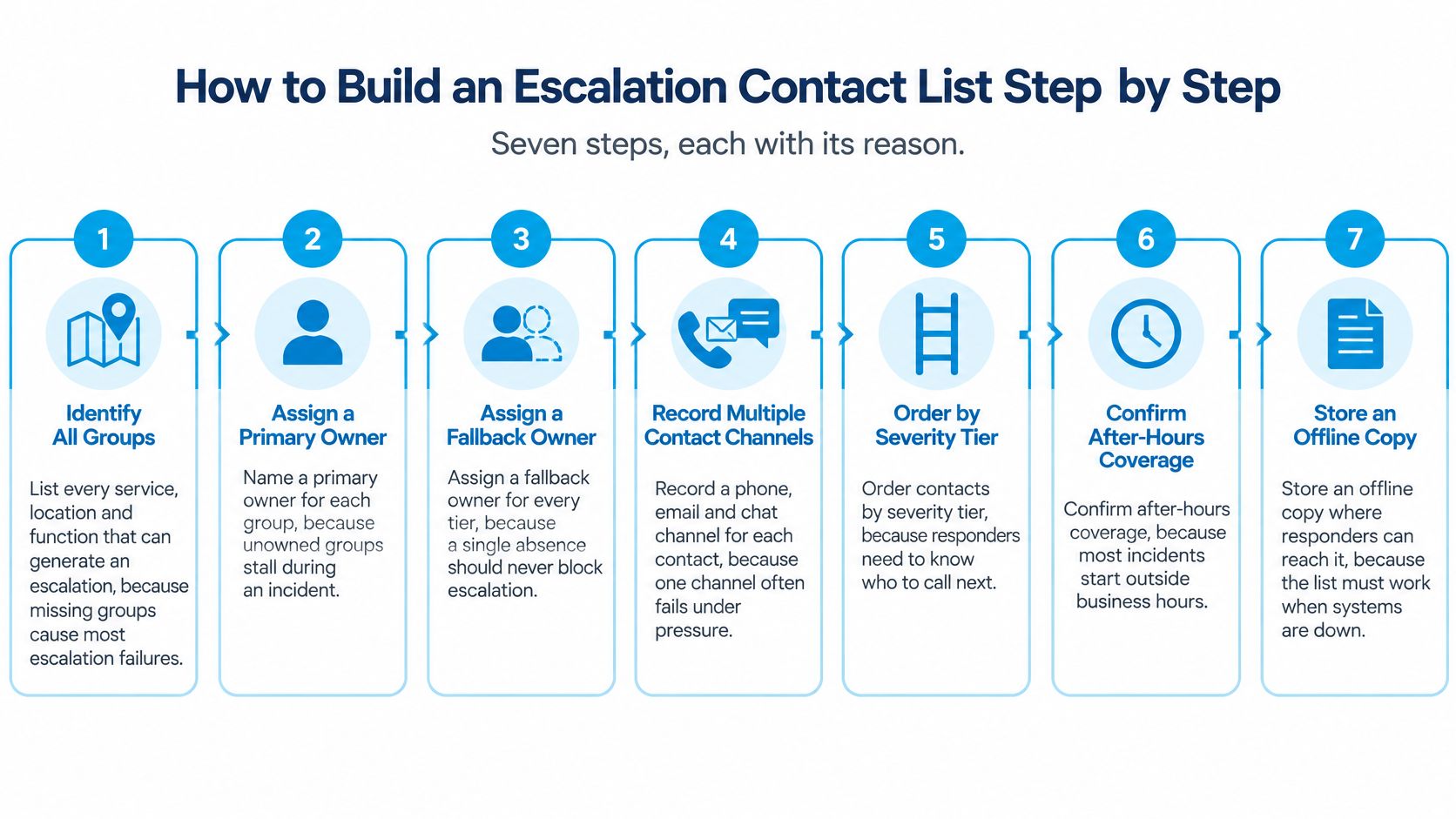
- List every service, location, and function that can generate an escalation. Missing groups cause most escalation failures, and the groups people forget are the ones nobody thinks of as "operations": facilities, billing, the answering service, the payment processor. If the business runs three clinics and a warehouse, every one of them gets its own set of rows.
- Name a primary owner for each group and give them at least two channels. Unnamed groups stall during an incident. Two channels matter because one device is a single point of failure, and a duty phone that lives on a desk is useless once the building is evacuated. A mobile number plus a secondary line or on-call rotation covers the likely failure modes.
- Map each severity tier to an ordered contact sequence. Responders need to know who to call next, and the same case type should always start with the same first call. If two supervisors handle the same trigger, the route is ambiguous and the case bounces. Write the sequence as a single chain: first name, second name, fallback owner.
- Write each trigger as a checkable condition. "Booking system cannot schedule jobs for more than one hour" is checkable. "System down" isn't, because it invites the receiver to ask three questions before acting. The test is whether a receiver can confirm the condition in one sentence without interrogating the caller.
- Assign decision authority and say what each role may approve. A receiver who can authorize a refund or an emergency visit within a stated limit doesn't have to wait for permission, and the customer doesn't wait either. Spell out the limit in the roster itself, because an undocumented ceiling is the same as no authority at all.
- Attach the handoff fields to every route and keep the filled notes with the case record. The receiver needs the customer ID, the issue summary, what has already been tried, consent status, and urgency, so the customer never repeats the story. Five fields sounds like paperwork until the third handoff in one night, when it becomes the only memory the case has.
- Name a communications lead and distribute the list. That person owns external messaging during an incident, which stops six staff members giving six versions. Printed or secured copies go to every expected responder, because the list has to work when systems are down.
For organizations documenting routes across a property portfolio rather than a single site, the response planning for commercial property managers shows how escalation steps get written down, distributed, and rehearsed instead of left in one person's head.
The build test. Hand the finished roster to a team member who wasn't involved in writing it and ask them to find the route for a SEV2 case. Under a minute is the target. If they have to ask which of two similar-looking tables is current, the document still has work to do.
Then watch what happens in real incidents. Slow acknowledgment almost always traces back to the route: a wrong first name, a dead channel, an ambiguous chain. When teams fix the roster instead of coaching the people, response times improve on their own, because the fastest responder in the world can't acknowledge a page that never arrived.
Escalation Timers and When to Move to a Backup
A timer turns a name on a page into an action. Without one, "call the backup" is advice, and advice doesn't happen at 2am.
| Minutes after alert | Action | Contacted |
|---|---|---|
| 0 | Alert logged and primary owner paged | Primary owner on duty phone |
| 5 | No acknowledgment, so call the primary and resend the alert | Backup contact |
| 10 | Still no response, so transfer ownership | Fallback owner or manager |
| 30 | Escalate to the executive if the tier threshold is met | Executive owner |
Two words get used interchangeably and shouldn't be. The NIST publication on incident response distinguishes escalation, which generally adds resources or extends time frames, from elevation, which hands the case to higher management. A timer that fires and adds another technician is escalation. A timer that fires and moves the decision to a director is elevation. Knowing which one you're doing explains why some timers produce help and others produce a meeting.
Adjust timers by incident type, not by preference. A suspected patient-data exposure gets a shorter window than a broken link on a marketing page, because one has a legal clock attached and the other doesn't. Add a time-of-day rule while you're there: after-hours events reach the on-call privacy or IT contact directly instead of waiting for the next business day, which is precisely when most incidents start.
Set the timer, then forget it. A deadline that can be waived by the person it applies to isn't a deadline, it's a suggestion with a timestamp.
Coverage is the weak point in most small businesses. If your team can't staff overnight, look at how night-shift IT coverage for care facilities structures 24/7 responsibility, then mirror the pattern with a rotating on-call rota and a published duty phone, rather than relying on one manager's mobile. Our own guide to on-call services covers how rotation and handoff work in practice when the same rota has to answer for several locations.
Every timer expiry creates a logged event, and that log is the point. Review it monthly and it shows exactly where routes stall: the same supervisor who never picks up, the fallback who was on leave, the backup number that was disconnected six months ago.
Accessible Escalation Routes for Every Customer
Most templates assume the customer can use a phone menu, a web form, a chatbot, or standard email. That assumption excludes people with disabilities, low vision, limited internet access, and communication-specific needs.
A UK government study on accessibility of private-sector products and services found that 42% of respondents identified inaccessible information or communication formats as a technology-sector barrier, and respondents stressed the importance of direct human support because automated channels can be inaccessible or hard to find. Separately, an Amtrak inspector-general audit found the organization didn't capture all accessibility-related complaints and resolutions, which limited its ability to learn from them.
That second finding is the one to sit with. A complaint you don't record is a complaint you can't fix twice. If an accessibility handoff fails and nobody logs it, the same customer hits the same wall next month.
So the route needs to exist before the automation. Place a clearly visible human alternative ahead of the phone menu, not after the customer has already gone through four options and given up. Then give each channel an owner and a response target:
- Voice, answered by a named coordinator during set hours, with an after-hours fallback that reaches a person rather than a voicemail box.
- Text, monitored on the same duty device as calls so it doesn't sit unread until morning.
- Relay services, with the account details recorded in the roster so staff don't have to look them up mid-call.
- Email, routed to a monitored inbox with an owner, not a general enquiries address.
- Language interpreters, booked through a listed provider with a primary and backup contact.
- Authorized advocates, confirmed against a consent record before any account detail is shared.
Accommodation notes belong in a restricted field that only the responding role can see, and the handoff should pass on only what the receiver needs to act.
Say a caller can't use the phone menu and sends a text instead. The roster routes that text to a named coordinator with a two-hour response target and a note that a sign-language interpreter is preferred. The audit field records that the handoff happened and that the customer confirmed it worked.
Automation should never be the only gate into the escalation path. Our phone tree template shows how to structure the automated layer so a live person stays one obvious step away, and so the escape hatch doesn't depend on the customer knowing it exists.
Response Procedure After Acknowledgment
Routes and timers get a case to a person. What happens next is a separate procedure, and skipping it wastes the response you just bought.
- Confirm the tier in the first few minutes. Apply the one-sentence trigger test, and if the facts differ, change the tier and log the reason. A silent tier change is how a SEV1 gets handled like a SEV3.
- Name the incident owner and the communications lead. Send the first internal update using the handoff notes, so everyone starts from the same facts instead of three versions of the story.
- Contain the impact before you diagnose it. For a booking outage, move customers to phone intake or a manual schedule while the system comes back. Customers care about being served, not about the root cause.
- Send updates on the cadence set for the tier. A SEV1 gets one every 30 minutes through the same channel the alert used, and an update that says "no change, still working" is more useful than silence.
- Talk to customers through the verified contact method only. Share the facts the receiver needs and nothing speculative, especially where a data or safety issue is involved.
- Close the case only when the affected service is restored and the owner confirms it. A ticket closed by the person who caused the problem isn't a resolution.
- Log the timeline, the failed escalations, and every contact-list error you found. Then correct the roster the same week, while the details are still fresh.
How a live handoff gets logged so the timeline stays complete is set out in our guide to the call escalation process.
That last step is the one that separates a roster that improves from one that decays. Every incident is a free audit of your own routing, and the errors it surfaces are usually small: a mobile that changed, a role that moved to another person, a backup who was on leave.
Worked Examples for Small and Multi-Location Teams
Three scenarios show how the fields and tiers combine. Each one uses rows from the same template, and each ends with a correction.
A dental clinic and a suspected patient-data exposure. The call comes in at 8:40pm from a patient who received someone else's appointment confirmation. That's a high-severity case: an incident commander role, a five-minute acknowledgment target, and routing to the on-call privacy or IT contact rather than waiting for morning. The fields used are role, primary channel (the duty phone), coverage hours, verification method (callback to the number on file), and handoff notes carrying the patient ID, what was disclosed, and consent status. Compare that with a broken booking link reported the same evening, which sits in the lowest tier and waits for the next business day. Same caller experience, different clocks, because the impact differs. After closure, the clinic records which contact answered and how fast, then updates the after-hours privacy row if the first name on it had changed jobs.
A multi-location cleaning franchise and a booking outage. Jobs stop appearing on the schedule at 6:15am across two regions. The tier is high because revenue stops. The on-call manager is paged immediately, the regional lead is called after 15 minutes without progress, and the executive owner joins once the outage is widespread and revenue-stopping. Franchises need rows most templates lack: a regional ownership row per territory, listing the regional lead, their time zone, and their backup, because one national escalation path assumes everyone is awake at the same hour. The handoff notes list the affected regions, the number of jobs at risk, what dispatch has already done manually, and which locations can still take calls. Afterward the franchise logs the regional lead's response time and corrects whichever row was out of date.
A home-service company and a no-heat emergency at 11pm. A customer reports no heat with a vulnerable occupant in the house. The call goes to the on-call technician's duty phone, with the dispatch manager as fallback if the technician doesn't acknowledge within the set window. The fields in play are decision authority (can the technician authorize an overtime visit without approval?), coverage hours, fallback owner, and handoff notes with the address, the equipment type, prior visits, and urgency. The technician's own safety matters here too, so the roster records whether a second technician is required for certain job types after dark. Once the visit is complete, dispatch logs the acknowledgment time and flags any address or equipment details the AI intake missed.
What changes by sector is ownership, not structure. Franchises need regional rows with their own time zones. Clinics need privacy contacts with confidentiality rules written into the handoff. Law firms need limits on who may receive a call summary at all. The fields stay the same across all three.
Keeping the List Accurate, Tested and Owned
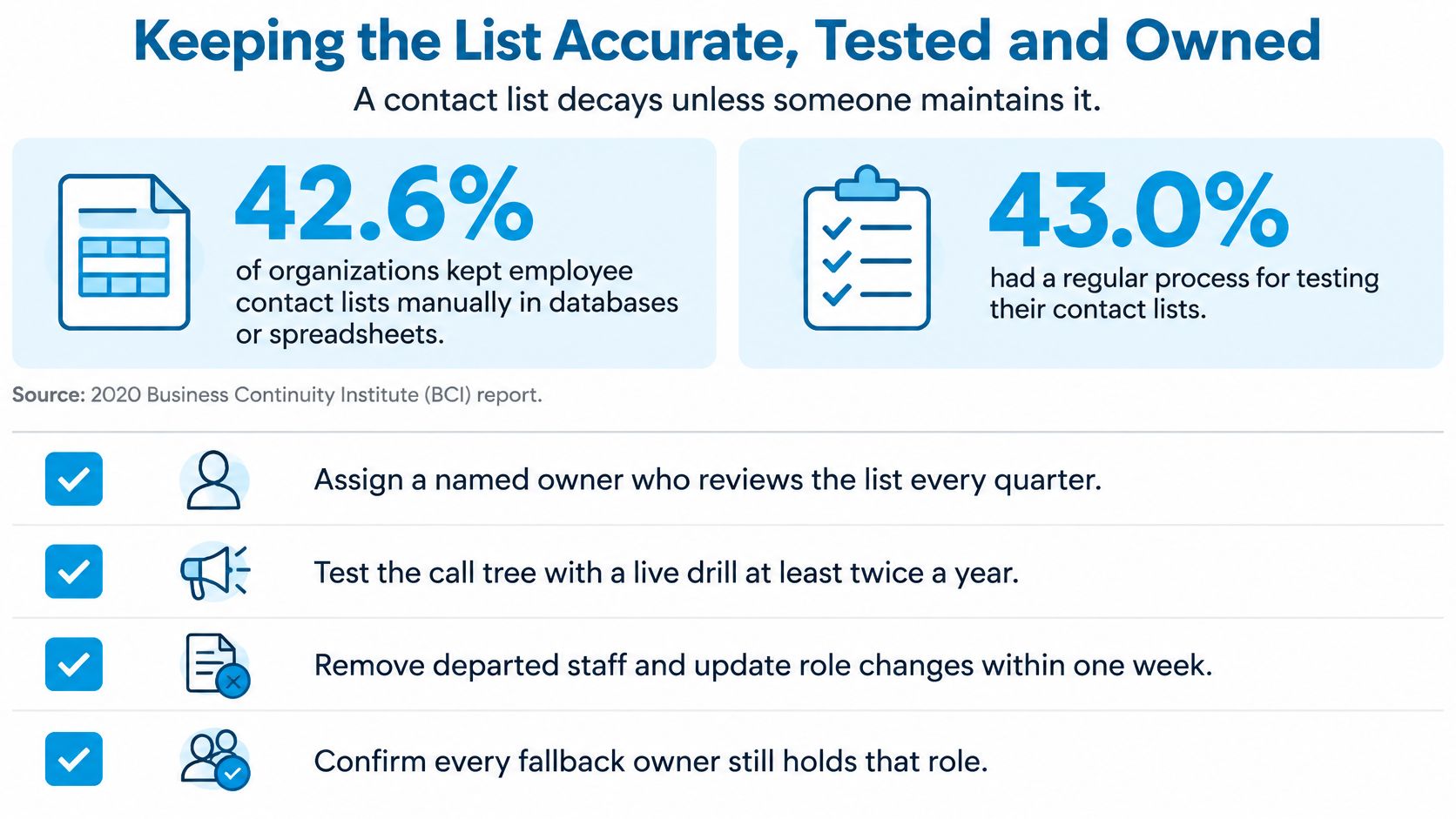
A roster starts decaying the day it's published. People change phones, leave companies, switch roles. A 2020 Business Continuity Institute emergency communications report found that 42.6% of organizations maintained employee contact lists manually in databases or spreadsheets, and only 43.0% of respondents reported having systems that regularly interfaced with human-resources systems to update contact data automatically. The same report found that 61.8% of emergency communications incidents were triggered by adverse weather or natural disasters, which is precisely when outdated numbers hurt most, because severe weather is also when staff move, travel, or lose power at home.
Those numbers describe a common state: a list exists, and it's wrong in places. The remedy is ownership plus a routine, and the two work like a smoke detector and its battery check. The detector only protects you because someone tests it on a schedule.
Ownership. Give every location and every vendor one named owner, plus a backup owner for each. Owners verify their own rows, which is faster and more accurate than a central administrator chasing twelve departments, because the owner knows that Priya left in March and the administrator doesn't.
The quarterly routine. Verify every entry at least once a quarter, sort by last-checked date so the stalest rows surface first, remove departed staff within one business day of their exit, and replace personal numbers with duty phones wherever the role allows. A resignation should change one row, not break a route. If a single departure can break a route, the route was never real; it was a person.
Testing. Run a live escalation drill at least quarterly. Page each route, time each acknowledgment against its published deadline, and record the result. Test the backup contacts too, since a drill that only reaches the primary contact confirms nothing about the path you'll really need at 11pm on a Sunday.
Storage. Keep the list versioned, access-controlled, and encrypted, with a printed or offline copy for the day the systems are down. Include vendor and provider contacts, such as the answering service, payment processor, and scheduling vendor, each with a primary and backup entry. Note where each record lives so nobody hunts for it during a disruption.
Record every failed escalation in a log with its cause. Write "mobile number disconnected in April", not "didn't answer". Causes become fixes; symptoms become complaints. When two failures share a cause, that cause is your next maintenance task.
You remain responsible for the accuracy and legality of every contact you hold, including consent for personal numbers and how the data is stored. That responsibility doesn't transfer to a template or a tool.
A smaller, verified roster with clear decision rights usually beats a long directory. Adding contacts feels safer, but every extra name adds a decision about who to call first, and indecision is slower than a short, confident list.
Turning signals into action follows the same logic as turning camera alerts into action: the alert only counts once somebody owns the next step. Your escalation list is exactly that kind of signal, so treat each drill result as an alert that demands a named owner and a dated fix.
Confirm Your Escalation Path Before the Next Incident
Four checks close the loop, and none of them need a meeting.
- Every tier has a fallback owner who can authorize the next action. Walk the tier table row by row. A fallback who can't approve anything is a message-taker, not a fallback.
- Fill any role with no backup before you add new names. A missing backup is a hole; an extra contact is a preference.
- Confirm that each failed acknowledgment from the last drill has a logged fix. If the same failure survives two drills, it isn't an oversight, it's a decision nobody has made.
- Check the printed copy matches the current version. Compare the version date on the paper copy with the one in the system, then replace it.

If your business handles a high volume of inbound calls, the routing rules you've written are only as good as the moment they run. We built Recepta.ai to answer around the clock, handle FAQs, intake, and qualification, then hand edge cases to trained humans following your playbook. It collects caller details, sends notifications by SMS, email, or dashboard, and passes call details straight into a CRM or Zapier, with HubSpot, Salesforce, and Clio among the supported integrations. That makes it the point where a written rule turns into a live action, which is the right place to test it in a trial before an incident tests it for you.
Your escalation contact list only proves itself on the night a system fails at 11pm and someone has to reach the right person in under a minute. Recepta.ai gives you that layer of response: AI intake and FAQ handling around the clock, with calls routed to the supervisors, operations managers, clinicians, or executives your playbook names, and summaries landing in Email, Slack, Teams, or your CRM straight after each conversation. Build the roster, set the timers, then try the routing in a trial at Recepta.ai so the first real test isn't a real incident.