Your Guide to on Call Services: Plan, Build, and Optimize
A homeowner finds a burst pipe at 10 PM, searches for a local plumber, and calls the first company that looks credible. The phone rings, hits voicemail, and the caller moves on. That lead is gone before the next business day starts.
That's the primary job of on call services. They're not just there to “answer after hours.” They protect revenue, catch urgent work, and keep customers from bouncing to the next provider. For small and midsize businesses, the difference between a live response and a dead end often decides who wins the job.
Why Always On Is No Longer Optional
Phone support still carries more weight than many teams want to admit. 76% of consumers still prefer the phone for customer support, and the global call center market was estimated at $352.4 billion in 2024, with a projection to reach $500.1 billion by 2030 according to Ringly's 2026 call center statistics roundup. That tells you two things fast. First, customers still call when the issue matters. Second, businesses still spend heavily on phone operations because those calls affect access, service, and cost.
For an SMB, the stakes feel more personal than corporate. A missed call after hours isn't a dashboard problem. It's an emergency HVAC replacement you never quoted, a legal intake that signs with another firm, or a patient who decides your office is too hard to reach.
That's why “always on” can't mean “someone might check voicemail later.” It has to mean the business has a real path for triage, escalation, and follow-through.
Where missed calls hurt most
Some businesses can tolerate delay. Others can't.
- Home services: A flood, lockout, or no-cooling call usually goes to whoever answers first.
- Healthcare: Post-procedure concerns and urgent scheduling requests can't sit in a queue all night.
- Legal and insurance: Time-sensitive matters need intake now, not the next morning.
- IT support: If your team is dealing with incidents after hours, practical resources on managing server outages in the Philippines are useful because they show what real downtime response looks like when systems and customer expectations collide.
The customer doesn't judge your staffing model. They judge whether they reached help.
A workable on call setup doesn't require a huge team. It requires clear rules, smart routing, and realistic coverage. That's what separates a service that sounds available from one that is.
Laying the Foundation with Scope and SLAs
Most on call services fail before the first schedule is published. The problem usually isn't effort. It's vague scope.
If your team hasn't defined what counts as urgent, who owns each call type, and how fast each category needs a response, your after-hours operation becomes a messy mix of over-escalation and missed priorities. One caller gets patched through for something routine. Another waits too long for something serious.
Healthcare shows how expensive that gap can get. In a high-stakes environment, call centers often handle 2,000 calls daily while staffing for only about 60% of that volume, and a 7% abandonment rate can mean 140 missed calls and over $45,000 in lost revenue daily according to this healthcare call center review. Even if your business is smaller, the lesson is the same. Capacity without clear service rules breaks fast.
Start with call categories
Don't build one blanket SLA for every incoming call. Build separate lanes.
A dental clinic is a good example. After hours, these are not the same problem:
Urgent clinical issue
A patient reports heavy bleeding after a procedure. That call needs immediate triage and likely a human response.Near-term operational issue
A patient needs to reschedule a morning appointment. That can wait for a callback window.New patient inquiry
A prospective patient wants pricing or availability. That should be captured cleanly and routed for next-day follow-up if it isn't urgent.Administrative request
Insurance questions or records requests usually belong in the non-urgent queue.
If you don't separate these, your team either interrupts clinicians for routine calls or lets urgent calls sit behind low-priority ones.
Write SLAs that match business risk
An SLA should answer four plain questions:
- What is this type of call?
- Who owns it first?
- How quickly must someone respond?
- What happens if the first responder doesn't pick up?
A simple version for an SMB looks like this:
| Call type | First response path | Response expectation | Fallback |
|---|---|---|---|
| Emergency service request | On-call technician or clinician | Immediate live triage | Secondary on-call person |
| New lead after hours | AI or receptionist intake | Capture now, route fast | Next-business-day task |
| Existing customer support | Frontline queue or callback | Based on severity | Escalate if repeated |
| Admin request | Voicemail, text, or form capture | Next business day | Office team follow-up |
That's also where reporting matters. If you can't see call outcomes by type, you can't tell whether your SLA is realistic. A practical starting point is to review your call records by urgency, disposition, and handoff quality. Recepta has a useful piece on call detail reporting for operational visibility if you need a framework for what to track.
Practical rule: If a call type can wake someone up, define it in one sentence so clearly that two different staff members would classify it the same way.
Avoid the common scope mistake
Many teams define availability first and decision rules second. That's backward.
“24/7 answering” sounds good, but it doesn't mean much unless you've also defined:
- Escalation triggers: words, issues, or customer types that require a live person
- Callback rules: who calls back, when, and in what order
- Documentation minimums: what must be logged before handoff
- End-of-shift ownership: who inherits unresolved issues
The best on call systems are strict where they need to be. They don't treat every call as an emergency, and they don't force callers to decode your internal structure. They sort demand into the right lane, then hold the team to a response standard that matches the risk.
Building Your On-Call Roster and Schedule
Staffing is where good intentions usually collide with budget and burnout. Small teams can't just add overnight headcount every time they want better coverage. At the same time, asking the same senior person to carry nights and weekends forever is how on call systems unravel.
That's why staffing model choice is more important than commonly believed.
Research on access and support systems points to a broader problem: demand and human capacity rarely line up neatly, which is why long waits and staff strain keep showing up across service environments. That same backdrop is why hybrid models using AI-assisted reception can help cover nights and weekends without adding full-time headcount, as discussed in this service access and capacity discussion.
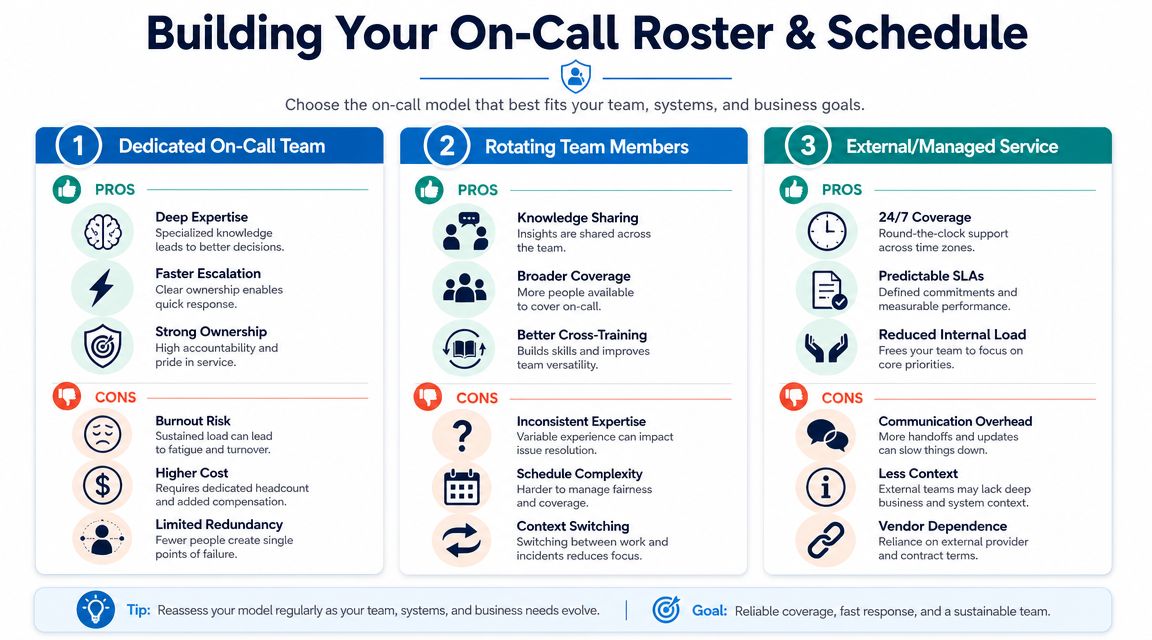
Three roster models in the real world
Here's how the common approaches usually play out.
| Model | What works | What breaks |
|---|---|---|
| Dedicated in-house on-call team | Strong context, direct control, tight accountability | Expensive, hard to scale, fatigue risk |
| Rotating staff roster | Shares load, builds team awareness, lower fixed cost | Uneven skill, inconsistent call handling, resentment if rules are fuzzy |
| External or managed service | Broader coverage, less internal interruption, predictable process | Requires clear scripts, can feel detached if handoffs are weak |
For most SMBs, the pure versions of these models all have limits. In-house can get too expensive. Fully outsourced can lose nuance. Rotation works until a few key people start carrying the hard calls every week.
Why hybrid is usually the practical answer
A hybrid model handles intake and routine qualification with automation or AI, then escalates only the right calls to a human. That changes the economics and the quality of life for the team.
A home services franchise is a good example. After hours, many calls sound urgent at first but aren't true dispatch emergencies. A strong intake layer can collect the address, issue type, customer status, and urgency cues before touching a technician's phone. The technician only gets interrupted when the call meets the escalation rule.
That's a much healthier design than waking skilled staff for every after-hours ring.
If you're mapping the call path itself, call forwarding options for business coverage are worth reviewing because forwarding rules often decide whether your roster feels smooth or chaotic.
Build the schedule around roles, not just names
A clean roster usually has at least two roles:
- Primary on-call: Takes the first escalated call in the assigned window.
- Secondary backup: Steps in if the primary misses, is already occupied, or needs specialist support.
Some teams also add a third role:
- Duty manager: Owns exception handling, customer recovery, and policy decisions.
Then set the operating rules around those roles:
- Use fixed handoff times: Midnight handoffs create confusion. Shift changes are easier when they happen at predictable, documented times.
- Define unreachable rules: If the primary doesn't acknowledge within your internal window, the system should escalate automatically.
- Protect recovery time: If someone had a rough overnight shift, don't schedule them for a full front-line day without adjustment.
- Log every transfer: Missed details during handoff cause repeat questions, delays, and angry callers.
If your schedule depends on “people being flexible,” you don't have a schedule yet. You have hope.
The most durable roster is the one your team can live with for months, not the one that looks heroic for two weeks.
Designing Bulletproof Communication Workflows
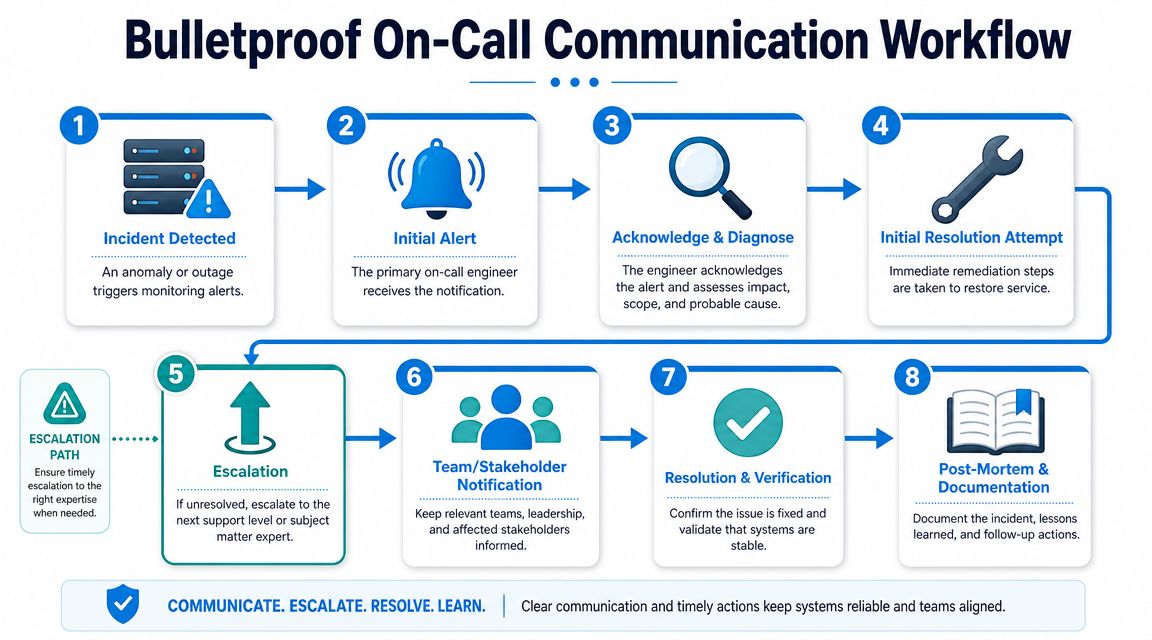
An on call service can answer every phone call and still fail the customer. The weak point is usually triage. The caller reaches a live system, but the system doesn't know where that call should go.
Research on urgent support access highlights this exact issue: the biggest gap often isn't availability by itself, but how systems decide what needs immediate human intervention versus what can be queued or routed, and poor routing creates delays and transfers that frustrate people under pressure, as noted in this HRSA-related access discussion.
Use a tiered workflow
The cleanest communication design is a tiered one. Not every call needs the same responder.
Tier 0 intake
This is the front door. It can be an IVR, an AI receptionist, or a trained live answering layer.
Its job is simple:
- identify the caller
- capture the issue
- detect urgency
- route based on rules, not guesswork
If this layer is weak, everything downstream gets noisy.
Tier 1 frontline handling
Tier 1 handles routine requests that don't need specialist judgment right away. Appointment booking, standard FAQs, status updates, and non-urgent existing-customer questions usually belong here.
This layer should have scripts, access to customer records, and permission to resolve basic issues without waking the on-call specialist.
A quick explainer on escalation and response design fits well here:
Tier 2 specialist escalation
Tier 2 is your actual on-call expert. That may be a plumber, nurse, attorney, account manager, or senior tech.
Only calls that meet defined triggers should get here. Good triggers are concrete:
- active leak
- safety concern
- post-treatment complication
- same-day legal deadline
- locked-out customer with active service contract
Bad triggers are vague:
- upset caller
- sounds important
- maybe urgent
Tier 3 management involvement
Management should only enter when the issue affects liability, high-value accounts, customer recovery, or repeated service failure. If managers are getting pulled into routine after-hours calls, the earlier tiers aren't doing their jobs.
A practical routing example
Take a small law firm with after-hours intake.
A caller says they were just arrested and need immediate legal help. A strong Tier 0 process captures the caller's name, callback number, matter type, and urgency. Because the call matches a predefined urgent legal category, it bypasses the standard queue and rings the on-call paralegal or attorney path directly.
A different caller asks about a real estate document review for next week. That call gets logged, summarized, and routed to next-business-day intake instead of waking legal staff.
Build workflows that survive friction
The workflow has to answer what happens when things go wrong.
- If no one answers the first escalation, what happens next?
- If the caller hangs up, who owns the callback?
- If the issue was misclassified, who can reroute it fast?
- If multiple urgent calls arrive at once, who triages the queue?
Good triage reduces interruptions for staff and reduces effort for callers. It does both or it isn't good triage.
The easiest way to test your workflow is to run five real scenarios from start to finish. Use examples from your own business. Burst pipe. Prescription concern. Court deadline. No-heat emergency. Existing client complaint. If the path feels confusing on paper, it will fail faster on a live phone line.
Choosing Your On-Call Technology Stack
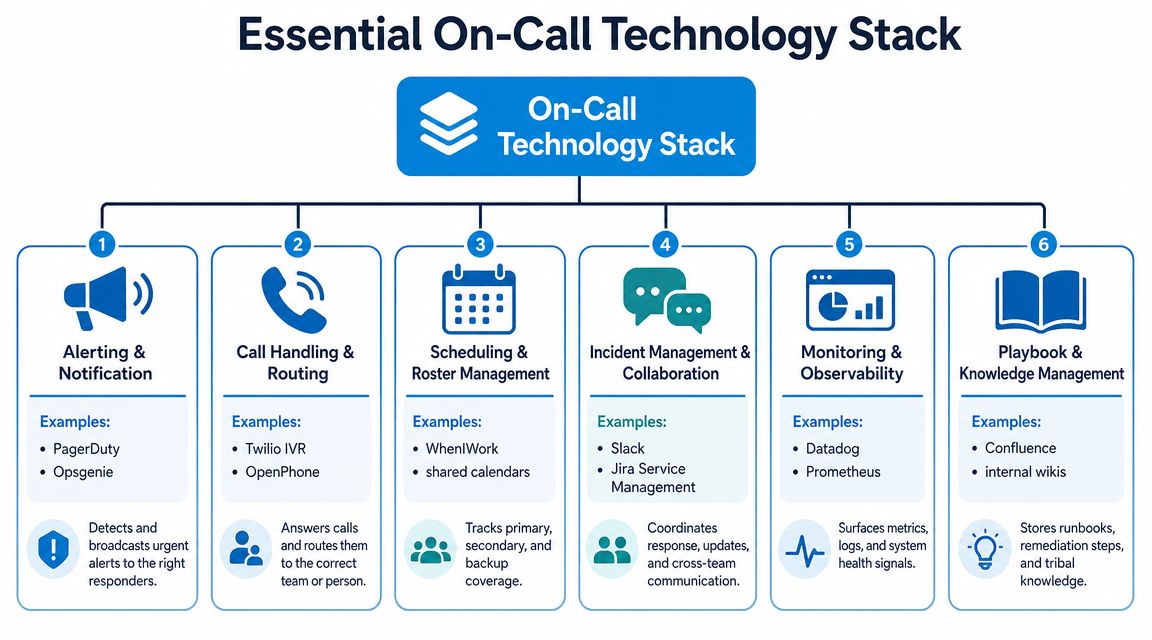
Technology should reduce handoffs, not create more of them. A modern on call stack works when three functions stay connected: call handling, alerting, and documentation.
If one of those is isolated, your team starts re-entering data, repeating questions, and losing context between shifts.
The three tool groups that matter
Call handling and routing
The call first lands here. Common tools include VoIP systems, IVRs, shared business numbers, and AI reception platforms.
The basic requirement is straightforward. The system must answer, classify, and route without trapping the caller in a maze. For SMBs, that often matters more than fancy telephony features.
Scheduling and alerting
This layer decides who gets contacted and when. It can be as simple as a shared calendar with strict ownership rules or as structured as a dedicated alerting workflow tied to shifts.
The key is reliability. If your routing rules say a primary responder is on duty, the alerting layer has to reflect the live schedule, not last month's spreadsheet.
Documentation and CRM
This is the layer too many teams underinvest in. If the interaction isn't logged correctly, the morning team starts cold. Leads go stale. Existing customers repeat the story. Managers can't diagnose where calls are getting stuck.
That's why an integrated call management application for handling, routing, and tracking conversations matters more than standalone phone software in many SMB settings.
Integration is where the value shows up
An HVAC company is a good model for this. A customer calls after hours about a failed unit. The intake layer captures the issue, confirms the service address, identifies whether the customer is existing or new, and marks urgency. Then the system creates or updates the contact record, opens a ticket, and schedules the callback or dispatch action in the right place.
That's the difference between a tech stack and a pile of tools.
A lot of teams are now trying to reduce manual glue work with automation platforms that can connect AI employees to 850+ tools. That kind of integration layer is useful when you need your phone system, CRM, calendar, and notification stack to move together without custom development.
A practical SMB stack
For many service businesses, a workable setup includes:
- Front-end intake: business phone system, IVR, or AI receptionist
- Routing logic: urgency rules, forwarding paths, backup contacts
- Shared scheduling: who is on call, who is backup, when handoff occurs
- System of record: CRM, ticketing tool, or practice management platform
- Team notification: SMS, app alerts, or shared internal channel
- Knowledge layer: scripts, playbooks, escalation criteria
Recepta.ai fits this hybrid pattern as one option in the market. It handles inbound and outbound conversations, captures appointment and lead details, escalates to human agents when needed, and syncs with connected systems so the handoff doesn't start from scratch.
The rule is simple. Buy tools that make the next action obvious. Avoid tools that require staff to remember extra steps when they're tired.
Optimizing Performance with Playbooks and KPIs
Launching on call services is operational progress. Keeping them sharp is management discipline.
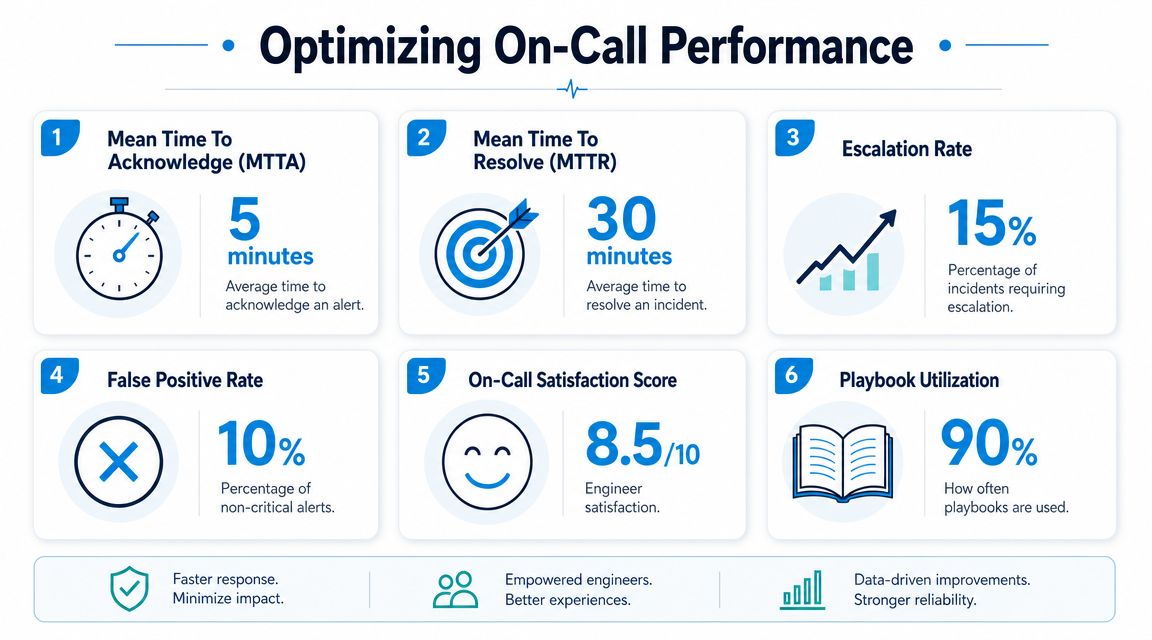
Thicker manuals are not the primary need for teams. They need short playbooks for common scenarios and a KPI set that reveals where the system is breaking. Without that, the same mistakes repeat under different names.
Keep playbooks short enough to use
A playbook should help a tired person make a good decision fast. If it reads like a policy binder, nobody will use it during a real call.
Good SMB playbooks often cover situations like:
- New customer inquiry after hours
- Existing customer with urgent service problem
- Escalation when primary responder is unreachable
- Billing or admin request that can wait
- System outage or office-wide disruption
Each playbook should answer:
- how to classify the issue
- what to say to the caller
- where to route it
- what to document
- when to escalate
For call review and quality checks, a structured quality assurance process in a call center helps teams find whether the issue is script quality, training, routing, or poor documentation.
Track the metric chain, not one vanity number
For inbound operations, the useful KPI chain is service level, abandonment rate, First-Call Resolution, Average Handle Time, and customer satisfaction. A good FCR range is 70% to 79%, and world-class performance is 80% or higher, based on the guidance summarized in CallMiner's service level and KPI article.
The important part isn't memorizing those numbers. It's using them together.
- Service level tells you how quickly calls are being answered based on the formula you've chosen.
- Abandonment rate shows whether callers are giving up before help arrives.
- FCR shows whether the caller's issue was resolved without follow-up.
- AHT shows how long calls are taking, but it should never be used alone.
- Customer satisfaction helps confirm whether “fast” also felt helpful.
A low handle time can mean efficiency. It can also mean your team rushed callers off the phone and created more work later.
Use KPIs as diagnostic tools
Here's what the patterns usually mean in practice:
| Pattern | Likely cause | What to check |
|---|---|---|
| Good speed, weak resolution | Rushed calls or weak training | Scripts, authority limits, QA reviews |
| High abandonment | Understaffing or bad routing | Queue design, callback policy, overflow path |
| Low FCR on one call type | Broken playbook | Classification rules and escalation criteria |
| Strong answer rate, poor customer sentiment | Calls answered by wrong person | Triage quality and handoff notes |
If you need cleaner raw data before investigating those patterns, a practical guide to CDR troubleshooting can help teams interpret call records and spot where response flow is breaking down.
Review weekly, adjust monthly
A simple operating rhythm works well for most SMBs:
- Weekly: review missed calls, escalations, and oddball cases
- Monthly: adjust routing rules, scripts, schedules, and backups
- Quarterly: revisit SLA definitions and call categories
Don't try to optimize everything at once. Fix the failure that creates the most customer friction first.
If your business needs after-hours coverage without building a full in-house phone team, Recepta.ai is one option to evaluate. It combines AI reception with human escalation, supports lead capture and scheduling, and helps teams route urgent calls without forcing every after-hours interaction to land on a staff member's phone.