
Phone Tree Template: How to Build One That Callers Use

A caller hears your long greeting, works through three menus, and then gets silence. They hang up while your team is still available to help. If you're updating your business phone system, that's probably the problem you want to prevent: callers getting lost between the greeting and the person who can solve their problem.
A phone tree template gives you a written map of that journey. For inbound business calls, it records what callers hear, where each choice sends them, and what happens when nobody answers. Treat it as a living routing document, not just a list of extensions.
Copy This Phone Tree Template
Start with the caller's experience, then add the staff responsibilities behind it. The standard pattern combines numbered choices, a replay key, and a human escape route, as illustrated in Nextiva's phone tree guide.
The filled-in example below is for a hypothetical pest-control business. Its hours, callback promise, and fallback rules are sample operating commitments, not recommended targets for every company.
Phone tree template elements in calling order
| Element | What the caller hears | Pest-control example |
|---|---|---|
| Greeting | Business name and hours | Thanks for calling Green Shield Pest Control, open 7 am to 7 pm |
| Main menu | Three or four numbered options | Press 1 for new estimates, Press 2 for existing appointments, Press 3 for urgent infestations |
| Urgent path | Immediate route for emergencies | Press 3 goes straight to the on-call technician |
| Live-help escape | Key that reaches a person | Press 0 for a team member |
| Repeat option | Key that replays the menu | Press 9 to repeat the menu |
| After-hours message | Recording plus callback promise | Leave your address and we call back within two hours |
| Fallback destination | Who receives the call if no one answers | Office manager's mobile after two unanswered attempts |
Keep the main menu focused on caller goals. Four recognizable choices are easier to compare than seven overlapping categories, particularly when someone's trying to remember the first option while listening to the last. Don't fill every available key just because your system supports it.
Every menu also needs an exit to a person. Someone with an unusual request shouldn't have to guess which department might accept the call.
Adapt the structure to your business
A dental office could use this sample menu:
- Press 1 to book or change an appointment.
- Press 2 to request a prescription refill.
- Press 3 for an urgent dental concern.
- Press 0 for the receptionist, or Press 9 to hear the options again.
A refill request should reach authorized practice staff, not trigger a promise that a prescription will be issued. Likewise, the urgent branch needs clinician-approved instructions and an actual on-call destination.
Practical rule: Never record a callback promise until someone has accepted responsibility for meeting it.
Copy this blank version into a shared document or spreadsheet. Keep routing details beside the script so your team can update both together.
| Field | Your entry |
|---|---|
| Business name | [Name callers recognize] |
| Hours and time zone | [Open hours, holiday exceptions] |
| Greeting | [Business name and short welcome] |
| Menu options | [Key, caller goal, destination] |
| Urgent trigger words | [Terms that activate the urgent path] |
| Destination owners | [Named owner and backup for each route] |
| Repeat and live-help keys | [Replay key and human-help key] |
| After-hours behavior | [Intake, message, or on-call instructions] |
| Fallback contact | [Person, contact method, activation rule] |
| Service targets | [Answer-time target, hold limit, callback deadline] |
| Document owner | [Name, last update, next review] |
How to Customize the Call Paths
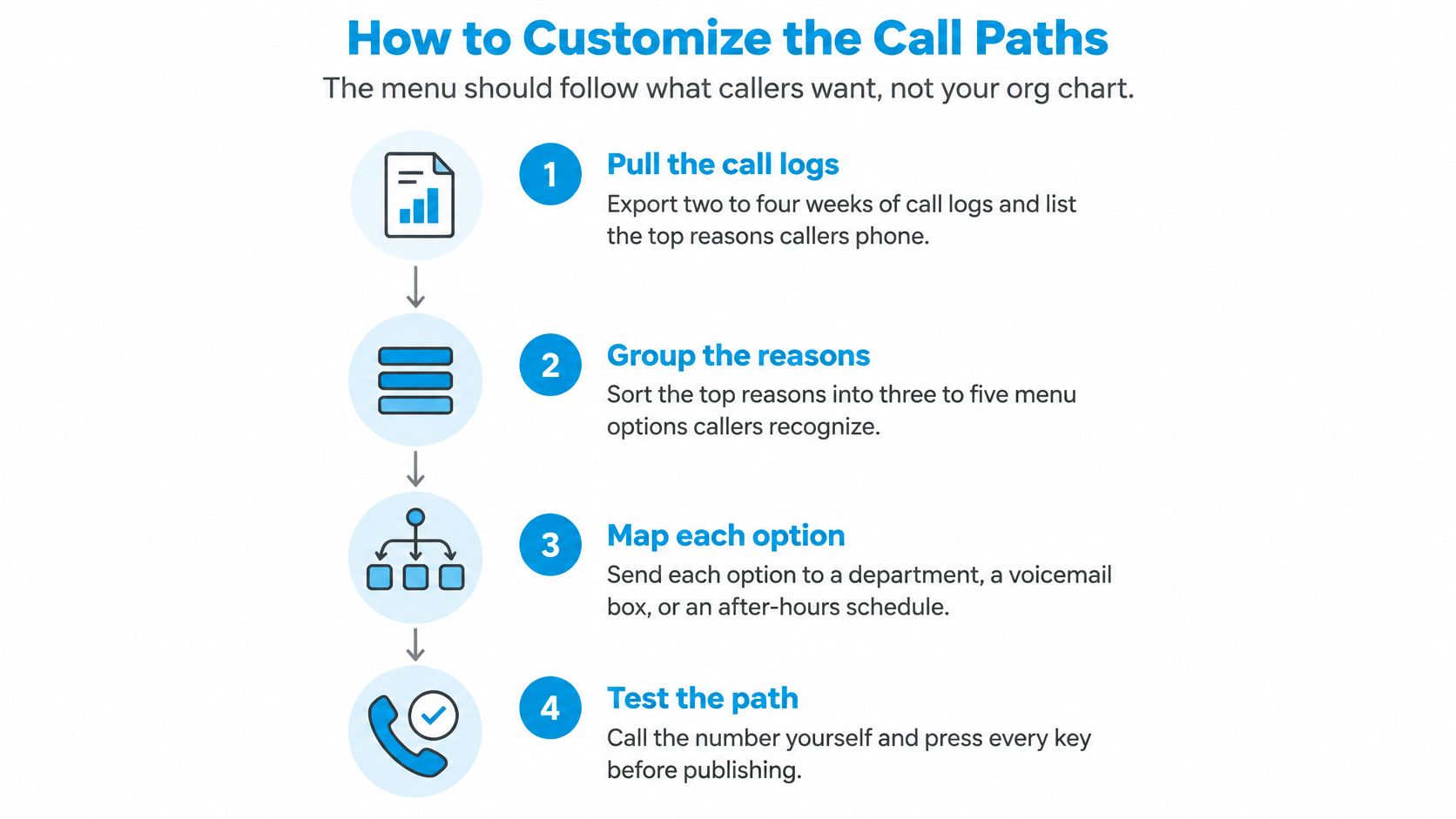
The menu should follow what callers want, not your org chart. A customer knows they need to change an appointment. They may have no idea whether your business assigns that task to scheduling, administration, or customer care.
Build the routing map from actual call reasons. Keep the script separate from the technical settings until you've agreed on the destinations.
Build from caller intent
Pull the call logs. As a practical starting window, export two to four weeks and label why people called. Don't copy the queue name as the reason, because a call answered by sales may concern an existing appointment.
Count and rank the reasons. Compare frequency with business value and urgency. The common slip is prioritizing only new sales while overlooking existing customers with time-sensitive problems.
Choose the first-menu actions. Put frequent, valuable tasks where callers can recognize them immediately. Don't give a rarely used request prominent placement just because a department asks for its own key.
Group by the caller's goal. Use actions such as book, change, pay, or report a problem. Avoid internal labels like service administration, which force callers to interpret your staffing structure.
Keep the map shallow. Use three routing levels and four options per level as design caps, preferably staying shallower. Don't create a submenu just to accommodate an obscure option that a receptionist could handle.
Provide a human exit. Make the help route available throughout the map. Don't let the same key reach a receptionist in one branch and disconnect the caller in another.
Plan for unavailable staff. Attach a callback or message destination to each staffed route. A transfer to an unattended desk isn't a complete call path.
Test from a mobile phone. Time each route, including unanswered calls, and write down where you hesitate. Don't test only with employees who already know which button to press.
The broad-versus-deep distinction matters. In a controlled IVR experiment, users completed an average of 6.70 tasks with the broad structure versus 5.26 with the functionally equivalent deep structure, and broad-menu users were more satisfied, according to the published study abstract.
Rebuild a confusing route
Say a plumber's logs show that most urgent calls arrive after hours. In this hypothetical rebuild, the owner moves emergency leaks from option 4 to option 1 and connects that route directly to the scheduled on-call plumber.
Routine booking goes to daytime scheduling or after-hours capture. The important change isn't merely a different key: the owner has matched urgency, availability, and destination. Use a small-business call-routing plan to document those schedule-dependent rules before configuring the phone system.
Writing Prompts Callers Will Follow
Callers start deciding whether they understand your menu with its first sentence. Give them an action they recognize, then the key that performs it. Each individual choice should fit comfortably in one breath.
You're writing for listening, not reading. Parentheses, slashes, and department abbreviations may look tidy on a page but become awkward when spoken.
Replace internal language with useful actions
Use these editing rules while reviewing your script:
- Choose everyday words. Replace service administration with schedule an appointment. Callers shouldn't need to translate your organization's vocabulary.
- Lead with the common task. Put booking before supplier inquiries if appointment calls dominate your logs. Don't organize the menu alphabetically.
- Set a short recording target. Aim for about fifteen seconds per prompt as an editing exercise, not a guaranteed usability threshold. Remove background information before speeding up the recording.
- Keep key meanings consistent. If a key means return to the previous menu, preserve that meaning wherever it appears.
- Announce help early. Say the live-help and repeat keys at the start of each menu, rather than making a confused caller wait until the end.
Consider a law firm's original script:
Press 1 for estate planning intake and general counsel referrals.
A caller may not know whether a question about an existing will qualifies as intake. A clearer replacement is:
Press 1 to talk about a will or trust. Press 2 for a current case. Press 0 for a receptionist.
These are sample scripts, not quotations from a study. The revised version names subjects callers recognize and separates new inquiries from ongoing work.
Read it aloud before recording
A warm, brief greeting gives callers room to hear the useful instructions. Keep necessary legal notices, but have the responsible adviser approve their wording and placement instead of attaching an oversized disclaimer to every branch.
Use your business phone greeting to establish the right tone. A dental practice might sound reassuring; an HVAC dispatcher might sound calm and direct.
Before recording, check:
- Breath: Can you say each choice without rushing?
- Meaning: Would a new customer understand every label?
- Distinctness: Could someone reasonably choose either of two options for the same request?
- Action: Does every instruction lead somewhere that's ready to respond?
- Playback: Are names, numbers, and pauses clear through a phone speaker?
Escalation and Accessibility Routes
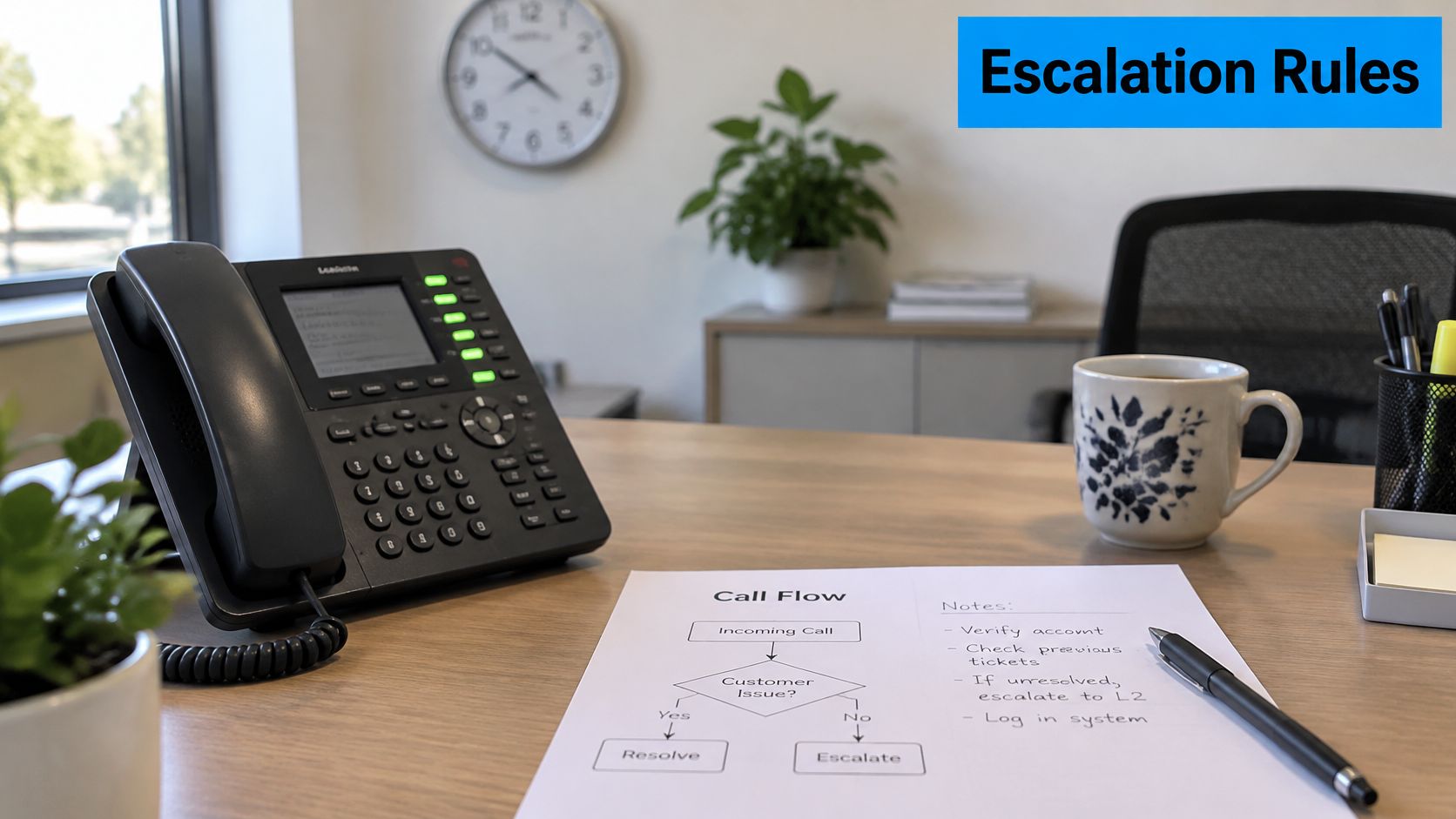
Escalation rules decide what happens when the menu stops working. Write the trigger, timing, and action together so staff don't have to improvise while someone waits.
Escalation triggers and actions
| Trigger | Timing rule | Action |
|---|---|---|
| Silence after a prompt | No input within the prompt's timeout | Repeat the menu once, then offer a live person |
| Invalid key pressed | Second invalid input in the same menu | Route to a human or a callback message |
| Repeated failed attempts | Two failed attempts at any menu | Transfer to a live agent with the reason logged |
| Urgent keyword | Caller says or enters an emergency term | Skip the menu and connect to the on-call contact immediately |
| Caller presses 0 or says help | Immediate on request | Connect to a team member at any level |
| Caller uses relay or TTY | Detected at the first menu | Route to a text line or a relay-compatible human queue |
The accessibility guidance summarized in Vida's phone tree guide includes W3C's recommendation for a reserved digit or spoken command to reach a human, U.S. Access Board guidance on TTY usability, and public-service design guidance limiting routing to three levels, four options per level, and live-agent diversion after two failed attempts. Treat these as practical design safeguards, while checking which accessibility requirements apply to your organization.
Make the exit usable
Silence shouldn't produce an endless replay loop. Configure enough response time for your callers, then test with people who need longer to process instructions.
For invalid input and repeated failure, preserve the route already attempted. The receiving employee should know that the caller couldn't complete the menu, rather than asking them to start over.
Urgent terms need business-specific handling. For a plumber, flooding may trigger dispatch; gas smell needs an approved safety instruction and appropriate emergency direction, not merely a place in the service queue.
Offer alternatives before callers struggle
TTY, relay, and real-time text callers need a route that doesn't depend on successfully navigating a voice menu. Publish a working text contact and relay instructions in the greeting and on your website. Don't assume every system can automatically detect these needs; make the alternative explicitly available.
Offer language routing at the first menu. Each language route needs translated prompts, an appropriate destination, and a fallback when a speaker isn't available.
A complete call escalation process also specifies the handoff. Send the caller's reason, contact details, urgency, and actions already attempted to the receiving person, using channels approved for the information involved.
When our AI detects that a caller needs something more nuanced, it hands off to a human receptionist following the business's playbook.
Add an accessibility decision layer to your template:
- Preferred access: Voice, text, relay, or another language.
- Alternative channel: SMS number, email address, or relay-compatible queue.
- Responsible owner: Person monitoring that channel and their coverage hours.
- Handoff record: Details already collected and what the caller needs next.
Measuring Routing Accuracy and Abandonment
| Metric | How to calculate it | What it reveals |
|---|---|---|
| Correct-routing rate | Callers reaching the intended queue divided by callers entering the tree | Whether menu labels match caller intent |
| Abandonment by stage | Callers who hang up at each menu divided by callers reaching that menu | Which prompt loses callers |
| Transfer rate per branch | Transfers divided by calls answered in that branch | Branches that send callers to the wrong place |
| Repeat-request rate | Callers pressing repeat divided by callers entering the menu | Prompts that are too long or unclear |
| Invalid-input rate | Invalid keypresses divided by total keypresses in the menu | Menus with confusing key mapping |
| Hang-up after hold | Callers who hang up after the hold timer divided by callers placed on hold | Whether live coverage matches call volume |
An orderly diagram doesn't prove callers reach the right person. An IVR human-factors analysis reported that only 35%–75% of callers reached the correct area in a complex directed menu, while 8.5% abandoned during account-number entry.
Those findings describe the analyzed systems, not a benchmark every business should accept. Your task is to identify where your callers struggle and whether a change improves their path.
Turn call events into decisions
- Define the intended destination for each top-level intent. Decide what counts as correct before reviewing outcomes.
- Log the events: prompts played, keypresses, transfers, repeat requests, timeouts, and hang-ups. Use a consistent call identifier to connect them.
- Calculate correct routing using all callers entering the tree as the denominator. Also inspect completed calls separately so abandonment doesn't disappear from view.
- Calculate abandonment by stage. Separate menu exits from hold exits and completed message submissions.
- Inspect troublesome branches. Read or listen to examples behind frequent transfers and repeats before rewriting the prompt.
Use call-detail reporting to connect each route to its outcome. Distinguish planned transfers from corrective transfers, because a scheduled escalation isn't necessarily evidence of misrouting.
Test a specific correction
In a hypothetical dental office, 25 of 100 callers choosing Press 2 for appointments hang up at the insurance question. The manager moves insurance collection into the intake conversation, where staff can explain what information is needed.
Suppose drop-off then falls. That's a reason to retain and monitor the change, not proof that every dental office should remove insurance questions. Compare similar operating periods and check that staff still collect the necessary information.
Count a transfer as operationally complete only when the receiving person has enough context to continue helping.
Review results weekly during the first month, then monthly once performance stabilizes. Assign a named owner to each failing branch and record the change, expected outcome, and review date.
When a Phone Tree Is the Wrong Tool
A logically correct tree can still lose a caller if nobody answers at its destination. For a lead-driven business, a tidy callback chain isn't a substitute for capturing the inquiry while the person is available.
U.S. consumer research summarized by AMBS Call Center reported that 78% of consumers abandoned a business after an unanswered call, and 41% hung up after only one to two minutes on hold. These findings make unanswered destinations and long waits worth examining alongside menu wording.
Replace unnecessary routing with intake
A hybrid model keeps a short emergency and after-hours branch while sending routine callers into structured capture. Collect the reason for calling, contact details, urgency, appointment preference, and relevant consent, then escalate to a person when needed.
An AI receptionist can perform that capture around the clock, with human support layered in where appropriate. The operating plan still needs an answer-time target, maximum hold duration, missed-call callback service-level agreement, named escalation owner, and weekly review of abandonment and transfers.
The thresholds below are suggested internal decision rules, not published industry benchmarks. Adopt them as testable starting points and adjust them to your staffing and risk.
| Situation | Decision rule | Recommended design |
|---|---|---|
| Routine lead calls | If more than a third of callers abandon at the first menu, move routine intake to capture | Keep only emergencies on the tree |
| High call volume | If serial callbacks miss the missed-call callback SLA, add structured capture | Capture followed by a staffed callback |
| Multilingual demand | If more than one language accounts for regular calls, add language routing at the first menu | Language key followed by capture |
| Appointment-heavy operations | If the Press 2 branch abandons above one third, move the insurance and booking questions into capture | Capture with appointment preference |
| Franchise or many locations | If you cannot audit each location's tree weekly, use one shared intake flow | Central capture with local escalation owners |
For example, a cleaning franchise can collect the property address and requested service centrally, then assign the inquiry to the correct local owner. That avoids asking callers to identify the franchise territory themselves.
Launch Your Phone Tree This Week
Launch a manageable version that your team can support. A short, tested route with accountable owners is more useful than a detailed diagram nobody has called.
Follow a controlled launch sequence
- Fill in the template. Replace sample text with your business name, hours, destinations, and approved service targets.
- Confirm ownership. Have each destination owner and backup verify their contact details and availability.
- Record the prompts. Read them aloud first, then listen to the recordings through an ordinary phone speaker.
- Test every path. Use a mobile phone to check urgent routing, live help, invalid input, after-hours behavior, and unanswered destinations.
- Launch on a controlled number. For a sample rollout, keep the previous number available as a fallback for two weeks. Confirm forwarding and monitoring arrangements before switching traffic.
- Review the first week. Fix the worst-performing branch, document the change, and test it again.
Keep a launch log with the test date, tester, expected destination, actual result, and unresolved issue. Don't mark a path complete just because the phone rang somewhere.
Match coverage to your target
Connecting callers to a trained person matters more than polishing an extra sentence in the greeting. Use your written answer-time target and measured outcomes to decide whether existing staffing can support the new route. Don't promise immediate help unless your coverage arrangements can deliver it.
At Recepta.ai, each customer gets a dedicated local or toll-free number. We create a receptionist in 15 minutes, and calls can be received immediately after setup. Our pricing process begins with a 15-minute call where you describe call volume, hours, and what a great customer experience looks like, and hear the AI live.
Fill in your template today, assign its owners, and put the first mobile-phone test on your calendar.
Recepta.ai offers AI reception with human support to put your routing playbook into practice, including intake and escalation. Visit Recepta.ai to book a call and discuss how to support your phone tree around the clock.