Event Management CRM: Boost ROI & Experience
You're probably dealing with some version of the same mess most growing teams hit. Registrations live in one tool. Reminder emails go out from another. Sales keeps notes in a generic CRM. Finance tracks invoices in spreadsheets. On event day, someone exports CSV files, someone else fixes duplicates, and nobody fully trusts the numbers.
That's the point where an event management crm stops being a nice-to-have and starts becoming infrastructure.
The mistake I see most often is buying software that only solves registration. That helps for one stage of the event, but it doesn't fix the handoffs between sales, communications, operations, and finance. If your first major tech investment is going to stick, it has to do more than collect names and send confirmations. It needs to become the place where the whole event operation connects.
What Is an Event Management CRM Really
An event management crm is easiest to understand when you stop thinking of it as a marketing add-on.
It's an operational hub. It should hold the shared record of who's attending, who's sponsoring, what was sold, what was promised, what was delivered, and what should happen next. If it only sends emails or processes registrations, it's not doing the full job.
A lot of businesses start with the manual toolkit version of event operations. One spreadsheet for invitees. One platform for ticketing. One email tool for reminders. One folder of sponsor contracts. One accounting process that sits off to the side. That setup works until the event gets larger, the team gets busier, or leadership asks a simple question like, “Which attendees turned into revenue?”
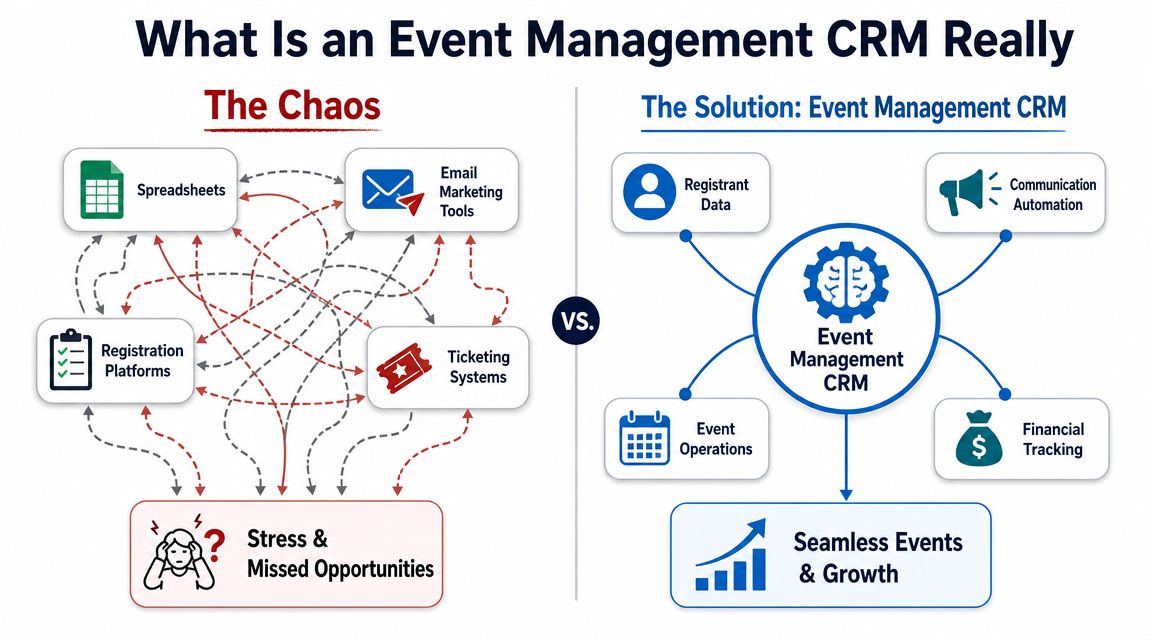
It's a system of record, not just a contact list
The most useful way to define an event management crm is this: it acts as a single system of record across the full event lifecycle, centralizing contact management with lead, opportunity, and pipeline tracking so teams can connect pre-event outreach, registration, and post-event follow-up in one data model, which reduces fragmentation and speeds up handoffs across departments, as explained in Momentus on event CRM.
That matters more than most buyers realize.
A generic sales CRM usually understands accounts, contacts, deals, and tasks. A ticketing platform usually understands orders and attendees. An event management crm should understand both, plus the workflow between them. That includes sponsor commitments, event status, communication history, revenue context, and operational milestones.
If your team has to ask three different people to answer one attendee question, the system isn't connected enough.
What it is not
It's not just Eventbrite with nicer reporting.
It's not your email marketing platform with an event template.
It's not your sales CRM with a custom field called “Attended webinar.”
Those tools can all be part of the stack. But they don't replace a platform built to manage the event lifecycle as one connected process.
A simple test helps:
| Question | Registration tool only | Real event management crm |
|---|---|---|
| Can sales see attendee history in account context? | Sometimes | Usually yes |
| Can operations track execution against commitments? | Rarely | Yes |
| Can finance tie invoices, payments, and event records together? | Limited | Often yes |
| Can post-event follow-up start from actual event behavior? | Partial | Yes |
For teams comparing deployment models and shared access, this guide about cloud event management is useful because it frames the practical shift away from isolated desktop-style workflows.
The deeper issue is integration. If your registration tool can't reliably write back to the rest of your systems, you're still stuck reconciling records manually. That's why it's worth understanding what CRM integration actually means in practice before you buy anything.
Core Features That Drive Event Success
The features that matter aren't the ones that look best in a demo. They're the ones that remove friction between teams.
When an event goes sideways, it's usually not because the platform lacked a colorful dashboard. It's because registration data didn't sync, reminders went out late, sponsors got handled in email threads, or nobody could tell who needed a follow-up call.
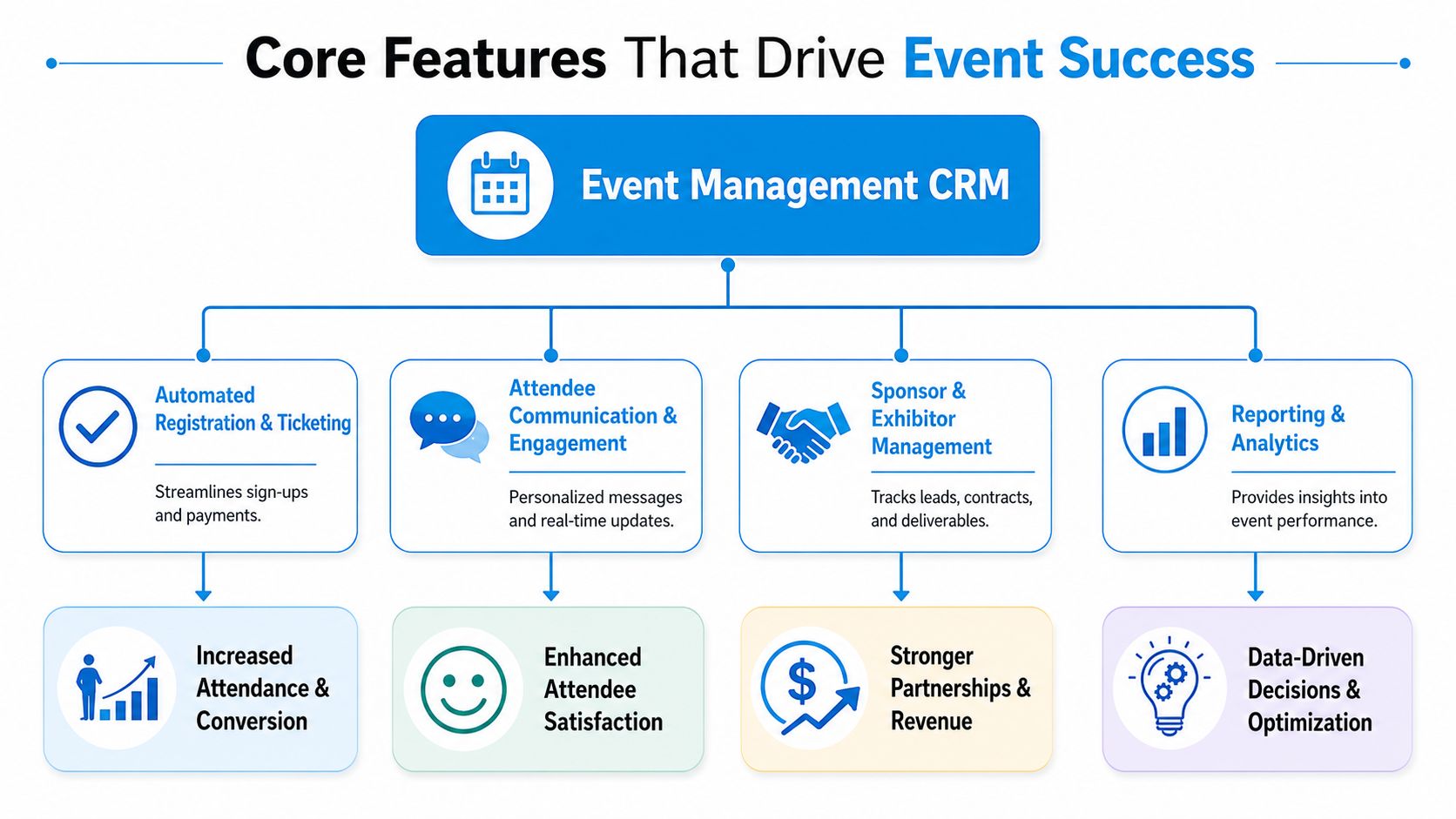
Registration that creates usable records
A law firm running an annual client seminar often starts with a basic sign-up page and a spreadsheet. That works until dietary needs, CLE tracking, guest substitutions, and partner follow-up all get handled in separate places.
With a proper event management crm, registration doesn't just create a ticket. It creates a structured record the rest of the business can use.
That means:
- Sales or relationship owners can see who registered from key accounts.
- Operations staff can track seating, session access, and special requirements.
- Finance can see paid versus unpaid registrations or sponsorship commitments.
- Marketing can trigger the right confirmation and reminder sequence without re-importing lists.
Communication that reacts to attendee behavior
In these situations, basic tools fall short.
A dental practice hosting an educational event for high-value treatments doesn't just need a blast email. It needs different messages for people who registered, people who started but didn't complete registration, and people who attended but didn't book a follow-up consultation.
Modern event CRM integration can create a CRM record at the moment of registration, eliminate manual exports, and support session-level engagement scoring and live dashboards for registrations, ticket sales, and campaign performance, according to InEvent's event management CRM overview.
That changes the follow-up model. The event stops being a one-day activity and becomes an active pipeline input.
Practical rule: If your reminder and follow-up flows depend on someone exporting a list after the event, you don't have a real workflow. You have a temporary patch.
Sponsor and exhibitor management that sales can actually use
This feature gets overlooked because many teams buy around attendee workflows first.
Take a regional trade event. A sponsor agreement may include booth placement, logo usage, speaking slots, lead delivery, and invoicing milestones. If those pieces live in separate documents, someone will miss a deliverable. When that happens, sponsor renewals get harder.
What works better is a CRM structure where sponsor records, contract notes, financial status, and fulfillment tasks all sit on the same timeline. Sales sees renewal context. Operations sees deadlines. Finance sees what should be billed.
Scheduling and service coordination
This becomes critical for businesses that use events to drive appointments, consultations, or site visits.
A home services company running a homeowner workshop doesn't want attendees to vanish after check-in. It wants inspections booked, estimates scheduled, and callbacks assigned. That's why scheduling integration matters more than many event teams expect.
If you're evaluating this use case, it helps to review how automated appointment scheduling software connects event-driven interest to actual booked conversations.
Reporting that answers operational questions
Good reporting doesn't just tell you how many people showed up.
It should answer questions like:
- Which event sources produced qualified conversations
- Which sponsors are likely to renew
- Which sessions generated the strongest follow-up activity
- Where registrations stalled in the process
- Which accounts engage repeatedly across multiple events
Those are management questions, not vanity metrics. Your CRM should help answer them without a cleanup project every time.
The Tangible ROI of an Event Management CRM
An event management CRM is often justified too narrowly. Focus tends to be on registration admin and email automation. Those matter, but the main return usually comes from better coordination and cleaner follow-up.
If the CRM shortens response time, gives sales better context, reduces invoice confusion, and makes repeat outreach more relevant, it changes revenue operations. That's where the business case gets stronger.
Early in the evaluation process, I tell clients to ignore broad claims about “better engagement” and ask a harsher question: what work disappears, what handoffs improve, and what revenue conversations become easier to track?
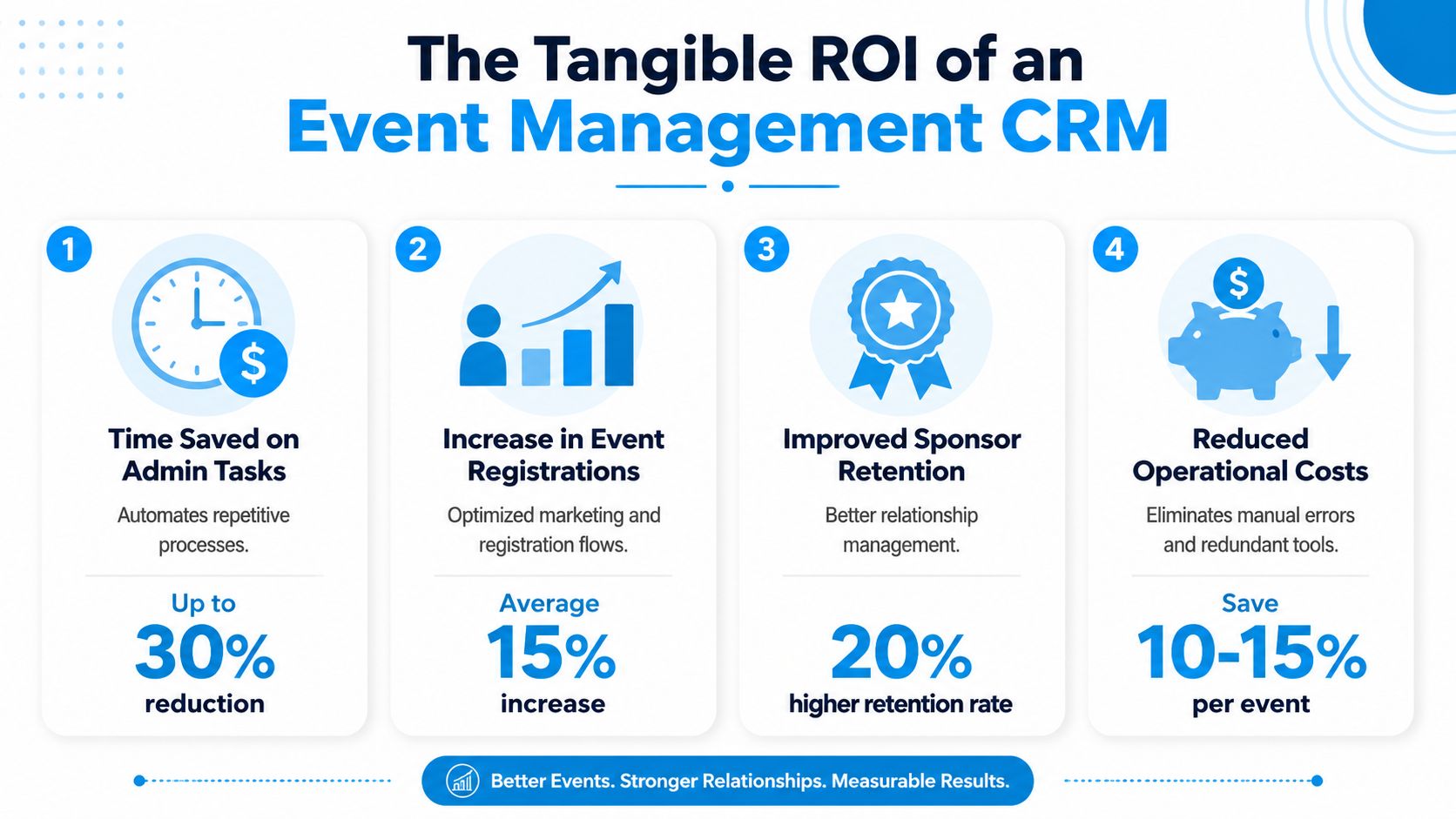
The ROI usually shows up in four places
Admin time drops
Teams stop rebuilding attendee lists, correcting duplicate records, and manually updating sales or finance.Follow-up quality improves
Staff can act on actual attendance and engagement signals instead of guessing from a final export.Sponsor and partner management gets tighter
Deliverables, billing, and renewals are easier to track when they live in one operational record.Repeat-event strategy gets smarter
You can see who returns, who rebooks, and which audience segments are worth nurturing between events.
Industry guidance for 2026 puts more pressure on this exact issue. Teams are being pushed to justify event spend through recurring relationship cycles across events, with attention to metrics like attendee-to-repeat-customer conversion and rebooking rates, as discussed in monday.com's event management guidance.
What practical ROI looks like
A healthcare practice running educational seminars may not care about “event engagement” as a standalone concept. It cares whether attendees turn into consults, whether no-shows can be re-engaged, and whether staff can see the full communication history without searching multiple systems.
A franchise group has a different lens. It wants local operators to run events with consistent workflows while central leadership still gets clean reporting and financial visibility.
A B2B company with sponsors cares about something else entirely. It wants proof that sponsor packages were fulfilled and that post-event outreach didn't die in someone's inbox.
This short explainer is worth watching because it helps frame event systems as a measurable business asset rather than a planning tool alone.
Don't measure the event in isolation
One of the biggest reporting mistakes is treating each event as a closed loop.
For example, if you invest in physical presence at trade shows, the booth experience affects what happens in the CRM afterward. This overview of LED Exhibit Booths on ROI is useful because it connects onsite presentation decisions to downstream performance.
The same principle applies to your CRM. Don't stop at attendance. Connect cost, pipeline creation, appointments booked, sponsor renewal conversations, and repeat participation. If your team needs a cleaner financial model for this, start with a framework for how to calculate cost per lead and adapt it to your event funnel.
The CRM earns its keep when it helps you decide what to repeat, what to stop, and who to contact next.
A Buyer's Checklist for Choosing Your CRM
Most demos are designed to make every platform look easy. Key differences show up later, when your team tries to connect accounting, calendars, outreach, check-in, and sales follow-up without creating duplicate records.
The buying process gets simpler when you evaluate around workflow risk instead of feature abundance.
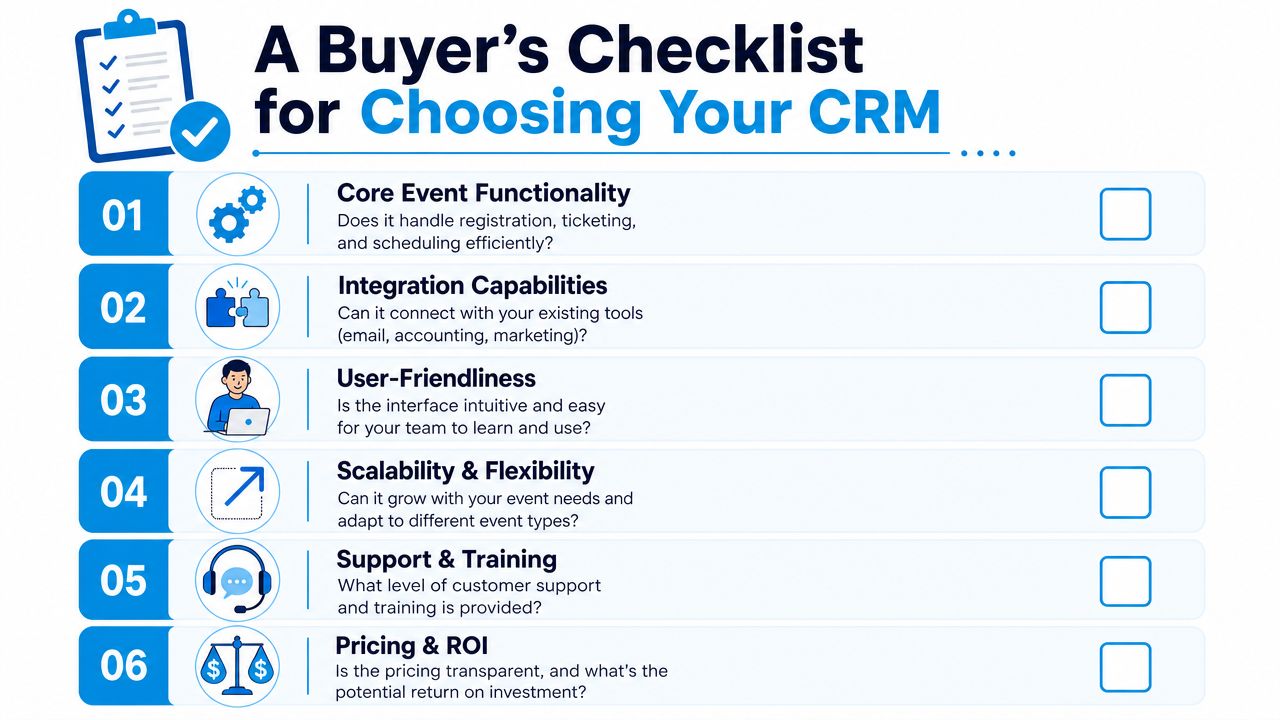
Questions that reveal whether the platform will hold up
A commonly overlooked issue is fragmentation across event tools. That's why integration quality matters more than long feature lists, especially when the CRM needs to sync with ERP, accounting, and scheduling systems rather than just email, as noted in RSVPify's event CRM discussion.
Use that as the lens for every vendor conversation.
Core workflow fit
Ask the vendor to show your exact process, not their idealized version.
For example:
- inquiry or invite
- registration
- payment or sponsorship commitment
- event updates
- onsite changes
- no-show handling
- post-event follow-up
- finance reconciliation
If they can only demo registration and email reminders, they're showing one slice of the problem.
Integration depth
This is usually the make-or-break category.
Ask:
- What syncs in real time, and what syncs later
- What happens when records conflict
- How duplicate contacts are prevented
- Whether financial data can map back to the event record
- How scheduling tools and communication tools write back to the CRM
A “yes, we integrate” answer is worthless without process detail.
A practical comparison table
| Buying criterion | What good looks like | What usually causes trouble |
|---|---|---|
| Ease of use | Staff can update records without extra training every week | Only one admin understands the system |
| Event workflow coverage | Registration, communications, sponsor tracking, and follow-up connect | Tool handles one stage well and exports the rest |
| Reporting | Teams can answer operational and revenue questions fast | Reports require spreadsheet cleanup |
| Finance visibility | Invoices, payments, and commitments tie back to event records | Finance works from separate files |
| Multi-team adoption | Sales, ops, and marketing each get usable views | One department owns it, others ignore it |
Support and scalability matter earlier than you think
A lot of growing firms buy for today's event and regret it during the second or third rollout.
That's why I push buyers to ask about:
- Role-based permissions for teams that shouldn't all see the same data
- Custom workflows for different event types
- Training support for non-technical staff
- Admin burden after launch
- Multi-location management if branches or franchisees run their own events
A polished demo can hide a brittle implementation. Ask what breaks when you add more users, more events, or more systems.
If you're a smaller team and need to think about follow-up and sales ownership at the same time, this guide to lead management software for small business helps clarify what should happen after the event data lands.
Implementation and Smart Integration Strategies
Buying the platform is the easy part. Rollout is where teams either create a durable operating system or a new layer of confusion.
The broader market is moving toward centralized platforms, not isolated event tools. Fortune Business Insights projects the global event management software market will grow from USD 11.31 billion in 2026 to USD 32.62 billion by 2034, at a CAGR of 14.16%, reflecting a shift toward platforms that manage the event lifecycle as a measurable revenue channel, according to Fortune Business Insights on the event management software market.
That shift only pays off if your implementation is disciplined.
Start with one event workflow, not every workflow
Teams often try to migrate everything at once. That slows adoption.
A better rollout starts with one repeatable event type:
- a quarterly seminar
- a sponsor-driven trade event
- a franchise open house
- a patient education webinar
- a client appreciation event
Map that process from first contact to final follow-up. Then decide what the CRM must own versus what connected tools should own.
For many businesses, the CRM should own:
- contact and account records
- event status
- communication triggers
- follow-up tasks
- sponsor or attendee relationship history
Connected systems may own payment processing, virtual session delivery, or specialized onsite check-in.
Clean data before you import it
This step is boring and expensive to skip.
Before migration, standardize:
- Contact names and company naming
- Duplicate attendee records
- Event naming conventions
- Status fields such as invited, registered, attended, cancelled, no-show
- Owner fields for sales or relationship managers
If you import dirty data, the CRM won't fix it. It will preserve the mess at higher speed.
Design handoffs between teams
Most event problems are handoff problems.
A simple operating model should answer:
- who owns pre-event outreach
- who confirms high-value attendees
- who handles onsite changes
- who approves sponsor deliverables
- who closes the financial record
- who triggers follow-up calls or appointments
Here, integration becomes practical, not technical.
For example, if a prospect calls after attending a workshop and wants to schedule a consultation, that interaction shouldn't die in voicemail or sit in someone's inbox. One option in a connected stack is Recepta.ai, which handles inbound conversations, appointment scheduling, lead capture, and CRM sync so event-driven calls can update records and trigger next steps without manual entry.
Build for exceptions, not just the happy path
Vendors love the clean scenario. Real events are messy.
Plan for:
- guest substitutions
- late payment approvals
- walk-ins
- partial attendance
- sponsor changes
- last-minute cancellations
- follow-up requests by phone instead of form
The CRM has to handle those exceptions without forcing your team back into spreadsheets.
The best implementation question isn't “Can the platform do this?” It's “What will my staff do when something unusual happens on a busy day?”
Scaling Securely and Ensuring Compliance
Growth changes the job of an event management crm.
At first, the system helps you run one event without chaos. Later, it has to support multiple event types, multiple users, more attendee data, more financial oversight, and stricter controls over who can do what. That's when scalability and compliance stop being abstract buying criteria.
Scaling means consistent control
A scalable CRM doesn't just handle more volume. It keeps processes consistent as complexity increases.
That matters if:
- a legal firm runs client briefings across offices
- a healthcare group hosts education sessions with sensitive attendee context
- a franchise brand needs local flexibility with central oversight
- a finance or insurance team needs cleaner records for approvals and follow-up
The system should let you standardize fields, permissions, communication templates, and reporting logic while still adapting to different event formats.
Compliance has to be built into the workflow
In regulated sectors, event operations can't rely on side spreadsheets and informal approvals.
For industries like life sciences, event CRM systems need configurable guardrails and full visibility into spend, speakers, attendees, and activities so the platform can support engagement while also enforcing compliance rules and maintaining auditability across the full event lifecycle, as described by Veeva Vault CRM Events Management.
That principle applies beyond life sciences.
A medical office may need tighter control over who sees attendee notes. A law firm may need audit trails for invitations and communications. A financial services team may need stricter approval workflows around event spend and content. The exact rules differ, but the requirement is the same: the CRM has to govern the process, not just record the outcome.
Security questions worth asking
When evaluating long-term fit, ask:
- Who can view attendee and financial records
- What audit trail exists for edits and approvals
- How consent and communication preferences are stored
- Whether workflows can enforce approvals before outreach or spend
- How data is segmented for multi-location teams
If the answer to those questions is vague, the platform may be fine for simple public events but risky for anything more sensitive.
From Event Chaos to Strategic Control
A good event management crm changes the role events play in the business.
Instead of functioning as isolated projects, events become connected workflows with visible ownership, cleaner data, stronger follow-up, and better financial accountability. Sales sees context. Operations sees deadlines. Finance sees commitments and outcomes. Leadership sees whether events are contributing to relationships and revenue, not just attendance.
That shift matters most for growing businesses making their first serious tech investment. If you buy for registration alone, you'll outgrow the system quickly. If you buy for coordination, integration, and operational visibility, you'll build something the team can keep using as event activity expands.
The smartest buyers also look beyond the event software itself. They review the surrounding stack. Phones, calendars, CRM records, finance tools, scheduling, and post-event follow-up all need to work together. That's where efficiency shows up.
If you're also planning internal or client-facing seasonal events, this ultimate guide for corporate holiday events is a useful example of how event complexity grows once guest experience, logistics, and coordination start overlapping.
The goal isn't to own more software. It's to create one reliable operational flow from first invite to next action.
If you want event inquiries, calls, and follow-up scheduling to flow into the same operating system as your CRM, Recepta.ai is worth a look. It handles inbound and outbound conversations, appointment scheduling, lead capture, and CRM syncing so your team can reduce manual handoffs and keep event-driven opportunities from slipping through the cracks.