Lead Management Software for Small Business: Practical Guide to Boosting Leads
Think of lead management software as an automated command center for your small business. It’s designed to catch every single inquiry—whether it comes from a phone call, a website form, or an email—and organize it all in one place. This system makes sure you follow up on time, preventing those valuable opportunities from getting lost and turning scattered interest into a steady, reliable sales pipeline.
Why Your Business Is Leaking Money and How to Plug the Holes
Picture your business as a bucket trying to catch rainwater. Every drop is a potential customer—a phone call, a form submission, a message on social media. But what if that bucket has tiny, almost invisible holes? A missed call here, a delayed email response there, a follow-up that never happens. Each one is a drop of precious water leaking out. For a small business, this isn't just a small drip; it's lost revenue.
Every lead that slips through the cracks is a direct hit to your finances. The competitor who picks up the phone faster lands the deal. The prospect who gets an immediate reply feels valued and is more likely to buy. This slow, steady trickle of missed chances can seriously drain your bottom line. The problem usually isn't a lack of interest from customers; it's a breakdown in how you handle that interest.
From Chaos to Control
This is exactly where lead management software for small business comes in as your go-to repair kit. It’s more than just another tool to juggle; it's a system built specifically to plug those leaks for good. Imagine having a digital assistant working around the clock, one that never gets tired, meticulously catching, organizing, and keeping track of every single lead.
Research shows that companies using automated lead management see a 10% or greater bump in revenue in as little as 6 to 9 months. That's a direct financial impact from simply switching from manual tracking to a more systematic approach.
This kind of software handles the tedious admin work that so often leads to forgotten opportunities. Instead of relying on sticky notes, messy spreadsheets, or just your memory, you get a clean, single dashboard where every conversation and interaction is logged. For a deeper dive into how these tools can work for you, check out this guide on marketing automation for small business.
The table below breaks down how this technology directly solves the everyday problems that probably feel all too familiar.
Common Small Business Lead Problems and Software Solutions
Here’s a quick look at the common headaches small businesses face with leads and how a dedicated system provides the cure.
Fixing these issues doesn’t just save you money; it helps you build a reputation for being responsive and reliable. It’s a fundamental step toward turning missed opportunities into loyal customers. In fact, a huge part of this is making sure scheduled meetings actually happen. You can learn more in our guide on how to reduce no-show appointments.
Turning Chaos Into a Predictable Sales Pipeline
A steady stream of inquiries is a fantastic problem to have, but let's be honest—it can quickly turn into chaos. Without a system, leads are just scattered bits of information: emails in one inbox, DMs on another platform, and sticky notes from phone calls. Lead management software takes this jumble and organizes it into a clear, four-stage journey that turns curious browsers into loyal customers.
This structured process ensures no one falls through the cracks and every single opportunity gets the attention it deserves. To truly get a handle on this, implementing proven strategies like these B2B lead generation best practices is a game-changer. Let's walk through how this transformation happens.
Stage 1: Capture Every Opportunity
First things first, you need to catch every lead, no matter where it comes from. This is the Capture stage. Think of it as creating one giant, reliable net for all potential business. A good system funnels every interaction—from your website, social media, and phone—into one clean dashboard. No more frantic searching.
A practical example: A local bakery gets inquiries from all over. They have online orders through their site, custom cake requests coming in via Facebook Messenger, and calls for catering. Instead of the owner trying to track all of this manually, their software automatically pulls every request into a central hub. Everything is in one place, instantly.
Stage 2: Qualify the Hottest Leads
Let's face it, not all leads are created equal. The Qualify stage is all about figuring out who’s ready to buy now so you can focus your energy where it counts. The software helps by automatically scoring leads based on criteria you set, like their budget, timeline, or the specific services they're asking about.
A practical example: A financial advisor gets dozens of inquiries a week. The software assigns a score to each one. A prospect who filled out a detailed form on retirement planning and has a high net worth might get a score of 95/100, flagging them for immediate follow-up. Meanwhile, a student just asking a general question gets a lower score. This frees up the advisor to focus on the most promising conversations. This is also where an AI receptionist for a small business can field initial questions, helping to further qualify leads before they even hit your desk.
Stage 3: Nurture Relationships Over Time
Many people aren't ready to pull the trigger right away. The Nurture stage is where you build trust and stay top-of-mind by providing value over time. This is often done with automated, personalized communication that keeps the conversation warm without you having to manually send every single email.
A practical example: A landscaping company offers a free "Seasonal Planting Guide" on their website. When a homeowner downloads it, the software kicks off an automated email sequence. A week later, they get an email with "5 Tips for a Greener Lawn," followed by a special offer for a spring cleanup two weeks after that. This keeps the company on their radar until they're ready to book.
Stage 4: Convert Interest Into Action
Finally, the Convert stage is where a qualified, nurtured lead becomes a paying customer. The software makes this final step feel effortless by logging every interaction, from that first inquiry to the signed contract. It gives you a complete history, so you know exactly what was discussed and what needs to happen to close the deal.
A practical example: After a series of emails and a phone call, a homeowner is ready to hire the landscaping company. The landscaper can see the entire conversation history in the lead’s profile, including the initial guide download and the email exchanges. They use this context to create a personalized quote, send it through the system, and get it approved, converting the lead into a paying client.
The infographic below shows how a solid system plugs the leaks that cause small businesses to lose money.
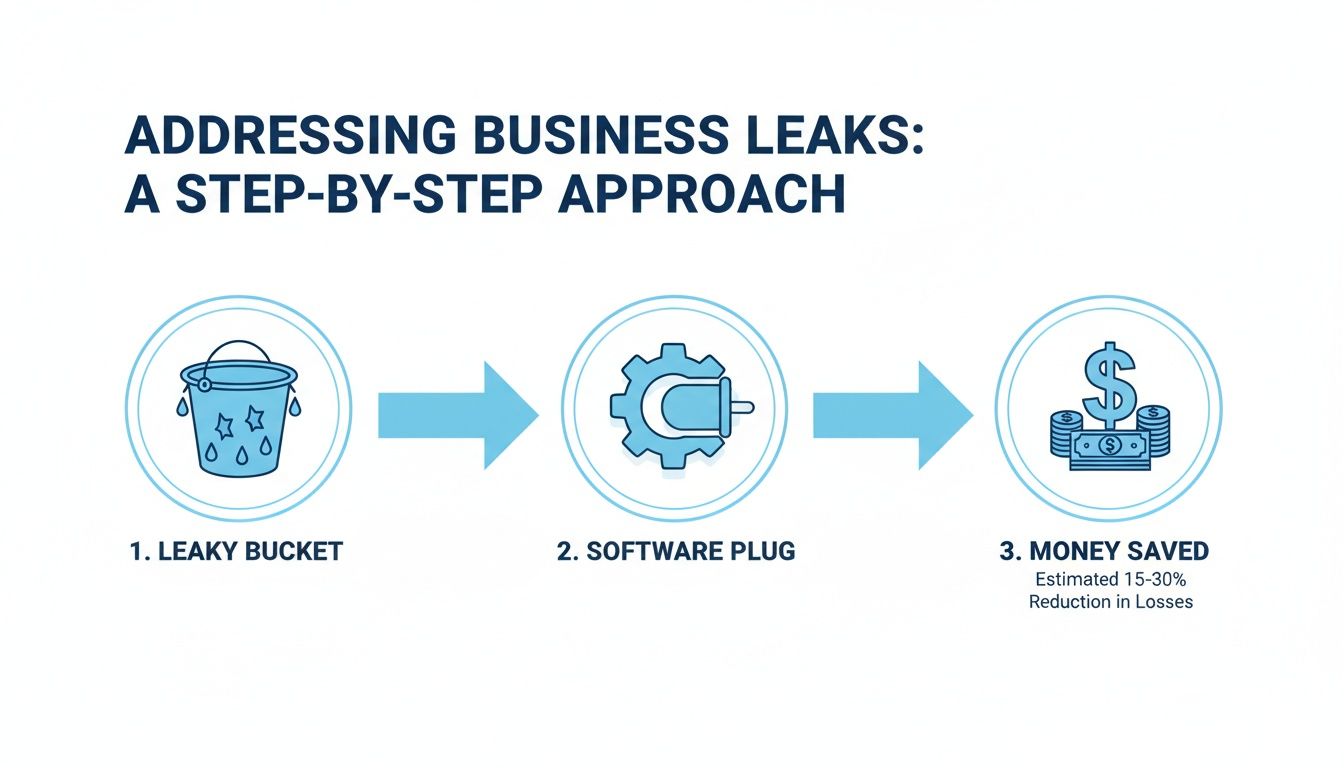
This process shows how software acts as a plug, stopping potential revenue from escaping. The global CRM lead management market is exploding for this exact reason, projected to jump from US$4.7 billion in 2026 to US$14.1 billion by 2033. This massive 17.0% annual growth is fueled by small businesses needing smarter ways to manage the flood of digital interactions and turn them into sales.
What Features Actually Matter?

When you first start exploring lead management software for small business, the feature lists can be dizzying. It's easy to get bogged down in technical jargon and marketing buzzwords. The trick is to tune out the noise and zero in on the core tools that will actually make a difference in your day-to-day work and, most importantly, your bottom line.
Think of it like buying a new truck for your business. You don't need every high-tech gadget on the market; you need the features that help you get the job done faster, safer, and more efficiently. Let's break down the non-negotiables that truly move the needle.
1. A Centralized Lead Database
At its core, any good system needs a centralized lead database. This is your single source of truth—a digital command center that holds every scrap of information about every lead. It’s the end of hunting through scattered emails, messy spreadsheets, and forgotten sticky notes.
A practical example: An independent insurance agent talks to a client about an auto policy. A month later, the client calls back about a home insurance quote. Instead of searching through old emails, the agent pulls up the client’s profile in the database and sees a complete history of every past conversation, quote, and interaction, allowing for a seamless and informed follow-up.
2. Automated Lead Routing
Manually assigning leads is a huge time-sink and a surefire way to let hot prospects go cold. Automated lead routing is the solution. It instantly sends new inquiries to the right person on your team based on rules you set up ahead of time. This guarantees the fastest possible response—a critical factor in closing deals.
A practical example: A real estate agency has agents specializing in different neighborhoods. When a lead comes in from the website interested in the "Northwood" area, the software automatically assigns that lead to Sarah, the Northwood specialist, and sends her a text alert so she can follow up immediately.
A fast response is everything. Studies show that getting back to a web lead within five minutes makes you nine times more likely to convert them. Automation is what makes that kind of speed a reality without having to watch your inbox like a hawk.
3. Intelligent Lead Scoring
Let's be honest: not all leads are created equal. Some are ready to buy right now, while others are just kicking the tires. Lead scoring is the feature that helps you tell the difference. It automatically ranks prospects based on their behavior, demographics, and how engaged they are with your business. This lets your team focus their precious time on the leads most likely to become customers.
A practical example: A small B2B consulting firm sets up lead scoring rules.
- Someone from a company with over 50 employees gets +10 points.
- They visit the pricing page: +15 points.
- They download a case study: +20 points.
- The system then automatically flags any lead with a score over 40 as "Hot" and creates a priority task for a consultant to call them.
This simple system immediately shows you who's hot and who's not.
The latest AI-powered tools are taking this a step further. Predictive scoring and automation are boosting conversion rates by up to 30%, and some systems can now predict who will convert with 87% accuracy. This allows teams to find the real gems in their prospect list. You can dig deeper into this trend in the global CRM lead management market report on intelmarketresearch.com.
4. Communication and Scheduling Tools
The best software doesn't just store data; it helps you act on it. Look for built-in communication tools that bring everything together.
- Email & SMS Automation: Set up hands-free sequences to welcome new leads, send follow-up reminders, or share helpful content.
- Integrated Appointment Scheduling: Let leads book meetings directly on your calendar, killing the endless back-and-forth of finding a time that works.
- Call Logging and Tracking: Automatically record calls with prospects so you have a complete communication history right in their file. If phone calls are a big part of your business, our guide on the best call tracking software shows how this can integrate seamlessly.
These features make sure your communication is fast, professional, and consistent, no matter where a lead is in their journey.
To make things even clearer, here’s a quick checklist to use when you're evaluating different platforms.
Essential Features Checklist for Small Business Software
This checklist covers the foundational features that deliver the most bang for your buck. By focusing on these core functions, you can find a tool that helps you grow without getting overwhelmed by complexity.
Your Step-By-Step Implementation Playbook

Choosing the right lead management software for small business is a great first move. But the real work—and the real payoff—comes from how you roll it out. A well-planned implementation turns a promising new tool into an actual growth engine for your company.
The goal is to get this right from day one. A thoughtful approach prevents confusion, makes sure your team actually uses the software, and starts delivering a return on your investment much, much faster. Let's walk through how to make that happen.
Phase 1: Define Your Core Needs and Budget
Before you even start looking at software options, you need to answer one critical question: what specific problem are we trying to solve?
A practical example: A local HVAC company identifies its biggest problem: missed calls after 5 PM and on weekends. Their core need is a system that can capture those leads 24/7. This immediately narrows their search to software with excellent after-hours call handling or an integrated AI answering service.
Pinpoint your top 1-3 pain points. This clarity will act as your north star, guiding every decision you make from here on out. It’s easy to get distracted by flashy features you'll never use; stay focused on what will make the biggest impact.
Once you know what you need, set a realistic budget. Think about the monthly subscription fee, but also factor in any potential one-time setup costs. Remember, the whole point is ROI—the right software should more than pay for itself by plugging revenue leaks and making your team more efficient.
Phase 2: Compare Vendors and Prioritize Simplicity
With your needs and budget clearly defined, you can start evaluating vendors. While a long feature list is tempting, small businesses should put two other things at the top of their list: ease of use and customer support. Software that’s too complicated often just gathers digital dust because nobody has the time to learn it.
Look for a platform with an intuitive interface and a great reputation for customer support. A vendor that offers hands-on onboarding, helpful tutorials, and responsive service is a true partner in your success, not just a software provider.
A practical example: The HVAC owner from before tests two different platforms. The first one is powerful but has a confusing dashboard. The second is simpler but has a clean, mobile-friendly app that their technicians can easily use in the field. They choose the second option, prioritizing usability over unnecessary features.
Create a simple comparison chart to weigh your top contenders. Score each one on how well it solves your core problems, its user-friendliness, the quality of its support, and how it aligns with your budget.
Phase 3: Map Your Workflow and Launch Strategically
The secret to a successful launch is to start small and build momentum. Trying to implement every single feature at once is a recipe for overwhelming your team. Instead, map out one simple, high-impact workflow to start with. This creates an early win and helps everyone see the value right away.
Practical Example: Workflow for a Dog Grooming Salon
A simple, effective workflow could look like this:
- Lead Capture: A new booking request from your website automatically creates a new lead in the system.
- Initial Contact: The software immediately sends an automated confirmation text to the pet owner.
- Qualification Task: A task is automatically assigned to a team member to call and confirm the pet’s details and appointment time.
- Nurture: An automated reminder text or email goes out 24 hours before the appointment.
This straightforward process is easy for the team to learn and immediately starts reducing no-shows and cutting down on administrative busywork. For more ideas on managing bookings, our guide on appointment scheduling software for small business offers some great insights.
Phase 4: Train Your Team and Measure Success
At the end of the day, a tool is only as good as the people who use it. Don't just send your team a login and hope for the best.
Schedule a hands-on training session where you walk them through the exact workflow you just mapped out. It's crucial to frame the software as something that will make their jobs easier—not just another box to check.
A practical example: During training for the dog grooming salon, the owner shows the team how the new system replaces the old paper calendar and eliminates the need to manually call every client for a reminder. They focus on the benefit: "This will save you about an hour of phone calls every single day."
Once you're live, set clear metrics to track your progress. Are your lead response times getting faster? Are you converting more inquiries into actual appointments? Is your team saving measurable time on admin tasks? Tracking these key performance indicators (KPIs) proves the software’s value and shows you where you can optimize and expand its use across your business.
How to Sidestep Common and Costly Mistakes
Investing in new software feels like a huge win, but let's be honest—many businesses find their shiny new tool gathering digital dust a few months later. A successful launch isn't just about picking the right tech. It’s about dodging the common traps that sink your budget and kill your ROI before you even get started.
Let's walk through the three biggest blunders small businesses make when they adopt lead management software for small business and, more importantly, how you can avoid them.
Mistake 1: Buying a Ferrari for a Trip to the Grocery Store
It's easy to get mesmerized by a long list of flashy features. But one of the most common pitfalls is buying software that’s way too powerful for what you actually need. If all you need is a reliable way to get from point A to point B, an overly complicated system is just going to slow you down and frustrate everyone.
This mistake is a classic budget-killer. You end up paying for features you'll never touch, and your team gets bogged down by a steep learning curve. Think about it: a local plumbing contractor doesn't need an enterprise-grade platform with global sales territory mapping. They just need a simple, bulletproof way to track incoming calls and schedule jobs.
The Fix: Before you even look at demos, clearly define the one or two core problems you're trying to solve. Are you missing calls after hours? Is your follow-up too slow? Is your contact list a complete mess? Find a tool that absolutely nails that specific thing. Always prioritize simplicity and ease of use over a bloated feature set.
Mistake 2: The Team Revolt
Here’s a hard truth: even the best software on the planet is worthless if your team won’t use it. Poor adoption is probably the number one reason these investments fail. If your employees see a new tool as just another chore piled onto their already busy day, they’ll find any excuse to go back to their old, familiar spreadsheets.
This “team revolt” usually happens when a decision is made in a vacuum, without any input from the people who will be in the software every single day. The tool feels like something being forced on them, not something that genuinely makes their job easier.
A practical example: A busy dental office manager invests in a new system to handle patient inquiries. But the receptionists find it clunky and much slower than their trusty paper system. Within a month, they’re back to using sticky notes, and that expensive software is just sitting there, unused.
The way around this is simple: involve your team from the very beginning. Ask them about their biggest daily headaches. Frame the new software as the solution to those frustrations. Show them exactly how it will eliminate tedious tasks like manual data entry or hunting for a phone number, giving them back more time to focus on what matters.
Mistake 3: Creating Digital Islands
Your business already runs on a handful of tools you know and trust—your email, your calendar, maybe an accounting program. A massive and costly mistake is buying a new platform that doesn’t play well with others. When your systems don't talk to each other, you create "digital islands" of isolated information.
Suddenly, you’re back to doing things manually. If your lead management tool can't sync with your calendar, you're stuck double-checking schedules and manually booking appointments. It completely defeats the purpose of investing in efficiency and automation in the first place.
The Fix: Make integrations a non-negotiable part of your checklist. Before you sign anything, verify that the software connects seamlessly with your must-have tools. More and more small businesses are turning to platforms that integrate with thousands of apps, from CRMs to calendars, to automate their lead nurturing and cut down on sales costs. For a deeper dive, you can find more insights on how SMEs are boosting their sales pipelines with integrated software on transparencymarketresearch.com. A connected tech stack ensures all your tools work together as one cohesive system, not a bunch of disconnected parts.
Answering Your Questions About Lead Management
Jumping into new technology can feel like a big step, especially when you're running a small business. You need to know that every dollar and every minute you invest is going to pay off. Let's tackle some of the most common questions that come up when considering lead management software.
What’s This Going to Cost Me?
Software pricing can feel all over the map, but it usually boils down to a couple of common structures. Most platforms charge a per-user, per-month fee, which can be anywhere from $15 to over $100 depending on how powerful the features are. This model is perfect for smaller teams because you’re not paying for seats you don't need.
You'll also see tiered plans (think Basic, Pro, Enterprise). A small business can start on a simple plan to get leads organized and then move up to a higher tier for things like marketing automation and in-depth reporting as the company grows. Just keep an eye out for any one-time setup fees, and don't forget to ask if they offer a discount for paying annually—it can save you a nice chunk of change.
How Fast Will I See a Return on My Investment?
Every business is unique, but you won't be waiting long to see the benefits. Getting set up usually takes just a few hours. Right away, you’ll stop losing leads from missed calls or website forms that go unanswered.
A practical example: A small marketing agency implements a new system and within the first month, they close two new clients who had previously "gone cold." The software had automatically reminded them to follow up, turning lost leads into $5,000 of new revenue that immediately paid for the software for the entire year.
Most small businesses see a real difference in their lead quality and sales organization within the first 30 to 90 days. The true ROI isn't just a one-time thing; it builds over time as you consistently capture and convert opportunities that used to fall through the cracks.
Will This Play Nicely With My Other Tools?
This is a huge one, and the answer should always be a firm "yes." Good lead management software is designed to be a team player, connecting right into the apps you already use every day.
Make sure it integrates with your essential tools:
- Email and Calendar: Connecting to Google Workspace or Microsoft 365 is non-negotiable for syncing conversations and booking meetings.
- Accounting Software: A link to platforms like QuickBooks means you can easily tie a new lead directly to a future invoice.
- Marketing Platforms: Syncing with a service like Mailchimp keeps your marketing lists clean and current without any manual work.
When your systems talk to each other, you cut out tedious data entry and get a complete picture of your business.
Is My Customer Data Secure?
It better be. Any software provider worth their salt puts security front and center. When you’re comparing options, look for companies that are open and clear about how they protect your data.
You'll want to see things like data encryption (to protect information as it moves and when it's stored) and compliance with standards like GDPR. If you're in a field like healthcare or finance, HIPAA compliance might be a must. Your customer data is one of your most important assets, and a professional platform will guard it fiercely.
Ready to stop leaking leads and start building a predictable sales pipeline? Recepta.ai combines 24/7 AI and human support to capture, qualify, and follow up on every opportunity, integrating seamlessly with over 2,500 of your favorite tools. Discover how our system can deliver a 15x ROI for your business by visiting https://recepta.ai to start your risk-free trial.