Unlock Growth with Automated Appointment Scheduling Software
At its core, automated appointment scheduling software is a system that lets your clients book, reschedule, and manage appointments online, any time of day, without ever having to talk to a person. It works like a digital receptionist that never sleeps, handling all the confirmations, reminders, and follow-ups that eat up your team's valuable time.
What Is Automated Scheduling and Why It Matters Now
Think about a standard shared calendar. It’s a great tool for seeing what’s on the books, but it's entirely passive. It’s like a digital wall planner—you still have to do all the work of penciling in appointments, rubbing them out, and calling people to remind them. Every booking, reschedule, or follow-up is a manual task.
Automated appointment scheduling software, however, is an active system. It’s not just a calendar; it’s an intelligent engine built to run your entire booking process for you. It gives clients the power to book for themselves, freeing your team from the endless game of phone and email tag.
This isn't just a "nice-to-have" anymore. Today's customers expect convenience and immediacy. They want to book a demo for your software at 10 PM after a long day or schedule a haircut on a Sunday morning while sipping their coffee. If they hit a voicemail or have to wait for you to open, there's a good chance they'll just find a competitor who lets them book instantly.
The Problem With Manual Booking
For any business that sells its time, manual scheduling is a constant drain on resources. It creates friction and administrative headaches that get in the way of actual, billable work.
- Endless Phone Tag: The back-and-forth of "Are you free Tuesday at 2?" followed by "No, but how about Wednesday at 10?" is a massive time-waster for both you and your potential client.
- Costly No-Shows: When reminders aren't sent automatically and consistently, clients simply forget. Those empty slots mean lost revenue and frantic, last-minute attempts to fill the gap.
- Lost Opportunities After Hours: Every call that goes unanswered outside of business hours is a potential customer you may never hear from again. In fact, research shows that a staggering 80% of callers won't bother leaving a voicemail.
How Automation Solves These Bottlenecks
Automated scheduling tackles these issues head-on by creating an efficient, hands-off booking experience. This shift is best understood by comparing the old, manual methods with a modern, automated approach.
Manual Booking vs Automated Scheduling
| Challenge | The Old Way (Manual Booking) | The New Way (Automated Scheduling) |
|---|---|---|
| Client Booking | Client must call or email during business hours, often leading to phone tag. | Client books online 24/7 via a link, seeing real-time availability. |
| Staff Time | Staff spends hours coordinating schedules, sending reminders, and processing cancellations. | The system handles all scheduling logistics automatically, freeing up staff for high-value tasks. |
| No-Shows | Relies on staff remembering to send manual reminders, leading to forgotten appointments. | Automated email and SMS reminders are sent before appointments, drastically reducing no-shows. |
| Payments | Payments are collected manually at the time of service, or invoices are sent later. | Can require upfront payment or deposits at the time of booking, securing revenue. |
| Data & Insights | Booking data is scattered or nonexistent, making it hard to track performance. | Provides clear data on booking trends, peak hours, and no-show rates to inform business decisions. |
By offloading the repetitive administrative work, automation lets you and your team focus on what you do best: delivering excellent service to the clients who are right in front of you.
The goal is to automate the logistics, not the relationship. Freeing your team from tedious tasks gives them more time and energy for meaningful client interactions.
For example, a marketing agency can use an automated system to let prospects book a paid discovery call directly from their website. The software can qualify the lead with a few questions ("What is your monthly marketing budget?"), collect the payment, send a confirmation with a Zoom link, and add the meeting to everyone's calendar. The consultant's time is protected, and the client gets a seamless experience from the very first touchpoint.
This isn't a niche trend; it's a fundamental shift in how service businesses operate, and the market growth proves it.
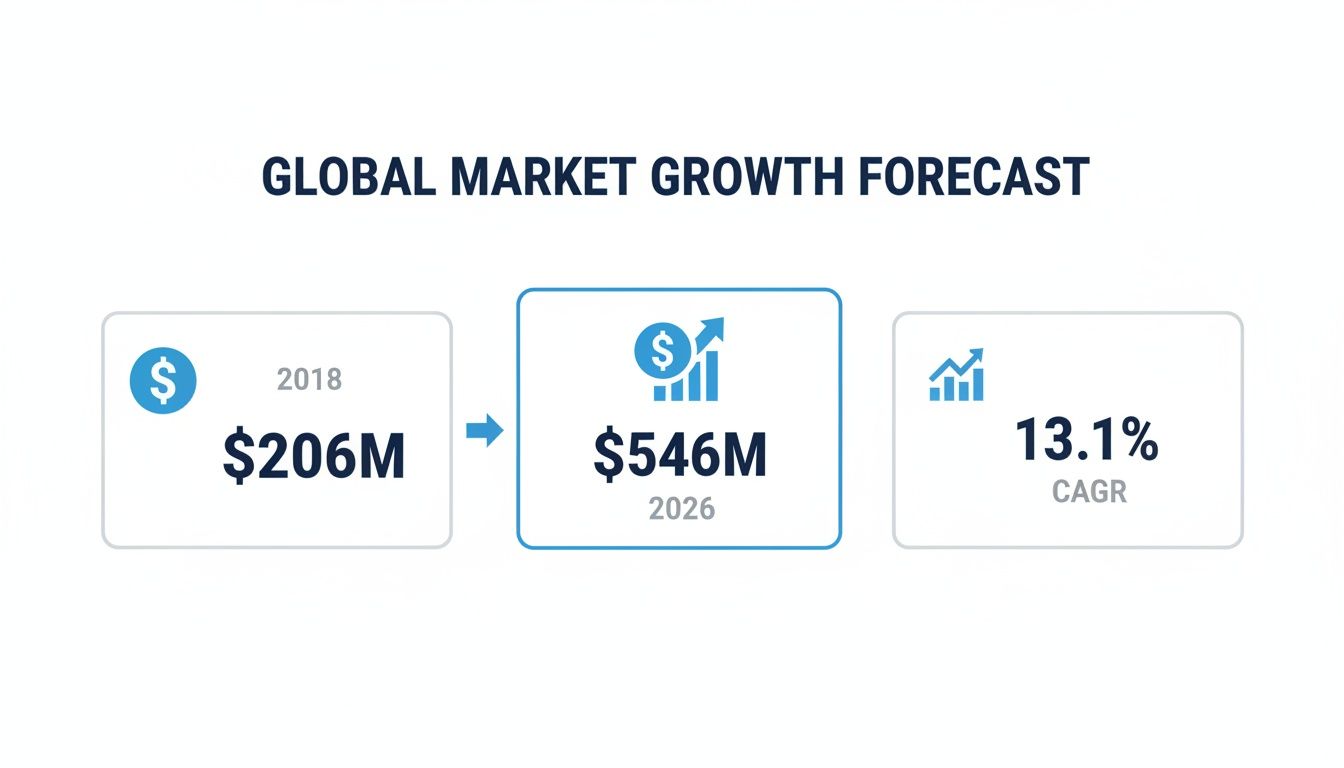
The numbers speak for themselves. The global market for this software grew from $205.85 million in 2018 and is on track to hit a projected $546.31 million by 2026. That's driven by a powerful compound annual growth rate (CAGR) of 13.1%.
This explosive growth, detailed in reports from firms like Allied Market Research, shows that businesses are rapidly adopting these tools to cut down on no-shows, improve efficiency, and ultimately, grow their revenue.
Core Features That Drive Real Business Growth
Automation sounds great in theory, but where does the real value come from? It’s the specific tools inside automated appointment scheduling software that actually solve the frustrating, day-to-day problems that cost businesses money—from losing hot leads to dealing with last-minute cancellations.
Understanding what these core features do is how you go from just buying software to making a smart investment. They work together to turn your calendar from a simple scheduling grid into a powerful engine for your business.
Turn Your Website Into a Booking Machine
If there’s one game-changing feature, it’s 24/7 online booking. Think of your website or social media profile as a digital storefront. The problem is, most storefronts force customers to come back during business hours.
Imagine a potential client lands on your site at 10 PM. Their motivation to solve their problem is at its peak right then and there. Making them wait until morning to call is a huge gamble. With online booking, you capture that intent the moment it happens, letting them turn their interest into a confirmed appointment on the spot.
- Practical Example: A home cleaning service can embed a booking widget on its homepage. A family moving into a new house can schedule a "Move-In Deep Clean" for next week, add "Window Washing" and "Carpet Shampooing" as paid extras, and get an instant confirmation—all long after the office has closed for the day.
This isn't just a convenience; it fundamentally changes how you get new customers by creating a direct path from discovery to a booked-and-paid service.
Protect Your Revenue with Automated Reminders
For any service business, no-shows are a silent profit killer. Every empty appointment slot represents lost revenue you can never recover. Automated reminders are your best line of defense.
It's a simple concept with a huge impact. In fact, sending automated reminders has been shown to cut no-show rates by over 40%. These aren't just generic notifications; they’re timely, helpful pings sent via email or SMS that keep your business top-of-mind.
Practical Example: A massage therapy clinic can set up a reminder sequence. The client receives an email confirmation at booking, an SMS reminder 24 hours before their appointment, and another quick text 1 hour before. Each message includes a link to reschedule, so if a conflict arises, the client can easily move their booking and the system can automatically offer that now-open slot to people on a waitlist.
This proactive approach respects your client's time while protecting your schedule and revenue. If you want to explore this further, our guide on how to reduce no-show appointments offers even more practical strategies.
Streamline Your Workflow with Essential Tools
Beyond booking and reminders, the best scheduling platforms pack in other practical features that eliminate administrative headaches and make your entire operation run smoother.
Key operational features include:
Integrated Payment Processing: This is about more than just convenience; it's about qualifying your clients. By requiring a deposit or full payment at the time of booking, you ensure people are serious. Practical Example: A law firm can require a non-refundable $100 deposit for a consultation, guaranteeing the attorney's time is spent on committed prospects and reducing last-minute cancellations.
Real-Time Calendar Sync: This is the non-negotiable backbone of any good system. It creates a two-way sync with the calendars you already use, like Google Calendar or Outlook, which makes double-bookings a thing of the past. When someone books online, the slot is instantly blocked off on your main calendar and removed from your public booking page.
Customizable Booking Pages: Your booking page shouldn't feel generic. Customizing it with your own branding reinforces trust and allows you to gather key information upfront. Practical Example: A dental practice can design its page to match the clinic's website and add custom fields for patients to specify their reason for visiting (e.g., "Annual Checkup," "Tooth Pain," "Cosmetic Inquiry"), helping the team prepare the right equipment and staff ahead of time.
How Smart Integrations Unlock Full Potential
While features like 24/7 booking and automated reminders are great on their own, the real power of automated appointment scheduling software comes alive when it talks to your other tools. It's one thing to automate booking; it's another to make it the hub that connects every part of your client's journey.
Think of it this way: a standalone scheduler is just a convenience. But an integrated scheduler becomes the central command for your entire client workflow, ensuring all your different systems work in harmony. For this to happen, you need seamless software integrations with the tools you already rely on. Without that connectivity, you’re simply swapping one manual task for another.
Connect Your Calendar and CRM Instantly
The most basic and essential connection is to your calendar. This is what puts an immediate stop to double-bookings. But the real magic starts when you link your scheduling tool with your Customer Relationship Management (CRM) platform, whether it's Salesforce, HubSpot, or another system.
This single connection transforms a simple booking into a powerful data-gathering event. Instead of your team manually creating a new contact every time a meeting is booked, the system handles it instantly and automatically.
Practical Example: A B2B software company uses a scheduler integrated with their CRM. When a lead books a product demo, the system automatically creates a new deal in the CRM pipeline, assigns the lead to the correct sales rep based on territory, and populates the contact record with information from the booking form, like "Company Size" and "Primary Challenge." The sales rep receives an instant notification and can see the lead's entire history before the call even starts.
A solid CRM connection is no longer a "nice-to-have"—it's a business fundamental. If you want to dig into the details, you can explore our guide on what CRM integration means for your business and the efficiencies it creates.
Create Automated Client Workflows
Once your core systems are talking to each other, you can build out intelligent workflows that guide a client from the moment they find you to their very first follow-up. This is where you can step back and let the automation do the heavy lifting.
Here’s a real-world example of how this looks for a financial advisory firm:
- Step 1 A New Lead Books: A potential client visits your website and books a "Free Consultation" slot.
- Step 2 Data Syncs Automatically: Instantly, the scheduler creates a new lead in your CRM, adds the meeting to the advisor’s Google Calendar, and tags the lead's source as "Website." No manual entry needed.
- Step 3 Communications Triggered: The system then automatically sends a calendar invite with a Zoom link, enrolls the client in a "New Lead" email sequence through your marketing platform, and texts them a reminder 24 hours before the appointment.
This entire sequence unfolds in seconds without anyone on your team lifting a finger. The client gets a smooth, professional experience, and your team gets a perfectly organized, data-rich record to work with.
This integrated approach is quickly becoming the industry standard. With cloud-based software now at 72% adoption, connecting with over 2,500 different CRMs and calendars is easier than ever. And as mobile bookings climb past 70%, having real-time, synced data is critical for busy law firms and real estate teams that operate on the go.
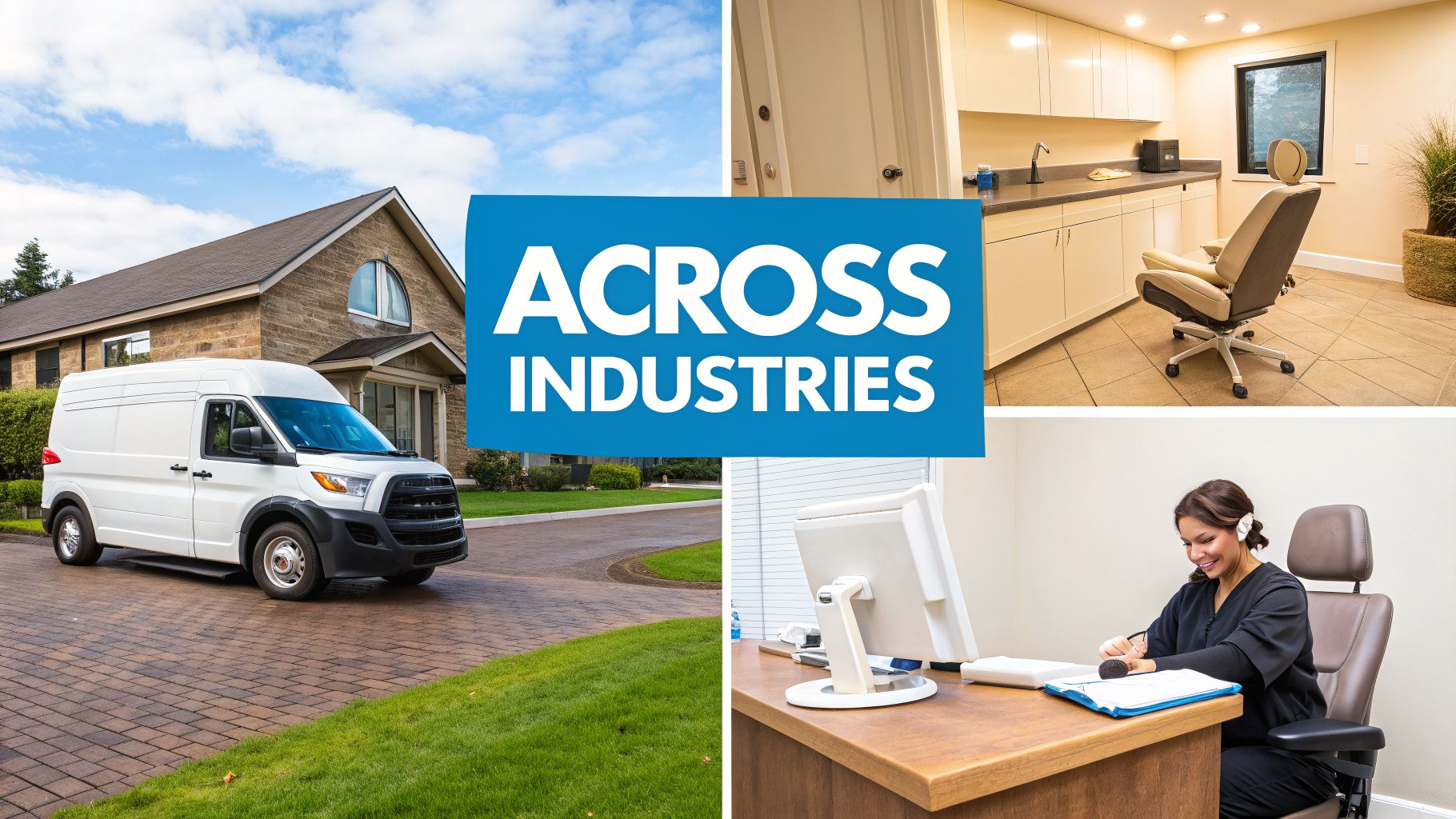
Putting Automated Scheduling to Work Across Industries
The real magic of automated appointment scheduling software isn't in the technical specs—it’s in what it actually does for businesses day in and day out. The theory is one thing, but seeing how this technology solves real-world problems is what actually grows your business.
Whether it’s a plumber trying to spend less time driving or a busy clinic trying to get out from under a mountain of paperwork, automation delivers concrete, measurable results. Let's look at a few examples of how service businesses are putting these tools to work.
Keeping Home Services on the Move
If your business is built on wheels—think plumbers, HVAC technicians, or pest control experts—efficiency is everything. Every minute stuck in traffic is a minute you aren't earning. This is where scheduling automation stops being about convenience and starts being a powerful logistics tool.
Imagine a plumbing company using location-based booking. When a customer goes online to book a visit, the system is smart enough to offer them time slots that are geographically close to other jobs already on the schedule for that day. This simple change can slash travel time by 20-30%, often freeing up enough time to squeeze one more paying job into a technician's day.
- Practical Example: A homeowner in a north-side suburb needs their water heater looked at. The scheduling tool shows them available times on Tuesday afternoon because it knows a technician will already be in that exact neighborhood for two other calls. No more sending a truck on a long, cross-town journey for a single appointment.
Giving Time Back to Patients in Healthcare
In any healthcare setting, from a doctor's office to a dental clinic, administrative busywork can easily get in the way of actual patient care. When your front desk team is swamped with phone calls and clipboards, they have less time for the people standing right in front of them.
Practical Example: A dental practice can set up their scheduling software to automatically send digital intake forms to new patients. As soon as someone books their first cleaning, they get a secure link to fill out their medical history and insurance info from their own device, before ever setting foot in the office.
This one feature alone can save 10-15 minutes of check-in time for every new patient. Better yet, the information syncs directly into the patient's file, which cuts down on typos from manual data entry and makes the whole check-in process feel effortless. We actually dive much deeper into this topic in our article on medical appointment scheduling software.
Protecting Billable Hours for Professional Services
For consultants, lawyers, and financial advisors, time is quite literally their product. Every hour spent on a call with an unqualified lead or an appointment that no-shows is a direct hit to their income. Here, automation acts as a very effective gatekeeper.
A business consultant, for example, can put a booking link on their website that requires clients to schedule and pay for a 30-minute strategy session upfront. This immediately filters out the tire-kickers and ensures the people booking their time are serious. The consultant’s calendar is protected for high-value clients, not "just browsing" inquiries.
And this isn't just a niche trend. The demand is widespread, with 64% of bookings happening on mobile devices and a 58% preference for tools that integrate with existing calendars. With 68% of businesses globally ditching their manual booking methods, it's clear that automated scheduling is now a fundamental part of running a modern service company.
You can even see this play out in very specific sectors. For instance, tools like gym class scheduling software are critical for managing class capacities and member bookings. It’s another great example of how the right tool can solve the unique challenges of a specific industry and add directly to a healthier bottom line.
How to Choose the Right Scheduling Partner
Picking an automated appointment scheduling software isn't just about buying a new tool. It's about choosing a business partner—one that will be front and center with your clients and deeply embedded in your daily operations.
To find a solution that actually makes your life easier, you have to look past the shiny feature list. It comes down to asking the right, tough questions that cut through the marketing fluff and get to the heart of what matters.
How Deep Do Your Integrations Go?
A scheduling tool that lives on an island by itself doesn't solve problems; it creates new ones. Before you even think about signing a contract, you have to know exactly how a platform will talk to the systems you already depend on. Don't settle for a simple "yes, we integrate." Dig deeper.
Let's say your team lives in a CRM like HubSpot. You should be asking, "When a new client books their first appointment, what specific data fields get automatically pushed to their contact record in my CRM?" A true partner can tell you precisely how it syncs names, appointment types, and any custom fields you use, all without your team lifting a finger.
The number of integrations a platform boasts is often just vanity. While it's nice to see thousands of logos, it's the depth and reliability of your core connections—your calendars and CRM—that will make or break the experience.
What Happens When AI Isn't Enough?
Automation is a workhorse, but it's not a mind reader. Some client questions are just too complex, too nuanced, or require a level of empathy that a machine can't replicate. This is where many automated-only systems hit a wall, leaving potential customers stuck in a frustrating loop and valuable leads going cold.
So, ask every vendor this critical question: "What's your exact process for handling inquiries that need a real person?"
Practical Example: A client is trying to book a complex service with multiple steps but gets confused. Instead of an error message, a hybrid system can present a button that says "Chat with an Expert." The client clicks, and a live agent immediately takes over the chat, answers their questions, and books the appointment for them, saving the lead.
This is where a hybrid approach shines. Platforms like Recepta.ai are built for this reality, using conversational AI to manage routine requests while instantly handing off more complex conversations to live agents. It’s the best of both worlds, ensuring you’re always efficient without sacrificing the human touch that closes deals.
How Is Client Data Protected?
Handing over client data to a third-party tool is a big deal. Your clients trust you with their personal information, and a security breach originating from your scheduling software can cause permanent damage to your reputation. This is absolutely non-negotiable.
You need to ask for specifics: "What security and compliance measures do you have in place to protect our clients' data?"
Don't accept vague answers. Look for concrete proof, such as:
- Data Encryption: Is data encrypted both while it's moving (in transit) and while it's being stored (at rest)?
- Compliance Certifications: Do they hold certifications relevant to your industry, like HIPAA for healthcare?
- Access Controls: How do they ensure only authorized people can view sensitive information?
If a vendor gets cagey about their security protocols, that's a massive red flag. A dental practice, for example, can't risk using a non-HIPAA-compliant scheduler—the legal and financial consequences are just too severe.
What Support Can I Expect?
Finally, think about what happens after you sign on the dotted line. The most powerful software on the planet is worthless if you’re left stranded when something goes wrong or you need guidance.
Ask about the support you'll actually get, both during setup and long-term. Find out about their onboarding process, what training materials they provide, and their average response time for support requests. A vendor who is invested in your success will be proud to show you how they'll support you.
Measuring Your Success and Calculating ROI
It feels great when a new tool makes life easier, but the real question is, is it actually growing your business? Proving the value of automated appointment scheduling software isn't as complicated as you might think. It’s all about looking past the convenience and focusing on the numbers that really matter.
When you can connect the software directly to revenue gained and costs saved, it stops being just a neat tool and becomes a measurable part of your success.
Key Metrics to Track for Success
To see the real impact, you need to know what to watch. These key performance indicators (KPIs) are the vital signs that show you how much the software is contributing to your bottom line.
Here are the four most important things to track:
- Reduction in No-Show Rate: Every no-show is a direct hit to your revenue. Compare the percentage of missed appointments before and after you started using the software to see exactly how much income you've recovered.
- Increase in After-Hours Bookings: Your scheduler never sleeps. How many new appointments are being made when your office is closed? This is brand-new business you were likely missing before.
- Administrative Hours Saved: Think about all the time your team used to spend playing phone tag, sending manual reminders, and entering appointment data. Tally up those hours and see how much time is now free for more important, client-focused work.
- Growth in Qualified Leads: How many serious prospects are now booking consultations on their own? This is a great indicator of high-intent leads. To get more granular, our guide on how to calculate cost per lead can help you dig deeper into lead acquisition costs.
A Simple Formula for Calculating ROI
Once you have these numbers, figuring out your return on investment is simple. This basic formula tells you exactly how much you're getting back for every dollar you spend.
(Revenue Gained + Costs Saved) / Software Cost = ROI
The answer you get is a clear multiplier. If the result is anything greater than 1, the software is officially paying for itself.
Putting It All Together: A Practical Example
Let's see how this works for a therapy practice that just started using an automated scheduler.
Before Automation: The practice was dealing with constant no-shows, and the front desk was tied up on the phone for hours every single day.
After Automation: They looked at their numbers after the first month.
- Costs Saved: The receptionist saved 10 hours of administrative work. At an hourly wage of $25, that's $250 in savings.
- Revenue Gained (No-Shows): Automated reminders cut their no-shows by 4 appointments. At $150 a session, they recovered $600 in lost revenue.
- Revenue Gained (New Clients): The 24/7 booking link brought in 3 new clients who scheduled their first session after hours. At $150 per session, that’s $450 in new revenue.
Now for the math.
Total Gain: $250 (Costs Saved) + $600 (Recovered Revenue) + $450 (New Revenue) = $1,300
If their scheduling software costs $150 per month, the ROI is crystal clear:
$1,300 / $150 = 8.6x ROI
That single calculation proves the point. The right software isn't an expense—it’s an investment that delivers a significant and very real return.
Frequently Asked Questions About Scheduling Software
Thinking about automated scheduling? You probably have a few questions rolling around in your head. We get it. When you're considering a new tool for your business, it's natural to wonder about the setup, the impact on your client relationships, and of course, security.
Let's clear up some of the most common questions we hear from business owners just like you.
Do I Need to Be Tech-Savvy to Set Up This Software?
Not in the slightest. This is one of the biggest misconceptions. Good automated appointment scheduling software is built for busy professionals, not IT wizards. You don't need to know any code or have a technical background to get started.
Honestly, the setup is usually a breeze. It boils down to a few simple actions:
- Link your calendar: This is often a one-click step to sync your Google Calendar, Outlook, or other calendars so the system knows when you're busy.
- Set your availability: You just tell the software when you’re open for business, what kinds of meetings you take, and how long they last.
- Share your booking page: The software gives you a unique link. You can put this link in your email signature, on your website, or share it on social media.
Most quality providers, including Recepta.ai, know that a smooth start is crucial. They'll have support guides or even a team to walk you through it and make sure everything is working perfectly from day one.
Will Automation Make My Business Feel Less Personal?
It's a valid concern, but in our experience, the opposite happens. The right automation actually makes your business more personal, not less.
Think about all the back-and-forth emails just to find a time that works. That's robotic, low-value work. By handing those administrative chores over to the software, you free up your team’s time and mental energy for what truly matters: the human connection.
Practical Example: A wealth management advisor used to spend the first five minutes of every new client call confirming details and asking basic questions. Now, with an automated scheduler gathering that info upfront, they can dive right into a meaningful conversation about the client's financial goals. The automation handled the busywork, allowing for a stronger human connection from the very start.
Your team's talent is better used preparing for a client call or providing amazing service, not playing email tag to schedule it.
How Secure Is My Client's Information With an Online Tool?
This is non-negotiable. Any reputable software provider treats your data—and your clients' data—like gold. Security isn't just a feature; it's the foundation of their business.
When you're looking at an automated appointment scheduling software, you need to be proactive. Don't just assume your data is safe; look for proof. Specifically, check for mentions of:
- Data Encryption: This is the standard for protecting information. It scrambles data so that it’s unreadable to anyone without authorization.
- Compliance Standards: Depending on your industry, this is critical. Look for compliance with regulations like HIPAA if you're in healthcare or GDPR if you serve clients in Europe.
Before you sign up for any service, make sure their security policies are clear and robust. Protecting your clients' information is essential for protecting your business's reputation.
Ready to stop missing calls and start booking more qualified appointments? See how Recepta.ai combines powerful scheduling automation with expert human support to capture every opportunity. Learn more at Recepta.ai.