Get a Business Phone Number Free in 2026

You’re probably in one of two situations right now.
Either you’re launching a business and need a number fast, or you’re still using your personal cell and you’ve hit the point where every unknown call feels like a gamble. A customer, a spammer, a late payment reminder, or a solid lead you can’t afford to miss.
If you want to get a business phone number free, the good news is that you can. I’ve helped small businesses do it many times, especially solo operators who need something working today, not after a long procurement process. The bad news is that “free” solves the first problem, not the long-term one. It gives you a line. It doesn’t automatically give you reliability, routing, compliance, or a process for handling growth.
That handoff point matters. A free number is often the right first move. It’s just not always the right permanent one.
Comparing Your Top Free Business Number Options
Most business owners don’t need every phone feature on day one. They need a number that separates business from personal calls, sounds credible, and doesn’t create friction for customers.
That makes the early decision simpler than most comparison pages suggest. In practice, your real choices are usually these:
- Google Voice
- Trial-based VoIP services
- Ad-supported apps or consumer messaging apps
The wrong move is picking the one with the longest feature list. The right move is picking the one that matches your current call volume, your industry, and how fast you expect to grow.
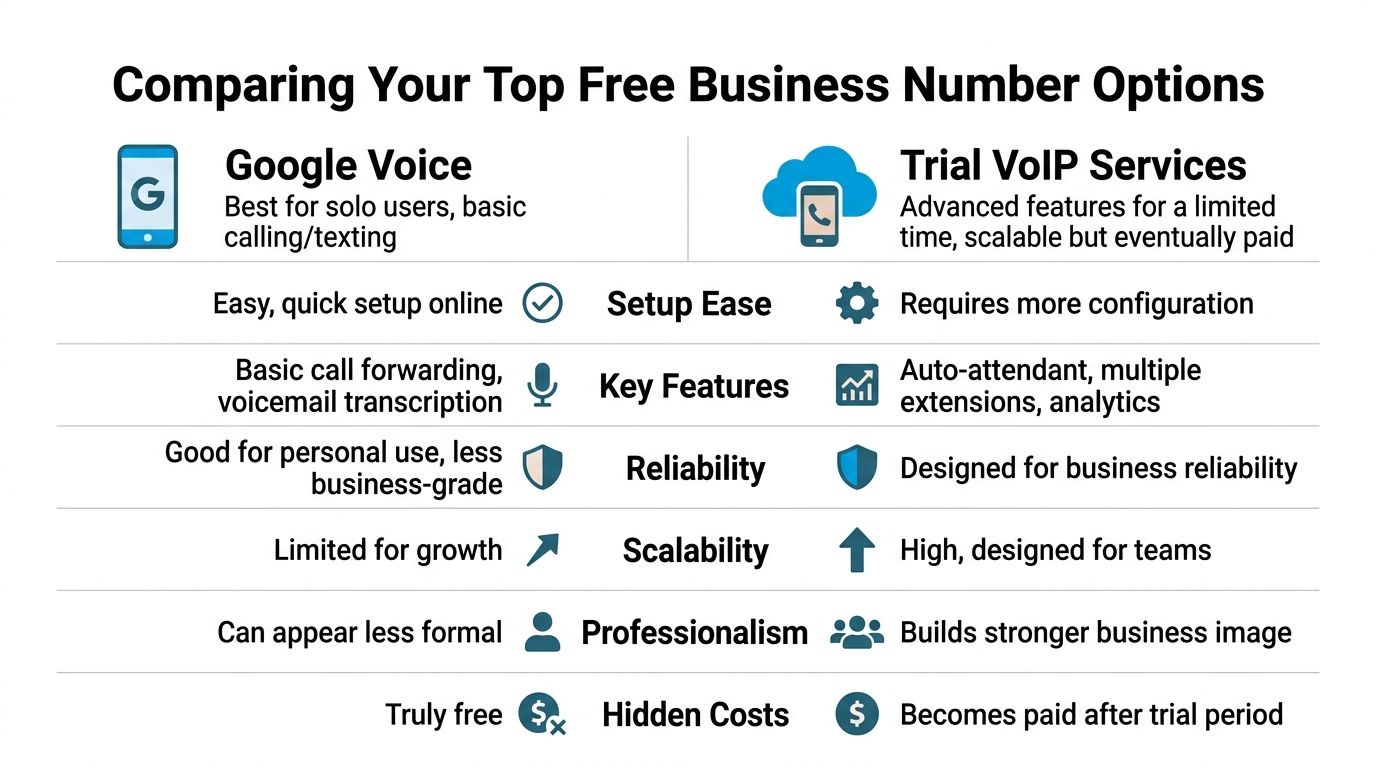
The short version
If you’re a solo operator, Google Voice is usually the cleanest starting point.
If you need a more polished business setup right away, a trial VoIP system can help you test auto-attendants, extensions, and routing before you commit.
If you’re considering ad-supported apps, be careful. Some are fine for temporary personal use, but they’re usually a weak foundation for a real business line.
A lot rides on that choice because phone responsiveness still drives outcomes. Only 37.8% of small business inbound calls are answered, while the rest go to voicemail or receive no response, which means many callers hit a dead end instead of a conversation (small business call answer data).
Free Business Phone Number Provider Comparison
| Provider | Best For | Key Features | Primary Limitation |
|---|---|---|---|
| Google Voice | Solo businesses, local service pros, consultants | Local number selection, call forwarding, voicemail transcription, texting | Limited team and growth support |
| Trial VoIP services | Firms testing a full business phone system | Auto-attendant, extensions, routing, admin controls | Free period ends, then it becomes a paid service |
| Ad-supported apps | Very temporary use, side projects | Quick signup, basic calling or texting | Often weak business credibility, policy restrictions, and uneven reliability |
Google Voice works when simplicity is the goal
For a solo plumber, cleaner, mobile notary, or real estate agent, Google Voice is often enough to get moving. You can choose a local number, forward calls to your mobile, send texts, and keep business calls separate from your personal line.
That setup works especially well when your business has one decision-maker and one main person answering the phone. It’s also the least confusing option for people who don’t want to learn a phone admin panel on day one.
Practical rule: If one person handles almost every call, start simple. If multiple people need to answer, transfer, or monitor calls, don’t force a solo-user tool into a team workflow.
The main trade-off is that Google Voice feels like a light business layer on top of a personal device. That’s fine early on. It gets awkward when calls need to go to different people, follow business hours, or trigger a more structured intake process.
If you want a deeper look at local and virtual number choices, this guide on virtual US phone numbers is a useful companion.
Trial VoIP services are better for testing a real phone system
A trial from a business VoIP provider makes sense when you already know you need more than forwarding.
A small law firm is a good example. Even if the firm wants to start free, it may still need a receptionist greeting, separate routing for new clients versus existing clients, and business-hour handling. A trial lets the firm test that workflow before spending money.
What works well with trial systems:
- Structured call flows: You can test greetings, menus, and extension routing.
- Shared accountability: More than one person can participate in answering calls.
- A more formal caller experience: That matters in legal, financial, and service businesses where first impressions carry weight.
What doesn’t work well:
- The clock starts immediately: Trials are often sales funnels, not long-term free solutions.
- Setup takes more effort: Someone has to configure greetings, users, and routing.
- You can end up rebuilding later: If you configure it casually during a trial, you may need to redo the whole setup after choosing a paid plan.
Ad-supported apps are usually a stopgap, not a strategy
These appeal to people who want “free” with almost no setup. I understand the temptation. But I rarely recommend them for a business that depends on inbound calls.
The issue isn’t just polish. It’s operational control. If the app shows ads, has vague commercial-use rules, or treats your account more like a consumer profile than a business asset, you’re building on unstable ground.
A handyman testing a weekend side business might tolerate that. A dental office, contractor, or insurance team should not.
Use ad-supported options only if losing the number, dealing with interruptions, or changing platforms quickly wouldn’t hurt your business.
What I’d choose in real situations
- Solo HVAC tech starting out: Google Voice.
- New attorney opening a practice: Trial VoIP first, then paid business service if intake starts coming in.
- Cleaning business owner with one phone and lots of texting: Google Voice, as long as one person handles responses.
- Multi-agent real estate team: Skip “free forever” thinking and test a business-grade system early.
Free is useful when it buys time and momentum. It’s a bad choice when it hides the fact that your phone setup already can’t support how you work.
Your Step-by-Step Guide to Setting Up Google Voice
Google Voice is still the most practical starting point for many small businesses in the US. It’s fast, familiar, and good enough for a solo operator who needs a separate business number today.
A simple example helps. Say Maria is starting a residential cleaning business in Austin. She wants a local number, wants business calls forwarded to her cell, and doesn’t want clients texting her personal line. That’s a classic Google Voice use case.
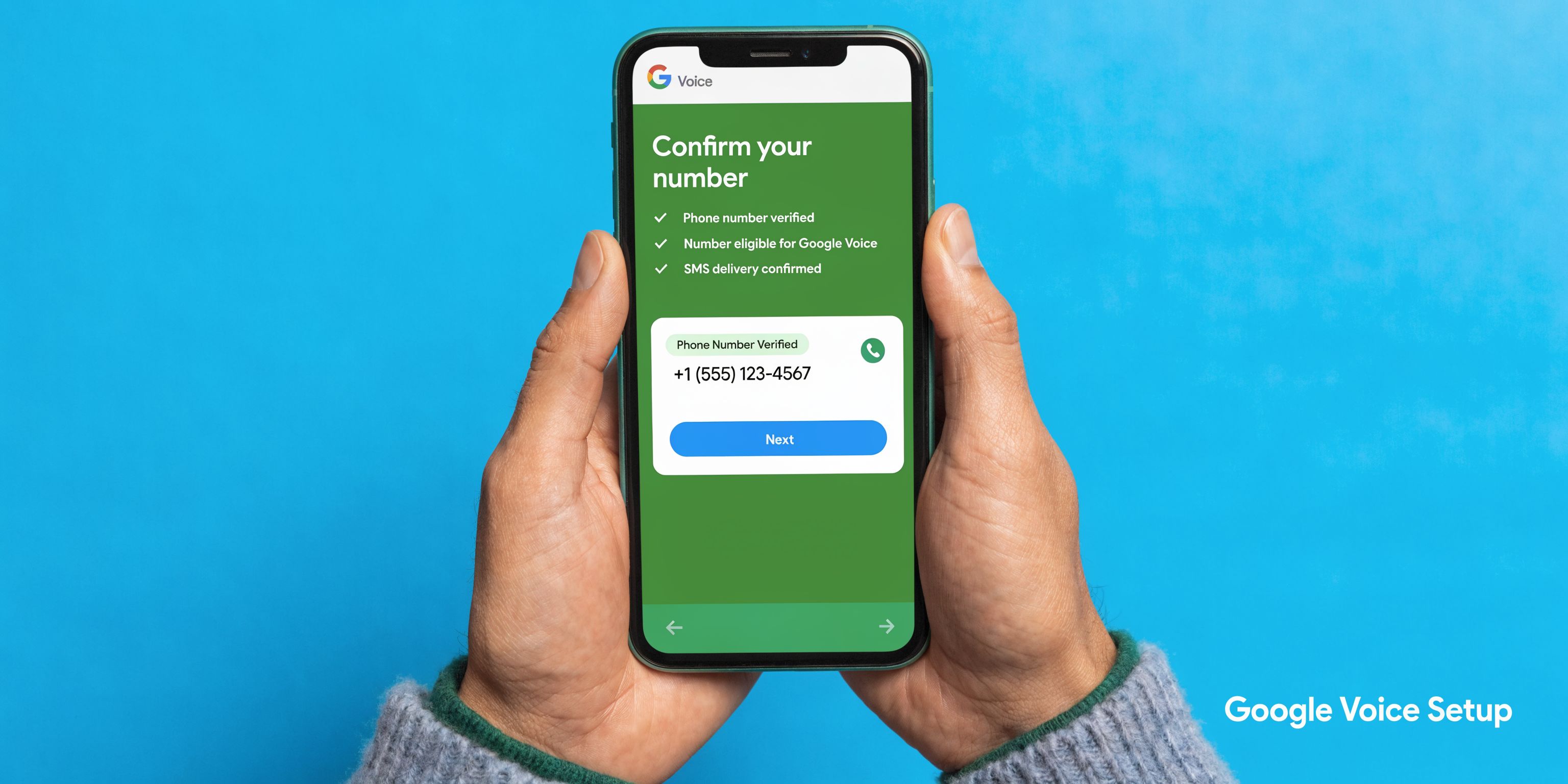
Step 1 Pick the right Google account
Use a Google account tied to the business, not your random old personal Gmail if you can avoid it.
That matters later when you want someone else to manage messages, access voicemail, or keep business records separate. Even if you’re solo today, act like the business will still be around in two years.
For Maria, I’d suggest something like a business-branded Google account rather than the account she uses for family photos and streaming logins.
Step 2 Search for a local number customers will recognize
Google Voice lets you search by city or area code. For a local service business, that’s useful because local familiarity still affects trust.
If Maria serves Austin, she’d look for a local Austin area code. A local presence tends to fit better for cleaning, plumbing, pest control, electrical work, and other neighborhood-based services.
Keep your standards realistic. You may not get the perfect memorable number. Prioritize these in order:
- Local relevance: Choose a number tied to the area you serve.
- Easy readback: Avoid strings that are hard to repeat over the phone.
- Reasonable professionalism: A plain, clean number beats waiting forever for a vanity pattern.
Step 3 Verify with a real US phone number
Many setups fail at this stage.
Google Voice requires you to link and verify an existing US phone number, and using another VoIP number for verification is a common mistake. That attempt has a 15% failure rate due to VoIP detection, so a standard mobile carrier SIM is the safer route (Google Voice verification guidance).
If a client tells me, “I’ll just verify this with my other app-based number,” I tell them not to bother. Use an actual mobile line and get through setup cleanly the first time.
Step 4 Turn on forwarding and make sure calls ring where you work
Once the number is active, send incoming calls to the device you answer.
For many owners, that’s still their cell phone. There’s nothing wrong with that. The point is that callers see your business number while you keep your personal number private.
Set this up carefully:
- Add the phone you want Google Voice to ring.
- Make a test call from another phone.
- Confirm how the caller ID appears.
- Check whether missed calls leave voicemail in the right place.
I always test this at least three times. One successful test isn’t enough. Call once when the phone is accessible, once when it’s locked, and once while you’re already on another call.
Step 5 Record a business voicemail that sounds like a business
Most owners rush this part and regret it later.
A good voicemail greeting does three things. It confirms the caller reached the right business, sets expectations, and gives a next step.
A cleaning company could use something like:
“You’ve reached Austin Sparkle Cleaning. We’re helping another client right now. Please leave your name, number, and the type of cleaning you need, and we’ll get back to you as soon as possible.”
That’s better than a generic personal voicemail because it reassures the caller that they reached a real business. It also tells you what information to ask for without needing a script later.
Step 6 Turn on voicemail transcription and message notifications
This is one of the most useful parts of Google Voice for busy owners.
Voicemail transcription helps when you’re in the field, on a ladder, driving between appointments, or with a client and can’t listen right away. You can skim the message and decide what needs an immediate callback.
That’s often the difference between “I’ll get to it later” and “this sounds like a serious lead.”
Here’s a walkthrough if you want to see the setup flow in action before doing it yourself:
Step 7 Set texting boundaries early
Google Voice can handle business texting, which is useful for appointment confirmations, “I’m on my way” updates, and quick lead replies.
The mistake is letting texting become unstructured. If clients can message you at all hours and there’s no routine for responses, your free business number turns into a second personal inbox.
I usually recommend three simple rules:
- Use texts for logistics: Confirm times, addresses, and simple follow-ups.
- Move complex issues to calls: Don’t negotiate jobs or explain legal or medical matters by text.
- Keep templates handy: Save a few standard replies for common questions.
Step 8 Do a live-business test before publishing the number
Before you place the number on your website, Google Business Profile, invoice footer, or yard signs, test it like a customer would.
Have a friend call, leave a voicemail, send a text, and call again during a time when you’re busy. Watch for weak spots.
A short pre-launch checklist helps:
- Call handling: Does the phone ring where you expect?
- Voicemail quality: Does the greeting sound clear and professional?
- Text workflow: Can you reply quickly from the right device?
- Lead capture: If someone leaves a message, do you know what to do next?
For more detail on whether this setup fits your business model, this article on Google Voice for a business number covers the broader decision well.
Google Voice is worth using when you need a free number that works now. Just treat setup like part of your sales process, not a side task. A weak greeting, bad forwarding, or failed verification can make a simple tool feel broken; rushed configuration is the root cause.
The Hidden Risks of Free Phone Numbers
Free numbers are appealing because they remove friction at the exact moment a business owner feels stretched. That doesn’t make them risk-free.
The biggest mistakes happen when owners assume a free number is “basically the same” as a business phone system. It isn’t. In low-risk settings, that gap may be manageable. In regulated or high-trust industries, it can become expensive fast.

Compliance is where free often stops making sense
If you run a healthcare practice, law office, financial service, or anything that touches sensitive client information, this is the line you can’t afford to blur.
Most free phone number providers, including Google Voice’s free tier, don’t provide the Business Associate Agreements and security features required for HIPAA compliance, which exposes regulated businesses to serious risk. The same source notes that average HIPAA violation penalties reached $1.5 million in 2025 (HIPAA compliance risks with free business phone services).
That doesn’t mean every free-phone user will get penalized. It means the burden is on you to know when the tool is inappropriate for the type of information your staff handles.
A dental office receptionist confirming appointments may think the phone setup is harmless. Then a patient leaves detailed treatment information in voicemail or sends protected details by text. That’s where casual setup becomes a compliance issue.
If your staff handles sensitive customer information, a free number isn’t automatically “good enough” just because it’s easy to activate.
Reliability and ownership are usually murkier than they look
A free number can work fine for months, then become a headache the minute you try to scale or migrate.
What I watch for are practical failure points:
- Unclear number ownership: Some platforms make it harder than expected to move the number later.
- Weak support paths: If calls stop routing, help may not arrive quickly.
- Consumer-style account rules: Business use may not be the provider’s real priority.
- Limited emergency and administrative controls: That matters more once multiple people rely on the line.
This is similar to the broader lesson in the hidden risks of a free domain name. Free tools often work until the day ownership, portability, or policy limits suddenly matter. At that point, “free” can become expensive in time, confusion, or lost opportunities.
Free tools can create a false sense of professionalism
A separate business number is better than handing out your personal cell. No question.
But a business number by itself doesn’t create a business-grade customer experience. If the line rings endlessly, routes badly, or sends everyone to a generic voicemail, the number still feels small and fragile.
That problem gets worse in industries where trust is part of the service. A family calling a clinic, a client calling a lawyer, or a homeowner calling after a plumbing emergency isn’t judging only the words you say. They’re judging how reachable and organized you sound.
The risk isn’t always immediate. It shows up at the handoff point
A common trap is that free works well enough early on, so owners postpone a better setup too long.
Then one of these happens:
| Risk area | What it looks like in practice |
|---|---|
| Compliance | Staff use the number for sensitive conversations without approved safeguards |
| Portability | The business wants to move providers and discovers the number is harder to transfer than expected |
| Reliability | Calls or texts become inconsistent, and there’s no robust business support path |
| Brand trust | Customers hear a loose, improvised process instead of a clear front-desk experience |
If you’re using a free number today, don’t panic. Just treat it like a temporary operating layer, not a permanent communications strategy.
If you need a primer on one of the most important bridge features before upgrading, this overview of what call forwarding is is worth understanding. Forwarding is often the cleanest way to keep your number while changing how calls are handled behind the scenes.
Knowing When Your Business Has Outgrown a Free Number
A free number isn’t a bad decision. Hanging onto it after your business has changed is the problem.
Most owners don’t notice the shift right away. They adapt. They answer from the truck, return missed calls at night, forward details by text, and tell themselves the chaos is temporary. Then the phone setup starts shaping the business in the wrong direction.
The clearest signs show up in daily operations
You’ve outgrown a free number when the phone starts controlling your day instead of supporting it.
That usually looks like this:
- You’re missing calls while actively working: You’re on a job site, with a patient, in a consultation, or driving.
- One number needs to serve multiple people: Sales, scheduling, and service all want the same line.
- Call routing matters now: Some callers need one destination, others need another.
- You need business-hour logic: The same response shouldn’t happen at noon and at midnight.
- You need records: You want to know which calls were missed, when they came in, and what happened next.
A solo electrician can live with a simple setup for a while. A growing home services company with dispatch, estimates, and follow-up calls can’t.
Team growth breaks basic tools first
The phone setup that works for one owner usually breaks at the exact moment the business hires help.
That’s where free tools become bottlenecks. Free numbers typically cap at 1 to 5 users and lack IVR or analytics, and Google Voice’s simple ring groups can fail under 50+ daily calls, leading to an estimated 20% lead loss (free number scaling limits for growing teams).
That kind of limitation doesn’t always announce itself dramatically. It shows up as confusion.
A caller reaches the office and no one knows who should answer. A scheduling request lands with the sales person. A lead calls after hours and gets a voicemail that nobody checks until morning. The business feels busy, but the phone system isn’t helping anyone organize the work.
A free number is a starting line. It becomes a liability when your business needs workflow, not just ringing.
A simple growth example
Take a small HVAC company that started with the owner’s mobile and a free business number.
At first, it works. New leads call one line. The owner answers when possible and returns messages later. Then summer hits. Calls come in while techs are on jobs, while estimates are being written, and while existing customers are calling about reschedules.
Now the phone needs to do several jobs at once:
- send emergency service calls one way
- direct estimate requests another way
- let existing customers reach support
- capture after-hours leads without losing details
A free number doesn’t fail because it’s broken. It fails because the business now has more than one communication path and no structure behind the line.
Analytics are not a luxury once volume rises
Many owners think analytics are only for large teams. I disagree.
If you don’t know when calls peak, how many were missed, or what happened after a voicemail, you’re managing by memory. That’s fine when volume is tiny. It’s dangerous when calls drive revenue.
You don’t need enterprise reporting. You do need visibility.
A few questions matter a lot:
| Operational question | Why it matters |
|---|---|
| When do most missed calls happen? | Helps staff coverage and callback timing |
| Are after-hours callers leaving messages? | Shows whether your current process captures demand |
| Which inquiries take the most time? | Helps decide who should answer first |
| Are multiple people touching the same lead? | Reveals handoff problems and duplication |
The upgrade point is earlier than most owners think
Owners often wait for a crisis. They wait until callers complain, staff get frustrated, or a valuable lead slips away.
A better rule is simpler. Upgrade when calls start requiring coordination.
That doesn’t always mean replacing the number. Often it means keeping the number customers already know and adding a more structured layer behind it. That’s the cleanest move because it preserves momentum instead of forcing a public switch.
How to Connect Your Number with an AI Receptionist
The easiest upgrade path is usually not changing your number. It’s changing what happens after someone dials it.
That matters because customers already know the line on your website, your Google Business Profile, your truck wrap, your yard sign, or your email signature. Replacing the number creates friction. Forwarding it keeps continuity.

The practical setup
If you already have a Google Voice number or another existing business line, the usual workflow is straightforward:
- Log into the account that controls your current number.
- Open the call forwarding settings.
- Add the destination number provided by your AI receptionist platform.
- Verify the forwarding setup if the platform requires it.
- Run live test calls for common scenarios.
- Update your greeting and call-handling rules.
The testing step matters more than the forwarding step.
Don’t just confirm that the call rings. Test real conditions. Call during business hours. Call after hours. Leave a voicemail. Ask a common lead question. Try a scheduling request. Make sure the handoff logic matches how your business operates.
What improves immediately
Once the forwarding is working, the phone line can do much more than just ring another device.
A stronger setup can:
- Answer consistently: Callers don’t hit an overworked mobile line first.
- Capture lead details: Name, reason for calling, and next action can be gathered systematically.
- Handle appointment requests: Scheduling becomes part of the call flow instead of a callback chore.
- Escalate when needed: Urgent or nuanced calls can move to a person.
- Create cleaner records: Conversations and summaries can be logged instead of living in someone’s memory.
This makes the handoff point useful instead of painful. You keep the number that got the business started, but the customer experience no longer depends on one person being available at the right second.
One realistic example
A plumbing company might keep its existing local number but forward it so that:
- emergency calls are identified quickly
- standard estimate requests are captured cleanly
- after-hours callers still get a professional response
- staff only step in when the situation needs judgment
That’s a far better use of the original number than letting every caller collide with one overloaded mobile phone.
One option in this category is Recepta.ai’s AI receptionist for small business, which is built around call answering, lead capture, scheduling, escalation, and integrations. The bigger point is the model, not the brand. Forwarding your existing number into an AI-assisted front desk is often the simplest way to upgrade without losing momentum.
Keep the public number stable. Change the workflow behind it.
That’s the cleanest transition I know for businesses that started free and now need coverage, consistency, and fewer missed opportunities.
Recommendations for Your New Business Number
The number itself is only part of the setup. The rest is operational discipline.
A mediocre number with a strong process will outperform a perfect number with sloppy handling. That’s why the best results usually come from a few basic habits done consistently.
Make the number look established everywhere
A business number builds trust when customers keep seeing the same one in the same places.
74.8% of Fortune 500 companies use toll-free business numbers to project a professional, accessible image, which shows how strongly phone presentation shapes perception (Fortune 500 business number usage).
Small businesses don’t need a Fortune 500 budget to apply the same principle. What matters is consistency.
Use your number in all the places customers check:
- Google Business Profile: Match the number you want people to call.
- Website header and contact page: Don’t hide it three clicks deep.
- Email signature: Make callback friction low.
- Invoices and proposals: Remind customers where to reach you.
- Social profiles: Keep your contact identity aligned.
Tighten the caller experience
A professional number still sounds amateur if the voicemail and message handling are weak.
A few practical upgrades make a big difference:
- Record a clear voicemail greeting: State the business name and what the caller should leave.
- Use texting carefully: Great for confirmations and logistics, weak for sensitive or complex issues.
- Create a callback routine: Decide who returns missed calls and when.
- Write two or three message templates: One for new leads, one for scheduling, one for missed calls after hours.
Customers don’t expect perfection. They do expect clarity.
Choose the right style of number for the way you sell
A local number often works best for service-area businesses. It feels familiar and close to the customer.
A toll-free number can work well if you serve multiple markets, want a broader brand image, or need a more “company-like” feel. Neither choice is automatically better. The test is whether the number matches how customers think about your business.
FAQ
Can a free number look professional
Yes, if the setup is clean.
A local number with a proper greeting, reliable answering, and consistent branding can look far more professional than a premium system that’s badly managed.
Should I use my personal cell instead
Not if you can avoid it.
Even a basic free number gives you separation between personal and business communication. That separation helps with privacy, branding, and sanity.
Is a free number good enough for a solo business
Often, yes.
For a solo operator with modest call volume and a straightforward workflow, a free number can be a practical starting point. The issue is usually not whether it works now. The issue is whether it will still work once calls, staff, or customer expectations increase.
Can I keep my existing number if I upgrade later
Sometimes, but the answer depends on the provider and how the number was issued and managed.
That’s why I tell clients to think about portability before they plaster a number across trucks, business cards, and local listings. If long-term ownership matters, confirm that early.
What’s the biggest mistake people make
They treat getting the number as the project.
It isn’t. The primary objective is making sure calls are answered, messages are captured, and customers know what happens next.
If you want to get a business phone number free, do it. It’s often a smart first move. Just be honest about what free is buying you. It buys speed, a cleaner business identity, and a workable starting point. It doesn’t buy a complete communications system.
If you’ve reached the point where your number needs to do more than forward calls, Recepta.ai is worth a look. It lets businesses keep or set up a number, handle calls around the clock, capture lead details, schedule appointments, and route conversations to humans when needed, which makes it a practical next step when a free setup starts creating risk instead of momentum.