Landscape CRM Software: Your 2026 Guide to Growth

The day usually breaks down in the same ugly sequence. A customer calls while you're loading mulch. You let it go to voicemail because the crew is waiting. Later, you scribble the callback on a receipt, send an estimate from memory, and then realize nobody told the maintenance crew about the gate code for tomorrow's stop.
By Thursday, the office has one version of the schedule, the foreman has another, and your phone has a chain of texts about a client who wants to add shrub trimming to a recurring visit. Nothing is technically lost. It's just scattered across calls, paper, photos, inboxes, and whatever one employee remembers.
That's where green industry CRM software earns its keep. Not as a fancy sales dashboard. As the system that stops your business from running on memory and interruption. If you're already working on marketing strategies for landscapers, this is the missing half. Better marketing creates more leads, but without a system to capture, assign, quote, schedule, and follow up, more demand just creates more chaos. For a closer look at how modern communication workflows fit service businesses, Recepta also has a landscaping and lawn care operations overview.
From Job Site Chaos to Centralized Control
A lot of landscaping companies don't have a sales problem first. They have a handoff problem.
The phone rings in the middle of a cleanup job. An estimator takes photos on one device, writes pricing on another, and forgets to move the lead into a quote follow-up list. A crew leader gets dispatched to a property without the latest notes, so the team trims the front beds but misses the side yard the client mentioned in a text.
Those issues look small when they happen one at a time. Together, they drag down margins.
What the mess looks like in real life
Here's a typical breakdown I see in field service operations:
- Lead capture is inconsistent: Calls after hours go to voicemail. Website forms sit in email. Referral leads get written on notepads.
- Quoting depends on one person: If the owner or estimator is busy, proposals wait.
- Scheduling lives in too many places: Whiteboards, text threads, calendar apps, and paper route sheets all compete.
- Customer communication is reactive: Clients call asking where the crew is, whether the invoice was sent, or if the enhancement quote is ready.
- No one sees the full picture: Sales knows the promise made to the client. Operations knows the route. Accounting knows who paid. Nobody sees all three in one place.
Practical rule: If your team has to ask three different people for one customer answer, your system is already too fragmented.
Industry-specific CRM software fixes that by giving one record to the office, the estimator, the crew, and the bookkeeper. The customer calls once. The details get logged once. The quote, work order, route, invoice, and follow-up all tie back to the same account and property.
What control actually feels like
Control isn't some abstract software benefit. It's practical.
A customer calls about spring cleanup. The system logs the lead, tags the service type, assigns the estimator, and schedules a site visit. The estimator builds a digital quote on-site with photos and measurements. Once approved, the job moves into scheduling without someone retyping the same information. The crew sees notes before arrival. When the work is done, invoicing starts from completed job data instead of a pile of handwritten notes.
That's the difference between software you own and software that actually runs the business.
What Landscape CRM Software Actually Is
Generic CRM tools were built for sales teams that live in pipelines, emails, and account records. Field-service CRM software was built for businesses that sell work, schedule work, perform work in the field, and then collect payment without losing details between steps.
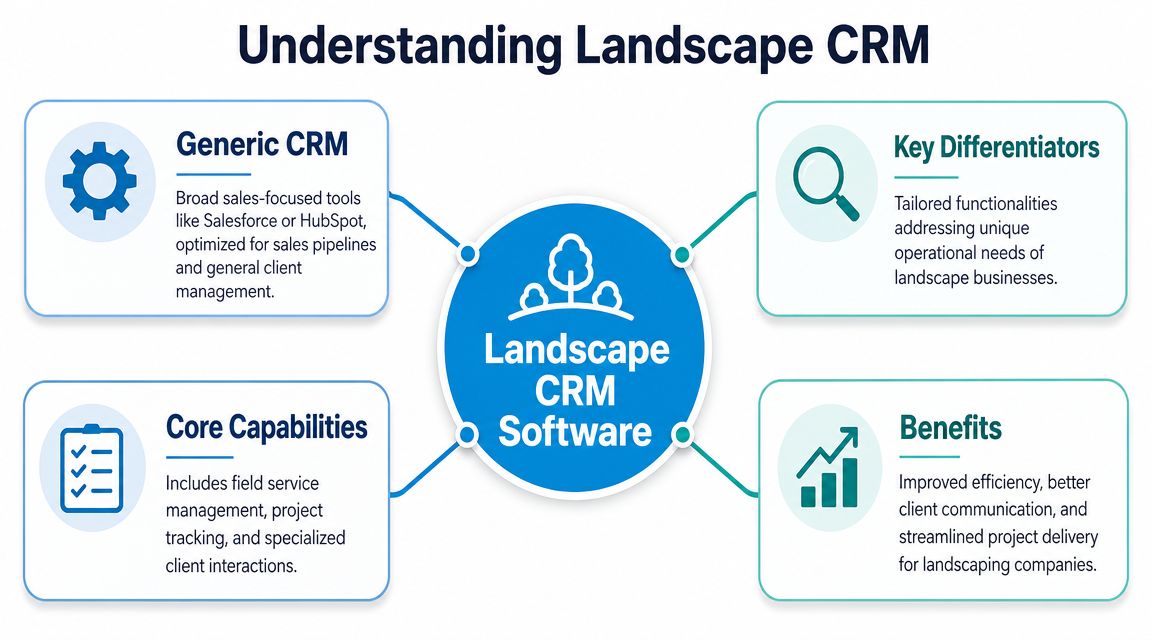
Think of it as air traffic control for a grounds care company. Leads are coming in. Estimates are going out. Crews are moving between properties. Recurring maintenance has to stay on schedule. Install jobs need labor, materials, and client approvals lined up. Billing has to reflect what transpired on-site. A generic CRM can track the contact. An industry-specific CRM has to coordinate the operation.
Why general-purpose CRM usually falls short
Salesforce, HubSpot, and similar platforms can store contacts and manage follow-ups. They aren't naturally built around route density, recurring service schedules, crew dispatch, property-level records, or production-linked customer updates.
That matters because landscaping work isn't just customer management. It's customer management tied to field execution.
A useful test is simple. Ask whether the platform can handle these without awkward workarounds:
- Recurring service logic: Weekly mowing, seasonal cleanups, renewal timing
- Route-aware scheduling: Jobs grouped to reduce windshield time
- Mobile field access: Crew notes, photos, service history, checklists on-site
- Production-driven communication: Messages triggered by visits, delays, or completed work
- Operational records: Chemical usage tracking, job status, and service-specific workflows
Why specialized tools became their own category
Green-industry CRM software exists as a separate category because green-industry companies need functions general CRMs don't prioritize. RealGreen says it has been built specifically for the green industry since 1984, and reports that customers can manage 20% more customers without adding administrative headcount after implementation in its overview of landscape CRM platforms.
That's the point many buyers miss. This isn't just a tool for keeping names and phone numbers organized. It's an operations platform built around repeat visits, field crews, route-based scheduling, and margin-sensitive service delivery.
A good landscape CRM doesn't just tell you who the customer is. It tells your team what needs to happen next, where, by whom, and with what billing consequence.
When owners understand that difference, software demos get easier to judge. The question stops being, "Does it have a pipeline?" The better question is, "Can this system keep sales, production, and customer communication in sync without my office babysitting every handoff?"
Must-Have Features That Run Your Business
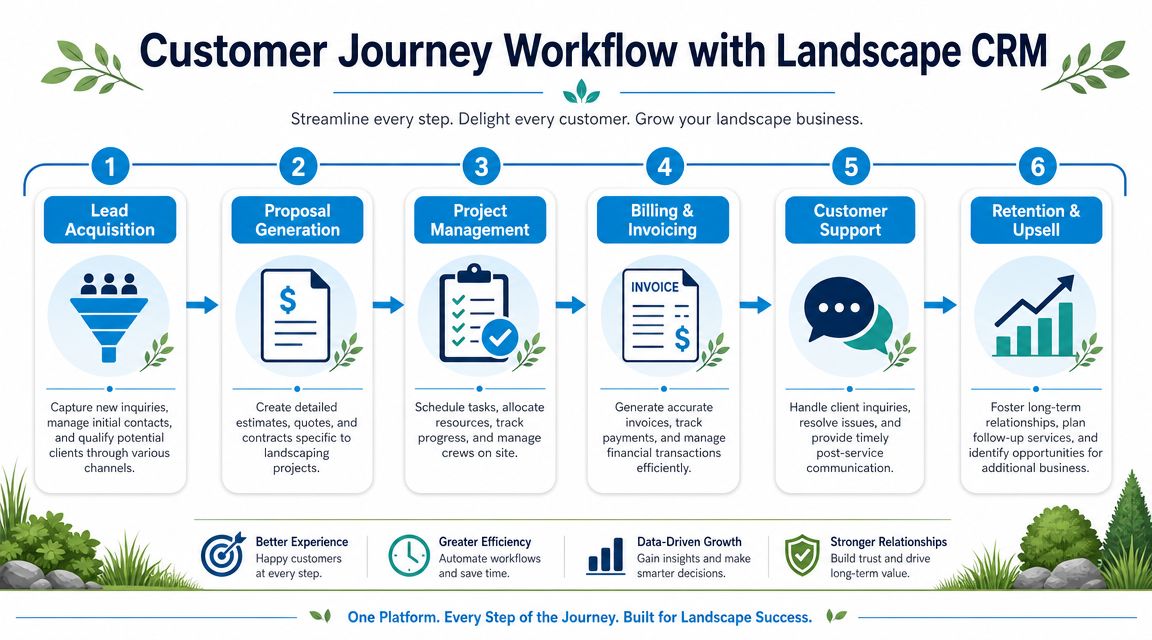
The value of landscaping CRM software isn't the feature list on a pricing page. It's whether one system can connect lead intake, customer records, estimates, scheduling, and job execution so your team isn't re-entering the same information all day. That unified workflow is the core value highlighted in this landscape CRM overview.
If you're still piecing together inquiries from voicemail, web forms, and text messages, it's worth reviewing how lead management software for small business supports cleaner intake before the work ever reaches scheduling.
From lead to estimate
In this regard, many companies leak revenue without realizing it.
A prospect calls for a retaining wall, fertilization program, or weekly mowing service. If that inquiry lands in one inbox and nowhere else, follow-up depends on memory. Better systems push the lead into a pipeline, attach the property address, assign ownership, and trigger the next action.
The features that matter here are:
- Lead capture from multiple channels: Calls, forms, referrals, and manual entries should all land in one place.
- Service-type tagging: Maintenance, design-build, irrigation, snow, and enhancements shouldn't all sit in one generic bucket.
- Digital estimating: Build proposals from the customer record instead of starting from scratch.
- Automated follow-up: If the customer hasn't approved, the system should remind someone or send the next message.
A practical example: send a quote on Tuesday, then trigger a follow-up text or email if there's no response after a defined interval. Another one: if an estimator visits a property and notices poor drainage, the CRM should let them add notes and photos to support a future upsell, not bury that observation in their camera roll.
From schedule to job completion
Once the quote is approved, the CRM has to hand the work to operations cleanly. Weak systems frequently fail at this point.
Crews need the right property, scope, notes, photos, and timing. Office staff need to see job status without calling the truck. Owners need to know whether the route makes sense.
What matters most:
- Drag-and-drop scheduling tied to real jobs
- Route-ready dispatching for recurring work
- Crew mobile access to notes, checklists, and photos
- Status updates from the field
- Change handling when weather or client requests shift the day
Field test: If a rain delay or same-day reschedule forces three phone calls and two text chains, your software isn't actually running dispatch.
A relatable scenario: the crew is halfway through the day when a commercial client asks to prioritize a different property entrance before an inspection. The office updates the schedule. The foreman sees the change on mobile, along with the revised note and contact instructions. That's what a usable system looks like.
From invoice to payment
This stage gets less attention than quoting and scheduling, but it directly affects cash flow.
The best setups tie completed work to billing logic so the office isn't chasing paperwork. For recurring maintenance, invoicing should reflect the service cadence. For projects, billing should follow approvals, progress, or completion. Payment records should sit next to the customer and job history, not in a disconnected accounting silo.
A workable finance flow usually includes:
- Invoice creation from completed jobs
- Online payment options
- QuickBooks or accounting sync
- Job-level cost visibility
- Customer communication tied to billing status
Here's the operational point. If your admin has to compare crew notes, text messages, and a calendar before sending an invoice, billing is still manual even if the invoice itself is digital.
How to Evaluate the Right CRM for Your Crew Size
The wrong way to buy CRM software is to ask for the most features. The right way is to match the system to the complexity of your operation.
A small owner-operator doing mowing, mulch, and light cleanups doesn't need the same platform as a multi-crew company running maintenance, install, irrigation, and snow across several branches. Pricing in the category reflects that spread. A 2026 comparison shows entry plans around $29.99/month, mid-market tools near $297/month, and enterprise systems often priced custom for larger businesses, including companies doing $1M+ in revenue, in this review of landscaping CRM options by business type.
Start with your operating model
Before you sit through demos, define what kind of business you're running.
Some companies are mostly recurring residential maintenance. Others make their money on enhancement work, design-build, or commercial contracts. Some run one location with a tight local route. Others manage crews across multiple service areas.
Those differences change what "good CRM" means.
| Business Size | Key Focus | Critical Features | Integration Needs |
|---|---|---|---|
| Solo operator | Speed and simplicity | Lead capture, basic quoting, calendar scheduling, invoicing | Calendar, payments, simple accounting |
| Small crew business | Office-to-field coordination | Customer records, digital estimates, recurring scheduling, crew notes, route planning | Phone intake, accounting, mobile crew tools |
| Multi-crew operator | Dispatch control and visibility | Role permissions, job status tracking, route management, service history, reporting | Accounting, communication workflows, field apps |
| Multi-location or multi-service company | Profitability by branch and service line | Division tracking, job costing, branch reporting, approval workflows, operational dashboards | Accounting, payroll, communication systems, deeper data sync |
Ask questions most buyers skip
A lot of demos stay shallow. The vendor shows a dashboard, a pretty estimate screen, and maybe a mobile app. That's not enough.
Ask the system to prove it can handle your messy reality:
- Show job profit at the service-line level: Can you separate maintenance, enhancements, install work, and snow?
- Show branch visibility: If you operate from more than one location, can managers see local performance without mixing everything together?
- Show schedule changes in real conditions: What happens when rain pushes half the route to tomorrow?
- Show field updates: Can a crew add photos, notes, and completion status from the property?
- Show customer communication history: If a client calls angry, can the office see the latest estimate, visit note, and invoice in one place?
Most guides focus on lead tracking. Mature buyers should also ask, "How does this system tell me which part of my business is actually making money?"
Match software to complexity, not ambition alone
It's smart to buy with some room to grow. It's a mistake to buy enterprise complexity before your team can use the basics.
If you have one office admin and two crews, you probably need clean estimating, reliable scheduling, a decent mobile workflow, and accounting sync. If you have separate maintenance and enhancement teams, now you need cleaner job costing and service-line reporting. If you operate across branches, CRM becomes less about contact storage and more about operating control.
The practical test is simple. Buy the system your team will use daily, not the one that looks most impressive in a demo.
Power Up Your CRM with Smart Integrations
A standalone CRM helps. An integrated CRM changes how the business runs.
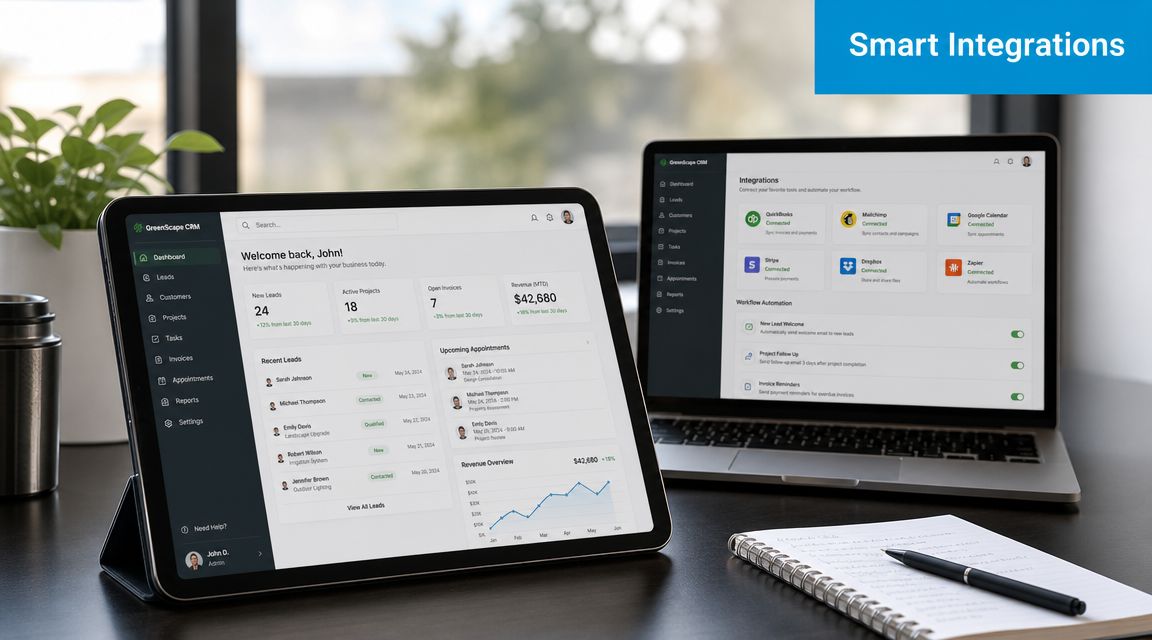
Most landscaping companies don't lose efficiency because one tool is terrible. They lose it because five decent tools don't talk to each other. The office answers calls in one place, estimates in another, scheduling in another, and bookkeeping somewhere else. Every handoff creates delay, missed details, and duplicate entry.
For a plain-English breakdown of how those systems connect, this guide on what CRM integration means in practice is worth reading before you start comparing vendors.
Communication tools that stop lead leakage
A missed call is often a missed estimate. That's especially true when prospects call after hours or during the morning rush.
Before integration, the process looks like this: customer calls, voicemail fills up, someone returns the call later, details get written down, and the office manually creates a lead if they remember. After integration, inbound communication can create or update the customer record, log the interaction, and push the next step into the workflow.
One option in this category is Recepta.ai, which handles inbound and outbound conversations, appointment scheduling, lead capture, and follow-ups while syncing records into connected systems. In a landscaping context, that means a missed office call doesn't have to stay disconnected from your CRM.
Field apps that make estimates and job data usable
For outdoor service contractors, field-first data capture is one of the biggest differentiators. Modern systems support on-site digital quotes, property measurements, photos, invoicing connections, and QuickBooks synchronization, as described in Houzz Pro's overview of CRM software for landscape contractors.
That matters because crews and estimators don't work at desks. They work at gates, driveways, backyards, commercial lots, and active job sites.
A simple before-and-after:
- Before: Estimator measures the site, takes photos, writes notes on paper, then retypes the estimate at the office.
- After: Estimator builds the quote on-site, attaches photos to the customer record, and sends the proposal without re-entering the same information later.
If you also offer design work, concept tools can support the front end of the sales process. For example, some contractors use inspiration apps or free software to design your garden during early client conversations before the final estimate moves into the CRM and operations workflow.
A short demo helps show what connected workflows should feel like in practice.
Accounting sync that removes re-entry
The accounting connection is where many teams finally feel the relief.
Without integration, the office completes a job in the CRM, then rebuilds the invoice in accounting software. Payments get recorded in a different place. Customer balances stop matching. Staff waste time comparing screens.
With a working sync, approved jobs and invoices move cleanly into the financial system. The benefit isn't just speed. It's accuracy. Your operations team sees what was done. Your accounting team sees what should be billed. The customer record stays aligned.
A Practical Guide to Implementation and ROI
Buying the software isn't the hard part. Getting your team to use it correctly is where projects succeed or fail.
The good news is that implementation is easier than it used to be because cloud systems now dominate the category. In one 2026 industry summary, cloud-based CRM accounted for 87% of CRM systems, and businesses using CRM reported an average 29% increase in sales, according to the RealGreen article cited earlier. That doesn't mean every rollout goes smoothly. It means the tooling is accessible enough that execution matters more than infrastructure.
If you want the rollout to stick, think in workflows instead of features. That's the same mindset behind business process automation.
Roll out in a sequence your team can handle
Don't try to automate the whole company in one week.
Use a staged approach:
- Clean your customer data first: Remove duplicates, confirm addresses, standardize phone numbers, and decide how you'll name properties and accounts.
- Build your core templates: Set up estimate templates, service items, job types, invoice formats, and common customer messages.
- Train by role: Office staff need lead intake, scheduling, and billing. Estimators need field quoting. Crew leaders need mobile access, notes, and status updates.
- Launch one workflow first: Most companies should start with lead-to-estimate or schedule-to-completion, not every department at once.
- Review usage weekly: Look for jobs completed without status updates, estimates sent without follow-up tasks, or invoices created outside the system.
Implementation warning: If your foreman and office manager aren't both using the same record by week two, you're not implementing a system. You're creating another layer of admin.
Measure ROI with operational numbers you already understand
You don't need a finance degree to evaluate return. Start with saved labor, recovered leads, and faster billing.
Use simple formulas:
- Admin time saved: Hours no longer spent retyping schedules, invoices, or customer notes
- Lead recovery: Jobs won because calls and inquiries stopped slipping through cracks
- Billing speed: Faster invoice creation after work completion
- Upsell visibility: Additional work identified from recorded site notes and service history
A practical way to measure it:
| ROI Area | What to Track | Simple Formula |
|---|---|---|
| Admin efficiency | Hours saved per week | Hours saved × loaded hourly wage |
| Lead conversion | Extra approved jobs | Extra jobs × average job value |
| Billing speed | Days from completion to invoice | Compare before and after rollout |
| Crew coordination | Fewer callbacks or revisits | Count avoidable return trips and office interventions |
Focus on proof, not hope
For the first 60 to 90 days, track a short scorecard every week:
- Open leads without follow-up
- Estimates waiting on approval
- Jobs missing field notes
- Invoices not sent from completed work
- Customer calls that require searching multiple systems
If those numbers keep dropping, the CRM is doing its job. If they don't, the problem usually isn't the subscription. It's weak process design, poor training, or too much customization too early.
Your Next Step Toward an Automated Business
CRM software for landscaping businesses isn't just a software purchase. It's a decision about how your business will operate when more leads come in, more crews go out, and more service lines compete for management attention.
The companies that get real value from it don't treat CRM as a digital address book. They use it as the operating layer between sales, dispatch, field execution, customer communication, and billing. That's how you stop running the business through memory, sticky notes, and constant interruption.
If you're evaluating options now, don't book another demo and ask for a tour of the dashboard. Use the criteria that matter in the field. Ask how the system handles last-minute route changes. Ask how it tracks profitability by service line. Ask what your office sees when a customer calls. Ask what the crew sees before stepping onto the property.
That conversation will tell you quickly whether you're looking at a real operations hub or just another sales tool wearing work boots.
If you want to connect inbound calls, appointment scheduling, lead capture, and CRM updates without relying on voicemail and manual re-entry, Recepta.ai is one option to evaluate alongside your operational software stack. It connects communication workflows to the systems your office already uses, which can help landscaping teams keep records current and reduce missed opportunities.