How to Reduce No Show Appointments and Boost Your Revenue
If you're serious about cutting down on no-show appointments, you need a game plan. It’s not about one magic bullet, but a combination of smart reminders, clear policies, and making it ridiculously easy for clients to reschedule. This isn't just about plugging a hole in your schedule; it's about actively engaging your clients from the moment they book.
The Real Cost of Empty Appointment Slots
That empty slot on your calendar? It’s more than just a minor inconvenience—it’s a direct punch to your revenue. Every single missed appointment means lost income, staff time that you're paying for goes down the drain, and a lost chance to help a client who would have gladly paid for your time. These little hits add up fast, creating a chaotic schedule and holding your business back.
For any business that relies on appointments—from dental practices and hair salons to home service contractors—the financial damage is very real. We often treat no-shows as a frustrating part of doing business, but they're a massive financial leak that's quietly sinking your profits. For example, a physical therapy clinic with a 15% no-show rate for appointments averaging $100 could be losing over $3,000 a week.
Why No-Shows Are More Than Just an Inconvenience
When someone doesn't show up, the cost isn't just the price of that one service. The fallout can throw off your entire day and put a real strain on your team. Think about it: your staff prepped for that appointment. They might have set up special equipment, pulled files, or mentally prepared for the client. All of that effort and cost is wasted.
This is exactly why figuring out how to reduce no-show appointments is one of the most important things you can do for your business. It's not about pointing fingers at clients; it’s about fixing the broken parts of your booking process. The damage stacks up in a few key ways:
- Direct Revenue Loss: This is the most obvious one. You simply don't get paid for the service you were supposed to provide.
- Wasted Staff Payroll: You're paying your team to be ready for an appointment that never happens. That time turns into pure overhead.
- Scheduling Inefficiency: A sudden gap in the schedule messes with the day's flow, making it tough to manage your team and workflow.
- Blocked Access for Other Clients: That no-show took a spot that another paying client—maybe someone on your waitlist—could have filled.
An appointment-based healthcare practice in the U.S. can lose an average of $150 billion annually due to no-shows. That number is staggering, and it shows just how urgent this problem is for businesses of all sizes.
The good news is that technology has completely changed the game. Let's look at how far we've come from the old, manual way of doing things.
Old vs. Modern Appointment Management
The difference between old-school booking methods and today’s automated systems is night and day. One invites no-shows, while the other actively prevents them.
Moving from a manual process to an automated one is a huge step toward reclaiming that lost revenue and making your entire operation run smoother.
This isn't just theory. You can see real-world proof in the detailed case studies showing how businesses reduced no-shows and dramatically improved their bottom line. It’s all about reframing the problem: no-shows aren't just an unavoidable annoyance; they are a solvable operational challenge.
It All Starts at the First Click
Let's be honest, the fight against no-shows begins the moment a client decides to book with you. It’s not about the reminder texts you send the day before; it's about creating a sense of commitment right from the start. Your booking experience is your first, and best, line of defense.
Think about it from their perspective. Is it easy? Is it quick? Does it make them feel like you value their time? The goal is to shrink the window between their decision to book and the actual appointment, giving them less time to forget, second-guess, or find someone else.
Close the Gap with Immediate Scheduling
One of the most powerful things you can do to slash no-show rates is to offer appointments as soon as possible. The longer someone has to wait, the more likely life gets in the way. Offering immediate or next-day availability taps into their initial sense of urgency and makes the appointment feel more concrete.
Imagine a law firm whose scheduling software automatically flags open slots in the next 24-48 hours. When a new client calls in a panic, the receptionist can offer a consultation for the very next day. This capitalizes on their immediate need and dramatically reduces the chance they'll bail.
It's not just a hunch; the data backs this up. A study found that 71% of patients said same-day or next-day availability was the number one thing that would prevent them from missing an appointment. That's a huge insight for any business. You can discover more insights about patient scheduling on Tebra.com.
This simple strategy directly combats the average 23% no-show rate that plagues so many industries. When you meet their needs right away, you lock in their commitment from the get-go.
Get the Contact Details Right—Every Single Time
An appointment reminder is completely useless if it goes to the wrong number or a misspelled email. That's why flawless data capture isn't just a "nice-to-have"; it's an absolute must. For example, if a client's email is john.doe@gmal.com instead of gmail.com, they will never get your confirmation or reminder.
Your system, whether it’s an online form or a person on the phone, needs to be foolproof. Modern booking platforms have built-in validation to check if an email looks right or a phone number is valid, which helps a ton.
This is also where technology can be a huge asset for phone bookings. An AI receptionist, for example, can patiently capture and confirm every detail without the risk of human error or a fuzzy phone connection causing a mix-up.
The point is, having a system that's always on and always accurate means no lead or booking inquiry ever gets lost. You secure good, clean data around the clock.
Get Their Permission to Send Reminders
Collecting their contact info is only half the battle. You also need their explicit permission to use it for reminders. This isn't just about being polite; it’s about meeting legal compliance and setting clear, professional expectations from day one.
Work this directly into your booking flow. It can be a simple checkbox online or a quick verbal confirmation over the phone.
- On your website: Add a line like, "By providing your contact info, you agree to receive appointment confirmations and reminders via text and email. You can opt out anytime."
- On the phone: A simple script works wonders. "Just to make sure you don't miss it, we'll send a confirmation email right now and a text reminder the day before. Is the best number to use [confirm number]?"
This one little step changes everything. Suddenly, your reminders aren't just messages—they're a helpful service the client actually asked for. It sets a professional tone from the beginning, which is so important. For more on this, you can check out our guide on professional phone greetings for businesses. Building that foundation of trust makes people far more likely to show up.
Designing a Reminder System People Actually Respond To
Let's be honest: a single text message the day before an appointment just doesn't cut it anymore. If you want to seriously reduce no-shows, you need a smart communication plan that feels helpful, not pushy. It’s all about creating a multi-channel reminder cadence that connects with clients where they are, at precisely the right moments.
This isn't about spamming people. It’s a strategic layering of messages—email, SMS, and maybe even a quick phone call—to gently reinforce their commitment. When you get this right, it shows you respect their time and makes them feel more organized, which is a huge win for customer loyalty.
The Proven Multi-Touchpoint Cadence
From my experience, a really effective reminder sequence has three key touchpoints. Each one serves a specific job, and together, they make sure your message lands without becoming just another notification to swipe away.
Here’s the breakdown:
- Immediately After Booking (Email Confirmation): The moment they book, an email should hit their inbox. This is your digital handshake. It locks in the details, gives them that instant confirmation they expect, and makes it easy to add the appointment to their calendar.
- 72 Hours Before (SMS Check-In): A friendly text three days out is the perfect gentle nudge. It’s far enough in advance that if a conflict has popped up, they can reschedule without a fuss. That’s always better than a last-minute cancellation or, worse, a complete no-show.
- 24 Hours Before (SMS/Call Confirmation Request): This is the final, most important reminder. It needs to ask for a direct confirmation, like "Reply YES to confirm." For high-value appointments—think a major dental procedure or a critical legal consultation—an automated call can add a personal touch and really secure that final commitment.
A great reminder system isn't just about notifications; it's a customer service tool. Executed properly, it makes your clients feel cared for and on top of things, which makes them far more likely to show up.
This simple flow chart really captures the essence of securing client commitment from the first click to the final reminder.
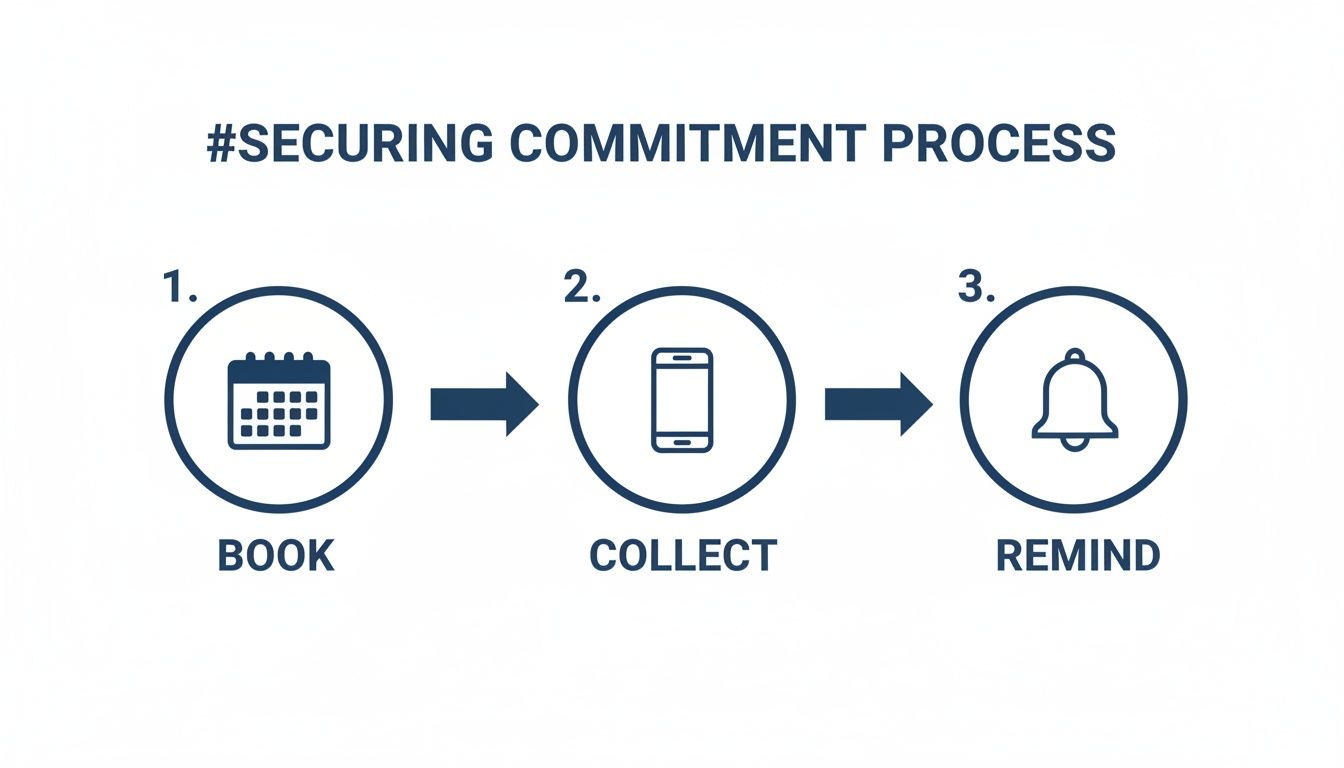
This visual drives home the point that cutting down on no-shows is a continuous process, not just a single action. It starts with the booking and is reinforced with every communication that follows.
A well-planned sequence of reminders across different channels keeps your appointment top-of-mind and makes it incredibly easy for clients to confirm.
Sample Multi-Channel Reminder Cadence
This cadence ensures you’re communicating effectively without overwhelming your clients. It gives them multiple, convenient ways to engage and confirm.
Scripts That Actually Get a Response
The words you use in your reminders matter—a lot. Keep your messages concise, friendly, and always include a clear call to action. Messages that are too formal or vague are just begging to be ignored.
Here are a couple of templates you can adapt:
SMS (72-Hour Reminder): "Hi [Client Name]! Just a friendly reminder about your appointment with [Business Name] on [Date] at [Time]. If you need to reschedule, please call us at [Phone Number] or visit [Link]. Thanks!"
Email (24-Hour Confirmation): "Hi [Client Name], we're looking forward to seeing you for your [Service] appointment tomorrow, [Date], at [Time]. Please reply to this email or click here to confirm: [Confirmation Link]. If your plans have changed, you can easily reschedule here: [Reschedule Link]."
See how both examples make rescheduling just as easy as confirming? That's the secret sauce. You want to keep their business, even if it has to be on a different day. The ultimate goal is to avoid that empty slot on your calendar.
How a Smart Cadence Works in the Real World
I worked with a busy dental practice that was struggling with a 20% no-show rate, especially for big-ticket procedures like crowns and implants. It was a huge drain on their revenue. We implemented this exact multi-touchpoint strategy.
- An instant email confirmation was sent with a
.icscalendar invite. - A 72-hour SMS reminder went out, giving patients an easy out to reschedule.
- A final 24-hour SMS asked for a simple "YES" confirmation.
- For any procedure over $1,000 that wasn't confirmed via text, an automated outbound call was triggered to get a verbal confirmation.
The results were fantastic. In just three months, their no-show rate was cut in half, dropping to under 10%. That combination of automated reminders with a targeted, personal touch for high-stakes appointments was the perfect formula.
This isn't just a one-off story. A poll from the Medical Group Management Association found that 73% of healthcare leaders saw their no-show rates either hold steady or decrease after implementing automated scheduling and reminder tools. It’s a clear signal that this approach works across service-based industries. By automating the process, you guarantee every client is contacted at the perfect time on their preferred channel, all without piling more work onto your team.
Creating No-Show Policies That Actually Work
Let's be honest, bringing up no-show policies can feel a bit awkward. But protecting your time and revenue is non-negotiable. The trick is to create a policy that’s firm but fair, and above all, clearly communicated. This isn't about punishing clients; it's about establishing mutual respect for the time you've both set aside.
A good policy sets expectations from the moment someone books. When clients understand the real impact of a last-minute cancellation, they're much more likely to show up or give you a heads-up if their plans change.
Deposits vs. Cancellation Fees: Which Is Right for You?
One of the first decisions you'll make is whether to require a deposit or charge a cancellation fee. They serve different purposes, and the best choice really hinges on the type of service you provide.
A deposit is an upfront payment made to secure an appointment, and it's perfect for high-value or time-intensive services. Think of it as a shared commitment. When a client has skin in the game, their follow-through rate skyrockets. This is your go-to when you're blocking off a large chunk of your schedule or ordering special materials.
A cancellation fee, on the other hand, is only charged if someone cancels late or simply doesn't show. This approach offers more flexibility for clients and works well for routine, shorter appointments where asking for money upfront might seem like overkill.
Here’s how this plays out in the real world:
- Home Services: A general contractor scheduling a two-hour deep-dive consultation for a kitchen remodel should absolutely require a deposit. It filters out window shoppers and covers the significant prep time involved.
- Healthcare: A dental practice might use a cancellation fee for a standard cleaning. But for a lengthy procedure like a crown, which ties up the dentist and specialized equipment, a deposit is the smarter move.
- Salons & Spas: A simple no-show fee makes sense for a standard haircut. For a three-hour balayage treatment, a deposit is the only way to protect that stylist's valuable time.
The best policies aren't about collecting fees—they're about encouraging communication. The goal is to get clients to call and reschedule so you can fill that slot, not to ding their credit card.
How to Talk About Your Policy Without Sounding Like a Robot
The way you communicate your policy is just as important as the policy itself. Your tone should be professional, direct, and focused on fairness. Introduce it during booking and reinforce it in your reminders. No surprises.
Your team needs consistent, easy-to-use scripts for this.
On the Phone During Booking:
"Alright, you're all set for [Date] at [Time]. Just a quick heads-up, we do have a 24-hour cancellation policy. If you need to make a change, just let us know at least a day in advance to avoid the $50 fee. Don't worry, we'll send a reminder two days beforehand to give you plenty of notice."
In Your Automated Reminders (SMS/Email):
"Hi [Name], just a friendly reminder about your appointment on [Date]. Please reply YES to confirm. Note: Cancellations within 24 hours are subject to a fee as per our policy."
Make Rescheduling Painfully Easy
This is the secret sauce to a successful no-show policy: make it easier to reschedule than to ghost you. Think about it. If a client has to find your number, call during business hours, maybe wait on hold, and then explain themselves, they're far more likely to just give up and not show.
This is where a little bit of tech makes a huge difference.
Including a simple, one-click rescheduling link in every reminder email or text is a game-changer. It empowers clients to manage their own appointments on their own time—even at 10 PM on a Sunday. An automated system can show them your current openings and let them rebook instantly, turning a potential no-show into a filled slot, all without a single phone call. You’ve removed all the friction.
Stop Chasing Clients: How to Automate Your Way to Fewer No-Shows
Let's be honest, manually confirming appointments and chasing down clients is a soul-crushing, time-consuming task. As your business grows, it becomes a massive bottleneck, leading to frustration, wasted time, and a real hit to your bottom line. The only way to win this game at scale is to lean on technology.
Smart automation takes your entire no-show prevention strategy off your plate, letting you operate with a level of precision and efficiency that just isn't possible by hand.
The first step is empowering your clients. When they can book, view, and manage their own appointments 24/7 through an online platform, the friction and forgotten commitments start to disappear.
But the real magic happens when you integrate these tools into a central command center that handles all client communication. This is where automation transforms from a helpful gadget into the engine of your growth.
Let Clients Take the Wheel with Online Scheduling
One of the simplest yet most powerful ways to slash your no-show rate is to give clients control over their own bookings. When someone can hop online at midnight, see their upcoming appointment, and reschedule with a single click, they're far less likely to just not show up. It completely removes the hassle of them having to call you during specific business hours.
This isn't just a theory; it has a direct, measurable impact. One study that dug into over 16,000 appointments found that practices using online scheduling saw their no-show rates plummet to a median of just 1.8%.
Why? Because clients have the power to cancel or move their slot 24-48 hours ahead of time, giving you a real chance to fill that opening. This self-service approach is a cornerstone of any modern strategy for tackling no-shows.
Your AI Receptionist: The Central Hub for Everything
Online scheduling is a fantastic start, but it's only one piece of the puzzle. A truly automated system needs a brain—a central hub connecting all your different communication channels and client touchpoints. This is where an AI-powered receptionist becomes your most valuable player.
Think of it as the ultimate command center for all your client communication. It doesn't just book appointments; it intelligently manages the entire client journey, making sure no detail gets missed and every interaction feels professional and timely.
Here’s what this looks like in practice:
- Never Miss a Call: It answers the phone 24/7, ready to book new appointments or handle rescheduling requests, even when you're closed.
- Send Reminders on Autopilot: It automatically sends the exact multi-channel reminder sequences we talked about earlier—email, SMS, and even automated calls—without you lifting a finger.
- Confirm High-Value Slots: For those really important appointments, it can make proactive outbound calls to lock in that final confirmation.
- Handle Rescheduling Instantly: It processes rescheduling requests on the spot, whether they come in via phone, a text reply, or an online link.
This central system guarantees that every client gets consistent, high-quality communication, no matter how they reach out or who on your team is working that day.
A Real-World Example: A Franchise Case Study
Imagine a home service franchise with 15 HVAC repair locations. Before they embraced automation, each office managed its own schedule, and it was pure chaos. Receptionists were drowning in calls, appointments were getting missed, and their no-show rate was hovering around 18%. That's a lot of money walking out the door every single day.
By bringing in an AI receptionist to act as their central hub, they completely turned things around.
- Unified Booking: Every inbound call and online request was funneled through the AI, which had real-time access to every technician's schedule across all 15 locations.
- Consistent Reminders: A standardized, automated reminder sequence was rolled out for every single appointment, franchise-wide. No client ever fell through the cracks again.
- Effortless Rescheduling: Clients could easily reschedule by replying to a text or calling back anytime. The AI would find and book the next available slot for them instantly.
The result? A staggering 60% reduction in their no-show rate in just three months. Technicians were no longer wasting fuel driving to empty houses, and the administrative staff were finally freed from the endless game of phone tag. They could focus on higher-value tasks like customer support and dispatch logistics, which directly improved the quality of their service.
This just goes to show that scaling your business doesn't have to mean scaling your headaches. By using an AI receptionist for your small business, you're building a reliable, repeatable system that plugs revenue leaks and delivers a polished client experience every single time. For another great look at this in action, check out the strategies dental clinics use to reduce no-shows with AI chatbots. It’s all about creating an operational backbone that supports your growth instead of holding it back.
Your Questions, Answered
Even after putting the best plans in place, you're bound to run into some tricky situations. Let's tackle some of the most common questions that pop up when you're working to get no-shows under control. Getting these right can make all the difference.
What’s a Good No-Show Rate to Aim For?
This definitely varies depending on your line of work, but a solid goal for most service businesses is to get your no-show rate under 10%. For example, a busy hair salon might see a higher rate than a specialized medical practice.
If you’re in a field like healthcare or law where every slot is critical, pushing for an even better rate of 5-8% is a great benchmark.
Honestly, though, the most important number is your own. The real win is seeing a steady downward trend in your own data. If you were sitting at a 20% no-show rate and your new system gets it down to 15%, that's a huge success. Always measure against your own past performance.
Should I Actually Charge a Fee for a First-Time No-Show?
For a first-timer, I usually recommend showing a little grace. It's the perfect moment to turn a negative into a positive.
A quick, friendly follow-up call to check in and gently explain your policy can build a ton of goodwill. You might even say you’ll waive the fee "just this once." It shows you’re human and can help keep a great client.
But for repeat offenders, you have to be consistent. A tiered system is your best bet:
- First time: A friendly warning and a gentle reminder of the policy.
- Second time: Enforce the cancellation fee. No exceptions.
- Third time: If someone is consistently disrespecting your time, it might be time to fire them as a client.
This approach is fair to everyone while still protecting your business.
How Do I Remind Clients Without Annoying Them?
The trick is to make your reminders feel like a helpful service, not a nagging demand.
Keep the language friendly and focus on their convenience. You want them to feel like you're helping them stay organized, not hounding them.
For instance, a simple message like, "Just a friendly reminder about your appointment on Tuesday! Please reply YES to confirm, or just give us a call if you need to reschedule," is helpful and puts them in control. Offering easy, one-click options is always less of a hassle than making them pick up the phone.
An automated reminder system is a professional touch your clients will actually appreciate. It takes the awkwardness out of manual follow-up calls and replaces them with a smooth, helpful interaction that respects their time.
Is an AI Receptionist Really Worth the Money?
Cutting down on no-shows is an obvious win that immediately impacts your bottom line, but the real value of an AI receptionist goes so much deeper. It’s not just a no-show tool; it's a complete front-desk solution that never sleeps.
Think bigger. An AI system means you never miss another lead. It books appointments 24/7, captures client info flawlessly, and plugs right into the software you already use.
When you add up the savings from not needing a full-time human receptionist and the new revenue from appointments booked after hours, the system pays for itself almost immediately. For example, if the AI books just two new appointments after hours that you would have missed, it has likely covered its monthly cost. The drop in no-shows is just one piece of a much larger operational upgrade.
For a deeper dive into this topic, a comprehensive guide on how to reduce no-shows appointments offers even more strategies.
Ready to stop losing revenue to empty appointment slots? Recepta.ai provides a 24/7 AI Receptionist that automates your scheduling, confirms appointments, and ensures you never miss a client call again. See how much you can save and grow by visiting https://recepta.ai for a risk-free 30-day trial.