Outsourced Call Center Solutions The Ultimate 2026 Guide

Monday starts with a full schedule. By 9:17 a.m., your front desk is already behind.
A plumbing company gets three emergency calls while the dispatcher is helping a tech who cannot find a job address. A dental office has two voicemails from new patients, one insurance verification question, and a frustrated caller who hung up after the third ring. A small law firm gets intake calls during court hours, then learns later that a high-value prospect called twice and never reached a person.
That is the core problem most owners are trying to solve. Not “phone coverage” in the abstract. Not a generic staffing issue. They are trying to stop revenue leakage, reduce front-desk overload, and keep service quality stable when the day gets messy.
Voicemail rarely solves that. It delays response, drops context, and creates cleanup work later. In service businesses, speed matters. The first business to answer often gets the booking, the consult, or the intake.
Outsourced call center solutions can fix that, but only when they are set up as part of operations, not treated like a cheap overflow patch. The difference is huge. A weak vendor just answers calls. A strong one captures the right details, routes urgency correctly, writes back to the right system, and protects your team from noise without hiding important conversations.
For SMBs, that usually means one question: can this partner fit the way we already work?
That is where many buying decisions go wrong. Owners focus on coverage and price. They should be looking just as hard at CRM sync, escalation logic, training depth, and whether the vendor can support after-hours demand without turning every caller into a ticket for tomorrow. If after-hours coverage is one of your main pain points, this guide on after-hours answering services is a useful companion to the decisions covered below.
When Every Missed Call Is a Lost Opportunity
The missed call problem usually starts small.
A roofing company owner tells the office manager to “just catch up after lunch.” A two-person legal intake team asks attorneys to forward unanswered calls to voicemail for one busy week. A med spa adds a second location but keeps the same phone workflow, hoping the front desk can absorb the extra volume.
Then the pattern sets in.
What missed calls look like in daily operations
A missed call is not only a missed conversation. It becomes a chain of operational drag:
- A new lead goes cold: The caller reaches a competitor before your callback happens.
- A current customer gets irritated: They call back twice, then start the interaction frustrated.
- Your staff lose time: Someone has to listen to voicemails, decode names, re-enter details, and chase context.
- Urgent issues get buried: An emergency repair call sits next to a routine billing question in the same inbox.
For home services, this often happens during dispatch peaks. For healthcare practices, it happens during patient check-in windows. For law firms, it happens when attorneys and intake staff are both unavailable at the same time.
Why in-house coverage breaks first
The first failure point is not effort. It is capacity.
Most SMBs do not have enough slack in the day to absorb random spikes in call volume. Front-desk staff also handle scheduling, payment questions, internal coordination, and walk-ins. When phones spike, something gives.
What usually does not work:
- Sending everything to voicemail
- Rotating call duty across already busy staff
- Using a basic answering service with no system access
- Assuming “we will just call back fast”
Practical takeaway: If your team regularly listens to voicemail in batches, you already have a response-lag problem, even if no one has named it yet.
The operational fix is not more chaos tolerance. It is a better call-handling design.
What Exactly Are Outsourced Call Center Solutions
The simplest way to think about outsourced call center solutions is this: they are an external communications team that handles some or all of your customer interactions using your workflows, standards, and systems.
That is not very different from outsourcing payroll or managed IT. You are not outsourcing your business model. You are outsourcing a specialized operating function to people and tools built to handle it at scale.
The practical definition
In day-to-day terms, outsourced call center solutions can handle work such as:
- Inbound calls: New inquiries, appointment requests, service questions, overflow coverage.
- Outbound calls: Follow-ups, reminders, lead qualification, scheduling confirmation.
- Omnichannel work: Phone, chat, email, and related routing when the provider supports it.
- Escalation management: Passing the right interactions to your team when empathy, judgment, or authority is required.
The important distinction is this. A serious outsourcing partner is not just “someone who answers the phone.” They should operate as an extension of your front office.
That means they need access to the right scripts, decision trees, calendars, and customer data. It also means they need clear boundaries. Which calls can they fully resolve? Which ones should they book? Which ones must go to an on-call manager, nurse, attorney, or service coordinator immediately?
Why this is not a niche solution
This is a mature operating model, not a fringe tactic. The global call center outsourcing market was valued at $102.59 billion in 2024 and is projected to reach $242.80 billion by 2034, with a 9.00% CAGR from 2025 onward. North America holds over 33.1% of the market, which shows how established outsourcing has become across healthcare, finance, home services, and other service-heavy sectors (Accio market trends).
That matters because mature categories usually produce better tooling, clearer vendor options, and more specialized service models.
What changes when you treat it as an operating system
A good outsourced setup shifts call handling from a reactive chore into a defined process.
Here is the difference:
| Approach | What it looks like |
|---|---|
| Basic answering service | Takes messages, forwards notes, little system context |
| Operational call partner | Books, routes, logs data, follows scripts, escalates correctly |
| Integrated outsourced solution | Connects with CRM, calendar, workflows, QA, and reporting |
For SMBs, the third model is where ROI usually appears. Not because it is flashy, but because it reduces rework.
Tip: When evaluating outsourced call center solutions, ask one question early: “What work disappears from my internal team’s day if this goes live?” If the answer is vague, the vendor is probably too shallow.
Who gets the most value
The strongest fit tends to be businesses with one or more of these conditions:
- Unpredictable call spikes
- After-hours demand
- Multi-location scheduling complexity
- Specialized intake or qualification workflows
- A front desk that is already overloaded
That includes HVAC, plumbing, pest control, dental, med spa, legal intake, insurance servicing, and franchise operations. In all of those environments, the call itself is only half the job. The other half is what happens in the system after the call ends.
Comparing Modern Outsourced Call Center Models
Most buyers compare vendors too early. They should compare models first.
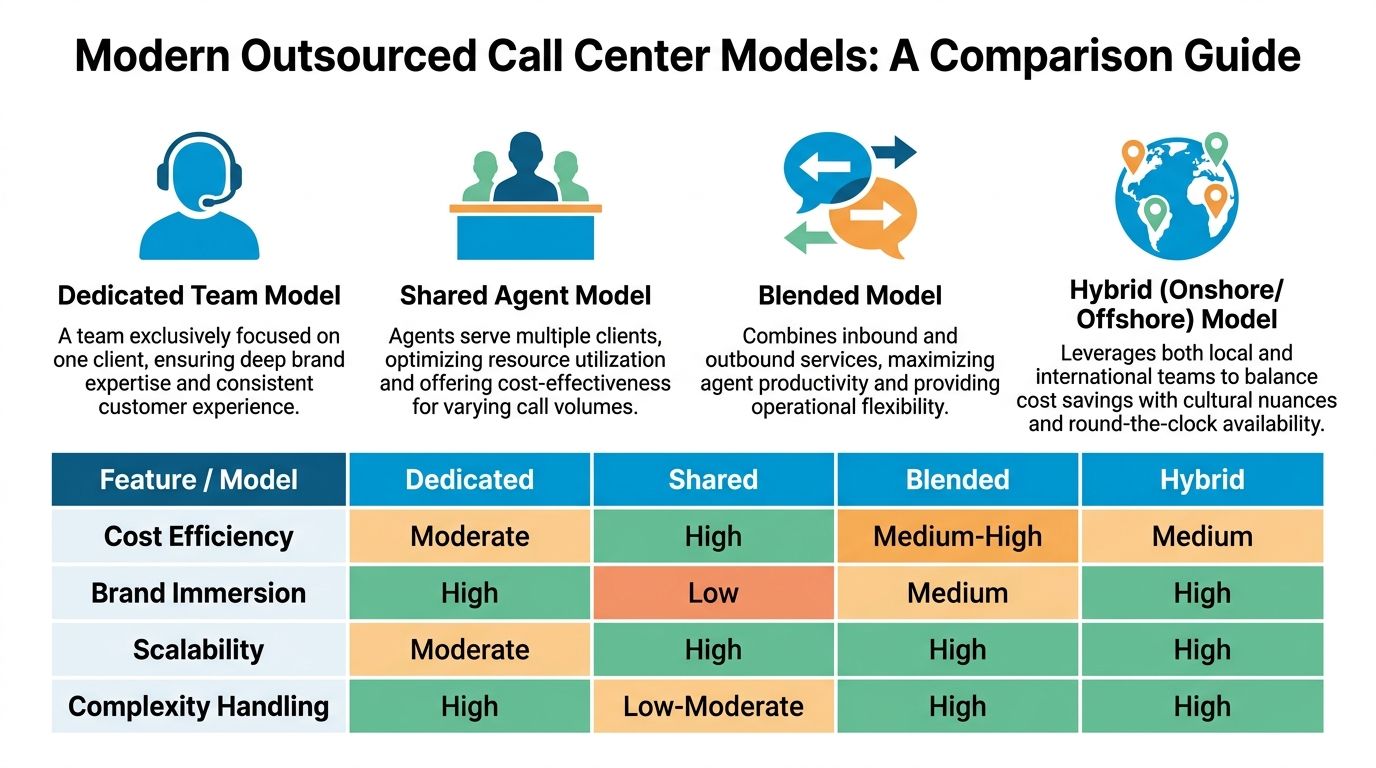
A dedicated team and a shared agent pool can both be called outsourced call center solutions, but they behave very differently in practice. The same goes for blended and hybrid delivery. If you choose the wrong model, you can still get decent call coverage and poor operational results.
The four models most SMBs will encounter
Dedicated team
A dedicated team works only on your account or on a tightly limited client set.
This model fits businesses with more complex scripts, stronger brand requirements, or specialized language around services and compliance. Think legal intake, specialty healthcare scheduling, or a high-ticket home services brand that wants very consistent call handling.
It usually produces stronger brand familiarity. The trade-off is cost and a longer setup cycle.
Shared agent model
Shared agents serve multiple clients. This is the most common low-friction option for SMBs.
It works best when call types are repetitive and easy to standardize. Appointment requests, simple FAQs, overflow answering, and basic lead capture fit well here.
The risk is shallow context. If your callers need nuanced answers, a shared pool can feel generic fast.
Blended model
A blended model combines inbound and outbound work.
This can be useful when the same vendor handles new lead intake, missed-call recovery, appointment reminders, and follow-up. It is common in dental, wellness, and service businesses where filling the schedule matters as much as answering incoming calls.
The strength is continuity. The caution is management discipline. If outbound work starts crowding inbound responsiveness, service quality slips.
Hybrid onshore and offshore model
This model combines local-market support with international coverage.
It can make sense for businesses that need overnight coverage, extended hours, bilingual capacity, or a better cost-to-coverage balance. A common setup is local handling for sensitive calls and offshore or nearshore support for routine volume.
This model can work very well. It can also become messy if the handoff rules are vague.
Outsourced Call Center Model Comparison
| Model Type | Best For | Key Advantage | Primary Consideration |
|---|---|---|---|
| Dedicated team | Regulated, specialized, or high-touch workflows | Strong brand and process immersion | Usually requires more onboarding and tighter management |
| Shared agent | Small businesses with simpler call types | Cost efficiency and easy scalability | Lower depth of business knowledge |
| Blended | Businesses needing inbound plus follow-up workflows | Better continuity across the customer journey | Needs clear priorities between inbound and outbound work |
| Hybrid onshore and offshore | Multi-location or extended-hours operations | Broader coverage with flexible staffing | Handoff quality and consistency need close control |
Where AI-assisted and hybrid AI-human setups fit
The market has shifted in this area. Over 60% of outsourced providers had deployed AI or chatbot solutions by 2024, and those implementations were associated with a 20% reduction in average handle time and a 5-point lift in CSAT (GigaBPO call center outsourcing statistics).
That does not mean AI should take every call. It means routine work can be handled faster so human agents spend more time where judgment matters.
A practical example:
- An AI layer answers a dental clinic’s after-hours call.
- It captures the patient name, callback number, and appointment type.
- It checks scheduling rules.
- If the caller asks a simple availability question, the system can proceed.
- If the caller sounds anxious, asks about pain, or has an unusual insurance issue, the conversation escalates to a person.
That is usually the sweet spot. Fast handling for structured tasks, human support for edge cases.
If you are comparing this category specifically, this overview of AI customer service solutions helps clarify where automation creates value and where it causes friction.
What works by business type
Different service businesses tend to fit different models.
- Solo or small law firms: Dedicated or tightly controlled hybrid models usually work better because intake quality matters more than raw call volume.
- Home service companies with dispatch peaks: Shared or hybrid models can work well if urgency rules and booking workflows are strong.
- Dental and wellness practices: Blended models often fit because reminders, reactivation, and scheduling all matter.
- Franchise groups: Hybrid models become attractive when different locations need common coverage with localized escalation.
Rule of thumb: If a call can affect liability, patient care, legal intake quality, or dispatch urgency, choose the model based on complexity first and labor cost second.
What does not work
A few combinations repeatedly fail:
- Shared agents with weak scripts for specialized industries
- Offshore-heavy setups without clear escalation authority
- AI-first flows that force every caller into the same path
- Dedicated teams without enough call volume to justify the structure
Buy the operating model that matches the complexity of your call flow, not the one with the best headline price.
The True Business Impact Beyond Cost Savings
Cost matters. It is just not the full story.
The stronger reason to adopt outsourced call center solutions is that they can improve response quality, protect lead flow, and reduce operational waste at the same time. That is where the strongest ROI shows up.
A short explainer on the broader economics of this model can help before you map your own numbers:
Better call handling changes revenue, not just staffing
Top-tier outsourced vendors do more than answer faster. They correlate with 10 to 15% higher first contact resolution by using real-time AI dashboards for coaching, and that same approach can prevent 30% of negative escalations. In practical sales and intake environments, it also supports outcomes like capturing 30% more qualified leads by automating routine interactions and escalating only high-value calls (Dialpad on call center outsourcing).
That matters because many SMBs are leaking revenue in preventable ways:
- A new lead calls after hours and never speaks to anyone.
- A customer with a simple scheduling question sits in queue behind calls that could have been automated.
- A stressed front-desk employee rushes an intake and misses key information.
- A frustrated caller is transferred twice and leaves with a poor impression.
Those are not isolated service issues. They affect bookings, retention, and staff efficiency.
Where the value appears first
In real operations, the first visible wins usually show up in three places.
Lead capture
If calls are answered consistently and routed properly, more inquiries become scheduled work. This is especially important in high-intent categories like emergency home services, legal intake, and healthcare scheduling.
Resolution speed
When a vendor uses good routing, structured scripts, and live coaching, customers spend less time repeating themselves. The internal team also receives cleaner handoffs.
Staff focus
Front-desk employees stop bouncing between ringing phones and core work. Dispatchers can dispatch. Coordinators can coordinate. Office managers can review exceptions instead of cleaning up every call.
How to calculate ROI without overcomplicating it
You do not need a complex finance model.
Start with four operational questions:
- How many calls are being missed, delayed, or dumped to voicemail now?
- Which call types consume the most staff time but follow repeatable steps?
- Which interactions need a human because they involve risk, empathy, or authority?
- How often does your team re-enter data because call notes do not land in the right system?
Then compare two states:
| Area | Weak setup | Strong outsourced setup |
|---|---|---|
| Lead response | Delayed or inconsistent | Immediate and structured |
| Scheduling | Manual follow-up | Booked during the interaction when appropriate |
| Escalation | Reactive, unclear | Rules-based and visible |
| Reporting | Basic call counts | Operational insight tied to outcomes |
A lot of teams make the mistake of evaluating only labor savings. A better lens is operational throughput.
Key takeaway: If outsourced call center solutions reduce missed leads, improve first-contact resolution, and remove admin rework, the business impact usually extends well beyond payroll.
The metric discipline that keeps ROI real
Do not sign a contract and hope for improvement. Track it.
Use a call tracking and attribution setup that shows what happened before and after implementation. If you need a framework, this guide to best call tracking software is useful for building that measurement layer.
The most useful scorecard for SMBs is not overly technical. It should answer:
- Are more calls being answered live?
- Are qualified leads being captured correctly?
- Are urgent calls reaching the right person?
- Is the front office spending less time on repetitive tasks?
- Are customer complaints about responsiveness going down?
That is the level where outsourced support becomes a growth system instead of a vendor expense.
How to Evaluate and Choose the Right Vendor
Most bad outsourcing decisions look sensible at the start.
The proposal is clean. The price is lower than hiring in-house. The sales demo shows polished dashboards. The provider says they support your industry.
Then the account launches, and significant gaps appear. Agents cannot use your CRM cleanly. Escalations go to the wrong person. Intake quality varies by shift. Compliance answers get vague when you ask for specifics.
Start with risk, not price
If your business handles regulated information, vendor screening has to be tougher. Outsourced centers can face 40% higher compliance violation risks than in-house teams because multi-client agent training is more complex. In regulated industries, non-compliance fines can average over $50,000 annually (SAS Call Center on outsourcing risk).
That does not mean you should avoid outsourcing. It means you should verify controls instead of accepting assurances.
Ask direct questions:
- Which compliance frameworks do you actively support for businesses like mine?
- How do you separate client data in agent workflows?
- Who can access recordings, transcripts, and notes?
- What happens when an agent is unsure whether a caller request crosses a compliance boundary?
If the answers are broad marketing language, keep looking.
The five checks that matter most
1. Demand a workflow demo using your actual scenario
Do not accept a generic platform walkthrough.
Ask the vendor to show how they would handle one of your real call flows. For a plumbing company, that might be an emergency leak after hours. For a dental office, a new patient needing an appointment and insurance capture. For a law firm, a potential personal injury intake with urgency cues.
You are looking for specificity. Can they route, qualify, log, and escalate without hand-waving?
2. Verify system fit before contract signature
A vendor can be excellent and still be wrong for your stack.
If you run ServiceTitan, Jobber, Clio, or a healthcare scheduling system, the issue is not whether the vendor has “integrations” in the abstract. The issue is whether they can support your exact fields, workflows, and handoff timing.
Some teams also use outside specialists for the technical side of implementation, especially if CRM logic or automation has become messy over time. In those cases, a partner focused on AI staff augmentation can help evaluate whether the vendor’s promised workflow is feasible inside your current systems.
3. Test training depth, not just onboarding polish
Vendor quality depends heavily on training discipline.
Ask for:
- Sample scripts
- Escalation trees
- QA scorecards
- Process for updating agent guidance when your policies change
A vendor that cannot show a living training system will struggle as your business evolves.
4. Review QA as an operating function
Quality assurance is not a checkbox. It is how outsourced teams stay aligned after launch.
You want to know how calls are reviewed, how coaching happens, and what triggers intervention. This breakdown of what is quality assurance in call center work is helpful if you want to pressure-test a vendor’s QA maturity.
5. Clarify ownership of edge cases
Weak partnerships often fall apart in this area.
Examples:
- A customer wants to reschedule and also disputes a prior invoice.
- A prospective client sounds intoxicated or distressed.
- A patient asks a question that scheduling staff should not answer.
- A franchise location wants one rule, but headquarters requires another.
If the vendor has no clear exception handling, your team will end up managing chaos after the fact.
A simple vendor scorecard
| Evaluation area | Strong sign | Warning sign |
|---|---|---|
| Compliance | Specific controls and documented procedures | Generic assurances |
| CRM fit | Can demo your real workflow | Talks only about “API capability” |
| Training | Maintains scripts, updates, QA loop | One-time onboarding only |
| Escalation | Clear rules by scenario | “We will customize later” |
| Reporting | Shows outcome-based metrics | Shares only basic call counts |
Tip: A cheap provider that creates cleanup work is usually more expensive than a better provider with a higher monthly fee.
One tool mention that fits the category
For businesses that want a hybrid AI and human option, Recepta.ai is one example of a platform that handles inbound and outbound calls, scheduling, lead capture, follow-ups, and escalation while connecting with a wide range of tools and industry systems. The relevant question is not the brand name itself. It is whether the provider can execute your workflow without forcing your team into extra manual work.
That is the standard every vendor should meet.
Ensuring Success with Seamless Implementation
The contract is not the finish line. It is the start of the part that determines whether outsourced call center solutions work.
Most implementations struggle for one reason. The business assumes the vendor will “figure it out” after kickoff. That rarely happens. Good launches are built. They do not emerge from generic onboarding.
The biggest mistake is weak system design
This is especially true for service businesses with industry software. General BPO reports suggest integration failure rates of 20 to 30% when outsourcing connects to industry-specific CRMs such as Jobber or ServiceTitan, and weak real-time syncing can create efficiency losses of 15 to 25% (Anserve on contractor answering service).
That sounds technical, but the consequences are very practical:
- Calls get answered, but appointments never hit the calendar correctly.
- Lead details land in notes instead of structured CRM fields.
- Follow-up tasks fail to trigger.
- Staff start double-checking every record, which defeats the point of outsourcing.
Build the launch in phases
Phase one: map the call types
List your most common interactions and separate them into three groups:
- Can be fully handled externally
- Can be handled with conditions
- Must be escalated
For a home service business, emergency dispatch requests might be conditional. For a dental clinic, a routine cleaning request may be fully handled, while treatment questions need escalation. For a law firm, basic intake may be captured externally, but legal advice never should be.
This first map becomes the operating blueprint.
Phase two: prepare clean knowledge assets
Most vendors receive too much information and too little clarity.
Give them:
- Approved scripts for common scenarios
- FAQs with exact language for sensitive topics
- Escalation contacts by time of day
- Calendar rules and booking constraints
- Examples of good and bad call outcomes
Do not bury key policy changes in email threads. Put them in a central reference the vendor is expected to use.
Practical takeaway: If your own internal staff answer the same question three different ways, an outsourced team will amplify that inconsistency.
Phase three: test the system handoffs
Before full launch, run live simulations.
Test these paths:
| Test case | What to confirm |
|---|---|
| New lead call | Captures the right fields and creates the right record |
| Existing customer reschedule | Updates calendar without duplicate entries |
| Urgent after-hours issue | Reaches the correct escalation path |
| Complex question | Handoff includes enough context for your team to act fast |
Do not sign off based on “call answered successfully.” Sign off when the downstream record is correct.
Train for judgment, not only scripts
Scripts matter. They are not enough.
Agents and AI flows both need business rules around ambiguity. For example:
- What qualifies as urgent?
- Which words or caller behaviors trigger escalation?
- When should an appointment request be blocked rather than booked?
- Which insurance or payment questions can be answered safely?
Many SMBs underinvest in this area. They focus on greetings and forget judgment criteria.
Set operating rhythms in the first month
The first month should be review-heavy.
A practical cadence:
- Daily check-ins during the first week
- Twice-weekly review of call samples and missed edge cases
- Weekly report review with actions, not just metrics
- Script and workflow updates as patterns emerge
Look especially hard at calls that were technically “handled” but still created work later. Those are the expensive failures.
What good implementation looks like in real life
A strong rollout in a dental office might look like this:
- New patient calls are answered live.
- Basic appointment requests are booked directly.
- Insurance questions are collected and routed for verification.
- Clinical questions are escalated with notes attached.
- The patient record updates correctly without front-desk re-entry.
A strong rollout in HVAC might look different:
- Routine service calls are booked.
- Emergency calls follow a priority path.
- Address, issue type, and equipment details are logged consistently.
- Dispatch receives clean information in the right system.
Different workflows. Same principle. The phone interaction has to connect cleanly to the work that follows.
Key takeaway: The launch succeeds when your internal team trusts the records, the escalation logic, and the call quality enough to stop checking everything manually.
Your Next Step Toward Smarter Communication
The best outsourced call center solutions do not just answer more calls. They make the rest of your operation cleaner.
That only happens when three things are true at the same time. The model fits your business, the vendor can work inside your systems, and the implementation covers the messy details that usually get skipped.
If you are deciding whether to move forward, do not start by requesting pricing from ten vendors. Start with a short internal audit.
Do this before you buy
- Review missed-call patterns: Look at when calls are missed, delayed, or pushed to voicemail.
- List your repetitive call types: Identify the top few interactions that follow predictable steps.
- Mark the sensitive exceptions: Note the calls that require empathy, compliance awareness, or expert judgment.
- Check your current records: See where call notes fail to sync cleanly into your CRM or scheduling tool.
If call recording is part of your QA or compliance process, make sure your policy is sound before you expand any external phone workflow. This guide on Is It Legal to Record Calls is a practical place to review the legal basics.
The low-risk next step is simple. Pick one call stream to improve first. After-hours leads. Overflow scheduling. Legal intake. Emergency service calls. One workflow is enough to expose whether a vendor can reduce friction instead of moving it around.
If your team is missing calls, juggling voicemails, or spending too much time on repetitive phone work, Recepta.ai is one option to evaluate. It combines conversational AI with human support for inbound and outbound calls, appointment scheduling, lead capture, follow-ups, and escalations, while syncing with business systems to keep records current. A practical way to assess fit is to trial one workflow, such as after-hours coverage or new lead intake, and measure whether response quality and internal workload improve.