Lead Nurturing Automation: A Practical Playbook for 2026
A water heater replacement form arrives at 10:47 PM. Nobody calls, texts, or emails until 9:15 AM. By then, the homeowner has already booked a competitor who responded in four minutes. The marketing team may still report a healthy number of new leads, but the operations team knows the truth: a captured lead that waits overnight is often a lost opportunity.
That pattern appears in healthcare, legal intake, franchise development, and home services. A downloaded guide, missed call, consultation request, or quote inquiry creates an open loop. Lead nurturing automation closes that loop with the right action, on the right channel, while the lead's intent is still visible.
Automation has become a standard part of lead nurturing. One industry roundup reports that 66% of marketers use automation for lead nurturing, while benchmark data cited in 2026 reports says 80% of marketers using automation software generate more leads and 77% convert more of those leads (Venture Harbour's lead-nurturing statistics). The practical lesson isn't to send more messages. It's to coordinate phone, SMS, email, IVR, CRM state changes, and human follow-up as one operating system.
Why Lead Nurturing Automation Breaks Without the Right Foundation
The missed water-heater lead didn't fail because the company lacked an email platform. It failed because the business hadn't answered four operational questions:
- What counts as a qualified hand-off? Is it a completed service address, a confirmed job type, a valid phone number, or a booked estimate?
- Which channels are conditional? SMS may require consent, while a phone task may be mandatory for an urgent request.
- How quickly must the first touch fire? For new inbound demand, sub-five-minute handling should be the operating target. Research cited in sales follow-up benchmarks reports that responding within five minutes rather than 30 minutes makes a lead about 100 times more likely to be contacted and 21 times more likely to be qualified.
- Which states require a person? A high-intent reply, clinical question, legal detail, or complex franchise inquiry shouldn't remain in a generic sequence.
This is why I don't treat nurture as an email project. Email is one output. The actual system listens for events, updates a CRM record, recalculates intent, selects a channel, and decides whether automation or a person owns the next move.
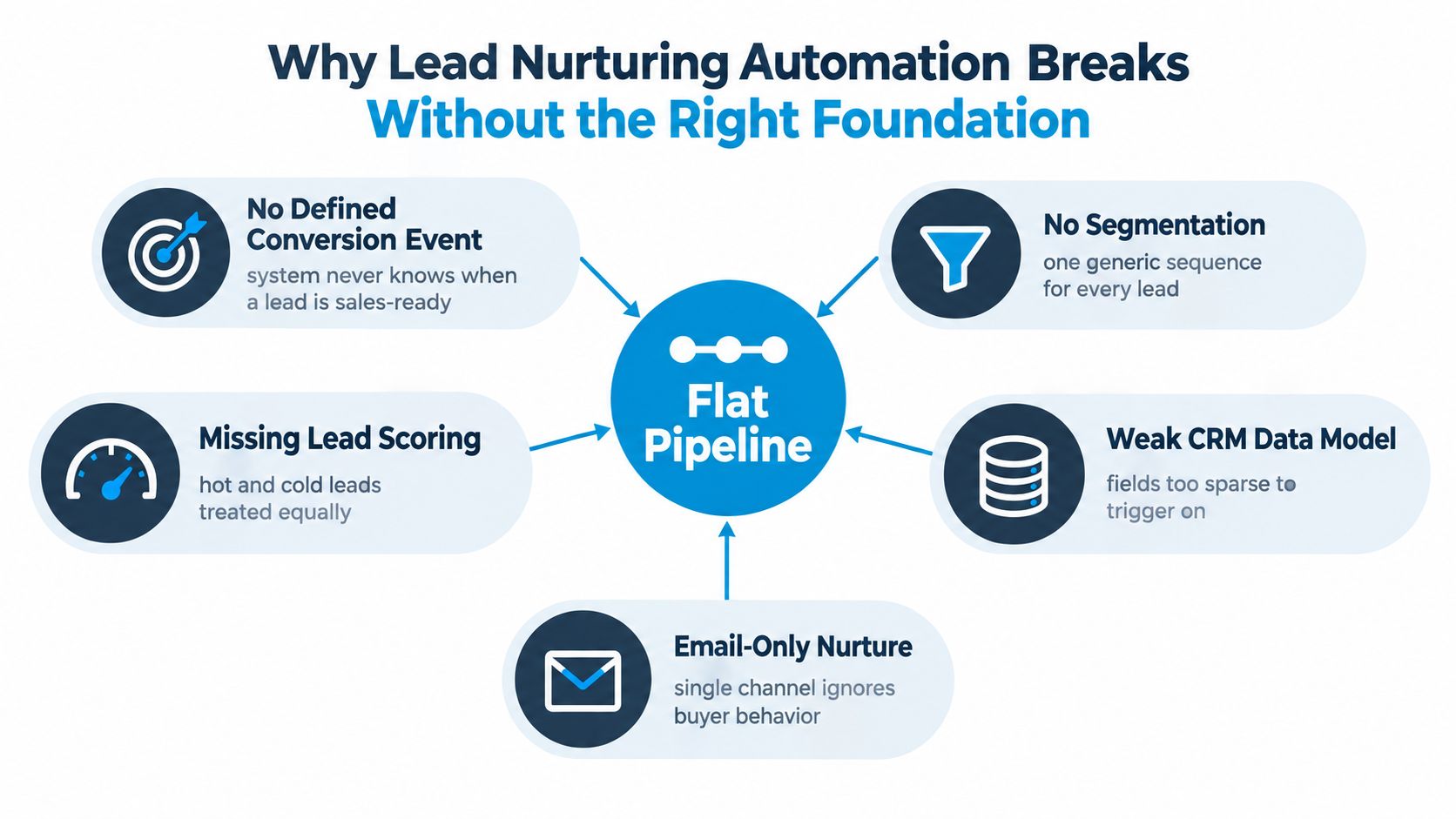
The foundation has to reflect buyer behavior
A homeowner requesting emergency plumbing shouldn't receive the same journey as someone researching a bathroom remodel. A dental patient asking about a routine cleaning needs a different path from someone requesting urgent pain relief. A franchise prospect comparing territories should receive scheduled human contact, not a generic product newsletter.
Teams also need a defined exit state. When a lead books, converts, opts out, becomes disqualified, or requests a human, every active sequence should know what to suppress. Without those states, the system keeps sending messages after the sale, duplicates outreach across departments, and makes the brand look careless.
Practical rule: Build the state model before building the sequence. If the CRM can't tell you what changed, when it changed, and who owns the next action, automation will only distribute confusion faster.
Defining Goals, Segments, and Lead Scoring Rules
A lead requesting emergency HVAC repair should not enter the same nurture path as someone comparing replacement options. Set the revenue event first, then define the CRM state and owner that should follow it. That event might be a booked estimate, scheduled healthcare consult, completed legal intake, or qualified franchise territory discussion.
Segments should combine source and behavior. Source shows why the lead arrived. Behavior shows whether intent is changing.
- Home services: Separate emergency repair from planned replacement, then refine by service area, job type, and timeline.
- Healthcare: Separate insured and self-pay inquiries, then distinguish acute needs from routine or chronic care. Keep messages administrative, and avoid requesting sensitive clinical details through unsecured channels.
- Legal: Route personal injury, family law, and estate inquiries into different intake paths, with practice-specific questions and escalation rules.
- Franchise networks: Segment by territory, service line, investment fit, and readiness for a scheduled development call.
A score should combine explicit information, such as service zip, budget range, and stated timeline, with observed activity, such as an email click, SMS reply, IVR completion, or meaningful call duration. Use the following values as a starting model, then compare scores with booked outcomes and sales feedback. If high-scoring leads fail to progress while lower-scoring leads convert, change the rules.
| Signal | Home Services | Healthcare | Legal | Franchise |
|---|---|---|---|---|
| Valid service area or location match | +20 | +15 | +15 | +20 |
| Clear timeline or appointment intent | +25 | +25 | +20 | +20 |
| Relevant form answer completed | +15 | +15 | +20 | +15 |
| SMS reply or completed callback | +20 | +20 | +20 | +20 |
| Meaningful call interaction | +15 | +15 | +15 | +15 |
| Unqualified location or service mismatch | -25 | -25 | -25 | -25 |
| Do-Not-Contact or missing consent | -100 | -100 | -100 | -100 |
Score totals matter less than the action attached to each change. A lower band can stay in educational nurture. A middle band can receive monitored outreach. A high band should create a human task or live transfer. Phone, SMS, email, and agents, including Recepta.ai, should read the same score and ownership fields rather than running separate cadences.
Keep Do-Not-Contact as a hard suppression. A negative score alone must not permit another message.
For practical guidance on response ownership, compare the setup with these lead follow-up best practices. Every score update should leave a visible next action in the CRM, whether that action is an automated message, a call task, a transfer, or suppression.
Mapping Multi-Channel Workflows with Triggers
A reliable workflow starts with a state change. A form submission, missed call, SMS reply, appointment booking, quote viewed, or consent update should trigger a defined action. Time delays can support the workflow, but they shouldn't be the main intelligence.
Use a matrix like this before configuring automation:
| CRM event | Immediate action | If no response | Suppression or hand-off |
|---|---|---|---|
| New lead submitted | SMS and IVR callback request within 60 seconds | Manual call task after 30 minutes | Stop when a human connects or the lead opts out |
| SMS reply received | Pause email cadence and route to an agent | Create follow-up task if unresolved | Preserve the conversation owner |
| Missed call | SMS acknowledging the call and callback option | Call task within the active service window | Suppress duplicate dial attempts |
| Appointment booked | Confirmation and calendar update | Reminder sequence | Suppress all other nurture |
| Quote or consult stalled | Helpful next-step message | Re-score after engagement | Escalate when intent rises |
The sample cadence should be simple enough for the team to operate:
- Touch one: Respond within five minutes, ideally immediately after capture.
- Touch two: Follow up at 24 hours with one useful answer and one clear action.
- Touch three: Follow up at 72 hours, then branch based on engagement.
- Branch: Move replies, clicks, call outcomes, and booking events into different paths.
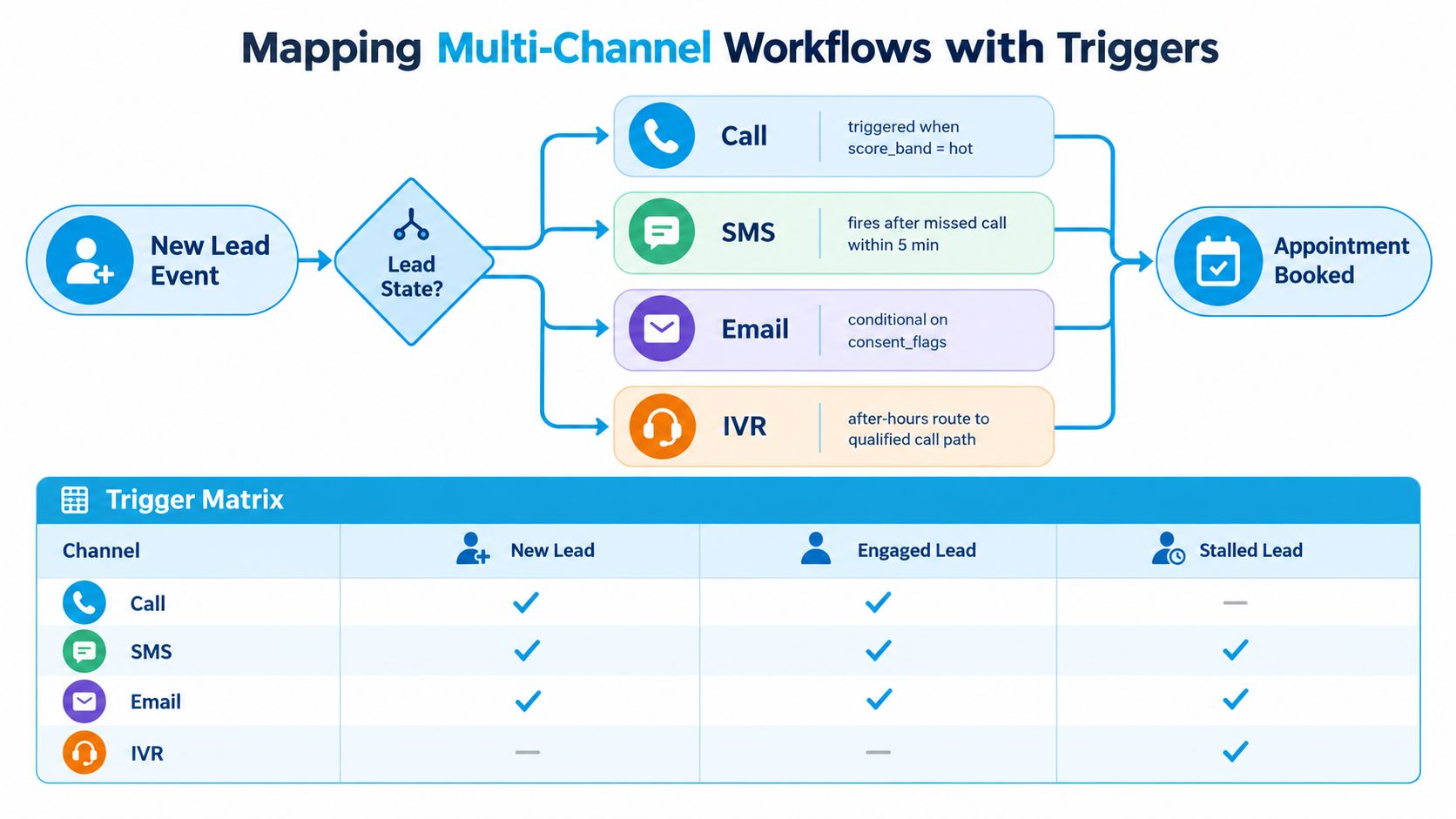
Choose channels by context, not habit
Home services and healthcare usually benefit from phone and SMS because the lead often needs scheduling, clarification, or reassurance. Legal intake may need email for document requests and a scheduled call for sensitive details. Franchise development tends to rely on email for structured information and scheduled calls for territory and qualification discussions.
Consent determines eligibility. The CRM should store channel permissions before automation selects SMS or email. A reply should pause competing channels, and a booked appointment should suppress promotional nurture while allowing only the relevant reminder path.
The same logic applies to dormant leads. If someone goes dark for more than 14 days, move the record into a lower-frequency re-engagement state rather than continuing the original cadence. If the lead later returns through a form, call, or meaningful page action, re-enter the appropriate segment with a fresh timestamp and score.
For the data movement behind these triggers, see this guide to real-time data sync.
Message and Call Script Templates by Vertical and Stage
A template should give an agent a reliable starting point without flattening every lead into the same scenario. Keep SMS under 160 characters, use one clear call to action, and write the next action to the CRM as soon as the lead replies. The message should reflect the lead's vertical, lifecycle stage, and current CRM state, rather than send the same copy to every contact.
Multi-Vertical Nurturing Script Comparison
| Vertical | Stage | SMS | Call Opener | Email Subject |
|---|---|---|---|---|
| HVAC or plumbing | Early | Hi {{first}}, we received your request. Is this an urgent repair or a planned project? Reply URGENT or PLAN. | Hi {{first}}, this is {{agent}} calling about your service request. I want to understand the issue and find the right next step. | We received your service request |
| HVAC or plumbing | Mid | We can help narrow down the next step. Would you prefer a quick callback or an appointment link? | I'm following up so we can confirm the job type, location, and timing before scheduling. | Choosing the right repair or replacement path |
| HVAC or plumbing | Late | Are you still looking for help with {{job_type}}? Reply CALL and we'll arrange a callback. | I'm checking whether the project is still active or whether you've already resolved it. | Should we keep your request open? |
| Dental or healthcare | Early | We received your appointment request. What type of visit should we help schedule? Please don't send clinical details by text. | I'm calling to help with scheduling and basic administrative questions. I won't ask you to share sensitive medical details here. | Help with your appointment request |
| Dental or healthcare | Mid | We can help find a suitable visit time. Reply CALL for assistance or use this secure booking link: {{link}} | I'm following up on your scheduling request and can help identify the appropriate appointment type. | Select your preferred appointment time |
| Personal injury or legal | Early | We received your inquiry. A member of the intake team can help with next steps. Please use the secure form for details. | I'm calling to complete the initial administrative intake and explain what information the team needs. | Next steps for your inquiry |
| Personal injury or legal | Mid | We're missing part of your intake. Can you complete the secure form here? {{link}} | I'm following up on the intake form so the appropriate team member can review a complete submission. | Complete your secure intake |
| Franchise | Early | Thanks for your franchise inquiry. Which territory and service line are you considering? | I'm calling to understand the territory and service line you're evaluating, then route you to the right development contact. | Your franchise territory questions |
| Franchise | Late | Would a scheduled territory call help? Reply CALL and we'll coordinate a time. | I'm following up to see whether you'd like to continue the territory discussion or pause the inquiry. | Schedule your territory discussion |
The strongest reply rates in testing came from stage-specific variants with one simple response path. A message that asks for urgency, a preferred time, or a missing intake step gives the lead an easy action and gives the CRM a usable event. Broad copy such as “Just checking in” creates little signal for scoring or routing.
Teams can adapt these scripts for home services to fit job type, service area, and urgency. Keep the variable set small enough for agents and automation to use consistently. Before release, read each message aloud and test unexpected replies, including a lead asking about price, requesting a human, or saying the problem has already been fixed.
The hand-off language matters
An AI agent or human caller should identify the reason for contact, offer one next step, and avoid unnecessary detail in a voicemail:
Hi {{first}}, this is {{agent}} calling about your request for {{service}}. Please call us back at {{number}}, or use the link in our message to choose a time. We'll be glad to help.
The same structure works across channels, but the permitted content changes by vertical. Healthcare messages should remain administrative and direct protected information to an approved secure channel. Legal messages should focus on completing intake, without promising representation or an outcome. Home-service messages should make urgency easy to express. Franchise messages should name the territory discussion or route the inquiry to the appropriate development contact.
Phone, SMS, and email should share the same conversation state. If a lead replies to an SMS, the workflow should pause duplicate outreach, record the reply category, and give the next agent or AI agent the relevant context. If the lead requests a call, create the task and preserve the requested time. If an appointment is booked, stop promotional nurture and keep only the appropriate reminders.
TCPA quiet hours, consent records, and opt-out handling belong in the workflow, not in a policy document that nobody checks. A stop request should suppress the relevant channel immediately. Escalate to a live agent when the lead asks for a person, raises a sensitive question, disputes information, or reaches the high-intent score band. Teams refining spoken prompts can use this call-in script guidance. Recepta.ai can support the conversational hand-off when the CRM passes the correct lead context, consent state, and routing instruction.
CRM Integration and Recepta.ai Wiring
A lead can receive the right message and still be mishandled if the CRM does not show who owns the conversation, what happened, and what should happen next. Set up these fields before connecting automation:
lifecycle_stage, the lead's current journey positionlead_source_detail, the campaign, referral, location, or channel that produced the contactlast_action_at, the latest meaningful engagement timestampscore_band, the routing tier used by automationconsent_flags, channel permissions and suppression statusappointment_state, such as requested, booked, attended, or no-show
CRM hygiene determines whether orchestration works. Deduplicate contacts, standardize job titles and lead-source values, require key intake fields, and check consent before SMS or email sends. These controls prevent duplicate outreach and give operators reports they can trust.
Route by intent and ownership
Separate what the lead states from what the lead does. Explicit intent includes service type, location, timeline, coverage, territory, or a requested appointment. Implicit intent includes recency, page depth, email interaction, call outcome, and completion of an IVR path.
A practical model uses score bands of 0 to 30, 30 to 60, and 60 to 100. The lower band can receive education or re-engagement, the middle band monitored follow-up, and the highest band a human task or live escalation. The CRM must recalculate the band after each meaningful event, not only after the original form submission.
Recepta.ai can connect the CRM to phone and other communication workflows. A form-submission webhook can start an intent and capacity conversation, while outcome events such as booked, qualified, voicemail_left, or dnc write back to the lead record. Those events can update appointments, suppress outreach, create sales tasks, and support reporting. Teams reviewing what CRM integration involves should define ownership rules before choosing the connection method.
The operating rule is simple: one lead, one active owner, one next action. Mark a record as being worked when an AI call starts. If it fails, create the next permitted action. If a live agent takes over, lock the AI sequence. After-hours coverage can route eligible leads to a callback or qualified call path, while a shared lock prevents the SDR queue from dialing the same contact.
Handoff rule: If the CRM cannot enforce one owner and one next action, pause automation until that control exists.
Measuring Performance and Running Tests That Improve It
A nurture program can produce healthy open rates while qualified leads wait too long for a call. Measure the operating path from CRM state change to revenue, then break results down by vertical, source, and channel.
Start with five measures:
- Speed to lead: Track the median time from capture to the first valid attempt, with a target under five minutes for new inbound leads.
- Contact rate: Count a person answering, replying, or completing a meaningful interaction.
- Qualified-lead rate: Keep qualification separate from contact. A connected call does not automatically create a sales-ready hand-off.
- Cost per qualified lead: Include media, software, agent time, and manual recovery work.
- Nurture-to-opportunity conversion: Compare sources, segments, channels, and lifecycle stages instead of blending every record.
A benchmark report from Venture Harbour reports median MQL-to-Opportunity rates of 18% to 22% for mature B2B SaaS nurture programs, compared with 13% across all B2B SaaS programs, and a 24.1% open rate by the fifth send. Treat these figures as context, not targets for a local dental office, plumbing company, or franchise location. The useful lesson is operational: engagement belongs beside opportunity creation, booked appointments, and revenue outcomes.
Build the reporting around decisions rather than a single scorecard. A funnel view should show captured, contacted, qualified, booked, attended, and won leads by vertical. A cohort view should compare campaign, referral, location, and channel quality. A channel view should separate phone, SMS, email, IVR, human-agent, and combined paths, including the CRM event that caused the next action.
Testing needs the same discipline. Change one variable per cycle, such as subject line, send time, channel order, or call opener. Use a 14-day minimum test window, then check whether the result holds across relevant segments. A higher open rate means little if it lowers replies, qualified calls, or booked work.
Pause a workflow after repeated complaints, invalid contacts, or no qualified movement over sufficient operational exposure. Create a branch when behavior signals a different need, such as an SMS reply, quote view, or completed intake. Review win, loss, and disqualification reasons monthly, then update scoring, suppression rules, routing, and agent feedback loops. Each test should leave the CRM with a clearer next action, not merely a more attractive dashboard.
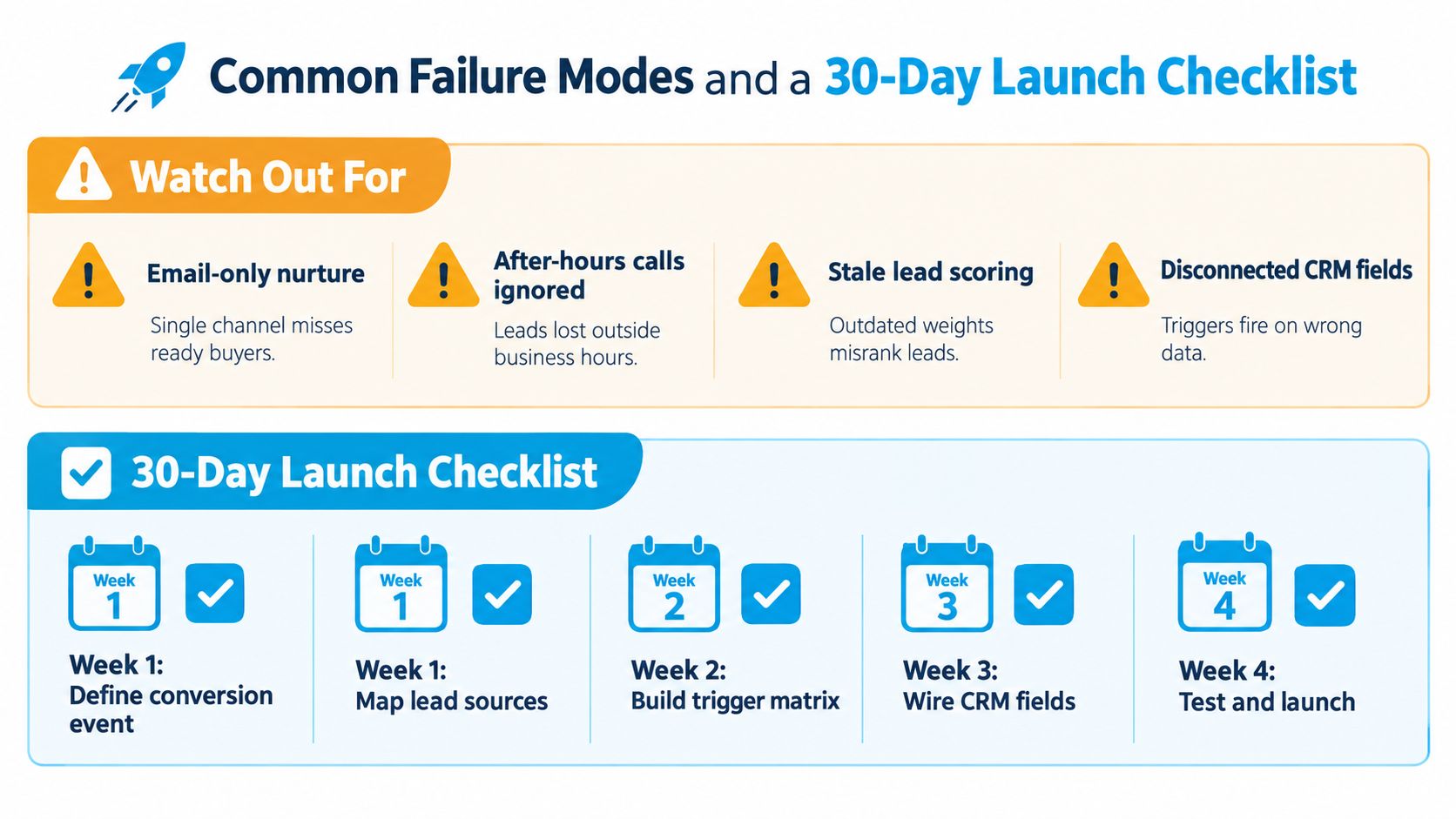
Common Failure Modes and a 30-Day Launch Checklist
The same breakdowns appear across verticals, although the symptoms differ. Email-only nurture misses a ready home-services buyer, ignores the healthcare caller who wants a person, and gives a legal prospect no clear intake path. Ignoring after-hours calls creates a gap exactly when urgent demand arrives. Stale scoring keeps an old franchise inquiry ahead of a new territory request. Disconnected CRM fields trigger duplicate outreach and send the wrong message.
| Failure mode | Symptom | Root cause | Corrective action |
|---|---|---|---|
| Email-only nurture | Replies arrive late or not at all | Channel choice follows software convenience | Add conditional phone, SMS, and IVR paths |
| After-hours calls ignored | New requests wait until staff return | No callback ownership or escalation rule | Create an after-hours route with a next-action timestamp |
| Stale lead scoring | Sales says “hot” leads aren't ready | Weights never reflect outcomes | Review win, loss, and disqualification reasons |
| Disconnected CRM fields | Duplicate or contradictory messages | Systems don't share state | Standardize fields, webhook events, and suppression logic |
| Weak opt-out handling | Complaints or unauthorized outreach | Consent isn't part of routing | Make consent a hard gate for every channel |
A 30-day launch plan
Week 1, foundation
- Marketing operations owner: Define the conversion event and document acceptance criteria.
- Sales owner: Map lead sources and lifecycle stages.
- CRM administrator: Deduplicate records, standardize fields, and validate consent data.
- Deliverable: Approved segment map and clean test dataset.
Week 2, workflow design
- Revenue operations owner: Build the trigger matrix for new, engaged, stalled, booked, and opted-out states.
- Service or intake leaders: Draft scripts for home services, healthcare, legal, and franchise inquiries.
- Compliance owner: Approve quiet-hour, consent, and escalation rules.
- Acceptance criteria: Every state has one owner, one next action, and one exit condition.
Week 3, integration and QA
- Integration owner: Connect CRM webhooks, contact updates, appointment events, and outcome logging.
- Recepta.ai administrator: Test qualification questions, after-hours handling, live escalation, and duplicate-dial prevention.
- QA lead: Run test submissions, replies, bookings, opt-outs, and failed calls.
- Acceptance criteria: Correct field updates, suppression, routing, and reporting for every test path.
Week 4, launch and optimization
- Marketing operations owner: Release the workflow to a controlled segment.
- Sales manager: Monitor response ownership and qualified hand-offs.
- Analytics owner: Publish the first funnel, source, and channel views.
- Acceptance criteria: No unowned hot leads, no prohibited sends, and a scheduled first optimization review.
Keep active nurturing to about 1 to 2 touches per week, a practical cadence described in lead nurturing automation guidance. Review workflows quarterly, and adopt a standing rule that any lead left uncontacted for more than seven days is automatically escalated back into a suitable nurture sequence.
Recepta.ai can support this operating model by handling inbound and outbound calls, SMS, email, voicemail, appointment scheduling, lead capture, and human escalation while writing outcomes back to your CRM. Map one high-value workflow, such as after-hours service requests or unsold quotes, and visit Recepta.ai to see how it can fit into your lead nurturing automation stack.