Real Time Data Sync: The Ultimate Explainer for 2026

A customer calls your HVAC office at 4:10 p.m. because their system just failed. Your receptionist sees a 5:00 p.m. opening and books it. At 4:11, your field technician updates their mobile app after accepting another urgent job. Nobody at the front desk sees the change in time. Now one customer is double-booked, one technician is overcommitted, and your office has to make an apologetic call.
That kind of problem doesn't feel like a “data architecture” issue when you're living through it. It feels like lost trust, rushed staff, and a day that gets harder by the minute.
This is where real-time data sync matters. It's the quiet layer that keeps calendars, CRMs, booking tools, intake forms, and communication systems aligned as changes happen. When it works, teams stop guessing which system has the latest truth. When it fails, businesses burn time cleaning up preventable mistakes.
The Hidden Cost of Outdated Information
Service businesses run on moving parts. Schedules change. Clients reschedule. Technicians finish early. A patient confirms by text. A legal client uploads a file after hours. None of those actions are unusual. The trouble starts when one system knows and another doesn't.
An HVAC office might book from a shared calendar, while technicians update jobs from a field app. A dental practice may use one system for reminders and another for scheduling. A law firm might receive client documents through a portal, then manually copy details into case software. In each case, the delay between systems creates avoidable friction.
What outdated information looks like in real life
It usually shows up as ordinary operational mess:
- Double booking: One team member sees a slot that another system has already filled.
- Missed follow-up: A lead enters the CRM, but nobody gets notified quickly enough to call back.
- Conflicting records: A customer changes their phone number in one tool, while another tool keeps the old one.
- Manual re-entry: Staff copy the same details between apps, increasing the chance of mistakes.
Practical rule: If your team regularly asks, “Which system is correct?”, you likely have a sync problem, not just a training problem.
The hidden cost isn't only the bad customer moment. It's the accumulation of small failures. Receptionists spend time reconciling records. Managers chase status updates. Staff build workarounds like spreadsheets, sticky notes, or side-channel messages.
For home services, legal, and healthcare teams, stale data creates a different kind of risk too. People make decisions based on what they can see right now. If that view is old, the decision is wrong even if the employee did everything “correctly.”
Why immediacy changes the outcome
With real-time sync, the technician's update doesn't sit around waiting for the next scheduled refresh. The booking system changes as the event happens. The receptionist sees the new reality before promising the slot. The same principle applies when a patient confirms an appointment or when a client uploads a document that should trigger the next step.
That doesn't remove every operational issue. But it does remove a big category of preventable errors caused by systems drifting apart.
What Is Real Time Data Sync
The simplest way to understand real-time data sync is to compare it with everyday communication.
Batch processing is like snail mail. You collect a pile of information, send it later, and the recipient gets it in a lump.
Near-real-time is closer to package delivery. Updates move more often, but still on intervals.
Real-time is like a phone call. One side speaks, the other hears it right away.
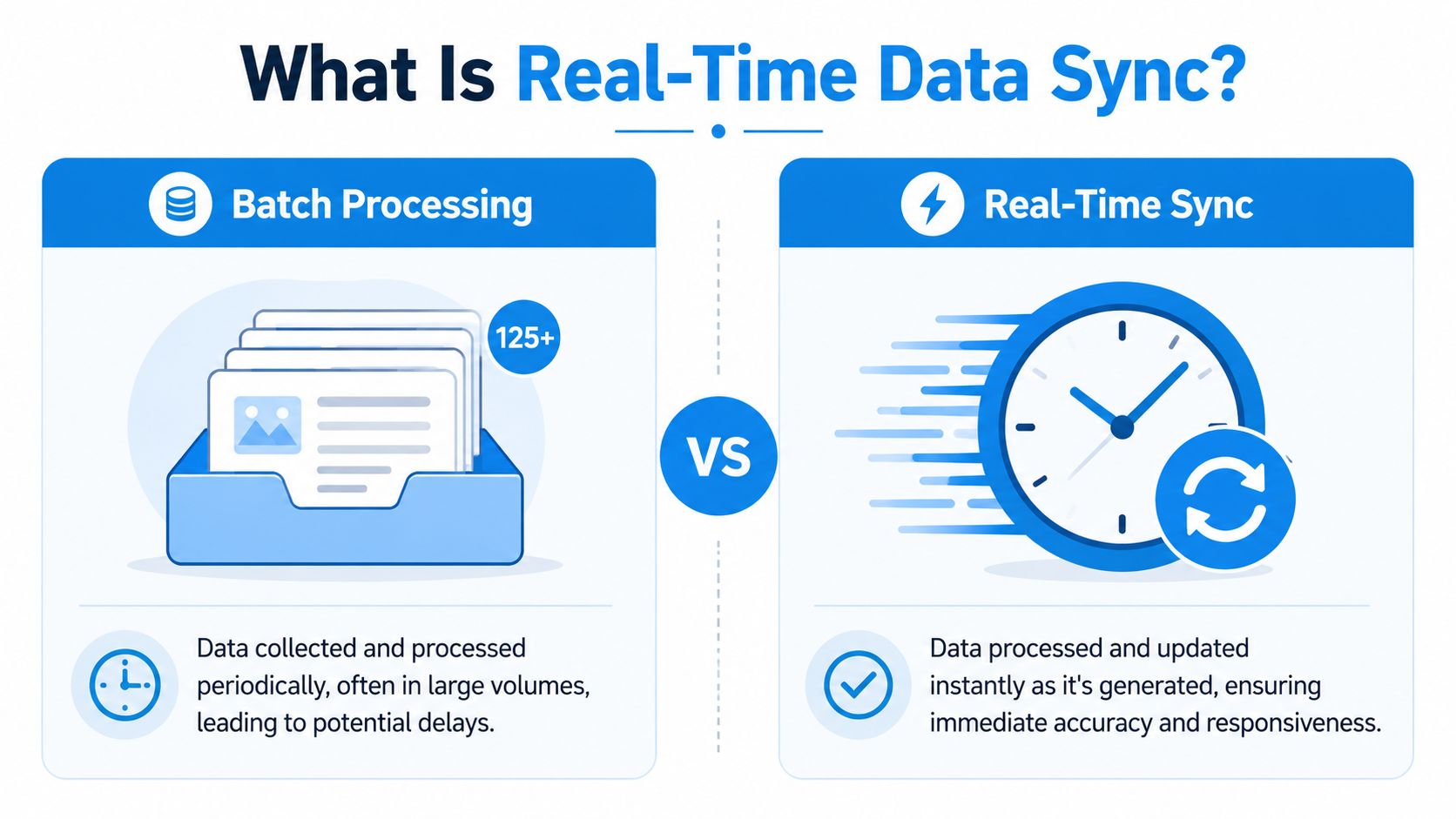
That “right away” part has a technical meaning. Real-time data sync is defined by immediacy: changes are propagated from source to target in milliseconds or seconds, and low-latency implementations often target response times of under 100 ms using APIs such as WebSockets to push updates as they happen (StreamKap's guide to real-time database synchronization).
Data sync methods compared
| Sync Method | Latency | Use Case Example |
|---|---|---|
| Batch processing | Delayed until the next scheduled run | Overnight reporting, daily exports, end-of-day reconciliation |
| Near-real-time | Short delay, usually interval-based | Syncing leads every few minutes between a form tool and CRM |
| Real-time sync | Milliseconds or seconds | Live booking updates, instant inventory changes, workflow triggers |
A useful way to think about it is this: the shorter the delay, the faster your business can react. If your dispatcher needs the latest technician availability, waiting for the next sync cycle is often too slow. If your accounting team only needs end-of-day totals, batch may be perfectly fine.
For teams trying to connect operational tools, this often overlaps with broader automation work. If you want a plain-English primer on that bigger picture, Recepta has a helpful explainer on business process automation.
Later in the stack, communication channels matter too. If your workflows depend on outbound messages, notifications, or AI-driven email actions, it helps to understand what makes a dependable delivery layer. This overview of the best email API for AI agents is useful context.
A quick visual helps before we go deeper:
Why readers often get confused here
People hear “real time” and assume it means “fast internet” or “systems integrated.” It doesn't. Two tools can be connected and still sync on a schedule. They can even sync every few minutes and still fail at the exact moment your team needs accuracy.
Real-time sync isn't about making data move eventually. It's about making the newest change available while it's still operationally useful.
That distinction is what makes the difference between a system that supports live decision-making and one that only updates after the moment has passed.
The Four Main Real Time Sync Architectures
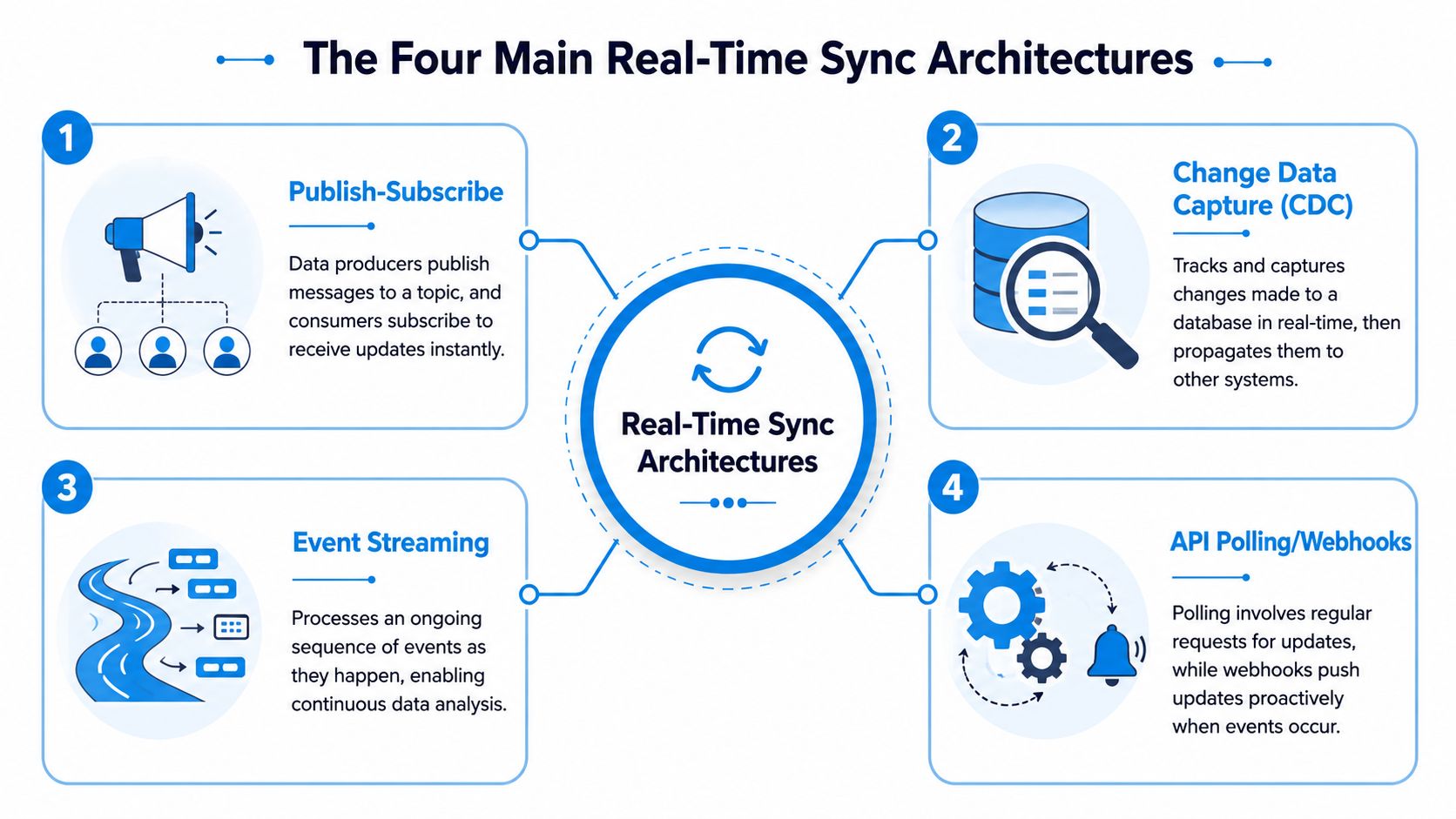
Under the hood, real-time sync can be built in a few common ways. You don't need to become an engineer to make good decisions about them. You just need a working mental model of what each pattern is good at.
Webhooks as the doorbell
A webhook is the digital version of a doorbell. One system “rings” another when something happens.
If a booking platform creates a new appointment, it can send that event immediately to your CRM or messaging system. The receiving system doesn't have to keep asking, “Anything new yet?” It gets notified as soon as the event occurs.
This makes webhooks a practical fit for many small and midsize businesses. They're often easier to reason about than heavier streaming setups. If you want a simple technical walkthrough, this guide to webhooks from Static Forms is a good companion.
Change Data Capture as the security camera
Change Data Capture, usually shortened to CDC, watches for changes in a database and sends only what changed. Imagine it as a security camera that records movement instead of filming an empty hallway all day.
That shift matters because modern real-time synchronization has moved toward CDC and streaming pipelines, with tools such as Apache Kafka and Debezium widely used to build them. The reason is efficiency: these systems move only changed data instead of full datasets, which reduces lag and supports operational use cases that need fresher information (Skyvia's explanation of data synchronization).
For business leaders, the takeaway is simple. If your systems hold lots of records and only a few change at any moment, CDC is often smarter than repeatedly copying everything.
Message queues as the post office conveyor belt
A message queue works like a conveyor belt in a sorting center. One system drops a package onto the belt. Another system picks it up and processes it. If the receiving side is busy, the package waits its turn instead of disappearing.
Queues help when reliability matters more than elegance. Let's say a legal intake form creates a new client matter, triggers a conflict check, and sends a welcome email. A queue can help those tasks happen in order, even if one downstream system slows down.
This pattern is especially useful when businesses want controlled, dependable processing rather than direct point-to-point connections everywhere.
Streaming platforms as the multi-lane superhighway
A streaming platform is built for lots of events moving continuously to many destinations. Think of it as a multi-lane highway rather than a single road.
Platforms like Kafka usually enter the picture. One stream of changes can feed analytics, search indexes, notifications, operational dashboards, and more. The system is designed for scale and for multiple consumers that all need the same event data.
Which architecture fits which business
Not every company needs the superhighway.
| Architecture | Best fit | Plain-language tradeoff |
|---|---|---|
| Webhooks | Simple app-to-app notifications | Easy to start, but can get messy across many systems |
| CDC | Database-driven operational sync | Efficient and accurate, but more technical |
| Message queues | Reliable task handoff | Great for resilience, less ideal for broad fan-out |
| Streaming platforms | High-volume, multi-system event flows | Powerful, but heavier to operate |
If you're trying to connect front-office tools with customer records, it also helps to understand the CRM side of the picture. Recepta's article on CRM integration lays that out clearly.
Choose the lightest architecture that solves the actual problem. A webhook can be enough for one triggered workflow. A streaming platform makes sense when many systems need the same events continuously.
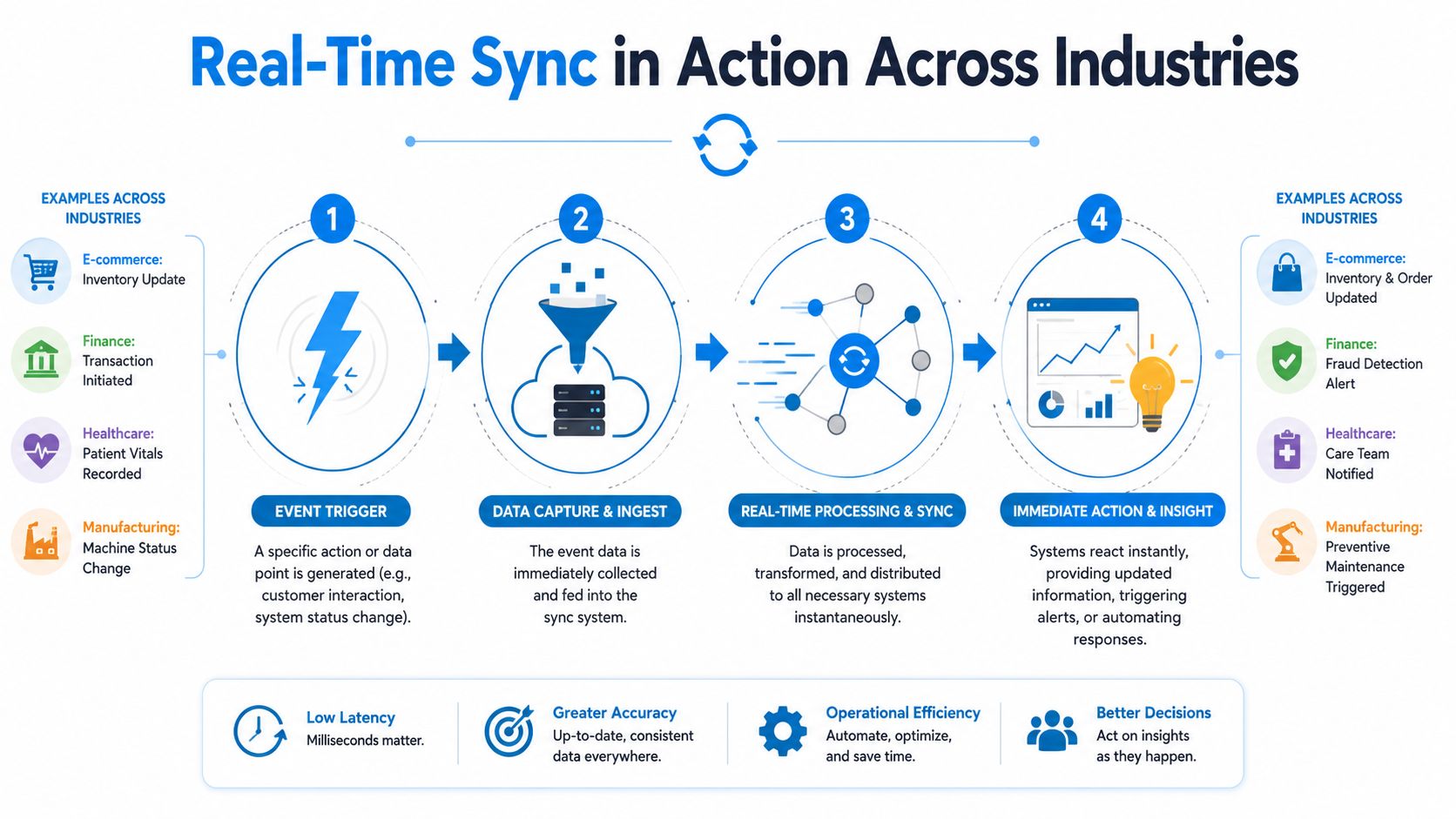
Real Time Sync in Action Across Industries
The value of real-time sync becomes obvious when you watch it inside a normal workday.
Home services
A customer visits a plumbing company's website at night and books a leak inspection. Without sync, the booking request might sit in one system until the office opens, then someone manually copies it into the dispatch calendar and CRM.
With real-time sync, the booking event can create the appointment, update the customer record, notify the right team member, and prepare follow-up communication right away. If the customer later calls to reschedule, the same change can update the field calendar without staff retyping anything.
For multi-channel service teams, this works even better when phone, text, and booking systems stay aligned. That's why omnichannel matters operationally, not just from a customer experience angle. Recepta's overview of omnichannel customer service connects those dots well.
Healthcare and wellness
A patient confirms an appointment by SMS. In a disconnected setup, the messaging tool logs the response, but the scheduling system doesn't reflect it until later. Staff may call the patient unnecessarily or fail to release a canceled slot quickly enough.
In a real-time flow, that patient response can immediately update the scheduling record and trigger the next step. If the patient cancels, the opening becomes visible faster. If they confirm, the team works from a current schedule instead of a stale one.
Healthcare teams especially benefit when intake, reminders, and scheduling stop behaving like separate islands.
Legal and professional services
A client uploads a signed agreement to a portal. Traditionally, someone checks the portal, downloads the document, emails a paralegal, and updates the matter manually.
With real-time sync, the upload itself becomes the trigger. The case record updates, the assigned team gets alerted, and the next task appears in the workflow system. That keeps work moving even after hours, which is often when clients finally complete forms or send documents.
What accessible implementation looks like
Many service businesses assume this level of sync requires custom engineering. Sometimes it does. Often it doesn't.
Tools now sit between business systems and handle common integration patterns for you. One example is Recepta.ai, which connects conversations with calendars, CRMs, and business apps so actions like lead capture, appointment scheduling, and follow-ups can sync into the tools a team already uses. For a non-technical operator, that's the important shift: the business gets the workflow outcome without having to build the pipeline from scratch.
The practical gain
Across these industries, the pattern is the same:
- One action happens once
- Multiple systems update without manual re-entry
- Staff act on current information
- Customers get faster, more consistent service
That's the core business case. Less clerical cleanup. Fewer stale records. Faster response when timing matters.
Best Practices for Implementation and Monitoring
Real-time sync can make a business feel dramatically smoother. It can also create fragile complexity if nobody designs for failure. Good implementations aren't just fast. They're observable, resilient, and boring in the best possible way.
Start with the business event, not the tool
The first mistake teams make is shopping for technology before naming the event that matters.
Ask questions like these:
- What must update immediately? A booked job, a canceled visit, a signed document, a payment status?
- Who depends on that change? Dispatchers, clinicians, intake staff, clients?
- What happens if the update is late? Mild inconvenience, missed revenue, compliance risk, broken customer promise?
If the answer is “nothing important breaks for a while,” then you may not need real time. A simpler sync model can be cheaper and easier to operate.
Design for reliability before speed
For dependable operational sync, expert guidance points to event-driven architectures and CDC, with APIs built for bidirectional delivery and latency ideally under 100 ms, plus at-least-once delivery with retries and failover so updates keep propagating when consumers fail (Essential Designs on real-time sync best practices).
That sounds technical, but the business meaning is straightforward:
- Retries mean a missed update gets another chance.
- Failover means another path or component can keep things running.
- Bidirectional delivery matters when changes can begin in more than one system.
If an update matters enough to automate, it matters enough to monitor when it fails.
Monitor the few signals that actually matter
Dashboards often drown teams in noise. For sync systems, a smaller set of signals tends to be more useful.
| Metric | Why it matters | Business meaning |
|---|---|---|
| Latency | Measures how long updates take to arrive | Staff may act on stale data if it rises |
| Error rate | Shows failed deliveries or transformations | Records may silently diverge |
| Endpoint uptime | Confirms connected systems are available | A healthy pipeline still fails if an app is down |
| Queue depth or backlog | Shows whether events are piling up | Delays may be growing before users notice |
A dispatch manager doesn't need deep protocol detail. They do need an alert if booking updates are backing up or if field status changes aren't arriving.
Have a conflict plan
The hard question isn't “Can these systems sync?” It's “What happens when two systems disagree?”
A practical conflict plan should define:
- Source of truth: Which system wins for each field.
- Allowed write paths: Which apps can edit customer data, schedule data, or status data.
- Human review rules: Which conflicts should create a task rather than an automatic overwrite.
For example, a law firm may decide the case management system is authoritative for matter status, while the intake platform is authoritative only for new lead details. That one decision prevents a lot of accidental overwrites.
Build an operating rhythm
Strong teams don't set up sync once and forget it. They review logs, watch drift, test retries, and check how downstream tools behave after schema or workflow changes.
A lightweight monthly review can cover:
- Recent failed events
- New fields added to source systems
- Workflows with recurring manual fixes
- Changes in business priority that alter freshness requirements
Done well, monitoring becomes less about firefighting and more about trust. Staff stop wondering whether the systems are in sync because they know someone is watching the health of the flow.
Common Pitfalls and How to Avoid Them
The biggest misconception about real-time sync is that faster is always better. It isn't. Some workflows need instant propagation. Others just need dependable updates on a sensible schedule.
Over-engineering the problem
A lot of teams build for sub-second freshness when the business only needs “updated soon.” That creates extra moving parts, more failure handling, and more maintenance than the workflow justifies.
The safer move is to classify workflows by urgency:
- Need it now: Dispatch changes, live availability, active customer conversations
- Need it soon: Lead routing, reporting dashboards, follow-up task creation
- Need it later: Daily summaries, archive copies, reconciliations
That forces discipline. If a workflow doesn't benefit from immediate action, don't give it real-time complexity.
Ignoring governance until the system sprawls
At scale, the hardest question often becomes what fails first: consistency, governance, or latency. One source on real-time synchronization notes that 77% of organizations report using data integration tools, while only 12% report full integration, which points to a large gap between adoption and operational success (Serverion on practices for real-time data synchronization).
In plain terms, many companies connect systems before deciding who owns the data, how conflicts get resolved, or how to track drift across tools.
A practical response is to document these basics early:
- Field ownership: Which system controls each critical field
- Change visibility: Where staff can see failed or delayed updates
- Data lineage: How a record moved from one app to another
Treating sync issues as isolated app bugs
Sometimes the visible problem shows up in email, calendars, or customer notifications, but the root cause is a broken sync step between systems. That's why it helps to get familiar with adjacent troubleshooting patterns. This guide to debugging common email issues is useful because it shows how small sync failures can surface as communication problems.
Security belongs in this conversation too. If you're moving customer, patient, or client data between systems, access control and transport protections can't be an afterthought. Recepta's piece on data security best practices is a solid operational checklist.
A sync design isn't complete when the data moves. It's complete when the right data moves, to the right place, with the right controls, and someone can prove it happened.
The Future Is Instantaneous
Real-time data sync isn't reserved for giant engineering teams anymore. It's part of how modern businesses keep promises. A home services company can avoid double-booking. A clinic can react faster to schedule changes. A law firm can move a case forward the moment a client submits what was needed.
The primary advantage isn't technical sophistication for its own sake. It's operational clarity. Staff stop working around stale information and start acting on current information.
That matters more as businesses add more tools, more channels, and more automation. The companies that stay responsive won't be the ones with the most software. They'll be the ones whose systems stay aligned closely enough for people to trust them.
If you want that kind of alignment without stitching everything together manually, Recepta.ai is worth a look. It connects conversations, scheduling, follow-ups, and business systems so customer interactions can flow into the tools your team already uses, with less manual entry and fewer gaps between what happened and what your staff can see.