Voicemail to e mail: The Modern Guide to Automating Business Communications

Let’s be honest, that blinking red light on your office phone isn't a friendly reminder—it's a backlog of missed opportunities. If you're still dialing into a clunky voicemail system, you're letting valuable leads and urgent client messages gather dust.
Switching to a voicemail-to-email setup isn't just a minor tech upgrade. It’s a fundamental shift that pulls customer messages out of a forgotten silo and pushes them directly into your team's workflow. It turns a reactive chore into a proactive way to capture every single lead.
Why Your Business Needs Voicemail to Email Today

The old way of checking voicemail is a real productivity killer. It forces you to stop what you're doing, dial a number, punch in a PIN, and then listen to every message in sequential order. It's slow, inefficient, and creates a costly delay between a client reaching out and your team actually doing something about it.
Sending voicemail audio directly to your email flips this entire process on its head. It puts critical information right where your team already spends their day: their inbox. The impact is immediate and massive.
Accelerate Your Response Times
When a potential customer leaves a message, the clock starts ticking. They aren't just calling you; they're probably calling your competitors at the same time. Getting that voicemail as an audio file in an email means you can listen and respond instantly, from anywhere, on any device.
A study found that a staggering 78% of customers buy from the company that responds to them first. Delays caused by dial-in voicemail systems don't just slow you down—they directly cost you business.
Make Every Message Actionable
An email is so much more than a notification; it’s a data packet you can act on. A modern voicemail-to-email system delivers the audio file along with searchable transcriptions, caller ID info, and a precise timestamp.
- Find Anything, Instantly: Need to find a client's message from last week? Just search your inbox for "Johnson quote" or "invoice 4512" instead of listening to 30 old voicemails.
- Delegate with a Click: A message comes in about a billing question. Instead of writing down notes, you just forward the email to your accounting department with a quick note: "Can you handle this?"
- Keep a Permanent Record: Emails create an organized, time-stamped archive of client communications that you can always refer back to, which is invaluable for resolving disputes or reviewing project details.
Turn Missed Calls into Wins
Imagine an after-hours call comes into your plumbing company. A frantic homeowner has a burst pipe. Instead of that message sitting unheard in a general voicemail box until morning, it’s instantly converted into an email and routed to the on-call technician's smartphone.
The tech listens, calls the client back within minutes, and gets the situation under control. That's not just good service—it's a business-saving action. The client is relieved, a potential disaster is averted, and you’ve just earned a five-star review.
This kind of responsiveness is simply impossible with a traditional voicemail setup, but it becomes the standard when you have an integrated system.
This table breaks down just how different the two approaches really are.
Comparing Voicemail Management Methods
The difference is clear. One method is a bottleneck, while the other is a catalyst for faster, smarter communication. Ready to see how this works in practice? You can learn more about the powerful capabilities of an AI phone answering service and how it can completely change your customer communication game.
Activating Voicemail to Email on Your Current Systems

Good news. You probably don’t need to invest in a brand-new system to start getting voicemails in your inbox. The reality is that many businesses already have the tools to enable voicemail to e mail—it's often just a matter of knowing where to look and what to click.
Activating this feature can take just a few minutes, yet it unlocks a far more responsive and organized way to handle missed calls. This is true whether you're using a personal mobile device for work or a sophisticated office phone network. The key is simply understanding the specific steps for your particular setup.
Setting Up on Mobile Carriers
For tons of small business owners and solopreneurs, a personal smartphone doubles as the business line. Major carriers like Verizon and AT&T have features that pave the way for a simple voicemail-to-email workflow. The most common tool for this is visual voicemail.
Visual voicemail is a game-changer. It presents your messages in a neat list, often with transcriptions, right inside your phone's dialer app. This is your first step. From there, you can typically share the audio file of a specific voicemail directly to your email with a few taps.
- Practical Example: A freelance designer using an iPhone on AT&T gets a voicemail from a hot new lead. She opens her phone app, taps the "Voicemail" tab, and sees the message transcribed. Instead of just calling back, she hits the share icon, selects her email app, and zips the audio file over to her business partner with a quick note: "Get this lead into our project pipeline ASAP."
This manual approach works great for occasional messages. But if you’re dealing with a higher call volume, you’ll definitely want a more automated solution.
Configuring VoIP Phone Systems
This is where true automation kicks in. Modern Voice over IP (VoIP) services like RingCentral, Nextiva, or Ooma are built from the ground up with business workflows in mind. Activating voicemail-to-email is usually a standard feature, you just have to find it in the admin settings. The goal is to set it and forget it.
Typically, you can assign one or more email addresses to get notifications automatically. When a caller leaves a message, the system instantly converts it to an audio file (like an .mp3) and emails it as an attachment, often including the caller's number and a handy transcription.
Pro Tip: Don't just dump all voicemails into your personal inbox—that’s a recipe for chaos. Create a dedicated team address, like "sales@yourcompany.com" or "support@yourcompany.com." This ensures the first available person can jump on the message, preventing delays and creating a sense of shared accountability.
Practical Example: A real estate agency using RingCentral wants to make sure every inquiry gets captured. Their office manager logs into the RingCentral admin panel, navigates to Phone System > Auto-Receptionist > General Settings, and enters the team's shared inbox (leads@bestagency.com) into the "Voicemail to Email" recipient field. Now, every new lead's message is instantly accessible to the entire sales team in a shared mailbox they monitor all day.
Working with Traditional PBX Systems
If your office still runs on a traditional Private Branch Exchange (PBX) system, the process is a bit different. You likely won't find a user-friendly web portal to tweak these settings yourself, as these systems are often managed by a dedicated telecom administrator or an external IT vendor.
To get started, you'll need to reach out to your telecom admin and simply request the feature. Tell them exactly what you need: you want all voicemails left on a specific extension or main line to be forwarded as audio files to a designated email address. They can handle the configuration on the back end, bridging your older hardware with your modern email workflow.
Not sure which system you have? Understanding your setup is the first step, and you can learn more about choosing the right small business phone system in our detailed guide.
How AI Takes Your Voicemail to the Next Level
Getting voicemails delivered as audio files to your email is a decent start. It's convenient, sure, but it’s basically just a digital delivery service. You still have to do all the heavy lifting: listen to the message, find a pen, jot down the details, and figure out what to do next.
This is where AI changes everything. It transforms that simple audio clip from a passive piece of information into a springboard for immediate, intelligent action. We're not just moving data around anymore; we're interpreting and organizing it from the moment the caller hangs up.
Beyond Audio Files to Actionable Data
An AI-powered system doesn't just forward an audio file. The first thing it does is give you a highly accurate transcription. Now you can scan the message in seconds, whether you’re in a noisy airport or a quiet meeting, and instantly know what’s going on. The engine behind this magic is a suite of advanced speech recognition software tools that are constantly getting smarter.
But a simple transcript is just scratching the surface. The real power comes when the AI analyzes that text to pull out the important stuff for you.
- Intelligent Summaries: It automatically extracts names, callback numbers, and the main reason for the call. No more re-listening to catch a phone number.
- Sentiment Analysis: The system can detect urgency or frustration in the caller's tone, flagging messages from upset customers so you can prioritize them.
- Keyword Tagging: It identifies and tags crucial terms like "new quote" or "support ticket," making it easy to sort and route messages.
This level of detail is a massive upgrade from a basic audio file. To see how this fits into a bigger picture, check out our guide on how an AI receptionist for small business can integrate these capabilities into your daily workflow.
Here’s a perfect example of what an AI-enhanced voicemail summary looks like—all the key details are pulled out and organized for you.
As you can see, it’s not just a block of text. The contact info, summary, and full transcription are all neatly structured, making the information immediately useful.
An HVAC Company in Action
Think about this in a real-world scenario. An HVAC company gets an after-hours call from a potential new customer. With a standard voicemail to e mail service, the owner gets an audio file on his phone. He has to stop what he's doing, listen, find something to write on, and then remember to create a task for his team in the morning.
Now, let's replay that with AI. The same call comes in. The AI transcribes the message, instantly identifies it as a "new lead," and flags the request for a quote as urgent. It then automatically creates a new contact in the company's CRM, fills in the caller's details, and assigns a follow-up task to the first available salesperson. This all happens in seconds.
That automated first step is a game-changer. It kicks off a powerful sequence that can make or break a sale.
Combining a fast voicemail alert with an immediate email follow-up is a proven recipe for success. In fact, research shows that organizations sending a follow-up email within minutes of receiving a voicemail see a +10–11% lift in email conversions. That's a serious competitive advantage, all because you acted on the information instantly.
Integrating Voicemail With Your CRM and Workflow
Getting voicemails delivered to your email is a great first step, but the real power kicks in when you connect that process directly to your business software. This is where a simple message transforms into an automated workflow, bridging the gap between a customer's call and the tools you use to run your business every day.
Think of it as creating a seamless runway from a potential lead to a closed deal. Instead of your team manually typing notes from a voicemail into your CRM, the system does the heavy lifting. This simple shift ensures no opportunity gets lost in translation.
This diagram breaks down how a client's message becomes an actionable, intelligent record in your system.
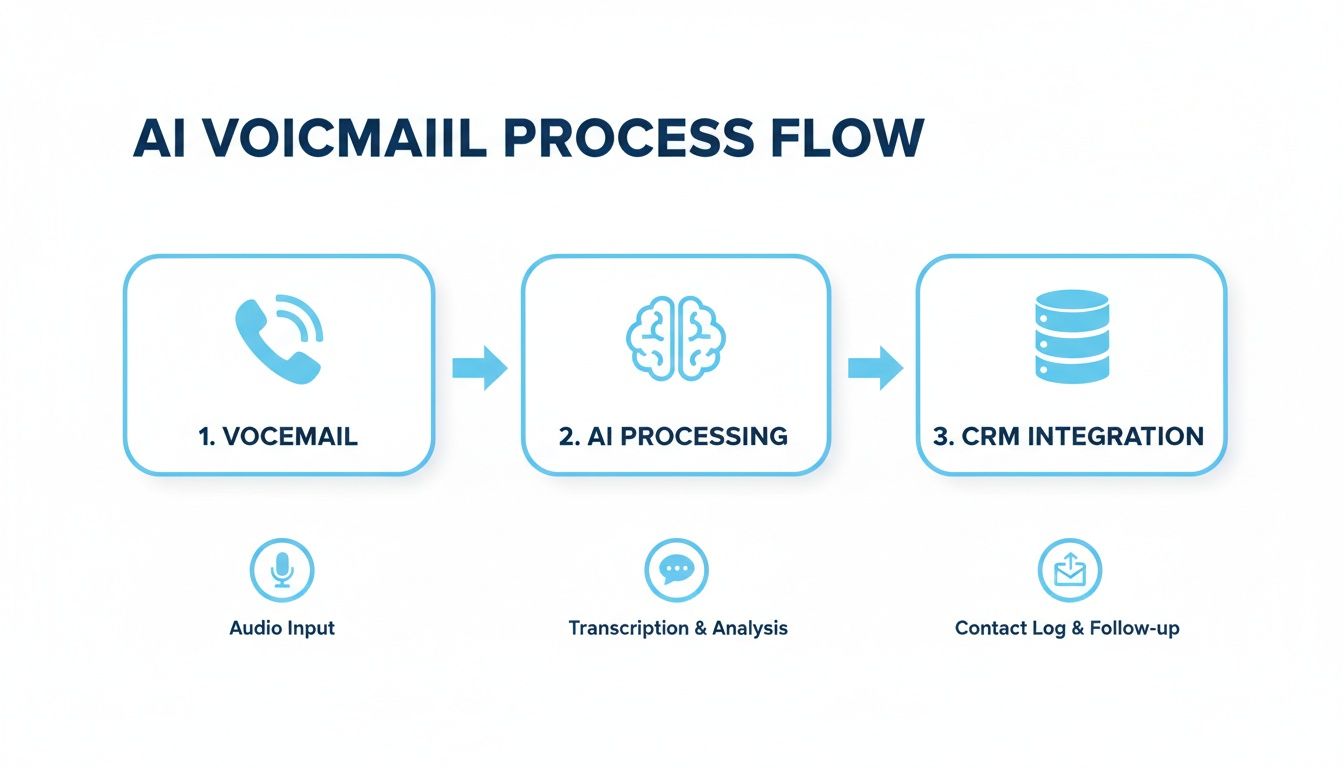
The key piece of this puzzle is that AI-powered step in the middle. It doesn't just pass the message along; it interprets and structures the data before it ever hits your CRM, making the whole process smarter and far more efficient.
Creating Industry-Specific Automations
The true value of this integration shines when you set up automations tailored to your specific industry. A generic workflow is one thing, but a customized one can completely change your operations.
Practical Example: A Busy Law Firm
Let’s take a law firm that relies on Clio for case management. When a prospective client calls and leaves a voicemail about a "personal injury case," the integrated system does much more than just forward an audio file.
- Action: It instantly creates a new matter intake record right inside Clio.
- Data: The caller's name ("John Doe") and phone number are automatically populated into the new contact fields.
- Next Step: The voicemail transcription is attached as the first note, giving the intake specialist all the context they need from the get-go.
This kind of automation removes the tedious data entry, slashes the risk of human error, and gets the intake process rolling the moment the call ends.
Automating Work Orders and Service Tickets
This same logic is a game-changer for home services businesses. For an HVAC company using a platform like Jobber, a voicemail about a busted AC unit isn't just a message—it's an urgent service request that needs immediate attention.
A voicemail that sits unchecked overnight can easily become a lost customer and a negative online review. Automating the initial response ensures every service request is logged and acknowledged right away, building client trust from the very first interaction.
When that voicemail lands, the system can be configured to:
- Generate a new job ticket in Jobber, automatically flagging it as high priority because it contains the word "emergency."
- Assign the ticket to the on-call technician’s schedule.
- Log the caller's details and the transcribed message directly into the ticket notes.
The technician sees the request pop up on their phone in real-time, already loaded with all the information they need to prepare for the job. You can dive deeper into these powerful connections by reading about what CRM integration is and how it can help your business.
Triggering Instant Follow-Ups
One of the most effective automations you can set up is the trigger-based follow-up. This gives the caller immediate confirmation that their message was received and is being handled, which is huge for customer perception.
Practical Example: A Marketing Agency
Imagine a new lead leaves a message for an agency that uses HubSpot. The second the AI system logs that voicemail in the CRM as a new contact, it triggers a HubSpot workflow. An automated email is sent straight to the prospect saying, "Hi [Caller Name], thanks for your message. We're reviewing your request and a member of our team will be in touch within the next hour."
This simple, automated touch accomplishes so much. It confirms you got the message, it manages their expectations, and it makes your business look professional and responsive—all before a single person has even listened to the audio. It's a small detail that makes a massive difference in the customer experience.
Building a Smart Workflow for Your Voicemail Inbox
Flipping the switch on your new voicemail-to-email setup is a great first step, but it’s really just the beginning. To get the most out of it, you need to build a smart workflow that turns those voicemails into clear, actionable tasks. If you don't, you'll just trade a messy voicemail box for an equally chaotic email inbox.
Think of your voicemail inbox less like a mailbox and more like a project management tool. Don't let messages sit and pile up. The moment a new voicemail email arrives, it needs a home.
Right away, create specific folders or labels to sort and prioritize every message that lands. This simple habit keeps important calls from getting lost in the shuffle and gives your team a quick, at-a-glance view of what needs attention.
Organize for Rapid Response
A well-organized inbox is built for speed. Instead of letting every voicemail email dump into one massive feed, use your email client’s rules and filters to start sorting things automatically. This is a game-changer for helping your team spot and act on high-priority messages without delay.
- Practical Example in Gmail: Create a filter where if an email comes from
voicemail@yourvoip.comAND contains the word "urgent" or "quote", it automatically gets the "Hot Lead" label and is marked as important. - Practical Example in Outlook: Set up a rule that moves any message from your voicemail service with a subject line from a known client's phone number into a "Current Clients" folder.
- Internal Messages: Create a separate folder for voicemails from your own team's phone numbers or internal extensions. This keeps internal chatter from cluttering up the client-facing work.
As you start replying to these voicemails, you'll also want to make sure your responses are actually getting delivered. It’s a good idea to learn how to improve email deliverability so your follow-ups don’t end up in a spam folder.
Establish Clear Team Accountability
A shared inbox with no clear owner is a black hole for opportunities. It’s where good leads go to die. Someone has to be the quarterback, making sure every single message is triaged and handled. You can either designate a primary person to own the inbox or create a rotating schedule.
This is non-negotiable. While voicemail on its own has a pretty dismal 4–6% response rate, studies show that a prompt email follow-up can easily double that. People expect a quick response, and your workflow makes that possible.
The key takeaway is simple: every voicemail email needs a clear owner and a defined next step. No message should ever be left in limbo. It needs to be assigned, logged, or scheduled for a callback—immediately.
Prioritize Security and Compliance
Last but certainly not least, remember that voicemails can contain some seriously sensitive information. If you're in healthcare (dealing with HIPAA), finance, or law, security isn't just a "nice to have"—it's a requirement.
Make sure your voicemail-to-email service uses end-to-end encryption for both the audio files and the emails themselves. Double-check that your email provider is also compliant with any industry regulations that apply to you. Taking this step from the get-go protects your clients, protects your business, and builds the trust you need to operate.
Common Questions About Voicemail to Email Systems
Switching up how you handle communications always brings up a few questions. When it comes to setting up a voicemail to email system, I find that most of the uncertainty boils down to a few key areas: how accurate the transcriptions are, how well it works for a team, and, of course, the security of your client data. Let's dig into the things people ask me most often.
How Accurate Is Voicemail Transcription, Really?
Honestly, modern AI transcription is pretty amazing. We’re regularly seeing 90-95% accuracy for clear messages left in a quiet spot. For most businesses, that's more than enough to quickly scan the message, figure out what the person needs, and grab their name and callback number.
The transcript becomes a great way to triage your messages in a split second. That said, if you're in a field like medicine or law where every single word is critical, it's still best practice to click play on the original audio just to be 100% sure you've got the details right.
Can I Send Voicemails to a Team Email Inbox?
You absolutely can—and you absolutely should! This is easily one of the biggest wins of setting up voicemail-to-email.
Practical Example: A small e-commerce business routes all voicemails to support@shopwidgets.com. They use a shared inbox tool like Front or Help Scout where team members can "assign" an email to themselves. When a customer leaves a message about a shipping issue, a support agent assigns it, listens, and replies, preventing two people from accidentally working on the same problem. The entire exchange is tracked in one place.
A shared inbox brings a new level of accountability. When the whole team can see what's been handled and what’s still waiting, nothing slips through the cracks. It’s a simple change that makes a huge difference in how your team operates.
What Happens with Voicemails in Other Languages?
This one really depends on the service you choose. The more basic systems will just forward the audio file, and it’s on you to figure out what it says.
But the more advanced AI platforms are built for a global audience. They can often:
- Automatically detect the language spoken.
- Provide a pretty accurate transcription in that original language.
- Sometimes even offer an English translation.
This is huge. It means a language barrier won't cost you a potential customer.
How Secure Is Sending Sensitive Voicemails via Email?
Security has to be a top concern, especially if you’re handling private client information in finance, healthcare, or any other regulated industry. My advice is to always go with a voicemail to email provider that offers end-to-end encryption for both the audio files and the emails themselves.
The best platforms are built from the ground up to be compliant with standards like HIPAA and GDPR. Before you sign on the dotted line, do your homework. Check their security protocols and make sure your own email setup is buttoned up, too.
Ready to stop worrying about missed calls and start capturing every lead automatically? Recepta.ai combines intelligent voicemail processing with a 24/7 AI receptionist to ensure you never lose another opportunity. Learn how you can automate your communications and grow your business at https://recepta.ai.