What Is Real Time Analytics and How It Works in 2026
You're probably already generating real-time data without calling it that. A phone rings, a web form arrives, a caller waits for an answer, and a customer either books or disappears. The difference between a useful data system and a passive report is whether your business can recognize that signal and respond while the opportunity is still alive.
Real-time analytics turns continuously arriving events into decisions and actions with very little delay. For a service company, that can mean routing an urgent call, scoring a lead, scheduling an appointment, or recovering a missed inquiry before another provider answers it. This guide explains what is real time analytics, how the underlying pipeline works, which latency level each workflow needs, and how an AI receptionist applies the idea to calls, leads, and bookings.
The Moment a Missed Call Becomes a Real Time Analytics Problem
It's Saturday night at a plumbing company. The owner is under a sink at a customer's house when two calls come in. One caller leaves a voicemail. The other hangs up after waiting. By Monday morning, both prospects have hired a competitor.
That looks like a staffing problem, but it's also a real-time analytics failure. The business received valuable signals, yet nobody converted those signals into an immediate decision.

Each call carried more information than the missed-call notification showed:
- The caller number could identify a returning customer or a new prospect.
- The geographic area could show whether the job sat inside the company's service territory.
- The call duration could reveal whether the caller reached voicemail, waited briefly, or spent time with an automated system.
- The wait time could indicate that the prospect needed help immediately.
- The gap before a human saw the notification could determine whether the opportunity was still recoverable.
A real-time pipeline can capture those events, enrich them with customer or scheduling data, and assign an action within seconds. An after-hours caller describing a burst pipe could receive an immediate response and a booking path. A repeat customer might be routed directly to the right team member. A low-priority inquiry could receive a follow-up message without occupying the emergency queue.
Practical rule: A missed call becomes expensive when the business treats it as a notification instead of an event that needs a next action.
The same principle applies to recovering missed calls with an immediate message. The message itself matters, but the analytics behind it decide who receives it, how quickly it arrives, and whether the conversation ends in a booked job.
Defining Real Time Analytics Without the Jargon
Think of a live cooking show. Ingredients arrive continuously, the chef prepares them while viewers watch, and seasoning decisions happen as the dish develops. The chef doesn't wait until the episode ends to discover that the sauce needed more salt.
Real-time analytics works the same way. Events arrive from phone systems, websites, transactions, sensors, or chats. A system processes those events as they become available, calculates useful signals, and makes the result available for a person or application to use. IBM describes real-time analytics as analyzing data as it becomes available instead of waiting for batch processing, often producing insights from continuously updated streams in seconds or less. (IBM's overview of real-time analytics)
Batch analytics follows a different rhythm. Data accumulates in a warehouse, a scheduled job processes it later, and a manager reviews the result after the reporting window closes. A Monday report might tell a plumbing owner how many calls arrived over the weekend. Real-time analytics can help answer whether the latest caller needs an emergency appointment while the caller is still available.
You can summarize the difference in one sentence:
Batch analytics tells you what happened after the fact, while real-time analytics helps you decide what to do while it's happening.
Three traits define the practical version of the term:
- Low latency: The system minimizes the interval between event capture and useful output. Technical definitions often describe end-to-end latency as the time from ingestion through processing to the final analytical result, with real-time systems routinely operating in seconds or subsecond timeframes. (The technical discussion of end-to-end latency)
- Continuous processing: The pipeline keeps listening instead of waiting for a scheduled batch job.
- Immediate action: The result feeds a dashboard, alert, workflow, application, or automated decision.
| Dimension | Real Time Analytics | Batch Analytics |
|---|---|---|
| Data arrival | Events are handled as they become available | Data waits for a scheduled collection or processing window |
| Insight timing | Seconds or subsecond intervals are common for operational workloads | Results arrive after the batch completes |
| Typical question | Should we route, alert, score, or book this inquiry now? | What happened across the previous reporting period? |
| Business output | Answered calls, booked jobs, live alerts, personalized experiences | Reports, trend reviews, planning, and historical analysis |
A business may use both approaches. A real-time data synchronization workflow can keep operational systems current, while batch reporting can support longer-term planning.
How Real Time Analytics Works From Event to Action
A real-time system is easier to understand as a moving line of responsibility. Each stage either adds delay, removes unnecessary work, or prepares the next stage to respond.
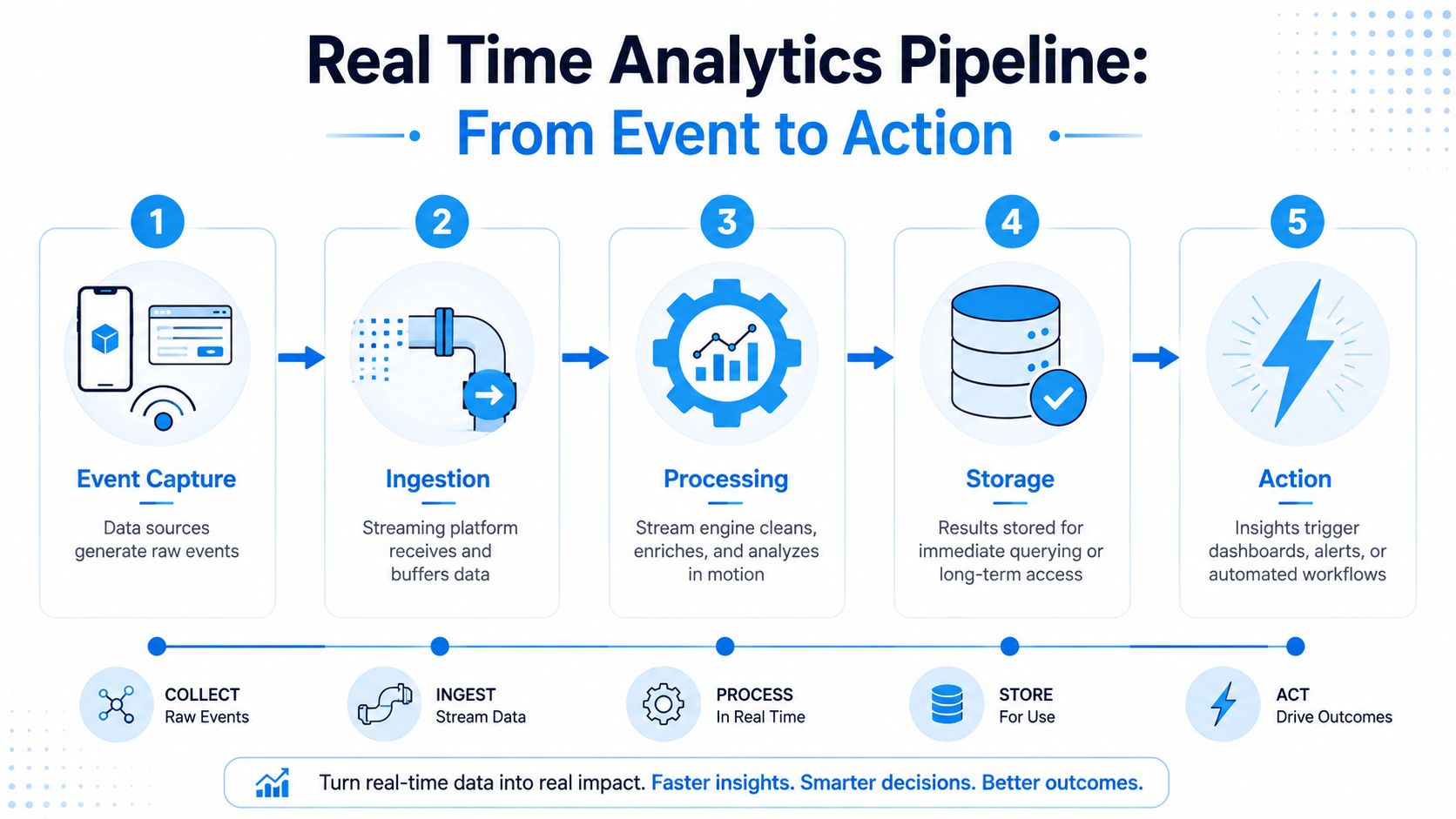
1. Event capture
The pipeline starts when something happens. A phone call begins, someone submits a web form, a customer sends a chat message, a point-of-sale terminal records a purchase, or a sensor reports a reading. The objective is to capture the event with enough context to support a decision, without forcing the source system to wait.
For a call, that context might include the caller number, timestamp, call status, transcript fragments, and existing customer record.
2. Ingestion
A streaming transport layer receives and buffers events. Apache Kafka, Amazon Kinesis, and WebSockets are common examples of technologies used for moving events between producers and consumers. Buffering protects the phone system or website from being blocked while downstream services process the event.
Latency can increase here if the system polls for updates, waits for large batches, or retries inefficiently. Event-driven delivery keeps the path shorter.
3. Stream processing
A processing engine cleans the event, adds context, and evaluates business logic. It might detect words associated with an emergency plumbing issue, match a caller to a customer record, or send the conversation through a machine-learning model.
Tools such as Apache Flink are designed for low-latency streaming workloads. The processor should do only the work needed for the decision, because unnecessary joins, repeated queries, and slow external calls can consume the time the workflow is trying to save.
4. Storage
The result can be written to a fast in-memory store for immediate access, a time-series database for event-oriented analysis, and a longer-term data lake for history. This hybrid design separates urgent serving needs from durable retention.
A business owner may need a live count of active calls now and a historical view of call outcomes later. One storage layer doesn't have to serve both jobs equally well.
5. Action delivery
The final output reaches the person or system that can act. That might be a dashboard, an alert, a booking workflow, a routing application, or a CRM update. A useful pipeline ends with a decision, not merely a fresh chart.
Teams evaluating architecture can also review how Wonderment Apps approaches data pipelines for business intelligence. For integrations that connect these stages to operational software, API connectivity for real-time workflows is often the practical handoff.
Core Components and the KPIs That Prove It Works
A real-time system has four operational layers. The architecture matters, but a small business owner shouldn't judge it by the number of services on a diagram. Judge it by whether a caller gets help, a technician receives the right context, and the company can connect the decision to revenue.
Ingestion captures the opportunity
The ingestion layer receives events from phone systems, webhooks, IoT sensors, and POS terminals. For a home services company, the relevant event might be an inbound call or a form submission.
Watch first-touch latency, the time between the customer's action and the moment the system records it. Also monitor capture rate, because an event that never enters the pipeline can't be scored or acted on.
Processing turns activity into meaning
Processing applies rules, enrichment, and complex event logic. It might identify a caller's intent, add location information, check appointment availability, or distinguish an urgent request from a general question.
The owner should care about end-to-end event lag and enrichment accuracy. A fast system that assigns the wrong service area or urgency level creates operational waste rather than useful speed.
Storage makes the result usable
Fast stores serve current decisions. Warm stores support recent operational analysis, while colder long-term storage preserves history for broader reporting. The practical measures are query freshness and storage efficiency, not just the existence of a database.
A dashboard that shows a call as active after the customer has already hung up isn't trustworthy, even if it loads quickly. Freshness means the displayed state matches the operational reality closely enough to guide action.
Action connects analytics to the business
The action layer presents dashboards, sends alerts, triggers workflows, or updates downstream applications. A home services example might route an emergency lead to an available technician, create an appointment, and write the outcome back to the CRM.
Measure response time, booking conversion, and revenue influenced by real-time decisions. Those metrics distinguish analytics that look impressive from analytics that help pay the bills. A performance dashboard for operational metrics should make that connection visible instead of stopping at call counts.
Latency Tiers and the Use Cases That Demand Each
“Real-time” isn't one universal speed. A fraud engine, an AI receptionist, and an end-of-shift operations report can all use continuously updated data while needing different response windows.
The right question is, how long can the business wait before the decision loses value? Technical and industry references commonly describe real-time processing in milliseconds to low seconds, but vendor definitions sometimes extend the phrase to minutes. That variation is why buyers should define an explicit service target for each workflow. (A practical discussion of real-time boundaries)
| Latency Tier | Typical Range | Best Fit Use Cases | Example Scenario |
|---|---|---|---|
| Millisecond | Sub-100ms | Fraud scoring, ad bidding, machine controls | A transaction receives a risk decision before authorization completes |
| Sub-second | Below one second | AI receptionist routing, instant lead scoring, dynamic pricing | A caller's intent changes the next prompt while the conversation continues |
| Near real-time | 1 to 10 seconds | Live dashboards, operational alerts, workflow monitoring | A dispatch team sees a new urgent lead and assigns coverage |
| Soft real-time | Minutes | End-of-shift summaries, SLA reporting, operational review | A manager reviews appointment response performance during the same work period |
These ranges are decision aids, not universal laws. Some fraud checks need extremely rapid responses because the transaction moves on immediately. A support queue may remain useful with a longer delay if a human still has time to respond. An appointment request usually benefits from a prompt reply, but it may not justify the infrastructure required for the tightest possible latency.
Cost and reliability also change with the tier. Faster processing can require more specialized infrastructure, more careful failure handling, and stricter monitoring. A company that chooses subsecond processing for every dashboard may spend heavily to solve a problem that a slightly slower update would handle well.
Design principle: Set the latency target from the decision backward, not from the tool's marketing label forward.
Real World Examples Across Home Services Healthcare and Law
A real-time analytics system earns its place when it changes the outcome of an interaction. The following scenarios show how the same pattern, capture, interpretation, action, applies across different industries.
Home services
An HVAC company receives an after-hours call from a homeowner whose heating system has stopped working. The system captures the call, streams the conversation into transcription, identifies urgency-related language, checks the customer's service area, and looks for available appointment options.
The immediate decision is whether to offer an appointment path, escalate the inquiry, or send a follow-up. The business outcome is a booked job or a qualified handoff, rather than an unanswered inquiry that can drift toward a competitor.
Healthcare
A patient portal receives a new vitals event from a connected monitoring workflow. The analytics layer compares the incoming reading with the patient's configured care rules and routes a relevant alert to the on-call nurse.
The important design detail is that the system doesn't treat every reading as an emergency. It filters and contextualizes the signal before notifying a person who can assess the situation. That creates a path toward timely intervention and may help prevent an avoidable escalation, but the analytics system itself shouldn't be described as guaranteeing a clinical outcome.
Law
A legal intake chatbot receives a prospective client's answers. During the conversation, it identifies signals such as matter type, urgency, location, and fit with the firm's practice areas. It sends the qualified context to a partner's mobile device and offers consultation times while the prospect is engaged.
The decision happens before the person starts another search. The result can be a scheduled consultation and a retained client, provided the firm's attorney completes the appropriate review and accepts the matter.
Across all three examples, the workflow has the same structure:
- Capture: Record the interaction and its useful context.
- Interpret: Score intent, urgency, eligibility, or risk.
- Act: Route, alert, schedule, or follow up.
- Measure: Compare response and conversion outcomes over time.
Real-time analytics doesn't replace professional judgment in healthcare or law. It gives the right person relevant context sooner, while preserving the controls needed for a responsible decision.
Trade Offs Common Pitfalls and Best Practices Before You Go Live
Faster isn't automatically better. A pipeline that delivers an incorrect lead score instantly can hurt more than a validated result delivered slightly later, especially when the output drives customer communication, dispatch, or a regulated workflow.
Real-time systems also introduce engineering costs. Continuous ingestion requires careful handling of backpressure, failures, changing schemas, replay, and observability. Data quality checks can add latency, creating a real trade-off between freshness and confidence. (The reliability and data quality trade-offs in real-time analytics)
Common failure modes
- Streaming by default: Teams build a continuous pipeline for a report that could run on a schedule.
- Ignoring backpressure: A sudden event surge overwhelms a consumer, causing lag or dropped work.
- Treating dashboards as action: Staff can see a problem but still lack a workflow to respond.
- Skipping replay tests: The team tests the happy path but not late events, duplicate events, or recovery after failure.
- Alerting on everything: People receive so many notifications that meaningful signals lose urgency.
- Breaking the schema: A source changes its event structure and downstream processors fail without a safe compatibility plan.
A practical launch checklist
- Start with one revenue-critical event. Choose an inbound call, lead form, or appointment request.
- Define the decision and SLA first. State who acts, what they do, and how quickly the result must arrive.
- Instrument the pipeline itself. Track event lag, failures, freshness, and delivery status alongside business KPIs.
- Plan for late-arriving data. Event time records when something happened, while processing time records when the pipeline observed it. Windows and watermarks help manage that difference. (The distinction between event time and processing time)
- Gate every alert on an actionable threshold. If nobody knows what to do next, it probably shouldn't page anyone.
How Recepta.ai Uses Real Time Analytics to Convert Every Interaction
An inbound call produces a sequence of decisions, not a single record. As the phone rings, speech can be streamed into transcription, caller intent can be evaluated, and relevant customer context can be matched to the conversation. The system can then guide the interaction toward appointment scheduling, lead capture, or a qualified handoff while the caller is still on the line.
That workflow connects the five pipeline stages to a revenue outcome. The call is the event, ingestion carries the conversation, processing identifies intent, storage keeps the interaction available for context and reporting, and the application delivers the next action. Recepta.ai is one example of an AI receptionist platform that handles inbound and outbound calls, schedules appointments, captures leads, and supports follow-ups, with integrations for CRMs, calendars, and other business systems.
The analytics layer gives an owner a way to inspect operational performance through call metrics, trends, costs, and performance insights. Useful signals include active calls, call volume, call success rates, average call duration, and live cost monitoring. Those metrics matter because they connect the conversation to response quality, booking behavior, and missed-call recovery instead of leaving performance inside disconnected call logs.
The broader shift is toward always-on operations. Businesses don't have to wait for a morning report to discover that calls went unanswered or that a booking workflow stalled. They can measure the interaction, learn from the result, and trigger the next step within the same customer journey.
Recepta.ai provides 24/7 AI receptionist support for calls, appointment scheduling, lead capture, follow-ups, and human escalation when a conversation needs personal expertise. Visit Recepta.ai to see how real-time call analytics and automated response workflows can help your team turn more inquiries into booked opportunities.