How to Answer a Call Like a Pro in 2026
A caller reaches your clinic while the front desk is checking in a patient. Your HVAC dispatcher is helping a technician, or your law firm's receptionist is opening a file. The phone rings, and the caller has a choice: stay on the line, leave a message, or call the next provider. A good response isn't just a pleasant greeting. It's a reliable process that makes the caller feel heard and gives the team a clear next step.
To answer a call well in 2026, combine professional etiquette with a consistent conversation flow and a sensible division of work between automation and people. The right setup helps you answer promptly, protect sensitive information, record what matters, and transfer a caller without making them start over.
What Good Call Answering Looks Like Today
A call begins before anyone says hello. If the caller waits through an unclear menu or hears a distracted greeting, they may decide the business won't handle their request well. The first moments should establish who has answered, where the caller has reached, and what the caller needs.
Phone support remains a meaningful customer-care option. In a U.S. study conducted in late 2023 with 537 consumers and 437 businesses, nearly 20% of consumers ranked phone calls as their top customer-care channel, and more than 23% named calling as their favorite way to reach companies (Sinch's customer communication research). A caller may be choosing voice because the issue is urgent, personal, or easier to explain aloud.
Good call handling rests on three connected practices:
- Etiquette: Answer with a calm, clear greeting, identify yourself and the business, and give the caller room to explain.
- Structure: Capture the caller's reason, confirm important details, and agree on what happens next.
- Smart escalation: Let automation handle predictable requests, but bring in a trained person when the issue needs judgment, reassurance, or specialist knowledge.
A measurable workflow turns those practices into daily habits. Set a service-level target, route calls to an appropriate queue, verify identity before collecting sensitive details, and record the outcome in the CRM. A general instruction to “answer quickly” isn't enough if calls are then transferred without context or left without an owner.
Practical rule: Every call should end with a clear outcome and a named next step, even when the caller's request can't be resolved on the spot.
If you're staffing a reception or support role, it can help to compare support specialist requirements when defining the listening, communication, and record-keeping skills the job needs. Those skills matter whether the first voice the caller hears belongs to an employee or an automated receptionist.
Setting Up Before the Phone Rings
Call quality often depends on preparation, not quick thinking. If the person answering has to hunt for the CRM, find a headset, or ask a caller to repeat information already in the account, the conversation starts with avoidable friction.
Set up the workspace before the queue opens. Keep the CRM and phone controls visible, use a headset that leaves your hands free, and know whether you're responsible for the live queue or an on-call line. Check that the mute button works before handling a private conversation, and keep the schedule and escalation contacts within reach.
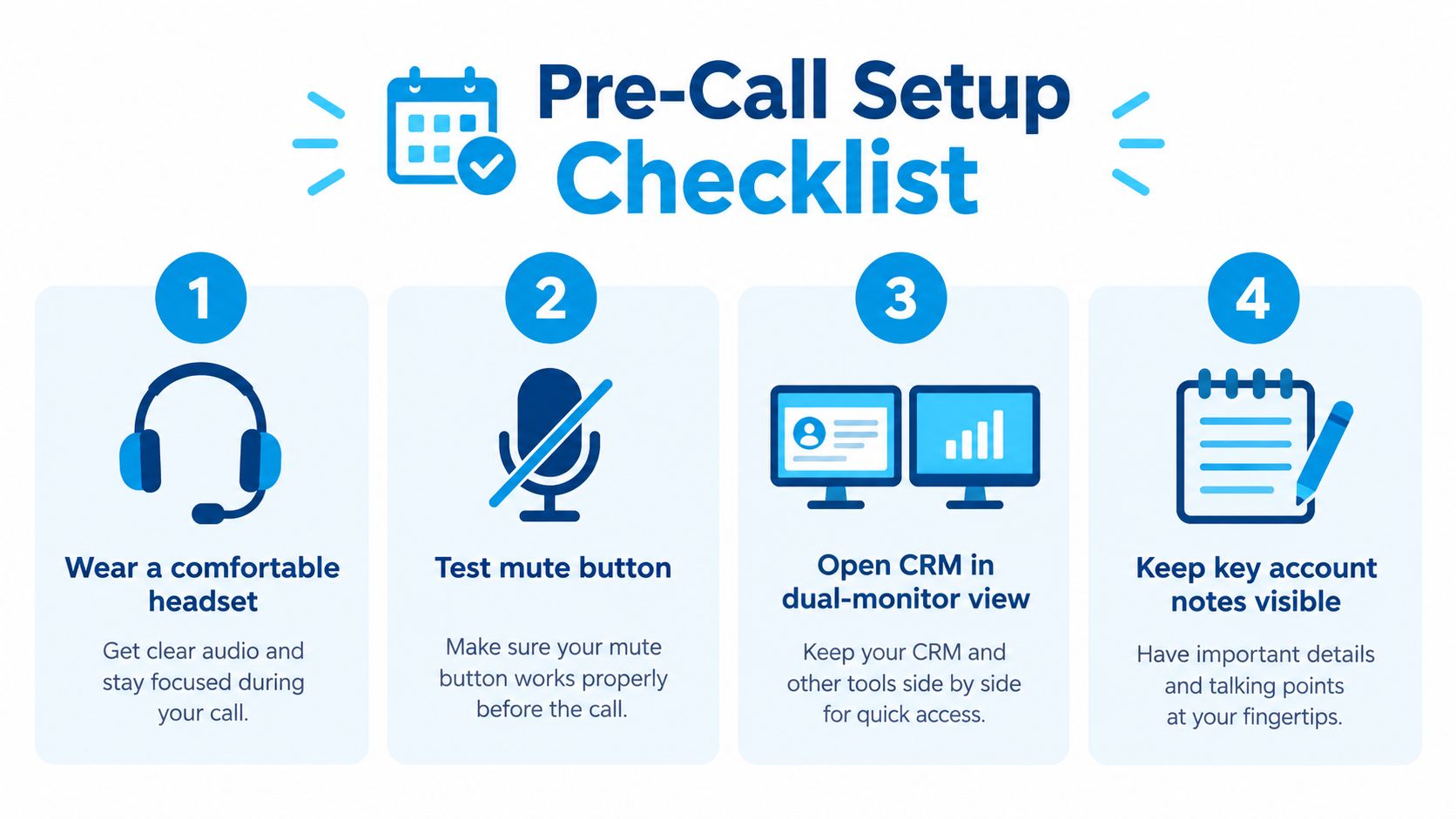
Use this five-item checklist before taking calls:
- Prepare the workspace: Wear a comfortable headset and test the mute button.
- Open the right screens: Keep the phone system and CRM available, ideally in a dual-monitor view.
- Check queue status: Confirm which calls you're expected to answer and who covers overflow.
- Review caller context: Use caller ID to look for an existing record, open ticket, or recent interaction.
- Keep notes accessible: Have business hours, service areas, appointment options, and escalation contacts ready.
A dental office can use caller ID to open an existing patient's record before answering. The receptionist can then greet the patient naturally and review the appointment history, rather than asking them to explain their relationship with the practice from scratch. For a cleaning service, the dispatcher can check the property address, the scheduled visit, and any access notes before picking up.
Preparation also means having a greeting that sounds human and gives callers a useful cue. A practice can review examples of professional business phone greetings and adapt one to its own tone and services. Keep the wording concise. If the caller needs a different team, explain the next step rather than reading a long, generic script.
Live answering isn't automatic just because a phone system is installed. In research covering 85 businesses across 58 industries, about 37.8% of incoming calls were answered by a live person, another 37.8% went to voicemail, and 24.3% received no response (missed-call behavior research). A short pre-shift check makes it easier to notice whether the queue is covered.
A Reliable Flow for the Live Conversation
Treat the conversation as one connected sequence, not a script to race through. The caller should know who answered, feel that the request was understood, and leave with a specific resolution or follow-up.
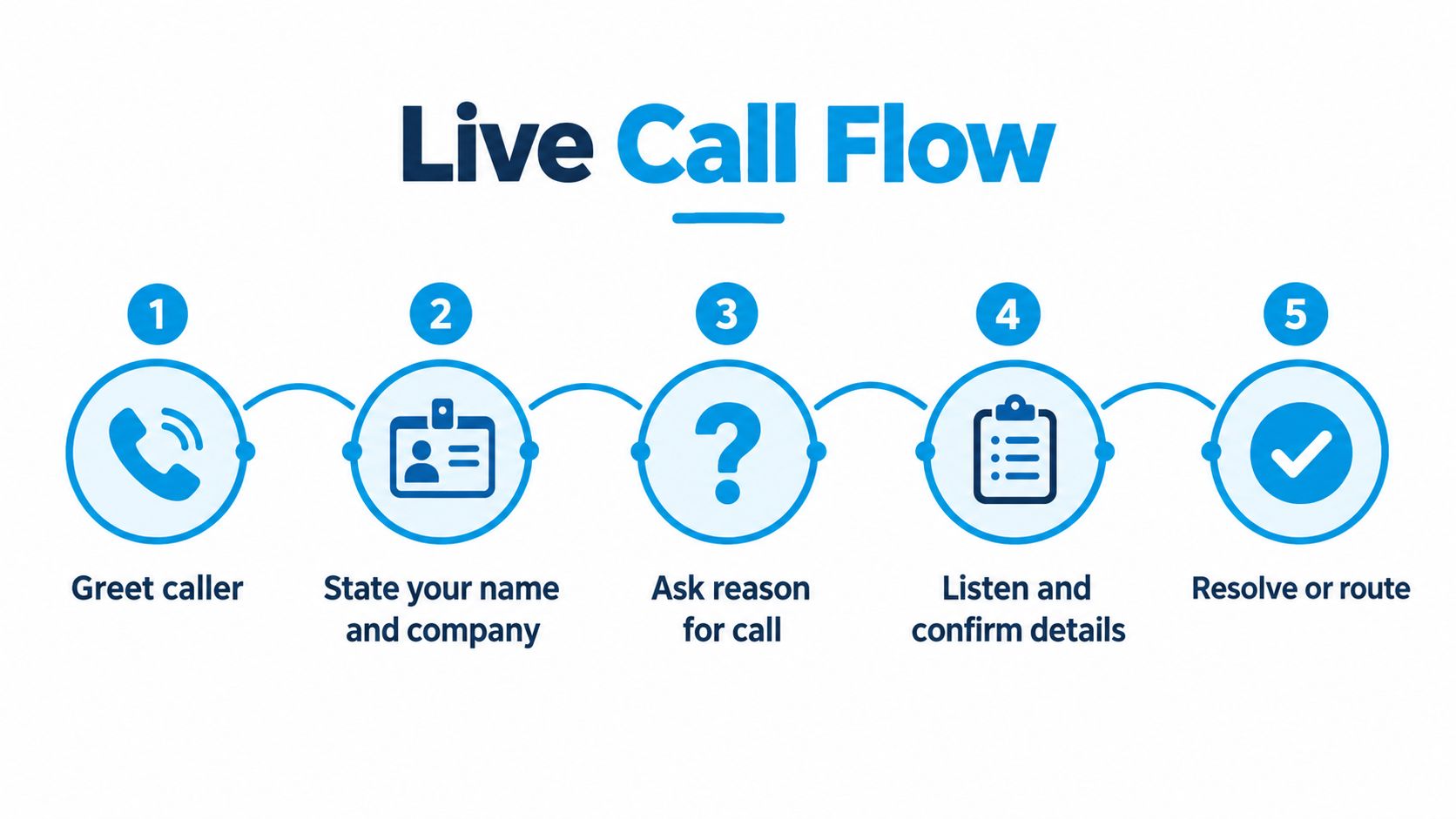
Start with a clear greeting and identification: “Good morning, Northside Heating, this is Maya. How can I help?” Listen without interrupting, then capture the reason for the call. If the caller asks for an appointment, clarify the service and location. If they report a problem, establish what happened and whether it's urgent.
Before discussing sensitive details, follow your organization's identity-verification process. Then restate the request in plain language. “You're at the Oak Street address, and the furnace has stopped producing heat this morning. Have I got that right?” A short confirmation catches errors before they become a dispatch problem.
Two calls, one dependable arc
At 7 a.m., an HVAC company might get a call about a home with no heat. The receptionist should capture the caller's name, callback number, service address, equipment type if known, the symptom, and whether anyone is at immediate risk. After confirming the details, the receptionist can explain whether the call is going to the on-call dispatcher and provide the next expected update. The CRM entry should record the urgency, address, issue, owner, and follow-up action.
A law firm's first-time caller may ask about a contested will. The receptionist should collect the caller's name and safe callback details, identify the matter at a high level, and follow the firm's intake and conflict-check procedures before inviting sensitive information. A useful close might be: “I've recorded that you're calling about a disputed will. Our intake team will review the information and contact you about the next step.” Log the inquiry and the person responsible for responding, not a detailed legal narrative that the receptionist isn't authorized to assess.
The final beat is a confirmed next action. Book the appointment, transfer with context, assign a follow-up, or explain what the caller should expect. A promise to “get back to you” without an owner or deadline leaves the caller guessing.
For new leads, delay can also weaken the chance to connect. Research summarized from the MIT/InsideSales lead-response study reports that contacting a lead within five minutes made qualification 21 times more likely than waiting 30 minutes, while the odds of reaching the lead fell roughly 100-fold between minute five and minute thirty (lead-response research summary). If a call drops, trigger an alert or callback promptly, then make the first human attempt within the business's chosen response target.
A brief demonstration of a call-flow experience can help teams discuss where a caller needs a person rather than another menu:
Choosing Between Voicemail, IVR, and an AI Receptionist
Voicemail, an interactive voice response menu, and an AI receptionist solve different coverage problems. The right choice depends on call volume, how much information the business needs to capture, and whether callers need a conversation rather than a place to leave a message.
A reported analysis found that the average small business answered only 38% of inbound calls, and about 85% of callers who reached voicemail didn't call back. The same analysis estimated annual lost revenue of $62,000 to $126,000 for a typical local service business (small-business missed-call analysis). Those figures make voicemail a weak default for businesses where callers are often seeking an appointment, urgent repair, or new-client intake.
| Coverage option | Average answer speed | 24/7 coverage | CRM data capture | Identity verification | Relative monthly cost |
|---|---|---|---|---|---|
| Voicemail | No live answer; depends on when staff review messages | Messages can be left outside business hours | Manual unless connected to a workflow | Usually handled during callback | Low |
| Basic IVR | Immediate menu response, with waits possible before reaching a person | Often available if configured | Limited unless connected to business systems | May route callers to a verification process | Low to moderate |
| AI receptionist | Immediate automated greeting; human response depends on escalation coverage | Can answer continuously when configured | Can capture and pass structured details when integrated | Must be configured carefully for the business's needs | Varies by service and scope |
Voicemail is simple and inexpensive, but it places the work on the caller. A menu can route predictable requests, yet too many options make callers work to reach the right person. An AI receptionist can answer routine questions, capture lead details, and schedule appointments, but it needs clear rules for uncertainty, sensitive topics, and human transfer. Read an overview of how an AI receptionist works before deciding which tasks are suitable for automation.
For a one-person shop, a short menu or an AI service that captures messages and appointment requests can provide coverage when the owner is on a job. A multi-location business may need more advanced routing tied to location, hours, and team availability. In either case, don't treat “available around the clock” as proof of good service. Test whether the caller can reach the right outcome, whether records reach the right system, and whether someone owns the follow-up.
Escalation Triggers and the Warm Handoff
Automation should handle predictable work, not make judgment calls beyond its limits. Write down the conditions that require a person, then teach staff and configure the system to recognize them consistently.
| Trigger | What the first responder should do |
|---|---|
| Emergency language, such as “no heat,” “flooding,” or “chest pain” | Follow the organization's emergency protocol and connect the caller to the appropriate responder. |
| Refund, credit, or legal-action language | Route to an authorized employee who can review the request. |
| Frustration after a transfer, or a request for a person | Stop routing loops and connect the caller to a human. |
| Sensitive medical or financial intake | Use the approved verification process and involve trained staff where required. |
| Low confidence in speech recognition or an atypical response | Ask a simple clarification once, then offer a human handoff rather than forcing repetition. |
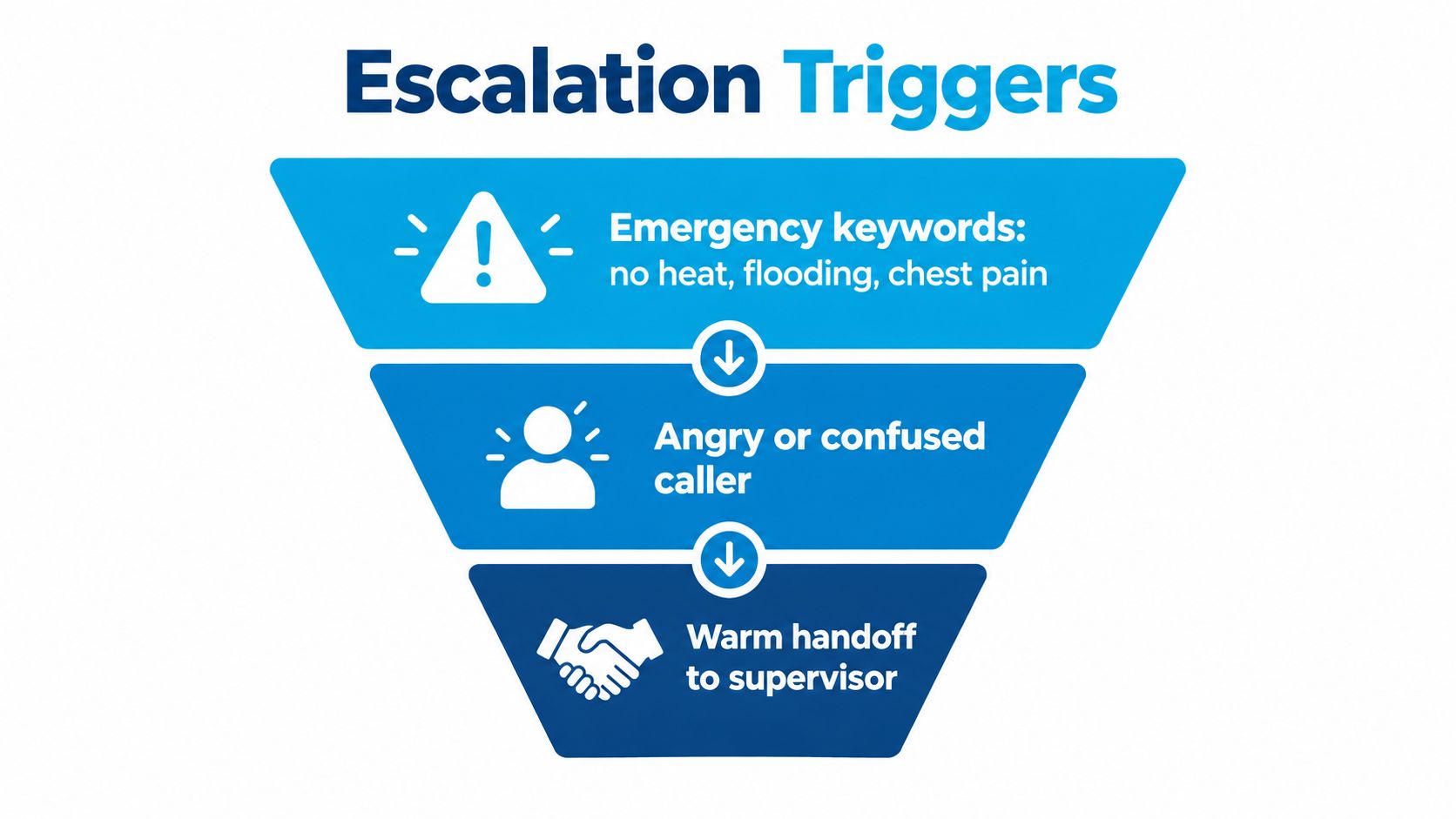
A good transfer carries the caller's story forward. Before connecting, summarize the issue, confirm the caller's preferred callback number if the call drops, and pass a brief note into the queue or CRM. The receiving person should start with context: “I have your address and the report that water is entering near the kitchen sink. I'm connecting you with the service team now.” For plumbing teams building their emergency criteria, Bear Valley Plumbing & Heating's emergency guide can help frame the difference between urgent problems and routine service requests.
A warm handoff can use a live introduction, a queue note, or a calendar event with the caller's request attached. It shouldn't force the caller to repeat sensitive details just because one system didn't pass the information along. For a closer look at how to distinguish a cold transfer from a warm transfer, focus on whether the receiving person has the context needed to continue.
Set performance expectations that staff can measure. A workflow can aim to answer 80% of calls within 20–30 seconds, verify identity before collecting sensitive details, and log the call's disposition, urgency, and next action in the CRM (contact-center productivity benchmarks). Track performance by queue and time of day, since a daily average can conceal periods when callers wait or abandon the call.
Trust, Accessibility, and a 14-Day Rollout Plan
A caller needs to know both that the business is legitimate and that the conversation can happen at a pace they can manage. Fast pickup alone doesn't establish trust. In 2025, 74% of robocalls used area-code spoofing, making legitimate calls harder for people to verify (caller-ID and accessibility report). Use consistent outbound numbers, identify the business and purpose immediately, avoid unexpected requests for sensitive information, and give callers a way to call back through a known channel.
Accessibility belongs in the call process, not in a separate afterthought. Let callers pause, avoid finishing their sentences, and confirm details neutrally. Offer alternatives such as SMS, email, text relay, or a web form when those options fit the request. For guidance on making home visits easier to move through, see accessibility details for house call care.
Voice automation needs the same care. Set confidence thresholds so the system can ask a brief clarification or transfer to a person when it doesn't understand the caller. Don't make someone repeat sensitive information because the system failed to recognize atypical speech. Keep call-recording policies clear and review call recording compliance considerations before changing how conversations are recorded or stored.
A practical 14-day rollout
- Days 1–3: Audit missed calls, callbacks, queues, and the points where callers repeat information.
- Days 4–7: Write the greeting, live-call flow, identity checks, and escalation matrix. Train staff using realistic clinic, HVAC, and legal-service examples.
- Days 8–10: Pilot an AI receptionist on the off-hours queue. Test routine calls, uncertain speech, sensitive requests, and transfers to people.
- Days 11–14: Review speed of answer, missed-call rate, and qualified-lead rate. Adjust routing, prompts, and staffing based on what the call records show.
Make the change measurable, but don't reduce success to call volume. The standard is a call the caller can trust, understand, and continue without starting over.
Recepta.ai combines AI call answering with human support for inbound and outbound calls, appointment scheduling, lead capture, follow-ups, and escalation when a request needs a person. Visit Recepta.ai to see how its receptionist workflows can connect calls to your CRM, calendar, and team.