Lead Follow Up System: How AI and Humans Convert More Leads
A lead that gets a response in five minutes is far more likely to turn into a real sales conversation than one left sitting for half an hour. In a three-year study covering more than 15,000 web leads and 100,000 call attempts, contacting a lead within five minutes made contact about 100 times more likely and qualification about 21 times more likely than waiting 30 minutes, according to the Lead Response Management Study summary. That statistic gets quoted a lot, but many teams still act like a lead follow up system is just "someone should call them back."
That's wrong. Speed matters, but it's only the first layer. The businesses that convert more inbound demand build a system that captures every inquiry, routes it instantly, uses the right channel, persists across multiple touches, and hands off cleanly between automation and humans. If you run HVAC, plumbing, dental, legal, insurance, or a multi-location service business, that's what protects your ad spend from leaking out through missed calls, slow callbacks, and sloppy follow-up.
What a Lead Follow Up System Does
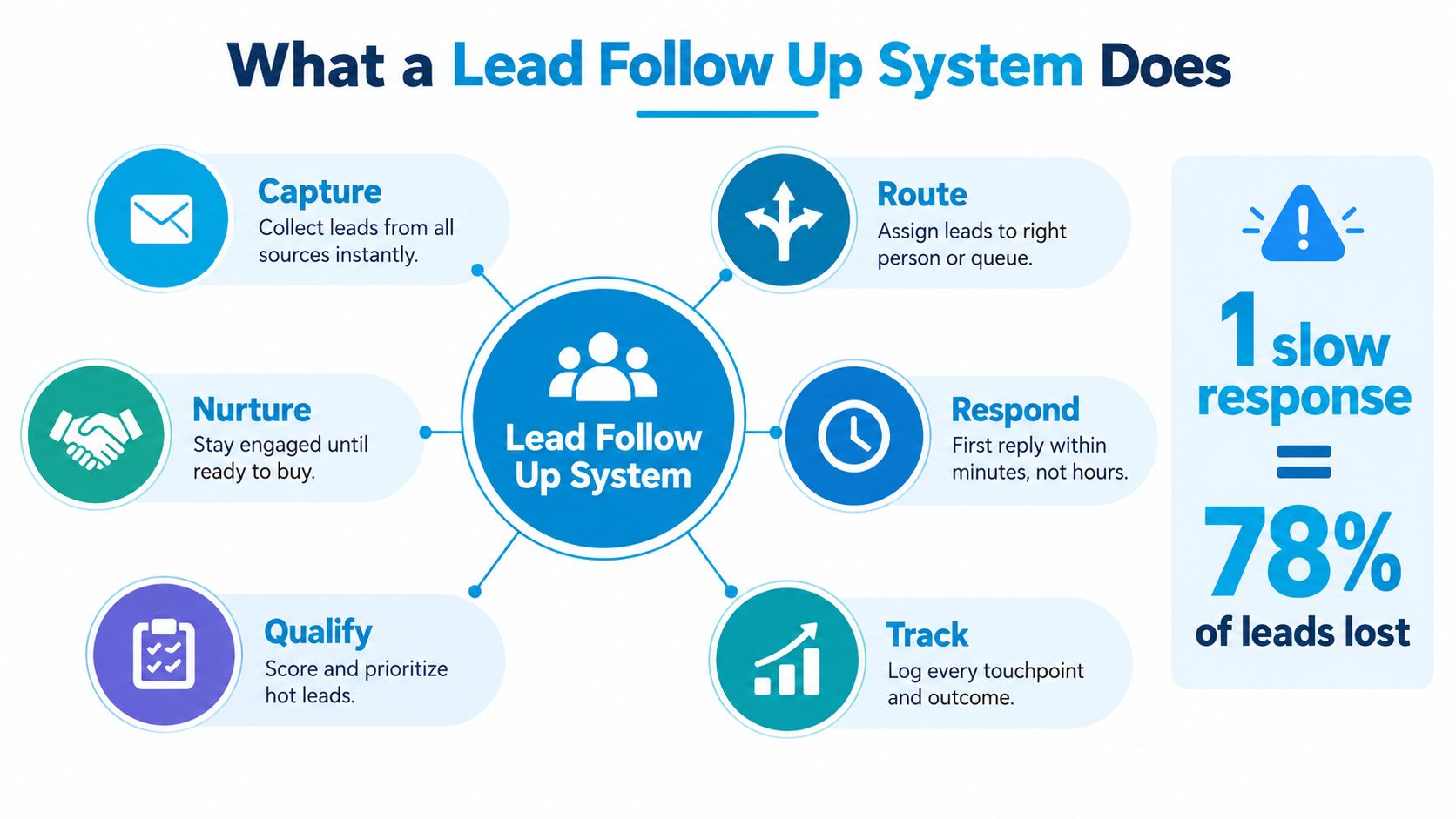
A lead follow up system decides whether inbound demand turns into booked work or dies in the gap between inquiry and response. Speed matters, but speed by itself does not carry the load. The system has to route the lead to the right person, use the right channel, keep working across multiple touches, and hand off cleanly when automation has done its job and a human needs to close.
The system is judged by outcomes
Measure the system by booked, qualified conversations, not by busywork. A team can log calls all day and still waste leads if ownership is unclear, follow-up starts late, or the first outreach happens in the wrong channel. A working setup captures the inquiry, timestamps it, assigns it, starts contact, escalates when there is no response, and records every step in one place.
Ask better questions:
- Was the lead captured instantly
- Who owned it within minutes
- What channel got the first response
- Was an appointment booked or a next step set
Your CRM is the filing cabinet. The follow-up system is the conveyor belt that keeps leads moving through it.
What you should be able to picture on Monday morning
Take a simple example. A prospect fills out your website form at 7:14 p.m. The right system confirms receipt right away, routes the lead by service area or location, triggers the first outreach, and alerts someone if no contact happens fast enough. If that path is fuzzy, manual, or trapped in one employee's memory, conversion is running on luck.
That is where channel fit matters. Some leads answer a call. Some reply to text. Some need an email confirmation first and a human call after. Good follow-up systems do not blast every lead the same way. They coordinate the sequence, then push the lead to a person when buying intent, urgency, or complexity shows up.
Practical rule: If your process depends on one person remembering to call back, you don't have a system. You have a hope-based workflow.
If you want a clearer side-by-side view of process versus database, this explanation of a lead management system makes the distinction concrete. The goal is simple. Make conversion repeatable. Stop relying on heroics.
The Four Core Parts Every System Needs
Most companies already own pieces of the stack. They have a phone system, a CRM, maybe web forms, maybe a scheduler. The problem is that the parts don't act like one machine. A lead follow up system needs four core parts working in sequence.
A missed-call example that exposes the gaps
Take a common scenario. An HVAC prospect calls after 6 p.m. Nobody answers. If the system is healthy, four things happen in order. The missed call is captured, the inquiry is routed, a follow-up attempt starts, and the final outcome writes back to the CRM or scheduling tool. If any one step fails, the lead drifts.
Harvard Business Review research auditing 2,241 companies found that firms contacting a web lead within one hour were nearly seven times more likely to qualify the lead than firms waiting longer, and over 60 times more likely than firms waiting 24 hours or more, as summarized in this speed-to-lead analysis. That's why system design matters more than rep intentions.
The four parts
| Part | Responsibility | Failure signal |
|---|---|---|
| Capture | Pull in leads from forms, calls, chats, ads, and referrals with a timestamp | Leads arrive with missing source data or not at all |
| Routing | Assign the lead to the right queue, location, or person based on rules | Leads sit unowned, or land with the wrong team |
| Contact attempts | Launch first-touch outreach and escalation across the right channels | One call gets made, then nothing else happens |
| Write-back | Log every attempt, reply, booking, and status change in one record | Staff rely on memory, spreadsheets, or duplicate notes |
What matters more than the dialer brand
Managers get distracted by tool labels. They compare phone systems, AI agents, SMS apps, and calendars as if picking one brand solves the whole problem. It doesn't. The important question is whether the tools share state.
Here's what has to connect cleanly:
- Calendar integration so booking confirmations and availability are real
- CRM integration so every touch lands on the same lead record
- Industry system sync so service businesses can route by territory, specialty, or office
- Alerting logic so leadership knows when response times break
A lead that's captured but not assigned is just organized neglect.
On your dashboard, a manager should see the timestamp of the lead, the timestamp of the first response, current owner, current stage, and which channel made contact. If you can't see those fields without manual digging, you can't manage follow-up at scale.
Why Speed Alone Is Not Enough
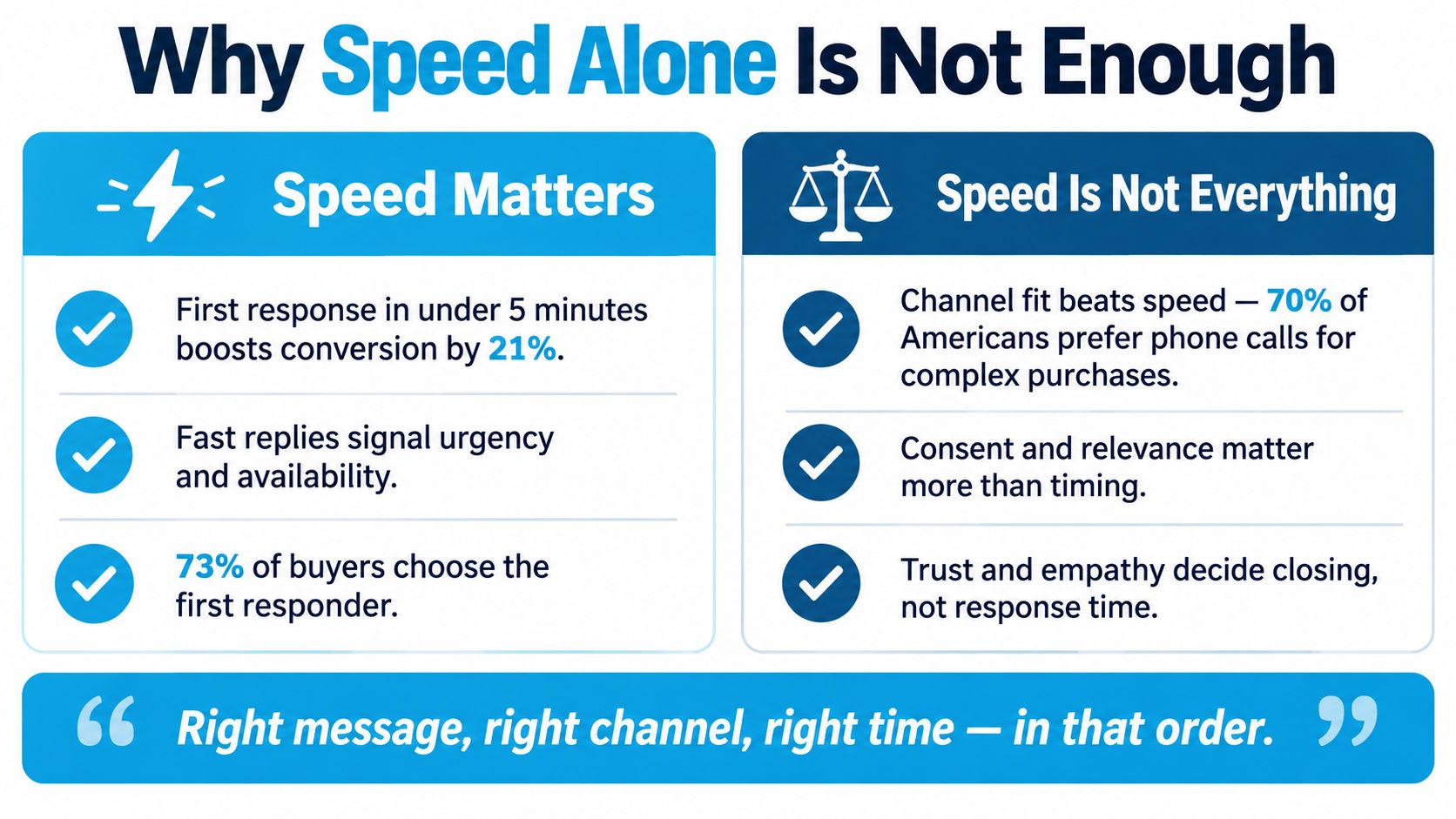
Fast response is necessary. It is not enough. The standard advice, call within five minutes, skips a practical problem that kills conversion in service businesses every day. You can respond quickly and still choose the wrong channel.
Channel fit decides whether speed pays off
Current consumer research shows a clear mismatch. Nearly 70% of Americans use phone support, but only 35% prefer it, and 58% of consumers globally want to choose their preferred communication channel when opting in, according to this analysis of response time and channel preference. That means the usual “call everyone immediately” playbook is too blunt.
If someone requests a legal consult during work hours and checks a box asking for text updates, an immediate phone call may underperform a fast text acknowledgment followed by a scheduled call. If a dental patient submits an appointment request from a mobile form, a confirmation text with scheduling options may do more than a voicemail they'll never hear.
What a good first response actually looks like
A strong first response has four qualities:
- It's fast and arrives while intent is still fresh
- It matches the channel the prospect is most likely to answer
- It's trusted because it confirms what happens next
- It preserves consent instead of spamming every outlet at once
If you want a broader operational guide to improve lead response speed, that resource is useful because it focuses on reducing delay. Just don't stop there. Speed without channel fit creates motion, not conversion.
A missed call workflow makes this obvious. Teams that use a dedicated missed call recovery system tend to perform better because they respond on the event itself, not when someone notices the missed call later.
The right first response isn't “call fast.” It's “respond fast on the channel the prospect will actually trust and answer.”
Audit your forms and intake scripts. If you're not capturing channel preference, opt-in language, and urgency signals at the point of inquiry, your speed-to-lead metric is hiding a design flaw.
Designing the Multi-Touch Follow Up Workflow
One callback is not a follow-up strategy. It's a first attempt. If your team marks leads “cold” after one unanswered call, they're not disqualifying bad leads. They're abandoning undecided ones.
Sales benchmark summaries report that roughly 80% of sales require five or more follow-up contacts, yet many representatives stop after a single attempt, and only about 12% make three or more touches, according to ZoomInfo's follow-up statistics roundup. That should change how you build the workflow from the ground up.
Use clear states, not vague status labels
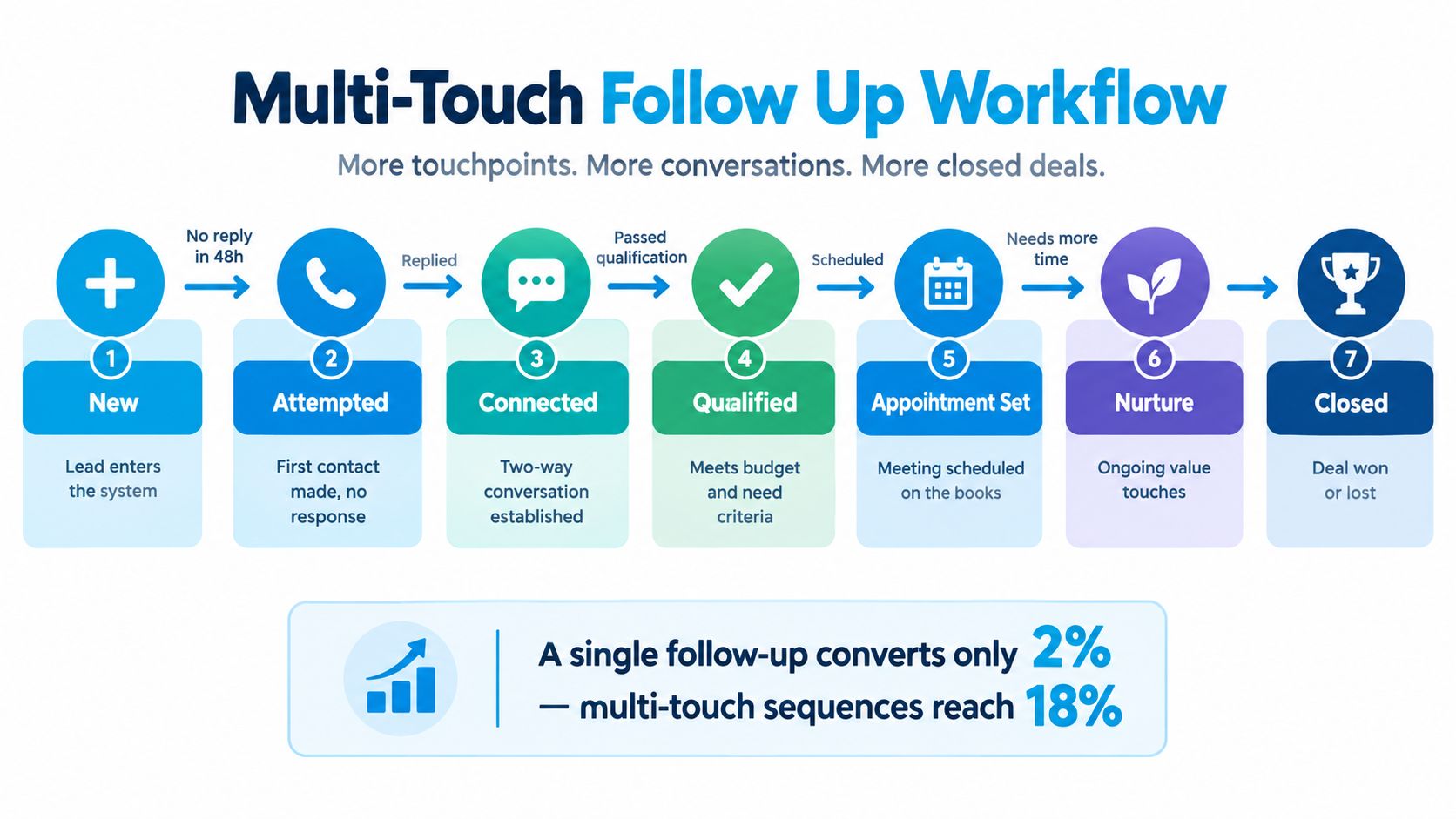
A workable lead follow up system uses explicit states:
New
The lead enters from form, call, ad, or referral. Timestamp it immediately.Attempted
First outreach was made, but no two-way response happened yet.Connected
The prospect replied, answered, or engaged in a real conversation.Qualified
The lead meets your business rules for fit and intent.Appointment Set
A booked consult, estimate, visit, or intake is on the calendar.Nurture
The lead isn't ready now, but should stay in structured follow-up.Closed
Won, lost, or disqualified with a real reason.
Change the objective on each touch
Bad sequences repeat the same ask. Good ones change the job of each contact attempt.
- First touch confirms receipt and offers help or scheduling
- Second touch uses a different channel if the first one failed
- Third touch answers a likely objection or offers an alternate slot
- Later touches create a reason to respond now, such as limited availability or a simpler next step
If you need ideas for cadence design, these timing tips for lead follow-up are useful because they push teams to think in sequences instead of isolated calls.
The controls that keep automation from becoming a mess
Every workflow needs suppression rules. Stop automation the second a lead replies, books, opts out, or gets handed to a human. Write every attempt and outcome back to one CRM record. If phone notes live in one tool, SMS in another, and appointments in a calendar with no sync, your reporting will lie.
For teams building longer-path sequences, practical examples of lead nurturing automation can help map transitions between active sales follow-up and nurture without losing context.
AI Plus Human Hybrid Follow Up
You have three real operating models. Pure automation. Pure human handling. Or a hybrid where AI does the instant, repetitive, always-on work and humans take over when judgment, empathy, or objection handling matters. For most service businesses, the hybrid model is the only one that holds up under real conditions.

The three models side by side
A fully human model sounds reassuring until the office closes, the front desk gets busy, or the rep with the best follow-up habits goes on vacation. Then response times stretch and lead handling gets inconsistent.
A fully automated model fixes speed and coverage, but it falls down when a homeowner asks a nuanced pricing question, a legal lead has a sensitive issue, or a patient needs reassurance before booking. Those moments need a person.
The hybrid model is better because each side does the job it's suited for.
| Model | What it handles well | Where it breaks |
|---|---|---|
| Fully automated | Instant acknowledgment, routine qualification, scheduling, after-hours coverage | Edge cases, objections, empathy-heavy conversations |
| Fully human | Nuance, trust, complex buying decisions | Slow response, no 24/7 coverage, inconsistent execution |
| AI plus human | Fast capture and persistence, with clean escalation for complexity | Requires thoughtful setup and handoff rules |
Why the hybrid model wins in practice
The right setup is simple to explain. AI handles the first mile and the repetitive middle. Humans handle the decisive moments. That means AI can answer after-hours inquiries, collect details, offer appointment windows, send reminders, and keep the record current. When the lead asks something sensitive or complex, the system hands off with context intact.
One example in this category is a platform that combines automation with handoff logic. Recepta.ai documents that businesses using a 24/7 AI receptionist with human handoff report up to 30% more qualified leads, around 80% cost savings versus in-house reception, and roughly 15x ROI, while reducing voicemail loss, as described on Recepta.ai. Those figures are reported platform outcomes, not a guarantee for every workflow, but they point in the right direction.
For operators comparing hybrid designs, this look at automated customer service solutions is useful because it shows where automation should stop and people should step in.
Here's a short walkthrough of the model in action:
If your business can't staff perfect lead handling around the clock, don't pretend it can. Build a handoff model that covers the gap.
Two Mini Case Studies That Show the System Working
Most advice on lead follow-up stays abstract. Real systems are easier to understand when you watch the sequence fire.
Dental clinic at 10 a.m.
A dental clinic gets an online appointment request at 10:00 a.m. The right system sends an automated confirmation immediately, then routes the request to the front desk or treatment coordinator for a fast call attempt. If no human follow-up happens by 10:30, the system creates an escalation task so the request doesn't disappear into the day's chaos.
That pattern matters because execution is rare. In Harvard Business Review's audit of 2,241 companies, only 37% of firms responded to a web lead within one hour, 24% took more than a day, and 23% never responded at all, according to this summary of the lead response time study. A clinic that timestamps the request, confirms instantly, and escalates missed ownership is already ahead of many competitors.
The small operational change is not fancy. It's assigning a time-based escalation instead of trusting memory. The KPI that moves is response latency, and the CRM record stays clean because the confirmation, call attempt, and outcome all live in one timeline.
After-hours HVAC inquiry
An HVAC company gets a missed call after business hours. The system immediately acknowledges the inquiry, captures the problem type, and offers a booking window or callback path. The prospect asks a pricing-related question. That's where a human should take over, because quoting without context can lose trust fast.
Hybrid design earns its keep here. The automation handles the instant intake and continuity work. The human addresses the objection, confirms the job fit, and moves the lead toward an appointment. When that handoff is logged correctly, managers can see which stage stalled, what question triggered escalation, and which script needs tightening.
Fast acknowledgment keeps the lead warm. Human judgment closes the gap when the conversation stops being routine.
Both examples are cloneable. One uses a daytime form with escalation. The other uses after-hours intake with human takeover on complexity. That's what a practical lead follow up system looks like.
KPIs That Reveal Whether Follow Up Is Working
Most follow-up dashboards are packed with vanity metrics. Total calls made. Emails sent. Tasks completed. None of that tells you whether the system is converting inbound demand into qualified appointments.
The six KPIs that matter
Track these instead:
Median time to first response
This tells you how fast the typical lead gets a first touch.90th percentile time to first response
This shows whether a minority of leads are getting ignored long enough to damage results.Contact rate
The share of leads that turn into a real two-way interaction.Qualification rate
The share of contacted leads that meet your fit and intent rules.Appointment-set rate
The percentage of leads that move from inquiry to a booked next step.Touches to booking
How many attempts it takes, by channel and sequence, before a booking happens.
Why averages hide operational failure
Averages flatter broken systems. One team might boast a low average response time while still leaving a chunk of leads untouched for hours because a few instant auto-replies drag the average down. That's why I prefer median and 90th percentile latency. They expose whether speed is consistent, not just occasionally impressive.
Use channel and attempt-level breakdowns to find friction:
| KPI view | What it reveals |
|---|---|
| By channel | Whether phone, SMS, or email is actually creating conversations |
| By attempt number | Whether your sequence stops too early or drags too long |
| By location or rep | Whether process gaps are operational or individual |
| By lead source | Whether some lead types need different urgency rules |
Governance matters
Someone must own the numbers. When response latency slips or contact rate drops, alerts should go to the person who can fix staffing, routing rules, or automation failures. Leadership should review the data on a regular cadence, not just at quarter-end when the revenue miss is already locked in.
If a metric can't trigger an action, it belongs lower on the dashboard.
A 30-Day Rollout and What Changes When You Fix This
You do not need a six-month transformation project to fix lead follow-up. You need one disciplined month.
Week-by-week rollout
Week one starts with instrumentation. Add lead-created timestamps, first-response timestamps, source tracking, and owner assignment. Connect your CRM and calendar so bookings and status changes stop living in separate places.
Week two is about first contact quality. Capture channel preference on forms, define what counts as high intent, and add a five-minute escalation rule for urgent inquiries. If nobody responds in time, the system should force visibility.
Week three builds the multi-touch workflow. Map states from New through Closed, add retry logic across channels, and make sure suppression kicks in on reply, booking, opt-out, or human takeover.
Week four layers in hybrid coverage, dashboards, and management review. Decide where AI handles intake, reminders, and routine follow-up, and where humans step in. Then review the workflow weekly until the numbers stabilize.
What changes when you fix it
The first visible change is fewer “we never heard back” losses. The second is cleaner reporting. The third is that your team stops confusing busyness with conversion. A real lead follow up system makes response speed, channel fit, persistence, and handoffs measurable.
Waiting another quarter is expensive, even if you can't see the exact invoice. Every month you delay, qualified leads book with competitors who answered faster, used the right channel, and didn't let the conversation die.
Recepta.ai gives service businesses a practical way to run this model with 24/7 AI receptionist coverage, appointment scheduling, lead capture, follow-ups, and human handoff when the conversation needs judgment. If you want to stop losing inbound leads to slow response, missed calls, and inconsistent follow-up, visit Recepta.ai and see how a real lead follow up system can be put into operation.