AI Appointment Scheduling Software: A Practical Guide
At 9 PM, a homeowner discovers water spreading under the kitchen sink and calls the local plumbing company. The call reaches voicemail. By morning, the office has a message to return, but the homeowner has already booked the first competitor who answered. The lost job wasn't caused by poor plumbing. It was caused by a scheduling process that couldn't respond when intent was highest.
That pattern appears in many businesses. Missed after-hours calls leave revenue unclaimed, no-shows weaken route density and staff utilization, and front-desk employees spend their day repeating availability, collecting details, and moving appointments. The administrative load behind those tasks can become a serious operational constraint, as the discussion of administrative burden in service operations makes clear.
AI appointment scheduling software addresses more than the booking step. The useful systems qualify a request before offering a slot, apply real calendar and staffing rules, predict which appointments may be missed, send reminders, and transfer complicated or sensitive conversations to a human. This guide treats the category as an operating system for customer access, not as another booking link.
Why the Old Way of Booking Is Breaking Down
A voicemail-based process assumes customers are willing to wait. A shared inbox assumes someone will notice every message. A basic booking link assumes the customer already knows which service they need, which appointment length applies, and whether the available slot is operationally suitable. Those assumptions rarely hold in home services, healthcare, or any business where urgency and context affect the booking.
Consider the plumbing call again. A receptionist returning the message the next morning may still win the job, but the business has already lost control of the first response. An AI receptionist could answer immediately, identify the emergency, ask for the address and problem type, check service-area rules, and route the request according to the company's escalation policy. If the situation sounds unsafe or falls outside the approved workflow, the system can hand the call to a person instead of improvising.
The same weakness appears in routine work. A cleaning company may accept an online request without knowing the property size. An HVAC business may book a general service call without learning that the customer needs a specialist. A clinic may offer a slot without accounting for the visit type, provider requirements, forms, or follow-up timing.
Practical rule: A confirmed appointment isn't automatically a good appointment. The booking must match the customer's need, the team's capability, and the available operational capacity.
No-shows create a second failure point. A vacant appointment slot can disrupt a technician's route, leave clinical capacity unused, or force staff to spend time calling people who may not answer. Open access scheduling, when designed around patient and provider needs and supported by stakeholder training, is described in a systematic review of outpatient scheduling as an effective strategy for reducing missed appointments. The lesson is broader than healthcare: flexible access and clear operating rules matter more than publishing availability.
Front-desk phone tag creates a third problem. Employees answer the same questions, search calendars, confirm details, resend instructions, and process rescheduling requests. Automation can remove repetitive work, but the strongest systems preserve human attention for exceptions, urgency, emotion, and decisions that require judgment.
What AI Appointment Scheduling Software Actually Does
Think of an AI scheduler as a 24/7 receptionist with access to the right systems. It answers a call or message, understands what the customer wants, checks the live calendar, asks questions that affect the appointment, offers valid times, records the outcome, and sends the next instruction. Unlike a static form, it can respond to the customer's actual words.
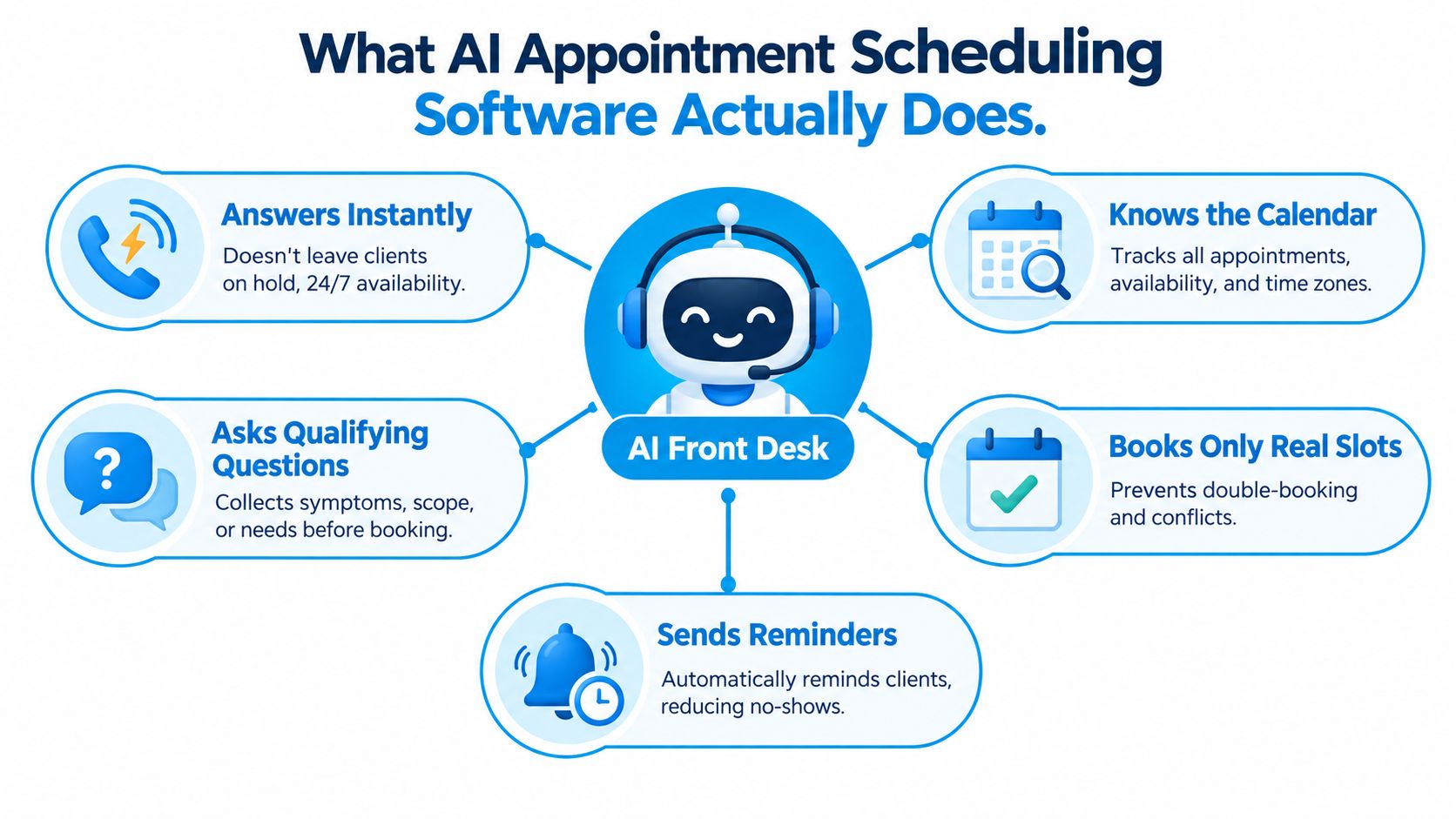
The category becomes easier to understand when you separate the work into four connected capabilities.
Conversation across customer channels
The system can communicate through phone, chat, and SMS, depending on the deployment. A customer might say, “I need someone to look at my air conditioner,” rather than select a service from a menu. The AI interprets the request, asks follow-up questions, and keeps the conversation moving without forcing the customer through a rigid form.
Routing and human escalation
A good scheduler knows when not to continue alone. It can route urgent requests, complex cases, dissatisfied callers, or policy exceptions to a trained employee. The handoff should preserve the conversation context, so the customer doesn't need to repeat the address, symptoms, or preferred time.
Calendar and capacity logic
The calendar is more than a list of open rectangles. Appointment length, buffers, technician skills, provider type, travel time, location, time zone, and existing holds can all affect whether a slot is available. AI appointment scheduling software should offer only slots that satisfy those rules.
Operational analytics
The system can surface patterns such as demand spikes, repeat customers, failed booking attempts, rescheduling activity, and possible no-show risk. That information helps an operations lead adjust staffing, availability, reminder workflows, and routing rules.
A booking widget usually publishes available times and records a selection. A traditional IVR menu routes callers through numbered choices. An AI scheduler combines conversation with workflow execution, which is why it can qualify intent and manage exceptions rather than merely display a calendar.
Core Features That Separate Real AI Schedulers from Booking Widgets
Buyers often compare feature lists as if every capability has equal value. They don't. A branded booking page may improve presentation, but unreliable calendar logic or poor human handoff can damage the customer experience. Rank the stack by how directly each layer protects capacity, response time, and service quality.
| Feature Group | What It Includes | Importance Rank |
|---|---|---|
| Reliability and conversation | Natural-language understanding, multilingual support, interruption handling, accurate transcripts | 1 |
| Routing and escalation | Human handoff triggers, priority recognition, escalation paths, context transfer | 2 |
| Calendar intelligence | Buffers, duration rules, travel time, time zones, skills-based matching | 3 |
| Integrations | CRM, payments, telephony, messaging, dispatch, clinical and practice systems | 4 |
| Analytics | No-show prediction, demand patterns, conversion tracking, revenue attribution | 5 |
Start with the conversation layer
The AI must understand ordinary customer language, including interruptions, corrections, incomplete answers, and changes of mind. Multilingual support may matter for the audience you serve, but language coverage alone isn't enough. Test whether the system can distinguish “I need a quote” from “I need emergency service,” and whether it can recover when a caller answers out of order.
Make routing explicit
Routing rules protect people from being booked into the wrong workflow. A sales prospect may need qualification before a demo. A tutoring business may need to match a student with a subject, level, or instructor, which is why a resource such as tutoring scheduling software is useful when evaluating education-specific requirements. In every industry, ask what causes an immediate transfer and whether the receiving employee sees the collected context.
Treat calendar logic as the operational core
The scheduler should respect buffers, service duration, travel, staff capability, and location. A system that books an appointment but ignores the time required to reach it can create an attractive calendar that the field team can't execute.
Measure outcomes, not activity
Analytics should connect conversations to confirmed bookings, cancellations, reschedules, attendance, and downstream outcomes. No-show prediction is valuable only when the business can act on it through reminders, deposits, waitlists, or human outreach.
The AI front desk model is a useful way to think about this hierarchy. The front desk isn't merely a page where customers pick times. It is the point where intent becomes a qualified, routed, and operationally valid appointment.
How the Software Works in Real Home Services and Healthcare Practices
The same scheduling engine can support very different businesses, but the questions and rules must change. An HVAC company cares about service area, technician capability, travel time, and urgency. A dental clinic cares about patient status, appointment type, provider resources, forms, and clinical suitability.
Scenario one, an HVAC request
At 7:30 PM, a homeowner calls about a failing air conditioner. The AI answers, asks about the symptoms, the unit's age, the address, and whether the situation is urgent. It checks whether the property is inside the service area and matches the request with technician skill tags.
The system then checks route density, travel time, parts availability, and appointment duration before offering two viable arrival windows. It doesn't promise a time that looks open but would force a technician to cross town or arrive without the right capability. If the customer describes a dangerous condition or requests work outside policy, the call moves to a human.
Scenario two, a dental booking
At 11 PM, a new patient visits a dental clinic website and requests a cleaning and exam. The AI confirms that the person is a new patient, checks the relevant insurance information, and looks for a combined appointment. It offers a 90-minute visit that includes a 60-minute cleaning block with a suitable hygienist, then sends the required pre-visit forms.
The conversation is more structured than the HVAC call because the clinic needs patient intake and appointment-type controls. The underlying orchestration is the same: understand intent, gather qualifying information, check constraints, reserve a valid slot, and communicate the next step. Readers assessing the broader role of AI in medical team workflows should apply the same distinction between conversational convenience and operational integration.
| Step | Home Services, HVAC | Healthcare, Dental |
|---|---|---|
| Intake | Symptoms, unit age, address, urgency | New-patient status, cleaning and exam request, insurance |
| Qualification | Service area, technician skills, parts needs | Provider capability, appointment type, forms |
| Slot logic | Duration, travel time, route density | Combined visit, hygienist block, clinical availability |
| Escalation | Safety concern or unsupported job | Sensitive question, eligibility issue, clinical uncertainty |
| Follow-up | Arrival confirmation and preparation details | Forms, visit instructions, reminders, rescheduling |
These patterns also adapt to salons, legal consultations, personal training, insurance intake, and real-estate showings. The dialogue changes, but the system still needs a clear definition of intent, qualification rules, capacity, and handoff.
For healthcare-specific workflows, medical appointment scheduling software should be evaluated against privacy, provider resources, patient context, and no-show management, not only self-service booking.
Integrations, Calendars, and the Plumbing Behind the Scenes
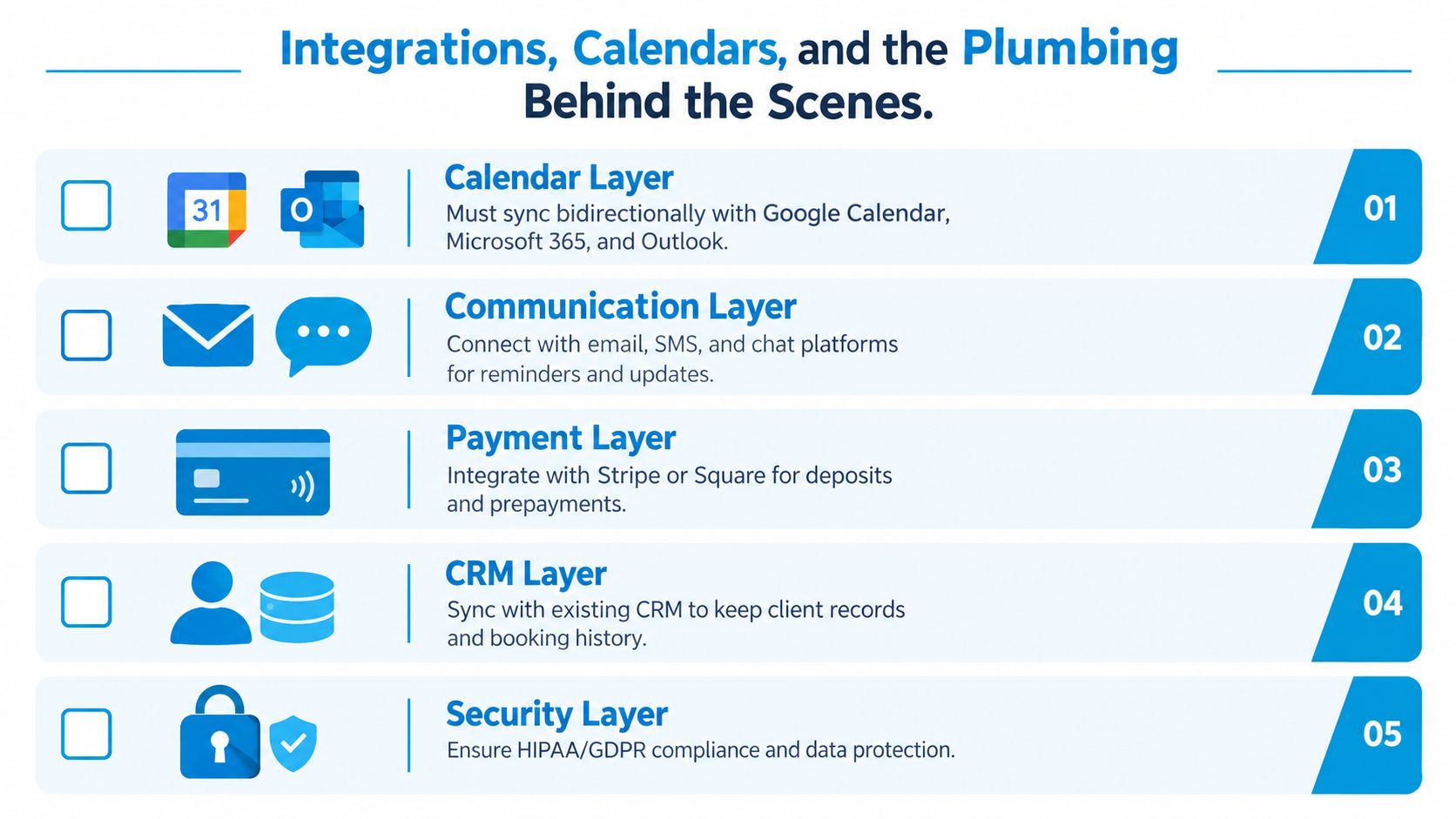
An AI scheduler is only as dependable as the systems it updates. Before launch, map every source of truth and decide which system owns each piece of information. A calendar may own availability, a CRM may own the customer record, and a field-service platform may own dispatch.
Use a bidirectional calendar connection
Connect Google Calendar, Microsoft 365, or Outlook so the scheduler can read and write availability. Bidirectional sync matters because human-only blocks, vacations, location changes, and manually created appointments must flow back into the booking logic. A one-way connection can make a slot appear available after a person has already taken it.
Keep customer records connected
HubSpot, Salesforce, Zoho, and Pipedrive should receive new contact and appointment information without creating duplicate records. Confirm how the system matches an existing customer, updates phone numbers, stores conversation notes, and handles a returning customer who uses a different email address.
Connect industry systems
Field-service teams may need ServiceTitan, Housecall Pro, or Jobber for dispatch and technician availability. Clinical organizations may need Epic, Dentrix, or Jane App for patient and provider scheduling. Don't assume a connector supports every object or workflow because the vendor lists the integration name.
Test communication and payment paths
Twilio, RingCentral, and WhatsApp Business can support conversation channels. SMTP and SMS gateways handle confirmations and reminders, while payment connections may collect deposits where the business requires them. Confirm that failed messages create an alert rather than disappearing.
Common failures include broken webhooks under load, expired OAuth scopes, one-way sync, and incorrect time-zone handling across locations. A practical integration guide should also account for appointment length, buffers, confirmation content, cancellation rules, payment collection, and location or video details, as outlined in this online appointment scheduling checklist.
Use a verification routine before going live:
- Create three test bookings: Use different appointment types and customer records.
- Check the calendar: Confirm the correct duration, time zone, buffer, and assigned resource.
- Check the CRM and operational system: Verify that the appointment and customer appear in the right records and dispatch views within 60 seconds.
- Test a reschedule and cancellation: Confirm that every connected system updates consistently.
For teams designing custom connections, API connectivity for AI workflows can help frame the questions around data ownership, event handling, and failure recovery.
Choosing the Right Tool and Avoiding Common Mistakes
Choose an AI scheduler with a weighted decision framework, not the longest feature list. A system that misses calls or books invalid appointments is worse than a simpler tool that performs its core job consistently.
Use these evaluation weights as a starting point:
- Reliability and uptime, 30 percent: Ask how the vendor monitors failed calls, calendar errors, and message delivery. Request evidence of incident handling, fallback behavior, and reporting.
- Conversation quality and human handoff, 25 percent: Test unclear requests, upset callers, interruptions, and requests outside policy. Ask how handoff latency is measured and whether the employee receives the full conversation context.
- Integration depth, 25 percent: Identify which CRMs, calendars, dispatch systems, and practice platforms have pre-built connectors. Ask which workflows require custom API work and what happens when a connector fails.
- Pricing transparency, 20 percent: Check subscription fees, per-conversation charges, per-booking overages, messaging costs, implementation fees, and support boundaries. A low entry price can become difficult to forecast if usage rules aren't clear.

The weights aren't a substitute for judgment. A healthcare practice may place greater emphasis on privacy controls and clinical-system compatibility. A mobile service business may prioritize travel-aware dispatch and live technician status. The principle remains stable: reliability and handoff deserve more attention than custom colors or a long list of optional features.
Avoid four common buying mistakes. Don't chase features your staff won't use. Don't underestimate change management, because employees need clear ownership rules when AI handles the first interaction. Don't ignore data residency and privacy requirements. And don't sign an annual contract before testing the workflow in real conditions.
Shortlist a few vendors, define the calls and bookings that matter most, and demand a live trial on your own phone number. Ask a real employee to interrupt the AI, request a reschedule, create a conflict, and trigger an escalation. The demo should show how the system behaves when the process stops being tidy.
Implementation Roadmap and Frequently Asked Questions
A controlled rollout gives a small business enough time to fix data, train staff, and measure whether the workflow works before expanding it.
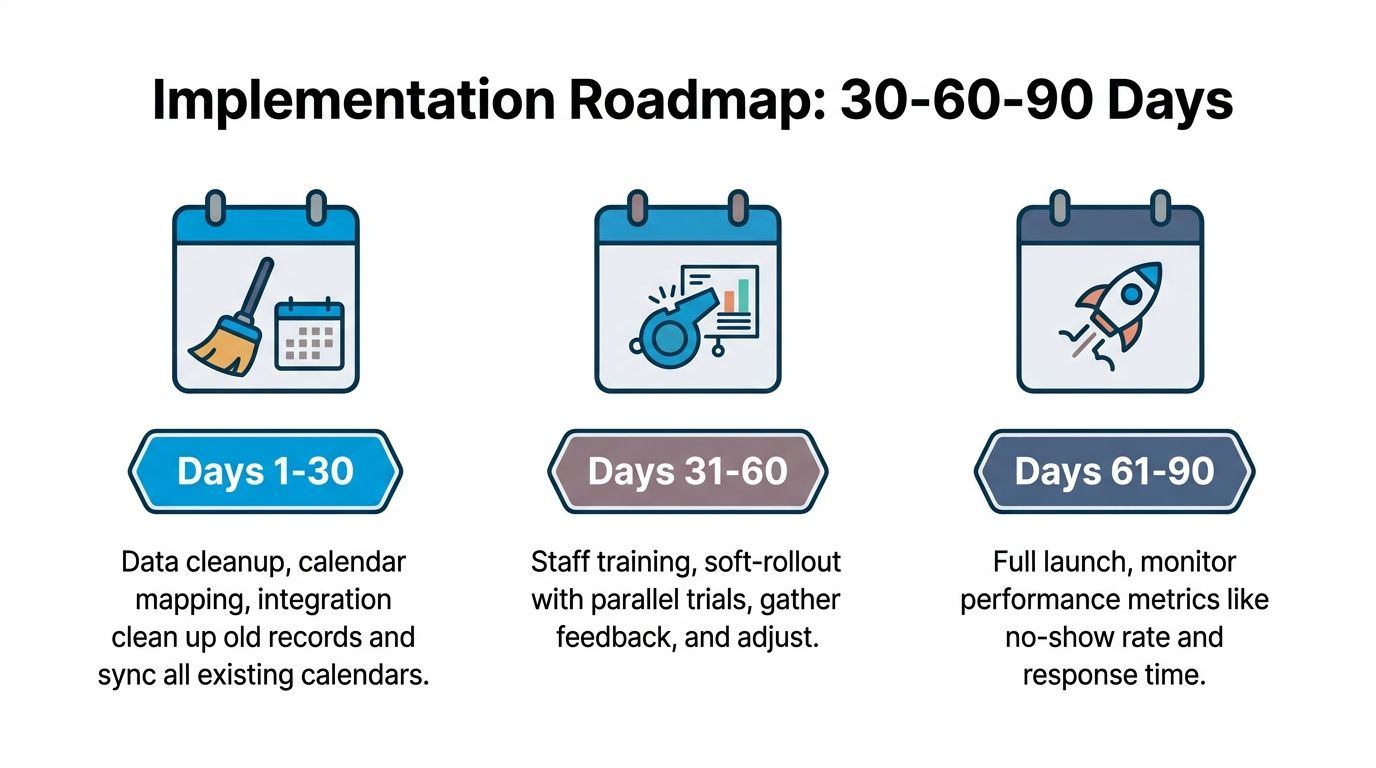
Days 1 to 30
Clean customer records, map calendars, define appointment types, and document buffers, service areas, escalation rules, and cancellation policies. Connect the calendar, CRM, telephony, messaging, and industry systems, then test the data path before exposing the scheduler to customers.
Days 31 to 60
Train staff on handoff ownership, exception handling, and record review. Run a soft launch with parallel monitoring. Track missed calls, confirmed bookings, reschedules, confirmation delivery, and no-show rates, then review failed conversations with the team.
Days 61 to 90
Expand from one channel to the channels customers use. Refine prompts and qualification questions, add routing rules, and review dashboards against the baseline established before launch. Scale only after the team can explain both successful and failed outcomes.
Questions buyers ask
How long does deployment take?
The answer depends on data quality, integrations, workflow complexity, and the number of appointment types. A narrow pilot is usually easier to control than a broad launch across every service and location.
Can the AI hand off to a live person?
It should. Define triggers for urgency, confusion, dissatisfaction, sensitive information, unsupported requests, and policy exceptions. Test whether the human receives enough context to continue naturally.
What happens during an internet or system outage?
Ask about fallback routing, voicemail behavior, incident alerts, and appointment protection. The system should fail safely rather than continue booking against stale availability.
How is privacy handled?
Review data retention, access controls, encryption practices, audit logs, data residency, and applicable healthcare or regional requirements. Ask which connected systems receive conversation data and how staff permissions work.
How is pricing structured?
Vendors may combine platform fees with conversation, call, message, booking, integration, or support charges. Request a realistic usage model that includes reminders, reschedules, failed attempts, and human handoffs.
The strongest implementation starts narrow, measures, and expands only after the first 90 days demonstrate that the system protects capacity and improves the customer handoff.
Recepta.ai combines conversational AI with human support for inbound and outbound calls, appointment scheduling, lead capture, and follow-ups, with integrations across calendars, CRMs, and industry systems. Visit Recepta.ai to see whether its AI receptionist and human escalation model fit your booking workflow.