AI Receptionist Demo: How to Request, Test, and Decide
A caller reaches your business while you're watching an AI receptionist sales deck. The phone rings on a Tuesday afternoon, staff are already handling customers, and the caller hangs up before anyone answers. The vendor's demo call sounds flawless, but it tells you nothing about what happens when a real customer interrupts, asks an ambiguous question, needs an appointment, or calls after hours.
That's why an AI receptionist demo should be treated as a buyer-side evaluation, not a product tour. You need your own script, real operating conditions, measurable criteria, and a defined path from demonstration to pilot. The category is moving quickly. A 2026 industry summary reports that voice AI handled 19% of inbound contact-center volume in 2026, up from 6% in 2024, while Gartner CX research cited in the same summary found 44% of enterprises were already using voice AI for at least one inbound call type and 12% had deployed it across more than half of their call volume. The industry summary helps explain why buyers should test completed outcomes, not just pleasant conversation.
Why Your AI Receptionist Demo Needs a Buyer-Side Plan
Start with the caller, not the vendor's interface. If your business misses a call, the caller doesn't care whether the failure came from staffing, routing, a calendar connection, or a polished but brittle voice model. They call another provider, leave without a message, or decide your business is difficult to reach.
The operational baseline is already clear. One analysis of 1,446,980 business calls across 2,074 businesses found that 28.5% arrived outside standard business hours and 12.4% arrived on weekends. The same analysis reported that 34.8% of after-hours callers expressed buying intent, while AI receptionists answered instantly and routed 73.8% of calls to the right person. The AI receptionist statistics analysis shows why a demo must test always-on answering, lead capture, and routing for phone-dependent businesses.
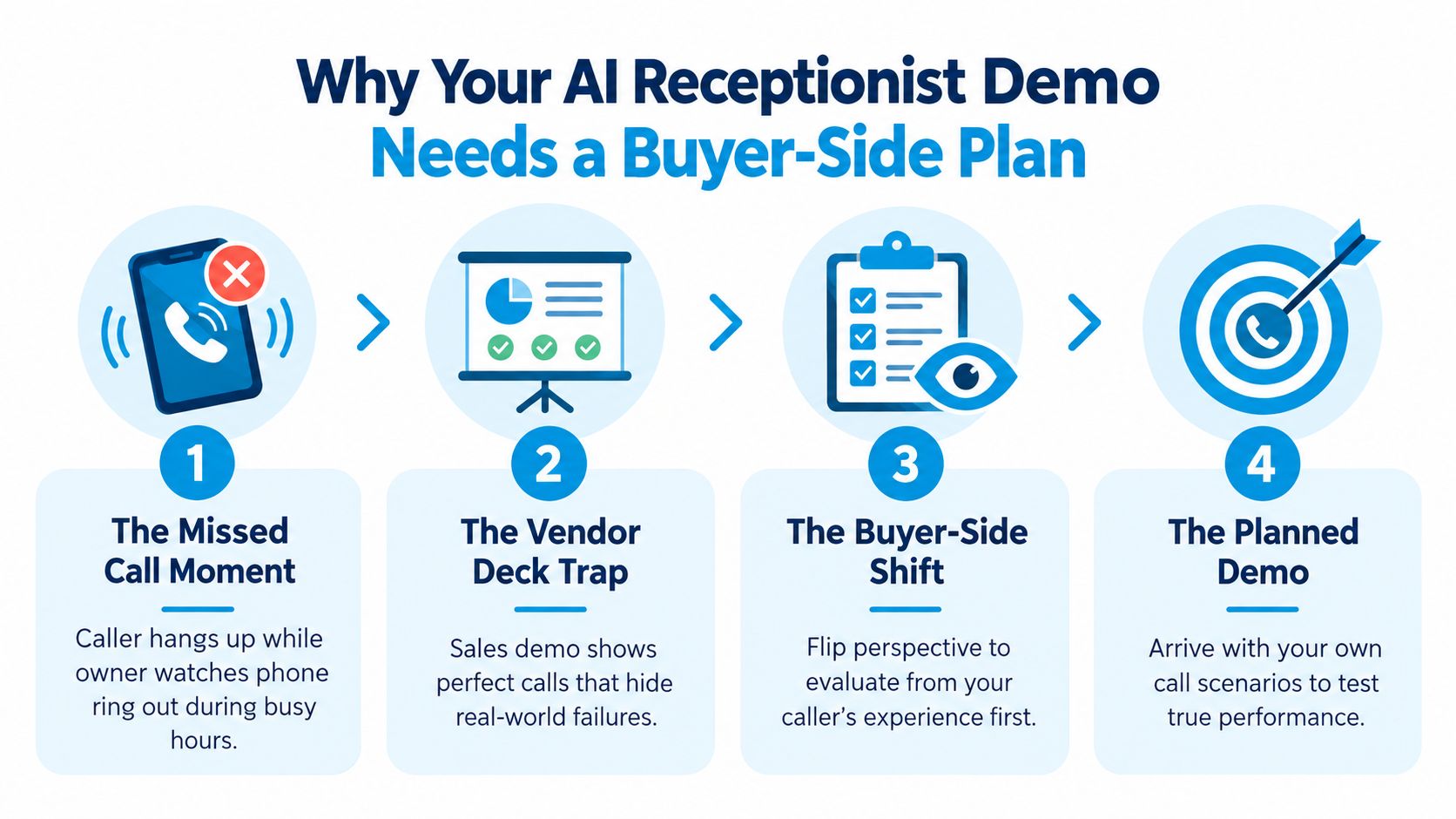
Use four phases to control the evaluation
First, prepare before the call. Bring recent call logs, common caller intents, business rules, and the systems the receptionist must use. Read a practical overview of what an AI receptionist does so your team can separate core requirements from vendor terminology.
Second, run live scenarios. Don't let the vendor choose every caller, question, and outcome. Test the calls that cause your staff the most trouble, including interruptions, noise, emotional callers, ambiguous requests, and failed transfers.
Third, measure outcomes. Call pickup is only the entry point. Track booking conversion, transfer escape rate, handle time by intent, and after-hours capture. Your scorecard should show whether the system creates qualified work, not whether it produces a convincing voice.
Fourth, convert the result into a pilot. A demo can prove that a workflow is possible. It can't prove that the workflow will remain accurate across your actual callers and staff processes. Use the same discipline you'd apply when reviewing a digital partner's Aim Set Win client portfolio, look for evidence of execution rather than presentation quality.
Buyer rule: If the vendor won't let you test your own scenarios live, you aren't evaluating the product. You're watching advertising.
Preparing Your Business Before the Demo Call
A vendor can only configure a useful demonstration when you provide a useful operating brief. Don't send a generic website link and expect the system to understand how your team handles bookings, emergencies, rescheduling, or transfers.
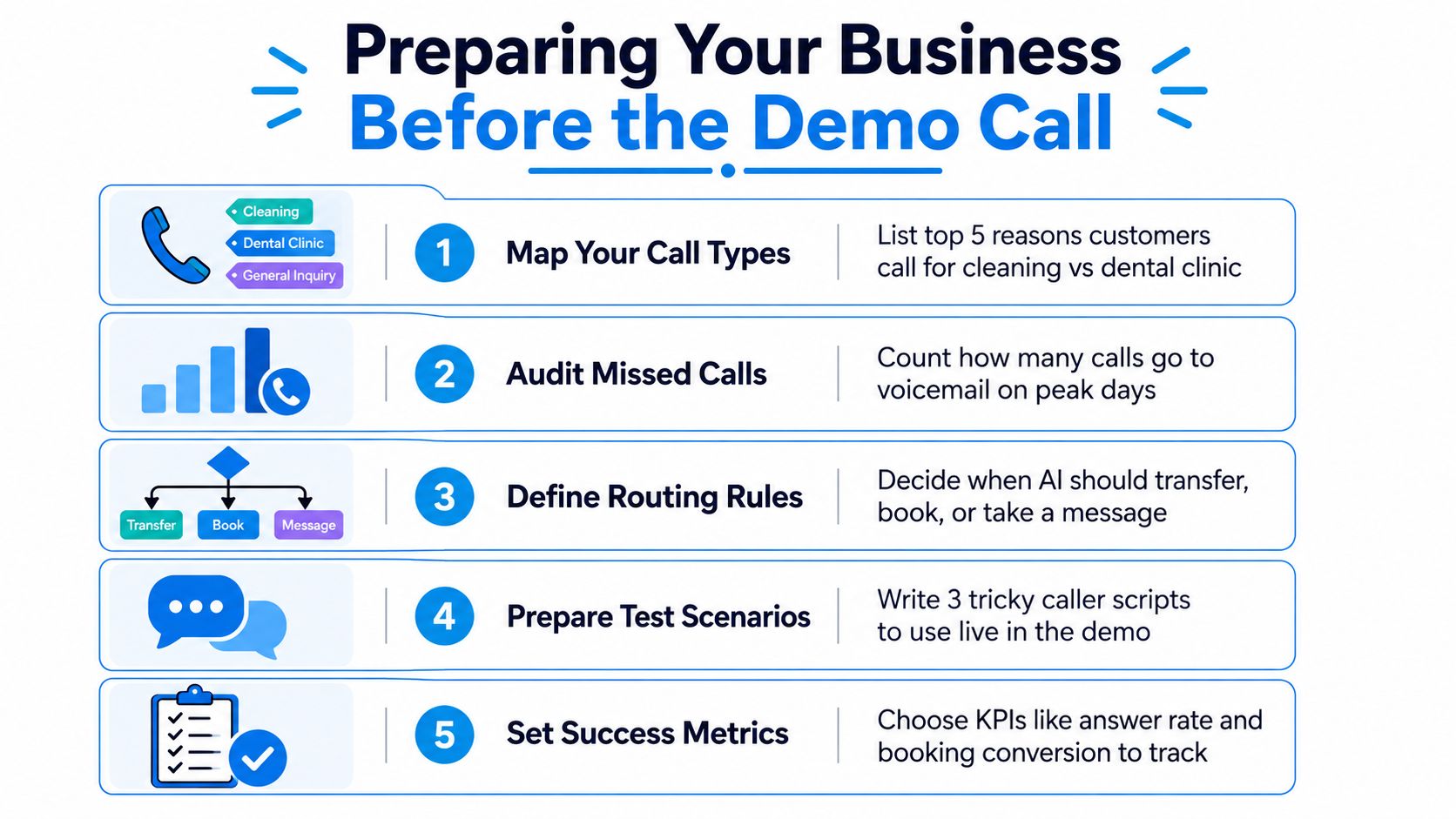
Take two weeks of real call logs and classify each call by intent. Use categories such as new booking, rescheduling, pricing, service availability, existing-customer support, emergency, and message taking. Remove sensitive information before sharing recordings or transcripts, and confirm what the vendor needs to demonstrate the workflow safely.
A small cleaning company might find that its highest-value calls involve recurring service quotes, property access questions, and requests that arrive while crews are in the field. A three-chair dental clinic may care more about new-patient appointments, cancellations, insurance questions, and urgent pain calls. Both businesses need an AI receptionist, but they shouldn't run the same test plan.
Define the calls that hurt most
Write down the three calls your team most regrets missing. For the cleaning company, that could be a recurring commercial quote, an after-hours move-out request, and a caller who wants service during a narrow availability window. For the dental clinic, it could be a new-patient booking, a same-day cancellation that opens capacity, and a caller reporting severe symptoms who needs correct human triage.
Then document what the AI should do in each case:
- Book: Use the approved calendar, confirm the appointment details, and send the right follow-up.
- Qualify: Collect the details a staff member needs before returning the call.
- Transfer: Route immediately when the caller meets a defined escalation rule.
- Fallback: After two failed attempts to understand or complete the request, transfer to a human or take a structured message.
Calendar behavior deserves its own test. The receptionist should know which appointment types, staff members, locations, buffers, and business hours it can use. Review the vendor's calendar integration guidance before the demo and write down what must happen when the preferred slot is unavailable.
Send the vendor a short preparation packet in advance:
- Call intent list: Your common reasons for calling, ranked by operational importance.
- Routing map: Departments, staff, transfer numbers, and fallback destinations.
- Business rules: Hours, service areas, booking constraints, emergency instructions, and prohibited promises.
- Integration list: Calendar, CRM, practice-management system, booking platform, and notification tools.
- Sample calls: Sanitized recordings, transcripts, or written scripts that represent normal and difficult interactions.
Running the Live Demo With Real Test Scenarios
Run the call as if the vendor has already replaced the current answering workflow. Assign one person to act as the caller, one to operate the vendor dashboard, and one to record scores. Ask permission before recording the session, then take timestamped notes for every pause, correction, transfer, and system action.
Start with a normal call, but don't stop there. For the dental clinic, open with a new patient who wants an appointment, asks about availability, and needs confirmation. For the cleaning company, request a quote for recurring service and provide the property type, preferred schedule, location, and contact details. Watch whether the AI gathers complete information and produces a usable next step.
Escalate the difficulty deliberately
Use the same sequence on every vendor call:
- Happy path: Book a new dental patient or qualify a recurring cleaning quote.
- Interruption: Interrupt the AI halfway through a sentence and change one detail.
- Accent and noise: Use a thick accent, background conversation, or traffic noise.
- Frustration: Say that you've already called, you're unhappy, and you need help now.
- Unsupported request: Ask for something outside the configured knowledge or workflow.
- Human escalation: Demand a staff member and judge whether the transfer preserves context.
- After-hours emergency: Call at 11 p.m. and report a burst pipe to a plumbing business. The system should identify the emergency, follow the approved triage rule, and route appropriately instead of treating the call as a routine service inquiry.
A field study across 85 businesses in 58 industries found that only 37.8% of inbound calls were answered live, while 37.8% went to voicemail and 24.3% received no response, implying roughly 62% were unanswered. The practical test is therefore simple: simulate a live inbound call, confirm intent, collect contact details, schedule or qualify the lead, and escalate when the situation exceeds the AI's authority. The observational AI receptionist data supports testing that complete sequence.
Score every scenario immediately. Don't accept “that works better in production” as an answer. If the vendor can't demonstrate the behavior now, mark the scenario as unproven.
| Scenario | Comprehension (0-3) | Response Quality (0-3) | Escalation (0-3) | Latency (0-3) |
|---|---|---|---|---|
| New-patient booking | ||||
| Recurring-service quote | ||||
| Interruption and changed detail | ||||
| Accent or background noise | ||||
| Frustrated caller | ||||
| Unsupported request | ||||
| 11 p.m. burst-pipe emergency |
Use the same script if you request a demo from another provider. Consistent testing gives you a comparison. Vendor-selected examples don't.
Measuring Demo Success With the Right KPIs
“Calls answered” is a weak success metric. An AI can answer every call and still fail if it books the wrong appointment, loses the caller during transfer, or captures a lead without creating follow-up work.
Use four measurements that connect directly to operations.
Booking conversion rate
Booking conversion rate is the share of qualified calls that become scheduled appointments or jobs. A dental clinic should separate new-patient calls from routine administrative requests. A cleaning company should distinguish quote requests that meet its service area and job criteria from calls that were never viable prospects.
The demo should show the full path from conversation to confirmed calendar event. Compare call recordings with the vendor dashboard and your own CRM or booking log. A dental clinic losing three new-patient calls each week at a $1,500 patient lifetime value would face a meaningful opportunity cost, even before considering referrals or future treatment. That example is a decision aid, not a universal valuation.
Transfer escape rate
This measures callers who hang up before reaching the intended person or completing a fallback message. Transfer attempts aren't enough. You need to know whether the caller stays connected, whether context reaches the staff member, and whether the staff member knows what to do next.
Average handle time per intent
Measure how long the AI takes to resolve a booking, qualification, reschedule, or transfer. A short call isn't automatically better. The right measure is efficient completion without repeated questions, unnecessary menus, or premature handoff.
After-hours capture rate
Track after-hours calls that become a qualified lead, booked appointment, emergency escalation, or complete message. Missed demand often appears outside staffed coverage. One field study found 85% of callers who reached voicemail hung up instead of leaving a message, as reported in the missed-call analysis. That makes message capture a weak substitute for live handling.
| KPI | Target Threshold | Missed-Call Cost Example | Pass / Partial / Fail |
|---|---|---|---|
| Booking conversion rate | Set from your baseline and qualified-call mix | Three lost dental calls weekly at a $1,500 patient lifetime value | |
| Transfer escape rate | Set a maximum your staff can investigate and recover | A caller hangs up before urgent or high-value handoff | |
| Average handle time per intent | Compare with current live handling by intent | Long calls consume staff time without completing the task | |
| After-hours capture rate | Measure qualified leads, bookings, and correct escalations | Evening or weekend callers reach voicemail instead of a next step |
Your baseline should come from the demo week, call recordings, the vendor's reporting, and your CRM booking log. Use the performance dashboard guidance to decide which fields need to be visible before you approve a pilot.
Red Flags and Green Flags During the Demo
A polished interface proves very little. Vendors can make a scripted call sound excellent while avoiding the failure modes that determine whether your team can trust the system.
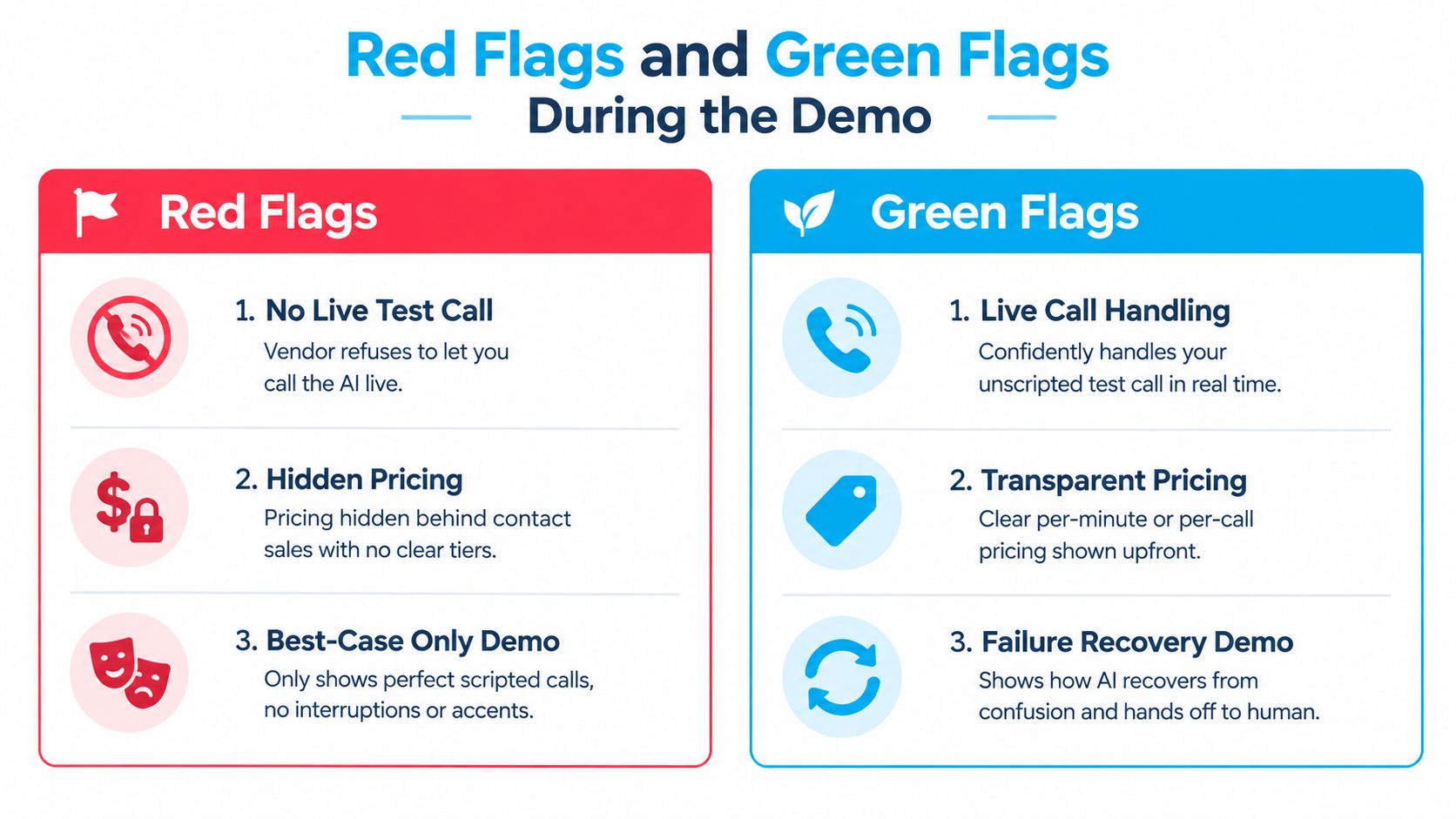
The most serious red flag is refusal to test live. If the vendor won't let you call a number, interrupt the AI, create noise, or force a transfer, ask what condition they're protecting. Other warning signs include pricing hidden behind “contact sales,” a demo limited to best-case calls, no explanation of latency, vague answers about data retention, and an inability to show genuine human failover.
Recent voice-AI commentary identifies latency above 700 ms as feeling uncomfortable or robotic, making response speed an acceptance criterion rather than a cosmetic preference. The voice-AI commentary also reflects how quickly the category is becoming crowded. Buyers should demand workflow evidence because conversational polish is easy to showcase and harder to trust.
Ask questions that force operational answers
- Red flag, no live test: “Can I call the system now and interrupt it?”
- Red flag, hidden pricing: “Show every usage charge, overage rule, setup fee, and cancellation condition.”
- Red flag, happy-path theater: “What happens when the caller gives conflicting information?”
- Red flag, unclear data policy: “How long are recordings, transcripts, and summaries retained, and who can access them?”
- Red flag, weak failover: “Show the transfer after the AI has misunderstood the caller twice.”
Green flags look less glamorous but matter more. A serious vendor can explain per-minute or per-call pricing, demonstrate similar workflows, state escalation rules clearly, discuss security controls such as SOC 2 or an equivalent standard, and provide a sandbox number for blind testing. The vendor should also explain what happens when the calendar is unavailable, the transfer target doesn't answer, or the caller refuses to provide information.
Do not let a sales representative redirect your test into a feature list. Ask them to repeat the unscripted scenario, identify the failure point, and show the recovery path. For broader vendor diligence, use a structured resource such as how to check if a company is legitimate.
Turning a Strong Demo Into a 30-Day Pilot
The demo is a gate, not the decision. A convincing call earns a controlled pilot with clear exit terms. It doesn't justify an open-ended contract or a full replacement of your existing answering service.
Use three checkpoints:
- Day 7: Tune greetings, caller-intent wording, business rules, and transfer destinations. Confirm that staff receive the information they need.
- Day 14: Review the KPI scorecard against the baseline. Identify failed intents, abandoned transfers, inaccurate bookings, and unresolved follow-up tasks.
- Day 30: Make a go or no-go decision using total cost, conversion data, call quality, staff feedback, and unresolved exceptions.
Put the pilot terms in writing
Require month-to-month terms, standard-format data export, a kill clause with 7 days' notice, and capped overage fees. Define ownership and access for recordings, transcripts, summaries, caller details, and workflow logs before calls begin.
Write success criteria into the pilot agreement. One example is 70% booking conversion on qualified leads with a transfer rate below 20%, but those thresholds should match your baseline, intent mix, compliance obligations, and capacity. Treat them as a proposed acceptance test, not a universal benchmark.
A healthcare practice should pay close attention to scheduling handoff and emergency routing. Research on healthcare phone handling found that practices can miss 20% to 30% of incoming calls, while another study cited in the same source reported that 80% of appointments are still scheduled over the phone. The healthcare missed-call research makes a controlled after-hours and front-desk overflow pilot especially practical.
At the end, choose one rollout path:
- Overflow only: Keep staff answering normally and send busy calls to the AI.
- After-hours only: Use the AI for evenings, weekends, and closure periods.
- Full replacement: Move the main line after the pilot proves routing, booking, escalation, and reporting.
Don't select full replacement because the voice sounds natural. Select it only when the workflow survives real operating pressure.
Your One-Page Demo Scorecard and Next Steps
Bring one page to the vendor call. It should combine the four evaluation phases: preparation, live scenario testing, KPI measurement, and red-flag review. Everyone who will answer transferred calls, manage appointments, review leads, or approve the contract should use the same sheet.
Rate each category from 1 to 5, then write one sentence explaining the score.
| Criterion | Weight | Rating 1-5 | Rationale |
|---|---|---|---|
| Scenario pass rate | 30% | Did the AI complete normal and edge-case calls? | |
| KPI baselines met | 25% | Did the test produce usable booking, transfer, handle-time, and after-hours data? | |
| Integration clarity | 15% | Are calendar, CRM, routing, and fallback behaviors explicit? | |
| Contract terms | 15% | Are cancellation, export, retention, and overage terms acceptable? | |
| Vendor responsiveness | 15% | Did the vendor answer difficult questions without hiding behind the demo script? |
Use the weighted result as a decision aid:
- Above 4.0: Move to a 30-day pilot with the tested script and written acceptance criteria.
- 3.0 to 4.0: Schedule a second demo focused only on the identified gaps.
- Below 3.0: Walk away, regardless of how polished the presentation felt.
A service business may also need industry-specific review. For example, an insurance agency could test whether call summaries enter its CRM without manual retyping. CRM research identifies high starting costs and poor interoperability as barriers to scaling CRM systems, while another source reports that basic CRM automations can save an average of 14.2 hours per employee per month, about 9% of total work time. The CRM automation research gives you a reason to score integration clarity separately instead of treating it as a technical footnote.
Schedule the second demo within seven days while the failed scenarios are still fresh. Circulate the scorecard to the people who'll live with the decision, including reception staff, appointment managers, sales staff, and whoever owns customer data. Agencies evaluating call workflows for specialist clients, including services for law firm marketing, should also preserve the scorecard as a repeatable review document rather than relying on one buyer's impression.
Recepta.ai provides a 24/7 AI receptionist for inbound and outbound calls, appointment scheduling, lead capture, follow-ups, and escalation to trained human agents, with integrations across CRMs, calendars, and industry systems. Visit Recepta.ai to test how its workflow fits your call scenarios and request a 30-day risk-free trial.

.webp)