What Is Ai Receptionist
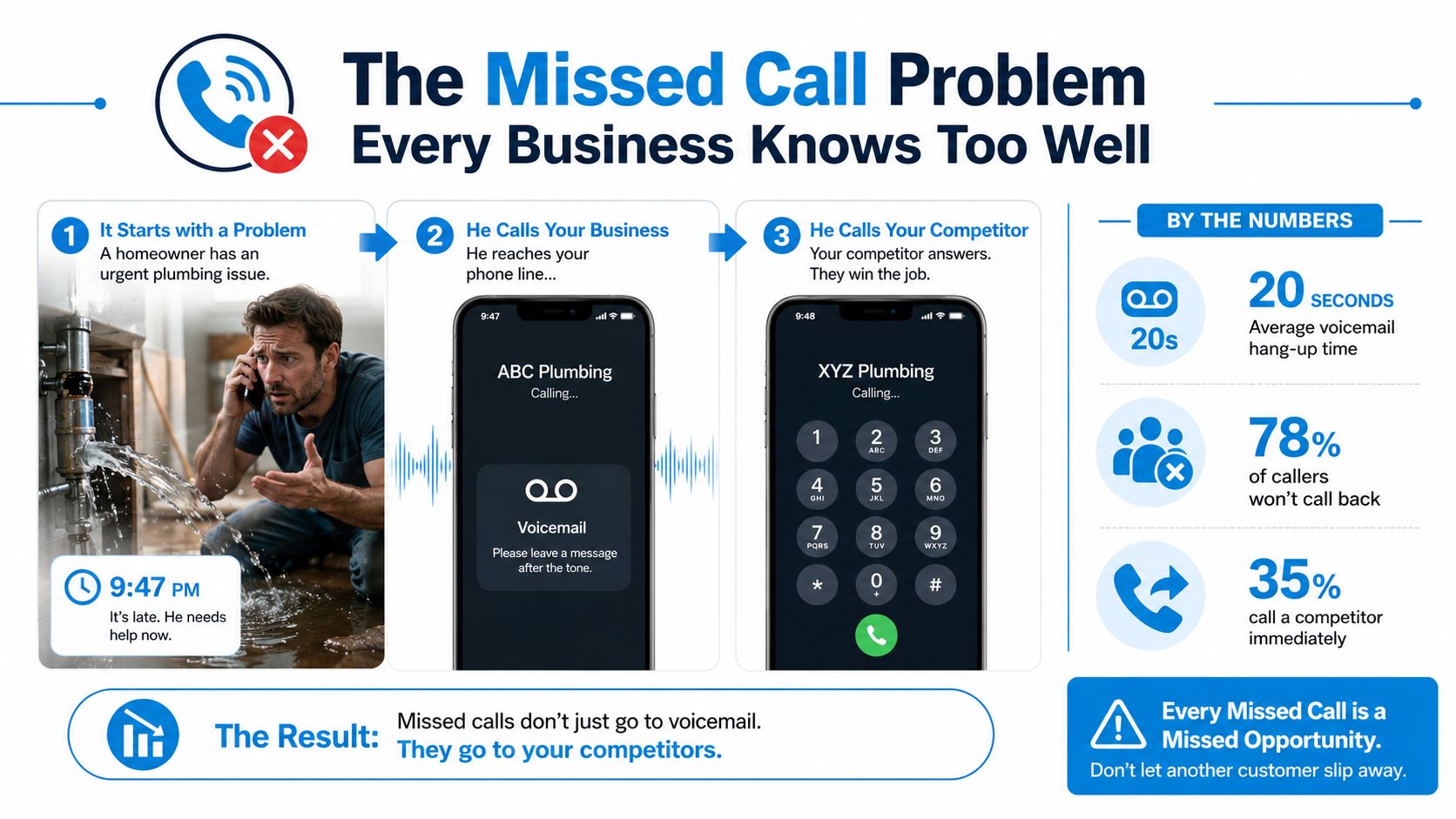
A homeowner calls a plumbing company at 9:47 PM because a burst pipe is filling the kitchen with water. The phone rings, reaches voicemail, and the caller waits briefly before trying another provider. For the business, the problem isn't only that one call. It's the broken connection between customer intent and the company's ability to respond at the exact moment help is needed.
That's the practical starting point for understanding what an AI receptionist is. It's software that answers business calls, understands ordinary speech, handles routine requests, books appointments, captures lead details, and sends urgent or complicated conversations to a person. The important question isn't whether it can sound human in a demonstration. It's whether the system responds quickly, follows the right workflow, shares useful context during handoff, and protects customer data in production.
The Missed Call Problem Every Business Knows Too Well
At 9:47 PM, the plumbing company's owner is asleep. The dispatcher has finished for the day, and the office line sends the homeowner to voicemail. After waiting about 20 seconds, the caller hangs up, searches again, and calls a competitor that answers.
The company never learns the caller's name, never hears the address, and never gets the chance to explain that an emergency technician is available. A voicemail system recorded the attempt, but it didn't preserve the opportunity. For an urgent service business, the difference between a ringing phone and a completed intake can determine whether the job goes to you or someone else.
Call handling is part of the customer experience, not a background administration task. In an analysis of 1.4 million business calls, 51.2% were identified as real leads, 28.5% arrived after hours, and appointment booking represented 38% of AI receptionist call intent according to call-intent analysis from RevSquared. Those calls often arrive when the office is closed, staff are busy, or every employee is already helping someone else.
A useful phone setup still matters. Businesses reviewing routing, voicemail, transfer, and availability options can use these tips from Networking2000 on business phones to improve the underlying call environment before adding automation. An AI receptionist then addresses the structural gap that ordinary phone features can't solve: it can pick up immediately, ask what happened, collect the information needed for dispatch, and either schedule the next step or reach an on-call human.
For the plumbing company, the ideal exchange might be simple:
- Identify the emergency: The system asks whether water is actively leaking and collects the property address.
- Protect the customer: It provides approved immediate guidance without pretending to diagnose the problem.
- Route the job: It contacts the on-call technician or creates an urgent service request.
- Confirm the next action: The caller receives a clear expectation instead of a silent voicemail box.
The technology doesn't guarantee that every caller becomes a customer. It does make sure the company has a conversation to work with, rather than discovering the missed call after the customer has already hired someone else.
What an AI Receptionist Is
A caller reaches a business line, speaks in ordinary language, and receives a response without waiting for staff to answer. An AI receptionist is the voice automation system behind that exchange. It recognizes the caller's request, applies configured business rules, connects with approved systems, and completes an allowed action. Depending on the setup, it can answer common questions, check availability, collect contact details, schedule an appointment, transfer the call, or leave staff a structured message.
A dental clinic provides a clear example. A caller says, “I need to move my cleaning appointment to next week.” The system identifies the scheduling request, checks permitted slots, confirms the chosen time, and updates the relevant record. If no suitable slot is available, the workflow can collect a callback request or send the call to staff.
The process has five practical stages:
- Start the conversation: The system greets the caller and establishes the reason for calling.
- Interpret the request: It distinguishes booking, pricing, directions, support, and urgent situations.
- Retrieve approved information: It checks a calendar, CRM, knowledge base, or ticketing system.
- Complete the permitted action: It schedules a visit, records a lead, or creates a message.
- Escalate when required: It transfers the call when authority, judgment, empathy, or specialist knowledge is needed.
The important production question is not only whether the system can answer. It is whether it knows what it may do, how quickly it must respond, and when a human should take over. A short pause can feel like a dropped call, while an urgent request needs a much lower tolerance for delay than a routine opening-hours question. Those thresholds and handoff rules belong in the configuration, not in guesswork.
What it isn't
An AI receptionist isn't just a chatbot with a phone number. A chatbot receives typed messages through a web or messaging interface. A voice system must handle interruptions, accents, pauses, background noise, corrections, and changing intent while the caller is still speaking.
It also differs from a traditional press-one IVR menu. IVR routes callers through fixed choices, usually by keypad input or rigid commands. An AI receptionist lets someone explain the situation naturally, then maps that language to a defined workflow.
Basic call forwarding only moves a call from one number to another. An AI receptionist can gather details before transfer, take an approved action, and give the human recipient useful context. Businesses comparing these capabilities can review this explanation of an AI phone receptionist for business.
The four building blocks
A working call depends on several connected systems:
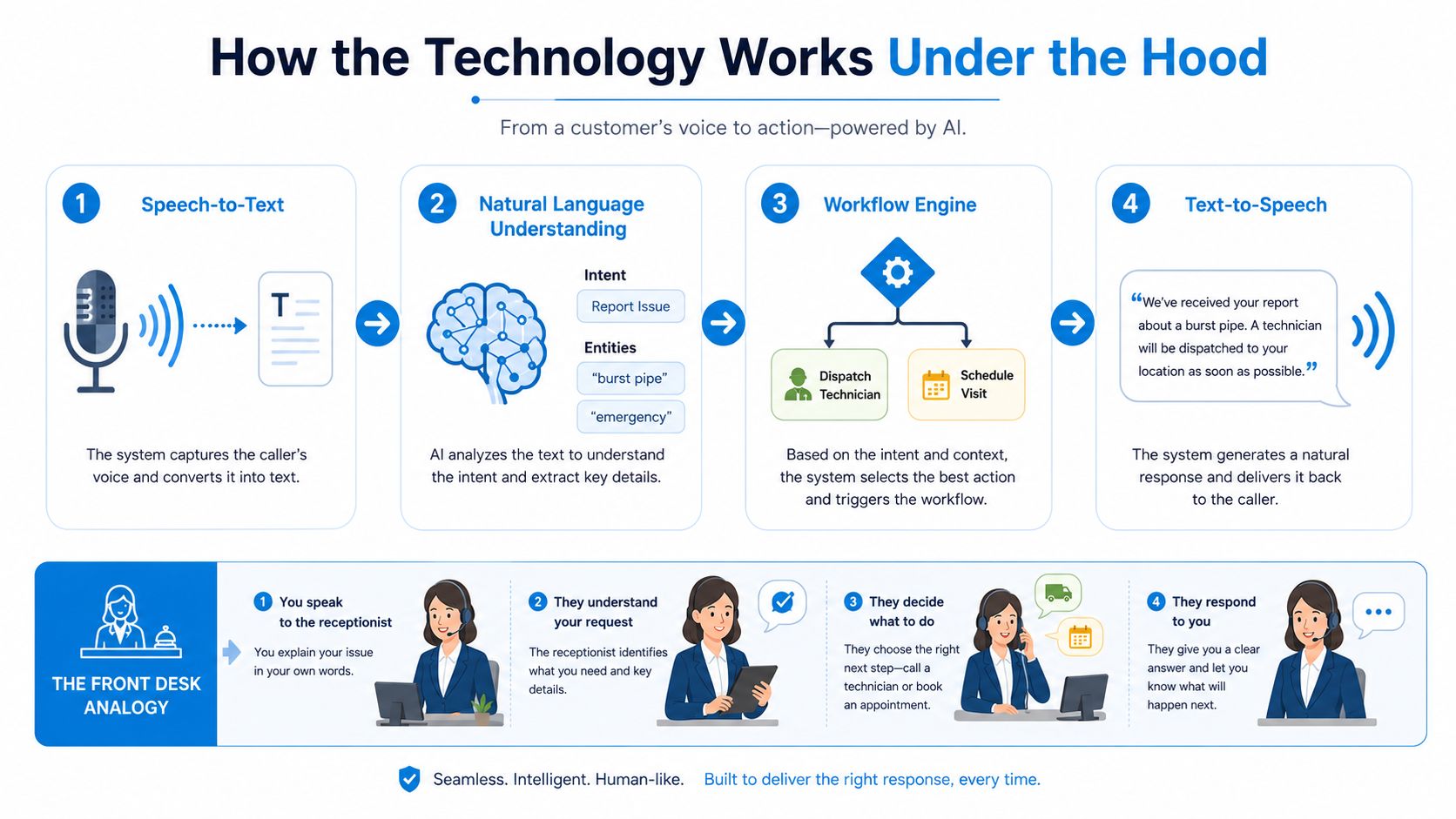
- Speech-to-text: Converts the caller's audio into processable text.
- Natural language understanding: Detects intent and extracts names, dates, service types, urgency, and locations.
- Response generation: Selects a reply or workflow action according to business rules and connected systems.
- Text-to-speech: Converts the response into spoken audio.
Together, these components turn a spoken request into a controlled business action. Their quality depends on the rules, integrations, latency limits, and escalation paths configured around them.
How the Technology Works Under the Hood
A production AI receptionist usually processes a call as a continuous pipeline rather than waiting for the caller to finish an entire paragraph. The system listens to incoming audio, recognizes partial speech, identifies meaning, checks business rules, and begins forming a reply while the conversation is still moving.
The voice pipeline
Speech-to-text turns “My basement pipe burst and I need someone tonight” into machine-readable text. A strong system should preserve useful details, including the service type and urgency, instead of treating the utterance as a generic request.
Natural language understanding then extracts intent and entities. In this example, intent could be emergency plumbing assistance, while entities include a burst pipe, the need for immediate help, and eventually the property address.
The workflow engine decides whether to give approved guidance, create a dispatch request, check an emergency route, schedule a visit, or transfer the call. This layer is where business operations matter most. A language model may understand the sentence, but it shouldn't decide on its own which technician receives an emergency or what a healthcare practice may disclose.
Text-to-speech delivers the next response. The caller hears a question such as, “I can help with that. Is water still running, and what address should the technician use?” The system then continues collecting information rather than restarting the interaction.
The broader voice AI market is expanding quickly. Voice-specific AI is reported at a 24.3% CAGR with a projected value of $14.6 billion by 2030, according to industry data on AI receptionist growth. That expansion raises the standard for deployment. Businesses aren't evaluating a novelty anymore. They're putting automated voice systems into high-volume communication workflows.
Why latency beats model size
Latency is the gap between the caller stopping and the receptionist responding. It feels like a pause in a face-to-face conversation. A short pause can sound natural. A long silence makes the caller wonder whether the line failed.
Production guidance places natural turn-taking in the sub-300 millisecond range, API response time under 200 milliseconds, perceived wait including silence detection under 400 milliseconds, and end-to-end conversation delay under 600 milliseconds, as described in real-time voice latency benchmarks from Gladia. Once latency rises above roughly one second, interruptions become harder to manage and the exchange feels less natural.
That's why effective systems use streaming, partial transcription, and parallel processing. A dental caller asking about a cancellation shouldn't wait for the entire audio file to upload, transcribe, interpret, and answer as separate steps. The platform should begin processing the request as the caller speaks.
Task resolution matters more than a polished demo. Independent benchmarks report 90% to 97% resolution for callback requests, 85% to 95% for general questions, 55% to 75% for direct bookings, and 60% to 75% for urgent routing, with booking performance reaching 80% to 92% when an SMS-link fallback is available. The same benchmark reports average conversations of 7.1 exchanges, while booking calls average 15 turns, according to AI receptionist resolution-rate benchmarks. A system that handles routine calls smoothly and escalates ambiguous cases is more valuable than one that tries to complete every call at any cost.
For a deeper look at the support use case, review this guide to conversational AI for customer support.
What Happens During a Real Call
Consider a law firm that wants to book consultations outside office hours. A caller rings on a weekend, says they want to discuss an accident, and asks whether an attorney is available. The AI receptionist shouldn't offer legal advice or promise representation. Its job is to collect approved intake details, identify the consultation request, check availability, and send the caller to a human when the conversation crosses a configured boundary.
From ring to intent
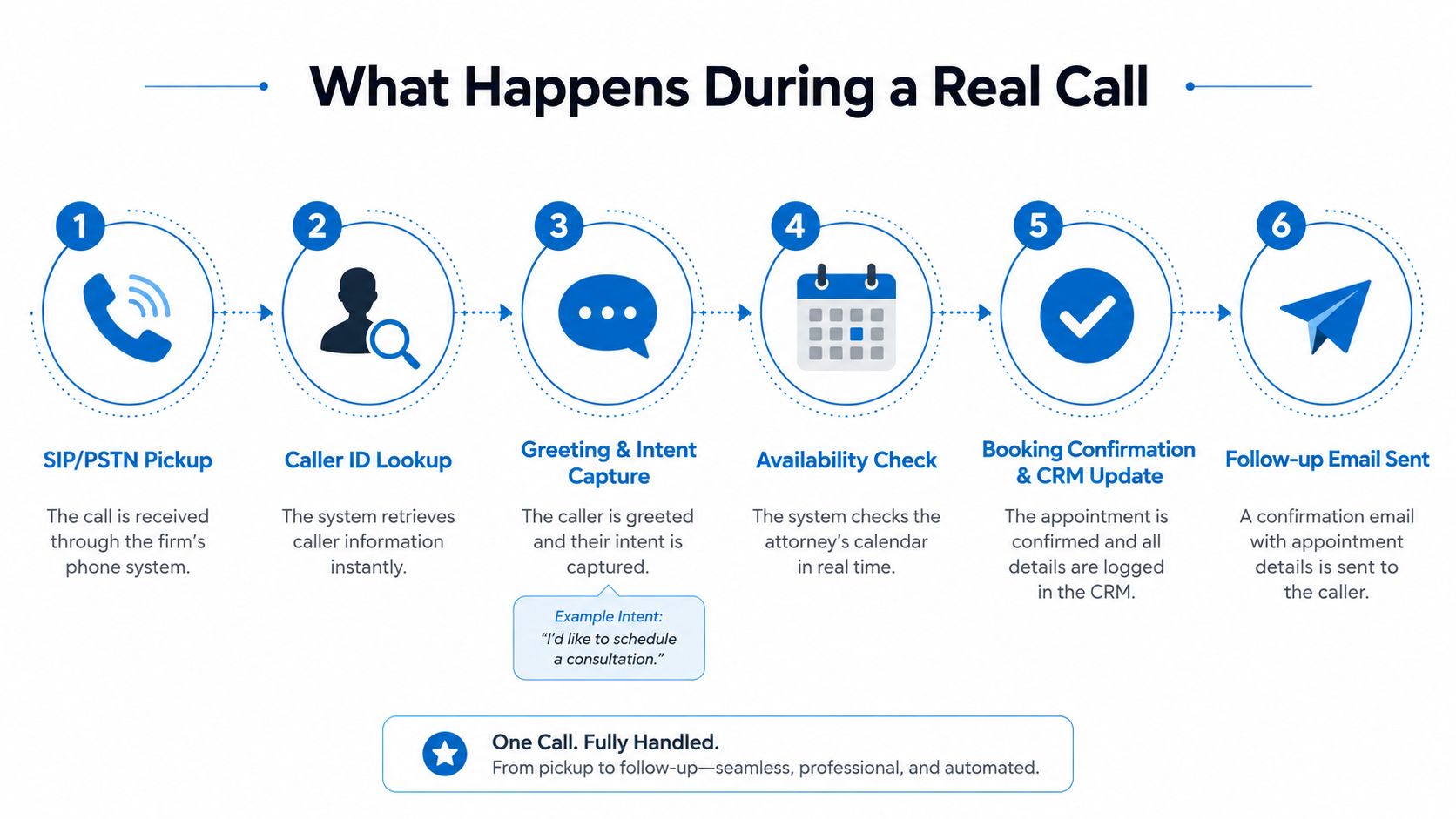
The call first arrives through the firm's telephony connection, such as SIP or the public switched telephone network. The AI answers with the approved greeting. If caller ID is available, the system can look for a matching record in the firm's CRM, while still asking the caller to confirm their identity rather than assuming the match is correct.
The opening sentence provides an early intent signal. “I'd like to schedule a consultation” points toward the booking workflow. “I need to know whether my case is worth pursuing” calls for a different response, because the system may need to explain the consultation process and route the question to staff.
A typical booking sequence looks like this:
- Capture the request: Detect the consultation intent and collect the caller's name, phone number, email address, and relevant intake information.
- Check the calendar: Query the firm's scheduling system for approved appointment slots.
- Offer options: Read available times clearly and handle corrections such as “not Tuesday, Thursday.”
- Confirm the selection: Repeat the date and time, then verify the caller's contact details.
- Update records: Write the booking and call outcome to the CRM or case-intake system.
- Send follow-up: Deliver an approved confirmation through email or SMS if the workflow allows it.
The handoff is part of the product
Suppose the caller asks about fees above the firm's configured threshold, requests a case assessment, or becomes difficult to understand. The AI should stop guessing. A confidence rule can trigger a warm transfer, where the human receives the caller with the relevant context instead of answering an unexplained ringing line.
That context can include:
- Caller history: Existing records, previous inquiries, or an earlier appointment.
- Transcript so far: The conversation captured before transfer.
- Detected intent: Consultation booking, fee question, urgent request, or another category.
- Collected details: Contact information and facts the caller already provided.
- Reason for escalation: Low confidence, sensitive subject, policy boundary, or explicit request for a person.
The transfer must also feel fast. A response budget of roughly 800 milliseconds to one second leaves little room for a system that processes audio in isolated stages. Speech recognition, intent analysis, workflow lookup, and voice generation need to overlap where possible. If the caller speaks over the assistant, provides an ambiguous name, or changes direction mid-sentence, the system should ask a short clarifying question rather than choosing an interpretation.
A practical script can help teams define those boundaries. This call-in script resource is useful for mapping greetings, qualification questions, booking language, and escalation phrases before configuration begins.
The best handoff doesn't hide the fact that automation was involved. It prevents the caller from repeating everything and gives the employee a clear starting point.
Practical rule: Escalation shouldn't mean “the AI failed.” It should mean the workflow recognized that a human has more authority, empathy, or context for the next decision.
AI, Human, or Hybrid Receptionist
The choice isn't between a machine and an employee. Businesses are choosing where each model performs well, what kind of interaction it can handle, and how much operational control the team needs.
An AI receptionist is strongest at repetitive, rules-based work. It can answer routine questions, collect standard details, schedule within defined rules, and handle calls outside normal office hours. A human receptionist brings richer emotional judgment and can adapt when a caller's circumstances don't fit the script. A hybrid model assigns the first layer to AI, then routes selected conversations to trained people.
| Receptionist model | Estimated cost per call | 24/7 coverage | Emotional handling | Best fit |
|---|---|---|---|---|
| AI receptionist | $1 to $3 per minute, depending on usage | Yes, when configured for continuous coverage | Bounded, policy-driven empathy | Routine calls, intake, scheduling, overflow |
| Traditional answering service | Varies by provider and service model | Depends on the agreement | Stronger human judgment | Sensitive conversations and complex intake |
| Hybrid receptionist | AI usage plus human support costs | Yes, with a defined human fallback | Strong where escalation occurs | Service businesses balancing volume and trust |
The cost reference for AI receptionists and human staffing comes from reported AI receptionist economics, which places a full-time receptionist at $35,000 to $55,000 per year including benefits and describes AI solutions as often positioned at 70% to 90% less. Those figures are useful for framing the decision, but the actual comparison depends on call volume, transfer frequency, setup, integrations, and whether the business needs a live person for every interaction.
Why hybrid often fits service businesses
A plumbing company may want every caller answered immediately, but it doesn't need an employee to repeat opening hours or collect a postcode. A human should probably handle an upset customer, a disputed invoice, or an emergency that falls outside the approved dispatch rules. AI can handle the first layer while the owner or dispatcher focuses on jobs that require judgment.
A healthcare practice needs an even clearer boundary. The AI might handle appointment availability and basic administrative requests, while staff handle clinical questions, symptoms, medication concerns, or emotionally sensitive conversations. That separation protects the patient and prevents the receptionist from acting beyond its authority.
The hybrid approach also makes staffing more deliberate. Employees spend less time screening routine calls and more time closing qualified opportunities, solving exceptions, and maintaining relationships. The business still needs to define handoff rules, staffing availability, and what happens when no human answers. Without those rules, “hybrid” becomes a vague promise rather than a reliable operating model.
Benefits, ROI, and the Compliance Question
The business case starts with recovered conversations. An AI receptionist can answer after-hours calls, capture a lead's details, book within an approved calendar, and route urgent requests before a member of staff is available. Those outcomes can support revenue, but the owner should calculate them from the company's own call records rather than relying on a generic promise.
Use this simple model:
Monthly missed calls × average job value × close rate = potential monthly revenue from recovered calls
For example, a plumbing company can count missed after-hours calls from its phone log, estimate the average value of a completed job, and apply its normal close rate for qualified leads. The result isn't guaranteed revenue. It's a decision estimate that helps the owner compare automation cost with the value of conversations currently disappearing into voicemail.
The broader category has a substantial economic backdrop. The virtual receptionist market is estimated at $3.85 billion in 2024 and projected to reach $9 billion by 2033 at a 9.8% CAGR, while 52% of organizations have invested in conversational AI capabilities, 44% plan to adopt, and 4% report no adoption plans, according to AI receptionist market and adoption data. The figures describe a wider shift from IVR and voicemail routing toward natural-language front-office automation, not a guarantee that every AI receptionist will produce the same return.
Compliance isn't a checkbox
Healthcare changes the implementation question. The issue isn't whether an AI receptionist is “HIPAA compliant” in the abstract. It's whether each workflow collects, stores, transfers, and deletes protected information safely.
A healthcare call can create exposure through the audio conversation, transcript, summary, appointment confirmation, SMS or email, and integration with an EHR or practice-management system. Healthcare guidance on AI receptionist compliance emphasizes the need to examine those separate paths, including Business Associate Agreements, minimum-necessary collection, role-based access, retention limits, and audit logs. An MGMA poll cited in 2025 found 68% of medical groups had added or expanded AI tools during the year, making configuration literacy increasingly important.
| Industry | Primary framework | Key requirement | Vendor must provide |
|---|---|---|---|
| Healthcare | HIPAA | Limit PHI collection and access | BAA, access controls, retention settings, audit logs |
| Payments | PCI-DSS | Avoid exposing payment data during voice handling | Secure payment workflow, redaction, restricted storage |
| European operations | GDPR and consent rules | Establish lawful processing and appropriate recording consent | Regional controls, consent configuration, deletion options |
| Outbound communications | TCPA | Follow applicable consent and contact rules | Consent records, campaign controls, opt-out handling |
A vendor should explain encryption for stored transcripts, personally identifiable information redaction, regional data residency, configurable retention windows, and the exact systems that receive call data. ROI gets the project approved. Compliance determines whether the workflow can remain in use.
For a broader operational view, see this resource on the benefits of AI in customer service.
Implementing an AI Receptionist in Your Business
Treat the rollout like a workflow deployment, not a switch you turn on. Start by documenting how calls arrive, what staff ask today, which requests are safe to automate, and where a human must take control.
Before launch
Create a short operating brief:
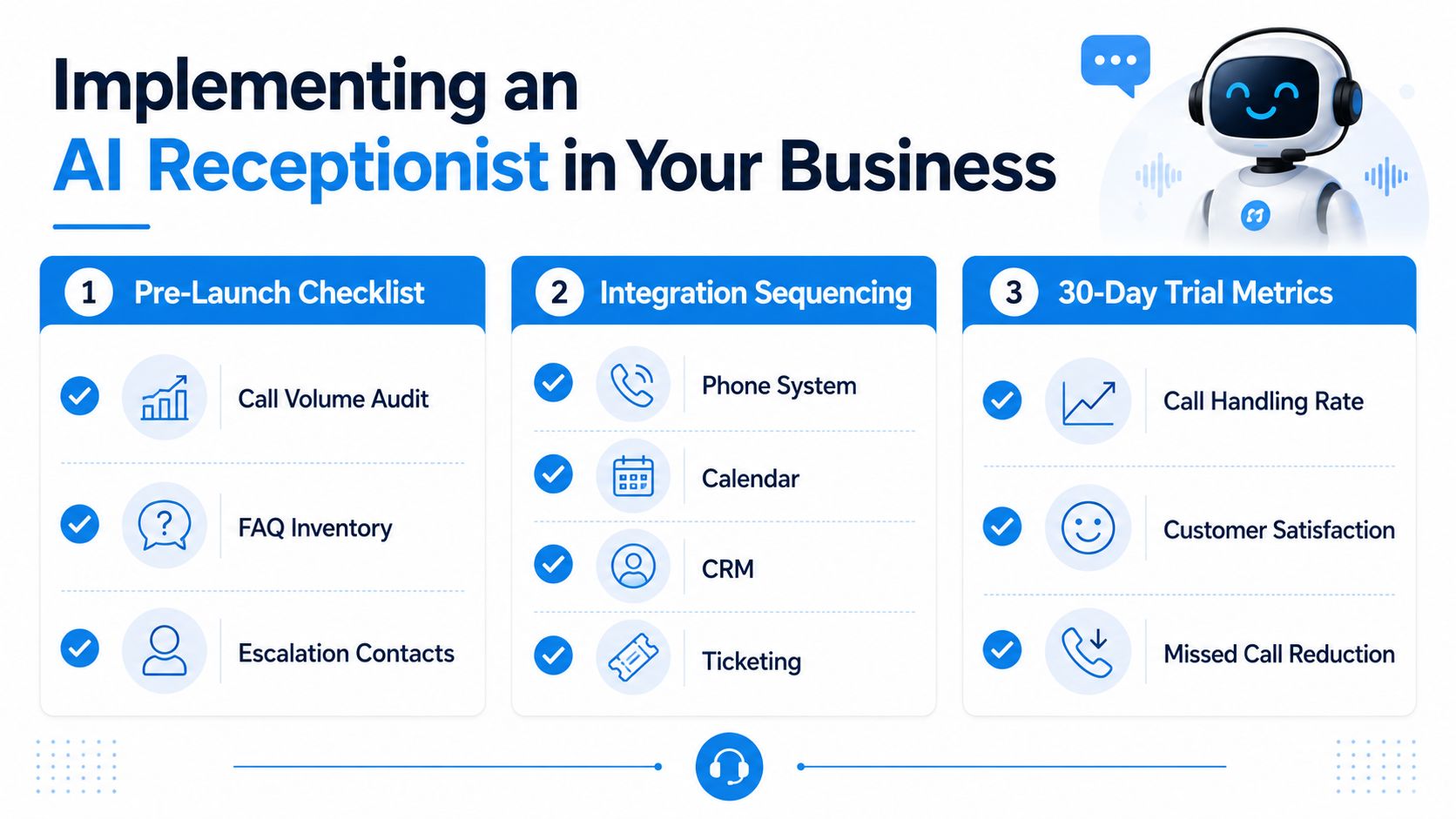
- Audit call volume: Review answered, missed, after-hours, transferred, and abandoned calls by type.
- Build the FAQ inventory: Include hours, service areas, pricing boundaries, appointment rules, cancellation policy, and directions.
- Name escalation contacts: Specify who receives emergencies, high-value leads, clinical concerns, legal questions, and system failures.
- Define data handling: Decide what the system may collect, where it may write information, and how long records should remain available.
- Test the audio path: Check the business number, microphone quality, background noise, transfer behavior, and caller experience on mobile networks.
Integration sequencing prevents a complicated launch. Connect the phone system first, then the calendar, CRM, and ticketing or dispatch platform. Test each connection independently before combining them into a single call flow. If the phone foundation needs modernization, a practical guide to hosted telephony can help clarify the relationship between business calling infrastructure and automated reception.
A 30-day plumbing trial
A plumbing company can use a controlled month to learn where the system needs adjustment:
- Week one, shadow calls: Let the AI listen or simulate responses while staff compare its intent detection and intake questions with real handling.
- Week two, live calls with human failover: Allow the system to answer routine calls and transfer uncertain or urgent requests immediately.
- Week three, edge-case tuning: Review ambiguous addresses, overlapping speech, unusual service descriptions, incorrect calendar assumptions, and callers who ask for a person.
- Week four, ROI measurement: Compare call handling, booked work, escalation quality, customer feedback, and missed-call patterns with the company's starting point.
A healthcare practice should run the same process with stricter controls. Test appointment changes separately from clinical questions, verify that transcripts and confirmations follow the approved data policy, and confirm that the vendor can provide the required BAA before production use.
Recepta.ai is one platform option for this type of rollout. It combines AI call handling with human escalation, supports appointment scheduling, lead capture, and follow-ups, and offers integrations for business systems. Teams should still test the specific workflows, data controls, transfer rules, and reporting they need before committing.
Launch standard: Don't ask whether the AI can answer a call. Ask whether it can complete the next approved action, explain failures, and deliver the right context to a human.
A successful deployment improves a defined process. It answers the right calls, collects only the information the business needs, books or routes accurately, and gives staff a clear path when automation reaches its limit.
Recepta.ai provides 24/7 AI receptionist support for calls, chat, and SMS, with appointment scheduling, lead capture, follow-ups, integrations, and human escalation for sensitive or complex conversations. Visit Recepta.ai to explore a guided setup and see how the platform can fit your call-handling workflow.