Lead Capture Automation: A Practical Guide to Workflows
The odds of qualifying a lead were approximately 21 times higher when the first contact attempt happened within five minutes rather than after 30 minutes, according to the Oldroyd and InsideSales.com study summarized by Retell AI. That's a contactability advantage, not a promise of revenue. Lead capture automation should protect the opportunity to have a useful conversation, then let qualification, consent, and human judgment determine what happens next.
Why Response Speed Decides Which Leads You Keep
Say a homeowner submits a service form at 9:40 PM. Your office is closed, the notification lands in a shared inbox, and nobody owns the next action. By the time someone calls the following morning, the homeowner may already have booked another contractor.
Lead capture automation is a workflow that records every inquiry when it arrives, qualifies it against your rules, routes it to the right person, and follows up on a timed schedule without anyone retyping details.
The distinction matters. Capture gets the inquiry into a record. Automation makes something happen without waiting for staff to open that record.
A 2011 Harvard Business Review study found that firms contacting web leads within an hour were nearly seven times more likely to establish a qualifying conversation with a decision-maker than firms waiting an additional hour, and more than 60 times as likely to qualify leads as firms waiting 24 hours or longer, as summarized by Machina.
Practical rule: An inbox notification isn't an ownership rule. Every incoming inquiry needs an assigned next action.
For the homeowner, useful automation means a confirmation, a service-area check, and an accountable person, not a generic promotional sequence. Those decisions belong in your customer communication strategy, alongside what you promise customers after hours.
A workable setup connects stages, triggers, integrations, qualification, and consent. Worked scenarios expose the failure points; operational measures and a first-week implementation plan give you a stage-by-stage workflow to copy and a way to judge whether it works.
The Five Stages of an Automated Lead Capture Workflow
Think of the process as a relay race. Capturing the inquiry is the first baton pass, but the team still loses the opportunity if nobody takes the next handoff.
Lead capture workflow stages and target times
These are proposed operating targets for a high-intent workflow, not universal performance benchmarks.
| Stage | What the system does | Target time | Example |
|---|---|---|---|
| 1. Capture | Creates one deduplicated record from a form, call, chat, or text | Under 1 minute | Form submitted at 9:40 PM creates one contact, not two |
| 2. Acknowledge | Sends a confirmation and asks one routing question | Under 2 minutes | Text asks for the ZIP code and preferred window |
| 3. Qualify | Applies rules for service area, job type, and urgency | Under 5 minutes | Out-of-area ZIP is flagged and not booked |
| 4. Route and book | Assigns an owner and places a confirmed slot on the calendar | Under 5 minutes for high-intent leads | Emergency plumbing lead goes to the on-call technician |
| 5. Follow up | Runs a timed sequence and escalates to a person | 1 hour, 24 hours, 3 days | Task created if no human contact within 1 hour |
Move the inquiry toward a decision
Capture starts with an event, not a person checking notifications. A form submission, missed call, completed chat, or incoming text should create a traceable inquiry with its source and arrival time.
Acknowledge tells the prospect what happens next. Ask only what you need to choose the next route; don't turn the confirmation into another intake form.
Qualify separates eligible requests from unsuitable ones. Missing information should produce a clarification question, not an invented answer or an automatic rejection.
The operational handoffs also need validation, routing, notification, and tracking:
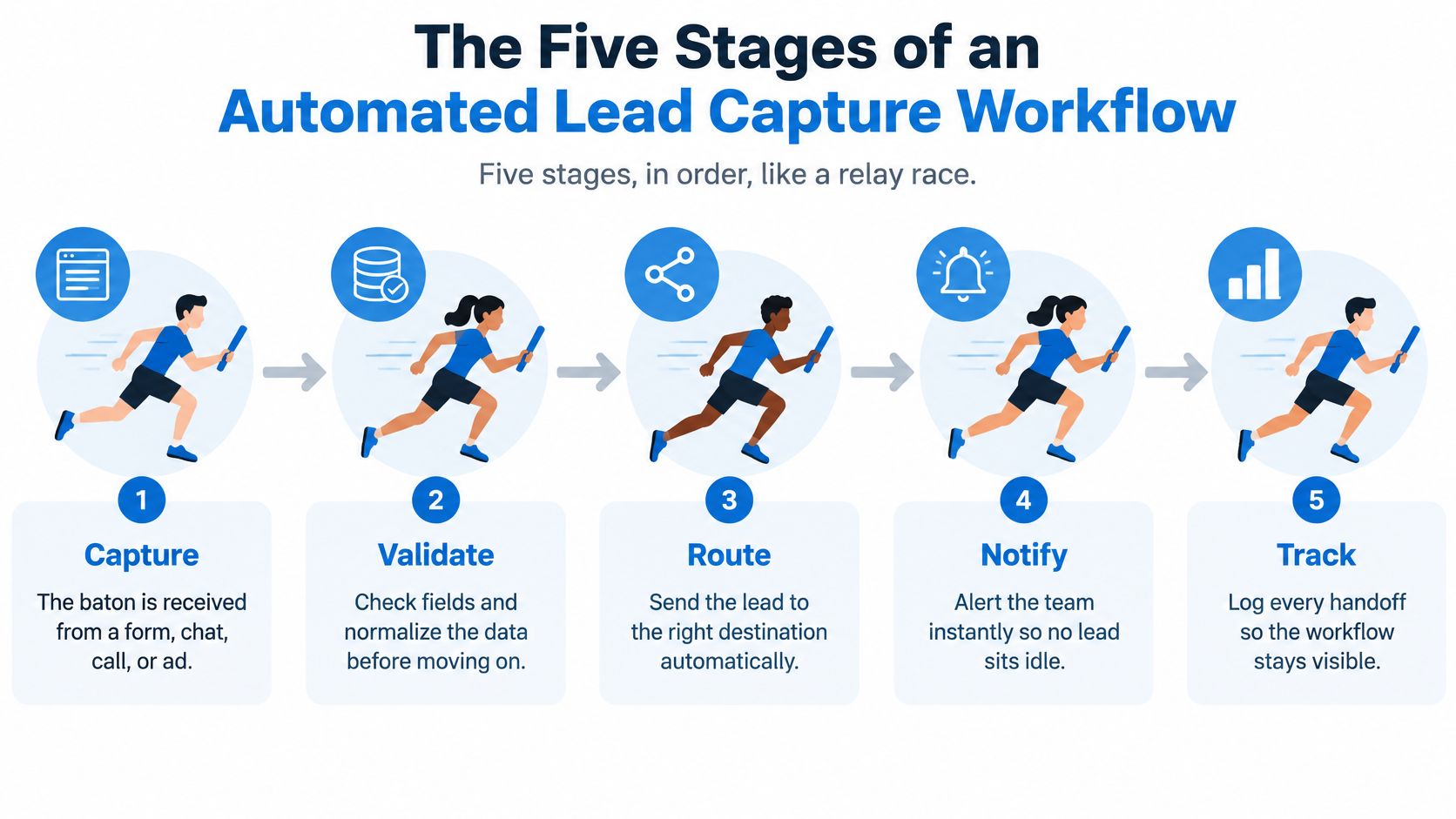
Finish the handoff rather than sending an alert
Route and book requires an available owner and a bookable slot. Don't label an appointment confirmed when a dispatcher still needs to approve the visit.
Follow up needs stop conditions. A reply, booking, decline, or opt-out should cancel incompatible pending messages. The proposed sequence should run only when the channel, consent, and request context permit it.
High-intent home services and healthcare inquiries justify a faster path than newsletter subscriptions. Even then, urgency doesn't justify booking outside staff capacity or bypassing consent.
For a broader way to identify tasks worth automating, Big Moves Marketing explains how to replace marketing busywork with strategic automation. Apply that distinction here: automate predictable handoffs, not unresolved business decisions.
Map your current process against the stages and mark the longest gap. Fix that gap before adding another channel.
Triggers, Follow-Up Timing and Human Escalation
Start the follow-up clock when the inquiry arrives, not when an employee opens it. An acknowledgment can reassure the customer, but it mustn't count as human contact in your escalation logic.
The Harvard Business Review response audit found that only 37% of the companies responded within an hour, while 23% never responded, as reported by Vida. A named fallback owner is more useful than another unassigned notification.
Match each trigger to an immediate action
- Website form submission: Send a confirmation and start the contact timer.
- Missed inbound call: Transcribe the voicemail when one exists and send an appropriate text where permitted. A silent missed call has nothing to transcribe.
- Completed web chat: Offer an eligible slot and book after confirmation.
- SMS reply of YES: Confirm the specific held appointment associated with that conversation.
- Uploaded contact list: Check consent and suppression status before starting reactivation.
- Call-me-now selection: Initiate the authorized callback, subject to your calling policy.
Consider an HVAC homeowner submitting a no-cooling request at 7:15 PM. Within seconds, the proposed workflow texts a receipt acknowledgment asking for the ZIP code and preferred appointment window, while assigning the nearest available technician.
The technician receives the request summary, phone number, location, and next action. If there's no human contact by 8:15 PM, dispatch receives an overdue task rather than another copy of the original alert.
Give the human enough context to continue
Escalate pricing exceptions, clinical or legal questions, emergencies, frustration, and requests in unsupported languages. Emergency language should invoke an approved safety protocol, not leave someone waiting in an ordinary sales queue.
Every handoff should include the transcript, captured fields, consent status, attempted contacts, and next action. If nobody's available, state the actual callback window and assign a backup owner.
Our process follows the business's custom scripts, logs every interaction in a structured way, and can trigger follow-ups. Script design should therefore specify both what automation says and when it stops.
Use the lead response strategies from H2 to examine follow-up ownership, and build your lead follow-up system around resolved next actions rather than message counts.
Qualification Rules and Consent at the Point of Capture
Set qualification and consent policies before enabling CRM writes or outreach. Otherwise, you'll automate inconsistent decisions and have to repair both records and customer expectations.
Hard disqualifiers determine whether you can serve someone. Scoring determines priority among eligible leads. An unsupported job type should receive a polite decline, with a waitlist option only if service could become available; a higher score shouldn't override that restriction.
Collect information where it earns its place
HubSpot's lead-capture analysis explains the trade-off between shorter forms and qualification detail. Use progressive profiling rather than requiring every answer before acknowledging the inquiry.
Which fields to collect and when
| Field | Collect at | Why |
|---|---|---|
| Name and phone | Form, first step | Needed to call back and to match duplicates |
| Form, optional | Confirmations and records; marketing only with opt-in | |
| Service type | Form dropdown | Routes the lead to the right team |
| Postal code or ZIP | Form, first step | Deterministic service-area routing |
| Budget or insurance type | Automated conversation or after consent | Qualifies without adding form drop-off |
| Project timeline | Chat or call follow-up | Scores urgency |
| Medical or legal details | Human handoff only, minimized | Limits sensitive data held in the workflow |
For example, a dental clinic that doesn't accept a particular insurance plan can route the inquiry to its front desk instead of automatically booking. The person may still want a self-pay appointment, so insurance mismatch needn't mean rejection.
Document these distinctions in your lead qualification process. Normalize phone formats, check required fields, and send invalid records to a repair queue instead of treating them as usable leads.
Separate the service request from marketing permission
The Dutch data-protection authority's GDPR consent guidance describes consent as freely given, specific, informed, unambiguous, and withdrawable. Where consent is the applicable basis, use an unchecked marketing opt-in, a plain-language privacy notice, and a record of the timestamp, exact disclosure, source page, purpose, and authorized seller.
FTC materials on lead marketing describe overlapping TCPA and Telemarketing Sales Rule obligations and emphasize express, informed consent for prerecorded outbound calls selling products. Don't make a form-triggered sales robocall the default.
More automation isn't safer automation. Preserve the permission and its limits alongside the contact details.
As a conservative workflow policy, an unsubscribe in any channel should pause future automated outreach across channels pending review. Don't switch from a revoked text permission to automated calls without telling anyone.
Connecting Your CRM and Calendar Without Duplicates
A customer who calls and then submits a form needs a connected history, not competing sales sequences. Keep a canonical contact record while retaining separate inquiries for different jobs.
The CRM view should make the contact, request, and next action visible together:
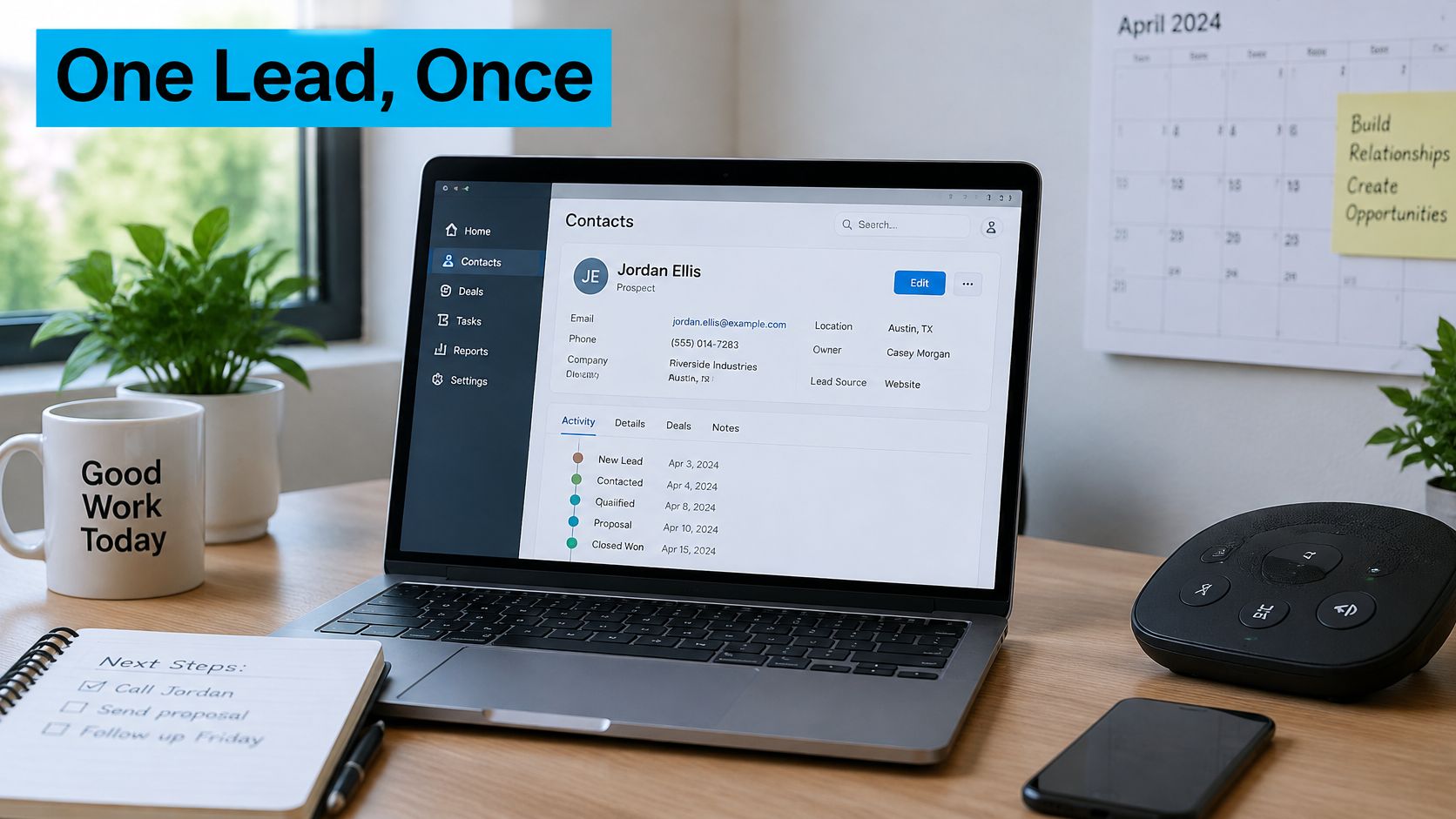
Match before creating or updating
Normalize the phone number first, then compare email. Use a chat session ID to connect activity within that session, not as proof that two different sessions belong to the same person.
A shared household phone or office email can produce ambiguous matches. Flag those cases for review rather than merging people automatically.
Create a contact when no reliable match exists. When one matches, append the inquiry and update approved fields without overwriting recently edited salesperson information. Define that protection window explicitly in your write rules.
Use an idempotency key, a unique identifier for the incoming event, so retrying a failed submission doesn't create another record. Attach permitted summaries and transcripts to the appropriate inquiry, with access controls for sensitive content.
Commit appointments only after confirmation
A calendar entry should carry service type, address where needed, appointment length, and the assigned resource. A held slot stays provisional until the customer confirms, and availability should be rechecked before committing it.
Our process places confirmed appointments directly on the business's calendar and triggers any follow-ups. The operational distinction is confirmed versus held, not just whether an event exists.
Use this integration walkthrough alongside your field map:
If no slot is available, offer a waitlist without implying a booking. If the CRM is unavailable, queue and retry the write; if there's no native connector, use middleware such as Zapier or Make with failure alerts. Your CRM telephony integration should preserve event history across those interruptions.
Before launch:
- Map the fields between intake, CRM, and calendar.
- Choose the deduplication key and ambiguous-match fallback.
- Set write rules for updates, protected fields, and retries.
- Test five sample leads, including a duplicate.
- Alert a named owner when writes fail.
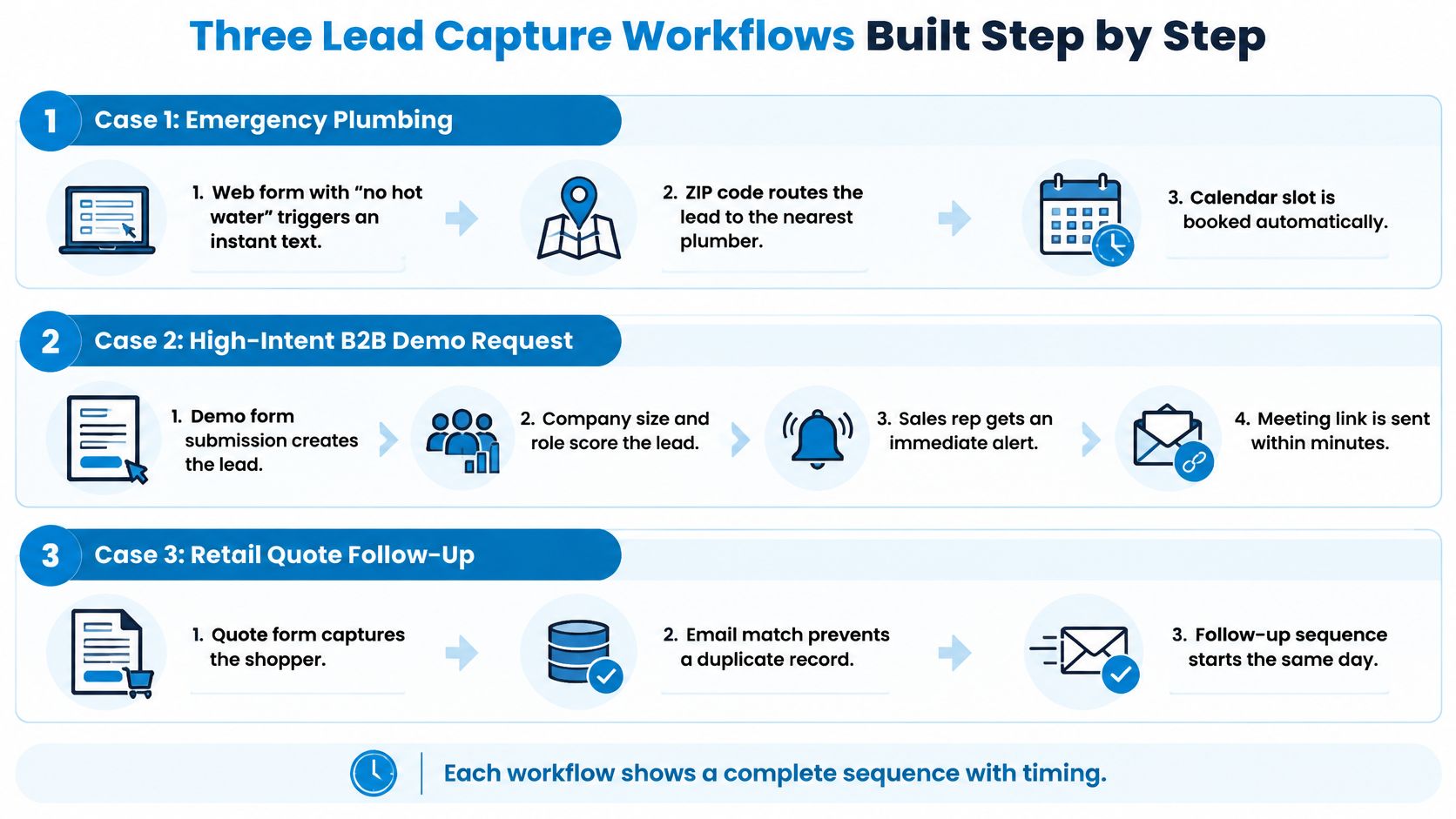
Three Lead Capture Workflows Built Step by Step
The same intake engine needs different boundaries for a plumbing job, a dental appointment, and a legal inquiry. Treat the timings below as sample configurations to test against actual staffing and permitted outreach.
Emergency Plumbing
A homeowner submits a form containing no hot water. That phrase starts a service workflow, but it doesn't establish a safety emergency by itself.
- Acknowledge immediately. Send a permitted service text confirming receipt and asking for missing routing information.
- Check the ZIP code. Verify coverage and job type before offering availability.
- Call the on-call technician within two minutes. Pass the request summary and callback number, and require acceptance of ownership.
- Handle an unanswered call. Offer the homeowner a booking link by a second permitted text, without suggesting that an unaccepted dispatch is confirmed.
- Escalate after one hour without contact. Create a manager task showing the unanswered attempts and current booking status.
If the customer reports a potential hazard, stop the routine booking path and use the approved emergency protocol.
The comparison graphic shows how the same event-to-action structure also applies to demo requests and retail quotes:
Dental Clinic After Hours
A prospective patient calls after closing and leaves a voicemail about availability. The workflow should help with scheduling without trying to conduct clinical assessment.
- Within one minute, transcribe the voicemail and send a permitted SMS with a booking link.
- Classify the reply as new or existing patient and collect insurance type through the approved intake path.
- Offer the next morning's eligible slot, confirming only after the patient accepts. Route insurance exceptions to the front desk.
- Schedule the reminder for 24 hours before the visit when that point is still in the future. For a next-morning booking, send an immediate confirmation instead of attempting an already-past reminder.
Clinical questions go to staff under the clinic's escalation policy. Don't collect a detailed symptom history in a general lead form.
Law Firm Web Chat
A visitor wants to know whether the firm handles a particular matter. The useful result is an appropriate intake callback, not automated legal advice.
- Select the practice area from a controlled list.
- Capture limited intake facts, such as incident date and case type, without inviting a detailed legal narrative.
- Raise a conflict-check flag for authorized staff. Don't describe the prospect as cleared or accepted.
- Offer a business-hours callback, give no legal advice, and escalate any stated deadline concern rather than interpreting it automatically.
For implementation ideas, the lead automation tips from Machine Marketing can help translate branches into workflow templates. Adapt the conditions and stop rules before enabling them.
All these scenarios require a logged record at each step and an explicit point where a person takes responsibility.
Metrics That Show Whether Automation Works
Submission volume can rise while useful conversations fall. Measure contact, qualification, booking, and revenue separately so a faster acknowledgment doesn't masquerade as a better sales outcome.
The MIT/InsideSales analysis summarized by Close found that contacting web leads within five minutes rather than 30 minutes made them approximately 100 times more likely to be contacted. The original analysis measured contact and qualification, not closed revenue.
Use operating targets rather than revenue promises
Lead capture metrics, healthy ranges and red flags
The ranges below are proposed starting rules for a high-intent workflow, not universal benchmarks. Define first contact as a two-way connection and track first attempt separately.
| Metric | Definition | Healthy range | Red flag |
|---|---|---|---|
| Median first-contact time | Minutes from submission to first contact | Under 5 minutes for high-intent leads | Over 30 minutes |
| 90th-percentile response time | Threshold above which the slowest 10 percent of responses fall | Under 15 minutes | Over 1 hour |
| Contact rate | Share of leads reached by phone, SMS, or chat | Rises after each workflow change | Flat or falling for two weeks |
| Qualified-lead rate | Share of leads passing qualification rules | Stable within each lead source | Sudden drop after a form change |
| Booked-appointment rate | Share of qualified leads with a confirmed slot | Compared by service line | Drop after a calendar change |
| Opt-out rate | Share of contacts who revoke consent | Low and steady | Spike after a new sequence launches |
Keep unreached leads visible rather than calculating response time only for successful connections. Compare the median with the slow tail, then segment by source, hour of day, and service line.
Connect each warning to a changeable rule
A slow after-hours tail calls for checking on-call coverage and acceptance rules. A booking decline after a calendar change calls for testing slot eligibility and confirmation handling.
For escalations, measure the share reached by a human within your proposed one-hour window. If escalation volume rises without better outcomes, inspect overly broad triggers and staff capacity.
Diagnostic check: Rising contact with falling qualification often points to looser qualification rules. Check lead-source changes before declaring success.
Set a baseline before editing the workflow. Compare outcomes after each change, with revenue as a later validation rather than an assumed consequence of speed.
Map Your First Workflow This Week
Start with a bounded process your team can test. Connecting every channel before resolving ownership only spreads the same failure across more entry points.
- Pick the busiest inquiry channel. Start with the web form, phone line, or chat path that brings the most requests.
- Export the last 30 days of leads. Calculate median and 90th-percentile response times, keeping unanswered inquiries visible.
- Draw the five stages. Assign a named owner and backup to each handoff.
- Write the decision rules. Include qualification, decline messages, consent disclosures, and timestamp and source storage for opt-ins.
- Test ten sample leads. Include at least three after-hours submissions and one duplicate. Confirm that every escalation reaches a named person.
- Review after 30 days. Compare with the baseline and change one rule at a time.
For example, a hypothetical plumbing company might find a 58-minute Saturday median and assign an on-call owner to that window before changing its form or follow-up copy. That's a specific operational fix, not a reason to rebuild everything.
Start with step one today: choose the channel and name the person responsible for mapping it.
Recepta.ai starts by evaluating your inbound and outbound workflows, then creates AI-driven communication strategies for capture, qualification, routing, and follow-up. Visit Recepta.ai to discuss your first workflow; onboarding involves describing your business, uploading or building scripts, setting routing rules, and connecting your calendar.

.webp)