AI Receptionist for Medical Office Guide to Boost Practice
A medical office can miss about 30% of patient calls and lose more than $150,000 annually through missed appointments, according to healthcare automation guidance on AI receptionists. The problem becomes sharper after hours, when 30%–40% of call volume may arrive outside staffed periods.
That means a patient calling to book, cancel, reschedule, confirm, or ask where to send a referral may reach voicemail instead of help. An AI receptionist for medical office workflows can answer those calls at any hour, complete approved administrative tasks, and transfer sensitive matters to trained staff. The safest design isn't a digital clinician. It's a reliable front-desk layer with clearly defined limits.
Introduction
A busy practice can lose opportunities before the front desk ever hears the phone ring. A prospective patient calls after work, reaches voicemail, and contacts another office. An existing patient needs to move an appointment, but the next available callback comes after the slot has disappeared. Meanwhile, a receptionist is helping someone in person while several other callers wait.
Staffing pressure makes that pattern harder to manage. In U.S. medical practices, front-desk turnover rose from 22% in 2019 to about 47% in 2025, while after-hours calls sent to voicemail increased from 34% to 54%. AI receptionist adoption reached 11%–14% of U.S. medical practices by Q1 2026, showing that practices have moved beyond isolated experiments, as reported in the 2026 review of AI receptionists in medical practices.
The practical response isn't to remove human judgment. It's to let software manage repetitive access tasks while people handle exceptions, empathy, and clinical concerns. Practices can also review Resources for finding flexible roles when they need additional staffing options alongside automation.
An AI receptionist works like a virtual extension of the front desk. For a plain-language overview of the technology, see what an AI receptionist is. The rest of this guide focuses on the design choices that matter most, especially the boundary between administrative support and clinical advice.
Understanding Key Concepts
Think of an AI receptionist as a virtual administrative assistant connected to a phone system, not as a replacement physician. A traditional receptionist listens to a caller, identifies the request, checks the practice's systems, completes a task, and escalates anything outside their authority. A healthcare-focused AI follows the same broad pattern through conversational language processing and configured workflow rules.
A typical interaction follows four steps:
- Understand intent. The caller says, “I need to move my appointment,” rather than selecting a rigid menu option.
- Verify the permitted details. The system gathers the information required for the administrative transaction.
- Take an approved action. It may check availability, schedule a visit, record a cancellation, answer office-hours questions, or route a referral inquiry.
- Escalate when the request becomes clinical or uncertain. A human receives the call, a callback task, or a secure-portal instruction.
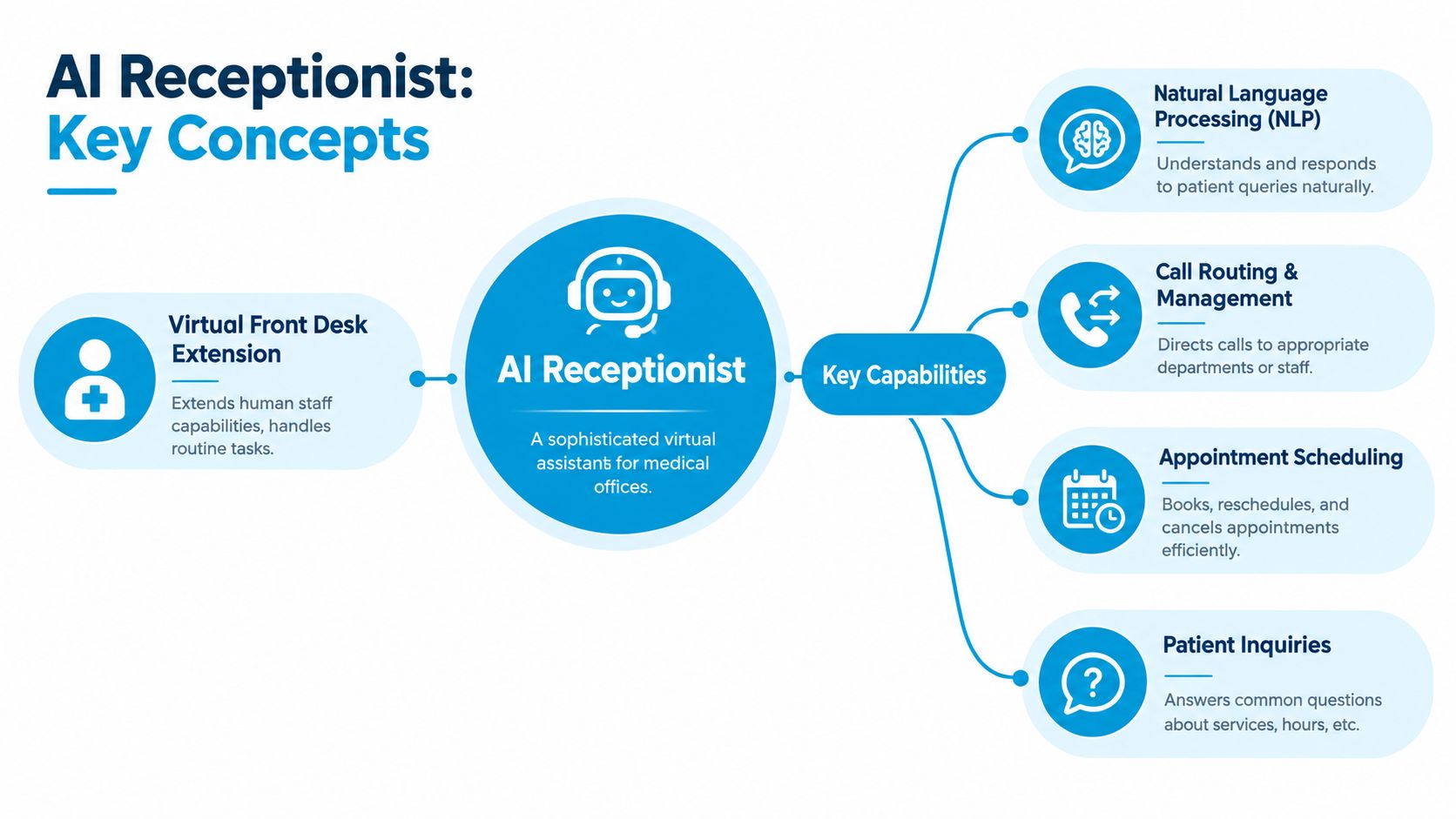
An ordinary IVR mainly routes callers through keypad choices. An AI receptionist can interpret natural language, which makes it more suitable for requests such as, “I'm a new patient looking for a morning appointment,” or, “Please cancel my visit and tell me how to reschedule.” The distinction matters because a missed call includes any interaction where the caller can't complete booking, rescheduling, confirming, cancelling, or referral follow-up.
The safe operating boundary
The AI should handle non-clinical work, including:
- Scheduling: Book, change, confirm, or cancel approved appointment types.
- Practice information: Provide hours, locations, directions, and accepted insurance information when configured.
- Routing: Send billing, referral, records, or clinician requests to the right queue.
- Administrative intake: Capture contact details and the reason for a callback without interpreting symptoms.
It shouldn't diagnose, recommend medication changes, decide urgency, or provide individualized symptom advice. If a caller starts describing chest pain, a medication reaction, worsening symptoms, or uncertainty about whether to seek urgent care, the workflow should stop its ordinary script and escalate according to the practice's approved policy.
The system is best understood as a front-desk traffic controller. It keeps routine vehicles moving, but it doesn't decide how a medical emergency should be treated.
Key Features and Capabilities
The value of an AI receptionist comes from completed tasks, not from a pleasant greeting. A practice should evaluate each capability by asking, “What happens in the system after the call ends?”
Always-on call handling
The AI can answer routine calls when staff are busy, the office is closed, or a queue suddenly fills. A caller might say, “I'm new and need an appointment with dermatology,” and the system can collect approved demographic details, identify the appropriate scheduling path, and offer available options if calendar access is configured.
It can also handle simple changes. A patient who needs to move a visit can receive available alternatives instead of leaving a voicemail. If the request falls outside the configured rules, the AI should capture the details and create a human follow-up rather than guess.
Scheduling that respects practice rules
Appointment booking requires more than reading an empty calendar. The workflow must account for provider availability, visit type, location, duration, preparation requirements, and restrictions configured by the practice. A well-integrated system should write the confirmed action back to the practice's scheduling environment, not merely promise that someone will call later.
For teams reviewing the mechanics of this workflow, AI appointment booking provides a useful reference point. During evaluation, ask the vendor to demonstrate a booking, reschedule, and cancellation using realistic practice rules.
Administrative routing, not diagnosis
A receptionist can identify that a caller wants a refill request routed to staff. That doesn't mean the AI should decide whether the refill is clinically appropriate. The same distinction applies to symptoms. It can recognize that the caller needs a nurse or clinician and transfer the interaction, but it shouldn't interpret the complaint or recommend care.
Escalation rule: If completing the request requires clinical judgment, the AI should route the caller instead of answering the medical question.
Reminders and follow-up
A scheduling workflow can continue after the call. The system may send approved confirmations, reminders, or callback prompts through configured channels. The strongest results come when reminders are connected to the actual appointment record, because staff can see what was sent and patients receive information tied to the correct visit.
This also helps with referral follow-up and incomplete administrative intake. A patient who starts a request but doesn't finish it can be routed to a staff queue, rather than disappearing into an unmonitored voicemail box.
Compliance and Security Best Practices
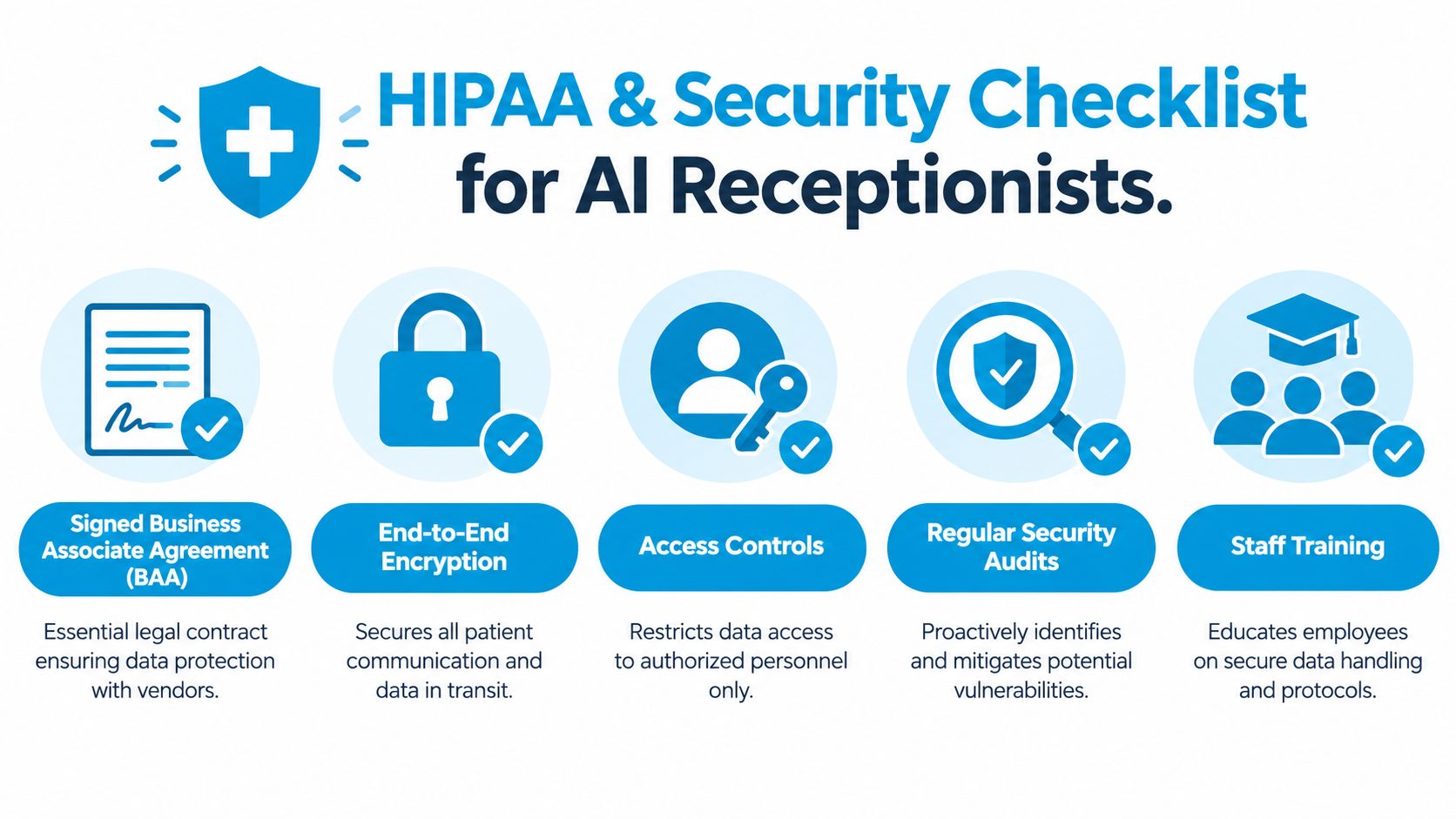
A healthcare AI receptionist must be designed as a HIPAA business associate workflow when it creates, receives, transmits, or stores protected health information. The voice interface is only one component. The practice also needs a defensible vendor relationship, controlled data access, secure transmission, monitoring, and workforce procedures, as outlined in this HIPAA compliance guide for AI receptionists.
Verify the vendor relationship
Start with the Business Associate Agreement. A vendor that handles PHI should be willing to sign a BAA that defines responsibilities, permitted uses, safeguards, incident obligations, and data handling expectations. Don't treat a general privacy statement as a substitute for that agreement.
Then review the technical controls:
- Encryption: Confirm protection for data in transit and at rest.
- Access controls: Ensure only authorized personnel can view recordings, transcripts, or patient details.
- Audit logging: Check whether the system records access, changes, transfers, and administrative actions.
- Workforce procedures: Verify that vendor and practice staff receive appropriate security training and follow documented processes.
Build a minimum-necessary workflow
The safest deployment often starts with limited scope. Let the AI answer office hours, location questions, accepted insurance questions, and scheduling requests that don't require clinical interpretation. Route symptom discussions, medication questions, urgency concerns, and diagnosis-related requests to a clinician, nurse line, or secure patient portal.
This boundary improves safety and makes testing easier. The practice can review a narrower set of conversations, refine escalation triggers, and expand only when the workflow performs reliably.
Make escalation observable
An escalation should produce a clear handoff. The receiving staff member needs the caller's contact details, the administrative request, the reason for transfer, and any approved context the AI collected. The system should also preserve an audit trail so the practice can investigate what happened without relying on memory.
A useful policy asks three questions for every workflow: What may the AI do, what must it refuse, and who receives the handoff? Write those answers before launch, then test them with ordinary and ambiguous calls.
Integration with EHR CRM and Calendars
An AI receptionist becomes operationally useful when it can exchange accurate information with the systems staff already use. Without integration, it may collect a request but leave someone else to re-enter the appointment, update the record, send the confirmation, and reconcile errors.
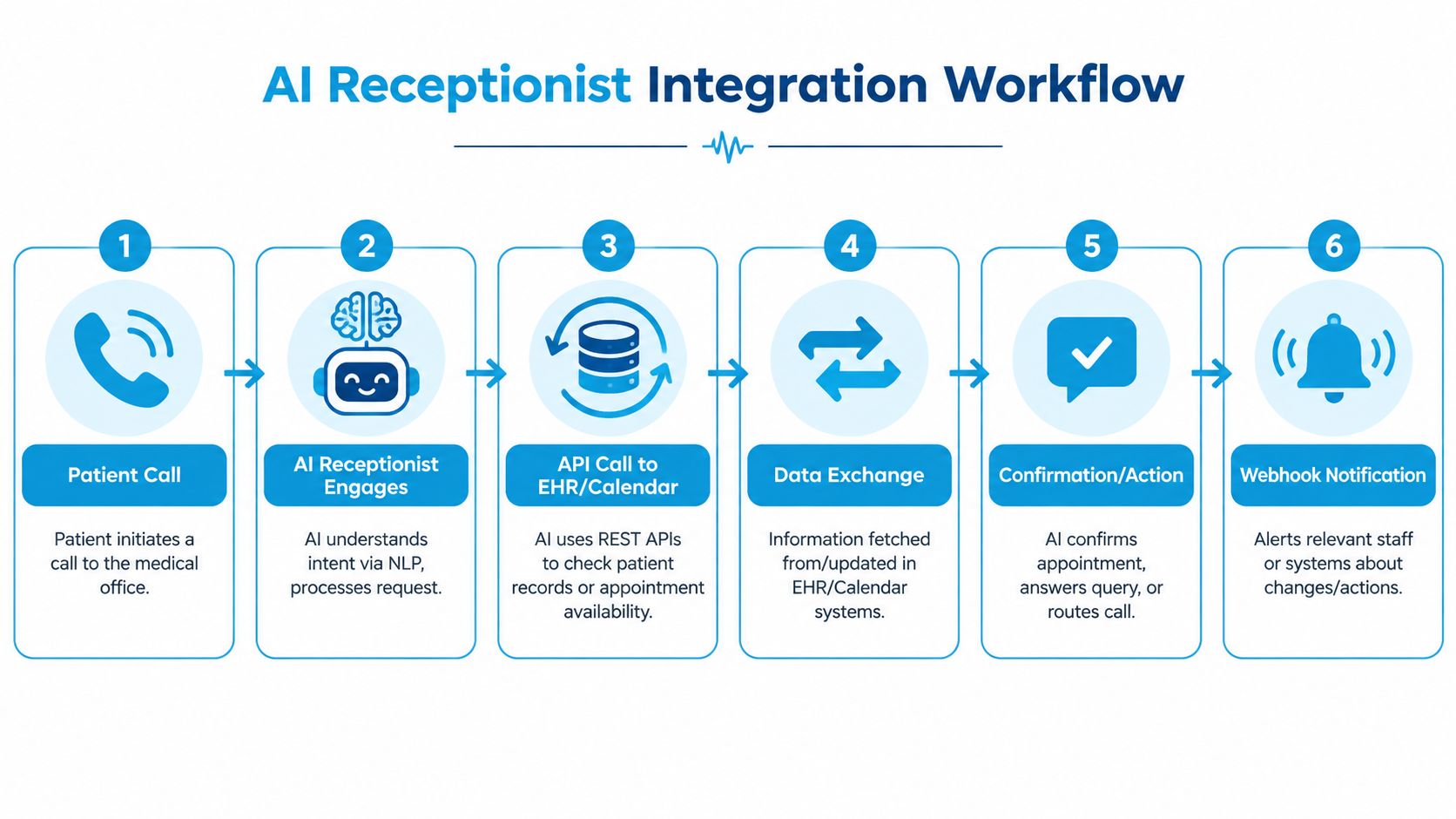
A simplified workflow looks like this:
- Patient call: The patient requests a new appointment or change.
- Intent recognition: The AI identifies the administrative request and gathers permitted information.
- API request: The system uses a REST API to check provider calendars or retrieve the record needed for the transaction.
- Data exchange: The scheduling system returns availability, and the AI writes back the selected appointment or update.
- Confirmation: The caller receives the approved result, with a confirmation through the configured channel.
- Notification: A webhook or internal event alerts relevant staff or connected systems about the action.
Protect the schedule from race conditions
Calendar availability can change between the moment the AI reads it and the moment it attempts to book. The integration should recheck availability before final confirmation and return a clear alternative if another user has taken the slot. It shouldn't tell the patient that an appointment is confirmed until the writeback succeeds.
The same principle applies to cancellations and reschedules. Every action needs an unambiguous status, such as confirmed, pending staff review, failed, or escalated. Staff dashboards should surface failed transactions instead of hiding them in technical logs.
Connect reminders to the appointment record
A reminder should reference the actual appointment, provider, location, and patient communication preference stored in the connected system. When scheduling logic, patient records, no-show risk scoring, and a three-touch cadence at 48 hours, 24 hours, and 2 hours work together, one documented workflow reduced no-shows from 6.8% to 4.6% and restored about 1,190 appointment slots per year, according to this healthcare scheduling automation case study.
For practices assessing software, medical appointment scheduling software can help frame the integration questions. Focus on live read and write access, error handling, auditability, and whether staff can correct an action without creating duplicate records.
Real World Use Cases and Measuring ROI
ROI analysis should begin with the practice's existing friction, not a vendor's headline promise. Count the calls that end in voicemail, the appointments staff manually re-enter, the referral requests awaiting follow-up, and the no-shows that could have received a timely reminder.
After-hours demand deserves special attention. One longitudinal study recorded 474 calls per 1,000 patients per year, while another study of a practice serving 5,020 patients recorded 3,662 after-hours calls over an 18-month period, as documented in the PubMed record on after-hours practice calls. These findings support designing for regular evening and weekend demand rather than treating it as an unusual exception.
Use case one, routine access after hours
A family practice can configure the AI to handle appointment changes, refill-message routing, directions, and approved FAQs outside staffed hours. Research on after-hours calls found that physicians managed about 70% of calls by telephone alone, and another study found 76.7% of patients were satisfied with after-hours handling, according to this review of telephone care after hours.
The lesson isn't that AI should provide medical advice. It's that many calls can be resolved or routed remotely when the workflow is clear. The practice should measure completed administrative requests, appropriate transfers, callback completion, and patient complaints.
Use case two, missed-call recovery
A missed call can represent more than a lost booking. In one study, when patient calls weren't forwarded, 51% of callers had an appointment, 4% went to the emergency department, and 2% were admitted to hospital within two weeks. The analysis also found 3% experienced harm and 26% discomfort from the delay, as reported in this analysis of missed patient calls.
That supports an immediate callback policy for calls the AI can't safely resolve. Track the time to callback, disposition, completed booking, and escalation reason.
A practical ROI worksheet
Use internal records to compare:
- Recovered access: completed bookings, reschedules, confirmations, and referral follow-ups.
- Avoided waste: no-show visits, duplicate manual entries, and abandoned callback tasks.
- Staff capacity: time redirected from repetitive calls to complex patient or in-office work.
- Patient experience: transfer quality, callback speed, complaint patterns, and successful completion rates.
For broader administrative planning, an efficiency guide for healthcare professionals can complement this call-specific analysis. Keep the calculation grounded in your own baseline, and separate revenue recovered from costs avoided.
Implementation Checklist and Addressing Concerns
A safe launch starts with workflow mapping, not a product demo. Record the common reasons patients call, identify which system contains the source of truth, and mark every point where human review is required.
Before activation
- Map the call paths. List scheduling, cancellation, referral, billing, records, and clinical requests.
- Define permitted actions. Specify exactly what the AI may answer, change, create, or route.
- Secure the BAA. Don't enable PHI workflows until the vendor relationship and safeguards are documented.
- Test integration credentials. Confirm that the AI can read the right calendars and write only approved updates.
- Create escalation rules. Route symptoms, medications, urgency, diagnosis, and uncertain requests to trained staff or a secure channel.
- Train the team. Show staff how to view handoffs, correct records, handle exceptions, and audit calls.

Questions decision-makers should ask
Accuracy: Can the vendor demonstrate real scheduling writeback, cancellation handling, and transfer behavior using your rules?
Patient experience: Does the AI explain when it's transferring the caller, provide a clear next step, and avoid pretending to be a clinician?
Hidden fees: Which activities create charges, including call minutes, transfers, messages, integrations, onboarding, and human support?
Uptime: What happens during an outage? Ask about monitoring, failover, incident communication, and the backup process for urgent callbacks.
A practice comparing medical virtual assistant companies should evaluate human support alongside automation. A hybrid model can be useful when a caller needs empathy, judgment, language support, or an exception that the configured AI workflow can't safely complete.
Launch standard: Don't measure success by how many calls the AI answers. Measure whether patients complete the right task and whether staff receive the right exceptions.
Start with a controlled group of administrative workflows, review transcripts and escalations, and adjust the rules before expanding. The practice should retain ownership of the policy, the vendor configuration, and the audit process.
Conclusion
An AI receptionist can give a medical office a dependable access layer, but the strongest deployments are carefully bounded. The system should answer routine calls, manage approved scheduling actions, route requests, and send connected reminders. It should not diagnose, interpret symptoms, advise on medication, or make urgency decisions.
Security belongs in the design from the beginning. A signed BAA, encryption, access controls, audit logs, workforce procedures, and explicit escalation rules protect patients while keeping administrative automation useful. Integration matters just as much. A system that reads calendars, writes confirmed changes, alerts staff, and ties reminders to appointment records can do far more than a standalone voice bot.
Start by measuring your unanswered calls, voicemail backlog, callback delays, scheduling workload, and no-show pattern. Then choose one low-risk workflow, test the handoff, and expand only after staff can verify that the AI stays inside its boundary.
Recepta.ai combines conversational AI with human support for inbound calls, appointment scheduling, patient intake, and follow-ups, with escalation to trained agents when a request needs human expertise. Visit Recepta.ai to review a healthcare receptionist workflow and assess whether it fits your practice's access, integration, and escalation requirements.