
Appointment Reminder Calls: How They Work and Cut No-Shows
Reminder interventions reduced hospital appointment nonattendance by about 34% of the baseline rate in a 2011 systematic review of telephone and SMS reminders. That's a reason to treat appointment reminder calls as capacity management, not just courtesy notifications. Their operational value comes from helping someone attend, reschedule, or release a slot while your team can still use it.
What Reminder Calls Achieve in Published Studies
A reminder call can lower missed visits, but it won't eliminate them. In a 2001 randomized trial published in the Journal of the American Board of Family Practice, 903 patients at an urban family-practice residency clinic were assigned to a reminder-call group or a no-call group, with no-show rates of 19% versus 26%, respectively.
The call came the day before the appointment. The difference was 7 percentage points, or approximately a 27% relative reduction, and was statistically significant at P = 0.0065. Those measures describe the same result differently: percentage points measure the gap between rates, while relative reduction compares that gap with the control rate.
Nearly one in five called patients still missed their appointment. Random assignment strengthens the evidence that the call helped in this clinic, but it doesn't establish the same improvement for every practice.
Measured results of reminder calls in published studies
| Study | Setting | Result |
|---|---|---|
| Randomized trial, 2001 | Urban family-practice clinic, 903 patients | No-shows fell from 26% to 19% |
| Systematic review, 2011 | Hospital appointments across multiple studies | Nonattendance cut by about 34% of baseline |
| Randomized trial, 2024 | Automated reminder calls added to usual outreach | Completed appointments rose from 75.9% to 77.8% |
The University of Pennsylvania trial described in the published study record reported that adding automated reminder calls increased completed appointments from 75.9% to 77.8%, a 1.9-percentage-point improvement. Completion and nonattendance aren't interchangeable measures, since cancellations and rescheduling can also affect appointment outcomes.
A patient's underlying concern also matters. For someone anxious about dental treatment, Winn Smiles' explanation of safe sedation for nervous patients can support a staff conversation rather than another generic reminder.
Measure usable capacity: Track completed visits, cancelled slots successfully refilled, and successful reschedules. Call volume alone doesn't tell you whether the schedule improved.
How a Reminder Call Moves From Schedule to Confirmed Visit
A reminder workflow needs a clear starting point, an answer path, and a calendar update. Build it around your actual appointment scheduling in healthcare process so staff and callers work from the same schedule.
Use this diagram as a visual checklist for the handoffs.
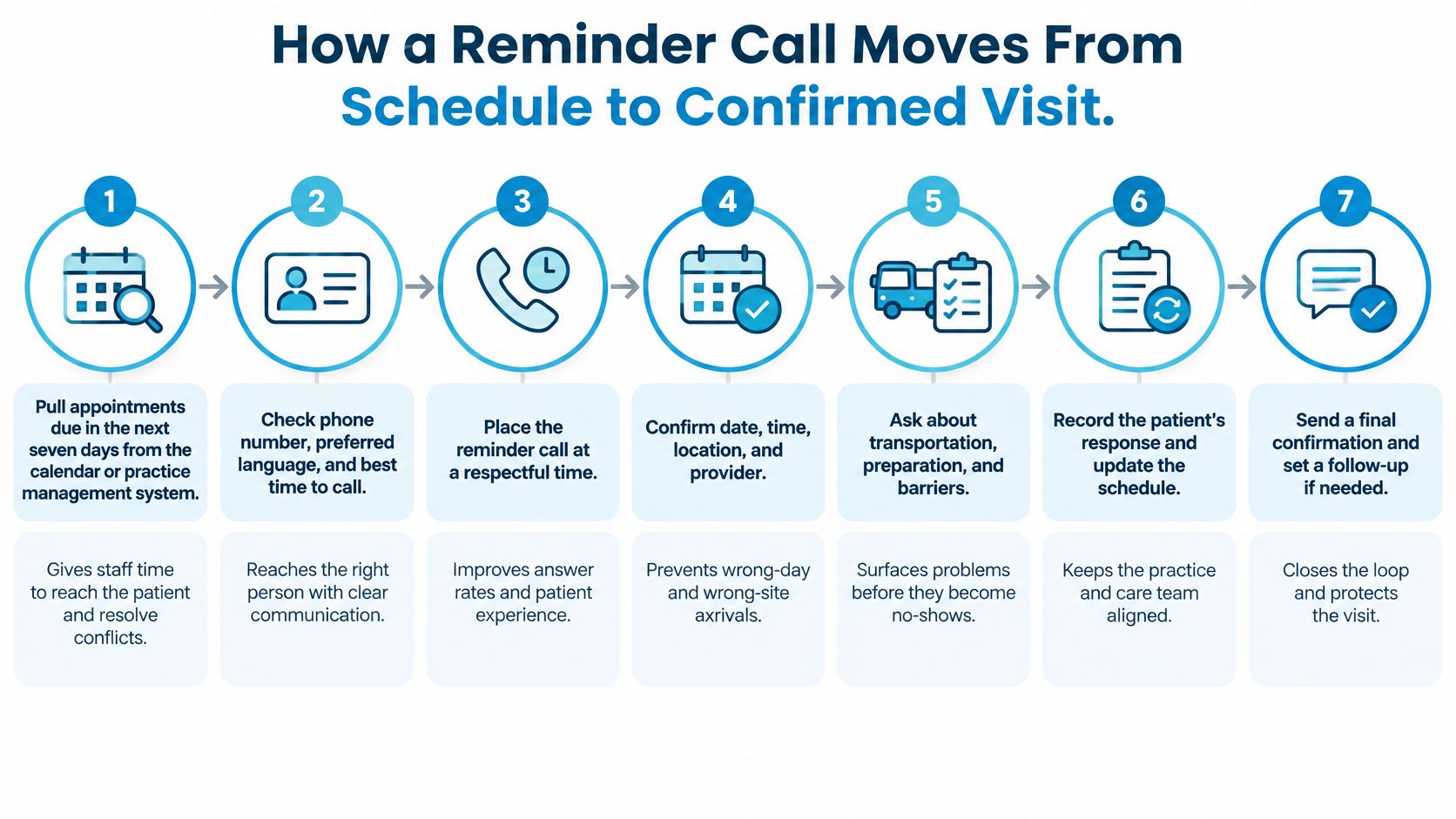
- Pull upcoming appointments. Build a working list covering the next seven days and tag each appointment by risk segment. Check phone numbers, preferred language, and contact restrictions before assigning calls.
- Sequence the queue. Call during business hours in the patient's local time zone. Deduplicate records and suppress appointments already handled so staff don't make conflicting calls.
- Introduce and verify. Identify the business and purpose briefly, then verify the intended recipient before reading appointment details. A shared phone isn't proof you've reached the patient.
- Offer an actionable choice. Let the recipient confirm, reschedule, or cancel through keypad or spoken responses. Don't make someone call back merely to report that the time no longer works.
- Escalate unresolved questions. Transfer transportation concerns, cost questions, disputed times, and preparation uncertainty to staff. For dental preparation questions, Seven Oaks Dentistry and Sleep Medicine's guide to what to know before dental appointments can provide supporting reading.
- Write the outcome. Record confirmed, moved, cancelled, or unanswered, together with the attempt time. At Recepta.ai, we place confirmed appointments directly on the business's calendar and trigger any follow-ups, removing that manual handoff.
- Handle unanswered attempts deliberately. Re-queue for a second attempt where permitted, then use an authorized SMS or staff follow-up. Silence isn't a cancellation.
Check whether the loop actually closed
Confirmed should mean the calendar reflects the patient's answer, not merely that software placed a call. Test a cancellation from beginning to end: if staff can offer and refill the released slot the same day, the workflow is producing usable capacity.
Timing Calls by Patient Risk Level
Using the same call time for everyone can waste scarce staff attention. Someone who needs transportation assistance requires a different conversation from someone who needs the arrival time repeated.
Start with practical review flags: previous missed appointments, a long gap between booking and attendance, a new-patient visit, or a procedure requiring preparation or insurance approval. These are routing criteria, not a diagnosis of why someone might miss care. Don't treat every new patient as unreliable or use a risk label to restrict access.
Call timing by patient risk segment
A randomized primary-care reminder trial involving 54,066 patients found missed-appointment rates of 4.4% with reminders three days and one day before, versus 5.8% with a single three-day reminder and 5.3% with a single one-day reminder.
| Segment | Call timing | Evidence | Purpose |
|---|---|---|---|
| High no-show risk | 7 days before the visit | 22.8% no-shows vs 29.2% without the call | Expose transport, preparation, authorization, or scheduling problems early |
| Standard patients | 3 days and 1 day before | 4.4% missed vs 5.8% with a single three-day reminder and 5.3% with a single one-day reminder | Confirm the visit and catch last-minute changes |
| Limited capacity, one call only | 1 day before | 5.3% missed, the better of the two single-reminder options | Use when a second reminder isn't possible |
The randomized trial of coordinator calls for high-risk primary-care patients used calls seven days before and reduced no-shows from 29.2% to 22.8%, a 6.4-percentage-point reduction, equivalent to roughly six fewer missed visits per 100 high-risk appointments.
These trials support differentiated timing, not a universal promise that this exact cadence will win everywhere. In particular, evidence about reminder timing doesn't establish that every reminder channel performs identically.
An early call is useful only if someone can act on the answer. Finding an authorization problem without assigning an owner leaves the appointment unresolved.
Record risk score or routing category, attempt time, answer status, confirmation outcome, cancellation reason, and rescheduling result. Compare outcomes within each segment before changing the cadence across the whole practice.
Live Staff Calls Versus Automated Reminders
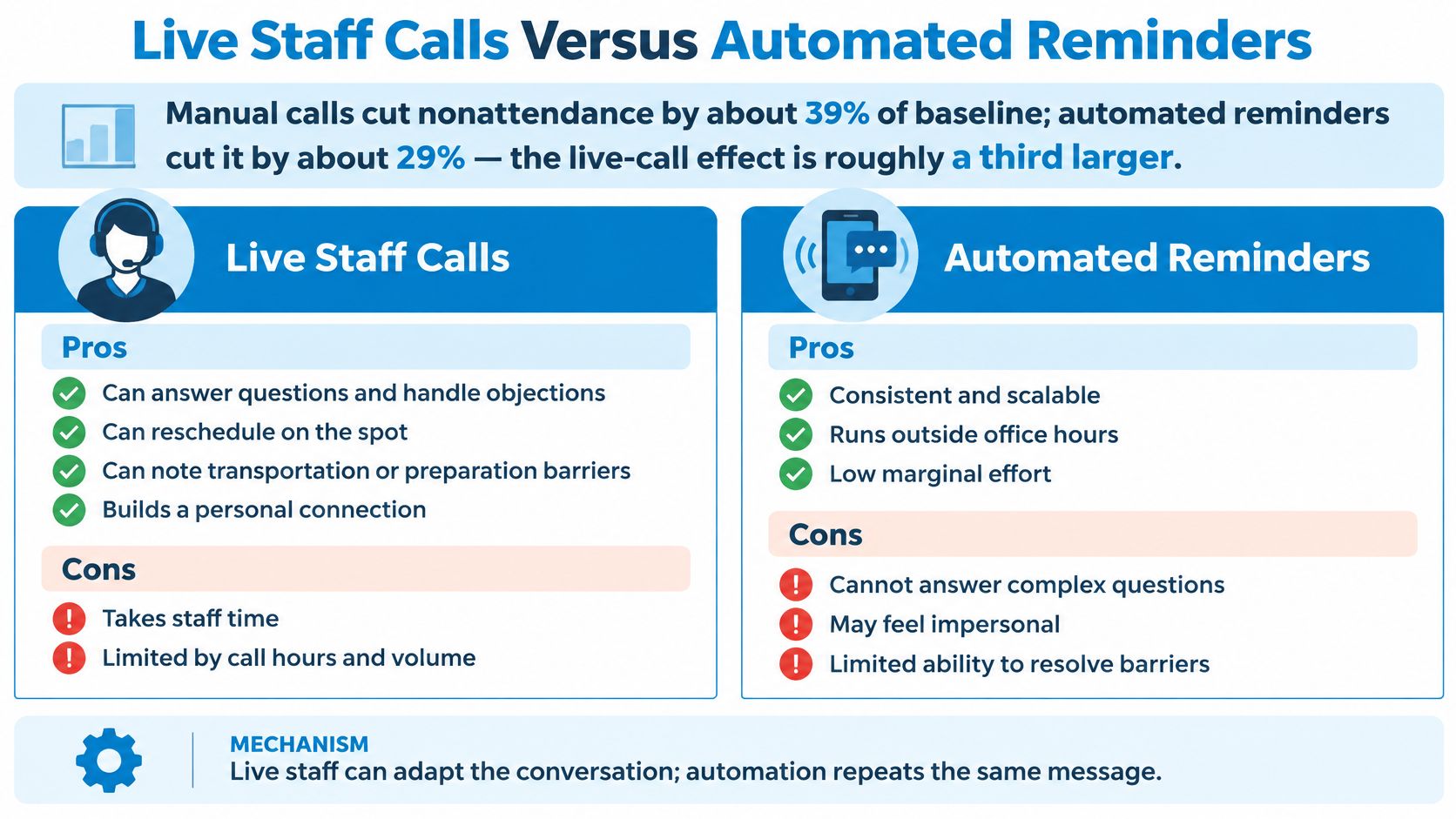
Manual calls reduced nonattendance by about 39% of baseline, compared with about 29% for automated reminders, in a systematic review of hospital appointment reminders. The manual-call effect was roughly a third larger, but that comparison doesn't guarantee that every live-call program will outperform every automated system.
This visual summarizes the practical trade-offs.
| Scheduling need | Live staff calls | Automated reminders |
|---|---|---|
| Routine confirmation | Requires staff time | Consistent delivery with little manual dialing |
| Unexpected question | Staff can clarify and adapt | Basic menus need an escalation path |
| Rescheduling | Staff can assess alternatives | Capability depends on calendar integration |
| Transport or preparation barrier | Staff can investigate and assign follow-up | Can flag the concern for a person |
| Call capacity | Limited by staffing and coverage | Can process a larger routine queue |
A live conversation offers plausible reasons for the difference: staff can uncover confusion, explain instructions, and change the booking during the interaction. The pooled comparison doesn't isolate how much each mechanism contributed.
Automate routine confirmations; route complexity to a person. When evaluating an AI voice agent for healthcare, test its actual rescheduling and escalation behavior rather than assuming it works like either a recorded message or a clinician.
The video below offers another format for considering voice-based workflows.
Test the staffing decision
Run a month-long pilot with comparable appointments assigned to each method. Compare completed visits and staff effort, accounting for differences in patient risk and successful contact.
If a missed visit costs more than the staff time for a call, prioritize human review. Then check whether the additional visits recovered justify that effort, since staff can't prevent every absence.
Lawful Scripts and Privacy Safeguards for Reminders
Appointment reminders aren't marketing calls. The U.S. federal calling rules distinguish qualifying healthcare reminders from promotional outreach and set conditions concerning approved purposes, identification, brevity, privacy, and opt-outs, including appropriate keypad mechanisms.
Don't add advertising or financial content to a healthcare reminder and assume the same permission applies. Review the applicable calling basis, technology, and jurisdiction before launch; a good script alone doesn't establish compliance.
Put safeguards before appointment details
- Minimize voicemail content. Don't disclose diagnoses, procedures, or unnecessary visit details.
- Verify the recipient. Reveal scheduling details only after the approved identity check.
- Log permissions and revocations. Keep consent and opt-out events attached to the contact record.
- Suppress further reminders after opt-out. Make the suppression effective across connected queues.
- Escalate ambiguity. Send disputed consent, shared-number concerns, and unusual disclosure requests to trained staff.
The HHS guidance on appointment messages permits voicemail reminders with reasonable privacy safeguards, including limiting disclosed information. For a patient-facing example of privacy communication, review how Prosth & Co. protects patient data, without treating another practice's policy as your own operating procedure.
Short scripts to adapt
These templates are designed to be read in under twenty seconds, but test them with your actual placeholders. The live-call versions assume identity verification has already occurred.
| Context | Suggested wording |
|---|---|
| Minimal voicemail | This is [practice name] calling for [patient]. Please call [number] regarding your appointment. |
| Home services | Hi, this is [company] confirming your visit on [day] between [time]. Press 1 to confirm, 2 to reschedule, or 3 to stop reminders. Call [number] for help. |
| Dental clinic | This is [clinic] confirming your appointment on [day] at [time]. Please arrive ten minutes early for paperwork. Call [number] for changes. Press 3 to stop reminders. |
| Law firm or insurance agency | This is [firm] confirming your meeting on [day] at [time]. Call [number] to reschedule. Press 3 to stop reminders. |
Use the dental arrival instruction only if it matches the clinic's policy. Live-call scripts include the business name, callback number, and appointment time; minimal voicemail deliberately omits the time to limit disclosure.
A promised opt-out key must work. Align the implementation with your outbound calling rules, then read each script aloud and ask whether a neighbour hearing it could learn anything sensitive.
Reaching Patients in Their Preferred Language
A technically delivered call can still fail if the recipient can't understand it. In a study of women with limited English proficiency, more than half either received no reminder or had difficulty understanding it, and 91% preferred reminders in their primary language, regardless of English ability.
That finding identifies a communication gap in the studied population. It doesn't establish the same preference rate for every patient group, but it gives scheduling teams a clear reason to record language preference rather than infer it.
Make comprehension part of the workflow
- Collect spoken-language preference at intake. Store it beside the phone number, and distinguish it from written-language preference.
- Use plain speech. Have qualified language support review high-volume scripts. A literal translation of administrative jargon can remain confusing.
- Provide a supported handoff. Route unsupported language selections or early hang-ups for staff review. Arrange an interpreter when needed rather than assuming a family member should translate.
- Check understanding respectfully. Ask the patient to repeat the appointment day and time, framing it as a check on your explanation. Use keypad answers for simple choices when appropriate.
- Compare outcomes by language group monthly. Review missed visits and completed visits, not just successful message delivery.
Comprehension check: Ask the patient to tell you when they're coming, rather than asking only whether they understood.
For example, replace an instruction to complete preregistration with a plain explanation that the patient needs to fill in a form before arriving. Keep sensitive preparation questions within the verified conversation.
Language is a routing segment alongside appointment risk. Ask your team: Which language group had the highest no-show rate last quarter, and what changed when its calls were reworded?
Set Your First Reminder Policy This Week
Start with a segment where an empty appointment creates a meaningful operational loss. A prepared procedure slot, a lengthy consultation, or a service visit requiring a dispatched technician gives the team a concrete reason to resolve uncertainty early.
Don't launch across every appointment type at once. A narrow pilot makes it easier to identify whether a problem came from contact details, wording, escalation, or calendar updates.
Assign owners before switching on calls
- Split the appointment list. Use past no-shows and visit type to distinguish high-risk from standard appointments. Name the person responsible for reviewing exceptions.
- Apply the timing policy. Give high-risk visits an early problem-solving call and standard visits the near-term confirmation pair. Stop obsolete attempts when an appointment changes.
- Choose the handler. Keep routine responses automated and assign complex or language-sensitive conversations to staff with the right support.
- Approve the communication controls. Finalize voicemail wording, opt-out handling, and the consent log before launch. For healthcare vendor assessment, use a HIPAA-compliant answering service checklist to organize your review.
- Review operational outcomes monthly. Compare completed visits, recovered cancelled slots, and successful reschedules by segment and language group. Check individual failures instead of relying solely on an overall average.
Our outbound calling follows the customer's lists and instructions for appointment booking, confirmations, reminders, and follow-ups. Every appointment is tracked, logged, and synced directly into the customer's workflow, so the team can review outcomes rather than reconstruct them from separate notes.
Give the pilot a named owner and a written decision rule for expansion. Start with the segment that costs the most when it no-shows, measure what happens, then expand.
Recepta.ai offers outbound appointment confirmations, reminders, and follow-ups based on your lists and instructions, with calendar updates and human support for conversations that need it. Visit Recepta.ai to discuss a reminder workflow for your highest-cost appointment segment and plan how confirmations, cancellations, and reschedules will reach your team.