Appointment Scheduling in Healthcare Made Simple
At 8:47 a.m., the front desk is already juggling a ringing phone, portal requests, and a patient asking whether an earlier appointment is available. One patient cancels, another never confirms, and a third is told the next opening is several weeks away. The schedule looks full, yet the clinic still loses usable capacity and patients still wait.
That tension explains why appointment scheduling in healthcare is no longer a back-office task. The booking horizon, appointment type, reminder strategy, and rescheduling process all influence whether care happens at the right time. A well-designed schedule protects clinician capacity while making access easier for patients.
This guide starts with the basic workflow, then examines why no-shows and long waits persist. It compares traditional, open-access, hybrid, manual, and automated approaches before showing how secure automation can connect calendars, EHRs, communication tools, and staff workflows. The practical examples focus on changes a clinic can test without rebuilding its entire operation.
Introduction to Appointment Scheduling in Healthcare Today
A patient calls after work, finds no suitable opening, and postpones care. Elsewhere, a reserved slot goes unused because a reminder arrived too late or rescheduling required another phone call. Scheduling decisions shape both access and the revenue a clinic can earn from its available capacity.
Across healthcare settings, no-show rates commonly cluster around 20% to 23%, with one review reporting a global average of 23.5%. A separate comparison found an average of 21.7% in resident clinics and 6.6% in faculty clinics, showing why each practice needs to understand its own operating pattern. These figures and related financial estimates appear in healthcare patient no-show rate data.
Access can fail in the opposite direction. In the largest U.S. metropolitan areas, the average time to schedule a new physician appointment increased from 21 days in 2004 to 31 days in 2025, a 48% increase over that period, according to AMN Healthcare survey reporting cited in a 2024 study of healthcare appointment scheduling access. Patients may face an unreliable near-term schedule and a long wait for the next available appointment.
Operational insight: A schedule is not healthy because every visible slot is occupied. It must balance access, attendance, continuity, and recovery when plans change.
Interval length is one control point. A follow-up placed in a slot built for a complex evaluation wastes capacity, while an overly short visit creates delays that spread through the day. Predictive reminders can focus extra outreach on patients more likely to miss an appointment, and open-access design can reserve timely options instead of filling every future slot too early.
Together, these choices turn the calendar into an access and revenue engine. Staff can see provider availability, visit length, location, equipment, and follow-up needs, while patients receive clearer choices and a simpler way to reschedule. The work begins by understanding how a request moves through the clinic.
How Healthcare Appointment Scheduling Really Works
Think of a healthcare schedule as an airport control tower. Patients are aircraft requesting landing times, providers and rooms are runways, visit types determine how much runway each arrival needs, and the scheduling system coordinates movement so two incompatible arrivals don't use the same space.
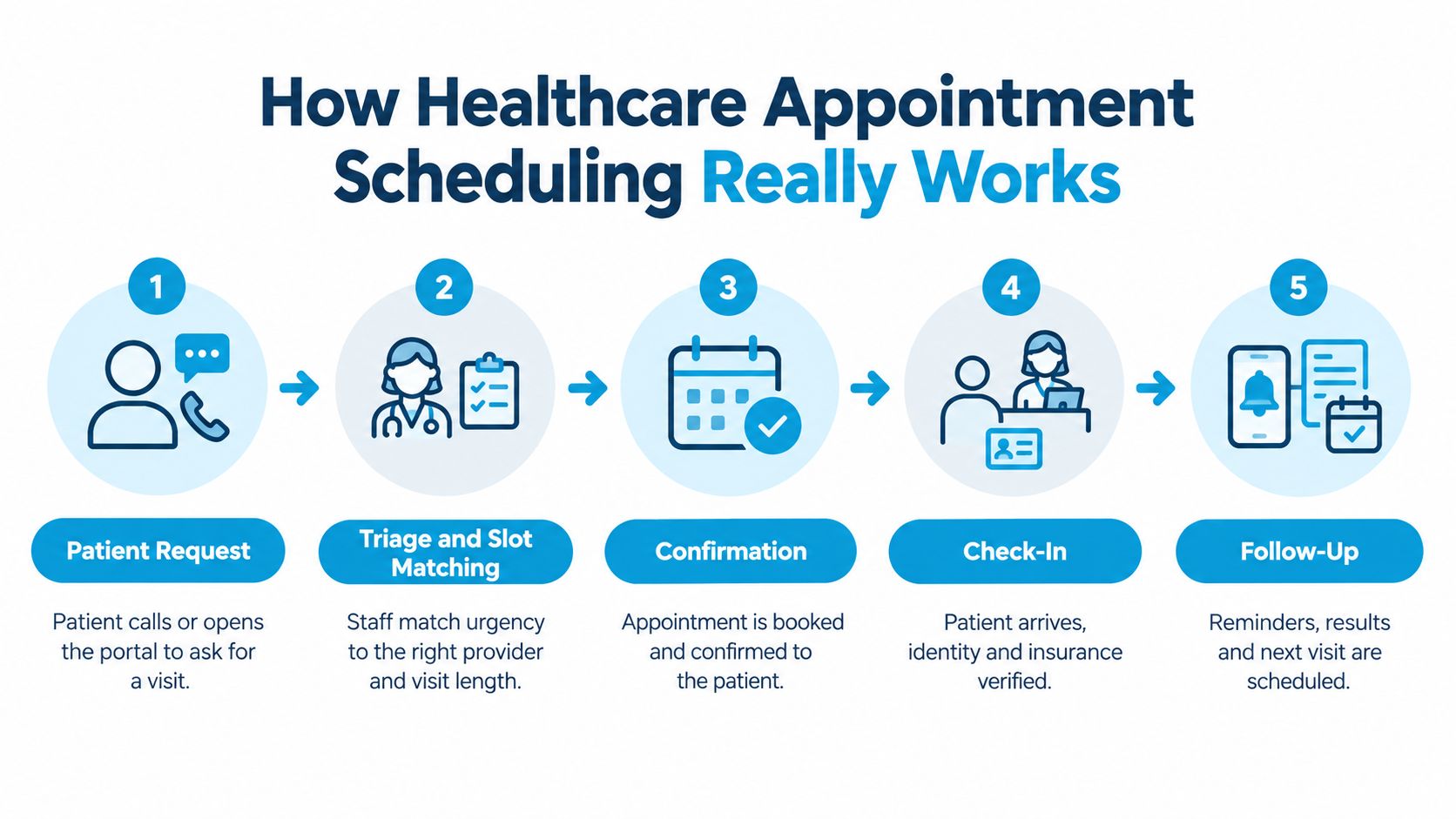
A reliable workflow follows five connected stages:
- Patient request: A patient calls, sends a portal message, or uses online booking. The request should capture the reason for the visit, preferred timing, location, and communication preference.
- Triage and slot matching: Staff or scheduling software match urgency, provider qualifications, visit duration, equipment, and preparation requirements. A short follow-up shouldn't consume a slot designed for a complex new-patient evaluation.
- Confirmation: The system records the appointment and sends the patient the date, time, location, instructions, and cancellation or rescheduling options.
- Check-in: The patient arrives, and staff verify identity, insurance information, forms, and any required pre-visit steps.
- Follow-up: The clinic records outcomes, sends permitted communications, and schedules the next visit when clinically appropriate.
Where handoffs create trouble
The calendar, EHR, patient communication platform, and staff inbox each hold part of the truth. If a staff member changes an appointment in one tool but not another, the patient may receive an outdated message or the provider may prepare for the wrong visit type. Calendar integration for healthcare workflows helps teams think about synchronization as a core operating requirement rather than a convenience.
Double-booking usually reflects a rule problem, not staff carelessness. The schedule may fail to distinguish urgent visits from routine follow-ups, allow incompatible appointment types to overlap, or hide capacity that another team member can see. Gaps often have the opposite cause, such as restrictive booking rules, unclear cancellation handling, or availability that isn't exposed across channels.
A practical workflow check
Map one appointment from initial request through follow-up. Write down who touches it, which system they use, what information they need, and what happens when the patient cancels. Then look for three warning signs:
- Repeated entry: The same date, patient detail, or visit type is typed into multiple systems.
- Unowned exceptions: Nobody is clearly responsible for unresolved requests, failed reminders, or late cancellations.
- Delayed visibility: Staff can't see newly opened capacity or a rescheduled appointment in real time.
A good flow gives every participant the right information at the right handoff. It also makes the next action obvious when the original plan changes.
Why No Shows and Long Waits Keep Happening
A clinic can have available clinicians and still feel inaccessible. A patient who books far ahead may face changes in work, transportation, family responsibilities, or health before the visit. Meanwhile, someone who needs care today may find that near-term slots are reserved for appointments made weeks earlier. The calendar becomes an access and revenue engine, because its rules determine whether capacity is used or lost.
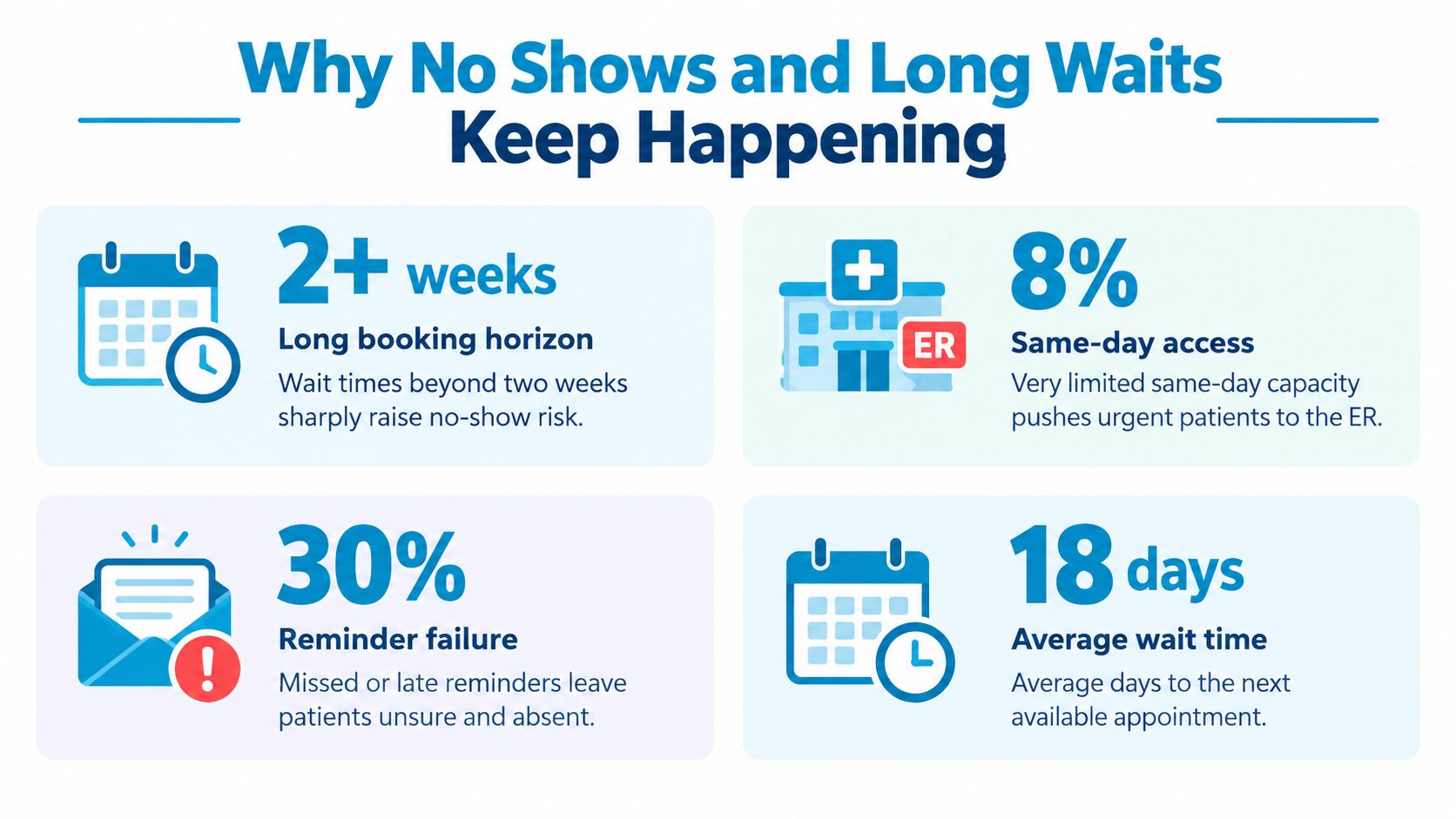
Booking interval has a strong effect on attendance. In one large study, the average no-show rate in resident clinics rose from 9.1% for appointments booked 0 to 2 weeks ahead to 38.3% when booked at a six-month lead time. Faculty clinics rose from 2.4% to 6.9% over the same range. The study estimated that moving more appointments into the two-week window could reduce no-shows by about 2 percentage points for every 10% shift in appointment share, as reported in the study of scheduling interval and missed visits.
Access pressure varies by setting
No single benchmark explains every clinic. Specialty-level differences are substantial. Primary care has been reported around 19%, OB/GYN near 18%, pediatrics and dermatology around 30%, and sleep clinics about 39%, according to the review of patient no-show rates. Practice setting also matters, as the difference between resident and faculty clinics shows.
Long waits create a separate failure loop. A new patient may wait 36 days for cardiology, 50.4 days for ophthalmology, or 82 days for endocrinology. During booking, average time on hold in the cited study ranged from 2.6 minutes to 5.4 minutes. These access findings appear in the Journal of Medical Internet Research scheduling access study.
Adding slots may not fix either problem if the clinic still books too far ahead, sends identical reminders to every patient, or makes rescheduling difficult. The capacity may exist, but it is placed at the wrong time or becomes unusable after a cancellation.
Diagnose before changing the calendar
Review the schedule by visit type, provider, location, booking interval, cancellation status, and reminder outcome. Compare appointments booked soon with those booked far ahead. Then compare resident-style and faculty-style workflows, or equivalent provider groups, to identify where attendance and access diverge.
The annual U.S. system cost associated with missed appointments has been estimated at about $150 billion, with an average direct cost of roughly $200 per missed appointment, according to the same no-show rate analysis. These figures show why a small scheduling change deserves testing, but the target should match the clinic's actual leakage.
Teams can pair their schedule data with strategies to reduce no-show appointments. Start with the largest failure source, such as long booking intervals, weak reminders, or unfilled cancellations. Test one rule at a time, measure attendance and wait time, then adjust the calendar based on what patients do.
Choosing the Right Scheduling Model for Your Practice
Traditional advance booking offers predictability. Staff fill the calendar into the future, patients can request a preferred provider, and clinicians can plan follow-up care. The weakness is that a long horizon increases the time available for plans to change.
Open access, also called advanced access or same-day scheduling, lets patients receive an appointment on the day they call. The model typically keeps about half the day open, reserving the remaining capacity for clinically necessary follow-ups and for patients who don't attend on the day they call, usually no more than 25% of patients, as described by the Agency for Healthcare Research and Quality guide to open access scheduling. A primary care clinic might leave morning and afternoon slots unscheduled so same-day sick visits can be placed immediately.
A hybrid model combines protected near-term capacity with advance booking for continuity, procedures, and planned follow-ups. It often suits practices that need same-day access but also depend on recurring visits or specialized resources.
| Scheduling Model Decision Matrix | Best For | Access Impact | Operational Trade-off |
|---|---|---|---|
| Traditional advance booking | Planned follow-ups, stable recurring care, patients who need a specific provider | Makes future planning straightforward, but can lengthen the wait | Predictable calendars can increase exposure to cancellations and no-shows |
| Open access or same-day scheduling | Primary care and services with variable daily demand | Improves near-term access by reserving capacity for callers | Staff must manage demand carefully and protect appropriate follow-up space |
| Hybrid scheduling | Practices balancing urgent care, continuity, and resource-dependent visits | Provides immediate options while preserving planned care | Requires clear rules for which slots belong to each demand type |
| Manual workflow | Small teams with simple calendars and limited appointment variation | Access depends heavily on staff availability and consistency | Exceptions, reminders, and updates can consume considerable administrative time |
| Automated workflow | Multi-provider, multi-location, or high-volume practices | Makes availability and rescheduling easier to expose across channels | Requires integration, access controls, testing, and human escalation |
Automation doesn't automatically mean replacing staff. It can handle routine confirmations, collect scheduling preferences, expose available slots, and route unusual cases to a trained person. Manual oversight remains important when a request involves clinical judgment, complex preparation, insurance questions, or an upset patient.
Decision rule: Choose the model that matches demand volatility and clinical dependencies, not the model that looks simplest on a calendar.
Building HIPAA Compliant Automated Scheduling Workflows
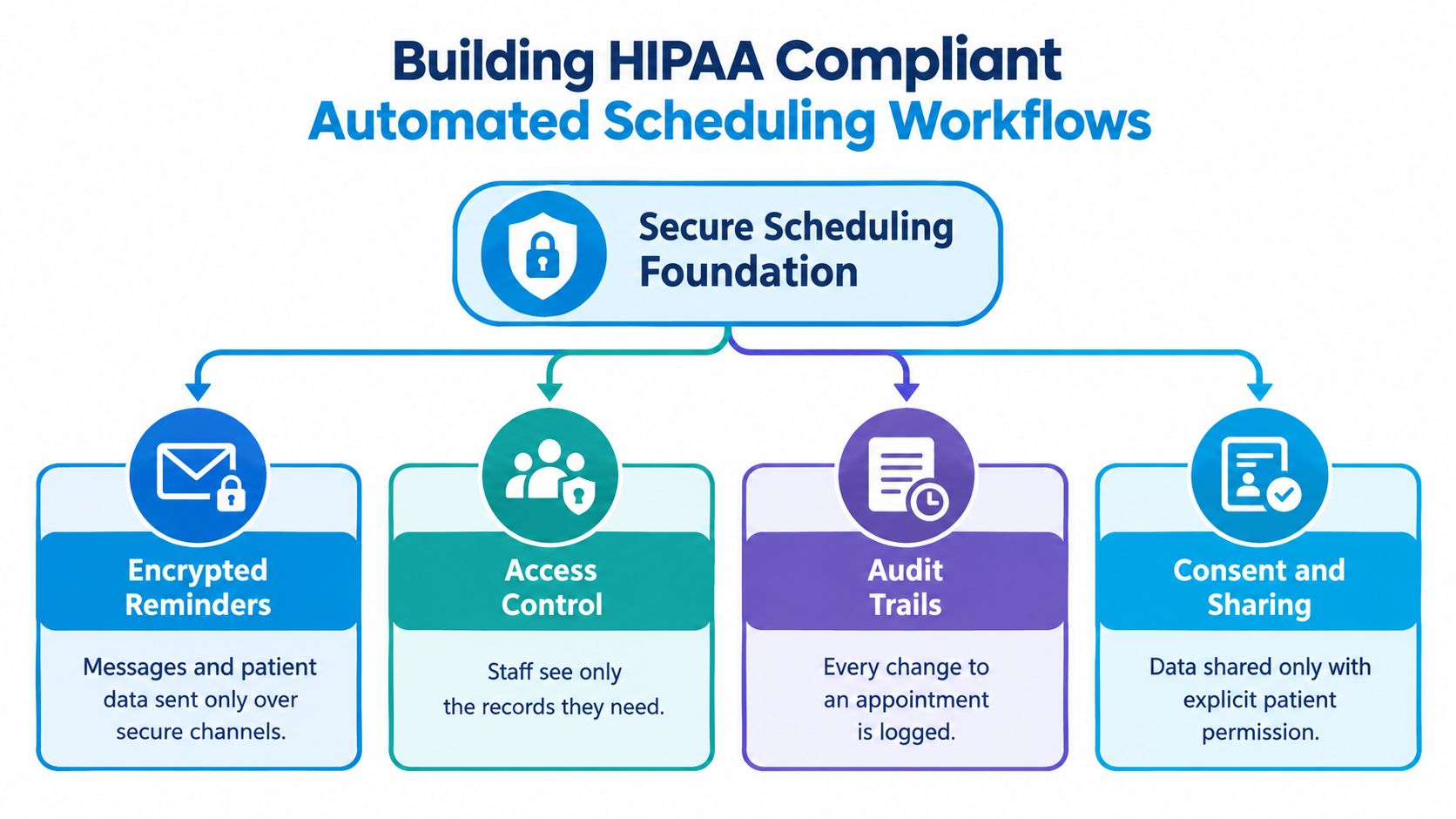
Secure automation starts with data boundaries. A reminder may need the patient's name, appointment time, location, and preparation instructions, but the clinic should decide what information belongs in each communication channel. Staff should also know which actions an automated system can complete and which require human review.
Connect the systems before adding triggers
The workflow should treat the EHR, scheduling calendar, patient communication tool, and reporting layer as one coordinated system. A patient who books through a portal, phone agent, or online form should create one consistent appointment record, not separate versions that staff must reconcile later.
Build the connection in stages:
- Define the source of truth: Decide where appointment status, provider availability, visit type, and patient preferences are maintained.
- Set permission boundaries: Give each staff role access only to the records and actions needed for that role.
- Log every change: Record who created, moved, canceled, or confirmed an appointment, along with the time and reason when available.
- Create escalation paths: Route clinical questions, unclear identity matches, unusual requests, and failed contact attempts to a human queue.
- Test exception cases: Try cancellations, duplicate requests, provider absences, location changes, and patients who need an interpreter or accessibility support.
For broader context on protecting patient communications in virtual care, Weight Method's overview of telehealth compliance methods offers a useful reference. The same discipline applies to scheduling, especially when several systems exchange patient information.
Use risk-scored reminders
Generic broadcast reminders treat every patient and appointment as equally likely to be missed. Predictive workflows use EHR or scheduling data to identify who may need additional support and choose the channel accordingly. A JAMIA review found high-certainty evidence that predictive model-based text reminders reduced no-shows, with a median risk ratio of 0.91. It also found moderate-certainty evidence that predictive model-based phone reminders probably reduce no-shows. The findings are available in the JAMIA review of predictive reminders.
A practical sequence might send a routine confirmation after booking, offer a simple reschedule option, and route higher-risk cases to targeted text or phone outreach. The message should make the next action obvious. “Reply to change this appointment” is more useful than a reminder that gives no recovery path.
Teams can review HIPAA-compliant scheduling software considerations when evaluating vendors. Recepta.ai is one option that can handle inbound and outbound appointment communication, scheduling, confirmations, reminders, and escalation while syncing records with connected business systems. Any platform still needs a clinic-specific privacy review, appropriate configuration, and clear human oversight.
Real World Examples of Smarter Healthcare Scheduling
A primary care clinic receives more requests for help today than its calendar can accommodate. Instead of filling every slot months ahead, it protects morning and afternoon capacity for same-day sick visits and uses the remaining appointments for planned follow-ups. Clear rules define which visit types qualify, while staff review unused protected slots so the model does not create avoidable gaps.
This design treats the calendar as an access and revenue engine. Reserved capacity gives urgent-but-appropriate patients a nearer option, while planned visits keep the schedule productive. The clinic can adjust the balance as demand changes rather than assuming every day follows the same pattern.

A specialty clinic targets leakage
A specialty practice reviews missed visits by appointment type and booking interval. It uses a benchmark near 20% as a prompt for investigation, not as a universal target, because no-show patterns differ across specialties and settings. The team then gives patients with higher scheduling risk stronger support and makes cancellation or rescheduling easier.
The workflow connects each intervention to a likely cause. Staff check whether the patient received confirmation, whether the appointment was booked far ahead, and whether a newly open slot was offered after a cancellation. A predictive reminder can focus outreach where it may prevent a lost visit, while an easy reschedule path helps recover capacity.
A multi-location group shortens the horizon
A practice with several locations centralizes provider availability and newly opened slots. After a cancellation, the system offers the appointment to an appropriate patient seeking an earlier visit. Staff retain control over exceptions and clinically sensitive bookings.
The interval evidence supports a clear operating hypothesis. As noted earlier, attendance worsens as appointments are placed farther from the visit date, with the effect varying between resident and faculty clinics. Rather than copying the earlier figures, the group uses that finding to test whether shifting suitable appointments closer to the visit date reduces no-shows. The research on appointment lead time and attendance provides the underlying evidence.
Across these examples, scheduling changes work like adjustments to a transport system. Protected capacity creates routes for urgent demand, risk-based outreach reduces missed trips, and faster rescheduling fills openings before they become lost revenue. Teams should measure the result by visit type and setting, including wait time, attendance, and recovered slots.
Your Next Steps to Better Appointment Scheduling in Healthcare
Start with a short operational review rather than a large technology project. Follow one appointment from request to follow-up, identify where information is re-entered or delayed, and separate no-shows from cancellations, reschedules, and unfilled openings.
Use the next 30 days to test one focused change:
- Days 1 to 7: Measure booking intervals, attendance, cancellations, and time to the next appropriate appointment.
- Days 8 to 14: Choose one intervention, such as exposing more near-term capacity, adding a reschedule option, or targeting reminders to higher-risk patients.
- Days 15 to 21: Run the workflow with clear ownership for exceptions, failed contacts, and late changes.
- Days 22 to 30: Compare results by provider, visit type, and booking horizon. Keep the change only if it improves access without creating new workflow problems.
Measure more than the number of filled slots. Track whether patients can reach the right service, how quickly staff recover canceled capacity, whether reminders lead to confirmed or rescheduled visits, and whether clinicians receive accurate visit information.
Automation can support this operating model when it connects scheduling channels to the clinic's calendar and records. Teams evaluating automated appointment scheduling software should ask how the system handles permissions, audit trails, patient preferences, exception routing, and real-time updates.
The most durable improvement usually starts small. A clinic that shortens one booking horizon, protects one appropriate access window, or improves one reminder workflow can learn what works before expanding it across providers and locations.
Recepta.ai helps healthcare practices manage inbound and outbound calls, book, reschedule, confirm, and cancel appointments, and keep connected calendars and systems updated. Visit Recepta.ai to explore a scheduling workflow that combines conversational AI with human escalation for patient interactions that need personal support.