
What Is a Call Logging System: A Practical Guide

Your phone shows missed calls, the appointment calendar has an unexplained booking, and someone on the team remembers promising a callback. You're trying to work out what happened without interrupting everyone who might have answered the phone. A call logging system replaces that guesswork with records you can search, review, and assign for follow-up.
The useful question isn't just what the software can collect. It's what you need to know, and how much information you should keep to answer it.
What a Call Logging System Records
A call logging system is a structured method for collecting, evaluating, and reporting telephone-call data, turning each call into a searchable record rather than merely a list of missed and answered calls, as the call logging overview explains.
Say a plumbing company's phone rings, a Saturday job gets booked, and three days later nobody can identify which caller requested that slot. The calendar tells the dispatcher something was scheduled, but not who handled the request or whether the customer needs confirmation.
A useful call log connects those details. Think of it as a ledger entry for each conversation, much as a bank statement records transactions instead of leaving you to remember them.
The core record and its fields
The underlying record is commonly called a call detail record, or CDR. Its fields describe the interaction; business software can enrich that record with handling information and outcomes.
Fields in a typical call log record
The values below are illustrative, not performance benchmarks.
| Field | What it records | Example |
|---|---|---|
| Caller or station number | Which line or device placed the call | Customer mobile number |
| Destination | Number or extension the call reached | Service line 2 |
| Start and end time | When the call began and finished | 09:14 to 09:21 |
| Duration | Total length of the call | 7 minutes |
| Direction | Whether the call came in or went out | Inbound |
| Outcome | How the call ended | Booked, missed, voicemail |
| Hold time and queue wait | Time spent waiting before answer | 45 seconds in queue |
| Handling agent | Staff member or automated system that handled it | Dispatcher, AI receptionist |
Hold and queue fields need careful definitions: waiting for an initial answer isn't the same as being placed on hold after someone answers.
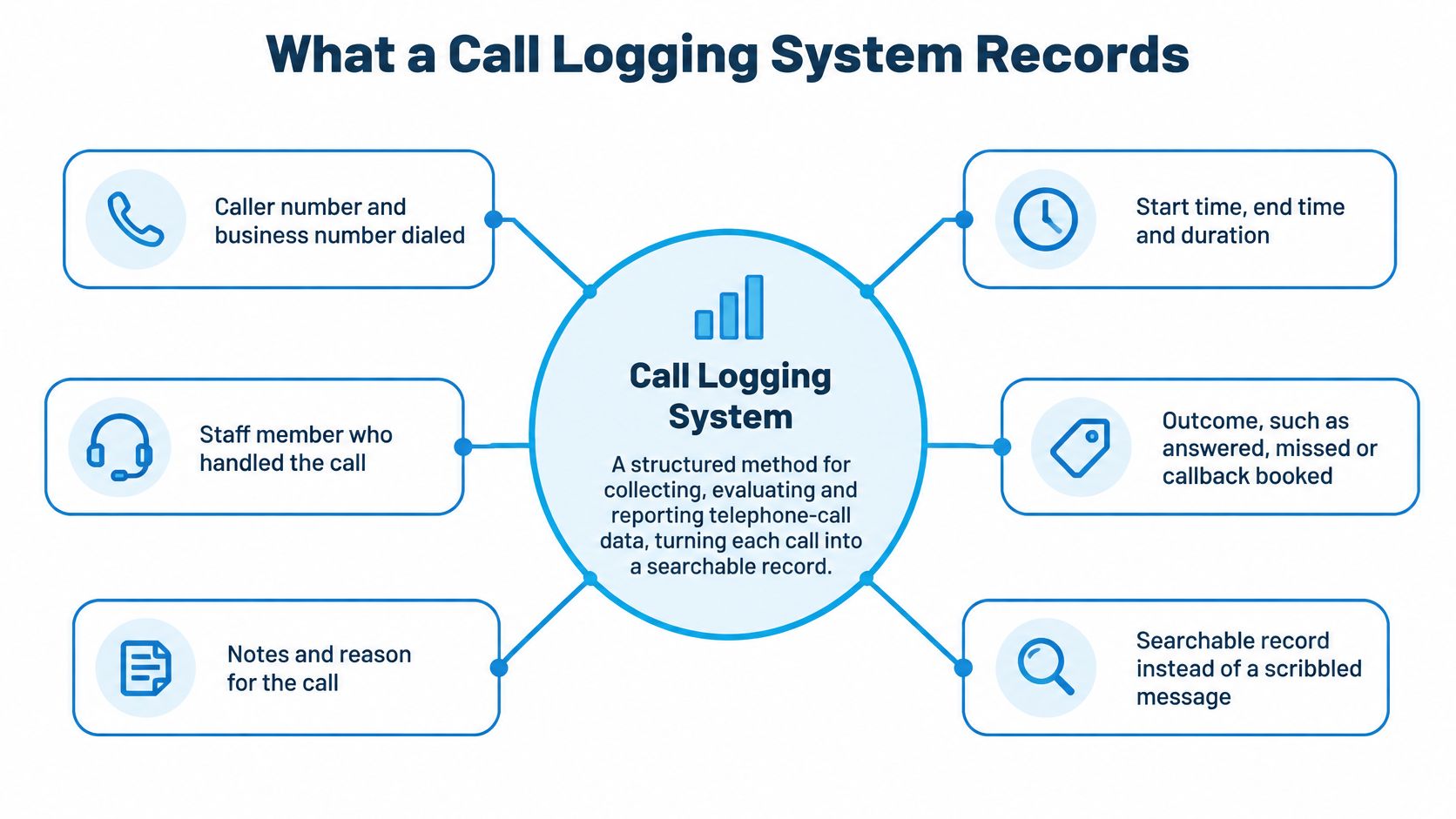
A basic log stores metadata, meaning facts about the call rather than its contents. Modern systems may add audio, summaries, and call transcription, but logging doesn't automatically mean recording every conversation.
The stakes are practical: in a 2025 CallRail survey, 78% of 1,000 U.S. consumers said they had abandoned a business after an unanswered call, according to the missed-call statistics summary.
For a manager, the immediate value is visibility: when calls arrive, whether someone answers, and which callers still need attention. If missed calls cost jobs, those are useful facts to preserve.
How a Call Turns Into a Log Entry
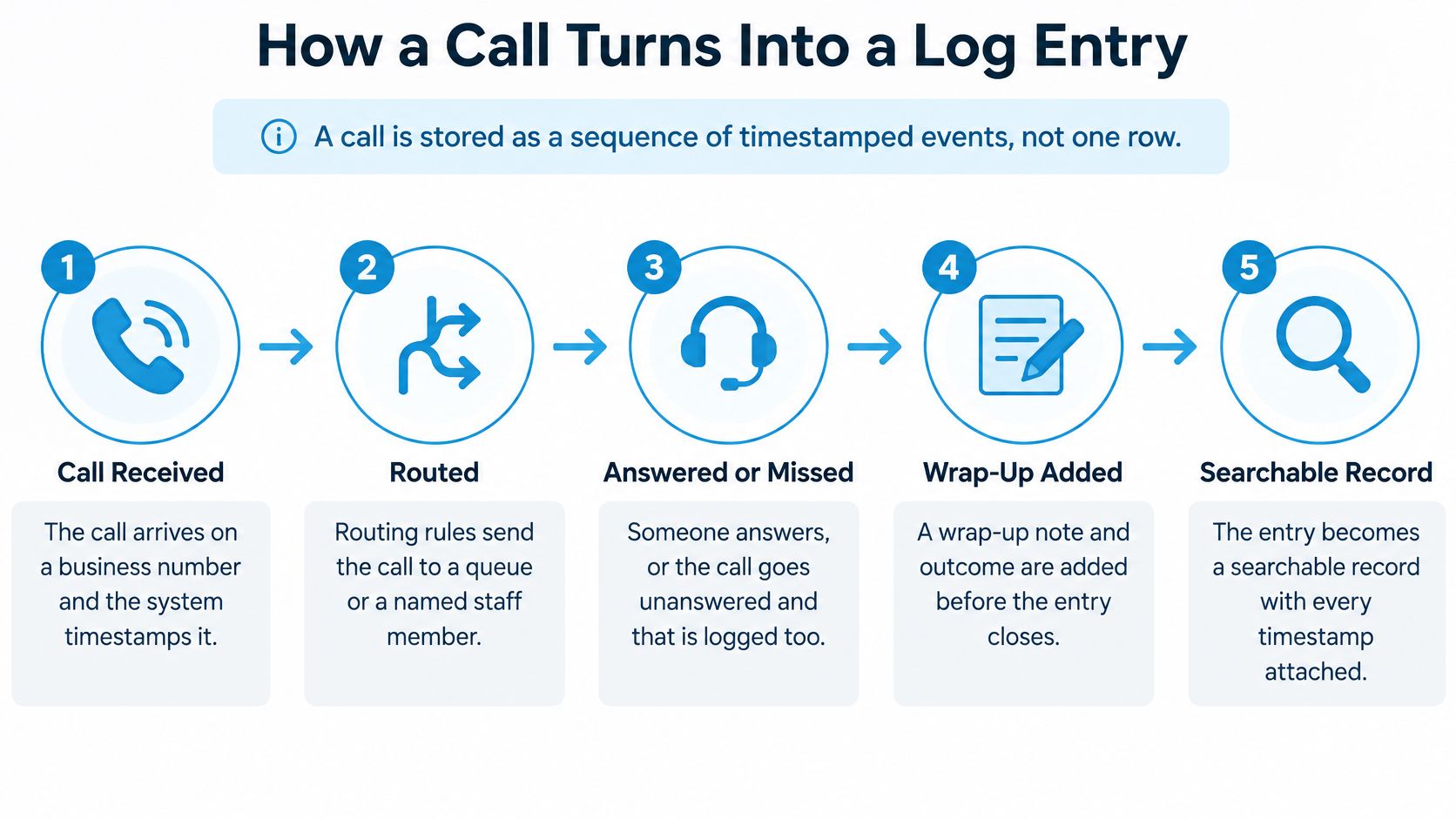
A finished log may look like a spreadsheet row, but the system should preserve the events behind it. NIST's mobile-device forensics guidance describes network-generated call-detail records containing identifiers, dialed numbers, and duration; business logging extends that foundation into a timestamped interaction history.
Follow the call through its stages
Capture arrival. The call reaches a business number, and the system timestamps it. Without that starting point, the manager can't reliably measure how long the caller waited.
Record routing. Configured rules send the caller to a staff member, queue, or automated answer. Logging only the destination hides whether the route itself caused a delay.
Preserve the answer or exit event. The caller may connect, continue waiting, leave voicemail, or abandon the queue. Don't label every unanswered attempt as voicemail, because those outcomes require different responses.
Keep transfers connected. Related call segments should retain a stable interaction ID, an identifier for the customer's overall call journey. Assigning an unrelated ID after every transfer makes one conversation look like several separate inquiries.
Apply a standard outcome. Staff or configured rules add a label such as booked, missed, transferred, or follow-up required. Free-text variations make otherwise similar calls difficult to compare.
Save and act. The system writes the record and, where configured, sends a summary or creates a follow-up task. A record without an assigned next action can still leave the customer waiting.
A dashboard isn't the whole system
A dependable pipeline needs ingestion, normalization, storage, analytics, access control, and retention. In everyday terms, it must receive records, standardize them, save them, make them useful, restrict access, and remove them under an agreed policy.
An Asterisk-based implementation paper distinguishes CDR data from more detailed queue logs. A CDR-only view establishes that a call occurred; queue events help explain whether delay arose before ringing, while waiting, or after transfer.
Use UTC timestamps with local display time so locations can compare events consistently. With CRM telephony integration, the resulting record can also connect to the customer's contact history rather than remain isolated in the phone system.
Our workflow follows the business's custom scripts, logs every interaction in a structured way, and can trigger follow-ups. Test your own setup by finding a transferred call: can you follow its arrival, routing, answer, transfer, and final outcome without guessing?
Choosing the Right Level of Logging
More data isn't automatically better. A manager trying to recover missed bookings may need an outcome label and a callback owner, not a permanent audio archive.
The Retell AI call logging glossary distinguishes basic call metadata from richer records such as transcripts and summaries. That distinction matters because collecting conversation content adds information you must govern, protect, and potentially retrieve during a dispute or legal discovery.
Logging levels and what each one supports
| Logging level | What it captures | Best use |
|---|---|---|
| Metadata only | Caller number, direction, start time, duration | Call volume and answer-rate reporting |
| Structured disposition | Outcome label such as booked, missed, transferred, follow-up required | Workflow automation and branch comparison |
| Summary | Short written notes after each call | Handoffs between staff members |
| Full recording and transcript | Complete audio and text of the conversation | Narrow quality, dispute or training review |
Match the detail to the decision
Start with metadata only when the question concerns demand or availability. A cleaning business checking whether its office can handle incoming calls needs arrival and answer information before it needs conversation content.
Add structured dispositions when the next step matters. A qualified inquiry that wasn't booked needs a different workflow from a customer checking an existing appointment. Consistent call detail reporting depends on defining those differences clearly.
A summary helps when someone else must continue the work. For example, a dispatcher can pass a technician the service request, agreed next step, and access instructions without requiring them to listen to the whole call.
Reserve recordings and transcripts for a defined purpose. If the question is whether an employee explained a cancellation condition correctly, conversation content may be necessary. If the question is whether anyone returned a call, it probably isn't.
Practical rule: Choose the least detailed record that lets someone make the required decision.
Make outcome labels usable
A shared outcome taxonomy, the agreed list of labels and their meanings, matters more than a large archive. Define booked, missed, transferred, qualified, and follow-up required so different employees classify the same situation consistently.
Don't force routing and business results into an ambiguous category. A call can be transferred and eventually booked, so keep a primary business outcome and supporting event history where needed.
In our workflow, recordings, transcripts, and summaries feed into the business's tools to improve service and sales; calls are recorded and transcribed only if the customer opts in. Define the business outcome first, then choose the lightest logging level that supports it.
Real Examples From Trades, Clinics and Firms
The following businesses are fictional scenarios. Each starts with a specific operational question and ends with an action an owner could take.
A trades dispatcher needs a record they can consult between jobs, not another message to remember.
Trades and clinics
Cedar Plumbing receives a complaint about a disputed appointment. Its manager checks the caller's number, start and end times, staff member, booking outcome, quoted estimate, and technician transfer rather than asking everyone to reconstruct the conversation. The manager then creates a same-day callback rule for every missed call that hasn't subsequently produced a booking.
Meadow Dental needs to understand its morning backlog. In a hypothetical review using 15-minute intervals, Monday 9:00 to 10:00 a.m. repeatedly has the highest abandonment, so the manager compares arrivals, handling time, transfers, and appointments booked before adding receptionist coverage; telephone call-center analysis by Brown and colleagues demonstrates how arrival and handling records support queue and staffing analysis.
The practice then checks whether comparable morning periods show fewer abandoned calls. It doesn't assume that adding staff worked merely because the schedule changed.
Log fields and the decisions they support
| Business | Fields to log | Question it answers |
|---|---|---|
| Plumbing company | Caller number, start and end times, staff member, booking outcome, quote, technician transfer | Which missed calls turned into jobs, and what happened in a disputed booking |
| Dental practice | Call volume per 15 minutes, abandoned calls, handling time, transfers, bookings | Which weekday hour needs an extra receptionist |
| Multi-location franchise | Structured disposition, branch ID, follow-up required flag | Which branch leaves the most follow-ups open |
| Law firm | Call start time, outcome, intake status, staff member | Whether new client inquiries receive a response within the same day |
Branches and professional firms
Harbor Home Services, a fictional franchise, finds open follow-ups concentrated at a particular branch. The operator uses branch IDs and required-follow-up flags to assign that location a daily review, checking the age of unresolved inquiries rather than comparing raw totals alone.
Oak Street Legal logs call start time, outcome, intake status, and the staff member responsible. When the intake manager finds unanswered new-client inquiries at close of business, the firm assigns a named intake owner and backup instead of assuming somebody else will respond.
For a visual companion to these telephone workflows, use the video below.
A useful log ends with an accountable action, not just a completed entry.
Consent, Retention and Access Rules
Metadata logging and conversation recording aren't interchangeable legal activities. A phone number and timestamp can still be personal information, but capturing what people say introduces additional consent and content-handling questions.
Consent follows the call's circumstances
The state recording-law guide summarizes federal U.S. law as generally permitting recording with at least one participant's consent, identifies 38 states and the District of Columbia with one-party rules, and lists the commonly identified all-party jurisdictions below.
Recording consent rules for U.S. calls
| Rule | Where it applies | What it means for logging |
|---|---|---|
| Federal U.S. law | Calls under federal law | Recording is generally allowed when at least one participant consents |
| One-party consent | 38 states and the District of Columbia | One participant's consent is enough |
| All-party consent | California, Florida, Illinois, Maryland, Massachusetts, Montana, Nevada, New Hampshire, Pennsylvania, Washington | Every participant must agree where the rule applies; use disclosure and obtain any required consent before recording |
State-specific exceptions and interpretations matter. An announcement such as “This call may be recorded for quality and training” is a practical opening notice, not a guarantee that legally sufficient consent has been obtained.
A national HVAC operator should configure disclosure, explicit-consent handling, and recording suppression where required. Check the rules for every state or country the calls touch, not only the head office's location, and get qualified legal review for cross-jurisdiction policies.
Retention and access need separate decisions
NIST's log-management guidance notes that documentation of actions and activities may need retention for at least six years in applicable environments. That isn't a universal requirement to keep every call recording for that period.
Document retention separately for logs, recordings, transcripts, and summaries. Provide a deletion route and a legal-hold process so routine deletion doesn't remove records that must be preserved.
Apply role-based access, mask sensitive healthcare, legal, and financial details, and retain an audit trail of record access. Cross-border calls can also introduce GDPR transparency, lawful-basis, retention, and rights-handling duties, as the Dialpad compliance overview explains.
Before enabling recording, resolve these questions in your call recording compliance workflow:
- Purpose: Why is conversation content necessary?
- Consent: Which rules apply, and how will agreement or refusal be handled?
- Retention: When will each record type be deleted or held?
- Access: Who can view, export, redact, and remove it?
Choose Your Logging Level Before You Switch It On
Finish the setup with the people who answer calls, review outcomes, and administer records. Assign a reviewer and review schedule, then tell the team what's logged, why it's collected, and who can see it.
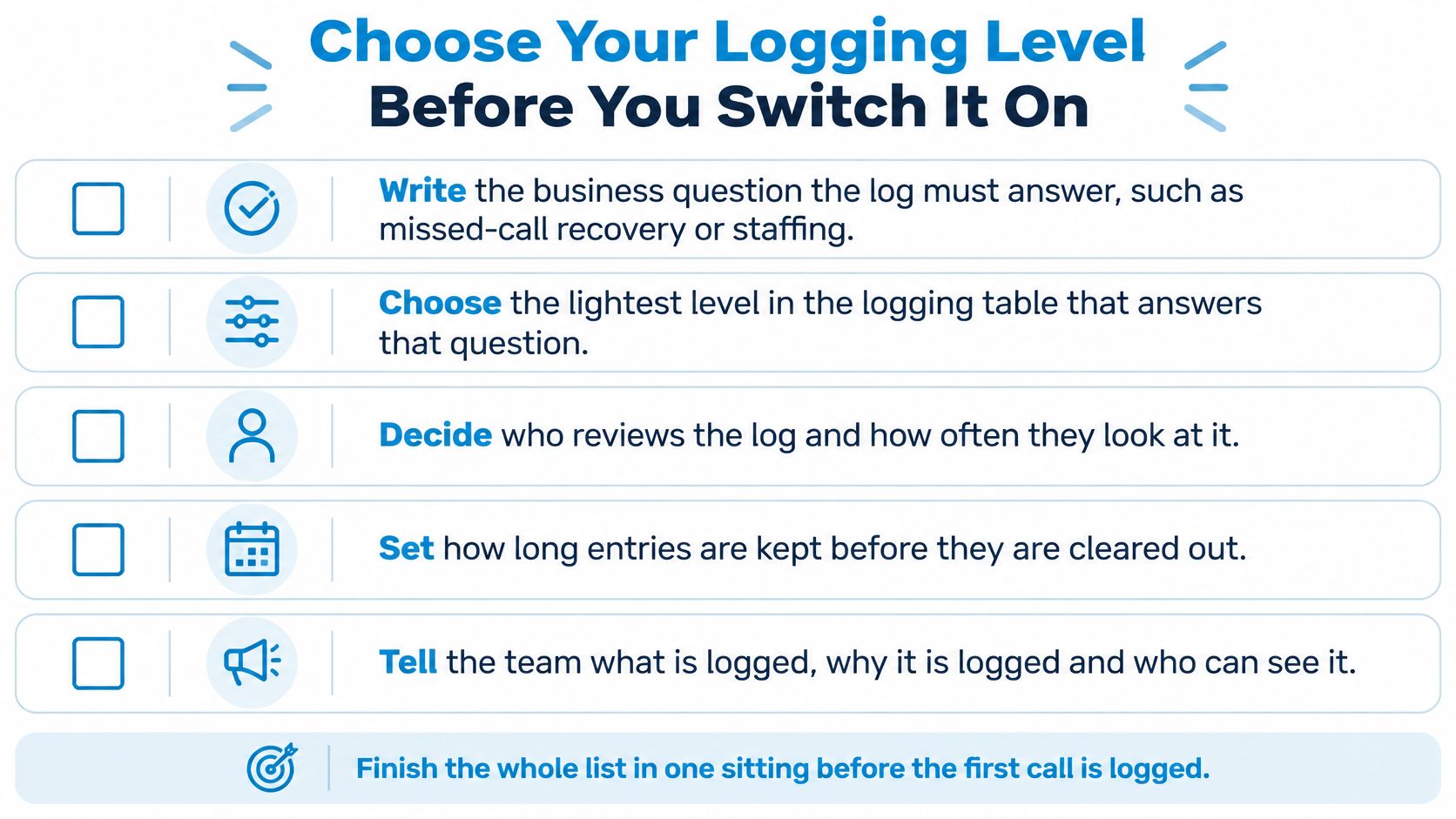
Complete the operating checklist
Write the business question. Use the decisions in Real Examples From Trades, Clinics and Firms to make it concrete, such as identifying missed inquiries that still need a callback.
Select the lightest logging level. Use Choosing the Right Level of Logging to separate essential fields from information that would merely be interesting.
Agree on outcome labels. Following the same comparison, define booked, missed, transferred, and follow-up required for every location. Assign someone to resolve unclear classifications.
Standardize time and identity. Apply the controls in How a Call Turns Into a Log Entry: UTC storage, local display time, and an interaction ID that survives transfers.
Set retention and deletion. Use Consent, Retention and Access Rules to document a schedule for each data type, including exceptions for legal holds.
Restrict access. Apply that section's role-based permissions and sensitive-detail masking. Test with an ordinary staff account, not just an administrator login.
Configure recording notices and consent. Follow the jurisdiction checks in Consent, Retention and Access Rules. Confirm what happens when a caller declines.
Run a review week. Using the field definitions in What a Call Logging System Records, confirm that each call has a start time, duration, and outcome. Investigate missing or duplicate entries before trusting reports.
Our logging scope may include every inbound and outbound call, message, and configured action for analytics, reporting, training, and quality control. If you'd rather not maintain these settings by hand, a call analytics platform such as Recepta.ai can support the process, but first check its support for your required outcome labels, retention controls, and access roles.
Recepta.ai combines AI call handling with human support, structured interaction records, and configured follow-ups. Visit Recepta.ai to discuss your call workflow and the logging detail you need, with recording and transcription enabled only if you opt in.