Compliance Workflow Automation Explained Simply
It's 4:45 p.m. before an audit, and someone is searching email for an approval, another person is updating a spreadsheet, and a third is trying to prove which policy version a vendor reviewed. The work may have happened, but the evidence is scattered, ownership is unclear, and nobody can reconstruct the decision without a last-minute investigation.
Compliance workflow automation changes that operating model. It turns recurring compliance work into a controlled sequence of triggers, rules, approvals, exceptions, and records. The value isn't that software sends reminders faster. The stronger outcome is that your organization can show what happened, why it happened, who approved it, and which policy governed the action.
The ideas below build from the basics toward secure implementation. You'll see how an automated workflow can manage a policy acknowledgment, route a vendor exception, capture evidence for an audit, and continue working when an unusual case reaches the process. You don't need to be a software engineer to design a trustworthy workflow. You need a clear control objective, named owners, defined decision points, and evidence that survives review.
Introduction to Compliance Workflow Automation Made Simple
Manual compliance work often starts innocently. A compliance manager creates a spreadsheet for policy reviews, sends an email to each owner, adds calendar reminders, and stores completed documents in a shared folder. As more departments become involved, the process develops cracks. An employee acknowledges an old policy, a manager approves an exception in a private email thread, or a vendor submits incomplete evidence that nobody notices until an auditor asks for it.
The problem isn't that people are careless. People are coordinating a process across tools that weren't designed to preserve a complete decision history. Email can communicate an approval, but it doesn't reliably enforce the next step. A spreadsheet can display status, but it may not prove who changed a cell or why a task was marked complete.
Automation provides a more dependable operating layer. For example, an employee onboarding workflow might begin when a person joins the HR system. It can assign the current code of conduct, require acknowledgment, route an unresolved question to a manager, and store the completed record. The employee doesn't just receive a document. The organization creates evidence that the required control operated.
Practical rule: Automate the sequence around a compliance decision, not the decision itself when judgment or risk is involved.
This distinction matters for compliance, legal, finance, healthcare, privacy, and operations teams. A finance team can automate document collection and approval routing while keeping final sign-off with an authorized reviewer. A healthcare practice can automate access-log review while sending unusual activity to a person. A home services company can automate customer-call follow-ups while escalating sensitive complaints to trained staff.
The journey is straightforward. First, define what compliance workflow automation does. Then connect it to measurable business value, identify reusable workflow patterns, design security and audit controls, and select integrations that don't create new gaps. A useful introduction to the broader automation concept is available in this guide to business process automation, but compliance adds a demanding requirement: every important action must remain explainable and defensible.
What Compliance Workflow Automation Really Means
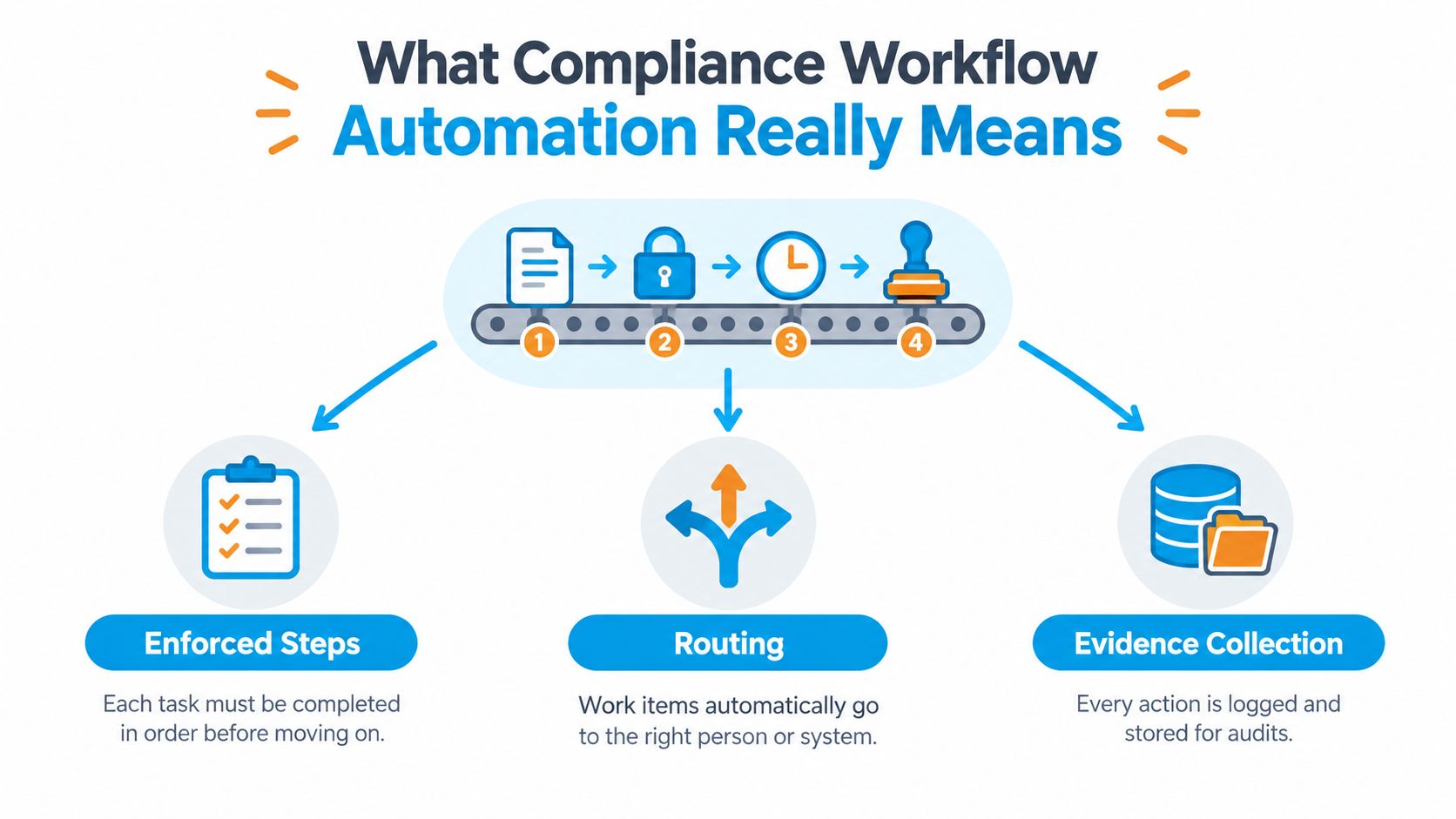
Think of a compliance workflow as an assembly line with checkpoints. A document arrives at the first station, a rule checks whether it contains the required information, an authorized person reviews it at the next station, and the system stores proof before the item moves forward. If a checkpoint fails, the item doesn't continue. It pauses, returns for correction, or follows an exception route.
That is the difference between automation and simple digitization. Uploading a paper checklist to a shared drive makes the checklist digital. Automation makes the required process enforceable. The system can require a policy acknowledgment, prevent completion without evidence, and route an exception to the right reviewer.
The basic building blocks
Most workflows contain three simple parts:
- Trigger: An event starts the process, such as a new employee record, a vendor submission, a completed review period, or a change to a controlled document.
- Rule: The system evaluates a condition, such as whether the required field exists, whether the requester has authority, or whether the case falls into a restricted jurisdiction.
- Action: The workflow assigns a task, requests approval, stores evidence, sends a notification, or rejects the input.
Consider a vendor onboarding example. A procurement employee submits a vendor record. The workflow checks the vendor's risk category and data access. A low-risk vendor may receive a standard questionnaire, while a vendor handling sensitive information goes to security and legal review. If an exception is requested, the workflow records the reason and requires an authorized approver.
The workflow doesn't make the organization compliant by itself. It operationalizes a control. Compliance tracking software commonly uses this model for policy acknowledgments, document reviews, and approvals, so required steps are completed and recorded during normal business activity. That creates a stronger record than an email saying someone probably completed the task.
Why evidence is part of the process
A completed task without supporting evidence is often only an assertion. A defensible workflow connects completion to the document, decision, approval, or system event that proves it. It should also distinguish between a normal completion, an exception, an override, and a rejected submission.
For example, “vendor approved” is a weak record. “Vendor questionnaire received, security rule evaluated, exception identified, legal approval recorded, and final decision stored” is much more useful to an auditor or investigator. The second record explains both the result and the path that produced it.
Why Automating Compliance Workflows Pays Off
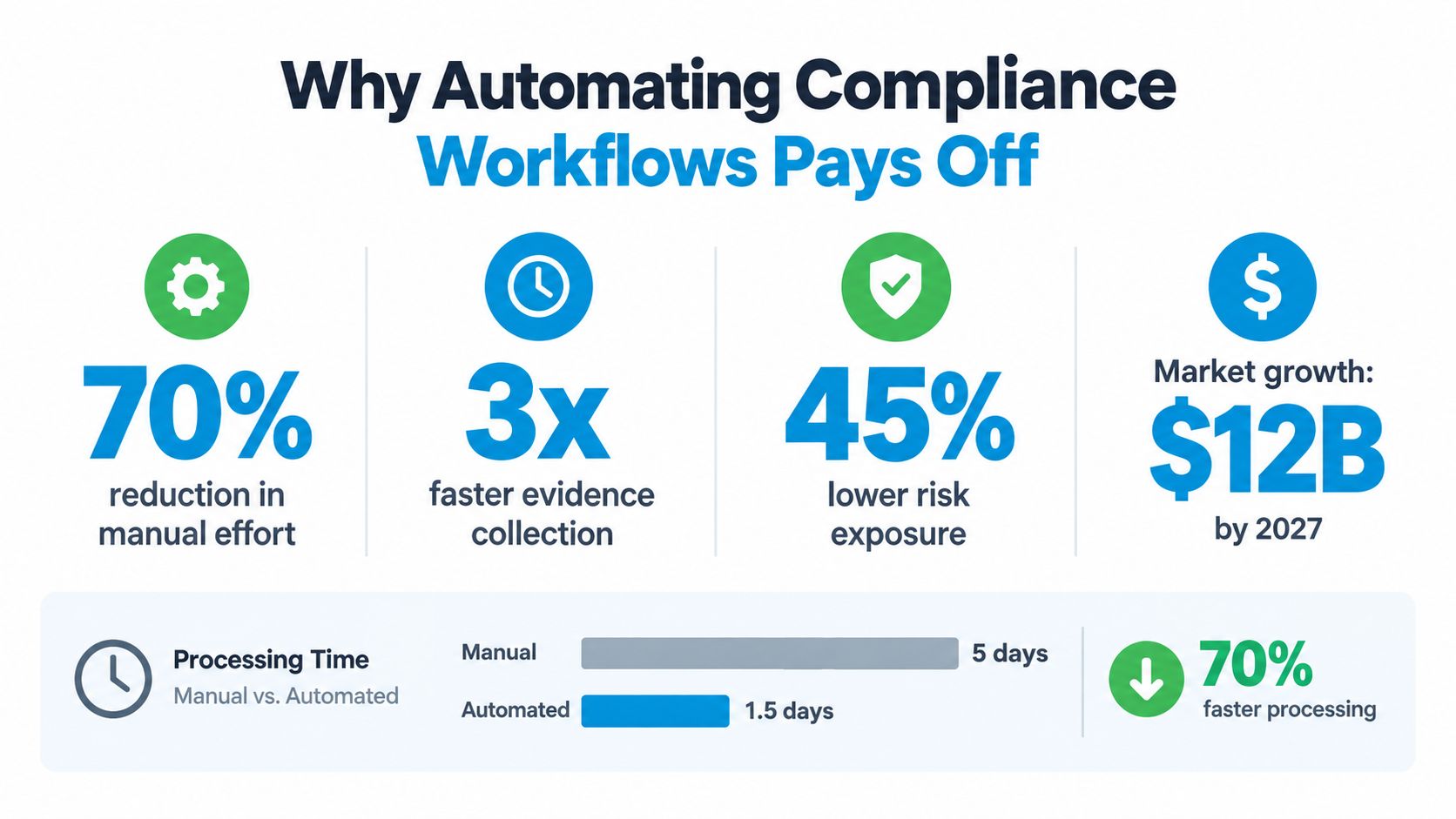
Compliance workflow automation earns attention because it connects routine control work to financial exposure, labor costs, and audit readiness. The broader enterprise GRC market was estimated at about $72 billion in 2025 and around $83 billion in 2026, while the narrower GRC software segment was estimated at roughly $21 billion in 2025 and projected to reach about $39 billion by 2031, at close to 11% CAGR, according to this 2026 GRC and compliance automation market summary. The connection is important because compliance workflow automation increasingly sits inside GRC platforms instead of operating as an isolated feature.
Cost pressure also makes slow control processes harder to defend. The same summary reports a global average data breach cost of $4.44 million in 2025, a U.S. average of $10.22 million, and a mean time of 241 days to identify and contain a breach. These figures don't mean automation prevents every incident. They help explain why boards and security leaders care about faster evidence collection, reliable approvals, access monitoring, and traceable remediation.
The operating benefits teams can defend
A 2026 industry compilation reports that 68% of enterprise organizations had implemented compliance automation tools, while 45% of mid-market companies planned adoption by 2025. Adoption was reported at 75% in healthcare and 70% in financial services. The same source reports an average 40% reduction in manual compliance tasks, 225% annual ROI, and more than $500,000 in annual compliance-related labor savings for enterprises using compliance automation. It also states that 65% of companies using automation reduced GDPR-related compliance costs by 40%. These figures come from the GRC market and compliance automation data compilation.
The practical gains usually appear in four places:
- Less chasing: Reminders, assignments, and escalations happen inside the process rather than through scattered messages.
- Earlier evidence: Owners attach proof when work occurs, so audit preparation doesn't depend on memory.
- Fewer missed checkpoints: The system can prevent a workflow from closing while required approvals or documents are missing.
- Better prioritization: Compliance staff can focus on exceptions, overdue work, and failed controls instead of checking every routine item manually.
The business case becomes stronger when teams choose a workflow with a visible bottleneck. Start with vendor evidence collection, policy attestations, access reviews, or corrective actions. Measure whether ownership is clearer, records are easier to retrieve, and exceptions reach the right people. Efficiency matters, but the investment is most valuable when it improves assurance, meaning your ability to demonstrate that a control worked as intended.
Common Automation Patterns You Will Actually Use
Most compliance workflows combine a small group of reusable patterns. Choosing the right pattern is easier when you start with the business question: does the process need a decision, proof, a recurring confirmation, an exception route, or an ongoing check?
Approval routing
Use approval routing when authority changes based on role, risk, vendor type, or transaction characteristics. A policy change may go to the policy owner, legal reviewer, and executive approver. A vendor requesting access to sensitive data may require security and privacy approval before procurement can complete onboarding.
The key design choice is to name the approver by role, not by an individual's name. If the employee changes jobs, the workflow should route the item to the current role owner instead of failing.
Evidence capture
Evidence capture works best when proof is produced as part of the task. A control owner uploads a review record, a system attaches an access report, or a manager records an approval with its supporting document. The workflow should validate that the evidence is present and associated with the correct period, policy, or control.
A folder that merely collects files isn't enough. The record should explain what the file proves and which decision it supports.
Scheduled attestations
Scheduled attestations suit recurring confirmations. Employees can acknowledge a current policy, managers can confirm that a control remains operational, and vendors can reconfirm required information. The workflow should identify the exact version being acknowledged and route nonresponses for escalation.
Exception handling
Exception handling separates unusual cases from normal throughput. If a vendor can't provide a standard certificate, the workflow can capture the reason, assess the risk, and route the request to a human reviewer. Don't force every case through the same automated path. Ambiguous inputs should be rejected or paused before they trigger downstream actions.
Continuous monitoring
Continuous monitoring checks changing conditions instead of waiting for a periodic review. A workflow might flag a revoked user account, a missing vendor document, or a control that no longer matches its approved configuration. Monitoring is valuable only when someone owns the response, so every alert needs severity rules, an escalation path, and closure evidence.
Teams handling repetitive records can also explore data entry automation, provided the automation preserves validation and decision context rather than merely moving fields between systems.
Building Secure and Audit Ready Automated Workflows
A secure workflow is a chain of explicit control points, not a single opaque automation. The triggering event should be validated, the service identity should have only the permissions it needs, high-risk changes should require human approval, and the system should record the complete decision chain. This design limits false positives and uncontrolled side effects because each step can be reviewed independently.
Start with controlled execution
Define the acceptable trigger before you connect systems. A new vendor record may start onboarding, but an incomplete or malformed record should stop at validation. Bind the workflow to a named service identity, apply least privilege, and separate permissions for reading data, changing records, approving actions, and administering the workflow.
Require human sign-off when an action affects access, vendor acceptance, regulated evidence, or a material policy change. Automation can prepare the decision and apply routine rules. An authorized person should own the judgment when the consequences are significant.
Log decisions, not just tasks
A task summary such as “review completed” won't help much during an investigation. Decision-level logging should capture:
- Time: The timestamp of the event, evaluation, approval, and final action.
- Input: The triggering event and the data values present when the decision occurred.
- Policy: The rule or condition evaluated, including the workflow version.
- Output: The decision, action, rejection, exception, or override.
- Identity: The system or user that initiated, changed, approved, or completed the step.
Structured records, such as JSON or database entries, make logs searchable and machine-parseable. Append-only or tamper-evident storage helps protect evidentiary integrity. Record who modified a workflow and when that modification was approved, because the same action can have different meaning under different process versions.
For a practical treatment of evidence design, the OperatorCompliance audit log guide offers useful context on what a reviewer may need to reconstruct. Every state change, exception, and override should remain tied to time, identity, and policy context.
Make retention and exceptions deliberate
Retention isn't uniform across frameworks. Common cited periods include 7 years for SOX-related audit workpapers and control evidence, 6 years for HIPAA Security Rule documentation, 12 months for PCI DSS audit evidence with the most recent 3 months immediately available, and record-life retention for 21 CFR Part 11 audit trails, as summarized in this compliance retention reference. Apply the relevant rule to each record category, and retain a deletion log showing when a record's retention period expired.
Your workflow should also make exceptions visible. An override needs a reason, an approver, a timestamp, and a link to the affected item. If a regulation changes or an integration changes its data format, pause the affected route, revalidate the logic, and preserve the version history.
For broader policy retention planning, see this guide to data retention policies.
Industry Examples That Show Automation in Action
A healthcare billing workflow illustrates why context matters. A staff member accesses a record, and the system logs the user identity, time, resource, and purpose where available. A scheduled review checks for unusual access patterns. Routine activity stays in the monitoring queue, while an unexplained access event goes to a privacy reviewer with the relevant evidence attached. The reviewer records the decision, and the workflow preserves the exception path rather than deleting the alert after closure.
Financial services uses a similar structure for loan or claims approval. An application enters the process, required information is validated, and the case moves to the appropriate reviewer. A rule may identify a missing document or an exception requiring additional approval. The final record includes each handoff, rule evaluation, approval, and exception resolution, allowing a reviewer to reconstruct the path without searching through email.
A practical vendor review
A procurement team can implement the process with a small set of fields:
- Collect: Request the vendor profile, service description, data access details, and supporting documents.
- Classify: Assign a risk category using defined criteria.
- Route: Send the request to security, privacy, legal, or business approval based on the category.
- Resolve: Pause incomplete submissions and record exceptions with reasons.
- Retain: Store the questionnaire, approvals, evidence, and final decision under the vendor record.
The same model works for a franchise network reviewing local policy attestations. A central team publishes the approved policy, each location receives the current version, the local manager confirms completion, and overdue or disputed attestations escalate to the regional owner.
A home services example
A plumbing or HVAC business may receive customer calls after normal office hours. An automated receptionist can capture the caller's details, schedule an appointment, and create a CRM record. If the caller reports a safety concern, billing dispute, or sensitive complaint, the workflow should route the interaction to a trained human instead of treating it as a routine booking.
The compliance lesson is simple: automation should standardize predictable work and expose judgment-heavy work. The workflow proves that the call was received, the record was created, the appointment was handled, and the escalation occurred.
Choosing Vendors and Integrations With Confidence
Select a platform by testing the control path, not by counting features. Ask a vendor to demonstrate what happens when a normal request arrives, when required data is missing, when an approver is unavailable, and when a rule changes after deployment. A polished dashboard can hide weak exception handling, fragmented evidence, or permissions that are broader than necessary.
Use a practical evaluation frame
| Evaluation area | Question to ask |
|---|---|
| Integration coverage | Can the platform exchange reliable data with your HR system, CRM, calendar, ticketing tool, or GRC suite? |
| Policy routing | Can rules direct work by role, risk, jurisdiction, or record type? |
| Human escalation | Can high-risk and ambiguous cases pause for named approval? |
| Audit evidence | Does each decision retain input, rule, identity, timestamp, output, and workflow version? |
| Change control | Can administrators test, approve, and revalidate workflow changes? |
| Retention | Can different record categories follow their applicable retention rules? |
Integration quality deserves special attention. A workflow that writes to one system but fails to update another can create conflicting records. Review field mapping, failed-connection behavior, duplicate handling, access permissions, and reconciliation reports before going live. This third-party integrations guide provides additional context for evaluating connected systems.
Teams comparing product capabilities can also review this overview of compliance tracking features, then test whether the described functions support their own control objectives. Don't accept a claim that a workflow is “compliant” without asking how it proves effectiveness. The platform should show what control ran, what data it evaluated, what decision it made, and who handled the result.
Start with one contained pilot, such as policy attestation or vendor evidence collection. Define success qualitatively around complete records, clear ownership, fewer unresolved exceptions, and faster retrieval. Revalidate the workflow after system changes, monitor false positives, and scan for regulatory changes continuously. A trustworthy automation program is maintained like a control, not installed like a one-time software feature.
Recepta.ai helps businesses manage inbound and outbound calls, appointment scheduling, lead capture, follow-ups, and human escalation while keeping interaction records consistent across connected systems. Visit Recepta.ai to see how its AI receptionist and human support model can fit into a traceable, compliance-conscious operating workflow.