How to Automate Follow-up Emails (A Step-by-Step Guide)
You already know the pattern. A new lead calls after hours. Your voicemail catches it. Someone on your team means to send a quote follow-up the next morning, then the day fills up with jobs, patients, filings, or cancellations. By the time anyone remembers, the prospect has hired another contractor, booked another clinic, or called another firm.
That’s why businesses need systems, not good intentions. When teams automate follow-up emails, they stop relying on memory at the exact point where work gets busy and attention gets fragmented. This matters even more in service businesses, where leads often come in during the day’s messiest moments, right between field visits, front-desk rushes, or client calls.
Why Manual Follow-Up Is Costing You Leads
Manual follow-up breaks in ordinary situations, not unusual ones. A plumber finishes three emergency calls and forgets to check who requested an estimate. A dental office gets voicemail traffic after closing and doesn't reconnect until the next afternoon. A law firm receives an inquiry, logs it, then lets the intake sit because everyone assumes someone else replied.
That isn't a discipline problem. It's an operations problem.

The revenue impact is large enough that manual follow-up shouldn't be treated as a minor admin issue. According to Gain's research on automated follow-ups, automated email campaigns generate 320% more revenue than non-automated ones, businesses that automate lead management see a 10% or greater increase in revenue in 6-9 months, and automated emails can achieve open rates up to 70% higher than one-off messages.
What manual follow-up usually gets wrong
Teams often fail in the same places:
- Timing slips: The lead inquiry arrives at the wrong moment, so the first response goes out late.
- No consistent second touch: Someone sends one email, gets no reply, and moves on.
- No process after calls: Call notes stay in a phone system, notebook, or inbox instead of triggering action.
- Tone mismatch: Staff reuse generic sales copy for situations that need empathy and context.
Practical rule: If a lead requires a person to remember the next step, the process is already fragile.
For service businesses, the first missed email isn't the only problem. The bigger problem is the missing chain of follow-up after a quote, consultation inquiry, intake call, or missed appointment. If you want a strong foundation before automating, this guide on mastering effective sales follow-up is useful because it clarifies the core habits and message logic automation should reinforce.
Automation fixes consistency first. Better revenue follows because more leads get contacted, reminded, and moved forward.
Defining Your Automation Goals and Triggers
Most bad automation starts too early. Teams open HubSpot, Mailchimp, ActiveCampaign, or Pipedrive, build a sequence, and only later realize they never defined what the sequence is supposed to accomplish.
A follow-up sequence needs one job. Book the estimate. Confirm the consult. Recover the missed call. Request the review. Collect the missing intake form. If one sequence tries to do all of that, it becomes vague fast.
Start with the business outcome
Set the goal in operational terms, not marketing language.
A home services company might use different sequences for:
- Unsold estimate follow-up: Get the homeowner to reply or schedule.
- After-hours inbound call follow-up: Confirm the issue and route to the right technician.
- Post-job review request: Ask for feedback after work is complete.
A healthcare clinic might separate:
- New patient inquiry: Move the prospect to a booked appointment.
- Missed appointment recovery: Encourage rescheduling.
- Post-visit communication: Send next-step instructions or request a review where appropriate.
A law firm usually needs tighter segmentation:
- New consultation request: Confirm receipt and explain the next step.
- Document reminder: Prompt the prospect to send requested information.
- No-response intake follow-up: Reopen contact without sounding aggressive.
Choose triggers that reflect real behavior
The strongest automations begin when something meaningful happens. Good triggers come from your CRM, intake forms, calendar, or phone system.
Use triggers like these:
Form submitted
Someone requests a quote, books a consultation, or asks for pricing.Call captured after hours
An AI receptionist logs the caller’s need, urgency, and contact details, then starts the next step automatically.Quote marked as sent
The estimate leaves your system. A reminder sequence starts if no reply comes back.Appointment status changes
A booking is completed, canceled, or missed.Pipeline stage stalls
A lead sits in “waiting for client” or “consult requested” with no movement.
The right trigger isn't “three days passed.” It's “the customer hit a moment where the next step became clear.”
Teams usually need cleaner process design, not more copywriting. If you're mapping those operational moments, business process automation for service teams is the right frame because it forces you to connect an event to a concrete action.
Match trigger to message
A missed call follow-up should sound different from a quote reminder. So should a legal intake email versus a cleaning estimate email.
A simple planning table helps:
| Trigger | Goal | Best first email |
|---|---|---|
| Contact form submitted | Get a reply or booking | Confirm inquiry and set expectation |
| After-hours call captured | Reassure and route | Reference the call reason and next step |
| Quote sent | Revive buying intent | Brief reminder with one clear CTA |
| Missed appointment | Recover revenue | Offer easy rescheduling |
| No response after intake | Restart conversation | Low-pressure check-in with context |
When you automate follow-up emails this way, each sequence feels connected to a real customer action instead of a generic drip campaign.
Building Your First Automated Follow-Up Sequence
Start with one sequence that solves one common problem. For most service businesses, that’s the lead who showed interest but didn’t take the next step.
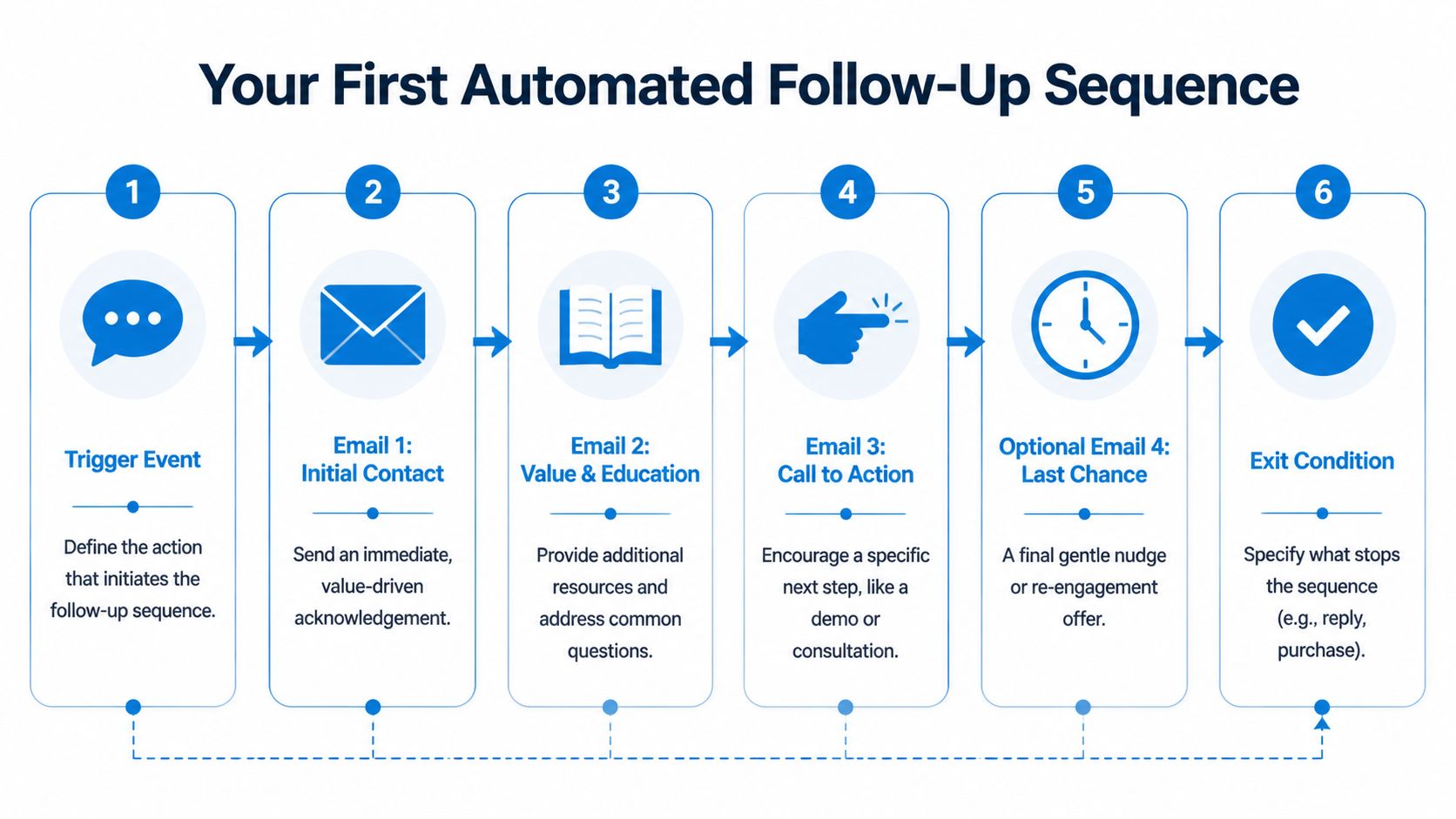
The cleanest setup is a 3-4 step sequence. According to Reachly's guide to automated email follow-ups, the practical structure is Day 1 for the initial email, Day 3-4 for a gentle nudge, and Day 7-8 for a new value-add. The same source notes that AI-powered triggers based on actions like opens or form submissions can boost conversion rates by up to 391%, and a first follow-up alone increases the chance of a response by 49%.
The core sequence
Email 1 on Day 1
Send this immediately after the trigger.
Purpose: confirm receipt, reflect the lead’s context, and make the next step easy.
Example for HVAC quote request
Subject: Your HVAC repair request
Hi Sarah,
Thanks for reaching out about your HVAC issue. We received your request and can help you review the problem and next steps.
If you'd like, reply to this email with the best time to talk, or call us back and we’ll get your estimate moving.
Best,
[Name]
This email works because it doesn't over-explain. It acknowledges the inquiry and asks for one action.
Here’s a useful companion resource if you’re handling inbound leads from forms and want your trigger logic tighter: AI-powered form follow-up.
After the first email, your system should know when to stop. A reply, booked appointment, signed estimate, or status change should remove the contact from the sequence. That kind of handoff works far better when your email tool and CRM share the same record, which is why CRM integration for automated workflows matters so much in practice.
A short walkthrough helps make the structure easier to picture:
Email 2 on Day 3 or 4
Purpose: remind them without sounding impatient.
Example for dental consultation inquiry
Subject: Following up on your consultation request
Hi James,
I wanted to follow up on your consultation request in case you still wanted to schedule. If you have questions about timing, insurance, or what to expect, just reply here and we’ll help.
Best,
[Practice Name]
This is a nudge, not a pitch. Keep it short.
Add value before you ask again
Email 3 on Day 7 or 8
Avoid making the message longer and weaker. Don’t repeat the first email. Add something useful.
Example for law firm intake
Subject: A few answers before you decide next steps
Hi Melissa,
I’m following up on your inquiry. If you're still considering your options, we can help clarify what the consultation process looks like, what information is helpful to gather beforehand, and whether your matter is a fit for our team.
If you'd like to talk it through, reply with a good time.
Best,
[Attorney or Intake Team]
A strong third email reduces uncertainty. It doesn't just ask, “Checking in?”
Optional Email 4
Use this only when the sales cycle justifies it.
Purpose: give the lead an easy exit or one final chance to engage.
Example for plumbing estimate
Subject: Should I close this out?
Hi Andre,
I haven’t heard back on your plumbing request, so I wanted to check one last time before I close this out on my side.
If you still want help, reply here and we can pick it back up.
Best,
[Name]
That final message often works because it lowers pressure. It also helps keep your list cleaner by letting unresponsive leads drop out.
Advanced Personalization and Smart Timing
Personalization is frequently thought to mean adding a first name token. That’s the weakest version of it. Better personalization uses the reason the person contacted you, what happened on the call, and what stage they’re in.
A homeowner who asked about a leaking water heater should not get the same follow-up as someone pricing a bathroom remodel. A patient who asked about a cleaning should not get the same sequence as someone who missed a specialist appointment. A legal inquiry about estate planning should not read like a personal injury intake.
Use context that actually matters
Useful dynamic fields usually include:
- Service requested: HVAC repair, teeth whitening, immigration consult, policy review.
- Location or branch: Helpful for multi-location operators.
- Last interaction type: Form, phone call, booked visit, missed consult.
- Assigned staff member: The technician, coordinator, provider, or intake specialist.
- Next expected action: Schedule, upload documents, approve estimate, confirm appointment.
Write the email so the inserted detail supports trust.
For example:
Hi Laura, thanks for calling about your plumbing issue in the kitchen. We’ve got your request and can help you schedule the next step.
That reads like a real follow-up. “Hi Laura, just checking in on your inquiry” sounds automated because it is.
Timing is where good automation becomes bad automation
There’s a wide gap between persistence and pressure. According to Prospeo's research on CRM automated follow-ups, the ideal sequence length is 4-7 emails over 14-21 days, but after 4 emails, unsubscribe and spam complaint rates can more than triple. That’s the trade-off. More touches can help, until they start damaging sender reputation and trust.
For service businesses, I usually see the best outcomes when teams stay conservative unless the buying cycle is naturally longer. Legal and insurance workflows may justify more touches. Home services and appointment-driven clinics usually need fewer, sharper messages.
A simple way to decide:
| Lead type | Better approach |
|---|---|
| Urgent service inquiry | Fast follow-up, short sequence |
| Scheduled consult lead | Moderate cadence with helpful context |
| Long-consideration professional service | More spaced touches with education |
| Missed appointment | Immediate recovery, then stop if no signal |
Segment before you send
One list creates sloppy automation. Segment by intent and behavior instead.
Segment by inquiry type
A pest control lead needs practical next steps. A family law lead may need discretion and reassurance. The sequence should reflect that difference.
Segment by engagement
If someone opened, clicked, or replied, they’ve signaled interest. If someone ignored every message, don't keep sending the same reminder.
Segment by workflow stage
An appointment reminder sequence behaves differently from a quote follow-up. If you need examples for time-sensitive scheduling messages, this appointment reminder email template guide shows the level of clarity those messages need.
Personalization works when it lowers friction. Smart timing works when it respects the lead’s situation.
Tracking Performance and Optimizing for Results
Launching a sequence is the starting line. Once the emails are live, the job becomes measurement and correction.
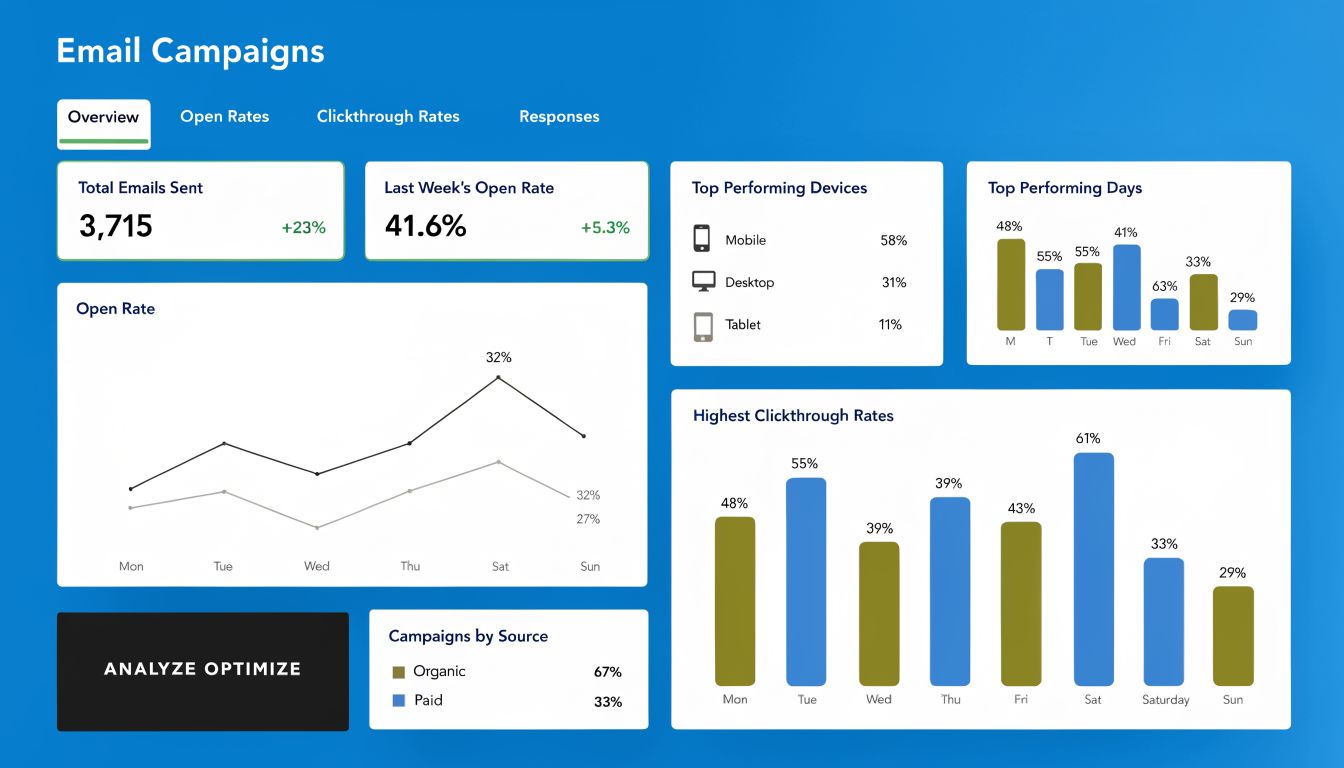
The baseline metrics are straightforward. According to Attention's guide to AI follow-up emails, you should monitor open rates with a target above 40%, click-through rates, and response rates. The same source recommends A/B testing subject lines and send times, and warns that delaying a follow-up can miss a 391% potential uplift in conversions.
What to review each month
Teams often drown in dashboard noise. Keep the review simple.
Check these first:
- Open rate: Are subject lines earning attention?
- Reply rate: Are people responding?
- Click-through rate: Are links useful or ignored?
- Conversion outcome: Did the email lead to a booking, consult, signed quote, or recovered appointment?
Then check the operational layer. Which trigger produced the strongest lead quality? Which branch location replies fastest? Which sequence gets engagement but no booked outcome?
Field note: A high open rate with a weak reply rate usually means the subject line worked and the email body didn’t.
What to test without breaking the system
Don’t test six variables at once. Change one thing and watch the result.
Useful tests include:
Subject line format
Compare direct subject lines against context-based ones.
Example: “Your consultation request” versus “Questions about next steps?”Send time
Try morning versus afternoon for different industries. A contractor lead behaves differently from a legal intake lead.CTA style
“Reply to schedule” may outperform “Book now” in empathy-heavy services.Length of email
Some service categories respond better to very short follow-ups. Others need a little more reassurance.
Tie email metrics back to lead economics
The point isn't better email stats. The point is better pipeline movement at a lower cost. If you’re trying to connect follow-up performance to acquisition efficiency, this guide on how to calculate cost per lead is useful because it forces you to ask whether your automation is improving actual business outcomes.
A simple review rhythm works well:
- Weekly for active troubleshooting
- Monthly for structured optimization
- Quarterly for deeper sequence redesign
Teams that improve fastest don't write cleverer emails. They keep the trigger clean, study where replies drop, and adjust one variable at a time.
Proven Follow-Up Playbooks for Service Industries
Generic sales automation advice often fails in service businesses because the buying decision is usually tied to trust, urgency, or sensitivity. That’s especially obvious in home services, healthcare, and legal. According to Fireflies' discussion of AI tools for follow-up emails, generic sales automation advice often fails in service industries like healthcare or legal, which require a blend of efficiency and empathy, and a major missed opportunity is the post-call workflow, where integrating an AI receptionist to trigger follow-ups can capture up to 30% more qualified leads that might otherwise be lost to voicemail or manual error.
That post-call moment is where a lot of service businesses leak revenue. The caller reached out. The need is real. Then the business drops the baton between the phone system, inbox, and calendar.
Industry-Specific Automation Playbooks
| Industry | Trigger | Goal of Sequence | Email 1 Subject Line Idea |
|---|---|---|---|
| Home services | Quote sent, no reply | Get estimate conversation restarted | Your estimate and next steps |
| Healthcare | New patient inquiry or missed call | Convert inquiry into appointment | We received your appointment request |
| Legal | Consultation form or intake call | Confirm intake and reduce uncertainty | About your consultation request |
| Insurance | Policy inquiry after hours | Route lead to the right advisor | Your insurance inquiry |
| Franchises and multi-location | Missed call to local branch | Reconnect quickly and assign correctly | We missed your call |
Home services playbook
A roofing company, HVAC contractor, or plumber needs speed and clarity. People don't want a nurture campaign when their issue is active. They want to know you got the request and what happens next.
A solid setup looks like this:
- Trigger: AI receptionist captures an after-hours plumbing call.
- Goal: Reconnect the next morning and book service or estimate.
- First email: Reference the issue directly. “We received your call about a plumbing issue and can help schedule the next step.”
- Second email: If no response, offer a simple reply path. “Reply with the best time to reach you.”
- Third email: Add practical value. Mention emergency availability, estimate process, or what information helps move faster.
What doesn't work is fluffy language. Home service leads respond better to direct next steps than brand-heavy messaging.
Healthcare playbook
Healthcare follow-up needs more care in tone. The email should feel organized and helpful, not sales-driven. A clinic can still automate, but the sequence should support trust.
Common scenario:
- Trigger: A patient inquiry comes in through phone or form after office hours.
- Goal: Move the patient to a confirmed appointment.
- Email angle: Confirm receipt, explain when the team will follow up, and give a low-friction scheduling option.
Another practical use case is post-visit communication. A dental practice might send a review request after an appointment, while a wellness clinic might follow up with next-step instructions and then a review request later. These should be separate workflows. Combining them usually produces awkward messaging.
In healthcare, the safest automation sounds like a competent coordinator, not a campaign.
Legal playbook
Law firms need restraint. The prospect may be stressed, private, or still deciding whether to move forward at all. Aggressive cadence can hurt trust fast.
A practical legal sequence often uses:
- Trigger: Consultation request submitted or intake call completed.
- Goal: Confirm the inquiry and prompt a reply or booking.
- Email 1: Acknowledge the request, explain what happens next, and keep the wording professional.
- Email 2: Address uncertainty. Mention that the recipient can reply with questions about process, fit, or timing.
- Email 3: Offer a final low-pressure check-in.
What fails here is generic “just bumping this up” language. Legal follow-up should sound measured and specific.
Insurance and multi-location operators
Insurance agencies and franchise businesses often struggle with handoffs. The lead comes in centrally, but the right person sits in a local office. Automation should bridge that gap.
Good workflow:
- Call or form submission is logged.
- Lead is assigned by territory, service line, or branch.
- Email confirms the request and names the next step.
- Sequence stops once the local team connects.
This is also one place where platform choice matters. Tools like HubSpot, Mailchimp, ActiveCampaign, and Pipedrive can all handle pieces of this workflow. For businesses that need inbound call handling tied to automated follow-ups, calendars, and CRM records, Recepta.ai is one option because it combines AI receptionist workflows with human escalation and follow-up automation instead of treating the phone and email journey as separate systems.
The pattern across all of these industries is consistent. Automation should carry the process. Humans should step in where judgment, empathy, or compliance matters.
If missed calls, after-hours inquiries, and inconsistent follow-up are costing your team opportunities, Recepta.ai can help connect call handling, lead capture, scheduling, and follow-up into one workflow. It’s built for service businesses that need automation without losing the human handoff when a conversation needs empathy or expertise.