What Is Business Process Automation A Practical Guide for 2026
Think of your business as an orchestra. Every employee and every department has a specific role, a part to play. But without a conductor, you just get noise—missed cues, poor timing, and a disjointed performance.
Business Process Automation (BPA) is that conductor. It’s the technology that ensures every part of your operation, from the first customer call to the final invoice, plays in perfect harmony.
What Is Business Process Automation Really
At its heart, BPA is about taking those messy, multi-step manual processes and turning them into a smooth, self-running system. This isn't just about getting tasks done faster. It's about fundamentally rethinking how work gets done.
It moves beyond simply automating a single task, like sending an email. Instead, BPA looks at the entire workflow—the whole sequence of events—and orchestrates it from start to finish. This is how you stop just managing chaos and start building a truly efficient operation.
The Shift From Manual to Automated
The difference between a manual and an automated process is night and day. One relies on human memory and sticky notes, while the other follows a precise, pre-defined digital map every single time. For any service business, where consistency is king, this shift is a game-changer.
To see this in action, let's compare a few common tasks.
Manual vs Automated Business Processes
| Business Task | Manual Process The Old Way | Automated Process The BPA Way |
|---|---|---|
| New Lead Capture | A receptionist scribbles notes during a call, then emails them to a sales rep to hopefully enter into a spreadsheet. | An AI agent answers the call 24/7, captures client details, and instantly creates a new lead in your CRM. |
| Appointment Scheduling | Endless phone tag and back-and-forth emails trying to find a time that works for everyone. | The system automatically sends the client a link to your live calendar, letting them book a time that's convenient for them. |
| Client Onboarding | Someone remembers to manually send a welcome email, a service agreement, and an initial questionnaire over a few days. | A new client automatically triggers a workflow: a welcome email is sent, a contract is generated, and onboarding tasks are assigned. |
As you can see, automation doesn't just speed things up; it makes your entire process more reliable and professional.
The point of BPA is not to replace your skilled people. It’s to unleash them. By automating the tedious, administrative work, you give your team the freedom to focus on high-value activities like problem-solving and building great customer relationships.
Let’s walk through a real-world example: a new customer inquiry at a local plumbing company. Manually, it’s a minefield of potential errors:
- The front desk takes a call and jots down a name and number for a "leaky faucet."
- Those notes get passed to a technician via text message.
- The technician has to manually type that info into the company’s scheduling app.
- Then, they have to remember to call the customer back to schedule the appointment and then follow up with a confirmation.
Each step is a chance for a delay, a typo, or a completely lost lead.
With BPA, that entire chain reaction is connected. An AI receptionist answers the call, and the moment it hangs up, a new lead is created in the CRM with the customer's name, number, and the "leaky faucet" issue noted. A task is automatically assigned to the right technician based on their schedule and location. This all happens because the systems are talking to each other. To get a better sense of how this works behind the scenes, it’s helpful to understand what CRM integration is and how it acts as the glue for your automated workflows.
This level of efficiency isn't just for giant corporations anymore. It's a powerful and accessible tool for owners in home services, healthcare, law, and beyond who are ready to work smarter, not just harder.
The Core Technologies Driving Modern Automation
To really get what business process automation is, you have to look at the tech that makes it all happen. It’s not just one tool, but a team of specialized technologies working in concert. Think of it like building a custom car: you have the engine for raw power, the onboard computer for smart decisions, and the wiring that connects it all. Each part is crucial for getting you where you need to go.
This diagram helps visualize how these pieces come together to produce real-world results like faster operations, fewer mistakes, and sustainable growth.
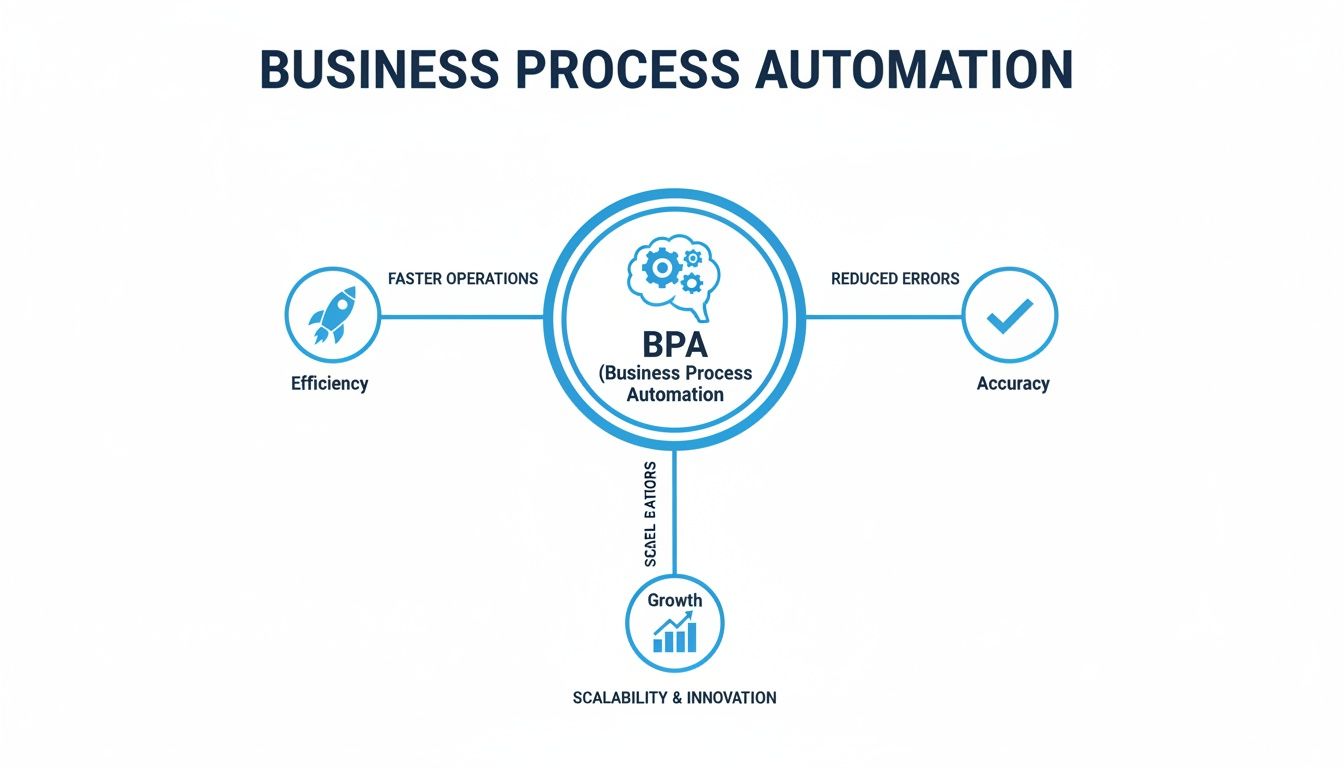
As you can see, automation isn't just a concept; it’s the engine that directly links your daily actions to tangible business improvements, turning manual grind into streamlined success.
Robotic Process Automation: The Digital Workforce
The workhorse of automation is Robotic Process Automation (RPA). The best way to think of RPA is as a digital employee you can train to handle your most repetitive, mind-numbing computer tasks. This "bot" interacts with your software the same way a person does—clicking, copying, pasting, and filling out forms—but without getting tired or making typos.
A practical example for an accounting firm is an RPA bot that logs into a bank portal every morning, downloads daily transaction statements, and then uploads them into the firm's accounting software. This saves an accountant 30 minutes every single day, freeing them up for client advisory work instead of manual data collection.
Artificial Intelligence: The Decision-Making Brain
If RPA is the hands, Artificial Intelligence (AI) and its partner, Machine Learning (ML), are the brains. Where RPA is great at following a script, AI introduces the ability to think, interpret, and make decisions. This is what allows automation to handle the messy, unpredictable parts of your business.
AI allows a system to move beyond simple "if this, then that" logic. It can analyze unstructured information—like the words a customer uses in a phone call—and decide on the best course of action.
For example, when a customer calls a home service company and says, "My basement is filling with water," an AI system can recognize the keywords "basement" and "water" as an emergency, automatically route the call to an on-call technician's cell phone, and send an SMS with the customer's details. This is the technology behind an AI phone answering service that can figure out if a caller is a hot sales lead or a current client with an urgent issue. That kind of intelligence is what makes automating customer-facing communications not just possible, but genuinely effective.
Workflow Management: The Central Nervous System
The final piece of the puzzle is Workflow Management Software. This is the central nervous system that directs the entire show. It connects all the different technologies and human touchpoints, making sure tasks happen in the right order, at the right time.
For instance, in a medical clinic, workflow software ensures that after an AI receptionist captures a new patient's information, an RPA bot is immediately tasked with creating their profile in the electronic health record (EHR) system. The workflow then automatically sends a notification to a nurse to review the new patient's file before their first visit. This need for interconnected, intelligent systems is driving massive adoption. In fact, the business process automation market is expected to jump from $8 billion in 2020 to an incredible $19.6 billion by 2026. It's no surprise that over 66% of organizations are already automating at least one process just to keep up.
The Real-World Payoff of Business Process Automation
So, we know what business process automation is. But the only question that really matters to a business owner is, "What's in it for me?" The answer isn't some vague promise of "efficiency"—it's about concrete, measurable results that directly impact your bottom line.
When you connect automation to your Key Performance Indicators (KPIs), you stop guessing and start proving. It’s how you turn a software subscription from a monthly expense into a strategic investment that pays for itself over and over again.

Driving Down Costs
Let's start with the most immediate win: significant cost reduction. Think about all the repetitive, manual tasks your team handles daily. They aren't just tedious; they're a constant drain on your payroll and a major operational expense. Automation lets you get more done, often with the same team you already have.
For example, businesses automating front-desk tasks like answering calls and scheduling appointments can slash their administrative costs. We’ve seen companies achieve up to 80% savings compared to hiring a full-time, in-house receptionist. A practical way to calculate this is to add up the receptionist's salary, benefits, and training costs, and compare it to the monthly subscription of an automation tool.
Here are the KPIs to watch:
- Cost Per Lead: When you automate lead capture and initial qualification, the human effort needed for each new prospect plummets. This number should drop.
- Administrative Overhead Savings: It's a simple but powerful comparison. Just pit the monthly cost of your automation tool against the loaded cost (salary, benefits, training) of the staff who used to handle those tasks.
Boosting Operational Efficiency
True efficiency isn't just about going faster; it’s about increasing your capacity without sacrificing quality. By automating workflows, you eliminate the bottlenecks and human errors that slow your business down. Processes run the same correct way, every single time.
A perfect example is lead management. Imagine an HVAC business where every after-hours call is answered. The AI captures the caller's need (e.g., "A/C not cooling"), qualifies them as a new customer, and automatically creates a new lead in the CRM. Your sales pipeline never runs dry. This alone can help you capture 30% more qualified leads that would have otherwise gone to voicemail or been missed entirely.
Track these efficiency KPIs:
- Reduced Task Completion Time: How long does it take to book a new client, from first call to calendar entry? Measure this before and after automation to see the difference.
- Higher Lead Conversion Rates: A smooth, instant follow-up process directly impacts how many leads become paying customers. This percentage is a critical measure of success.
Enhancing the Customer Experience
In today's market, a great customer experience is your best defense. Automation is key to creating the seamless, on-demand service that builds real loyalty. When your customers can get answers, book services, or pay bills 24/7 without waiting for a person to become available, their perception of your business skyrockets.
Here's a real-world story: A busy clinic, "Bright Smiles Dental," was fighting a losing battle with no-shows and an overwhelmed front desk. By bringing in an AI receptionist to automate appointment confirmations and reminders, they cut their no-show rate by 40%. That simple change recovered thousands in lost revenue every month.
The system also fielded new patient calls after hours, booking them directly into the schedule. All told, this single piece of automation delivered a 15x return on investment in the first year just by plugging revenue leaks and making it easier for patients to get care.
You can measure this with a few key metrics:
- Customer Satisfaction Score (CSAT): After an interaction, a quick survey can tell you exactly how happy customers are with the automated process.
- First Contact Resolution (FCR): This tracks how often a customer's need is met on the very first try. Good automation sends this number way up.
By focusing on these tangible outcomes, you can clearly see how business process automation isn't just a tech trend—it's a fundamental tool for building a more profitable and resilient operation.
Practical Automation Examples for Service Businesses
It's one thing to talk about automation in theory, but seeing it solve real problems is where the lightbulb really goes on. For any service business—where every missed call, scheduling mistake, and client interaction matters—automation has moved from a "nice-to-have" to a core part of staying competitive.
Let's look at how automation works on the ground in a few different industries.
These examples show how the right automation can transform daily frustrations into a major advantage, boosting both your bottom line and your customers' happiness.
Home Services: HVAC and Plumbing
In the home services world, your business lives and dies by booked jobs and quick response times. Every unanswered call is money walking out the door, and a scheduling mix-up can ruin a customer's day and a technician's entire route.
The Problem: An HVAC company was consistently losing out on after-hours emergency calls. A customer with a broken furnace at 10 PM isn't going to wait for a callback the next morning; they'll just call the next name on the list. On top of that, their manual scheduling was causing double-bookings and sending technicians crisscrossing the city.
The Automation Solution: They brought in an AI-powered receptionist to field calls 24/7. This system could instantly tell the difference between a routine maintenance question and a "my basement is flooding" emergency. Urgent calls were automatically flagged, and the details were sent directly to the on-call tech's phone. For everyone else, the AI offered a link to the company’s real-time calendar so they could book their own appointments.
The Outcome: The results were immediate. The company captured over 25% more emergency jobs in the first three months alone. Double-booking errors vanished completely. And with smarter routes, each technician was able to fit in one extra service call per day. If you want to see how this could work for you, check out our guide on choosing the right appointment scheduling software for small businesses.
Healthcare: Dental and Medical Clinics
For clinics, nothing is more important than the patient experience and keeping administrative tasks airtight. But front-desk staff are often swamped with a constant flood of calls, appointment management, and paperwork, which pulls their focus away from the patients right in front of them.
The Problem: A busy dental clinic was hemorrhaging money because of a high no-show rate. Staff were spending hours every single day making manual reminder calls, a tedious task that kept them from helping patients in the office. The whole intake process was still on paper, which meant illegible handwriting, data entry mistakes, and longer wait times.
The Automation Solution: The clinic set up a system to automatically send appointment reminders via text and email 24 hours before the appointment. Patients could confirm with a 'C' or reschedule by tapping a link. They also digitized the intake process. New patients received a link to a secure online form they could fill out at home before their visit.
The Outcome: No-shows dropped by a staggering 45%, recovering thousands of dollars in lost revenue each month. With shorter wait times, patient satisfaction scores jumped. Best of all, the admin team got back nearly 10 hours per week, time they could now spend providing a better, more personal experience for patients in the clinic. Solutions for streamlining practice compliance are another great example, as they can drastically reduce administrative work and minimize costly errors.
Professional Services: Law and Accounting Firms
For law and accounting firms, the onboarding process is often a bottleneck. Manually collecting and verifying stacks of documents is slow, creates a clunky experience for new clients, and delays the moment you can actually start doing billable work.
This is exactly where the industry is heading. Experts are seeing a major shift toward what they call hyperautomation.
By 2026, hyperautomation and AI-powered decision intelligence are revolutionizing business processes, with 67% of marketers already relying on automation for demand generation and conversions spiking 77% from such investments.
This isn't just a trend for big corporations. Sales automation is already giving B2B companies a 10% performance boost year-over-year, showing just how powerful this shift is.
Let's see what this looks like for a small law firm:
The Problem: A law firm's client intake was a mess. Paralegals were stuck in an endless loop of emailing forms, chasing down missing signatures, and manually typing information into their system. It was a slow, frustrating start for clients and delayed the whole case.
The Automation Solution: The firm automated its entire onboarding workflow. As soon as a client signs a digital engagement letter, the system triggers a sequence: it sends a welcome email with next steps, provides a secure portal link to upload documents (like IDs and case files), and shares a digital questionnaire. If a document is missing after 48 hours, the system automatically sends a polite reminder email.
The Outcome: The time it took to get a new client fully onboarded dropped from an average of five days to just one. Paralegals reclaimed an estimated 8 hours per week that they previously spent on administrative busywork, freeing them up to focus on high-value legal tasks. This quicker, more professional process not only made clients happier but also got the firm to its billable work faster.
Your Step-by-Step Roadmap to Implementing Automation
Getting started with automation can feel a bit overwhelming. You know the end goal is a more efficient, profitable business, but figuring out the first few moves can be tough. Let's break it down into a practical roadmap that takes you from where you are now to a successful rollout, step by step.
Step 1: Identify and Prioritize Processes
Before you even think about buying a tool, you have to know what you’re trying to fix. The best place to start is with tasks that are repetitive, high-volume, and rule-based. These are the daily friction points that quietly drain your team's time and energy.
A practical action is to sit with your team for 30 minutes and brainstorm. Ask: "What's the most annoying, repetitive task you do every day?" You'll quickly get a list of prime candidates for automation.
For most service businesses, front-line communication is a goldmine of opportunity. Ask yourself a few honest questions:
- How many calls do we miss after hours or when the phones are ringing off the hook?
- How much time does my team spend just scheduling and rescheduling appointments?
- Is lead information being captured perfectly every time, or are details getting lost in cluttered inboxes and messy voicemails? You can learn more about how a voicemail to email service turns those missed calls into solid leads.
Answering these questions will point you to the tasks that offer the biggest and fastest return. For an HVAC company, that might be automating emergency call dispatch. For a law firm, it could be streamlining new client intake.
Step 2: Define Your Goals and Metrics
Once you’ve picked a process, you need to be crystal clear about what success will look like. A fuzzy goal like "improve efficiency" just won't cut it. You need specific, measurable targets that prove the automation is actually working.
Success in automation isn't about the technology itself; it's about the business outcomes it produces. Your metrics should directly reflect the problems you're trying to solve.
For example, if you’re automating your appointment scheduling, your goals could be:
- Reduce no-shows by 30% within the first quarter.
- Cut down on manual scheduling by 10 hours per week for your admin staff.
- Achieve a 95% Customer Satisfaction (CSAT) score for the new booking process.
These clear metrics become your north star, guiding your decisions and making it easy to measure the real return on your investment.
Step 3: Choose the Right Tools
The market for automation software is exploding. The Digital Process Automation (DPA) sector, a more advanced form of BPA, is valued at $17.5 billion in 2024 and is expected to nearly double by 2030. This isn't just hype; it's driven by businesses demanding smarter systems that eliminate manual errors and integrate with the tools they already use. You can read the full market analysis on GlobeNewswire to see how this trend is reshaping industries.
For a medical office or home service provider, this means finding a platform that can automate calls, qualify leads, and talk directly to your CRM and calendar.
When you're evaluating options, focus on these key factors:
- Integration Capability: Can the tool actually connect with the software you rely on every day? For instance, does it integrate with your specific CRM, like Jobber or ServiceTitan?
- Scalability: Will this solution grow with you, or will you be looking for a replacement in a year?
- Ease of Use: Is it designed for a business owner to manage, or will you need a developer on speed dial?
Step 4: Implement in Phases
Don't try to boil the ocean. Start small with a pilot project focused on the high-impact process you found in Step 1. This phased approach lets you learn as you go, adapt quickly, and get a quick win on the board. A tangible result is the best way to get your team excited and on board.
For instance, start by just automating your after-hours call handling. Once that's running smoothly and you see the results (e.g., "We captured 15 new leads this month that we would have missed!"), you can expand to automate appointment reminders, then move on to lead follow-ups, and so on.
Step 5: Train Your Team and Monitor Performance
Finally, it's crucial to frame automation as a tool that augments your team, not replaces them. Show your staff how this new system frees them from the tedious, repetitive work so they can focus on what really matters—like building great relationships with customers and solving complex problems.
A practical way to do this is to hold a brief training session where you walk them through the "before" and "after." Show them exactly how the new automated workflow handles a task, and then explain how their role shifts. For example: "Instead of manually entering leads, you will now be responsible for reviewing the high-quality leads the system flags for you and making the first personal contact."
Once you go live, keep a close eye on your analytics and measure them against the KPIs you set. The data will tell you what's working, where the bottlenecks are, and what to improve next. This turns your automation system into a constantly evolving engine for growth.
Common Questions About Business Process Automation
When you start looking into automation, a few key questions always come up. It's natural to have concerns, and getting straight answers is the only way to figure out if this is the right move for your business. Let's tackle some of the most frequent ones we hear.
Is Business Process Automation Only For Big Corporations?
Absolutely not. It might have started that way, but things have changed. Modern cloud-based tools have made automation affordable and surprisingly easy for small and medium-sized businesses to adopt.
A solo plumber can use an AI phone service for a monthly fee that's less than what they'd lose in a single missed emergency call. You no longer need a huge upfront investment or an in-house IT department to get started. Many solutions, like an AI receptionist, are now built for specific industries—home services, healthcare, you name it—and are ready to go right out of the box. The goal is the same for everyone, big or small: work smarter, cut down on costs, and free up your team to do their best work.
Will Automation Replace My Employees?
This is probably the biggest worry we hear, but it comes from a misconception. Good automation is about augmentation, not replacement. The whole point is to take over the repetitive, thankless tasks that drain your team's time and energy—things like manual data entry, answering the same questions over and over, or typing up voicemails.
By letting technology handle those background jobs, you give your skilled people the freedom to focus on what actually grows the business: building relationships with customers, solving tricky problems, and thinking strategically. It’s like turning your front-desk staff from call-takers into client success managers who finally have the time to be proactive.
How Do I Know Which Process To Automate First?
A great place to start is by looking for the bottlenecks. Find a task that is repetitive, follows a clear set of rules, and is prone to human error. For most businesses that rely on appointments and customer service, the front line of communication is the perfect target for an immediate and high-impact win.
Just ask yourself a few questions:
- How many calls are we missing after hours or when we're swamped?
- How much of my team’s day is spent just booking and rescheduling appointments?
- Are we capturing new lead information perfectly every single time?
Automating your customer communications has a direct impact on your bottom line. It stops you from losing money on missed calls and makes a fantastic first impression on new clients.
Ready to see how automation can fix your customer communications? Recepta.ai offers a 24/7 AI-powered receptionist that captures every lead, books appointments, and works with your existing software, delivering a 15x ROI. Start your 30-day risk-free trial and never miss a call again.