Timekeeping Software for Lawyers: The Ultimate 2026 Guide

You’re probably seeing the same pattern most firms see before they replace manual timekeeping. Attorneys do the work when it matters, then try to reconstruct it later from memory, calendars, email threads, call logs, and half-finished notes. Billing gets delayed, write-downs creep in, and nobody feels confident that every entry would hold up if a client challenged it line by line.
That’s why timekeeping software for lawyers isn’t a nice add-on anymore. It’s part of the operating system of a modern firm. If your firm bills by the hour, handles mixed billing arrangements, manages trust funds, or needs defensible records, weak timekeeping creates both financial leakage and ethical exposure.
Beyond the Stopwatch What Is Legal Timekeeping Software
Most lawyers first think of timekeeping software as a digital timer. That definition is too small. A stopwatch measures duration. Legal timekeeping software records work in context. It ties time to the client, matter, task, billing rule, expense, and invoice that follow.

A lawyer using a yellow pad or spreadsheet may still “track time,” but that approach breaks down as soon as the day gets fragmented. A client call interrupts document review. An associate sends a draft for comments. A court email comes in. Then a partner asks for a quick strategy discussion on a separate matter. By late afternoon, memory fills in the gaps, and memory is a poor billing system.
According to Harvest’s discussion of attorney time tracking, modern time tracking tools can help law firms capture an additional 15 to 25% more billable hours through improved efficiency. That number matters because lost time rarely disappears in large obvious chunks. It disappears in transitions, interruptions, and end-of-month reconstruction.
What the software actually does
Good legal timekeeping software sits at the center of the firm’s workflow. It connects:
- People to matters so each lawyer, paralegal, or staff member records work against the correct client file
- Work activity to billing records so calls, emails, calendar events, notes, and document work can become time entries
- Time entries to invoices so approved entries flow into billing without duplicate typing
- Billing to reporting so partners can review productivity, realization patterns, and matter-level profitability
That’s why I describe it as the central nervous system of a law practice. It doesn’t just log minutes. It helps the firm sense, route, and document billable work in real time.
Practical rule: If a time entry has to be recreated from memory, the firm has already accepted avoidable revenue loss and avoidable billing risk.
The shift from disconnected tools to one system
Older firms often keep time in one place, invoices in another, and accounting somewhere else. That creates friction at every handoff. Someone has to reconcile matter names, correct rates, re-enter narrative descriptions, and clean up formatting before bills go out.
Modern firms move in the opposite direction. They want one workflow where time starts close to the work itself and then travels forward cleanly into billing and reporting. The same logic that drives business process automation in service operations applies here. Every manual handoff creates delay, inconsistency, and error.
What this looks like on a normal day
A practical example makes the difference clear.
With manual tracking, a lawyer finishes a client call, opens a draft motion, responds to two emails, and attends a case team meeting. None of that gets entered immediately. At 7:30 p.m., the lawyer tries to reconstruct the day and enters “review file and correspondence” as a catch-all block. That entry is vague, hard to defend, and often incomplete.
With legal timekeeping software, the lawyer can create the call entry as the call ends, convert a calendar event into billable time, tie the meeting to the matter, and pull supporting context from communications or documents. The billing narrative is stronger because it was captured closer to the actual work.
The real objective is value capture
The point isn’t to make lawyers feel monitored. The point is to make legitimate work visible and billable. Firms don’t get paid for effort they can’t document. They also shouldn’t bill clients from foggy memory or generic descriptions that invite dispute.
That’s why timekeeping software for lawyers belongs in the essential tech stack. It protects revenue, improves billing discipline, and gives the firm cleaner records for operations and compliance.
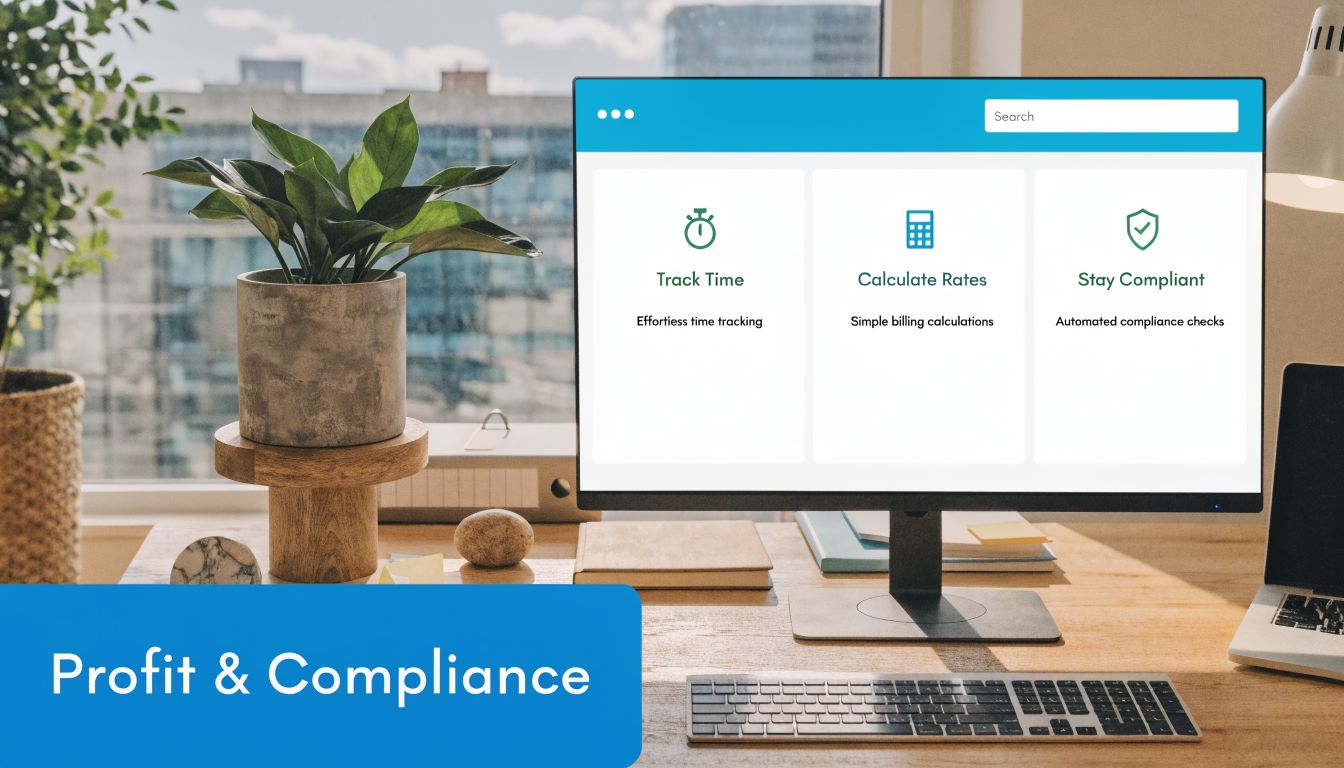
Critical Features That Drive Profitability and Compliance
The wrong way to buy legal timekeeping software is to compare feature grids and pick the longest list. The right way is to ask which features solve the failures that hurt law firms. Missed entries. Weak narratives. Billing lag. Trust accounting confusion. Duplicate admin work. Software either fixes those problems or it doesn’t.
Manual and passive capture
The market now supports two distinct approaches. The Federal Bar Association overview of attorney time tracking tools notes that firms are choosing between manual tracking and passive tracking. Passive systems automatically capture documented activity across configured applications and URLs, and platforms such as Laurel use dedicated AI models trained on firm data to generate time records for billable and non-billable work.
That sounds attractive, and often it is, but there’s a trade-off.
Manual capture gives lawyers direct control. It works well for firms with disciplined users, straightforward workflows, or sensitive practice areas where attorneys want to review everything before anything is proposed as billable. Passive capture reduces reliance on memory and lowers admin burden, but it only works if the firm sets clear review rules. Passive data without attorney review can create clutter, duplicate entries, or descriptions that don’t match the firm’s billing style.
Passive capture should create a draft, not a final bill.
In practice
- Before: A litigation associate spends the day in Outlook, Word, Teams, and a document system, then forgets two short client calls and a document review block.
- After: Passive capture logs the activity trail, groups related work, and presents a draft timesheet for review before billing.
Matter-based tracking and rate control
Every serious system must anchor time entries to matters, not just clients. One client may have multiple active matters with different billing terms, staffing rules, or budgets. If the software can’t handle matter-level tracking cleanly, billing staff will spend hours fixing entries later.
Rate control matters just as much. A partner’s review time, a paralegal’s filing prep, and a contract attorney’s research may all bill differently. The software should apply the right rate logic automatically and still allow exceptions when a client agreement requires them.
Here’s the test. If your billing team still edits rates by hand on a large share of invoices, the system isn’t carrying its weight.
Multi-source entry creation
Some of the most useful systems let lawyers create time from the work they’re already doing. Calendar events become entries. Task completions become entries. Communication logs and notes can be turned into billing narratives. That matters because lawyers don’t want to stop and “go do billing.” They want billing to happen inside the work.
A practical courthouse example is simple. A lawyer leaves a hearing, walks to the car, opens the mobile app, and converts the event plus follow-up client call into matter-specific entries before the details fade. That’s far better than waiting until Friday.
For firms trying to reduce repetitive finance work beyond time capture, it also helps to understand adjacent back-office automation. This overview of automated invoice processing software is useful because it shows how time, billing, and invoice handling fit into one cleaner financial workflow.
Billing integration and compliance-ready invoicing
Time entries have to move downstream without re-entry. If the lawyer tracks time in one platform and accounting rebuilds the invoice in another, errors multiply. Good systems flow approved entries directly into invoicing, support different billing arrangements, and preserve the matter context that justifies each line item.
This is also where legal-specific billing requirements matter. General-purpose timers may track duration, but they often fall short when a firm needs structured legal billing output, matter-based expense handling, or more formal invoicing logic.
To see why connected systems matter beyond law firms, it’s worth understanding CRM integration and data flow across business systems. The same principle applies here. When client, matter, communication, and invoice data stay connected, staff stop retyping the same information in three places.
A short walkthrough can help you visualize what a connected setup should feel like:
Audit trails, reporting, and trust-related controls
Not every feature affects profitability in the same way. Some reduce leakage. Others reduce disputes. Others reduce firm risk.
The following features are the ones I treat as high-value, not optional:
- Audit trails: You need a record of who created, edited, approved, or wrote off time. If a client questions a bill, the firm needs defensible history.
- Mobile capture: Lawyers work in hallways, courtrooms, cars, and airports. If time can’t be captured on a phone, it will be lost.
- Expense tracking: Costs tied to a matter should be recorded close to when they happen, not reconstructed from receipts later.
- Budget visibility: Teams handling capped matters or budget-sensitive clients need to see burn rate before the invoice becomes a surprise.
- Trust-aware workflows: If the platform touches retainers, payments, or trust balances, the controls have to reflect legal accounting realities, not generic bookkeeping logic.
Before and after
| Common failure | What the right feature changes |
|---|---|
| Lawyers enter vague time at month-end | Real-time capture creates specific, defensible narratives |
| Billing staff retype entries into invoices | Direct invoice flow removes duplicate admin |
| Teams miss small but valid work blocks | Passive or in-workflow capture surfaces overlooked time |
| Client disputes generic descriptions | Matter-linked narratives and audit trails support the bill |
| Staff lose expenses or apply them late | Matter-level expense capture keeps records current |
A legal timer by itself isn’t enough. Timekeeping software for lawyers should help the firm record work accurately, route it into billing cleanly, and preserve the context needed to justify every charge.
Navigating Ethical Minefields with Your Software
Law firms shouldn’t treat timekeeping as a back-office convenience. It’s a risk management system. Weak timekeeping creates more than delayed invoices. It creates inaccurate invoices, bad client communication, and records that can’t survive scrutiny.
Clients don’t care whether a vague bill came from a lawyer’s memory or a rushed admin process. They see a charge they don’t understand. Then the firm has to defend it. If the record is sloppy, the firm starts that conversation from a weak position.
Reasonable fees require specific records
If your firm bills hourly, you need records that show what was done, for whom, by whom, and why the charge is reasonable. Generic entries like “attention to file” or “review correspondence” are not just bad habits. They invite objections.
Dedicated legal systems help because they anchor entries to matters, users, and activity context. That makes it easier for a lawyer to produce a narrative that reflects actual work instead of broad filler language added long after the fact.
The ethical problem usually starts before the invoice goes out. It starts when the firm allows weak entries into the system.
Task switching and double-billing risk
Lawyers rarely work in a straight line. They jump between calls, drafts, internal consults, and client messages. That’s exactly where manual timekeeping breaks down. Enterprise-grade legal timekeeping software addresses this with concurrent multi-timer architecture that allows lawyers to track 3 to 10 simultaneous timers across different cases, and integrated systems report 39% faster client payment cycles when timekeeping flows directly into invoicing, as explained in MyCase’s review of legal timekeeping software.
The ethical value is just as important as the financial one. When a new timer automatically pauses the previous task, the software helps prevent accidental overlap. That matters because clients can forgive many things more easily than they forgive a bill that appears to charge twice for the same slice of time.
Trust accounting is not a generic accounting problem
A surprising number of firms try to stretch general accounting tools into legal workflows. That’s where avoidable mistakes happen. Trust funds, retainers, earned fees, reimbursements, and operating funds must be handled with clear separation and reliable records.
A legal-specific timekeeping and billing platform won’t replace sound accounting judgment, but it can reduce the chance of administrative mistakes that lead to commingling, delayed transfers, or poor client ledger visibility. That’s why audit logs, matter-level financial records, and user permissions matter. The firm needs to know who touched what, when, and why.
Software choices that lower ethical risk
The safest setups usually share the same characteristics:
- Detailed audit history: Every edit to time or billing records should be traceable.
- Matter-based ledgers: Entries should never float around disconnected from the client matter they belong to.
- Controlled approvals: Draft entries should be reviewed before they become invoices.
- Clear role permissions: Not every user should be able to alter billing or trust-related records.
- Integrated billing logic: The fewer manual transfers between systems, the fewer chances to create errors.
A practical example shows the difference. Suppose a paralegal logs filing work, a partner reviews a motion, and the client’s retainer needs to be applied against earned fees. In a fragmented system, those steps may be handled in separate places by separate people with no clean audit trail. In a legal-specific system, the matter, time entries, invoice, and payment application stay connected.
That doesn’t eliminate risk. It makes risk visible and manageable. For a law firm, that’s the standard.
How to Choose the Right Timekeeping Software for Your Firm
Most firms don’t fail at software selection because they ask too few questions. They fail because they ask the wrong ones. “How much is it?” and “Does it track time?” are entry-level questions. Any vendor can answer those well. The harder question is whether the platform fits how your firm works.
A solo estate planning lawyer, a plaintiff firm with contingency matters, and a mid-sized litigation practice won’t evaluate the same way. The right approach is to assess fit across operations, compliance, finance, and adoption.
Key evaluation criteria
| Evaluation Criterion | What to Look For | Why It Matters for a Law Firm |
|---|---|---|
| Security | Clear security practices, role-based access, reliable authentication controls | Time entries and billing records contain sensitive client information |
| Matter structure | Clean matter-level tracking with support for multiple billing arrangements | One client may have several matters with different rules |
| Billing workflow | Direct flow from approved time into invoices without duplicate entry | Billing staff shouldn’t rebuild invoices by hand |
| Trust-related support | Legal-specific financial workflows and reporting awareness | General business tools often miss law firm accounting realities |
| Mobility | Strong mobile app or browser access | Lawyers need to capture time away from the desk |
| Usability | Fast entry, minimal clicks, intuitive review process | Adoption fails when attorneys think the system slows them down |
| Reporting | Matter, user, and period-based reporting that management can actually use | Partners need visibility into billing discipline and operational patterns |
| Integration capability | Native connections to practice management, accounting, and communication tools | Disconnected systems create duplicate work and inconsistent records |
| Support and onboarding | Real implementation help, migration guidance, responsive support | Software problems during rollout can stall billing operations |
| Pricing model | Transparent pricing with clarity on add-ons, migration costs, and billing modules | “Low cost” systems often become expensive once key modules are added |
Questions that expose weak vendors
During a demo, don’t let the vendor drive the script with polished screens. Ask operational questions that force specifics.
Start with these:
- How does the system prevent duplicate or overlapping time entries when a user switches matters quickly?
- What happens if a lawyer starts an entry on mobile and finishes review on desktop?
- How are edits, write-downs, and approvals tracked in the audit history?
- Describe how your billing workflow handles hourly, flat-fee, and mixed matters inside the same firm.
- What trust-related reporting or safeguards are built for legal use cases?
- Which integrations are native, and which require third-party connectors or custom work?
- How do you support data migration from our current system or spreadsheets?
- What breaks if one integration fails temporarily?
- How quickly can staff learn the daily workflow without formal retraining every week?
- What does support look like during billing week, not just during sales?
If a vendor answers with generalities, assume the implementation will also be general.
Red flags during evaluation
Some products demo beautifully and still fail in practice. Watch for these warning signs:
- The tool looks polished but requires too many clicks for a simple time entry.
- The vendor shows dashboards first and avoids live billing workflow demonstrations.
- Trust accounting questions get redirected to a generic accounting integration.
- Mobile use is technically available but clearly secondary to the desktop experience.
- The pricing depends on multiple add-ons for features your firm would consider basic.
Fit matters more than feature count
The best platform for your firm is the one your lawyers will use, your billing staff can trust, and your administrators can manage without daily workarounds. For firms comparing broader operational systems around legal growth and client management, this guide to CRM software for law firms is helpful because timekeeping choices rarely stay isolated from intake, communications, and follow-up workflows.
Good software makes the right action easy. Bad software forces discipline to overcome friction. In a busy firm, friction wins more often than discipline.
Implementing Software and Maximizing Your ROI
Buying the software is the easy part. Getting lawyers to use it correctly is where firms either recover revenue or waste the investment. Most implementation failures aren’t technical. They’re behavioral. The firm turns the system on, gives one training session, and assumes adoption will happen on its own.
It won’t.
There’s also a gap in practical deployment guidance for remote and distributed legal teams. Proofserve’s discussion of law firm time-tracking apps highlights that firms need better guidance for handling time zone complexity, asynchronous work patterns, and billing consistency across multiple devices and locations. That’s no longer a side issue. It’s daily operating reality for many firms.
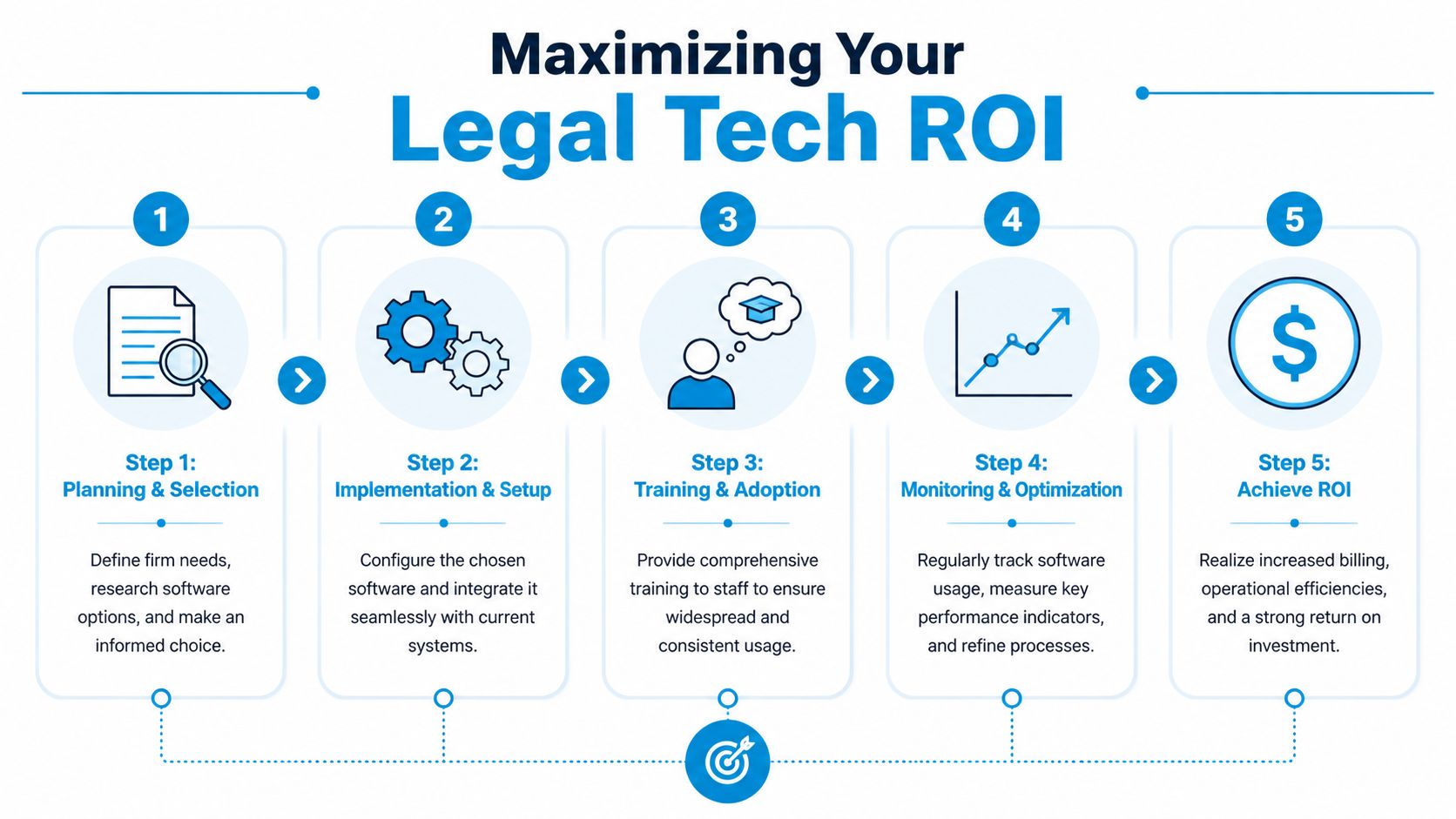
Roll out the system in stages
A strong implementation usually follows a controlled sequence, not a big-bang launch.
Define the billing rules first
Before migration, decide how the firm wants time described, reviewed, edited, and approved. If your current habits are inconsistent, software will expose that inconsistency immediately.Clean your matter data
If client and matter records are messy, time entries will attach to the wrong places or force users to search through bad data. Clean names, status fields, billing contacts, and matter structures before launch.Train by role, not all at once
Partners, associates, paralegals, billing staff, and firm admins use the system differently. Train them on their actual tasks, not on every menu item.Launch with a short review cycle
In the first weeks, managers should review time entry quality frequently. Don’t wait until month-end billing to find out the team has developed bad habits.
What good change management looks like
Lawyers adopt new systems when the workflow is clearly easier and leadership treats usage as mandatory. They resist when the firm sends mixed messages such as “use the new tool if you can” while still allowing spreadsheets and late manual entry.
A practical implementation policy should include:
- Daily capture expectations: Define when time should be entered or reviewed.
- Narrative standards: Give examples of acceptable and unacceptable descriptions.
- Approval checkpoints: Specify who reviews entries before billing.
- Mobile usage rules: Explain how to capture time after hearings, calls, travel, and offsite meetings.
- Correction procedures: Make it clear how users should fix misassigned or incomplete entries.
A timekeeping rollout fails when the firm treats accuracy as a preference instead of a standard.
Remote teams need explicit operating rules
Distributed firms need more structure, not less. When attorneys work across time zones and devices, the software configuration must reflect that.
Use practical rules like these:
- Set one official time-entry review window so daily work doesn’t sit unreviewed across multiple time zones.
- Require matter confirmation on passive entries before anything moves into billing.
- Define primary-device expectations when a lawyer works on desktop and mobile in the same block of time.
- Create a duplicate-check process for overlapping communication activity, especially when calls, emails, and calendar events can all generate candidate entries.
- Standardize billing language across offices so invoices don’t sound like five separate firms stitched together.
Where ROI actually comes from
Return on investment doesn’t come from “having software.” It comes from cleaner habits plus connected systems.
A useful way to measure value is to track whether the firm is:
- Capturing time closer to the work
- Reducing billing prep effort
- Sending invoices faster
- Resolving fewer billing questions
- Improving partner visibility into team performance
Operationally, firms should also watch the surrounding admin burden. If your intake, scheduling, and communication workflows are still fragmented, the gains from timekeeping software won’t be as strong as they should be. That’s why firms often pair timekeeping improvements with a broader review of administrative overhead, including how to calculate operating expenses and identify where manual labor is still eating margin.
A practical workflow example
Take a common litigation intake scenario. A prospective client calls. Staff schedules a consultation. The lawyer reviews the intake details, conducts the meeting, opens a matter, and starts follow-up work. If that front end isn’t connected, the first billable actions often get lost in the handoff between intake and matter setup.
A better implementation maps those steps clearly. The consultation becomes a calendar event tied to the matter. Follow-up emails and document review create or support time entries. The billing team doesn’t have to chase lawyers for narrative detail because the context already exists inside the system.
That’s how firms maximize ROI. Not with a flashy dashboard. With disciplined workflows that make captured work easier to bill and easier to defend.
Frequently Asked Questions about Legal Timekeeping Software
Can I use general accounting software for legal timekeeping
You can, but it’s usually a compromise. General accounting tools may handle invoices and payments, but they often don’t handle legal workflows cleanly. Law firms need matter-based tracking, legal billing logic, audit history, and trust-aware processes. If your team spends time forcing a general tool to behave like a legal platform, you’re paying for that mismatch in staff effort and billing risk.
Is passive tracking better than manual timers
Not always. Passive tracking is better for firms where attorneys switch tasks constantly and tend to forget manual entries. Manual timers are better when lawyers want tighter control over what gets recorded in real time. In many firms, the best setup is mixed. Passive capture creates a draft record, and lawyers review, edit, and approve before billing.
How do these systems handle flat-fee and contingency matters
Good systems don’t force every matter into hourly billing logic. They let firms track time even when the invoice doesn’t depend directly on hours. That matters because firms still need visibility into effort, staffing, and profitability. For flat-fee work, the software should help the firm compare effort against the fee. For contingency work, it should still let the team document work performed and related expenses without pretending the matter is hourly.
How steep is the learning curve for lawyers who aren’t tech-savvy
Usually lower than partners fear, assuming the product is well designed and the rollout is structured. Lawyers don’t need to master every feature. They need to know how to start time, review entries, assign matters correctly, and fix mistakes quickly. Adoption gets easier when training is role-specific and the firm sets clear daily expectations.
Can timekeeping software reduce billing disputes
Yes, if the firm uses it correctly. The software helps most when it supports specific, timely entries tied to actual work. It helps less when lawyers still enter vague descriptions at the end of the month. Disputes usually drop when invoices are more detailed, more consistent, and sent without long delay.
What should solo lawyers prioritize first
Speed and simplicity. A solo lawyer should look for fast entry, mobile access, clean invoicing, and enough structure to keep matters organized. The system doesn’t need every enterprise feature on day one, but it does need to make billing easier than postponing billing.
What should mid-sized and larger firms prioritize first
Workflow control. Once several lawyers and staff members are involved, consistency becomes the main challenge. Look for matter-level controls, approval steps, strong reporting, mobile support, and integrations with billing and practice management. The larger the team, the more costly inconsistent habits become.
How often should time entries be reviewed
Daily is best. At minimum, lawyers should review entries while the work is still fresh. Billing teams should not be the first people discovering incomplete narratives, wrong matters, or duplicate items during invoice prep. Review close to the work creates better bills and fewer corrections.
Does mobile time capture really matter
Yes. Some of the easiest billable work to lose happens away from the desk. Court appearances, quick client calls, travel-related follow-up, and post-meeting notes disappear fast if the system only works well from a desktop. Mobile capture matters because legal work doesn’t stay at a desk.
What is the biggest mistake firms make after purchase
They assume software alone will fix bad habits. It won’t. If the firm doesn’t define billing standards, require consistent usage, and review entry quality early, the new platform just digitizes the old problems.
If your firm wants fewer missed calls, cleaner intake handoffs, and stronger operational follow-through around every client interaction, Recepta.ai is worth a close look. It helps firms capture conversations, route follow-ups, sync records with the rest of the tech stack, and reduce the administrative gaps that often lead to lost matters and missed revenue.