Automated Customer Service Solutions The Ultimate Guide
A lot of small business owners don’t start looking for automated customer service solutions because they love software. They start because the same problem keeps repeating. Calls come in during lunch. Web inquiries arrive after hours. A patient wants to reschedule, a homeowner needs urgent service, a prospective client wants to know if you handle their case, and nobody gets back to them fast enough.
That’s usually the actual trigger. Not innovation. Not trend-chasing. Lost revenue, overloaded staff, and the sinking feeling that your front desk is carrying too much of the business on its shoulders.
The good news is that modern automation can solve that problem. The bad news is that many businesses buy the wrong kind. They install a bot, frustrate customers, and conclude that automation doesn’t work. In practice, what works is much narrower and more useful: a hybrid AI plus human model that handles routine interactions instantly and hands off high-stakes moments to a real person without friction.
The Hidden Cost of a Single Missed Call
A plumbing company gets a call at 8:17 p.m. on a Saturday. A pipe burst in a finished basement. The owner is with family, the office is closed, and the caller hits voicemail. By 8:25, that same homeowner has called the next company on Google and booked the job.
Nothing dramatic happened inside the business. No alarms went off. No report landed in anyone’s inbox saying, “You just lost a high-value emergency call.” But that’s how service businesses leak revenue. One missed call at a time.
The same thing happens in dental offices when a new patient tries to book after work, in law firms when a prospective client reaches out after a stressful event, and in HVAC companies during weather spikes. If the first interaction fails, the opportunity often disappears before your team even sees it.
That’s why automated customer service solutions matter. They’re not just “AI tools.” They’re a way to keep your business responsive when your staff can’t physically be at the phone, chat window, inbox, and scheduling calendar at once.
The broader market shift makes that clear. The AI customer service market reached $12.06 billion in 2024 and is projected to grow to $47.82 billion by 2030, according to GetNextPhone’s AI customer service statistics. Businesses aren’t adopting automation for novelty. They’re adopting it because customers expect immediate response and because labor-heavy front desk models don’t scale cleanly.
For small businesses comparing options, tools like Nomiss virtual receptionist can help frame what always-on call coverage looks like in practice, especially when the goal is to stop sending valuable inquiries to voicemail.
Before choosing any setup, it also helps to understand the economics of live answering versus automated support and hybrid coverage. A useful starting point is this breakdown of business answering service cost.
Missed calls don’t show up as expenses on your P&L. They show up as jobs you never booked.
Deconstructing Automated Customer Service
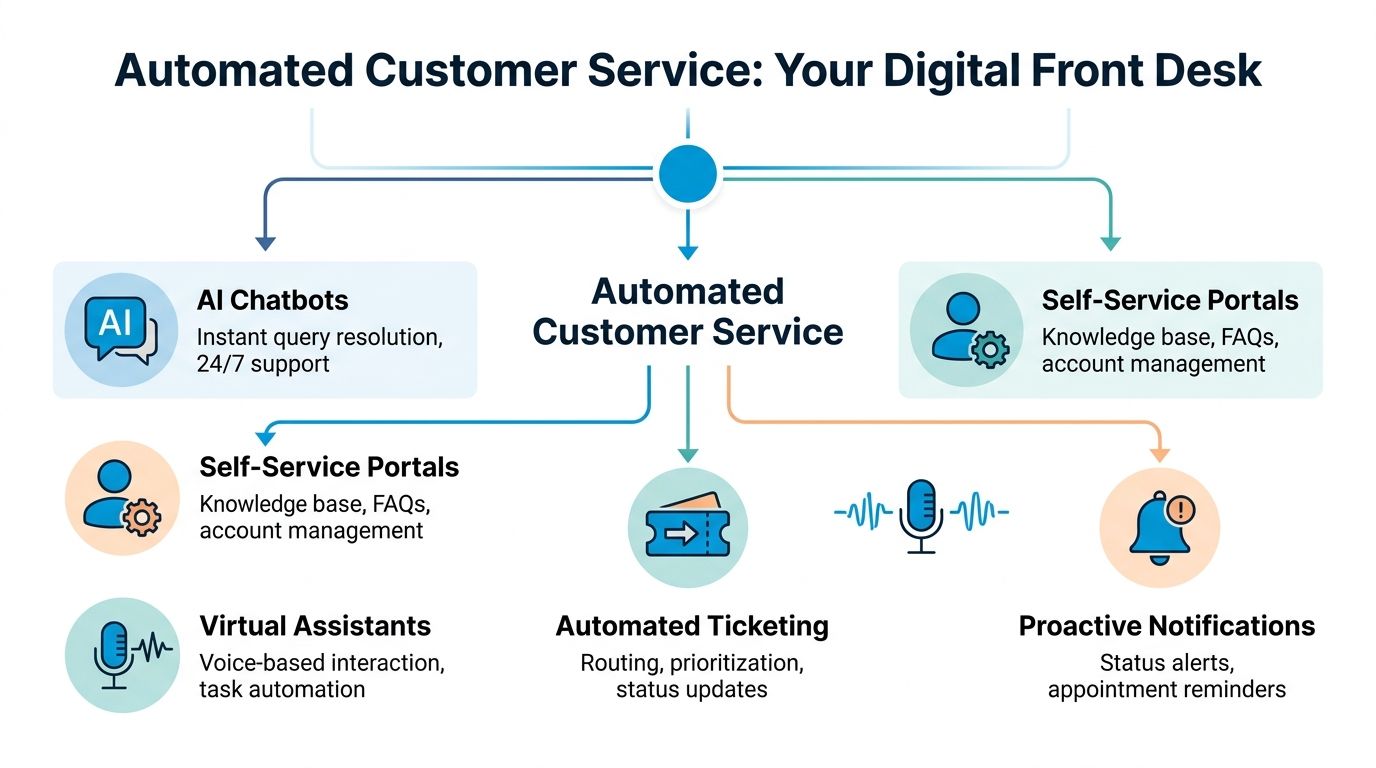
Most owners hear “automation” and picture a clumsy chatbot that traps people in scripted loops. That’s outdated. Good automated customer service solutions operate more like a digital front desk team than a single bot.
Think of it as three parts working together. One part greets and handles routine requests. Another connects to your systems so actions happen. The last part routes sensitive or messy situations to a human before the customer gets annoyed.
The conversational layer
This is the part customers notice first. It answers the phone, responds in chat, handles common questions, collects intake details, confirms appointments, and gives status updates. If you run a cleaning company, it might ask for square footage, zip code, and preferred service date. If you run a dental office, it might collect insurance basics and appointment preferences.
The quality of this layer matters because customers are quick to notice when the system doesn’t understand them. 45 to 46% of consumers cite “ability to understand the request” as the top area of improvement for automated systems, according to Zendesk’s overview of automated customer support. That single point explains why pure automation often fails in service businesses. If the system can’t interpret a real-world request with enough accuracy, it creates extra work instead of removing it.
That’s also why conversational design matters as much as the underlying AI. The language has to sound like your front desk, not like a generic support script. If you want a sense of how that works operationally, this overview of conversational AI for customer support is a practical reference.
The integration layer
This is the part owners often overlook until implementation begins. If the system can answer a call but can’t check your calendar, create a lead, log notes, or trigger a follow-up, it becomes another inbox your staff has to manage.
A useful automation setup should connect to the tools you already rely on, such as:
- Calendars: so callers can book or request times without double-entry
- CRM records: so lead details don’t disappear into a separate dashboard
- Ticketing systems: so service issues can be routed and tracked
- Messaging tools: so confirmations and reminders go out automatically
Without these connections, the “automation” is just a front-end layer sitting on top of manual work.
The human escalation path
This is the difference between a system that helps and one that harms. In high-stakes industries, not every interaction should stay with AI. A distressed patient, a legal conflict question, an irate policyholder, or a homeowner with a flooding emergency needs fast human intervention.
Practical rule: If misunderstanding the request could damage trust, delay help, or create liability, build human handoff into the workflow from the start.
The strongest setups don’t hide the human option. They make it easy. That means the system captures context first, then passes the interaction to a trained person who can pick up without forcing the customer to repeat everything.
The Tangible Business Benefits You Can Measure
The business case for automated customer service solutions usually comes down to three outcomes. Lower front-end labor pressure. Better lead capture. Better customer experience when your team is stretched thin.
Those outcomes only count if you can measure them. Otherwise, automation turns into another monthly software bill with a vague promise attached.

Lower operating cost without shrinking responsiveness
A lot of owners assume the comparison is simple: software versus receptionist salary. It’s not. The better comparison is this: what does it cost to maintain reliable front-door coverage across busy hours, after-hours periods, overflow spikes, lunch breaks, sick days, and seasonal demand?
That’s where hybrid models usually make more sense than a fully in-house structure for smaller teams. According to Pylon’s customer support statistics roundup, businesses using hybrid automated solutions like Recepta.ai report up to 80% cost savings compared to in-house reception, a 30% increase in qualified leads, and a 15x return on investment by preventing lost opportunities from voicemail.
Those numbers matter because they reflect the economics of access. A service business doesn’t just need a person to answer. It needs consistent coverage.
Here’s what that looks like in practice:
- Routine requests are handled automatically: hours, directions, pricing ranges, scheduling windows, intake questions
- Overflow gets absorbed cleanly: your staff doesn’t have to choose between serving the customer in front of them and answering the ringing phone
- Human time gets reserved for higher-value work: sales conversations, exceptions, escalations, and customer retention
More qualified leads from the same demand
Most small businesses spend too much time talking about lead generation and too little time talking about lead leakage. If you’re buying traffic, running local SEO, or investing in referral programs, every missed inquiry weakens the return on those efforts.
That’s why front-end response systems deserve attention from whoever owns growth, not just whoever manages operations. For contractors trying to tighten that connection between marketing and response handling, this guide to lead generation for home service contractors is useful because it highlights a reality many teams ignore: generating demand and capturing demand are two different disciplines.
A practical example helps. Say a pest control company gets a web lead at night and a phone inquiry early the next morning before the office opens. A good automated system can ask qualifying questions, log the lead source, capture service type, and offer scheduling options. By the time staff arrives, they’re not sorting through vague voicemail recordings. They’re working a cleaner queue with usable context.
Better lead capture isn’t just answering faster. It’s collecting enough detail that the next step can happen without rework.
Reporting matters here. If you can’t see which calls turned into appointments, where after-hours leads came from, or which inquiry types keep escalating, you can’t improve the system. That’s where tools like call detail reporting become useful operationally. They let you review response patterns, staffing gaps, and conversion friction instead of guessing.
Better customer experience at the point of contact
Often, many automation projects get oversold. Automation doesn’t improve customer experience by existing. It improves it when it removes friction.
That can mean:
- Immediate acknowledgment: customers know their request was received
- Consistent answers: common questions get the same clear response every time
- Faster next steps: bookings, routing, and follow-up happen without delay
- Reduced hold pressure: your staff handles exceptions while the system absorbs routine demand
In well-designed hybrid systems, the customer experience improves because the business becomes easier to reach and easier to deal with. That’s the operational win. Not replacing humans, but protecting their time so they can show up where judgment and empathy matter most.
Automation in Action Across Key Industries
The value of automated customer service solutions gets easier to judge when you stop thinking in features and start thinking in real interactions. Different industries break in different places. Home services lose emergency calls. healthcare offices get buried in repetitive scheduling work. Law firms need intake without casual mishandling of sensitive details. Franchise groups struggle with consistency across locations.
Home services when urgency arrives after hours
An HVAC company gets a call late on a Sunday. The customer says the system stopped working and there’s a toddler in the house. A weak automation setup forces them through a rigid menu. A strong hybrid setup recognizes urgency, captures address and equipment basics, checks the on-call schedule, and sends the issue to the right person immediately.
That’s what matters in home services. Not flashy AI. Fast qualification and smart routing.
If you run plumbing, HVAC, pest control, electrical, or restoration, the system has to do more than answer. It should gather enough information to move the job forward:
- Service type: repair, estimate, maintenance, emergency
- Location details: service area, property type, access notes
- Timing: now, next available, specific date request
- Priority cues: water leak, no cooling, safety concern, repeat customer
The same pattern applies outside traditional contractor workflows too. Teams in adjacent property-driven businesses often face similar intake volume and response pressure, which is why examples like a real estate answering service are worth studying even if you don’t work in real estate. The operational lesson is the same: speed matters, context matters, and missed first contact costs money.
Healthcare when staff time is the bottleneck
In healthcare and wellness practices, the front desk usually carries a chaotic mix of calls. Appointment requests, reschedules, insurance questions, refill requests, directions, intake details, reminder callbacks. Most of that work is necessary, but much of it is repetitive.
Good automation can reduce that burden without turning the patient experience into a cold script. A dental clinic, for example, can use automation to confirm appointments, collect basic new patient information, answer common office questions, and route urgent clinical concerns to staff. A primary care office can separate routine administrative requests from issues that need human review.
The design choice matters. Patients don’t mind speed. They mind confusion and dead ends.
A practical healthcare workflow usually works best when the system:
- Handles repeatable administrative requests such as booking requests and reminders
- Flags emotionally sensitive or medically urgent language for rapid handoff
- Keeps records synced so staff sees the same information across channels
What doesn’t work is making anxious patients fight through menus to explain something nuanced. In healthcare, the handoff standard needs to be high.
A short walkthrough helps show what capable systems look like in practice:
Legal when trust is fragile
Law firms need intake systems, but they can’t afford sloppy intake. A caller may be under stress, unsure how much to share, and highly sensitive to whether the firm sounds competent and discreet.
That changes how automation should be used. The system shouldn’t try to “handle” legal advice. It should:
- identify the inquiry type
- collect contact and case basics
- screen for fit based on firm-defined criteria
- pass the matter to the right person quickly
A family law practice might want a gentle intake flow that captures urgency and preferred callback times. A personal injury firm may want immediate triage on accident timing and injury context. A business law firm might route based on practice area and company size.
In legal services, the best automation behaves like a careful intake coordinator, not a substitute for attorney judgment.
Pure automation often breaks here because the emotional context is too important. A caller who feels rushed, misunderstood, or over-screened may never answer your callback.
Franchises when consistency matters more than any single location
Franchise and multi-location businesses face a different problem. It’s less about one missed call and more about inconsistent handling across many sites.
One location answers quickly. Another sends everything to voicemail. A third has a strong front desk manager, but only during weekday hours. Customers don’t care why the experience changes. They just notice that your brand feels uneven.
A centralized automation layer can help standardize the basics:
- Brand-consistent greetings
- Location-aware routing
- Shared FAQs and service policies
- Unified lead capture and reporting
- Escalation rules based on business hours and local staffing
A hybrid platform is a natural consideration at this point. Tools such as Recepta.ai are built around that blend of conversational AI and human support, handling inbound and outbound interactions, scheduling, lead capture, and escalation while syncing with business systems. For multi-location operators, that kind of model is useful because it combines standardization with room for local handoff when nuance is needed.
For franchise operators, the practical test is simple: can a customer call any location and receive a clear, professional, actionable first response every time? If the answer is no, automation isn’t optional. It’s operational infrastructure.
How to Evaluate and Choose the Right Solution
A lot of buyers focus on the demo. The voice sounds natural. The chat widget looks clean. The sales rep shows a few routing rules and everyone nods. Then implementation starts, and the team discovers the problem wasn’t whether the AI could talk. It was whether the system could fit the business.
That’s why vendor selection should be stricter than most small businesses expect. The best automated customer service solutions aren’t the ones with the fanciest front end. They’re the ones that hold up when customers are confused, upset, or off-script.
Start with the handoff, not the bot
This is the first question I’d push on in any evaluation: what happens when automation fails, or when it shouldn’t be used in the first place?
That matters because 79% of consumers view the ability to escalate to a human as important, according to Neqqo’s discussion of automation and AI in the contact center. For high-stakes businesses, that isn’t a nice-to-have feature. It’s a core operating requirement.
Ask vendors questions like these:
- How does escalation happen: live transfer, callback queue, text alert, or internal ticket?
- What context transfers with the handoff: transcript, caller details, intent, sentiment, prior history?
- Who receives the escalation: your staff, outsourced agents, or a mixed model?
- How does the system detect frustration or ambiguity: can it route out before the customer gets stuck?
If the answer is vague, keep looking.
Check integration depth early
A surprising number of tools can answer a call and still create more admin work for your team. The test isn’t whether the platform “integrates.” Almost every vendor says that. The test is what the integration does in your workflow.
Look for concrete actions:
- Calendar sync: can it check availability and create bookings correctly?
- CRM logging: does it create or update records automatically?
- Follow-up triggers: can it send confirmations, reminders, or task assignments?
- Workflow fit: does it align with how your staff already handles leads and service issues?
If your team has to copy notes from one dashboard into another, the automation layer is incomplete.
Evaluate for your risk profile
Not every business needs the same setup. A med spa, plumbing company, law office, and insurance agency all have different tolerance for error, delay, and tone.
Use this shortlist when comparing vendors:
| Evaluation area | What to ask |
|---|---|
| Industry fit | Has the vendor handled your kind of inquiries before? |
| Compliance posture | Can the system support your privacy and data handling requirements? |
| Conversation control | Can you shape scripts, routing rules, and escalation triggers? |
| Reporting clarity | Can you see what was handled, missed, escalated, and booked? |
| Human support model | Are humans part of the service design or only an afterthought? |
The wrong automation choice usually doesn’t fail all at once. It fails in edge cases first, then damages trust quietly.
The best buying decision comes from pressure-testing edge cases during evaluation. Ask the vendor to walk through a frustrated patient, an emergency service request, a conflicted legal intake, and an after-hours overflow spike. If the system handles only the easy scenarios, it won’t hold up in practical operations.
Your Implementation and ROI Measurement Checklist
Most automation projects don’t fail because the technology is weak. They fail because the business skipped setup discipline. The script was too generic. The routing rules were incomplete. Nobody decided which requests should stay automated and which should go straight to a human.
Implementation deserves the same seriousness you’d give a hiring plan or a location launch.
Implementation checklist for a first rollout
Start small. Pick a narrow set of use cases that happen often and don’t require complex judgment.
A strong first rollout usually includes:
Choose the first workflows carefully
Start with tasks like appointment requests, FAQ handling, lead intake, reminder calls, or after-hours overflow. Don’t begin with your most sensitive interactions.Map your escalation rules
Decide what always goes to a human. Urgent service requests, emotionally distressed callers, billing disputes, and case-specific legal or medical questions usually belong here.Build a clean knowledge base
Gather office hours, service areas, pricing ranges, accepted insurance basics, intake questions, scheduling rules, and common objections. Bad source material creates bad automation.Define the exact handoff path
Specify who receives escalations, when they receive them, and what context they get. The handoff should include enough detail that the customer doesn’t have to start over.Connect operational systems
Link calendars, CRM records, ticketing tools, and notifications before launch. Integration quality often determines whether the rollout saves time or creates duplicate work.Train your staff on the new workflow
Front desk teams, dispatchers, office managers, and sales staff need to know what the system handles, what lands with them, and how to fix errors quickly.
What to monitor in the first weeks
The first month should be treated like tuning, not just deployment. Review real interactions, look for repeated confusion points, and tighten the language.
A few practical review questions help:
- Where do callers abandon the interaction?
- Which questions keep triggering escalation?
- Are bookings arriving with complete information?
- Are staff editing or correcting the same fields repeatedly?
According to Vida’s overview of automated customer service systems, well-integrated AI solutions can improve ticket routing precision and lead to 20 to 40% higher first-contact resolution rates. That’s a useful implementation reminder. Results don’t come from turning the software on. They come from integrating it well and refining it against actual workflows.
Launching fast is fine. Launching sloppy is expensive.
Key ROI metrics for automated customer service
The easiest way to lose internal support for automation is to report only soft benefits. Tie the rollout to operating metrics your team already understands.
| Metric | How to Measure | Example Goal for a Service Business |
|---|---|---|
| Time to first response | Compare inbound inquiry timestamp to first business response across phone, chat, or web forms | Reduce response delay on after-hours and overflow inquiries |
| After-hours coverage rate | Track how many inquiries received outside business hours were answered or captured | Ensure after-hours opportunities no longer default to voicemail |
| Qualified lead capture | Count inquiries that arrive with usable contact details, service need, and next-step status | Increase the share of leads staff can act on immediately |
| Appointment booking completion | Compare booking requests to confirmed scheduled appointments | Reduce drop-off during intake and scheduling |
| Human escalation quality | Review whether escalated conversations reached the right person with full context | Minimize customer repetition and transfer friction |
| First-contact resolution | Measure how often the initial interaction solved the need or moved it forward without rework | Improve resolution through better routing and intake |
| Admin time per inquiry | Estimate staff time spent logging notes, routing, and follow-up coordination | Cut manual front-desk workload on repetitive requests |
| Missed call recovery | Compare missed call volume before and after launch, then review callback outcomes | Turn previously lost inquiries into active opportunities |
The goal isn’t to build a complicated analytics program. It’s to prove whether your front door got stronger. If your team responds faster, captures more complete inquiries, routes issues better, and spends less time cleaning up intake, the project is working.
Beyond Automation Building a Resilient Business
The strongest reason to invest in automated customer service solutions isn’t labor reduction by itself. It’s resilience. A resilient business doesn’t depend on one receptionist having a perfect day, one office manager working through lunch, or one employee remembering to call back every inquiry before closing.
It builds a front door that stays open, stays consistent, and knows when to bring in a human.
That’s why the hybrid AI plus human model is the only sustainable path for high-stakes industries. Pure automation misses emotional nuance, struggles when requests are messy, and creates unnecessary friction when customers need judgment. Purely manual systems miss opportunities, burn out staff, and break under uneven demand. The middle ground is where the practical value sits.
If you run a service business, start with a simple exercise. Look at your last week of missed calls, delayed callbacks, abandoned web forms, and repetitive front-desk tasks. Estimate what those moments cost in bookings, staff time, and customer trust. That number is usually a better buying guide than any product demo.
In the current market, not having an intelligent, always-available front door is becoming a competitive weakness. The businesses that win won’t be the ones that automate everything. They’ll be the ones that automate carefully and keep the human touch exactly where it matters.
If you want to see what that hybrid approach looks like in practice, Recepta.ai is built to handle calls, scheduling, lead capture, follow-ups, and human escalation in one workflow. For small businesses that need reliable 24/7 responsiveness without turning customer service into a bot maze, it’s a practical place to start evaluating your options.