Master Outreach and Marketing: Practical Playbook

A lot of service businesses are stuck in the same loop. The team buys a list, sends a batch of emails, leaves a few voicemails, gets a trickle of replies, and then loses half the interest because nobody answers the phone fast enough or follows up cleanly. Outreach and marketing start to feel unpredictable when the actual problem is usually operational, not just creative.
The fix isn't more activity. It's a better system.
The outreach playbook that works for home services, clinics, law firms, insurance agencies, and multi-location businesses is simple in principle. Define a narrow target, choose channels on purpose, write messages that sound relevant, and build a capture process that doesn't let inbound interest die in voicemail or an overworked front desk queue. When those pieces connect, outreach stops being a disconnected set of tasks and starts acting like revenue infrastructure.
Laying the Foundation for Successful Outreach
Most outreach campaigns fail before the first message goes out. Not because the email copy is bad, but because the business hasn't decided what success looks like or who the campaign is for.
A useful outreach and marketing plan starts with one concrete business outcome. "Get more leads" is too vague to manage. "Book 20 new consultations per month for a dental clinic" is better because the team can work backward from it. That kind of goal shapes list building, message angle, channel choice, and follow-up rules.

Start with a goal your team can actually operate
For a home service business, a practical goal might look like this:
- Outcome: Book estimate requests from commercial property managers
- Audience: Facilities managers at small to mid-sized multi-site properties
- Offer: Faster response handling for after-hours service inquiries
- Time frame: One quarter
- Operational owner: Sales or marketing ops, not "everyone"
That last point matters. Outreach falls apart when ownership is fuzzy. Someone needs to own the list, someone needs to own the cadence, and someone needs to own lead handling once a prospect responds.
If you want a clean starting worksheet, an essential ideal customer profile template and guide is a useful resource because it forces specificity around firmographics, pain points, buying triggers, and role-level context.
Build your ICP from buying reality, not from demographics alone
A usable ideal customer profile is more than industry plus company size. For service businesses, the better questions are operational:
- What problem interrupts their day? Missed calls, unbooked jobs, delayed intake, slow quote response
- What makes them switch vendors? Inconsistent communication, weak follow-through, admin overload
- What event creates urgency? Expansion, hiring, seasonality, new location openings, increased inbound demand
- Who feels the pain first? Owner, office manager, intake coordinator, operations lead
Take an HVAC contractor selling into property management companies. The wrong ICP is "commercial real estate businesses." The useful ICP is "facilities managers responsible for multiple buildings who need vendors that answer quickly after hours and keep communication documented."
That difference changes everything. Subject lines get sharper. Calls sound less generic. Follow-ups can reference actual workflow problems instead of broad promises.
Practical rule: If your team can't explain why this buyer would care this month, the list isn't ready yet.
Segment before you write
Segmentation is where campaigns stop sounding like bulk outreach. In B2B outreach, campaigns that begin with detailed prospect segmentation and data enrichment see 20 to 30% open rates and 5 to 10% reply rates, while generic, non-segmented campaigns often fail to surpass 2% replies. Overlooking this foundational step can lead to over 50% lower engagement, based on the prospect segmentation and enrichment benchmarks cited here.
The practical application is straightforward. Break your list into groups that change the message:
Vertical segment
Dental offices don't respond to the same language as law firms or plumbing companies.Role segment
An owner cares about revenue leakage. A front desk manager cares about call load and scheduling friction.Situation segment
A new location opening deserves a different message than a struggling practice trying to reduce no-shows.
One of the fastest ways to lose momentum is sending outreach from a spreadsheet that doesn't connect to your sales process. That's why the CRM matters early, not later. If your contact data, pipeline stage, and follow-up history don't sync cleanly, the campaign creates admin work instead of momentum. Understanding what CRM integration means in practice proves useful, especially for teams that want responses, appointments, and notes to land in one place.
A simple example from the field
Say a dental clinic wants to book more new patient consultations. A weak ICP says "adults in our area." A stronger outreach target might be local employers, wellness coordinators, and community partners who can refer families to the clinic. Another segment might be inactive leads who asked about appointments but never booked.
Those are different audiences with different motivations. One needs a partnership message. The other needs reactivation. If both get the same email, neither message lands.
Foundation work isn't glamorous, but it saves budget, protects team time, and makes every later step easier.
Choosing Your Outreach Channels Strategically
A bad channel mix creates fake underperformance. Teams conclude that outreach doesn't work when the actual issue is that they pushed the wrong message into the wrong channel for the wrong buyer.
Service businesses don't need to be everywhere. They need a small set of channels that match buyer behavior and internal capacity. The channel mix for a law firm targeting referral partners won't look like the mix for a pest control company trying to re-engage old estimates. That's normal.
Use channels based on buyer context
Here's the practical rule I use. Match the channel to the type of decision and the urgency of the conversation.
- Email works when the buyer needs context, proof, or a forwardable message.
- Phone works when the prospect is high value, timing matters, or the objection needs live handling.
- SMS works when speed matters and the prospect already expects direct communication.
- LinkedIn works when the buyer is a professional operator, partner, or decision-maker who lives in a B2B environment.
- Partnerships and referrals work when trust matters more than reach.
Multi-channel matters because buyers don't all respond to the first touch. According to the multi-channel outreach statistics compiled here, social selling through LinkedIn uncovers 45% more sales opportunities, and campaigns using three or more touchpoints achieve 287% higher purchase rates than single-channel efforts.
That doesn't mean you should add channels blindly. It means coordinated touchpoints beat isolated activity.
Outreach channel comparison for service businesses
| Channel | Best For | Avg. Cost | Typical Response Rate | Key Benefit |
|---|---|---|---|---|
| B2B outreach, follow-up, detailed offers | Low | Varies by list quality and message relevance | Easy to personalize by segment and scale across lists | |
| Phone | High-value prospects, urgent needs, objection handling | Medium | Strong when paired with prior touches | Creates immediate conversation and qualification opportunity |
| SMS | Appointment reminders, warm lead follow-up, confirmations | Low to medium | Strong for time-sensitive interactions | Fast, direct, and well suited to operational follow-through |
| Law, insurance, healthcare admin, franchise operators | Medium | Strong for professional audiences | Adds visibility and social context before or after email | |
| Referral partnerships | Home services, local businesses, professional services | Variable | Slower but often higher intent | Borrowed trust improves conversion quality |
The table isn't a universal ranking. It's a planning tool. A local plumbing company may get more value from SMS and referral relationships than LinkedIn. A healthcare SaaS partner selling into clinics may see the opposite.
Build a channel mix instead of choosing a favorite
A good mix usually answers three questions:
Where can this buyer first notice you without friction?
Often email or LinkedIn.Where can you resolve uncertainty fastest?
Usually phone.Where can you reduce drop-off after interest appears?
Often SMS and fast callback handling.
Buyers rarely care which channel your team prefers. They respond in the channel that feels easiest in the moment.
For example, an insurance agency targeting local businesses might open with email, reinforce with LinkedIn, then use phone for the accounts that show intent. A med spa might rely more on SMS follow-up after a form fill or missed call because scheduling speed matters more than long-form persuasion.
If you're mapping that customer journey, it helps to think in terms of a connected experience rather than isolated tools. That's where a clear view of omnichannel customer experience becomes practical, especially when multiple locations or teams touch the same lead.
What usually doesn't work
The common failure modes are predictable:
- Over-spreading the team across too many channels with weak execution in all of them
- Using the same script everywhere, which makes LinkedIn messages sound like email and calls sound scripted
- Ignoring handoff speed, so a prospect replies but no one picks up the thread promptly
- Treating partnerships as passive, instead of giving partners clear offers and referral triggers
The strongest outreach and marketing programs don't chase novelty. They run a disciplined mix, know why each channel is there, and make sure one touchpoint reinforces the next.
Crafting Messages and Scripts That Get Responses
Once the list and channels are set, the next mistake teams make is writing as if the prospect owes them attention. They don't. The message has to earn the next step quickly.
Most outreach copy underperforms because it's self-focused, too long, or too vague. The average sales outreach email gets an 8.5% response rate, follow-ups can double that figure, and 33% of recipients decide to open based on the subject line alone, according to the sales outreach benchmarks collected by Zendesk. That tells you where to focus first. The subject line has to create relevance, and the body has to make replying feel easy.

Write the subject line for one person, not the whole market
Subject lines don't need to be clever. They need to feel specific.
Good examples for service businesses:
- Quick question about after-hours call handling
- For your [City] dental intake team
- Missed estimate calls at your second location
- Following up on intake and scheduling workflow
Weak subject lines tend to sound generic or inflated:
- Transform your business today
- Increase revenue fast
- Partnership opportunity
- Strategic solution for growth
Formatting matters too. If your team debates every style choice, this guide to email subject line capitalization best practices is a useful reference point because it keeps the presentation professional without overcomplicating the process.
Keep the first email short and operational
For most cold outreach, I prefer an email under 125 words. Not because brevity is trendy, but because busy buyers scan first and decide second.
Here is a weak version for an insurance agency:
Hi, we're a company that helps businesses improve customer communication and streamline front office operations with advanced AI and automation. We'd love to schedule a demo to show how we can transform your workflow and drive better outcomes.
Here is a better version:
Hi Sarah,
Noticed your agency has multiple producers and a front desk team handling inbound call flow. That's usually where quote requests get delayed or dropped after hours.We're seeing interest from agencies that want tighter intake, cleaner follow-up, and fewer missed opportunities when nobody can answer live.
Worth a quick conversation next week?
The second version works because it points at a workflow problem the recipient already understands.
Use message structure that lowers reply friction
A simple framework works across industries:
- Observation about the business, role, or operating reality
- Problem that creates cost, delay, or missed opportunity
- Reason to care now, tied to current workload or growth
- Low-friction CTA that asks for a small next step
For a law firm:
Hi Mark,
Firms with growing intake volume often hit the same snag. New inquiries come in after hours, staff follow up the next day, and some matters go cold before a consult is booked.Reaching out because that process is usually fixable without changing the whole intake team.
Open to a brief conversation?
For a plumbing company reactivating old estimates:
Hi Jenna,
Reaching out to a few homeowners who requested plumbing help but never scheduled. If the issue is still open, we can help you pick a time that works.Want me to send over current availability?
Message filter: If the first two sentences could be sent to five other industries with no edits, the copy isn't specific enough.
Build call scripts around questions, not monologues
Phone scripts should sound like prompts, not speeches. The rep or caller needs room to react.
A workable structure:
Permission opener
"Hi David, this is Alex. Did I catch you with a minute?"Reason for the call
"I'm following up because teams handling inbound service requests often lose a few opportunities when calls hit after hours or during peak dispatch times."Diagnostic question
"How are you currently handling calls that come in when your office staff is tied up?"Next step
"If it's useful, I can send a short overview and line up a time to talk through options."
If your team needs a stronger starting point, this guide to a script for outbound calls gives a practical base you can adapt by vertical.
Follow-up is where most revenue gets recovered
A lot of teams send one message, wait, and call the channel ineffective. That's usually impatience disguised as strategy.
A clean follow-up sequence might look like this:
- Touch 1: Initial email with a role-specific pain point
- Touch 2: Short follow-up that adds one operational detail
- Touch 3: Call or voicemail referencing the earlier message
- Touch 4: LinkedIn note or brief reconnect
- Touch 5: Breakup-style message that keeps the door open
What changes across touches isn't just the wording. It's the angle. One touch can focus on missed calls. Another on scheduling drag. Another on after-hours intake. Same prospect, different entry point.
That kind of disciplined follow-up is what turns a decent campaign into a reliable one.
Building Your Automated Outreach and Capture Engine
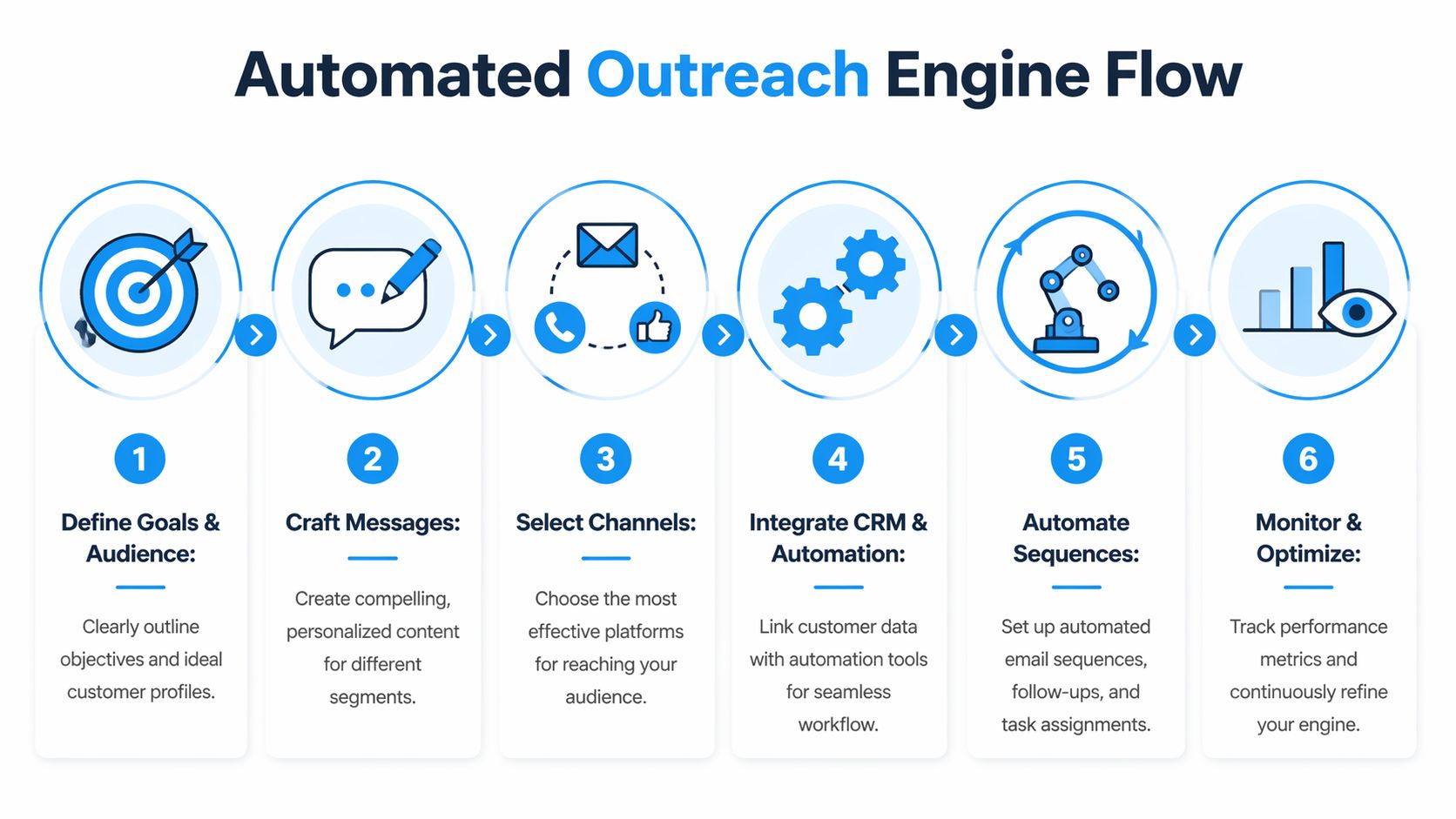
Outreach gets expensive when every handoff depends on a person remembering the next step. A scalable system removes that dependency. The campaign should know what to do after a send, after a click, after a missed call, and after a callback.
The easiest way to think about this is as an operating loop, not a blast. Prospect data enters the CRM, messages run in sequence, signals get captured, and inbound responses route into scheduling or qualification without waiting for office hours.
A visual process helps keep the build clean:
Use a coordinated cadence, not disconnected tasks
A coordinated multi-channel cadence using email, LinkedIn, and phone can achieve an 8 to 12% response rate, compared with 2 to 4% in single-channel efforts. Top-performing teams also balance automation at 70% with 30% manual personalization, based on the multi-channel cadence benchmarks summarized here.
That balance matters. Full manual execution doesn't scale. Full automation makes the campaign sound interchangeable.
A practical cadence for a service business might look like this:
| Day | Touch | Purpose |
|---|---|---|
| 1 | Personalized email | Establish relevance and invite a low-friction reply |
| 3 | LinkedIn profile view or connection request | Add familiarity before the next contact |
| 5 | Follow-up email | Reinforce the problem with a tighter angle |
| 7 | Call or voicemail | Create live contact or prompt a callback |
| 10 | Final email | Ask for a simple yes, no, or later response |
The engine needs four connected systems
Many teams already have some version of these, but they often sit in silos.
CRM and list management
Your CRM should hold source, segment, owner, status, and next action. If records don't update automatically when a prospect replies or books, reps start working from stale information.
Outreach automation
Tools like Smartlead, Instantly, HubSpot sequences, Salesloft, or Apollo can manage email timing and task creation. The point isn't the logo. It's consistent execution with enough flexibility to branch based on engagement.
Calendar and qualification logic
When a warm lead responds, the system should know who qualifies, what questions need answering, and where the appointment belongs. That's where many campaigns break. The top of funnel works, but the booking layer is manual and slow.
Inbound capture
This is the missing piece for a lot of service businesses. Prospects don't always reply by email. They call the main line, return a voicemail at night, or respond while the front desk is busy.
The campaign isn't complete when a prospect shows interest. It's complete when that interest is captured, qualified, and routed without delay.
For businesses that need phone coverage in that workflow, automated phone answering service is the category to evaluate. In practice, that means the system answers inbound calls, gathers the right details, and pushes the result into the same operating environment as the outreach campaign.
Where an AI receptionist fits
This operational gap is frequently overlooked. Marketing generates interest, but operations still lose opportunities after hours, during lunch, or when staff are tied up. That's where an AI receptionist can connect outreach and conversion.
One option is Recepta.ai, which handles inbound and outbound calls, captures lead details, books appointments, follows qualification logic, and syncs outcomes into connected systems. In a practical outreach workflow, that means a prospect who gets an email on Tuesday and calls back Thursday night doesn't disappear into voicemail. The call can be answered, tagged, summarized, and routed without waiting for the office to reopen.
Build the workflow from response backward
A lot of teams build automation from the first send forward. I prefer to build from the response backward.
Ask these questions:
- If someone replies by email, who owns the follow-up?
- If someone calls after hours, what information must be captured before booking?
- If the lead isn't qualified, where does it go?
- If they say "not now," how does the system re-enter them later?
Those answers shape the automation much better than starting with message templates alone.
For teams working on this layer, mastering automated lead nurturing is a helpful reference because it pushes the thinking beyond "send sequence" and into actual progression logic.
A short explainer on workflow design is useful here:
Common build mistakes
The usual problems aren't technical. They're design choices.
Too many branches early
Teams create complex logic before proving the core sequence.No qualification rules
Every lead gets treated the same, so the calendar fills with poor-fit conversations.No voicemail recovery plan
The system sends outbound touches but doesn't handle returned calls well.No closed-loop reporting
Marketing sees opens and replies, but not booked appointments or downstream quality.
A strong outreach and marketing engine isn't flashy. It runs the same way every day, captures intent regardless of when it shows up, and gives the team clean data to improve the next round.
Measuring Success and Optimizing Your Playbook
Most campaign reviews focus on the wrong numbers. Teams celebrate opens, complain about reply rates, and still can't answer the core question: did this outreach create qualified conversations and booked revenue opportunities?
The useful dashboard for a service business is small. You don't need dozens of metrics. You need a few indicators that tell you where the breakdown is.

Track the handful of KPIs that diagnose performance
I like to separate metrics into three layers.
Campaign health
These tell you whether the system can even reach people.
- Deliverability
- Bounce trend
- Open rate
If opens are weak, don't rewrite the whole sequence yet. Check list quality, segmentation, and subject line relevance first.
Message resonance
These show whether the copy is doing its job.
- Reply rate
- Positive reply rate
- Call-back rate
- Meeting acceptance rate
If opens are healthy but replies are poor, the message is probably too generic, too long, or aimed at the wrong pain point.
Business impact
These decide whether the campaign deserves more budget.
- Appointments booked
- Qualified leads created
- Show rate
- Cost per qualified lead
- Pipeline created
Targeted outreach sets itself apart from broad activity. B2B marketers using account-based marketing report higher ROI than other initiatives, and that approach can produce a 28% lift in account engagement and a 14% increase in pipeline conversion, as noted in the earlier Zendesk benchmark reference.
Read the pattern, not just the metric
A dashboard is useful only if the team knows what action to take next.
Here's a simple interpretation grid:
| Signal | What it usually means | What to adjust |
|---|---|---|
| Low opens, low replies | List quality or targeting issue | Tighten segmentation and subject lines |
| Good opens, low replies | Message doesn't connect | Rewrite body copy and CTA |
| Good replies, low bookings | Weak handoff or qualification process | Improve scheduling flow and call handling |
| Good bookings, poor fit | Offer is attracting the wrong accounts | Refine ICP and qualifying questions |
A campaign with decent reply rates and poor booking rates usually has an operations problem, not a top-of-funnel problem.
That distinction matters for service businesses. If a clinic's outreach gets responses but the front desk takes too long to return calls, the fix isn't another email variation. It's a process change.
Use call outcomes as optimization data
Phone analytics are often the missing feedback loop. If your system logs why prospects called, whether they were qualified, and where they dropped, you can tighten both targeting and scripts.
Useful operational questions include:
- Which segment books most often after a callback?
- Which objections show up repeatedly by industry?
- Which offers create conversation but not appointments?
- Which locations or reps convert interest fastest?
For multi-location operators, this becomes even more important. One location may be strong at converting warm calls, while another leaks demand because response handling is inconsistent. Outreach and marketing performance can't be judged fairly if the intake process varies wildly after the response.
Keep the review cycle short
Monthly reporting is fine for executive visibility, but campaign tuning should happen more often. Review message performance, channel contribution, and qualification outcomes on a regular cadence so weak segments don't keep soaking up budget.
A simple optimization loop works well:
- Keep one audience steady
- Change one variable at a time
- Review booked outcomes, not just surface engagement
- Promote winners into the standard sequence
- Cut weak segments quickly
That discipline is what turns outreach from a series of experiments into a repeatable playbook.
If your team is generating interest but still missing calls, chasing callbacks, or losing after-hours opportunities, Recepta.ai is worth a look. It gives service businesses a way to connect outreach with live capture, qualification, scheduling, and follow-up so responses don't stall between marketing and the front desk.