Activate Call Forwarding: iPhone, Android, & Business
A customer calls while you're under a sink, driving between job sites, finishing a treatment plan, or sitting in court. You don't answer. They hit voicemail, hang up, and call the next business.
That problem sounds small, but it isn't. For a small business, the phone system is often the front door, the dispatcher, and the sales desk all at once. If that first handoff fails, the rest of your process doesn't matter.
Call forwarding is the basic plumbing that keeps calls moving instead of dying in a voicemail box. Used well, it gives you coverage during lunch, after hours, on busy days, and when your main line can't be answered fast enough. Used poorly, it creates loops, delays, and silent failures that you won't notice until someone says, "I tried calling twice."
A lot of owners stop at the phone setting and assume they're done. They aren't. The smarter move is to activate call forwarding with a routing plan behind it, especially if you're trying to create an automated sales machine for cleaning companies or any service business that depends on fast response. If after-hours coverage is part of your gap, this guide on after-hours answering services is also worth reviewing alongside your forwarding setup.
Stop Missing Calls and Start Growing Your Business
The businesses that answer more calls usually win more opportunities. That doesn't mean a person has to sit by the phone all day. It means your system needs a reliable fallback whenever the first answer point isn't available.
For a plumber, that might mean calls ring the main cell first and then route elsewhere if the tech is on a ladder. For a dental office, it might mean the front desk rings during office hours but redirects after closing. For a law firm, it might mean overflow goes to a secondary intake path when everyone is already speaking with clients.
What call forwarding really solves
Most owners think of forwarding as a convenience feature. In practice, it's an availability control. You decide what happens when you're busy, unreachable, or off the clock instead of letting the carrier or voicemail make that choice for you.
That distinction matters because callers don't care why you missed the call. They only notice whether someone answered, how long they waited, and whether they got help.
Where basic setups fall short
A simple all-calls-forwarded setup can work for a solo operator on vacation. It usually breaks down for a business with real call volume. If every call goes to one backup number, that backup number becomes the new bottleneck.
The better approach is to match the forwarding rule to the business moment:
- During active work hours: Use conditional forwarding so your primary line still gets first shot at the call.
- After hours: Use a planned fallback instead of letting calls drift to voicemail.
- During outages or weak signal: Add unreachable forwarding so your system still catches calls when a device drops off the network.
A missed call is rarely just a missed conversation. It's usually a missed estimate, appointment, intake, or follow-up.
Understanding Your Call Forwarding Options
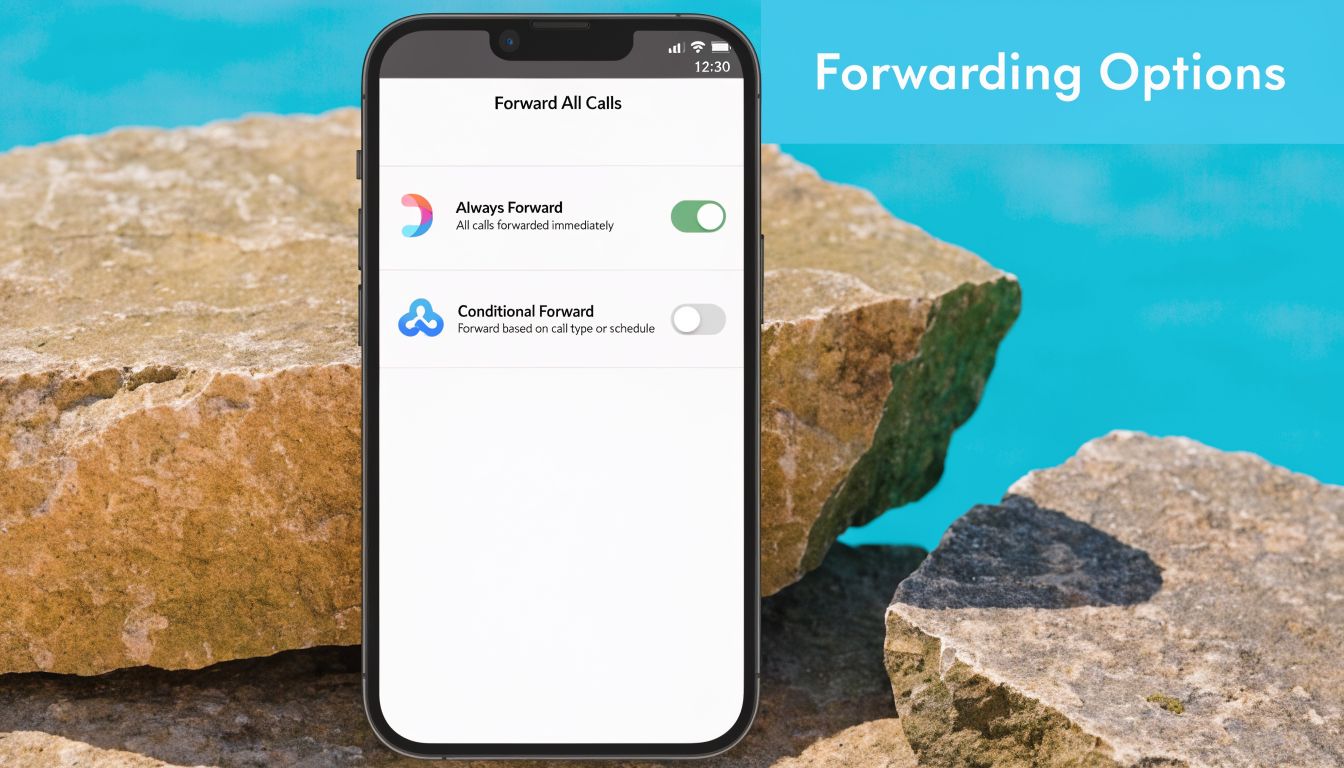
Call forwarding isn't one setting. It's a group of routing behaviors. If you pick the wrong one, your phone system will technically work while still creating a bad caller experience.
The feature has been around for decades. Verizon's overview of call forwarding history notes that call forwarding became widely standardized in the United States with AT&T's Touch-Call service in 1966, and the GSM standard in 1991 formalized codes like 21 for unconditional forwarding. That same source says over 80% of mobile subscribers in major markets were using it by 2000.
Unconditional forwarding
Unconditional forwarding sends every incoming call somewhere else right away. Your original phone usually doesn't ring.
This is the right choice when you want a clean handoff with no ambiguity. Common examples:
- A medical office closes for the day and wants all evening calls redirected.
- A contractor is on vacation and wants every business call to route to the office manager.
- A franchise location is temporarily closed and needs calls handled by a shared regional line.
Unconditional forwarding is simple, but it's blunt. If you leave it on by accident, you'll keep bypassing your main line even when you're back and available.
Conditional forwarding
Conditional forwarding only triggers in certain situations. This is usually the better fit for working businesses because it keeps your main line active while adding a backup.
The usual conditions are:
| Condition | What it does | Practical use |
|---|---|---|
| When busy | Forwards if you're already on another call | Good for solo operators and small front desks |
| When unanswered | Forwards after a set ring period | Good when you want staff to have first chance to answer |
| When unreachable | Forwards when the device is off or out of service | Good for field teams and weak coverage areas |
Which one should you choose
If you only remember one rule, remember this: use unconditional forwarding for schedule-based coverage, and conditional forwarding for overflow coverage.
A few examples make it easier:
- Dental office: Forward all calls after hours to a monitored answering path.
- HVAC owner-operator: Forward when busy so supplier calls don't block new service inquiries.
- Real estate agent: Forward when unanswered during showings, but keep direct ringing when available.
- Two-attorney practice: Forward when unreachable so dropped mobile coverage doesn't mean dropped intake.
If your phone should still ring sometimes, you probably want conditional forwarding, not all-calls forwarding.
How to Activate Forwarding on iPhone and Android
The device steps are easy. The business logic behind them matters more. Before you activate call forwarding, know which number should receive the call, which condition should trigger it, and whether that destination is a direct mobile line, office line, or virtual business number.
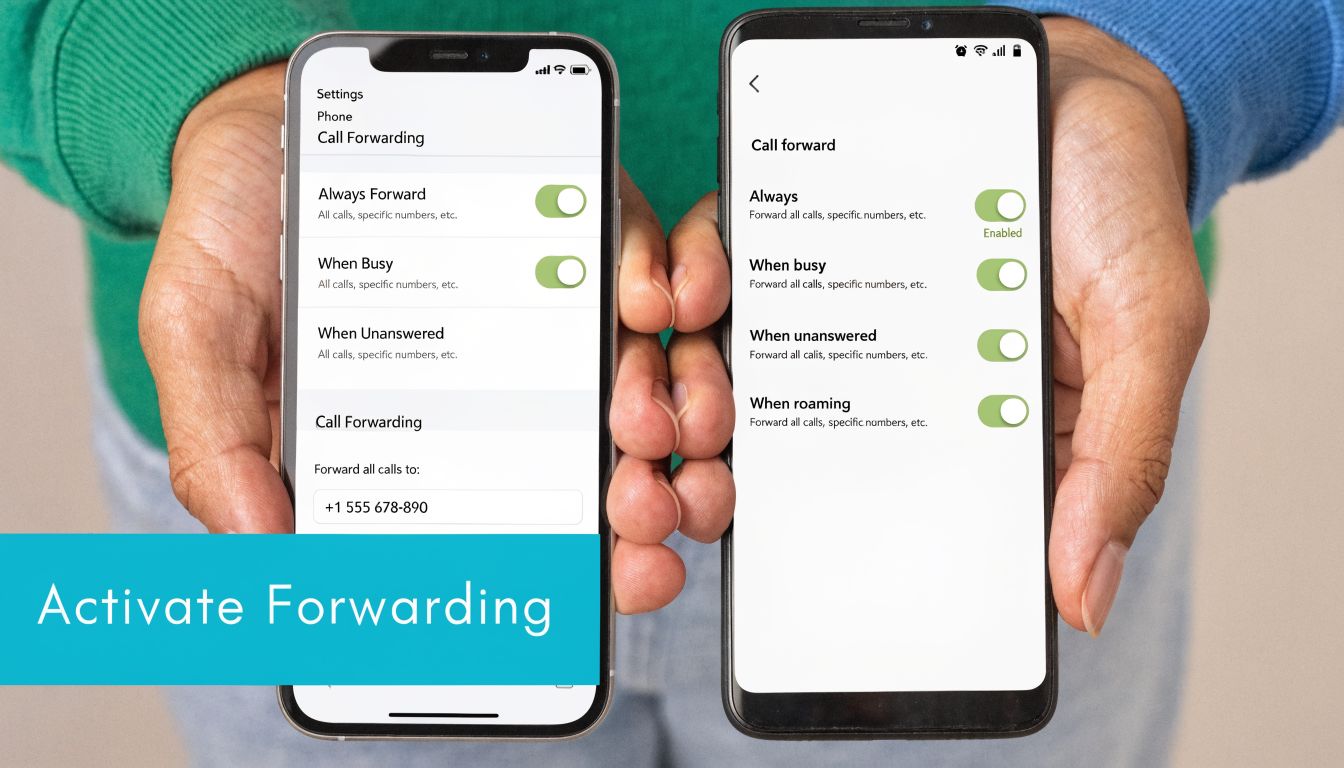
Mitel's call forwarding guide reports that 75% of Android users activate call forwarding through the Phone app settings. The same source says a 2025 Statista telecom survey found 55% of iPhone business users use Dual SIM to separate work and personal lines. That matters because forwarding the wrong line is a common setup error.
Activate call forwarding on iPhone
On iPhone, go to Settings, then Phone, then Call Forwarding. Turn the feature on, choose Forward To, and enter the destination number.
That path is straightforward, but there are a few business details to watch:
- Use the correct line: On Dual SIM setups, make sure you're changing the business line, not your personal one.
- Confirm the destination number carefully: One wrong digit can send callers somewhere useless.
- Look for the status indicator: iPhone usually shows that forwarding is active, which helps prevent the classic problem of leaving forwarding on longer than intended.
For a real estate agent, a practical setup is to forward the business line during listing appointments while keeping the personal line untouched. For a home services owner, it can make sense to send the business line to a staffed backup only during periods when you're physically unable to answer.
Activate call forwarding on Android
Android usually gives you more forwarding options directly inside the Phone app. Open Phone, tap the menu, open Settings, then find Call forwarding. Depending on the device and carrier, you'll usually see choices such as Always forward, Forward when busy, Forward when unanswered, and Forward when unreachable.
That flexibility is why Android often works better for business routing from the handset itself. A field supervisor can choose unanswered forwarding for daytime overflow and unreachable forwarding for dead-signal situations without forwarding every call all the time.
Here is a walkthrough if you want to compare the menu flow visually before changing live settings:
What to choose on each device
Don't pick a forwarding type based only on what the menu offers. Pick it based on caller experience.
- Always forward: Best when you're intentionally not taking calls on that device at all.
- When busy: Useful when one active call shouldn't block the next opportunity.
- When unanswered: Best when you want the primary phone to get first chance, then hand off.
- When unreachable: Best for technicians, inspectors, and mobile teams who lose signal.
A practical setup example
Say you're a mobile notary or inspector. You want calls to ring your cell first because some clients need you directly. But if you're in an appointment, you still need new inquiries captured.
A smart Android setup would be:
- Primary line rings first
- Forward when busy sends overflow to your backup number
- Forward when unanswered catches calls you can't pick up quickly
- Forward when unreachable handles low-signal zones
On iPhone, where options can be more limited in the settings interface, many businesses end up relying on carrier support or the receiving business phone system to handle the more advanced logic.
Practical rule: Before leaving the settings screen, place a test call from a different phone. Never assume the toggle alone means the route works.
Forwarding Calls from Landlines and Business Phone Systems
Landlines and office phone systems still matter. Medical practices, law firms, franchises, and established local businesses often receive their most important calls through a main published number, not an employee's mobile.
The setup method depends on whether you're using a traditional carrier line, a hosted VoIP platform, or a more complex PBX environment. The goal is the same. Decide what rings first, what happens next, and what should never happen at all.
Landline activation basics
For many landlines, you activate forwarding by picking up the handset, dialing a carrier code, entering the destination number, and waiting for a confirmation tone. The specific code varies by provider and by forwarding type.
A practical pattern looks like this:
- Immediate forwarding: Used when the office is closed or the front desk isn't staffed.
- Conditional forwarding: Used when the main line should still ring first, but unanswered or busy calls need a backup path.
- Deactivation code: Used when normal call flow should return.
If you're forwarding a landline to another business number, test from outside the office. Internal extension tests can make a broken setup look functional.
What works better in business phone systems
Hosted VoIP and PBX systems usually give you a dashboard instead of relying on star codes alone. That's better for business use because you can build routing logic instead of just redirecting everything to one number.
Common patterns that work well:
- Sequential ringing: Office desk first, then mobile, then backup answer point.
- Time-based routing: Daytime goes to reception, evenings route somewhere else.
- Department routing: Intake calls go one direction, existing customer support another.
- Failover routing: If the office endpoint goes offline, calls continue elsewhere.
For a law firm, the cleanest setup is often to ring intake staff first, then a designated backup, then a monitored final destination. For a multi-location clinic, you may want one published number with location-aware routing behind it.
Where businesses make avoidable mistakes
The biggest mistake is copying consumer phone habits into a business environment. Forwarding the main office line straight to one cell phone might seem fast, but it creates several problems:
- The business becomes dependent on one device.
- Shared call visibility disappears.
- Overflow handling breaks when that person is already occupied.
- Caller experience changes wildly depending on who answers.
Another mistake is building too many forwarding layers without documenting them. If the desk phone forwards to a manager's cell, and that cell has its own carrier forwarding active, and the hosted system also has a no-answer rule, you can end up with delays or loops that are hard to diagnose.
A better routing model
For most small businesses, the healthiest structure is simple:
| Call stage | Best first choice | Why |
|---|---|---|
| Primary answer | Main desk, owner line, or published business number | Keeps normal calls direct |
| Overflow | Conditional forwarding or ring group | Preserves coverage when busy |
| Last resort | Monitored backup answer path | Avoids dead-end voicemail dependence |
This model gives callers a smooth path without forcing every call through the same narrow point. It also gives you room to scale later without replacing the number customers already know.
Best Practices for Bulletproof Call Routing
Most forwarding problems aren't caused by the feature itself. They're caused by lazy setup. Someone enters a number, sees the toggle turn on, and assumes the job is finished.
It isn't. Reliable routing comes from testing, timing, and keeping one rule from fighting another. Kavkom's step-by-step call transfer guide says proper setup yields over 95% transfer efficiency in VoIP systems, recommends Forward When Unanswered after 4 rings, or about 20 to 25 seconds, and notes that conflicting carrier rules account for a 90% conflict rate in forwarding issues. The same source ties voicemail fallback to 30% lead loss in industry benchmarks when calls aren't handed off properly.
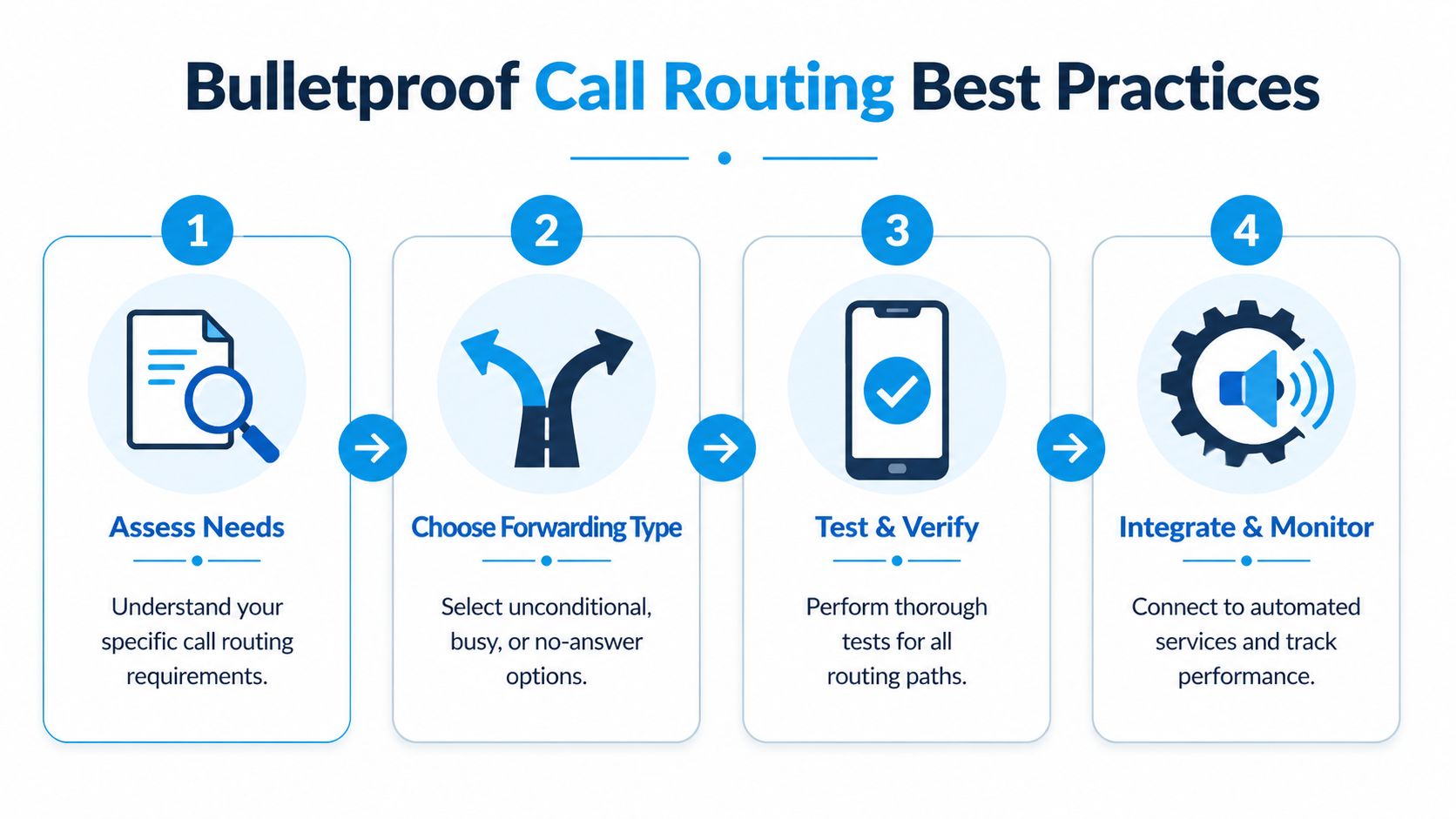
If you're refining overflow strategy, these call handling best practices pair well with your forwarding plan.
Test like a customer, not like an admin
Owners often test from the same device family, office network, or internal extension pool. That doesn't always reveal the failure point.
Do this instead:
- Call from an outside number: Use a different mobile carrier if possible.
- Test each condition separately: Busy, unanswered, and unreachable don't fail in the same way.
- Listen to timing: If the handoff takes too long, callers feel abandoned even if the forward eventually works.
- Repeat after changes: A successful test last month doesn't confirm today's setup.
Forwarding that works only under perfect conditions is not a reliable business system.
Set ring timing on purpose
The no-answer timer shapes the caller experience. Too short, and calls jump away before your team can realistically answer. Too long, and callers sit through dead air before getting help.
For many small businesses, the recommended setting of 4 rings, roughly 20 to 25 seconds is a practical middle ground in the source above. It gives a human first shot without forcing the caller to wait too long.
Use that timing intentionally:
- A front desk with steady staffing can let calls ring before overflow.
- A solo field operator may want a quicker handoff during work hours.
- A service business with urgent calls shouldn't make a caller wait through long idle ringing.
Prevent loops and collisions
Forwarding loops are one of the fastest ways to break your phone experience. They usually happen when one forwarded destination has its own active forwarding rule that sends the call back upstream or sideways into another rule chain.
Watch for combinations like these:
- Office line forwards to cell, cell forwards back to office
- Carrier forwarding conflicts with VoIP dashboard routing
- Busy and unanswered rules point to different systems that both re-route the same call
Watch this first: When troubleshooting, disable all forwarding rules, then re-enable them one at a time. Stacked rules hide the real failure.
Keep the route simple enough to maintain
A good routing plan is one your staff can understand on a bad day. If only one person knows where the calls are supposed to go, you're carrying hidden risk.
Document these basics in plain language:
| Item | What to document |
|---|---|
| Published number | Which line customers dial |
| Primary destination | Who answers first during business hours |
| Overflow rule | What happens when busy or unanswered |
| Failover path | Where calls go during outages or low signal |
| Reset method | How to turn forwarding off and restore normal flow |
If a manager can't read that plan and verify it in a few minutes, it's too complicated.
Troubleshooting Common Forwarding Failures
At this point, most online guides stop being useful. The phone setting looks correct, the carrier says forwarding is active, and calls still don't land where they're supposed to.
That gap is especially common when a traditional mobile or landline number is forwarding into a VoIP-based business system. Quo's analysis of conditional call forwarding issues highlights that 68% of small business owners in trades like HVAC and plumbing reported "forwarding not triggering to VoIP" errors in forum data from 2025. The same source says FCC data from January 2026 showed a 42% rise in such failures after 5G upgrades, leading to an estimated 25% of missed leads per month for affected businesses.
If you're trying to spot where calls disappeared, strong call detail reporting helps separate a carrier problem from a routing problem.
Failure pattern one, forwarding never triggers
This usually means one of three things. The forwarding condition wasn't the one you thought you enabled, the carrier didn't apply the change correctly, or the device-level setting and carrier-level rule aren't aligned.
Check these first:
- Confirm the exact condition: "Always forward" and "when unanswered" are not interchangeable.
- Retest after turning the feature off and back on: Carrier-side changes don't always stick cleanly the first time.
- Try from an external number: Internal testing can bypass the failure mode.
Failure pattern two, forwarding works to mobiles but not to business VoIP
This is the overlooked problem. The destination number may be valid, but the carrier may handle that call path differently, especially after network changes or when the destination sits inside a virtual business telephony environment.
Practical fixes include:
- Use unreachable forwarding as a backup path: If the mobile device is off, out of service, or unstable, this route can catch calls that another condition misses.
- Verify the destination number format: A wrong digit or missing area code still causes simple but costly failures.
- Test the destination directly: Call the receiving number on its own before troubleshooting forwarding logic.
Failure pattern three, calls disappear into voicemail or dead air
When a caller hears too many rings and then voicemail, the system may be technically forwarding but failing operationally. That often means the ring timeout is too long, voicemail is intercepting first, or multiple rules are competing.
Use this sequence:
- Turn off all forwarding rules.
- Disable any unwanted unconditional forwarding still active at the carrier level.
- Rebuild one path only.
- Test busy, then unanswered, then unreachable.
A forwarding failure is easier to solve when only one variable is changing at a time.
Failure pattern four, the setup worked once and then broke
This often points to network-side changes, handset updates, or someone changing one layer of the routing chain without checking the others. Businesses run into this after carrier upgrades, device swaps, or office phone system changes.
When that happens, don't just toggle the old setting and hope. Re-verify the full path from incoming call to final answer point and document what changed.
Frequently Asked Questions and Next Steps
Does call forwarding cost extra
It depends on the carrier and plan. Some forwarded calls are billed like regular calls. In practice, you should verify charges before sending business traffic through a personal mobile line or a frequently used backup route.
Will callers know the call was forwarded
Usually, callers care more about whether someone answers quickly than about the routing behind the scenes. The bigger issue is making sure the answer experience stays professional and consistent.
Can I forward calls internationally
Some carriers restrict international forwarding or treat it differently for security and billing. If you need global coverage, confirm the policy before relying on it in production.
What's the next step after you activate call forwarding
Activating call forwarding is the start, not the finish. The bigger business win comes from deciding what happens after the call lands. If the destination is just another voicemail box, you've only moved the problem. If the destination is built to capture leads, book appointments, and maintain service coverage, the phone system starts acting like a growth system.
If you're evaluating that next layer, this overview of a modern call answering service is a practical place to compare what basic forwarding can do versus what a structured answer workflow can do.
If you've already decided voicemail isn't good enough, Recepta.ai is worth a look. It helps businesses turn forwarded calls into handled conversations with AI-powered reception, appointment scheduling, lead capture, follow-up, and human escalation when needed. The result is a phone system that doesn't just redirect calls. It keeps opportunities moving.