Conversational AI for Customer Support Your Ultimate Guide
When you hear "conversational AI," you might picture a simple chatbot. But the technology we're talking about for customer support is so much more than that. Think of it as a super-smart digital team member, one that can understand what a customer really needs, figure out the context, and provide an accurate answer instantly. It’s the ability to do this across all your channels, 24/7, that's making it a cornerstone for modern businesses.
What Is Conversational AI and Why It Matters in 2026

Let's get practical. Imagine a customer calls your plumbing company in a panic: "My basement is filling with water, and I don't know where it's coming from!" The old, frustrating automated systems would offer a generic menu. Modern conversational AI for customer support, on the other hand, recognizes the urgency in the customer's voice and words. It immediately starts asking the right questions to diagnose the issue and book an emergency dispatch, all without human intervention.
That's the difference. We’ve moved past the clunky, keyword-based bots that drove everyone crazy. Today’s AI uses sophisticated machine learning and natural language processing (NLP) to hold a real conversation. It understands nuance, intent, and even customer sentiment.
The Shift from Luxury to Necessity
By 2026, your customers won't just hope for instant, helpful service—they'll expect it. The days of making someone wait on hold or sit around for an email reply are over. This is where conversational AI goes from a "nice-to-have" feature to an essential part of doing business.
The market data tells the same story. The global AI customer service market is on track to become a $15.12 billion industry by 2026 and is expected to balloon to $47.82 billion by 2030. This explosive growth is happening for a simple reason: the results are undeniable.
Take Klarna, for example. Their AI assistant managed 2.3 million customer conversations in its very first month. That’s the equivalent of 700 full-time human agents. Even better, it slashed average resolution times from a painful 11 minutes down to less than 2.
To give you a clearer picture, let's compare the old way with the new.
Traditional Support vs Conversational AI at a Glance
This table breaks down how conversational AI stacks up against traditional phone and email support channels across key metrics.
| Feature | Traditional Support (Phone/Email) | Conversational AI |
|---|---|---|
| Availability | Typically 8-12 hours/day, 5 days/week | 24/7/365, including holidays |
| First Response Time | Minutes to hours (or even days) | Instant, under 2 seconds |
| Resolution Time | 10+ minutes for simple issues | Under 2 minutes for routine tasks |
| Cost Per Interaction | High (agent salaries, overhead) | Low (pennies per interaction) |
| Scalability | Limited by headcount; struggles with volume spikes | Infinitely scalable to handle any volume |
| Consistency | Varies by agent, mood, and training | 100% consistent and on-brand |
As you can see, the advantages in speed, cost, and availability are overwhelming. The AI handles the volume, and your human team handles the high-value interactions.
AI Efficiency Meets Human Expertise
It's a common misconception that AI is here to replace your customer support team. The reality is much more powerful: it's here to empower them. Conversational AI takes on the repetitive, soul-crushing tasks so your skilled professionals can focus on what they do best—solving complex problems and building lasting customer relationships.
By blending AI efficiency with human expertise, businesses create an unbeatable customer experience. The AI handles initial triage and data gathering, and then seamlessly transfers the interaction—along with full context—to a human whenever necessary.
This hybrid model delivers the best of both worlds:
- 24/7 Availability: Your customers get the help they need, the moment they need it. Actionable Example: An e-commerce customer wants to return an item at 2 AM. The AI guides them through the return process, generates a shipping label, and answers their questions, all while your team is asleep.
- Cost Efficiency: Automating routine inquiries leads to a dramatic drop in operational costs. Actionable Example: An insurance company uses AI to handle thousands of daily "what's my policy status?" calls, reducing the need for dozens of call center agents and saving hundreds of thousands in annual salaries.
- Improved Agent Focus: Your team is freed up to work on the issues that truly require a human touch. Actionable Example: Instead of resetting passwords all day, a software company's support agents now spend their time helping users with complex software bugs and providing high-value training.
Of course, just plugging in an AI isn't enough. To get these kinds of results, it needs to be part of a smart AI-Driven Strategy that’s focused on clear business outcomes. This means making sure every interaction, whether with AI or a person, contributes to a single, smooth customer journey. This is a core principle of what we call omnichannel customer service.
How Conversational AI Actually Understands and Solves Customer Problems
So, what’s really going on behind the scenes when a customer interacts with a conversational AI? It’s not just a fancy phone tree. It's a sophisticated, three-part process that works in seconds to turn a customer's urgent problem into a solved ticket.
Let's walk through a real-world scenario that every home service business owner dreads. It’s 2 AM on a Saturday. A homeowner calls your plumbing business, and they’re frantic. "My basement is flooding! The sump pump gave out, and the water is rising fast!" An old, automated system would fail spectacularly here, but this is where a modern AI assistant shines.
Step 1: Understanding the Words with NLP
First, the AI has to figure out what the person is actually saying. This is done with a technology called Natural Language Processing (NLP). Think of it as a world-class transcriptionist who instantly converts spoken words into clean, digital text.
Even with the background noise of gushing water and the caller's panicked tone, the AI captures every word. It's not just listening for keywords; it's processing the raw audio of a stressed-out human and turning it into something a computer can analyze. This is the foundation for everything that follows.
Step 2: Identifying the Real Intent with NLU
Just turning speech into text isn't enough. The AI now needs to understand the meaning behind those words. This is the job of Natural Language Understanding (NLU), which is a much smarter subset of NLP. NLU is the brain of the operation.
In our flooding basement example, the NLU model instantly pieces the puzzle together:
- The Core Problem: It recognizes "flooding basement" and "sump pump gave out" as a critical equipment failure.
- The Urgency: Words like "panic" and "fast" signal an emergency that can't wait until morning.
- The Customer's Goal: They need a technician dispatched immediately, not a link to a troubleshooting guide.
This is what separates a true AI assistant from a basic chatbot. A simple bot would get stuck, but the NLU-powered system grasps the context. It knows that "my basement is a swimming pool" means the exact same thing as "my sump pump failed" — get help, now.
Step 3: Crafting a Helpful Response with NLG
Once the AI fully understands the situation, it has to respond in a way that’s both helpful and reassuring. This is where Natural Language Generation (NLG) comes in. NLG is the AI's voice, tasked with crafting a human-like, intelligent response on the fly.
Instead of a clunky, pre-recorded message, the AI formulates a reply tailored to the emergency: "I understand this is an emergency and that you need help right away. I am dispatching our on-call technician to your address now, and you can expect them to arrive within the hour." This is a dynamic response, not a script. The ability to sound natural and empathetic is a crucial part of a great virtual assistant for customer service.
At its heart, conversational AI follows a simple but powerful loop: it listens (NLP), it understands the context (NLU), and it responds with a solution (NLG). This cycle allows it to handle complex, high-stakes customer requests with incredible speed and accuracy.
But the real magic happens when the AI takes action. It’s not just talking; it’s doing. By integrating directly with your business software, the AI can:
- Check the Calendar: Instantly see which technician is on call and available.
- Book the Job: Schedule the emergency dispatch right on the technician's calendar.
- Update the CRM: Automatically create a new service ticket with all the details under the customer’s account.
- Send Alerts: Notify the on-call technician with the customer's name, address, and issue.
And the system gets smarter with every call. Through machine learning, it continuously refines its understanding of different problems and learns what a successful resolution looks like. This isn't a static tool; it's a constantly improving engine built to resolve customer issues, automate your workflows, and keep your business running smoothly, 24/7.
Calculating the ROI of Smart Customer Support Automation
It’s great to understand how conversational AI works on a technical level, but let's be honest—what really matters is how it impacts your bottom line. The return on investment (ROI) from using conversational AI for customer support isn't some vague, futuristic promise. It's a tangible result built on three solid pillars: serious cost savings, new revenue streams, and a major boost in operational efficiency.
The numbers speak for themselves. We're seeing companies report an ROI between 3.5x to 8x their initial investment, with some slashing support costs by up to 80% compared to running a fully staffed in-house team. Customer expectations have also shifted dramatically; the demand for instant replies shot up by 63% from 2023 to 2024 alone. AI is no longer a luxury—it's essential for capturing leads that would otherwise get lost in a voicemail abyss. It's no surprise that by 2026, 80% of firms are expected to have AI integrated into their customer service.
This simple flowchart breaks down how the AI thinks, moving from understanding the customer's words to figuring out their goal and, finally, providing the right response.
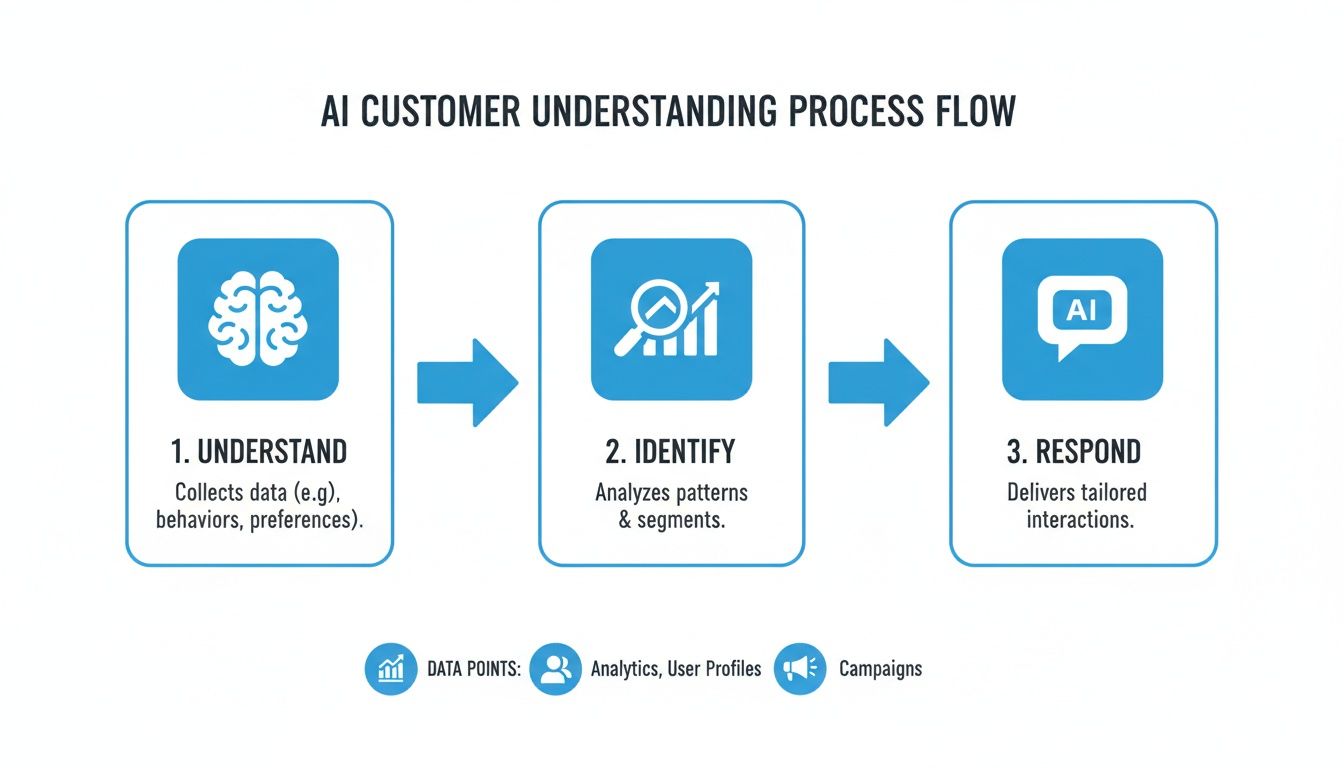
This "Understand, Identify, Respond" cycle is the engine that drives all the financial benefits.
Reducing Costs and Plugging Financial Leaks
One of the first places you'll see a return is in your staffing budget. A single AI assistant can easily handle the workload of several employees, especially when it comes to repetitive tasks like booking appointments, answering common questions, and qualifying new leads. This immediately cuts down on overhead from salaries, benefits, and training.
Just as important, however, is stopping the financial drain from missed opportunities. Every call that goes unanswered after hours or every email that sits in the inbox for too long is potential money walking out the door. An AI that works 24/7 ensures every single inquiry gets handled, effectively turning your business into a round-the-clock operation without the huge payroll.
Driving New Revenue and Boosting Lead Capture
A 24/7 AI receptionist doesn't just save money; it actively makes you money. By being there to instantly engage every person who calls, texts, or messages your business, it can increase the number of qualified leads you get by as much as 30%.
Think about it in real-world terms:
- The Problem: A multi-location dental practice was losing dozens of potential new patients every week. Calls came in after 5 p.m. and during lunch breaks, but with no one to answer, they went straight to voicemail.
- The Fix: They brought in a conversational AI to manage all their inbound calls.
- The Result: The AI immediately started booking new patient consultations, answering questions about insurance, and capturing contact details for follow-up. The practice stopped bleeding leads to competitors and saw a clear jump in new patient revenue in the very first month.
The ROI here is crystal clear. By simply capturing the leads they were already getting but previously missing, the practice added thousands of dollars in new monthly revenue—paying for the AI service many times over.
Gaining Operational Efficiency for a 15x Return
Here’s where the ROI really compounds. When you automate the routine administrative grind, you do more than just cut costs—you free up your talented people to focus on work that actually grows the business. Instead of being stuck scheduling appointments or manually typing notes into a CRM, your office manager can now handle complex client issues, nurture high-value relationships, or find ways to improve your service.
Actionable Example: A legal firm's paralegals used to spend 10-15 hours a week just conducting initial client intake over the phone. After implementing an AI receptionist, that time was reduced to almost zero. Paralegals now use those freed-up hours for billable work like legal research and document preparation, directly boosting firm revenue.
For businesses like that dental practice, this shift in focus is what leads to a predictable and sustainable 15x ROI. It’s the powerful combination of saving money, making more money, and empowering your team to do their best work. To see what else is possible, check out our guide on other powerful AI customer service solutions.
Conversational AI Use Cases for Your Industry
The real value of conversational AI for customer support isn't just theory—it comes alive when you see it working in the wild. While the technology itself is flexible, how you apply it is anything but one-size-fits-all. Every industry has its own unique set of headaches, and a truly smart AI solution is one that adapts to solve them with precision.
Let's look at how this actually plays out in the day-to-day operations of a business.
Customer expectations have shifted dramatically. Recent data shows that 51% of people now actually prefer using a bot if it means getting an immediate answer. This is huge, especially for businesses with high call volumes like home services or franchises. People are just getting more comfortable with the idea—49% of U.S. customers feel more at ease with AI than they did just a year ago.
The best systems, the ones that blend AI with a smart handoff to a human when needed, are driving incredible results. We're talking about a 30% increase in qualified leads and a stunning 15x ROI. These aren't just flashy numbers; they represent real business growth. You can see more data on how AI is changing customer service over at Zendesk.com.
These statistics really hammer home the need to meet customers where they are. Here are a few concrete examples of how a hybrid AI model works in the real world.
Home Services: HVAC, Plumbing, and More
For any home service company, a missed call after hours is a lost job, period. Conversational AI acts as your 24/7 dispatcher, making sure you catch every single lead, especially when an emergency strikes and your office is dark. For businesses built on rapid response, this isn't just a nice-to-have; it's a complete game-changer.
Here’s how that looks in practice:
- The Situation: It’s 10 PM on a Friday. A homeowner’s furnace just died in the middle of a cold snap, and they are frantically calling for help. Normally, that call goes straight to a frustrating voicemail box.
- The AI Solution: The AI answers on the first ring. It picks up on the urgency in the caller's voice and keywords like "no heat" and "freezing." It then asks smart, qualifying questions—"Is there a strange smell?" or "Are any warning lights on?"—to get the essential details.
- The Outcome: The AI confirms it's an emergency, checks the on-call tech’s schedule through a calendar integration, and automatically dispatches them. It immediately follows up with a confirmation text to the homeowner, complete with an ETA. You just provided incredible peace of mind and secured a high-value job you would have otherwise missed.
Healthcare Clinics and Medical Offices
Healthcare practices are in a constant battle with administrative overload. The endless cycle of scheduling, rescheduling, and chasing down patient information leads to staff burnout and a poor patient experience. No-shows and inefficient booking are massive revenue drains. An AI receptionist can take over these workflows, freeing up your team to focus on actual patient care.
- The Situation: A patient needs to schedule a check-up and also needs to know if their new insurance plan is accepted. This usually involves being put on hold, playing phone tag, and a lot of back-and-forth.
- The AI Solution: The patient calls, and the AI assistant offers to book their appointment directly. It syncs with the clinic's scheduling software to present available slots, confirms the time, and sends a calendar invite. In the same call, it can guide the patient through verifying their insurance details.
- The Outcome: The appointment is on the books and the insurance is verified, all without a human lifting a finger. The AI also sends out automated reminders, drastically cutting down on no-show rates. And if the patient has a complex medical question, the AI seamlessly transfers the call—along with the patient’s chart and the conversation history—to a live nurse.
Legal Firms and Professional Services
In the legal world, first impressions are everything. Professionalism and accuracy are non-negotiable from the moment a potential client reaches out. A conversational AI can handle that initial client intake with the precision and discretion the legal field demands.
For law firms, the initial intake is a critical moment. An AI receptionist ensures every potential client is greeted professionally and their information is captured accurately, 24/7, creating a flawless first impression.
Picture this scenario:
- The Situation: A person finds your firm through an online ad late at night. They've just been in an accident and are looking for personal injury advice right now.
- The AI Solution: The AI greets the caller professionally, confirms they need help with a personal injury case, and begins a basic intake using pre-approved questions like, "When did the incident occur?" It then checks attorney availability and schedules an initial consultation on the spot.
- The Outcome: The potential client feels heard and gets an appointment booked immediately, which is a huge relief for them. Your attorney wakes up to an email with the new appointment, a summary of the intake call, and the client’s information already logged in the firm’s CRM.
Franchises and Multi-Location Businesses
Keeping the customer experience consistent across dozens, or even hundreds, of locations is one of the biggest challenges for any franchise. A centralized AI system is the perfect solution. It ensures every customer gets the same high-quality, on-brand service, no matter which location they call, and funnels all lead data into one place for better business intelligence.
- The Situation: A national fitness chain launches a new promotion. Call volume spikes across all locations with people asking about pricing, class schedules, and the new offer.
- The AI Solution: A single conversational AI is deployed to handle calls for the entire franchise network. It answers common questions with consistent, brand-approved information, books introductory classes, and captures lead details for the local managers.
- The Outcome: Every caller gets an instant, correct answer. Headquarters gets a unified, real-time view of lead generation across the country, and local managers get a steady stream of qualified leads sent directly to them. This creates a standardized, professional experience that strengthens the entire brand.
Integrating Conversational AI Without Disrupting Your Business

Let's be honest—the thought of a big tech overhaul is enough to give any business owner pause. We often picture weeks of downtime, complex technical hurdles, and frustrated staff. But bringing conversational AI for customer support into your business doesn't have to be that kind of headache.
The secret is to see it not as a disruptive tech project, but as a natural improvement to your workflow. When done right, this tool fits right into your existing operations, empowering your team from day one. It all comes down to a clear, methodical approach that focuses on connecting the AI to the tools you already count on.
Mapping Your Customer Communication Flows
Before you can automate a single task, you need a solid understanding of how customers already interact with you. Where do they call from? What do they ask? Think of it like drawing a map of your current conversations; you need to know the landscape before you can build a new road.
Start by listing every way a customer can reach you—phone, website contact forms, text messages, you name it. Then, look for the patterns. You’ll likely find that a huge chunk of your inbound communication, often up to 80%, is made up of the same repetitive questions and requests.
These are your golden opportunities for automation. Look for:
- Appointment Booking and Rescheduling: These are high-volume tasks that are incredibly time-consuming but follow a simple script.
- Frequently Asked Questions: Think about calls asking for your hours, services, location, or basic pricing.
- Lead Qualification: The initial fact-finding you do with every new prospect can easily be handled by an AI.
- After-Hours Inquiries: Instead of losing leads overnight, you can have an AI capture their details for morning follow-up.
By targeting these high-frequency, low-complexity interactions first, you get immediate wins. This strategy proves the AI’s value right away without getting in the way of your team’s more important work.
Connecting to Your Existing Business Tools
For conversational AI to be truly useful, it can't operate in a silo. A standalone AI that can't talk to your other software is just a fancy answering machine—and it actually creates more work by forcing your team to shuttle data back and forth. A properly integrated AI, on the other hand, becomes an active, helpful part of your daily workflow.
A great platform has to connect directly with the software you use every day. This includes:
- CRM Systems: The AI should automatically log conversations, update contact records, and even create new profiles for leads.
- Calendars: It needs to check your team's real-time availability and book appointments directly into their schedules. No more double-booking.
- Industry-Specific Software: Whether it's a dental practice manager or a home service dispatching tool, the AI must sync with it.
Practical Example: A dental clinic connects its AI receptionist to its practice management software and CRM. When a patient calls for a cleaning, the AI checks the calendar for an open slot, books the appointment in the practice software, and updates the patient's record in the CRM. That entire process happens in a single, two-minute chat. If you want to dive deeper into this topic, you can learn more about how powerful CRM integration can be for your business.
Designing Intelligent Escalation Paths
Here’s a critical truth: no AI should handle every single conversation. The smartest setups use a hybrid model where the AI knows its own limits and can pass a customer to a human agent at exactly the right moment. This ensures anyone with a complex or sensitive issue gets the expert attention they deserve.
Creating these escalation paths means setting clear rules for the handoff. For example, the AI should always transfer a call when:
- A customer asks for a person. This is the most important rule. If someone says, "I need to talk to a human," the AI's only job is to make that happen instantly.
- The conversation becomes high-stakes or emotional. An AI shouldn't handle a legal client discussing sensitive case details or a patient reporting urgent symptoms.
- The question is outside its programming. If a customer asks a highly specific or unusual question, the best move is to get them to someone who knows the answer.
Actionable Example: A customer of a SaaS company is trying to explain a complex software bug. The AI attempts to diagnose the issue but recognizes keywords like "frustrated," "not working," and "deadline." It immediately says, "I understand this is a complex issue. Let me connect you with a senior support specialist right now who can help." The call is transferred along with the full transcript, so the agent is instantly up to speed.
Most importantly, the handoff has to be completely seamless. The human agent must get a full transcript and summary of the AI's conversation. Nothing frustrates a customer more than having to repeat themselves, and this simple step ensures your team is prepared and the customer feels heard.
Your Checklist for Choosing the Right AI Solution
Picking the right conversational AI feels like a huge decision, but it doesn't have to be a shot in the dark. With so many options out there, you need a clear way to cut through the marketing fluff. Think of this checklist as your guide to asking the tough questions and finding a solution that actually delivers.
Your real goal isn't just to buy another piece of software; it's to find a partner that becomes a genuine extension of your team. It's a telling statistic that while 88% of contact centers now use some form of AI, only 25% have it fully baked into their operations. That gap is where your opportunity lies. By choosing a deeply connected platform, you can leapfrog the competition. You can see more on these AI integration trends at Zendesk.com.
Core Functionality and Service Model
Let's start with the basics. The heart of any good AI is its ability to do the job well but also know its own limits. A system that can’t handle real-world questions or gracefully hand things off will just create more headaches for everyone.
Get straight to the point with these questions:
- Does it offer a hybrid model? An AI-only approach is a recipe for frustrated customers. The best systems blend automation with a human touch. Make sure there’s a seamless way to escalate a call to a live agent when things get complex or a customer simply asks for one.
- Is the service truly 24/7? Your business doesn’t stop at 5 PM, and neither should your customer support. Verify that the service offers genuine round-the-clock coverage to capture every lead and answer every question, no matter the time of day.
- How does it handle complex scheduling? Booking a simple appointment is one thing. But can it juggle schedules across multiple locations, account for different service types, and understand your team's real-time availability? A robust AI needs to manage this complexity without creating double-bookings or chaos.
Integration and Workflow Automation
A standalone AI tool is just an island. Its true power is unlocked when it talks to the other systems you already use, freeing up your team from mind-numbing manual work.
The most critical question you can ask is: "Will this make my team's life easier?" The right AI automates administrative tasks, logs data automatically, and ensures information is consistent across all your systems.
Before you even consider a demo, confirm the platform can do the following:
- Can it connect to my CRM? The AI absolutely must be able to create new customer records, update existing ones, and log all the details from a call directly into your CRM. This creates a single source of truth and ends the "who spoke to them last?" confusion.
- Does it integrate with my calendars? Look for out-of-the-box integrations with tools like Google Calendar and Outlook. This is non-negotiable for preventing scheduling conflicts and showing customers real-time availability.
- Is it compatible with my industry software? This is a deal-breaker for specialized fields like healthcare, law, or home services. The AI has to communicate with your practice management, EHR, or dispatching software to be truly useful.
Security, Compliance, and Analytics
Finally, any AI you bring into your business must be a trusted guardian of your data and a source of clear, actionable insights. Without solid security and reporting, you’re essentially flying blind and taking on unnecessary risk.
Make sure any potential partner gives you a confident "yes" to these questions:
- Is the platform secure and compliant for my industry? If you're in a field that handles sensitive data, confirm the provider meets all relevant standards, like HIPAA for healthcare. Don't just take their word for it; ask for documentation.
- Does it provide detailed analytics and call summaries? You need to see what’s working. Look for easy-to-understand dashboards with real-time data on call volume, lead capture rates, and resolution times. Post-call summaries are also essential for measuring your ROI and finding ways to improve.
Frequently Asked Questions About Conversational AI
Okay, let's get real. New technology always brings up some practical questions. If you’re thinking about bringing conversational AI into your business, you're probably wondering if it’s a pain to set up, if your customers will hate it, and if it will actually make you money.
We hear these questions all the time. Here are the straight answers.
How Long Does Setup Take for My Business?
Most people hear ‘AI implementation’ and picture a months-long technical nightmare. That’s completely understandable, but thankfully, it’s a thing of the past. Modern platforms are built to get you results fast—we’re talking minutes, not weeks.
The whole process is surprisingly simple. A quick, guided onboarding walks you through connecting your calendars, CRM, and other software you already use. After you set a few basic rules for your business, the AI is ready to go. It can start handling calls and messages right away.
The goal of a good conversational AI is to deliver value from day one. You shouldn't have to get bogged down in a complex project just to get started.
Will Customers Know They Are Talking to a Robot?
This is a big one. Nobody wants their customers stuck in a frustrating loop with a mindless bot. The truth is, the goal isn't to trick anyone. It’s to get them the help they need so quickly and easily that for simple tasks, it doesn't matter who—or what—is on the other end.
The best systems use what's called a hybrid model. It's the perfect blend of automation and a real human touch.
- The AI jumps in first, instantly answering the call or message to gather details or solve a straightforward request.
- The moment the conversation gets complex, the customer gets frustrated, or they simply ask for a person, the AI seamlessly transfers them to a human team member.
This way, your customers get an immediate response, every time. And if they need a person, they get one without having to fight for it. It's the best of both worlds.
Is This Technology Secure Enough for My Industry?
Security isn't just a feature; it's a must-have, especially if you work in sensitive fields like healthcare, legal services, or finance. Any reputable AI provider has built their platform from the ground up with security and compliance in mind, using strict protocols to protect every piece of data.
For example, if you're in healthcare, you absolutely need a HIPAA-compliant platform to ensure patient information is handled correctly. Before you commit to any solution, make it a priority to verify that they meet the specific compliance standards your industry demands.
How Do I Actually Measure the ROI?
Figuring out the return on your investment isn't guesswork. It comes down to tracking concrete numbers that any solid AI platform should show you right in your dashboard. You’ll see the ROI in both the money you save and the new revenue you generate.
Here are the key performance indicators (KPIs) you should be watching:
- Lead Capture Rate: How many new leads are you catching that you would have otherwise missed, especially after hours?
- Cost Per Interaction: See how the minimal cost of an AI interaction stacks up against the time and salary of a staff member.
- Customer Satisfaction (CSAT): Are your customers happy? Good AI should improve, not hurt, your satisfaction scores.
- Resolution Time: How fast are you solving common problems for your customers from the moment they reach out?
When you track these metrics, you’ll see a clear and direct financial impact on your bottom line.
Ready to see how a hybrid AI and human support model can transform your customer interactions? With Recepta.ai, you can capture every lead, book more appointments, and deliver exceptional service 24/7. Discover what a 15x ROI looks like at https://recepta.ai.